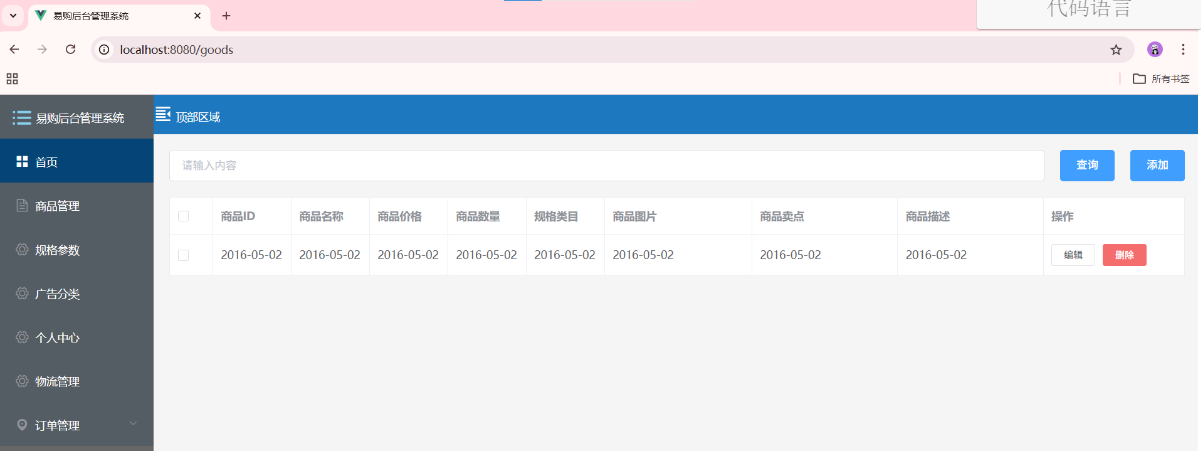
商品列表-静态布局 实现代码如下
1, src/views/Goods/Goods.vue

<template>
	<div class="goods">
		<!-- 1,搜索区域 -->
		<div class="header">
			<el-input v-model="input" placeholder="请输入内容"></el-input>
			<el-button type="primary">查询</el-button>
			<el-button type="primary">添加</el-button>
		</div>
		<!-- 2, 表格区域 展示视图数据 -->
		<div class="wrapper">
			<el-table :data="tableData" border @selection-change="handleSelectionChange">
				<el-table-column type="selection" width="55">
				</el-table-column>
				<el-table-column prop="date" label="商品ID" width="100">
				</el-table-column>
				<el-table-column prop="date" label="商品名称" width="100">
				</el-table-column>
				<el-table-column prop="date" label="商品价格" width="100">
				</el-table-column>
				<el-table-column prop="date" label="商品数量" width="100">
				</el-table-column>
				<el-table-column prop="date" label="规格类目" width="100">
				</el-table-column>
				<el-table-column prop="date" label="商品图片">
				</el-table-column>
				<el-table-column prop="date" label="商品卖点">
				</el-table-column>
				<el-table-column prop="date" label="商品描述">
				</el-table-column>
				<el-table-column prop="date" label="操作" width="180">
					<template slot-scope="scope">
						<el-button size="mini" @click="handleEdit(scope.$index, scope.row)">编辑</el-button>
						<el-button size="mini" type="danger"
							@click="handleDelete(scope.$index, scope.row)">删除</el-button>
					</template>
				</el-table-column>
			</el-table>
		</div>

		<!-- 3, 分页展示 -->
		<div class="pagination"></div>
	</div>
</template>

<script>
	export default {
		data() {
			return {
				// 声明变量
				input: '',
				tableData: [{
					date: '2016-05-02',
					name: '王小虎',
					address: '上海市普陀区金沙江路 1518 弄'
				}]
			}
		},
		methods: {
			// 编辑操作
			handleEdit(index, row) {
				console.log(index, row);
			},
			// 删除操作
			handleDelete(index, row) {
				console.log(index, row);
			},
			// 选择数据
			handleSelectionChange(val) {
				this.multipleSelection = val;
			}
		}
	}
</script>

<style lang="less" scoped>
	.goods {
		margin: 20px;
	}

	.header {
		display: flex;

		button {
			margin-left: 20px;
		}
	}

	.wrapper {
		margin: 20px 0;
	}
</style>