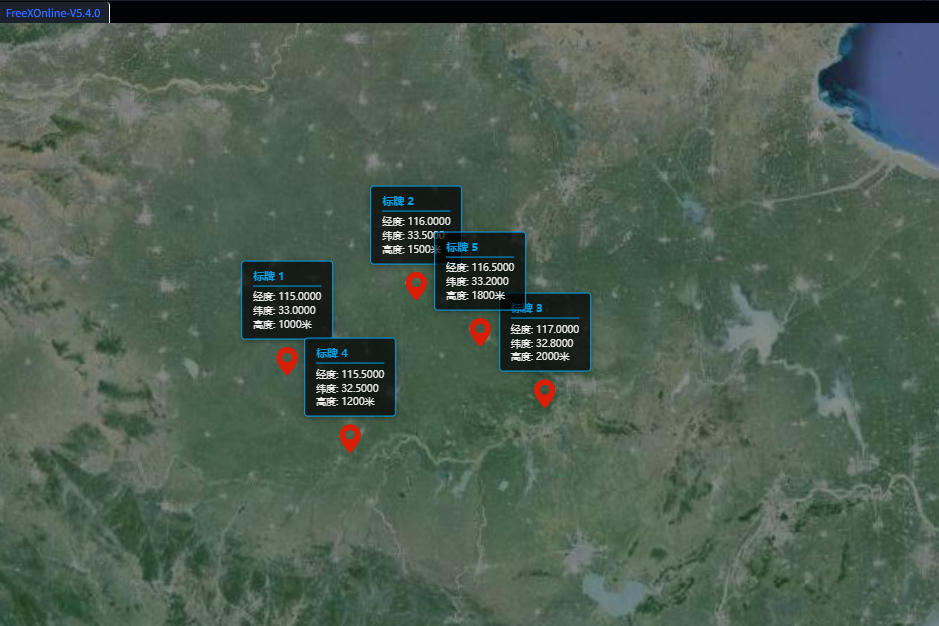
在三维地理信息系统(GIS)开发中,标记点(Marker)是最基础也最常用的可视化元素,而结合自定义交互标牌能极大提升用户体验。本文将基于 FreeXGIS(FreeXEarth)和 Cesium 引擎,详细讲解如何实现三维场景中多标记点的创建、自定义交互式标牌的开发,以及标记点的管理与交互优化。
一、技术背景与核心依赖
1. FreeXGIS(FreeXEarth)
FreeXGIS 是一款轻量级的 WebGIS 开发框架,封装了 Cesium 引擎的核心能力,简化了三维地球的初始化、图层管理、要素操作等流程,适合快速搭建三维 GIS 应用。
2. Cesium 引擎
Cesium 是一款开源的三维地理空间可视化引擎,支持高精度地形、影像、矢量要素的渲染,提供了丰富的空间坐标转换、相机控制、实体管理等 API,是 Web 端三维 GIS 开发的主流选择。
二、核心功能实现步骤
1. 三维地球初始化配置
首先完成 FreeXEarth 的初始化,配置基础图层(WMTS 格式),并获取 Cesium Viewer 实例(FreeXEarth 实例可直接兼容 Cesium Viewer 核心 API)。
javascript
// 初始化 FreeXEarth 实例
var FreeEarth = new FreeXEarth.FeMap($('#editEarthContainer')[0]);
var options = {
    layerManagerConfig: {
        baseLayers: [{
            "url": "dataserver/htc/service/wmts",
            "name": "World_30m_Local_6dm",
            "title": "HGT",
            "format": "image/jpeg",
            "visible": true,
            "maxVisibleLevel": 21,
            "iconUrl": "/static/img/geolayer/hgt.png",
            "mobileIconUrl": "static/img/geolayer/mobile_hgt.png",
            "type": "WMTS"
        }],
        "terrains": [],
    },
    dataSources: []
};
FreeEarth.loadConfig(options);

// 获取 Cesium Viewer 实例(FreeXEarth 实例兼容 Cesium Viewer API)
var viewer = FreeEarth;
// 存储所有创建的实体,便于后续管理
var entities = [];
2. 多标记点创建(Cesium Billboard)
通过 Cesium 原生的 Billboard 实现标记点渲染,支持自定义图标、尺寸、颜色等样式,并批量创建多个位置的标记点。
javascript
// 添加多个marker的函数
function addMultipleMarkers() {
    // 定义多个位置坐标 [经度, 纬度, 高度]
    var positions = [
        [115, 33, 1000],
        [116, 33.5, 1500],
        [117, 32.8, 2000],
        [115.5, 32.5, 1200],
        [116.5, 33.2, 1800]
    ];

    // 为每个位置创建marker和自定义标牌
    positions.forEach(function(position, index) {
        // 1. 创建Cesium原生marker(Billboard)
        var entity = viewer.entities.add({
            position: Cesium.Cartesian3.fromDegrees(position[0], position[1], position[2]),
            billboard: {
                image: 'femap/Data/images/marker/point.png', // 自定义标记图标
                width: 32,
                height: 32,
                verticalOrigin: Cesium.VerticalOrigin.BOTTOM, // 锚点在底部
                scale: 1.0,
                color: Cesium.Color.WHITE
            },
            name: '标记点 ' + (index + 1)
        });

        // 2. 创建自定义div标牌
        createCustomLabel(position, index);

        entities.push(entity); // 存入实体数组,便于后续管理
    });
}
3. 自定义交互式标牌开发
原生 Cesium Label 样式定制能力有限,因此通过 HTML/CSS 自定义 div 标牌,结合 Cesium 坐标转换 API 实现标牌与三维空间位置的绑定,并添加鼠标交互、相机联动更新等功能。
3.1 创建自定义标牌 DOM 元素
javascript
// 创建自定义div标牌
function createCustomLabel(position, index) {
    // 创建div元素
    var labelDiv = document.createElement('div');
    labelDiv.className = 'custom-label';
    // 填充标牌内容(经度、纬度、高度等信息)
    labelDiv.innerHTML = `
        <div class="label-content">
            <div class="label-title">标牌 ${index + 1}</div>
            <div class="label-info">经度: ${position[0].toFixed(4)}</div>
            <div class="label-info">纬度: ${position[1].toFixed(4)}</div>
            <div class="label-info">高度: ${position[2]}米</div>
        </div>
    `;

    // 基础样式设置
    labelDiv.style.cssText = `
        position: absolute;
        background: rgba(0, 0, 0, 0.7);
        color: white;
        padding: 8px 12px;
        border-radius: 4px;
        font-size: 12px;
        border: 1px solid #00a0e9;
        box-shadow: 0 2px 8px rgba(0, 0, 0, 0.3);
        white-space: nowrap;
        pointer-events: auto;
        cursor: pointer;
        transform: translate(-50%, -100%);
        margin-top: -40px;
    `;

    // 添加到viewer的容器中
    viewer.container.appendChild(labelDiv);

    // 初始化更新标牌位置
    updateLabelPosition(labelDiv, position);

    // 鼠标悬停样式交互
    labelDiv.addEventListener('mouseenter', function() {
        this.style.background = 'rgba(0, 100, 200, 0.9)';
    });
    labelDiv.addEventListener('mouseleave', function() {
        this.style.background = 'rgba(0, 0, 0, 0.7)';
    });

    // 点击标牌飞行到对应标记点
    labelDiv.addEventListener('click', function() {
        viewer.flyTo(entities[index], {
            duration: 1.5,
            offset: new Cesium.HeadingPitchRange(0, -0.5, 1000)
        });
    });

    // 监听相机变化,实时更新标牌位置
    viewer.scene.postRender.addEventListener(function() {
        updateLabelPosition(labelDiv, position);
    });
}
3.2 标牌位置实时更新
通过 Cesium 的 cartesianToCanvasCoordinates API 将三维空间坐标转换为画布像素坐标,实现标牌随相机视角、地球旋转实时更新位置;当标记点超出视口时,隐藏标牌。
javascript
// 更新标牌位置
function updateLabelPosition(labelDiv, position) {
    var canvasPosition = viewer.scene.cartesianToCanvasCoordinates(
        Cesium.Cartesian3.fromDegrees(position[0], position[1], position[2])
    );

    if (canvasPosition) {
        labelDiv.style.left = canvasPosition.x + 'px';
        labelDiv.style.top = canvasPosition.y + 'px';
        labelDiv.style.display = 'block';
    } else {
        labelDiv.style.display = 'none';
    }
}
4. 标记点与标牌的统一管理
实现标记点和标牌的批量移除功能,包括 Cesium 实体的删除、自定义 DOM 标牌的清理,以及 FreeXEarth 要素的移除(兼容原有框架逻辑)。
javascript
// 移除所有标记和标牌
function removeMark() {
    // 移除所有Cesium实体
    entities.forEach(function(entity) {
        viewer.entities.remove(entity);
    });
    entities = [];

    // 移除所有自定义标牌DOM
    var labels = document.querySelectorAll('.custom-label');
    labels.forEach(function(label) {
        if (label.parentNode) {
            label.parentNode.removeChild(label);
        }
    });

    // 移除FreeXEarth的feature(兼容原有框架)
    FreeEarth.removeAllFeature();
    arrow.map(item => {
        item.removeFromMap();
    });
}
5. 样式优化与交互增强
通过 CSS 过渡效果、字体样式优化,提升标牌的视觉体验和交互流畅度。
javascript
// 添加CSS样式
function addCustomStyles() {
    var style = document.createElement('style');
    style.textContent = `
        .custom-label {
            transition: all 0.3s ease;
            font-family: 'Microsoft YaHei', Arial, sans-serif;
        }

        .label-content {
            line-height: 1.4;
        }

        .label-title {
            font-weight: bold;
            color: #00a0e9;
            margin-bottom: 4px;
            border-bottom: 1px solid #00a0e9;
            padding-bottom: 2px;
        }

        .label-info {
            font-size: 11px;
            opacity: 0.9;
        }

        .custom-label:hover {
            transform: translate(-50%, -100%) scale(1.05);
            z-index: 1000;
        }
    `;
    document.head.appendChild(style);
}
6. 初始化与测试优化
初始化样式、添加标记点,并可选择添加测试按钮,方便调试标记点的添加 / 清除功能。
javascript
// 初始化样式
addCustomStyles();
// 批量添加标记点和标牌
addMultipleMarkers();

// 飞行到初始查看位置
FreeEarth.flyTo({
    destination: [115, 33, 4500000],
    duration: 3,
});

// 可选:添加测试按钮
function addTestButtons() {
    var buttonContainer = document.createElement('div');
    buttonContainer.style.cssText = `
        position: absolute;
        top: 10px;
        left: 10px;
        z-index: 1000;
        background: rgba(0,0,0,0.7);
        padding: 10px;
        border-radius: 4px;
    `;

    var addBtn = document.createElement('button');
    addBtn.textContent = '添加标记';
    addBtn.onclick = addMultipleMarkers;

    var removeBtn = document.createElement('button');
    removeBtn.textContent = '清除标记';
    removeBtn.onclick = removeMark;

    buttonContainer.appendChild(addBtn);
    buttonContainer.appendChild(removeBtn);
    viewer.container.appendChild(buttonContainer);
}
// addTestButtons(); // 取消注释启用测试按钮
三、关键技术要点总结
1. 坐标转换
Cesium 的 cartesianToCanvasCoordinates 是实现三维空间坐标与二维画布坐标绑定的核心,确保自定义 DOM 标牌能精准跟随三维标记点。
2. 相机联动
通过 viewer.scene.postRender 事件监听相机变化,实时更新标牌位置,解决地球旋转、缩放、视角切换时标牌偏移的问题。
3. 交互体验优化
- 鼠标悬停时的样式过渡,提升视觉反馈;
- 点击标牌飞行到标记点,结合 Cesium
flyToAPI 实现平滑视角切换; - 超出视口时隐藏标牌,避免无效渲染和视觉干扰。
4. 资源管理
通过数组存储 Cesium 实体,批量移除时避免内存泄漏;清理自定义 DOM 元素时检查父节点,确保移除成功。
四、扩展与优化方向
- 性能优化:当标记点数量较多(上千个)时,可通过 Cesium 的 BillboardCollection 批量渲染,替代单个 Entity 创建,提升渲染性能;
- 样式定制:支持根据标记点属性(如类型、状态)动态切换标牌样式和图标;
- 拖拽交互:结合 Cesium 的 ScreenSpaceEventHandler 实现标记点拖拽,同步更新标牌位置;
- 数据驱动:对接后端接口,从数据库加载标记点坐标和属性,实现动态渲染;
- 移动端适配:优化标牌尺寸、字体大小,适配移动端触摸交互。
五、总结
本文基于 FreeXGIS 和 Cesium 实现了三维场景中多标记点与自定义交互式标牌的开发,核心在于结合 Cesium 的空间坐标转换、相机监听能力,以及 HTML/CSS 的灵活样式定制,既保留了 FreeXGIS 框架的便捷性,又通过原生 DOM 扩展了交互体验。帮助开发者快速实现高交互性的三维标记点可视化功能。