待优化的点,滑动的时候没有齿轮卡住的声音(已经写了函数,如果有这个效果的网友可以发我一份,谢谢)
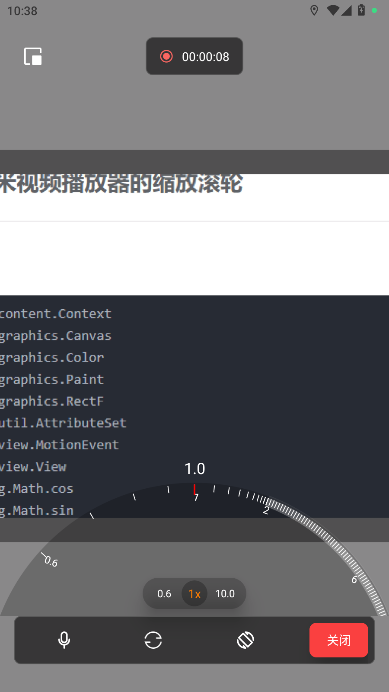
Kotlin
import android.content.Context
import android.graphics.Canvas
import android.graphics.Color
import android.graphics.Paint
import android.graphics.RectF
import android.util.AttributeSet
import android.view.MotionEvent
import android.view.View
import java.lang.Math.cos
import java.lang.Math.sin
import android.graphics.PointF
import android.os.Vibrator
import android.util.TypedValue
import com.czisoft.frontlinework.utils.dp
import java.lang.Math.abs
/**
* 仿小米视频播放器的缩放滚轮
* @Author: guanlinlin
* @Date: 2025/12/04 16:49
*/
class XiaomiVideoZoomWheelRollerView @JvmOverloads constructor(
context: Context, attrs: AttributeSet? = null, defStyleAttr: Int = 0
) : View(context, attrs, defStyleAttr) {
private var hideTimer: Runnable? = null
private val handler = android.os.Handler(android.os.Looper.getMainLooper())
private val autoHideDelay: Long = 3000 // 3秒延迟
var onValueChangeListener: ((Float)->Unit)? = null
// 刻度线画笔
private val scalePaint = Paint().apply {
isAntiAlias = true
color = Color.WHITE
strokeWidth = 2f
style = Paint.Style.STROKE
}
// 右侧弧形背景画笔
private val rightArcBgPaint = Paint().apply {
isAntiAlias = true
color = Color.parseColor("#f5f5f5")
alpha = 20
style = Paint.Style.STROKE
strokeWidth = 8f
}
// 指示线画笔
private val indicatorPaint = Paint().apply {
isAntiAlias = true
color = Color.RED
strokeWidth = 4f
style = Paint.Style.STROKE
}
// 文字画笔
private val textPaint = Paint().apply {
isAntiAlias = true
color = Color.parseColor("#ffffff")
textSize = TypedValue.applyDimension(TypedValue.COMPLEX_UNIT_SP, 18f, resources.displayMetrics)
textAlign = Paint.Align.CENTER
}
// 在类中添加新的画笔用于绘制刻度值
private val scaleTextPaint = Paint().apply {
isAntiAlias = true
color = Color.parseColor("#ffffff")
textSize = TypedValue.applyDimension(TypedValue.COMPLEX_UNIT_SP, 12f, resources.displayMetrics)
textAlign = Paint.Align.CENTER
}
// 在类中添加新的画笔用于绘制环带
private val ringBandPaint = Paint().apply {
isAntiAlias = true
color = Color.parseColor("#47f5f5f5") // 环带颜色,可根据需要调整
style = Paint.Style.STROKE
strokeWidth = context.dp(10).toFloat()
}
private var centerX = 0f
private var centerY = 0f
private var chordLength = 0f
private var radius = 0f
private val centralAngle = 137.5f
private var maxValue = 10.0f
private var minValue = 0.6f
// 存储刻度信息
private val leftScales = mutableListOf<ScaleInfo>()
private val rightScales = mutableListOf<ScaleInfo>()
private var rightArcRectF: RectF? = null
// 当前旋转角度
private var currentRotation = 0f
private var lastTouchX = 0f
private var isDragging = false
// 当前选中的刻度值
private var selectedValue = 2f
override fun onSizeChanged(w: Int, h: Int, oldw: Int, oldh: Int) {
super.onSizeChanged(w, h, oldw, oldh)
// 更新弦长
chordLength = w.toFloat()
// 根据弦长和圆心角重新计算半径
radius = calculateRadiusFromChord(chordLength, centralAngle)
// 将中心点设置在视图底部
centerX = w.toFloat() / 2
val distanceFromCenterToChord = radius * sin(Math.toRadians((180 - centralAngle) / 2.0))
centerY = h.toFloat() + distanceFromCenterToChord.toFloat()
// 初始化刻度
initScales()
// 初始化时旋转到刻度值1的位置
post {
rotateToScaleValue(1.0f)
}
// 初始化完成开始计时
startAutoHideTimer()
}
override fun onDraw(canvas: Canvas?) {
super.onDraw(canvas)
canvas?.let {
// 绘制圆形背景
drawCircleBackground(canvas)
// 保存画布状态
canvas.save()
// 应用旋转变换,只旋转圆弧和刻度线
canvas.rotate(currentRotation, centerX, centerY)
// 绘制需要旋转的元素
drawRotatingElements(it)
// 恢复画布状态
canvas.restore()
// 绘制不随旋转移动的元素
drawFixedElements(it)
}
}
/**
* 绘制圆形背景
*/
private fun drawCircleBackground(canvas: Canvas) {
val backgroundPaint = Paint().apply {
isAntiAlias = true
color = Color.parseColor("#37000000")
style = Paint.Style.FILL
}
canvas.drawCircle(centerX, centerY, radius, backgroundPaint)
}
/**
* 根据弦长和圆心角计算半径
* 公式: radius = chordLength / (2 * sin(centralAngle / 2))
*/
private fun calculateRadiusFromChord(chordLength: Float, centralAngle: Float): Float {
val halfAngleRad = Math.toRadians((centralAngle / 2).toDouble())
return (chordLength / (2 * sin(halfAngleRad))).toFloat()
}
/**
* 绘制旋转元素(随旋转变化的元素)
*/
private fun drawRotatingElements(canvas: Canvas) {
// 先绘制环带(随旋转但固定在刻度线上)
val dp20 = TypedValue.applyDimension(TypedValue.COMPLEX_UNIT_DIP, 10f, resources.displayMetrics)
drawScalesWithoutRingBand(canvas)
drawRingBand(canvas, dp20)
}
/**
* 绘制固定元素(不随旋转变化的元素)
*/
private fun drawFixedElements(canvas: Canvas) {
drawIndicator(canvas)
drawSelectedValueText(canvas)
}
/**
* 绘制刻度线
*/
private fun drawScalesWithoutRingBand(canvas: Canvas) {
val dp2 = TypedValue.applyDimension(TypedValue.COMPLEX_UNIT_DIP, 2f, resources.displayMetrics)
val dp8 = TypedValue.applyDimension(TypedValue.COMPLEX_UNIT_DIP, 8f, resources.displayMetrics)
val dp12 = TypedValue.applyDimension(TypedValue.COMPLEX_UNIT_DIP, 12f, resources.displayMetrics)
val dp15 = TypedValue.applyDimension(TypedValue.COMPLEX_UNIT_DIP, 15f, resources.displayMetrics)
// 确定需要显示值的刻度
val showValues = mutableSetOf<Float>()
showValues.add(0.6f) // 起始值
showValues.add(1.0f) // 中间值
showValues.add(2.0f) // 结束值
// 添加右侧刻度值
val maxRightValue = getMaxRightScaleValue()
if (maxRightValue > 2) {
if (maxRightValue <= 5) {
showValues.add(maxRightValue)
} else {
showValues.add(((2 + maxRightValue) / 2).toInt().toFloat()) // 中间值
showValues.add(maxRightValue) // 最大值
}
}
// 绘制左侧刻度线
for (scale in leftScales) {
val innerRadius = radius - dp2
val outerRadius = radius - dp2 - dp8
val innerPoint = getPointOnCircleWithRadius(scale.angle, innerRadius)
val outerPoint = getPointOnCircleWithRadius(scale.angle, outerRadius)
canvas.drawLine(innerPoint.x, innerPoint.y, outerPoint.x, outerPoint.y, scalePaint)
// 绘制刻度值在圆内刻度线下方
val shouldShow = showValues.any { abs(it - scale.value) < 0.01f }
if (shouldShow) {
// 将文字位置调整到圆内,刻度线内侧更靠近圆心的位置
val textPoint = getPointOnCircleWithRadius(scale.angle, radius - dp15)
canvas.drawText(
String.format("%.1f", scale.value).replace(".0", ""),
textPoint.x+5f, textPoint.y+10f, scaleTextPaint
)
}
}
// 绘制右侧弧形背景
rightArcRectF?.let {
val rightStartAngle = 270f
val rightSweepAngle = centralAngle / 2
canvas.drawArc(it, rightStartAngle, rightSweepAngle, false, rightArcBgPaint)
}
// 绘制右侧刻度线
for (scale in rightScales) {
val innerRadius = radius - dp2
val outerRadius = radius - dp2 - dp8
val innerPoint = getPointOnCircleWithRadius(scale.angle, innerRadius)
val outerPoint = getPointOnCircleWithRadius(scale.angle, outerRadius)
canvas.drawLine(innerPoint.x, innerPoint.y, outerPoint.x, outerPoint.y, scalePaint)
// 绘制刻度值在圆内刻度线下方
val shouldShow = showValues.any { abs(it - scale.value) < 0.01f }
if (shouldShow && scale.value > 2) {
// 将文字位置调整到圆内,刻度线内侧更靠近圆心的位置
val textPoint = getPointOnCircleWithRadius(scale.angle, radius - dp15)
canvas.drawText(String.format("%.0f", scale.value),
textPoint.x, textPoint.y+10f, scaleTextPaint)
}
}
}
/**
* 初始化刻度
*/
private fun initScales() {
leftScales.clear()
rightScales.clear()
// 左侧刻度 (0.6-2.0,包含2.0)
val leftStartAngle = 270f - centralAngle / 2
val leftEndAngle = 270f
// 计算左侧刻度位置 - 优化版本
var distance = context.dp(50).toFloat() // 初始距离1cm
var currentValue = 0.6f
var currentAngle = leftStartAngle
// 生成左侧刻度值,包括2.0
initLeftScalesFixed()
// 右侧刻度 (2.1-10.0,步长0.1,避免2.0重复)
val rightStartAngle = 270f
val rightEndAngle = 270f + centralAngle / 2
// 生成2.1到10.0之间步长为0.1的刻度值
val maxRightValue = getMaxRightScaleValue() // 10f
val rightValues = mutableListOf<Float>()
var value = 2.0f
while (value <= maxRightValue) {
rightValues.add(value)
value += 0.1f
// 保留一位小数
value = String.format("%.1f", value).toFloat()
}
// 计算右侧刻度位置
if (rightValues.isNotEmpty()) {
val valueRange = maxRightValue - 2.1f
for (value in rightValues) {
val percentage = if (valueRange > 0) (value - 2.1f) / valueRange else 0f
val angle = rightStartAngle + (rightEndAngle - rightStartAngle) * percentage
rightScales.add(ScaleInfo(value, angle))
}
}
// 设置右侧弧形区域
rightArcRectF = RectF(
centerX - radius + 2, centerY - radius + 2,
centerX + radius - 2, centerY + radius - 2
)
}
/**
* 初始化左侧刻度 - 固定数量和角度范围
*/
private fun initLeftScalesFixed() {
leftScales.clear()
val totalScales = 14
val startAngle = 270f - centralAngle / 2 // 例如 225度
val endAngle = 270f // 270度
val totalAngleSpan = endAngle - startAngle // 45度
// 使用一个数组来存储每个间隔的角度增量
val angleIncrements = FloatArray(totalScales - 1)
// 设定初始增量和衰减因子
var initialIncrement = totalAngleSpan * 0.4f // 第一个间隔占比较大
val decayFactor = 0.75 // 衰减因子,越小衰减越快
var minIncrement = totalAngleSpan * 0.02f // 最小间隔,防止过于紧密
var sumIncrements = 0f
for (i in 0 until totalScales - 1) {
// 应用衰减
if (i == 0) {
angleIncrements[i] = initialIncrement
} else {
angleIncrements[i] = (angleIncrements[i - 1] * decayFactor).coerceAtLeast(minIncrement.toDouble()).toFloat()
}
sumIncrements += angleIncrements[i]
}
// 归一化,确保总和等于 totalAngleSpan
val scaleFactor = totalAngleSpan / sumIncrements
for (i in angleIncrements.indices) {
angleIncrements[i] *= scaleFactor
}
// 根据计算出的角度增量生成刻度
var currentAngle = startAngle
for (i in 0 until totalScales) {
val value = 0.6f + i * 0.1f // 0.6, 0.7, ..., 1.9
leftScales.add(ScaleInfo(value, currentAngle))
// 计算下一个刻度的角度
if (i < angleIncrements.size) {
currentAngle += angleIncrements[i]
}
}
// 添加最后一个刻度 2.0
leftScales.add(ScaleInfo(2.0f, endAngle))
}
/**
* 获取右侧最大刻度值
*/
private fun getMaxRightScaleValue(): Float {
// 这里应该根据实际需求返回最大值,暂时固定返回10
return maxValue
}
/**
* 绘制2-10刻度线之间的环带
*/
private fun drawRingBand(canvas: Canvas, bandWidth: Float) {
// 查找2.0对应的刻度角度
val scale2 = leftScales.find { abs(it.value - 2.0f) < 0.01f }
if (scale2 != null) {
// 计算环带的半径位置(在刻度线内侧)
val dp2 = TypedValue.applyDimension(TypedValue.COMPLEX_UNIT_DIP, 2f, resources.displayMetrics)
val ringRadius = radius - dp2 - bandWidth / 2
// 定义环带绘制区域
val ringRect = RectF(
centerX - ringRadius,
centerY - ringRadius,
centerX + ringRadius,
centerY + ringRadius
)
// 计算起始角度(2.0刻度的角度)
val startAngle = scale2.angle
// 计算结束角度(固定为最大刻度角度)
val maxScale = (leftScales + rightScales).maxByOrNull { it.value }
val endAngle = maxScale?.angle ?: (270f + centralAngle / 2)
// 计算扫过角度
val sweepAngle = endAngle - startAngle
// 绘制环带
if (sweepAngle > 0) {
canvas.drawArc(ringRect, startAngle, sweepAngle, false, ringBandPaint)
}
}
}
/**
* 根据角度和半径获取圆上的点
*/
private fun getPointOnCircleWithRadius(angle: Float, radius: Float): PointF {
val angleRad = Math.toRadians(angle.toDouble())
return PointF(
centerX + radius * cos(angleRad).toFloat(),
centerY + radius * sin(angleRad).toFloat()
)
}
/**
* 绘制指示线
*/
private fun drawIndicator(canvas: Canvas) {
val dp2 = TypedValue.applyDimension(TypedValue.COMPLEX_UNIT_DIP, 2f, resources.displayMetrics)
val dp12 = TypedValue.applyDimension(TypedValue.COMPLEX_UNIT_DIP, 12f, resources.displayMetrics)
val indicatorAngle = 270f // 固定在顶部
val innerRadius = radius - dp2
val outerRadius = radius - dp2 - dp12
val innerPoint = getPointOnCircleWithRadius(indicatorAngle, innerRadius)
val outerPoint = getPointOnCircleWithRadius(indicatorAngle, outerRadius)
canvas.drawLine(innerPoint.x, innerPoint.y, outerPoint.x, outerPoint.y, indicatorPaint)
}
/**
* 绘制选中值文本
*/
private fun drawSelectedValueText(canvas: Canvas) {
val dp20 = TypedValue.applyDimension(TypedValue.COMPLEX_UNIT_DIP, 20f, resources.displayMetrics)
// 将文字位置调整到圆外,指示线上方
val textPoint = getPointOnCircleWithRadius(270f, radius - dp20)
val distanceFromCenterToChord = radius * sin(Math.toRadians((180 - centralAngle) / 2.0))
val y = height.toFloat() + distanceFromCenterToChord.toFloat() - radius
canvas.drawText(String.format("%.1f", selectedValue), textPoint.x, y - 20f, textPaint)
}
override fun onTouchEvent(event: MotionEvent?): Boolean {
event?.let {
// 重置计时器
resetAutoHideTimer()
when (it.action) {
MotionEvent.ACTION_DOWN -> {
// 检查点击位置是否在圆内
if (!isPointInCircle(it.x, it.y)) {
// 不在圆内则隐藏视图
hideView()
return true
}
lastTouchX = it.x
isDragging = true
return true
}
MotionEvent.ACTION_MOVE -> {
if (isDragging) {
val deltaX = it.x - lastTouchX
// 根据滑动距离旋转
currentRotation += deltaX * 0.5f
// 限制旋转角度范围
constrainRotation()
lastTouchX = it.x
// 更新选中的刻度值
updateSelectedValue()
invalidate()
return true
}
}
MotionEvent.ACTION_UP -> {
isDragging = false
// 自动吸附到最近的刻度
snapToNearestScale()
// 开始自动隐藏计时
startAutoHideTimer()
return true
}
MotionEvent.ACTION_CANCEL -> {
isDragging = false
// 开始自动隐藏计时
startAutoHideTimer()
return true
}
}
}
return super.onTouchEvent(event)
}
/**
* 判断点是否在圆内
*/
private fun isPointInCircle(x: Float, y: Float): Boolean {
val dx = x - centerX
val dy = y - centerY
val distanceSquared = dx * dx + dy * dy
val radiusSquared = radius * radius
return distanceSquared <= radiusSquared
}
/**
* 更新选中的刻度值
*/
private fun updateSelectedValue() {
// 查找最接近指示线角度的刻度
val indicatorAngle = 270f
var minDistance = Float.MAX_VALUE
var closestScale: ScaleInfo? = null
for (scale in leftScales + rightScales) {
val adjustedAngle = (scale.angle + currentRotation) % 360
val distance = abs(adjustedAngle - indicatorAngle)
if (distance < minDistance) {
minDistance = distance
closestScale = scale
}
}
closestScale?.let { scale ->
if (selectedValue != scale.value) {
selectedValue = scale.value
// 触发震动和声音反馈
triggerHapticFeedback()
onValueChangeListener?.invoke(selectedValue)
}
}
}
/**
* 限制旋转角度,防止超出刻度范围
*/
private fun constrainRotation() {
// 查找最小和最大刻度对应的角度
val minScale = (leftScales + rightScales).minByOrNull { it.value }
val maxScale = (leftScales + rightScales).maxByOrNull { it.value }
if (minScale != null && maxScale != null) {
// 计算最小和最大允许的旋转角度
val minRotation = 270f - maxScale.angle
val maxRotation = 270f - minScale.angle
// 限制旋转角度在有效范围内
currentRotation = currentRotation.coerceIn(minRotation, maxRotation)
}
}
/**
* 自动吸附到最近的刻度
*/
private fun snapToNearestScale() {
// 实现吸附逻辑
val indicatorAngle = 270f
var minDistance = Float.MAX_VALUE
var closestScale: ScaleInfo? = null
for (scale in leftScales + rightScales) {
val adjustedAngle = (scale.angle + currentRotation) % 360
val distance = abs(adjustedAngle - indicatorAngle)
if (distance < minDistance) {
minDistance = distance
closestScale = scale
}
}
closestScale?.let { scale ->
// 计算需要旋转的角度,使选中的刻度对准指示线
val targetRotation = 270f - scale.angle
// 可以在这里添加动画效果使旋转更平滑
currentRotation = targetRotation
selectedValue = scale.value
// 触发震动反馈
triggerHapticFeedback()
invalidate()
}
}
/**
* 触发震动和声音反馈
*/
private fun triggerHapticFeedback() {
// 震动反馈
val vibrator = context.getSystemService(Context.VIBRATOR_SERVICE) as? Vibrator
vibrator?.vibrate(10)
// 声音反馈(需要添加音频资源)
// val mediaPlayer = MediaPlayer.create(context, R.raw.gear_sound)
// mediaPlayer?.start()
}
/**
* 刻度信息数据类
*/
private data class ScaleInfo(
val value: Float,
val angle: Float
)
/**
* 开始自动隐藏计时器
*/
private fun startAutoHideTimer() {
hideTimer?.let { handler.removeCallbacks(it) }
hideTimer = Runnable {
hideView()
}
handler.postDelayed(hideTimer!!, autoHideDelay)
}
/**
* 重置自动隐藏计时器
*/
private fun resetAutoHideTimer() {
startAutoHideTimer()
}
/**
* 取消自动隐藏计时器
*/
private fun cancelAutoHideTimer() {
hideTimer?.let {
handler.removeCallbacks(it)
hideTimer = null
}
}
/**
* 隐藏视图
*/
private fun hideView() {
this.visibility = android.view.View.GONE
// 可以在这里添加其他隐藏时需要执行的操作
}
// 添加公共方法,根据刻度值自动旋转到对应位置
fun rotateToScaleValue(targetValue: Float) {
// 查找目标刻度对应的角度
val targetScale = (leftScales + rightScales).find {
// 使用近似比较处理浮点数精度问题
abs(it.value - targetValue) < 0.01f
}
targetScale?.let { scale ->
// 计算需要旋转的角度,使得指示线指向该刻度
// 指示线固定在270度位置,所以需要将刻度旋转到270度位置
currentRotation = 270f - scale.angle
selectedValue = targetValue
invalidate()
}
}
// 在需要显示视图的地方调用此方法
fun showView() {
this.visibility = android.view.View.VISIBLE
resetAutoHideTimer()
}
fun setMaxValue(maxValue: Float) {
this.maxValue = maxValue
initScales()
}
fun getMaxValue() : Float{
return maxValue
}
// 添加设置当前选中值的方法
fun setSelectedValue(value: Float) {
selectedValue = value
rotateToScaleValue(value)
}
}