文章目录
- 一、理解"⽂件"
- 二、C⽂件接⼝
- [三、系统⽂件 I/O](#三、系统⽂件 I/O)
-
- 1、⼀种传递标志位的⽅法
- 2、常用函数
- 3、写⽂件
- 4、读⽂件
- 5、系统调用和库函数
- 6、⽂件描述符fd
-
- [1)0 & 1 & 2](#1)0 & 1 & 2)
- 2)⽂件描述符的分配规则
- 3)重定向
- [4)使⽤ dup2 系统调用](#4)使⽤ dup2 系统调用)
- 5)在minishell中添加重定向功能
一、理解"⽂件"
1、狭义与广义理解
狭义理解
- ⽂件在磁盘⾥
- 磁盘是永久性存储介质,因此⽂件在磁盘上的存储是永久性的
- 磁盘是外设(即是输出设备也是输⼊设备)
- 对于磁盘上的⽂件操作,都是对外设的输⼊和输出,简称 IO
⼴义理解
- Linux 下⼀切皆⽂件(键盘、显示器、⽹卡、磁盘等等)
2、⽂件操作的认知
- 0KB 的空⽂件也要占⽤磁盘空间
- ⽂件 = 内容 + 属性
- ⽂件操作本质就是⽂件内容操作和⽂件属性操作
3、系统理解
- 用户对⽂件的操作本质是进程对⽂件的操作
- 磁盘的管理者是操作系统
- ⽂件的读写本质不是通过 C 语⾔/C++ 的库函数来操作的,⽽是通过⽂件相关的系统调⽤接⼝来实现的。
二、C⽂件接⼝
1、常用函数
cpp
#include <stdio.h>

FILE *fopen(const char *path, const char *mode);

int fclose(FILE *fp);

size_t fwrite(const void *ptr, size_t size, size_t nmemb, FILE *stream);

size_t fread(void *ptr, size_t size, size_t nmemb, FILE *stream);
2、打开/关闭⽂件
示例:
cpp
// code1.c
#include<stdio.h>
#include<string.h>

int main()
{
    FILE* fp = fopen("log.txt", "w");
    if(fp == NULL)
    {
        perror("fopen");
        return 1;
    }

    while(1);
    fclose(fp);
    return 0;
}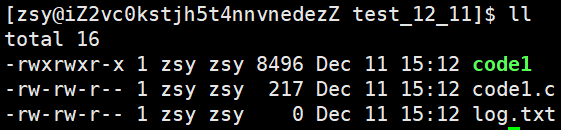
可以看到新打开的log.txt在程序的当前路径下,那系统怎么知道程序的当前路径在哪⾥呢?
可以使⽤ ls /proc/进程id -l 命令查看当前正在运⾏进程的信息:
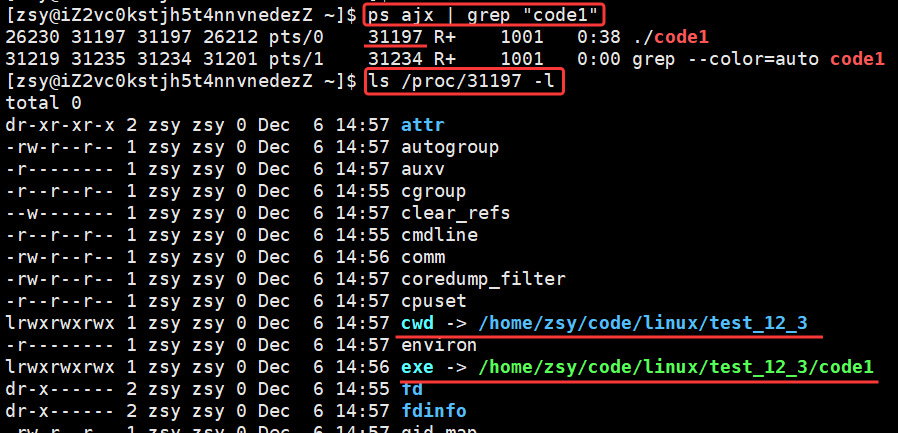
我们可以看到存在两个符号链接文件cwd和exe。
cwd:指向该进程运行时所处的工作目录
exe:指向该进程对应的可执行程序文件的实际路径
打开⽂件的本质是进程打开,所以进程知道⾃⼰在哪,即便⽂件不带路径,进程也知道。因此OS就能知道要创建的⽂件放在哪⾥。
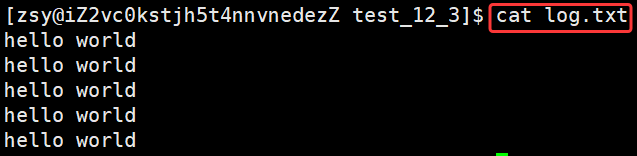
3、写⽂件
示例:
cpp
// code2.c
#include<stdio.h>
#include<string.h>

int main()
{
    FILE* fp = fopen("log.txt", "w");
    if(fp == NULL)
    {
        perror("fopen");
        return 1;
    }

    const char* msg = "hello world\n";
    int count = 5;
    while(count--)
    {
    	// 向fp内写入
        fwrite(msg, strlen(msg), 1, fp);
    }

    fclose(fp);
    return 0;
}
4、读⽂件
cpp
// code3.c
#include<stdio.h>
#include<string.h>

int main()
{
    FILE* fp = fopen("log.txt", "r");
    if(fp == NULL)
    {
        perror("fopen");
        return 1;
    }

    while(1)
    {
        char buffer[128];
        // // 读取fp内容
        int n =fread(buffer, 1, sizeof(buffer)-1, fp);
        if(n > 0)
        {
            buffer[n] = 0;
            printf("%s", buffer);
        }
        if(feof(fp))
            break;
    }

    fclose(fp);
    return 0;
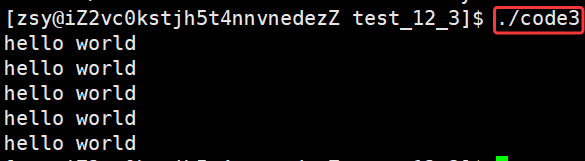
}
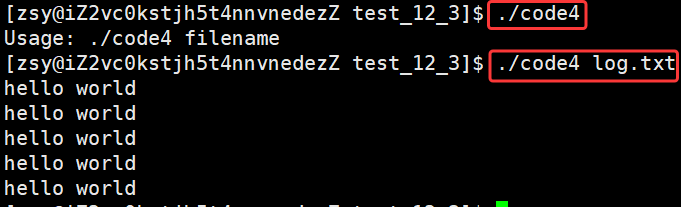
在main函数中添加命令行参数,即可实现简单cat命令:
cpp
// code4.c
#include<stdio.h>
#include<string.h>

int main(int argc, char* argv[])
{
	// 确保有两个命令
    if(argc != 2)
    {
        printf("Usage: %s filename\n", argv[0]);
        return 1;
    }
	// 打开第二个命令(文件)
    FILE* fp = fopen(argv[1], "r");
    if(fp == NULL)
    {
        perror("fopen");
        return 2;
    }

    while(1)
    {
        char buffer[128];
        int n =fread(buffer, 1, sizeof(buffer)-1, fp);
        if(n > 0)
        {
            buffer[n] = 0;
            printf("%s", buffer);
        }
        if(feof(fp))
            break;
    }

    fclose(fp);
    return 0;
}
5、输出信息到显示器的⽅法
cpp
// code5.cc
#include<stdio.h>
#include<string.h>

int main()
{
    printf("hello printf\n"); // 1
    fprintf(stdout, "hello fprintf\n"); // 2

    const char* msg = "hello fwrite\n";
    fwrite(msg, strlen(msg), 1, stdout); // 3

    return 0;
}
6、stdin & stdout & stderr
cpp
#include<stdio.h>

extern FILE* stdin;   // 标准输入 键盘文件
extern FILE* stdout;  // 标准输出 显示器文件
extern FILE* stderr; // 标准错误 显示器文件- C默认会打开三个输⼊输出流,分别是stdin,stdout,stderr
- 这三个流的类型都是FILE*
7、打开⽂件的⽅式
r(读):文件必须已存在
r+(读写):文件必须已存在;写操作会覆盖原有内容
w(写):文件不存在则创建;存在则清空
w+(读写):文件不存在则创建;存在则清空
a(追加写):文件不存在则创建;存在则保留原有内容
a+(读+追加写):文件不存在则创建;存在则保留原有内容
三、系统⽂件 I/O
1、⼀种传递标志位的⽅法
cpp
// Flags.c
#include<stdio.h>

#define ONE_FLAG (1<<0)   // 0000 0000 ... 0000 0001
#define TWO_FLAG (1<<1)   //               0000 0010
#define THREE_FLAG (1<<2) //               0000 0100
#define FOUR_FLAG (1<<3)  //               0000 1000

void func(int flags)
{
    if(flags & ONE_FLAG) printf("One! ");
    if(flags & TWO_FLAG) printf("Two! ");
    if(flags & THREE_FLAG) printf("Three! ");
    if(flags & FOUR_FLAG) printf("Four! ");
}

int main()
{
    func(ONE_FLAG);
    printf("\n");
    func(ONE_FLAG | TWO_FLAG);
    printf("\n");
    func(ONE_FLAG | TWO_FLAG | THREE_FLAG);
    printf("\n");
    func(ONE_FLAG | FOUR_FLAG);
    printf("\n");

    return 0;
}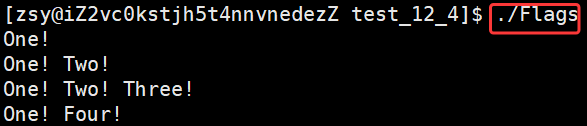
可以看到只需要传入特点的标志位,就可以实现对应的效果,并且支持多个标志位同时传入。
2、常用函数
cpp
#include <sys/types.h>
#include <sys/stat.h>
#include <fcntl.h>
#include <unistd.h>

int open(const char *pathname, int flags, mode_t mode);

int close(int fd);

ssize_t write(int fd, const void *buf, size_t count);

ssize_t read(int fd, void *buf, size_t count);
这里重点介绍一下open函数:
cpp
int open(const char *pathname, int flags, mode_t mode);

pathname:要打开或创建的目标文件
flags:   打开文件时,可以传入多个参数选项,用下面的一个或者多个常量进行 "或" 运算,构成flags。
          O_RDONLY: 只读打开
          O_WRONLY: 只写打开
          O_RDWR : 读、写打开
          (上面这三个常量,必须且只能指定一个)
          O_CREAT : 若文件不存在,则创建它。需要搭配mode选项,表示新文件的默认权限
          O_APPEND: 追加
返回值:
          成功:新打开的文件描述符
          失败:-1
3、写⽂件
我们还可以采⽤系统接⼝来进⾏⽂件访问。
cpp
// myfile.c
#include<stdio.h>
#include<sys/types.h>
#include<sys/stat.h>
#include<fcntl.h>
#include<unistd.h>
#include<string.h>

int main()
{
    umask(0);
    int fd = open("log.txt", O_CREAT | O_WRONLY, 0666);
    if(fd < 0)
    {
        perror("open");
        return 1;
    }

    const char* msg = "hello world\n";
    // 向fd内写入
    write(fd, msg, strlen(msg));
    close(fd);

    return 0;
}
4、读⽂件
cpp
// myfile1.c
#include<stdio.h>
#include<sys/types.h>
#include<sys/stat.h>
#include<fcntl.h>
#include<unistd.h>
#include<string.h>

int main()
{
    umask(0);
    int fd = open("log.txt", O_RDONLY);
    if(fd < 0)
    {
        perror("open");
        return 1;
    }

    while(1)
    {
        char buffer[64];
        // 读取fd内容
        int n = read(fd, buffer, sizeof(buffer)-1);
        if(n>0)
        {
            buffer[n] = 0;
            printf("%s", buffer);
        }
        else if(n == 0)
        {
            break;
        }
    }
    return 0;
}
5、系统调用和库函数
fopenfclosefreadfwrite等都是C标准库当中的函数,我们称之为库函数(libc)。- ⽽
openclosereadwritelseek都属于系统提供的接⼝,称之为系统调⽤接⼝。
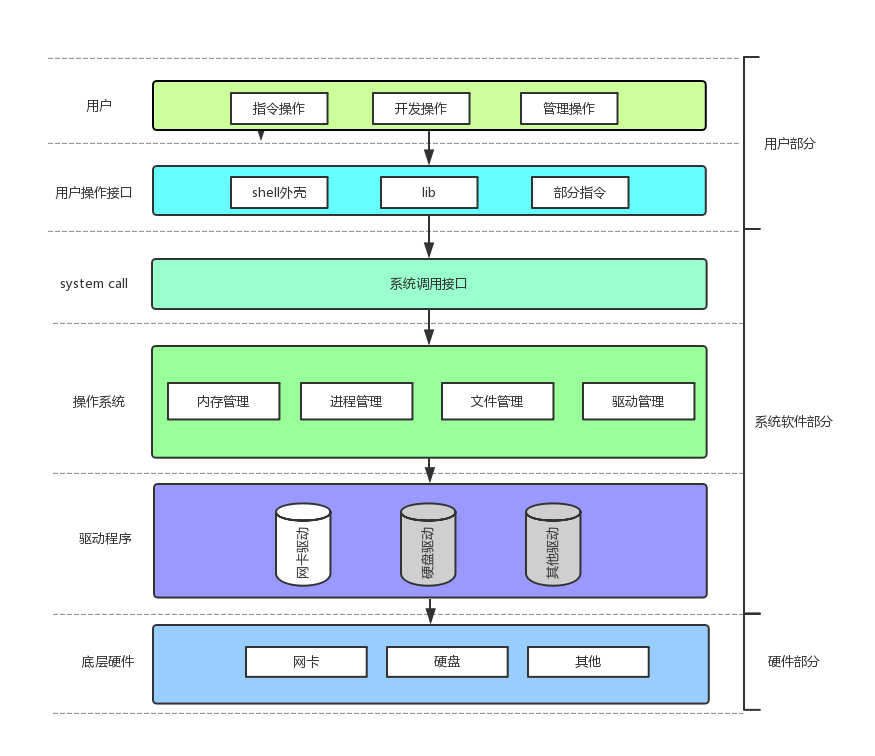
上图展示的是系统调⽤接⼝和库函数的关系,一目了然,库函数对系统调用接口进行了封装。
所以,可以认为 f# 系列的函数,都是对系统调⽤的封装,⽅便⼆次开发。
6、⽂件描述符fd
1)0 & 1 & 2
-
Linux进程默认情况下会有3个打开的⽂件描述符,分别是标准输⼊(stdin)0,标准输出(stdout)1,标准错误(stderr)2。
-
0,1,2对应的物理设备⼀般是:键盘,显示器,显示器
所以输⼊输出还可以采⽤如下⽅式:
cpp
#include<stdio.h>
#include<sys/types.h>
#include<sys/stat.h>
#include<fcntl.h>
#include<unistd.h>
#include<string.h>

int main()
{
    char buffer[1024];
    int s = read(0, buffer, sizeof(buffer)); // 0: 标准输入
    if(s > 0)
    {
        buffer[s] = 0;
        write(1, buffer, strlen(buffer));// 1: 标准输出
    }
    return 0;
}
文件描述符具体见下图:
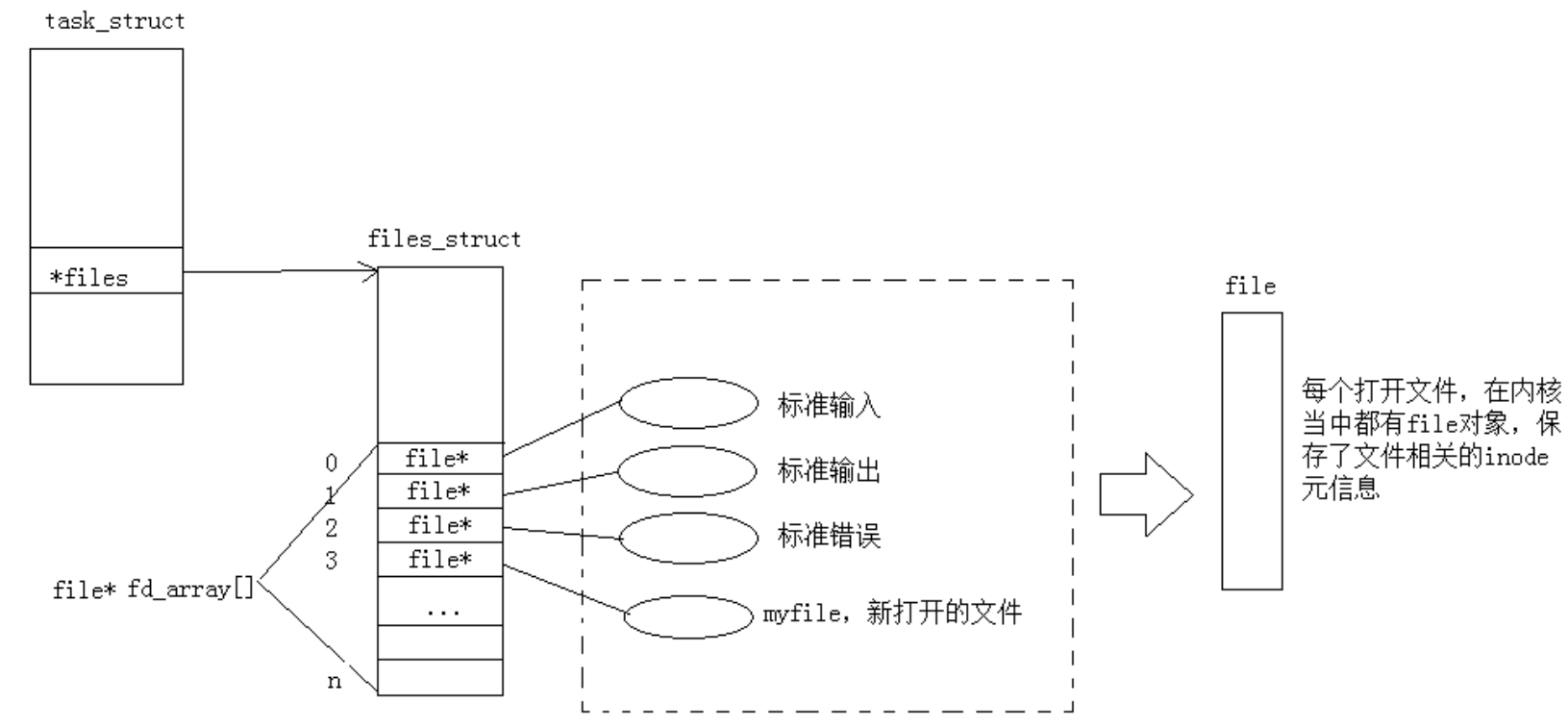
⽂件描述符就是从0开始的⼩整数。
当我们打开⽂件时,操作系统在内存中要创建相应的数据结构来描述⽬标⽂件。于是就有了file结构体。表⽰⼀个已经打开的⽂件对象。⽽进程执⾏open系统调⽤,所以必须让进程和⽂件关联起来。
每个进程都有⼀个指针*files,指向⼀张表files_struct,该表最重要的部分就是包含⼀个指针数组,每个元素都是⼀个指向打开⽂件的指针!所以,本质上,⽂件描述符就是该数组的下标。所以,只要拿着⽂件描述符,就可以找到对应的⽂件。
2)⽂件描述符的分配规则
示例1:
cpp
// test1.c
#include<stdio.h>
#include<sys/types.h>
#include<sys/stat.h>
#include<fcntl.h>
#include<unistd.h>

int main()
{
    int fd = open("log.txt", O_RDONLY);
    if(fd < 0)
    {
        perror("open");
        return 1;
    }

    printf("fd: %d\n", fd);
    close(fd);
    return 0;
}
示例2:关闭0
cpp
// test1.c
#include<stdio.h>
#include<sys/types.h>
#include<sys/stat.h>
#include<fcntl.h>
#include<unistd.h>

int main()
{
	close(0);
    int fd = open("log.txt", O_RDONLY);
    if(fd < 0)
    {
        perror("open");
        return 1;
    }

    printf("fd: %d\n", fd);
    close(fd);
    return 0;
}
示例3:关闭2
cpp
// test1.c
#include<stdio.h>
#include<sys/types.h>
#include<sys/stat.h>
#include<fcntl.h>
#include<unistd.h>

int main()
{
	close(2);
    int fd = open("log.txt", O_RDONLY);
    if(fd < 0)
    {
        perror("open");
        return 1;
    }

    printf("fd: %d\n", fd);
    close(fd);
    return 0;
}
可⻅,⽂件描述符的分配规则是:在files_struct数组当中,找到当前没有被使⽤的最⼩的⼀个下标,作为新文件的⽂件描述符。
3)重定向
那如果关闭1呢?
cpp
#include<stdio.h>
#include<sys/types.h>
#include<sys/stat.h>
#include<fcntl.h>
#include<unistd.h>

int main()
{
    close(1); // fd = 1

    int fd = open("log1.txt", O_CREAT | O_WRONLY | O_TRUNC, 0666);
    if(fd < 0 )
    {
        perror("open");
        return 1;
    }

    printf("fd: %d\n", fd);
    fflush(stdout);
    close(fd);
    return 0;
}
此时我们发现,本来应该输出到显⽰器上的内容,输出到了⽂件 log1.txt 当中,其中fd=1。这种现象叫做输出重定向。常⻅的重定向有: >,>> ,<
那重定向的本质是什么呢?见下图:
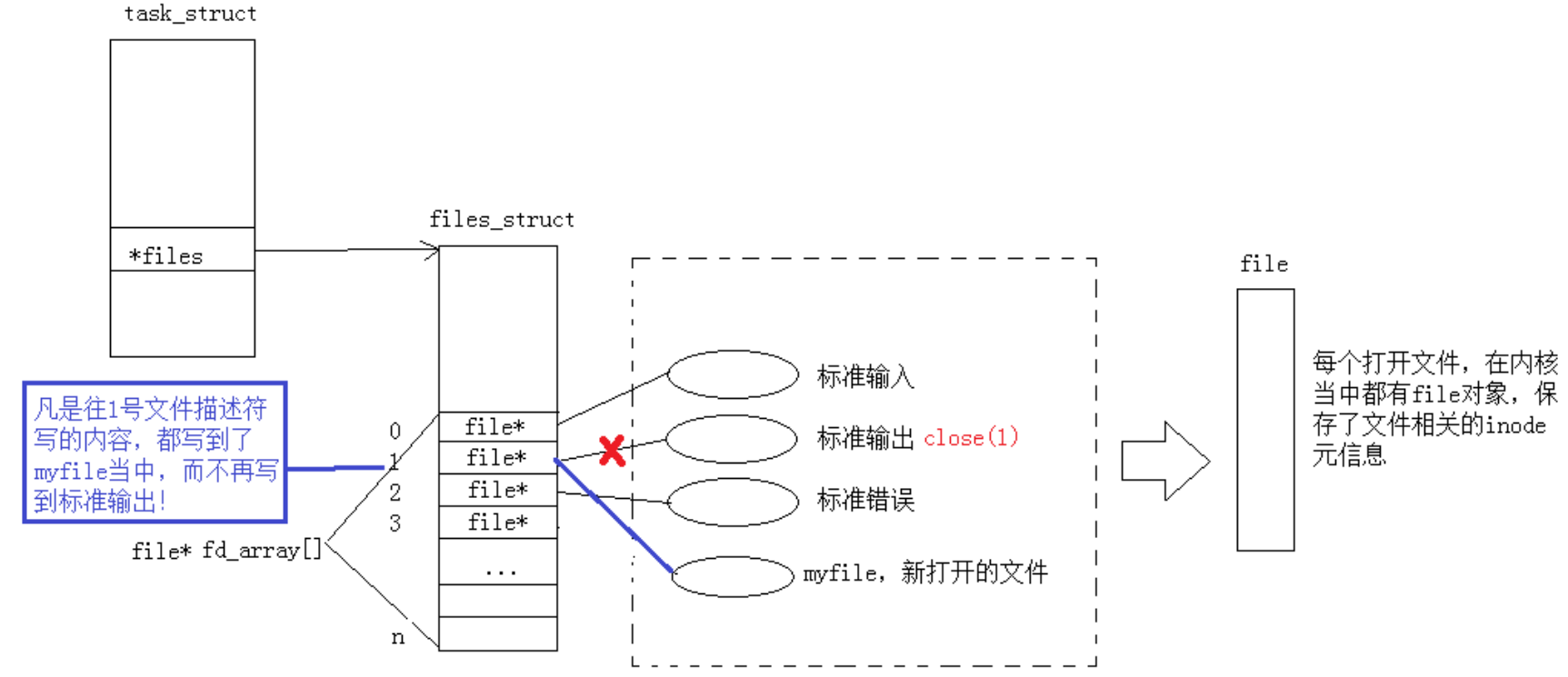
由于关闭了1号文件描述符,因此就给新文件myfile分配了1号文件描述符,导致1号文件描述符指向myfile,凡是往1号文件描述符里写的内容都写到了myfile中,而非标准输出。
4)使⽤ dup2 系统调用
函数原型:
cpp
#include<unistd.h>

int dup2(int oldfd, int newfd);
核心功能: 让文件描述符newfd 指向 oldfd 对应的文件
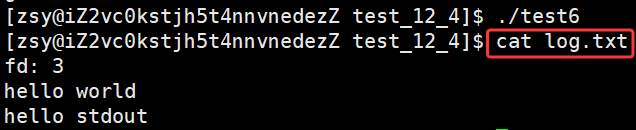
示例代码:输出重定向
cpp
#include<stdio.h>
#include<sys/types.h>
#include<sys/stat.h>
#include<fcntl.h>
#include<unistd.h>
#include<stdlib.h>
#include<string.h>

int main()
{
    int fd = open("log.txt", O_CREAT | O_WRONLY | O_TRUNC, 0666);
    if(fd < 0)
    {
        perror("open");
        return 1;
    }

    dup2(fd, 1);
    close(fd);

    printf("fd: %d\n", fd);
    printf("hello world\n");
    fprintf(stdout, "hello stdout\n");
    return 0;
}
5)在minishell中添加重定向功能
cpp
#include<iostream>
#include<cstdio>
#include<cstdlib>
#include<cstring>
#include<unistd.h>
#include<sys/types.h>
#include<sys/wait.h>
#include<cstring>
#include<unordered_map>
#include<sys/stat.h>
#include<fcntl.h>

#define COMMAND_SIZE 1024
#define FORMAT "[%s@%s %s]# "

// 下面是shell定义的全局数据

// 1. 命令行参数表
#define MAXARGC 128
char* g_argv[MAXARGC];
int g_argc = 0;

// 2. 环境变量表
#define MAX_ENVS 100
char* g_env[MAX_ENVS];
int g_envs = 0;

// 3. 别名映射表
std::unordered_map<std::string, std::string> alias_list;

// 4. 重定向
#define NONE_REDIR 0
#define INPUT_REDIR 1
#define OUTPUT_REDIR 2
#define APPEND_REDIR 3

int redir = NONE_REDIR;
std::string filename;

// for test
char cwd[1024];
char cwdenv[1024];

// last exit code
int lastcode = 0;

const char* GetUserName()
{
    const char* name = getenv("USER");
    return name == NULL ? "None" : name;
}

const char* GetHostName()
{
    const char* hostname = getenv("HOSTNAME");
    return hostname == NULL ? "None" : hostname;
}

const char* GetPwd()
{
    //const char* pwd = getenv("PWD");
    const char* pwd = getcwd(cwd, sizeof(cwd));
    if(pwd != NULL)
    {
        snprintf(cwdenv, sizeof(cwdenv), "PWD=%s", cwd);
        putenv(cwdenv);
    }
    return pwd == NULL ? "None" : pwd;
}

const char* GetHome()
{
    const char* home = getenv("HOME");
    return home == NULL ? "None" : home;
}

void InitEnv()
{
    extern char** environ;
    memset(g_env, 0, sizeof(g_env));
    g_envs = 0;

    // 1. 获取环境变量
    for(int i = 0; environ[i]; i++)
    {
        // 申请空间
        g_env[i] = (char*)malloc(strlen(environ[i])+1);
        strcpy(g_env[i], environ[i]);
        g_envs++;
    }
    g_env[g_envs++] = (char*)"HELLO=ENV"; // for test
    g_env[g_envs] = NULL;

    // 2. 导成环境变量
    for(int i = 0; g_env[i]; i++)
    {
        putenv(g_env[i]);
    }
    environ = g_env;
}

// /a/b/c
std::string DirName(const char* pwd)
{
#define SLASH "/"
    std::string dir = pwd;
    if(dir == SLASH) return SLASH;
    auto pos = dir.rfind(SLASH);
    if(pos == std::string::npos) return "BUG?";
    return dir.substr(pos+1);
}

void MakeCommandLine(char cmd_prompt[], int size)
{
    // 将获取的信息存入cmd_prompt数组中
    snprintf(cmd_prompt, size, FORMAT, GetUserName(), GetHostName(), DirName(GetPwd()).c_str());
    //snprintf(cmd_prompt, size, FORMAT, GetUserName(), GetHostName(), GetPwd());
}

void PrintCommandPrompt()
{
    char prompt[COMMAND_SIZE];
    MakeCommandLine(prompt, sizeof(prompt));
    printf("%s", prompt);
    fflush(stdout);
}

bool GetCommandLine(char* out, int size)
{
    // ls -a -l -> "ls -a -l\n" 字符串
    char* c = fgets(out, size, stdin);
    if(c == NULL) return false;
    out[strlen(out)-1] = 0; // 清理\n
    if(strlen(out) == 0) return false;
    return true;
}

// 3. 命令行分析 "ls -a -l" -> "ls" "-a" "-l"
bool CommandParse(char* commandline)
{
#define SEP " "
    g_argc = 0;
    g_argv[g_argc++] = strtok(commandline, SEP);
    while((bool)(g_argv[g_argc++] = strtok(nullptr, SEP)));
    g_argc--;
    return g_argc > 0 ? true:false;
}

void PrintArgv()
{
    for(int i = 0; g_argv[i]; i++)
    {
        printf("argv[%d]->%s\n", i, g_argv[i]);
    }
    printf("argc: %d\n", g_argc);
}


bool Cd()
{
    // cd不带参数(等价于 cd ~) 家目录
    if(g_argc == 1)
    {
        std::string home = GetHome();
        if(home.empty()) return true;
        chdir(home.c_str());
    }
    else
    {
        std::string where = g_argv[1];
        // cd - 切换到上一次目录
        if(where == "-")
        {
            const char* old_pwd = getenv("OLDPWD");
            if(old_pwd != nullptr)
            {
                chdir(old_pwd);
                printf("%s\n", old_pwd);
            }
        }
        else if(where == "~")
        {
            std::string home = GetHome();
            if(!home.empty())
            {
                chdir(home.c_str());
            }
        }
        else // 其他路径, 直接切换
        {
            chdir(where.c_str());
        }
    }

    return true;
}

void Echo()
{
    if(g_argc == 2)
    {
        // echo "hello world"
        // echo $?
        // echo $PATH
        std::string opt = g_argv[1];
        if (opt == "$?")
        {
            std::cout << lastcode << std::endl;
            lastcode = 0;
        }
        else if (opt[0] == '$')
        {
            std::string env_name = opt.substr(1);
            const char* env_value = getenv(env_name.c_str());
            if (env_value)
                std::cout << env_value << std::endl;
        }
        else
        {
            std::cout << opt << std::endl;
        }
    }
}

// 检测内建命令
bool CheckAndExecBuiltin()
{
    std::string cmd = g_argv[0];
    if(cmd == "cd")
    {
        Cd();
        return true;
    }
    else if(cmd == "echo")
    {
        Echo();
        return true;
    }
    else if(cmd == "export")
    {
		// ...
    }
    else if(cmd == "alias")
    {
  	    // ...
    }

    return false;
}

int Execute()
{
    pid_t id = fork();
    if(id == 0)
    {
        int fd = -1;
        // 子进程检测重定向情况
        if(redir == INPUT_REDIR)
        {
            fd = open(filename.c_str(), O_RDONLY);
            if(fd < 0) exit(1);
            dup2(fd,0);
            close(fd);
        }
        else if(redir == OUTPUT_REDIR)
        {
            fd = open(filename.c_str(), O_CREAT | O_WRONLY | O_TRUNC, 0666);
            if(fd < 0) exit(2);
            dup2(fd,1);
            close(fd);
        }
        else if(redir == APPEND_REDIR)
        {
            fd = open(filename.c_str(), O_CREAT | O_WRONLY | O_APPEND, 0666);
            if(fd < 0) exit(2);
            dup2(fd,1);
            close(fd);
        }
        else
        {}

        // 进程替换不会影响重定向的结果
        // child
        execvp(g_argv[0], g_argv);
        exit(1);
    }

    // father
    int status = 0;
    pid_t rid = waitpid(id, &status, 0);
    if(rid > 0)
    {
        lastcode = WEXITSTATUS(status);
    }
    return 0;
}

// 让end指向第一个非空白字符的位置
void TrimSpace(char cmd[], int& end)
{
    while(isspace(cmd[end]))
    {
        end++;
    }
}

void RedirCheck(char cmd[])
{
    redir = NONE_REDIR;
    filename.clear();
    int start = 0;
    int end = strlen(cmd) - 1;

    // "ls -a -l >> file.txt"    > >> <
    while(end > start)
    {
        if(cmd[end] == '<')
        {
            cmd[end++] = 0; // 拆分命令与重定向信息
            TrimSpace(cmd,end);
            redir = INPUT_REDIR;
            filename = cmd + end; // &cmd[end]
            break;
        }
        else if(cmd[end] == '>')
        {
            if(cmd[end-1] == '>')
            {
                // >>
                cmd[end-1] = 0;
                redir = APPEND_REDIR;
            }
            else
            {
                // >
                redir = OUTPUT_REDIR;
            }
            cmd[end++] = 0;
            TrimSpace(cmd,end);
            filename = cmd + end;
            break;
        }
        else
        {
            end--;
        }
    }
}


int main()
{
    InitEnv();

    while(true)
    {
        // 1. 输出命令行提示符
        PrintCommandPrompt();

        // 2. 获取用户输入的命令
        char commandline[COMMAND_SIZE];
        if(!GetCommandLine(commandline, sizeof(commandline)))
            continue;

        // 3. 重定向分析 "ls -a -l > file.txt" -> "ls -a -l" "file.txt" -> 判定重定向方式
        RedirCheck(commandline);
        // printf("fedir: %d, filename: %s\n", redir, filename.c_str());

        // 4. 命令行分析 "ls -a -l" -> "ls" "-a" "-l"
        if(!CommandParse(commandline))
            continue;
        //PrintArgv();

        // 5. 检测并处理内建命令
        if(CheckAndExecBuiltin())
            continue;

        // 6. 执行命令
        Execute();
    }
    return 0;
}