Spring AI Alibaba + Crawl4ai + Docker 搭建一个具有联网搜索能力的Agent
前置要求
1、本地启动ollma
2、docker 拉取 unclecode/crawl4ai:0.7.6 并启动
1、maven 依赖
xml
<?xml version="1.0" encoding="UTF-8"?>
<project xmlns="http://maven.apache.org/POM/4.0.0"
         xmlns:xsi="http://www.w3.org/2001/XMLSchema-instance"
         xsi:schemaLocation="http://maven.apache.org/POM/4.0.0 http://maven.apache.org/xsd/maven-4.0.0.xsd">
    <modelVersion>4.0.0</modelVersion>

    <groupId>com.example</groupId>
    <artifactId>oak-spring-ai-alibaba-crawl4ai</artifactId>
    <version>1.0-SNAPSHOT</version>


    <properties>
        <maven.compiler.source>17</maven.compiler.source>
        <maven.compiler.target>17</maven.compiler.target>
        <project.build.sourceEncoding>UTF-8</project.build.sourceEncoding>
        <graalvm.polyglot.version>24.2.1</graalvm.polyglot.version>
        <spring.ai.version>1.1.0-M4</spring.ai.version>
        <spring.boot.version>3.4.3</spring.boot.version>
        <spring.ai.alibaba.version>1.1.0.0-M5.1</spring.ai.alibaba.version>
        <hutool.version>5.8.20</hutool.version>

    </properties>


    <dependencyManagement>
        <dependencies>
            <dependency>
                <groupId>org.springframework.ai</groupId>
                <artifactId>spring-ai-bom</artifactId>
                <version>1.1.0-M4</version>
                <type>pom</type>
                <scope>import</scope>
            </dependency>
            <dependency>
                <groupId>org.springframework.boot</groupId>
                <artifactId>spring-boot-dependencies</artifactId>
                <version>3.4.3</version>
                <type>pom</type>
                <scope>import</scope>
            </dependency>
            <dependency>
                <groupId>com.alibaba.cloud.ai</groupId>
                <artifactId>spring-ai-alibaba-bom</artifactId>
                <version>1.1.0.0-M5</version>
                <type>pom</type>
                <scope>import</scope>
            </dependency>
        </dependencies>
    </dependencyManagement>


    <dependencies>
        <dependency>
            <groupId>org.springframework.boot</groupId>
            <artifactId>spring-boot-starter-web</artifactId>
        </dependency>
        <dependency>
            <groupId>com.alibaba.cloud.ai</groupId>
            <artifactId>spring-ai-alibaba-agent-framework</artifactId>
        </dependency>
        <dependency>
            <groupId>org.springframework.ai</groupId>
            <artifactId>spring-ai-starter-model-ollama</artifactId>
        </dependency>

        <dependency>
            <groupId>com.alibaba.cloud.ai</groupId>
            <artifactId>spring-ai-alibaba-studio</artifactId>
            <exclusions>
                <exclusion>
                    <groupId>com.alibaba.cloud.ai</groupId>
                    <artifactId>spring-ai-alibaba-dashscope</artifactId>
                </exclusion>
            </exclusions>
        </dependency>

        <dependency>
            <groupId>cn.hutool</groupId>
            <artifactId>hutool-all</artifactId>
            <version>${hutool.version}</version>
        </dependency>
    </dependencies>


    <build>
        <plugins>
            <plugin>
                <groupId>org.springframework.boot</groupId>
                <artifactId>spring-boot-maven-plugin</artifactId>
                <version>3.4.3</version>
                <executions>
                    <execution>
                        <goals>
                            <goal>repackage</goal>
                        </goals>
                    </execution>
                </executions>
            </plugin>
            <plugin>
                <groupId>org.apache.maven.plugins</groupId>
                <artifactId>maven-compiler-plugin</artifactId>
                <version>3.11.0</version>
                <configuration>
                    <source>17</source>
                    <target>17</target>
                </configuration>
            </plugin>
        </plugins>
    </build>

    <repositories>
        <repository>
            <id>spring-milestones</id>
            <name>Spring Milestones</name>
            <url>https://repo.spring.io/milestone</url>
            <snapshots>
                <enabled>false</enabled>
            </snapshots>
        </repository>
        <repository>
            <id>spring-snapshots</id>
            <url>https://repo.spring.io/snapshot</url>
            <snapshots>
                <enabled>false</enabled>
            </snapshots>
        </repository>
        <repository>
            <id>central-portal-snapshots</id>
            <name>Central Portal Snapshots</name>
            <url>https://central.sonatype.com/repository/maven-snapshots/</url>
            <releases>
                <enabled>false</enabled>
            </releases>
            <snapshots>
                <enabled>true</enabled>
            </snapshots>
        </repository>

    </repositories>


</project>
2、主要代码
Crawl4aiApiImpl 调用 Docker 本地 启动crawl4ai服务提供md接口
java
package com.example.service.impl;

import cn.hutool.http.HttpRequest;
import cn.hutool.http.HttpResponse;
import cn.hutool.json.JSONUtil;
import com.example.config.ConfigProperties;
import com.example.http.response.CrawlTaskResponse;
import com.example.service.Crawl4aiApi;
import org.apache.commons.lang3.StringUtils;
import org.slf4j.Logger;
import org.slf4j.LoggerFactory;
import org.springframework.ai.tool.annotation.Tool;
import org.springframework.ai.tool.annotation.ToolParam;
import org.springframework.beans.factory.annotation.Autowired;
import org.springframework.stereotype.Service;

import java.io.UnsupportedEncodingException;
import java.net.URLEncoder;
import java.util.HashMap;
import java.util.Map;
import java.util.Objects;

@Service
public class Crawl4aiApiImpl implements Crawl4aiApi {

    @Autowired
    private ConfigProperties configProperties;

    private Logger logger = LoggerFactory.getLogger(Crawl4aiApiImpl.class);

    @Override
    @Tool(description = "Get the crawl result by the given taskId")
    public String task(String taskId) {
        logger.debug("taskId: {}", taskId);
        HttpRequest httpRequest = HttpRequest.get(configProperties.getBaseUrl() + "/task/" + taskId)
                .bearerAuth(configProperties.getApiToken());
        HttpResponse response = httpRequest.execute();
        logger.debug(response.body());
        CrawlTaskResponse rsp = JSONUtil.toBean(response.body(), CrawlTaskResponse.class);
        return JSONUtil.toJsonStr(rsp);
    }

    /**
     * 必应搜索方法
     * @param q 用户输入
     * @return
     */
    @Override
    @Tool(description = "Call crawl4ai API to crawl a URL")
    public String bingSearchToolMd(@ToolParam(description = "the user input content") String q ) {
        if(StringUtils.isBlank(q)){
            return "The parameter can not be blank, Please input the parameter q and retry call crawl_tool again.";
        }
//        url 编码处理
        try {
            q = URLEncoder.encode(q , "utf-8");
        } catch (UnsupportedEncodingException e) {
            e.printStackTrace();
        }
        Map<String, Object> params= new HashMap<>();
        params.put("url" , "https://cn.bing.com/search?q=" + q);
        params.put("f" , "fit");
        params.put("q" , null);
        params.put("c" , "0");
        logger.debug(JSONUtil.toJsonStr(params));

        //craw4ai 提供 输出 markdown 的接口
        HttpRequest httpRequest = HttpRequest.post(configProperties.getBaseUrl() + "/md")
                .header("Content-Type" , "application/json")
                .bearerAuth(configProperties.getApiToken()).body(JSONUtil.toJsonStr(params));

        HttpResponse response = httpRequest.execute();
        logger.debug(response.body());
        Map map = JSONUtil.toBean(response.body(), Map.class);
        //输出 markdown 格式内容
        Object markdown = map.get("markdown");
        return Objects.isNull(markdown) ? "" : markdown.toString();
    }
}
ReactAgentConfig 配置一下ReactAgent
java
package com.example.config;

import com.alibaba.cloud.ai.graph.agent.ReactAgent;
import com.alibaba.cloud.ai.graph.agent.hook.modelcalllimit.ModelCallLimitHook;
import com.alibaba.cloud.ai.graph.checkpoint.savers.MemorySaver;
import com.example.http.request.CrawlRequest;
import com.example.tools.CrawlTool;
import org.springframework.ai.chat.model.ChatModel;
import org.springframework.ai.tool.ToolCallback;
import org.springframework.ai.tool.function.FunctionToolCallback;
import org.springframework.beans.factory.annotation.Qualifier;
import org.springframework.context.annotation.Bean;
import org.springframework.context.annotation.Configuration;
import org.springframework.context.annotation.Primary;

@Configuration
public class ReactAgentConfig {

    private static final String INSTRUCTION = """
            You are a helpful assistant named research_agent.
            You can use the crawl_tool  search content from internet for user.
            You have access to tools that can search content from Internet.
            Use these tools to assist users with their tasks.
            """;


    //
    @Bean
    public AgentStaticLoader agentStaticLoader(ReactAgent reactAgent){
        return new AgentStaticLoader(reactAgent);
    }


    @Bean("research_agent")
    @Primary
    public ReactAgent researchAgent(ChatModel chatModel, @Qualifier("crawlToolCallback") ToolCallback crawlToolCallback) {

        return ReactAgent.
                builder()
                .name("research_agent")
                .model(chatModel)
                .instruction(
                        INSTRUCTION
                )
                .saver(new MemorySaver())
                .tools(crawlToolCallback)
                .hooks(ModelCallLimitHook.builder().runLimit(5).build())  // 限制模型调用次数为5次
                .build();
    }

    @Bean
    public ToolCallback crawlToolCallback(@Qualifier("crawlTool") CrawlTool crawlTool) {
        return FunctionToolCallback.builder("crawl_tool", crawlTool)
                .description(
                        """
                                   When you need search content from Internet for user, you can use crawl_tool.
                                    Usage:
                                    - The q parameter is a string, representative user input content.
                                    - When you use crawl_tool , the parameter just like below content:
                                     {
                                       "q":"user input content"
                                     }
                                """
                )

                .inputType(CrawlRequest.class)
                .build();
    }

}
3、主要配置
yml
spring:
  ai:
    ollama:
      # 本地ollama 地址
      base-url: http://localhost:11434
      # 聊天模型
      chat:
        model: llama3.2
# 去掉Springboot banner
  main:
    banner-mode: off

# crawl4ai Settings - update your URL and token below
crawl4ai:
  # 本地 docker 启动  crawl4ai 提供的 url
  base-url: http://localhost:11235
  # 如果 docker 启动 crawl4ai 时有token,则配置
  api-token:

logging:
    level:
        com:
          example: DEBUG
        org:
          springframework:
            web: INFO
    file:
      name: ./logs/crawl4ai.log
CrawlTool 提供给Agent使用的tool
java
package com.example.tools;

import com.example.http.request.CrawlRequest;
import com.example.service.Crawl4aiApi;
import org.springframework.ai.chat.model.ToolContext;
import org.springframework.beans.factory.annotation.Autowired;
import org.springframework.stereotype.Component;

import java.util.function.BiFunction;

@Component
public class CrawlTool implements BiFunction<CrawlRequest, ToolContext , String> {

    Crawl4aiApi crawl4aiApi;

    @Autowired
    public CrawlTool(Crawl4aiApi crawl4aiApi) {
        this.crawl4aiApi = crawl4aiApi;
    }

    @Override
    public String apply(CrawlRequest query, ToolContext toolContext) {
        return crawl4aiApi.bingSearchToolMd(query.getQ());
    }
}
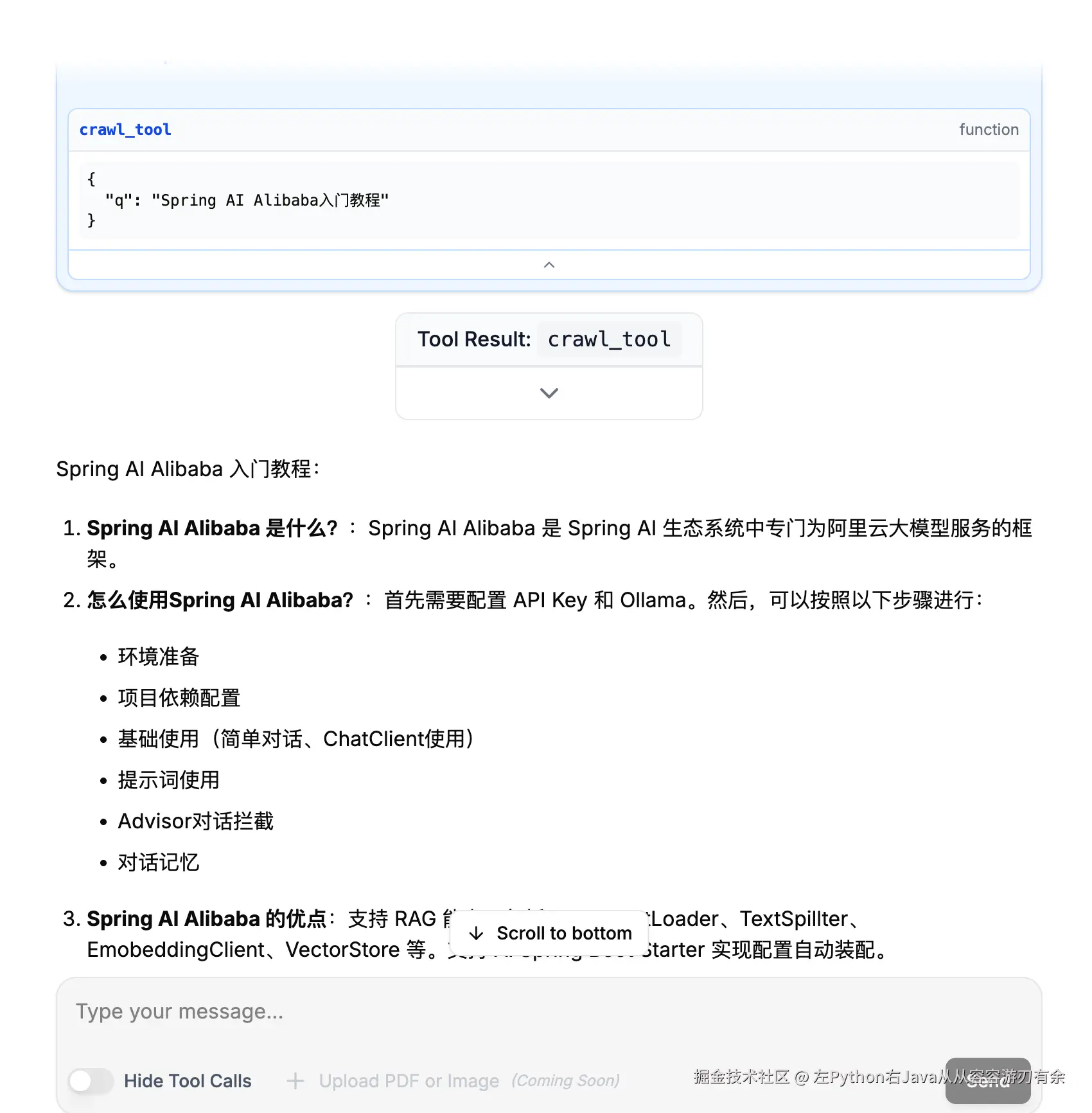
4、运行效果
输入:Spring AI Alibaba 入门教程 ,ReactAgent 会判断,调用crawl_tool 查询信息