参考
不支持中文,试过了
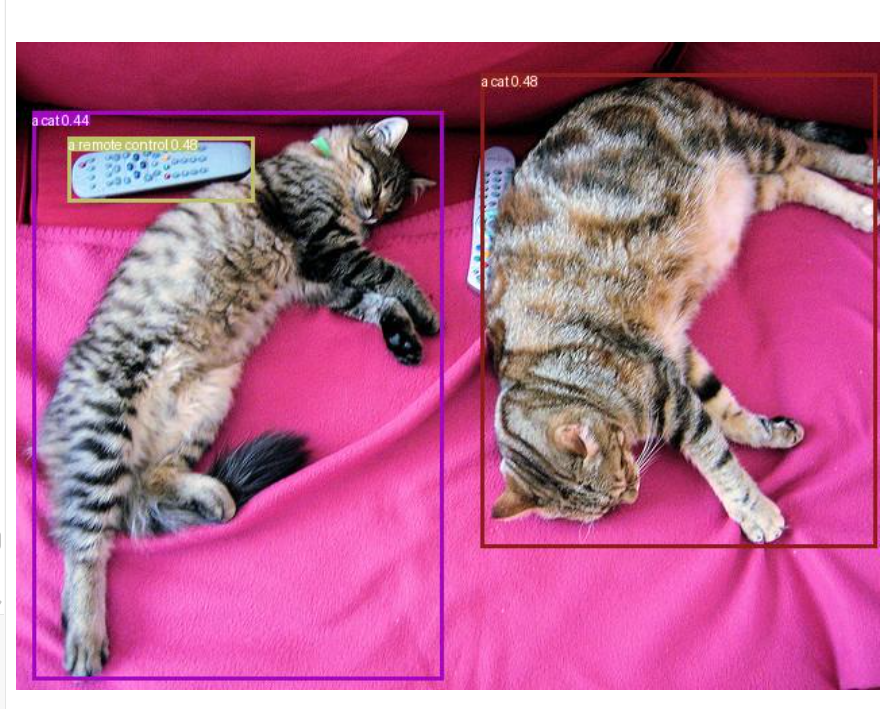
Downloading Model from https://www.modelscope.cn to directory: C:\Users\njsgcs\.cache\modelscope\hub\models\IDEA-Research\grounding-dino-tiny
Downloading Model from https://www.modelscope.cn to directory: C:\Users\njsgcs\.cache\modelscope\hub\models\IDEA-Research\grounding-dino-tiny
检测结果:
Result 0:
  Boxes shape: torch.Size([3, 4])
e:\code\my_python_server\micromambavenv\lib\site-packages\transformers\models\grounding_dino\processing_grounding_dino.py:93: FutureWarning: The key `labels` is will return integer ids in `GroundingDinoProcessor.post_process_grounded_object_detection` output since v4.51.0. Use `text_labels` instead to retrieve string object names.
  warnings.warn(self.message, FutureWarning)
  Labels: ['a cat', 'a cat', 'a remote control']
  Scores: tensor([0.4785, 0.4381, 0.4759], device='cuda:0')
  Text Labels: ['a cat', 'a cat', 'a remote control']
结果已保存到 result.jpg
python
import requests
import torch
from PIL import Image, ImageDraw, ImageFont
import numpy as np
from modelscope import AutoProcessor, AutoModelForZeroShotObjectDetection

def visualize_results(image, results, text_labels):
    """
    可视化检测结果
    """
    draw = ImageDraw.Draw(image)

    # 从结果中获取检测框、标签和分数
    boxes = results[0]['boxes']
    labels = results[0]['text_labels'] if 'text_labels' in results[0] else results[0]['labels']
    scores = results[0]['scores']

    for i in range(len(boxes)):
        box = boxes[i].cpu().numpy()
        score = scores[i].item()
        label = labels[i]  # 现在是字符串,不需要 .item()

        # 只绘制置信度高的框
        if score > 0.4:
            x0, y0, x1, y1 = box
            color = tuple(np.random.randint(0, 255, size=3).tolist())
            draw.rectangle([x0, y0, x1, y1], outline=color, width=3)

            # 使用标签文本
            text_to_draw = f"{label} {score:.2f}"

            # 绘制标签
            font = ImageFont.load_default()
            if hasattr(font, "getbbox"):
                bbox = draw.textbbox((x0, y0), text_to_draw, font)
            else:
                w, h = draw.textsize(text_to_draw, font)
                bbox = (x0, y0, x0 + w, y0 + h)
            draw.rectangle(bbox, fill=color)
            draw.text((x0, y0), text_to_draw, fill="white", font=font)

    return image

model_id = "IDEA-Research/grounding-dino-tiny"
device = "cuda" if torch.cuda.is_available() else "cpu"

processor = AutoProcessor.from_pretrained(model_id)
model = AutoModelForZeroShotObjectDetection.from_pretrained(model_id).to(device)

image_url = "http://images.cocodataset.org/val2017/000000039769.jpg"
image = Image.open(requests.get(image_url, stream=True).raw)

# Check for cats and remote controls
# VERY important: text queries need to be lowercased + end with a dot
text = "a cat. a remote control."

inputs = processor(images=image, text=text, return_tensors="pt").to(device)

with torch.no_grad():
    outputs = model(**inputs)

# 使用正确的参数名
results = processor.post_process_grounded_object_detection(
    outputs,
    input_ids=inputs.input_ids,
    threshold=0.4,        # 使用 threshold 而不是 box_threshold
    text_threshold=0.3,
    target_sizes=[image.size[::-1]]
)

# 打印结果
print("检测结果:")
for i, result in enumerate(results):
    print(f"Result {i}:")
    print(f"  Boxes shape: {result['boxes'].shape}")
    print(f"  Labels: {result['labels']}")
    print(f"  Scores: {result['scores']}")
    print(f"  Text Labels: {result.get('text_labels', 'N/A')}")

# 可视化结果
result_image = visualize_results(image.copy(), results, text)
result_image.save("result.jpg")
print("结果已保存到 result.jpg")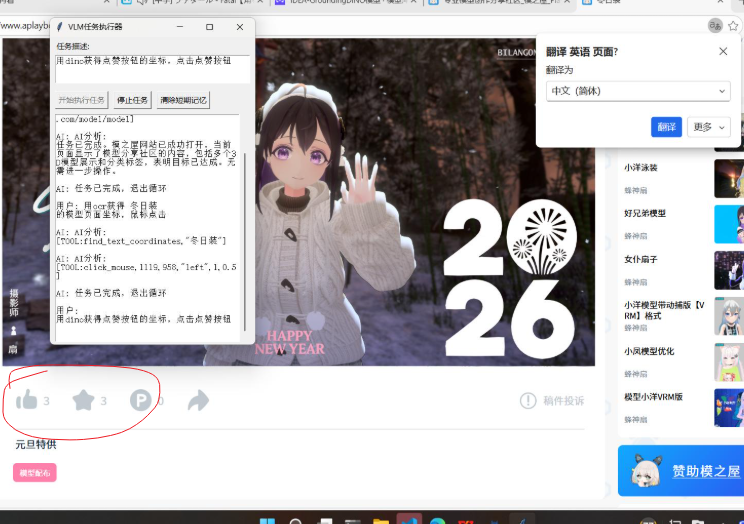
想让它识别点赞和收藏按钮识别不出来,效果很拉