自动化测试(Web Playwright)
自动化测试(Pytest)
文章目录
- [1. 概述](#1. 概述)
-
- [1.1. Pytest 介绍](#1.1. Pytest 介绍)
- [1.2. 文件与函数](#1.2. 文件与函数)
-
- [1.2.1. 测试文件](#1.2.1. 测试文件)
- [1.2.2. 测试函数](#1.2.2. 测试函数)
- [2. 环境部署](#2. 环境部署)
-
- [2.1. 基础插件](#2.1. 基础插件)
- [2.2. 并行测试 pytest-xdist 插件](#2.2. 并行测试 pytest-xdist 插件)
- [3. 执行测试](#3. 执行测试)
-
- [3.1. 基本测试](#3.1. 基本测试)
-
- [3.1.1. 添加测试文件](#3.1.1. 添加测试文件)
- [3.1.2. 测试运行](#3.1.2. 测试运行)
- [3.2. 测试套件子集](#3.2. 测试套件子集)
-
- [3.2.1. 执行特定文件](#3.2.1. 执行特定文件)
- [3.2.2. 函数名称的子串匹配](#3.2.2. 函数名称的子串匹配)
- [3.2.3. 测试分组(mark 标记)](#3.2.3. 测试分组(mark 标记))
- [3.3. 参数化测试](#3.3. 参数化测试)
-
- [3.3.1. 夹具(Fixtures)](#3.3.1. 夹具(Fixtures))
- [3.3.2. Conftest.py](#3.3.2. Conftest.py)
- [3.3.3. 多组输入(parametrize 标记)](#3.3.3. 多组输入(parametrize 标记))
- [3.4. 失败与跳过](#3.4. 失败与跳过)
- [3.5. N 次测试失败后停止测试](#3.5. N 次测试失败后停止测试)
- [3.6. 并行测试](#3.6. 并行测试)
- [3.7. XML 格式的测试结果](#3.7. XML 格式的测试结果)
转载:
https://www.cainiaoya.com/pytest/pytest-xfail-skip-tests.html
1. 概述
1.1. Pytest 介绍
Pytest 是一个基于 python 的测试框架,用于编写和执行测试代码。在当今的 REST 服务中,pytest 主要用于 API 测试,尽管我们可以使用 pytest 编写简单到复杂的测试,即我们可以编写代码来测试 API、数据库、UI 等。
Pytest 的优点:
- Pytest 可以并行运行多个测试,从而减少了测试套件的执行时间。
如果没有明确提及,Pytest 有自己的方式来自动检测测试文件和测试函数。 - Pytest 允许我们在执行期间跳过测试的子集。
- Pytest 允许我们运行整个测试套件的一个子集。
- Pytest 是免费和开源的。
- 由于语法简单,pytest 很容易上手。
1.2. 文件与函数
1.2.1. 测试文件
在不提及文件名的情况下运行 pytest,将运行当前目录和子目录中所有符合格式(test_*.py 或 *_test.py)的测试文件。Pytest 会自动将这些文件识别为测试文件。
1.2.2. 测试函数
Pytest 要求测试函数名称格式为 "test*",不符合格式的函数名称不被 pytest 视为测试函数。
2. 环境部署
2.1. 基础插件
bash
# 安装 pytest
pip install pytest == 2.9.1

# 显示 pytest 的帮助部分
pytest -h
2.2. 并行测试 pytest-xdist 插件
bash
pip install pytest-xdist3. 执行测试
3.1. 基本测试
3.1.1. 添加测试文件
mation/test_square.py
python
import math

def test_sqrt():
   num = 25
   assert math.sqrt(num) == 5

def testsquare():
   num = 7
   assert 7*7 == 40

# 不会被执行,因为它的名称不是格式test*.  pytest 不会将其视为测试函数
def tesequality():
   assert 10 == 11
mation/test_compare.py
python
def test_greater():
   num = 100
   assert num > 100

def test_greater_equal():
   num = 100
   assert num >= 100

def test_less():
   num = 100
   assert num < 200
3.1.2. 测试运行
bash
> pytest.exe
=================================================================== test session starts ====================================================================
platform win32 -- Python 3.10.11, pytest-9.0.2, pluggy-1.6.0
rootdir: D:\works\demo\playwright
plugins: anyio-4.10.0
collected 5 items

mation\test_compare.py F..                                                                                                                            [ 60%]
mation\test_square.py .F                                                                                                                              [100%]

========================================================================= FAILURES =========================================================================
_______________________________________________________________________ test_greater _______________________________________________________________________

    def test_greater():
       num = 100
>      assert num > 100
E      assert 100 > 100

mation\test_compare.py:4: AssertionError
________________________________________________________________________ testsquare ________________________________________________________________________

    def testsquare():
       num = 7
>      assert 7*7 == 40
E      assert (7 * 7) == 40

mation\test_square.py:9: AssertionError
================================================================= short test summary info ==================================================================
FAILED mation/test_compare.py::test_greater - assert 100 > 100
FAILED mation/test_square.py::testsquare - assert (7 * 7) == 40
=============================================================== 2 failed, 3 passed in 0.13s ================================================================
查看结果的第一行。显示文件名和结果。F 代表测试失败,点 (.) 代表测试成功。
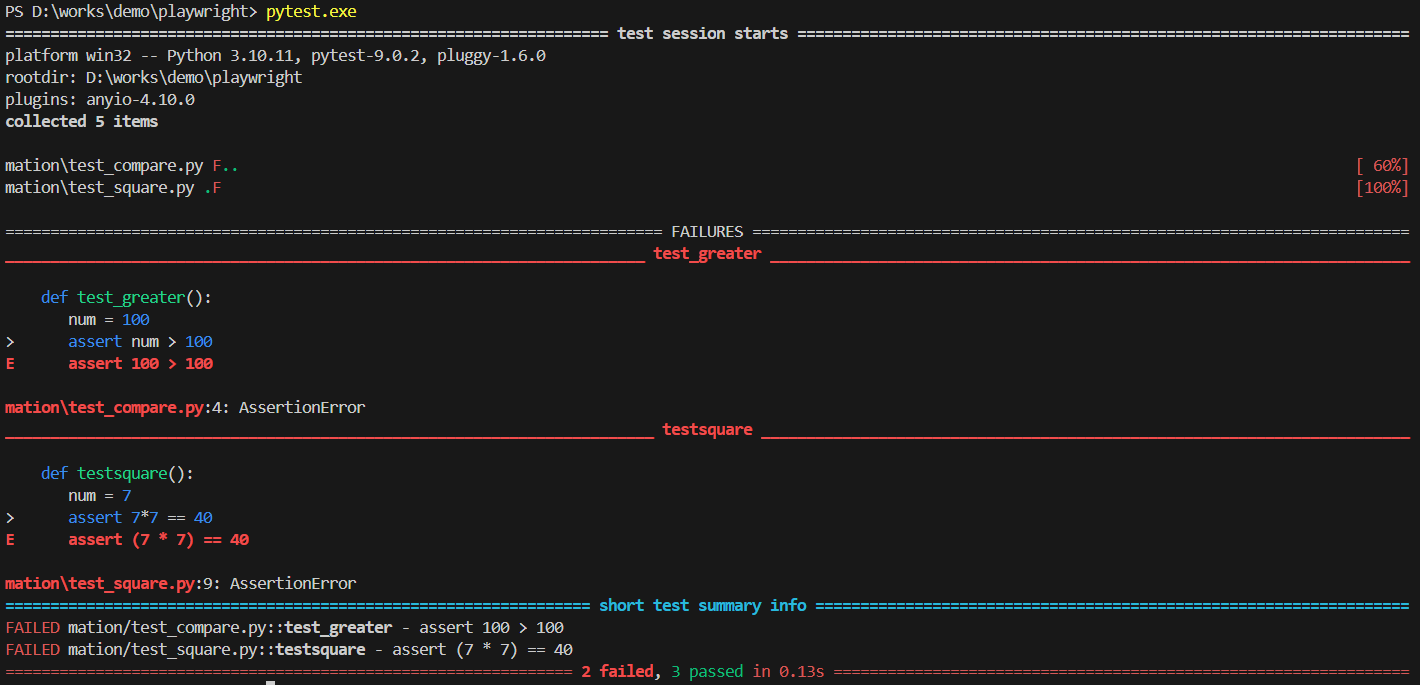
-v 增加详细程度(增加文件名 FAILED or PASSED)
bash
> pytest.exe -v
=================================================================== test session starts ====================================================================
platform win32 -- Python 3.10.11, pytest-9.0.2, pluggy-1.6.0 -- D:\programs\python\python310\python.exe
cachedir: .pytest_cache
rootdir: D:\works\demo\playwright
plugins: anyio-4.10.0
collected 5 items

mation/test_compare.py::test_greater FAILED                                                                                                           [ 20%]
mation/test_compare.py::test_greater_equal PASSED                                                                                                     [ 40%]
mation/test_compare.py::test_less PASSED                                                                                                              [ 60%]
mation/test_square.py::test_sqrt PASSED                                                                                                               [ 80%]
mation/test_square.py::testsquare FAILED                                                                                                              [100%]

========================================================================= FAILURES =========================================================================
_______________________________________________________________________ test_greater _______________________________________________________________________

    def test_greater():
       num = 100
>      assert num > 100
E      assert 100 > 100

mation\test_compare.py:4: AssertionError
________________________________________________________________________ testsquare ________________________________________________________________________

    def testsquare():
       num = 7
>      assert 7*7 == 40
E      assert (7 * 7) == 40

mation\test_square.py:9: AssertionError
================================================================= short test summary info ==================================================================
FAILED mation/test_compare.py::test_greater - assert 100 > 100
FAILED mation/test_square.py::testsquare - assert (7 * 7) == 40
=============================================================== 2 failed, 3 passed in 0.10s ================================================================
3.2. 测试套件子集
3.2.1. 执行特定文件
要从特定文件执行测试,使用以下语法:
bash
pytest <filename> -v

# 例如
pytest mation/test_compare.py -v
运行结果:
bash
> pytest mation/test_compare.py -v
=================================================================== test session starts ====================================================================
platform win32 -- Python 3.10.11, pytest-9.0.2, pluggy-1.6.0 -- D:\programs\python\python310\python.exe
cachedir: .pytest_cache
rootdir: D:\works\demo\playwright
plugins: anyio-4.10.0
collected 3 items

mation/test_compare.py::test_greater FAILED                                                                                                           [ 33%]
mation/test_compare.py::test_greater_equal PASSED                                                                                                     [ 66%]
mation/test_compare.py::test_less PASSED                                                                                                              [100%]

========================================================================= FAILURES =========================================================================
_______________________________________________________________________ test_greater _______________________________________________________________________

    def test_greater():
       num = 100
>      assert num > 100
E      assert 100 > 100

mation\test_compare.py:6: AssertionError
================================================================= short test summary info ==================================================================
FAILED mation/test_compare.py::test_greater - assert 100 > 100
=============================================================== 1 failed, 2 passed in 0.08s ================================================================
3.2.2. 函数名称的子串匹配
要执行名称中包含字符串的测试,可以使用以下语法:
bash
pytest -k <substring> -v

# 例如
# 将执行所有名称包含'great'的测试。如 test_greater()和test_greater_equal()
pytest -k great -v
运行结果:
bash
> pytest -k great -v
=================================================================== test session starts ====================================================================
platform win32 -- Python 3.10.11, pytest-9.0.2, pluggy-1.6.0 -- D:\programs\python\python310\python.exe
cachedir: .pytest_cache
rootdir: D:\works\demo\playwright
plugins: anyio-4.10.0
collected 5 items / 3 deselected / 2 selected

mation/test_compare.py::test_greater FAILED                                                                                                           [ 50%]
mation/test_compare.py::test_greater_equal PASSED                                                                                                     [100%]

========================================================================= FAILURES =========================================================================
_______________________________________________________________________ test_greater _______________________________________________________________________

    def test_greater():
       num = 100
>      assert num > 100
E      assert 100 > 100

mation\test_compare.py:6: AssertionError
================================================================= short test summary info ==================================================================
FAILED mation/test_compare.py::test_greater - assert 100 > 100
======================================================== 1 failed, 1 passed, 3 deselected in 0.09s =========================================================
在结果中,可以看到 3 个测试被取消选择。这是因为其测试名称不包含 great。
3.2.3. 测试分组(mark 标记)
要使用分组标记,必须在测试文件中引入模块 import pytest。可以为测试定义自己的标记名称,并运行具有该标记名称的测试。
bash
# 引入模块
import pytest
# 测试函数标记
@pytest.mark.<markername>

# -m <markername> 表示要执行的测试的标记名称。
pytest -m <markername> -v
修改 mation/test_compare.py
python
import pytest

@pytest.mark.great
def test_greater():
   num = 100
   assert num > 100

@pytest.mark.great
def test_greater_equal():
   num = 100
   assert num >= 100

@pytest.mark.others
def test_less():
   num = 100
   assert num < 200
运行测试:
bash
> pytest -m others -v
=================================================================== test session starts ====================================================================
platform win32 -- Python 3.10.11, pytest-9.0.2, pluggy-1.6.0 -- D:\programs\python\python310\python.exe
cachedir: .pytest_cache
rootdir: D:\works\demo\playwright
plugins: anyio-4.10.0
collected 5 items / 4 deselected / 1 selected

mation/test_compare.py::test_less PASSED                                                                                                              [100%]

===================================================================== warnings summary =====================================================================
mation\test_compare.py:3
  D:\works\demo\playwright\mation\test_compare.py:3: PytestUnknownMarkWarning: Unknown pytest.mark.great - is this a typo?  You can register custom marks to avoid this warning - for details, see https://docs.pytest.org/en/stable/how-to/mark.html
    @pytest.mark.great

mation\test_compare.py:8
  D:\works\demo\playwright\mation\test_compare.py:8: PytestUnknownMarkWarning: Unknown pytest.mark.great - is this a typo?  You can register custom marks to avoid this warning - for details, see https://docs.pytest.org/en/stable/how-to/mark.html
    @pytest.mark.great

mation\test_compare.py:13
  D:\works\demo\playwright\mation\test_compare.py:13: PytestUnknownMarkWarning: Unknown pytest.mark.others - is this a typo?  You can register custom marks to avoid this warning - for details, see https://docs.pytest.org/en/stable/how-to/mark.html
    @pytest.mark.others

-- Docs: https://docs.pytest.org/en/stable/how-to/capture-warnings.html
======================================================= 1 passed, 4 deselected, 3 warnings in 0.02s ========================================================
在结果中,可以看到 4 个测试被取消选择。这是因为其测试标记不为 others。
3.3. 参数化测试
3.3.1. 夹具(Fixtures)
夹具是函数,它将在应用它的每个测试函数之前运行。
Fixtures 用于向测试提供一些数据,例如数据库连接、要测试的 URL 和某种输入数据。我们可以将 Fixtures 函数附加到测试中,而不是为每个测试运行相同的代码,它会在执行每个测试之前运行并将数据返回给测试。
python
import pytest

@pytest.fixture
添加文件 mation/test_divisible_1.py
python
import pytest

@pytest.fixture
def input_value():
   input = 39
   return input

def test_divisible_by_3(input_value):
   assert input_value % 3 == 0

def test_divisible_by_6(input_value):
   assert input_value % 6 == 0
这里,有一个名为 input_value 的夹具函数,它为测试提供输入。
Pytest 在执行测试时,会将夹具名称作为输入参数。然后它执行 Fixture 函数并将返回值存储到输入参数中,供测试使用。
测试运行:
bash
> pytest -k divisible -v
=================================================================== test session starts ====================================================================
platform win32 -- Python 3.10.11, pytest-9.0.2, pluggy-1.6.0 -- D:\programs\python\python310\python.exe
cachedir: .pytest_cache
rootdir: D:\works\demo\playwright
plugins: anyio-4.10.0
collected 7 items / 5 deselected / 2 selected

mation/test_divisible_1.py::test_divisible_by_3 PASSED                                                                                                  [ 50%]
mation/test_divisible_1.py::test_divisible_by_6 FAILED                                                                                                  [100%]

========================================================================= FAILURES =========================================================================
___________________________________________________________________ test_divisible_by_6 ____________________________________________________________________

input_value = 39

    def test_divisible_by_6(input_value):
>      assert input_value % 6 == 0
E      assert (39 % 6) == 0

mation\test_divisible.py:12: AssertionError
================================================================= short test summary info ==================================================================
FAILED mation/test_divisible_1.py::test_divisible_by_6 - assert (39 % 6) == 0
======================================================== 1 failed, 1 passed, 5 deselected in 0.10s =========================================================
然而,这种方法有其自身的局限性。在测试文件中定义的夹具函数仅在测试文件中具有范围。我们不能在另一个测试文件中使用该夹具。
3.3.2. Conftest.py
为了使一个夹具可用于多个测试文件,我们必须在一个名为 conftest.py 的文件中定义夹具函数。
添加文件 mation/conftest.py(conftest.py 名称不能修改)
python
import pytest

@pytest.fixture
def input_value():
   input = 39
   return input
修改文件 mation/test_divisible_1.py
python
import pytest

# 删除了夹具功能
# @pytest.fixture
# def input_value():
#    input = 39
#    return input

def test_divisible_by_3(input_value):
   assert input_value % 3 == 0

def test_divisible_by_6(input_value):
   assert input_value % 6 == 0
添加文件 mation/test_divisible_2.py
python
import pytest

def test_divisible_by_13(input_value):
   assert input_value % 13 == 0
运行测试:
bash
> pytest -k divisible -v
=================================================================== test session starts ====================================================================
platform win32 -- Python 3.10.11, pytest-9.0.2, pluggy-1.6.0 -- D:\programs\python\python310\python.exe
cachedir: .pytest_cache
rootdir: D:\works\demo\playwright
plugins: anyio-4.10.0
collected 8 items / 5 deselected / 3 selected

mation/test_divisible_1.py::test_divisible_by_3 PASSED                                                                                                [ 33%]
mation/test_divisible_1.py::test_divisible_by_6 FAILED                                                                                                [ 66%]
mation/test_divisible_2.py::test_divisible_by_13 PASSED                                                                                               [100%]

========================================================================= FAILURES =========================================================================
___________________________________________________________________ test_divisible_by_6 ____________________________________________________________________

input_value = 39

    def test_divisible_by_6(input_value):
>      assert input_value % 6 == 0
E      assert (39 % 6) == 0

mation\test_divisible_1.py:7: AssertionError
================================================================= short test summary info ==================================================================
FAILED mation/test_divisible_1.py::test_divisible_by_6 - assert (39 % 6) == 0
======================================================== 1 failed, 2 passed, 5 deselected in 0.09s =========================================================
测试将在同一文件中查找夹具。由于在文件中没有找到 fixture,它会在 conftest.py 文件中检查 fixture。找到它后,将调用 fixture 方法并将结果返回到测试的输入参数。
3.3.3. 多组输入(parametrize 标记)
针对多组输入运行测试。可以通过使用标记来做:
python
import pytest

@pytest.mark.parametrize
添加文件 mation/test_multiplication.py
python
import pytest

@pytest.mark.parametrize("num, output",[(1,11),(2,22),(3,35),(4,44)])
def test_multiplication_11(num, output):
   assert 11*num == output
运行结果:
bash
> pytest -k multiplication -v
=================================================================== test session starts ====================================================================
platform win32 -- Python 3.10.11, pytest-9.0.2, pluggy-1.6.0 -- D:\programs\python\python310\python.exe
cachedir: .pytest_cache
rootdir: D:\works\demo\playwright
plugins: anyio-4.10.0
collected 12 items / 8 deselected / 4 selected

mation/test_multiplication.py::test_multiplication_11[1-11] PASSED                                                                                    [ 25%]
mation/test_multiplication.py::test_multiplication_11[2-22] PASSED                                                                                    [ 50%]
mation/test_multiplication.py::test_multiplication_11[3-35] FAILED                                                                                    [ 75%]
mation/test_multiplication.py::test_multiplication_11[4-44] PASSED                                                                                    [100%]

========================================================================= FAILURES =========================================================================
_______________________________________________________________ test_multiplication_11[3-35] _______________________________________________________________

num = 3, output = 35

    @pytest.mark.parametrize("num, output",[(1,11),(2,22),(3,35),(4,44)])
    def test_multiplication_11(num, output):
>      assert 11*num == output
E      assert (11 * 3) == 35

mation\test_multiplication.py:5: AssertionError
================================================================= short test summary info ==================================================================
FAILED mation/test_multiplication.py::test_multiplication_11[3-35] - assert (11 * 3) == 35
======================================================== 1 failed, 3 passed, 8 deselected in 0.10s =========================================================
3.4. 失败与跳过
执行 xfailed 测试,不会被视为部分失败或通过测试。即使测试失败,也不会打印这些测试的详细信息(注意,pytest 通常会打印失败的测试详细信息)。
python
@pytest.mark.xfail跳过测试意味着不会执行测试。
python
@pytest.mark.skip修改 mation/test_compare.py 文件
python
import pytest

@pytest.mark.xfail
@pytest.mark.great
def test_greater():
   num = 100
   assert num > 100

@pytest.mark.xfail
@pytest.mark.great
def test_greater_equal():
   num = 100
   assert num >= 100

@pytest.mark.skip
@pytest.mark.others
def test_less():
   num = 100
   assert num < 200
运行结果:
bash
> pytest mation/test_compare.py -v
=================================================================== test session starts ====================================================================
platform win32 -- Python 3.10.11, pytest-9.0.2, pluggy-1.6.0 -- D:\programs\python\python310\python.exe
cachedir: .pytest_cache
rootdir: D:\works\demo\playwright
plugins: anyio-4.10.0
collected 3 items

mation/test_compare.py::test_greater XFAIL                                                                                                            [ 33%]
mation/test_compare.py::test_greater_equal XPASS                                                                                                      [ 66%]
mation/test_compare.py::test_less SKIPPED (unconditional skip)                                                                                        [100%]

===================================================================== warnings summary =====================================================================
mation\test_compare.py:4
  D:\works\demo\playwright\mation\test_compare.py:4: PytestUnknownMarkWarning: Unknown pytest.mark.great - is this a typo?  You can register custom marks to avoid this warning - for details, see https://docs.pytest.org/en/stable/how-to/mark.html
    @pytest.mark.great

mation\test_compare.py:10
  D:\works\demo\playwright\mation\test_compare.py:10: PytestUnknownMarkWarning: Unknown pytest.mark.great - is this a typo?  You can register custom marks to avoid this warning - for details, see https://docs.pytest.org/en/stable/how-to/mark.html
    @pytest.mark.great

mation\test_compare.py:16
  D:\works\demo\playwright\mation\test_compare.py:16: PytestUnknownMarkWarning: Unknown pytest.mark.others - is this a typo?  You can register custom marks to avoid this warning - for details, see https://docs.pytest.org/en/stable/how-to/mark.html
    @pytest.mark.others

-- Docs: https://docs.pytest.org/en/stable/how-to/capture-warnings.html
=================================================== 1 skipped, 1 xfailed, 1 xpassed, 3 warnings in 0.07s ===================================================
3.5. N 次测试失败后停止测试
如果我们想在 n 次测试失败后立即停止执行测试套件怎么办。可以在 pytest 中使用 maxfail 来完成。
python
pytest --maxfail = <num>添加文件 mation/test_failure.py
python
import pytest
import math

def test_sqrt_failure():
   num = 25
   assert math.sqrt(num) == 6

def test_square_failure():
   num = 7
   assert 7*7 == 40

def test_equality_failure():
   assert 10 == 11
执行此测试文件时,所有 3 个测试都将失败。在这里,我们将通过以下方式在**一次失败(即一个测试失败)**后停止执行测试
bash
> pytest .\mation\test_failure.py -v --maxfail 1
=================================================================== test session starts ====================================================================
platform win32 -- Python 3.10.11, pytest-9.0.2, pluggy-1.6.0 -- D:\programs\python\python310\python.exe
cachedir: .pytest_cache
rootdir: D:\works\demo\playwright
plugins: anyio-4.10.0
collected 3 items

mation/test_failure.py::test_sqrt_failure FAILED                                                                                                      [ 33%]

========================================================================= FAILURES =========================================================================
____________________________________________________________________ test_sqrt_failure _____________________________________________________________________

    def test_sqrt_failure():
       num = 25
>      assert math.sqrt(num) == 6
E      assert 5.0 == 6
E       +  where 5.0 = <built-in function sqrt>(25)
E       +    where <built-in function sqrt> = math.sqrt

mation\test_failure.py:6: AssertionError
================================================================= short test summary info ==================================================================
FAILED mation/test_failure.py::test_sqrt_failure - assert 5.0 == 6
!!!!!!!!!!!!!!!!!!!!!!!!!!!!!!!!!!!!!!!!!!!!!!!!!!!!!!!!!!!!!!!! stopping after 1 failures !!!!!!!!!!!!!!!!!!!!!!!!!!!!!!!!!!!!!!!!!!!!!!!!!!!!!!!!!!!!!!!!!
==================================================================== 1 failed in 0.08s =====================================================================
3.6. 并行测试
默认情况下,pytest 按顺序运行测试。在真实场景中,一个测试套件会有很多测试文件,每个文件都会有一堆测试。这将导致很大的执行时间。为了克服这个问题,pytest 为我们提供了并行运行测试的选项。需要先安装 pytest-xdist 插件。
测试语法:
bash
pytest -n <num>

# 例如
pytest -n 3
-n 使用多个 worker 运行测试,这里是3。
当只有几个测试要运行时,我们不会有太多的时间差异。但是,当测试套件很大时,这很重要。
3.7. XML 格式的测试结果
可以在 xml 文件中生成测试执行的详细信息。这个 xml 文件主要在我们有一个可以投影测试结果的仪表板的情况下很有用。在这种情况下,可以解析 xml 以获取执行的详细信息。
现在将从 test_multiplcation.py 执行测试并通过运行生成 xml。运行结果:
bash
> pytest .\mation\test_multiplication.py -v --junitxml="result.xml"
=================================================================== test session starts ====================================================================
platform win32 -- Python 3.10.11, pytest-9.0.2, pluggy-1.6.0 -- D:\programs\python\python310\python.exe
cachedir: .pytest_cache
rootdir: D:\works\demo\playwright
plugins: anyio-4.10.0
collected 4 items

mation/test_multiplication.py::test_multiplication_11[1-11] PASSED                                                                                    [ 25%]
mation/test_multiplication.py::test_multiplication_11[2-22] PASSED                                                                                    [ 50%]
mation/test_multiplication.py::test_multiplication_11[3-35] FAILED                                                                                    [ 75%]
mation/test_multiplication.py::test_multiplication_11[4-44] PASSED                                                                                    [100%]

========================================================================= FAILURES =========================================================================
_______________________________________________________________ test_multiplication_11[3-35] _______________________________________________________________

num = 3, output = 35

    @pytest.mark.parametrize("num, output",[(1,11),(2,22),(3,35),(4,44)])
    def test_multiplication_11(num, output):
>      assert 11*num == output
E      assert (11 * 3) == 35

mation\test_multiplication.py:5: AssertionError
------------------------------------------------- generated xml file: D:\works\demo\playwright\result.xml --------------------------------------------------
================================================================= short test summary info ==================================================================
FAILED mation/test_multiplication.py::test_multiplication_11[3-35] - assert (11 * 3) == 35
=============================================================== 1 failed, 3 passed in 0.14s ================================================================
可以看到 result.xml 已生成。
xml
<?xml version="1.0" encoding="utf-8"?><testsuites name="pytest tests"><testsuite name="pytest" errors="0" failures="1" skipped="0" tests="4" time="0.065" timestamp="2025-12-12T17:14:37.165889+08:00" hostname="PC00071873"><testcase classname="mation.test_multiplication" name="test_multiplication_11[1-11]" time="0.001" /><testcase classname="mation.test_multiplication" name="test_multiplication_11[2-22]" time="0.001" /><testcase classname="mation.test_multiplication" name="test_multiplication_11[3-35]" time="0.001"><failure message="assert (11 * 3) == 35">num = 3, output = 35
@pytest.mark.parametrize("num, output",[(1,11),(2,22),(3,35),(4,44)])
def test_multiplication_11(num, output):
> assert 11*num == output
E assert (11 * 3) == 35
mation\test_multiplication.py:5: AssertionError</failure></testcase><testcase classname="mation.test_multiplication" name="test_multiplication_11[4-44]" time="0.001" /></testsuite></testsuites>在这里,标签 <testsuit> 总结有 4 次测试,失败次数为 1。
- 标签 <testcase> 给出每个已执行测试的详细信息。
- <failure> 标签给出了失败的测试代码的详细信息。
