目录
[3.1、 python的命名规则](#3.1、 python的命名规则)
[3.2、 pytest的命名规则](#3.2、 pytest的命名规则)
[8.5.1、scope = "function"](#8.5.1、scope = “function”)
[8.5.2、scope = "class"](#8.5.2、scope = “class”)
[8.5.3、scope = "module":与class相同,只从.py文件开始引用fixture的位置生效](#8.5.3、scope = “module”:与class相同,只从.py文件开始引用fixture的位置生效)
[9.3、 pytest.skip(msg="",allow_module_level=False)](#9.3、 pytest.skip(msg=“”,allow_module_level=False))
[9.4、 pytest.skip(msg="",allow_module_level=False)](#9.4、 pytest.skip(msg=“”,allow_module_level=False))
[9.6、pytest.importorskip( modname: str, minversion: Optionalstr = None, reason: Optionalstr = Nonse )](#9.6、pytest.importorskip( modname: str, minversion: Optional[str] = None, reason: Optional[str] = Nonse ))
[9.7、使用自定义标记 mark](#9.7、使用自定义标记 mark)
[十、pytest参数化 @pytest.mark.parametrize](#十、pytest参数化 @pytest.mark.parametrize)
[11.1 、标记为预期失败的函数](#11.1 、标记为预期失败的函数)
[11.2 失败后重试](#11.2 失败后重试)
一、前言
pytest是一个非常成熟的全功能的Python测试框架,主要有以下几个特点:
1、简单灵活,非常方便的组织自动化测试用例;
2、支持参数化,可以细粒度地控制要测试的测试用例;
3、能够支持简单的单元测试和复杂的功能测试,比如web端selenium/移动端appnium等自动化测试、request接口自动化测试
4、pytest具有很多第三方插件,并且可以自定义扩展,比如测试报告生成,失败重运行机制
5、测试用例的skip和fail处理;
6、结合业界最美的测试报告allure+Jenkins,持续集成
二、pytest安装
2.1、安装
pip install -U pytest2.2、验证安装
pytest --version # 会展示当前已安装版本2.3、pytest文档
官方文档:https://docs.pytest.org/en/latest/contents.html
三、pytest框架的约束
3.1、 python的命名规则
1)py文件全部小写,多个英文用_隔开
2)class名首字母大写,驼峰
3)函数和方法名小写,多个英文用_隔开
4)全局变量,前面要加global
5)常量字母必须全大写,如:AGE_OF_NICK
3.2、 pytest的命名规则
1)模块名(py文件)必须是以test_开头或者_test结尾
2)测试类(class)必须以Test开头,并且不能带init方法,类里的方法必须以test_开头
3)测试用例(函数)必须以test_开头
四、pytest的运行方式
4.1、主函数运行
python
import  pytest

def test_01():
    print("啥也没有")

if __name__=='__main__':
    pytest.main()
main中可使用的参数有:
| 参数 | 描述 | 案例 |
|---|---|---|
| -v | 输出调试信息。如:打印信息 | pytest.main('-v','testcase/test_one.py','testcase/test_two.py') |
| -s | 输出更详细的信息,如:文件名、用例名 | pytest.main('-vs','testcase/test_one.py','testcase/test_two.py') |
| -n | 多线程或分布式运行测试用例 | |
| -x | 只要有一个用例执行失败,就停止执行测试 | pytest.main('-vsx','testcase/test_one.py') |
| -- maxfail | 出现N个测试用例失败,就停止测试 | pytest.main('-vs','-x=2','testcase/test_one.py' |
| --html=report.html | 生成测试报告 | pytest.main('-vs','--html=./report.html','testcase/test_one.py') |
| -m | 通过标记表达式执行 | |
| -k | 根据测试用例的部分字符串指定测试用例,可以使用and,or |
4.2、命令行运行
文件路径:testcase/test_one.py
python
def test_a():
    print("啥也不是")
    assert 1==1


#终端输入:pytest ./testcase/test_one.py --html=./report/report.html| 参数 | 描述 | 案例 |
|---|---|---|
| -v | 输出调试信息。如:打印信息 | pytest -x ./testcase/test_one.py |
| -q | 输出简单信息。 | pyets -q ./testcase/test_one.py |
| -s | 输出更详细的信息,如:文件名、用例名 | pytest -s ./testcase/test_one.py |
| -n | 多线程或分布式运行测试用例 | |
| -x | 只要有一个用例执行失败,就停止执行测试 | pytest -x ./testcase/test_one.py |
| -- maxfail | 出现N个测试用例失败,就停止测试 | pytest --maxfail=2 ./testcase/test_one.py |
| --html=report.html | 生成测试报告 | pytest ./testcase/test_one.py --html=./report/report.html |
| --html=report.html | 生成测试报告 | pytest ./testcase/test_one.py --html=./report/report.html |
| -k | 根据测试用例的部分字符串指定测试用例,可以使用and,or | pytest -k "MyClass and not method",这条命令会匹配文件名、类名、方法名匹配表达式的用例,这里这条命令会运行 TestMyClass.test_something, 不会执行 TestMyClass.test_method_simple |
4.3、pytest.ini配置文件方式运行**(常用)**
不管是mian执行方式还是命令执行,最终都会去读取pytest.ini文件
在项目的根目录下创建pytest.ini文件
python
[pytest]
addopts=-vs -m slow --html=./report/report.html
testpaths=testcase
test_files=test_*.py
test_classes=Test*
test_functions=test_*
makerers=
	smock:冒烟测试用例
pytset.ini文件尽可能不要出现中文。
| 参数 | 作用 | |
|---|---|---|
| pytest | 用于标志这个文件是pytest的配置文件 | |
| addopts | 命令行参数,多个参数之间用空格分隔 | |
| testpaths | 配置搜索参数用例的范围 | |
| python_files | 改变默认的文件搜索规则 | |
| python_classes | 改变默认的类搜索规则 | |
| python_functions | 改变默认的测试用例的搜索规则 | |
| markers | 用例标记,自定义mark,需要先注册标记,运行时才不会出现warnings |
五、pytest配置文件pytest.ini文件
pytest的配置文件通常放在测试目录下,名称为pytest.ini,命令行运行时会使用该配置文件中的配置.
python
#配置pytest命令行运行参数
   [pytest]
    addopts = -s ... # 空格分隔,可添加多个命令行参数 -所有参数均为插件包的参数配置测试搜索的路径
    testpaths = ./scripts  # 当前目录下的scripts文件夹 -可自定义
#配置测试搜索的文件名称
    python_files = test*.py
#当前目录下的scripts文件夹下,以test开头,以.py结尾的所有文件 -可自定义
配置测试搜索的测试类名
    python_classes = Test_*

   #当前目录下的scripts文件夹下,以test开头,以.py结尾的所有文件中,以Test开头的类 -可自定义
配置测试搜索的测试函数名

    python_functions = test_*

#当前目录下的scripts文件夹下,以test开头,以.py结尾的所有文件中,以Test开头的类内,以test_开头的方法 -可自定义
六、pytest的常用插件
插件列表网址:https://plugincompat.herokuapp.com
包含很多插件包,大家可依据工作的需求选择使用。
七、pytest中conftest.py文件
7.1、conftest.py的特点
- pytest 会默认读取 conftest.py里面的所有 fixture
- conftest.py 文件名称是固定的,不能改动
- conftest.py 只对同一个 package 下的所有测试用例生效
- 不同目录可以有自己的 conftest.py,一个项目中可以有多个 conftest.py
- 测试用例文件中不需要手动 import conftest.py,pytest 会自动查找
7.2、conftest.py的示例目录
最顶层的 conftest,一般写全局的 fixture

八、pytest中fixture装饰器
8.1、前言
虽然setup和teardown可以执行一些前置和后置操作,但是这种是针对整个脚本全局生效的
如果有以下场景:1.用例一需要执行登录操作;2.用例二不需要执行登录操作;3.用例三需要执行登录操作,则setup和teardown则不满足要求。fixture可以让我自定义测试用例的前置条件
8.2、fixture的优势
- 命名方式灵活,不限于setup和teardown两种命名
- conftest.py可以实现数据共享,不需要执行import 就能自动找到fixture
- scope=module,可以实现多个.py文件共享前置
- scope="session" 以实现多个.py 跨文件使用一个 session 来完成多个用例
8.3、Fixture的调用方式:
python
@pytest.fixture(scope = "function",params=None,autouse=False,ids=None,name=None)8.4、Fixture的作用范围
| 取值 | 范围 说明 |
|---|---|
| function | 函数级 每一个函数或方法都会调用 |
| class | 函数级 模块级 每一个.py文件调用一次 |
| module | 模块级 每一个.py文件调用一次 |
| session | 会话级 每次会话只需要运行一次,会话内所有方法及类,模块都共享这个方法 |
8.5、fixture参数详解-scope
用于控制Fixture的作用范围
作用类似于Pytest的setup/teardown
默认取值为function(函数级别),控制范围的排序为:session > module > class > function
8.5.1、scope = "function"
- 场景一:做为参数传入
python
import pytest
# fixture函数(类中) 作为多个参数传入
@pytest.fixture()
def login():
    print("打开浏览器")
    a = "account"
    return a

@pytest.fixture()
def logout():
    print("关闭浏览器")

class TestLogin:
    #传入lonin fixture
    def test_001(self, login):
        print("001传入了loging fixture")
        assert login == "account"

    #传入logout fixture
    def test_002(self, logout):
        print("002传入了logout fixture")

    def test_003(self, login, logout):
        print("003传入了两个fixture")

    def test_004(self):
        print("004未传入仍何fixture哦")

if __name__ == '__main__':
    pytest.main()
从运行结果可以看出,fixture做为参数传入时,会在执行函数之前执行该fixture函数。再将值传入测试函数做为参数使用,这个场景多用于登录
- 场景二:Fixture的相互调用
python
import pytest
# fixtrue作为参数,互相调用传入
@pytest.fixture()
def account():
    a = "account"
    print("第一层fixture")
    return a

#Fixture的相互调用一定是要在测试类里调用这层fixture才会生次,普通函数单独调用是不生效的
@pytest.fixture()
def login(account):
    print("第二层fixture")

class TestLogin:
    def test_1(self, login):
        print("直接使用第二层fixture,返回值为{}".format(login))

    def test_2(self, account):
        print("只调用account fixture,返回值为{}".format(account))


if __name__ == '__main__':
    pytest.main()
1.即使fixture之间支持相互调用,但普通函数直接使用fixture是不支持的,一定是在测试函数内调用才会逐级调用生效
2.有多层fixture调用时,最先执行的是最后一层fixture,而不是先执行传入测试函数的fixture
3.上层fixture的值不会自动return,这里就类似函数相互调用一样的逻辑
8.5.2、scope = "class"
**当测试类内的每一个测试方法都调用了fixture,fixture只在该class下所有测试用例执行前执行一次
**测试类下面只有一些测试方法使用了fixture函数名,这样的话,fixture只在该class下第一个使用fixture函数的测试用例位置开始算,后面所有的测试用例执行前只执行一次。而该位置之前的测试用例就不管。语法
python
1@pytest.fixture(scope='class')
python
import pytest
# fixture作用域 scope = 'class'
@pytest.fixture(scope='class')
def login():
    print("scope为class")


class TestLogin:
    def test_1(self, login):
        print("用例1")

    def test_2(self, login):
        print("用例2")

    def test_3(self, login):
        print("用例3")


if __name__ == '__main__':
    pytest.main()
python
import pytest
@pytest.fixture(scope='class')
def login():
    a = '123'
    print("输入账号密码登陆")

class TestLogin:
    def test_1(self):
        print("用例1")

    def test_2(self, login):
        print("用例2")

    def test_3(self, login):
        print("用例3")

    def test_4(self):
        print("用例4")

if __name__ == '__main__':
    pytest.main()
8.5.3、scope = "module":与class相同,只从.py文件开始引用fixture的位置生效
python
import pytest
# fixture scope = 'module'
@pytest.fixture(scope='module')
def login():
    print("fixture范围为module")


def test_01():
    print("用例01")


def test_02(login):
    print("用例02")


class TestLogin():
    def test_1(self):
        print("用例1")

    def test_2(self):
        print("用例2")

    def test_3(self):
        print("用例3")

if __name__ == '__main__':
    pytest.main()
8.5.4、scope = "session":
session的作用范围是针对.py级别的,module是对当前.py生效,seesion是对多个.py文件生效
session只作用于一个.py文件时,作用相当于module
所以session多数与contest.py文件一起使用,做为全局Fixture
8.6、fixture参数详解-autouse
默认False
若为True,刚每个测试函数都会自动调用该fixture,无需传入fixture函数名
由此我们可以总结出调用fixture的三种方式:
1.函数或类里面方法直接传fixture的函数参数名称
2.使用装饰器@pytest.mark.usefixtures()修饰
3.autouse=True自动调用,无需传仍何参数,作用范围跟着scope走(谨慎使用)
让我们来看一下,当autouse=ture的效果:

8.7、fixture参数详解params
Fixture的可选形参列表,支持列表传入
默认None,每个param的值
fixture都会去调用执行一次,类似for循环
可与参数ids一起使用,作为每个参数的标识,详见ids
被Fixture装饰的函数要调用是采用:Request.param(固定写法,如下图)
举个栗子:

8.8、fixture参数详解-ids
用例标识ID与params配合使用,一对一关系
举个栗子:
未配置ids之前,用例:

配置了IDS后:

8.9、fixture参数详解-name
fixture的重命名
通常来说使用 fixture 的测试函数会将 fixture 的函数名作为参数传递,但是 pytest 也允许将fixture重命名
如果使用了name,那只能将name传如,函数名不再生效
调用方法:@pytest.mark.usefixtures('fixture1','fixture2')
举栗:
python
import pytest
@pytest.fixture(name="new_fixture")
def test_name():
    pass

#使用name参数后,传入重命名函数,执行成功
def test_1(new_fixture):
    print("使用name参数后,传入重命名函数,执行成功")

#使用name参数后,仍传入函数名称,会失败
def test_2(test_name):
    print("使用name参数后,仍传入函数名称,会失败")
九、pytest跳过测试用例skip、skipif
9.1、@pytest.mark.skip
跳过执行测试用例,有可选参数 reason:跳过的原因,会在执行结果中打印
- @pytest.mark.skip可以加在函数上,类上,类方法上
- 如果加在类上面,类里面的所有测试用例都不会执行
python
import pytest


@pytest.fixture(autouse=True)
def login():
    print("====登录====")


def test_case01():
    print("我是测试用例11111")


@pytest.mark.skip(reason="不执行该用例!!因为没写好!!")
def test_case02():
    print("我是测试用例22222")


class Test1:

    def test_1(self):
        print("%% 我是类测试用例1111 %%")

    @pytest.mark.skip(reason="不想执行")
    def test_2(self):
        print("%% 我是类测试用例2222 %%")


@pytest.mark.skip(reason="类也可以跳过不执行")
class TestSkip:
    def test_1(self):
        print("%% 不会执行 %%")
9.2、pytest.skip()函数基础使用
作用:在测试用例执行期间强制跳过不再执行剩余内容
类似:在Python的循环里面,满足某些条件则break 跳出循环
python
def test_function():
    n = 1
    while True:
        print(f"这是我第{n}条用例")
        n += 1
        if n == 5:
            pytest.skip("我跑五次了不跑了")
执行结果:
9.3 模块级跳过 (pytest.skip)
使用场景
在模块级别根据条件跳过整个测试文件。
python
import sys
import pytest

# 如果是Windows平台,跳过整个模块
if sys.platform.startswith("win"):
    pytest.skip("跳过Windows平台的测试", allow_module_level=True)

@pytest.fixture(autouse=True)
def login():
    print("====登录====")

def test_case01():
    print("我是测试用例11111")
参数说明
-
msg:跳过的原因说明 -
allow_module_level=True:允许在模块级别跳过(默认False,只能在测试函数中使用)
常见应用场景
python
import pytest
import os

# 跳过无GPU环境的测试
if not os.environ.get("CUDA_AVAILABLE"):
    pytest.skip("需要GPU环境", allow_module_level=True)

# 跳过特定操作系统的测试
if sys.platform != "linux":
    pytest.skip("仅支持Linux系统", allow_module_level=True)
9.4 条件跳过 (pytest.mark.skipif)
使用场景
根据特定条件跳过单个测试函数或类。
python
import pytest

class Test_ABC:
    def setup_class(self):
        print("------->setup_class")

    def teardown_class(self):
        print("------->teardown_class")

    def test_a(self):
        """正常执行的测试用例"""
        print("------->test_a")
        assert 1

    @pytest.mark.skipif(condition=2>1, reason="条件成立,跳过该函数")
    def test_b(self):
        """被跳过的测试用例"""
        print("------->test_b")
        assert 0
执行结果
python
test_abc.py
------->setup_class
------->test_a    # 只执行了test_a
.
------->teardown_class
s                 # test_b被跳过
参数说明
-
condition:跳过条件,为True时跳过 -
reason:跳过的原因说明
9.5、跳过标记
- 可以将 pytest.mark.skip 和 pytest.mark.skipif 赋值给一个标记变量
- 在不同模块之间共享这个标记变量
- 若有多个模块的测试用例需要用到相同
- 的 skip 或 skipif ,可以用一个单独的文件去管理这些通用标记,然后适用于整个测试用例集
python
# 标记
skipmark = pytest.mark.skip(reason="不能在window上运行=====")
skipifmark = pytest.mark.skipif(sys.platform == 'win32', reason="不能在window上运行啦啦啦=====")


@skipmark
class TestSkip_Mark(object):

    @skipifmark
    def test_function(self):
        print("测试标记")

    def test_def(self):
        print("测试标记")


@skipmark
def test_skip():
    print("测试标记")
9.6、pytest.importorskip( modname: str, minversion: Optionalstr = None, reason: Optionalstr = Nonse )
作用:如果缺少某些导入,则跳过模块中的所有测试
参数列表
- modname:模块名
- minversion:版本号
- reason:跳过原因,默认不给也行
python
pexpect = pytest.importorskip("pexpect", minversion="0.3")
@pexpect
def test_import():
    print("test")
9.7、使用自定义标记 mark
前言
- pytest可以支持自定义标记,自定义标记可以把一个web项目划分为多个模块,然后指定模块名称执行
- 譬如我们可以标明哪些用例在window上执行,哪些用例在mac上执行,在运行的时候指定mark就行
python
import pytest

@pytest.mark.model
def test_model_a():
    print("执行test_model_a")

@pytest.mark.regular
def test_regular_a():
    print("test_regular_a")

@pytest.mark.model
def test_model_b():
    print("test_model_b")

@pytest.mark.regular
class TestClass:
    def test_method(self):
        print("test_method")

def testnoMark():
    print("testnoMark")
命令运行:
pytest -s -m model test_one.py
如何避免warnings
创建一个 pytest.ini 文件
加上自定义mark
pytest.ini 需要和运行的测试用例同一个目录,或在根目录下作用于全局
pytest
markers =
model: this is model mark
如果不想标记 model 的用例
pytest -s -m " not model" test_one.py
如果想执行多个自定义标记的用例
pytest -s -m "model or regular" 08_mark.py
十、pytest参数化 @pytest.mark.parametrize
pytest允许在多个级别启用测试化参数:
1)pytest.fixture()允许fixture有参数化功能
2)pytest.mark.parametrize 允许在测试函数和类中定义多组参数和fixtures
3)pytest_generate_tests允许定义自定义参数化方案或扩展
def parametrize(self,argnames, argvalues, indirect=False, ids=None, scope=None):
argnames:
含义:参数值列表
格式:字符串"arg1,arg2,arg3"
例如:
@pytest.mark.parametrize("name,pwd", ("yy1", "123"), ("yy2", "123"))
argvalues:
含义:参数值列表
格式:必须是列表,如: val1,val2,val3
如果只有一个参数,里面则是值的列表如:@pytest.mark.parametrize("username", "yy", "yy2", "yy3")
如果有多个参数例,则需要用元组来存放值,一个元组对应一组参数的值,如:@pytest.mark.parametrize("name,pwd", ("yy1", "123"), ("yy2", "123"), ("yy3", "123"))
ids:
含义:用例的id
格式:传一个字符串列表
作用:可以标识每一个测试用例,自定义测试数据结果的显示,为了增加可读性
indirect:
作用:如果设置成 True,则把传进来的参数当函数执行,而不是一个参数(下一篇文章即讲解
python
@pytest.mark.parametrize("test_input,expected", [("3+5", 8), ("2+4", 6), ("6*9", 42)])
def test_eval(test_input, expected):
    print(f"测试数据{test_input},期望结果{expected}")
    assert eval(test_input) == expected
10.1、函数数据参数化
方便测试函数对测试属于的获取。
方法:
parametrize(argnames, argvalues, indirect=False, ids=None, scope=None)
常用参数:
argnames:参数名
argvalues:参数对应值,类型必须为list
当参数为一个时格式:value
当参数个数大于一个时,格式为:(param_value1,param_value2...),(param_value1,param_value2...)
使用方法:
@pytest.mark.parametrize(argnames,argvalues)
️ 参数值为N个,测试方法就会运行N次
python
import pytest
class Test_ABC:
    def setup_class(self):
        print("------->setup_class")
    def teardown_class(self):
        print("------->teardown_class")

	@pytest.mark.parametrize("a",[3,6]) # a参数被赋予两个值,函数会运行两遍
	def test_a(self,a): # 参数必须和parametrize里面的参数一致
    	print("test data:a=%d"%a)
   		assert a%3 == 0

执行结果:
test_abc.py
------->setup_class
test data:a=3 # 运行第一次取值a=3
.
test data:a=6 # 运行第二次取值a=6
.
------->teardown_class
多个参数:
python
import pytest
class Test_ABC:
    def setup_class(self):
        print("------->setup_class")
    def teardown_class(self):
        print("------->teardown_class")
	@pytest.mark.parametrize("a,b",[(1,2),(0,3)]) # 参数a,b均被赋予两个值,函数会运行两遍
	def test_a(self,a,b): # 参数必须和parametrize里面的参数一致
	    print("test data:a=%d,b=%d"%(a,b))
	    assert a+b == 3
  执行结果:
  test_abc.py
  ------->setup_class
  test data:a=1,b=2 # 运行第一次取值 a=1,b=2
  .
  test data:a=0,b=3 # 运行第二次取值 a=0,b=3
  .
  ------->teardown_class
函数返回值作为参数
python
import pytest
def return_test_data():
    return [(1,2),(0,3)]
class Test_ABC:
    def setup_class(self):
        print("------->setup_class")
    def teardown_class(self):
            print("------->teardown_class")
	@pytest.mark.parametrize("a,b",return_test_data()) # 使用函数返回值的形式传入参数值
	def test_a(self,a,b):
	    print("test data:a=%d,b=%d"%(a,b))
	    assert a+b == 3

  执行结果:
  test_abc.py
  ------->setup_class
  test data:a=1,b=2 # 运行第一次取值 a=1,b=2
  .
  test data:a=0,b=3 # 运行第二次取值 a=0,b=3
  .
      ------->teardown_class
"笛卡尔积",多个参数化装饰器
一个函数或一个类可以装饰多个 @pytest.mark.parametrize
这种方式,最终生成的用例数是 nm,比如上面的代码就是:参数a的数据有 3 个,参数b的数据有 2 个,所以最终的用例数有 32=6 条
当参数化装饰器有很多个的时候,用例数都等于 nnnn...
python
# 笛卡尔积,组合数据
data_1 = [1, 2, 3]
data_2 = ['a', 'b']
@pytest.mark.parametrize('a', data_1)
@pytest.mark.parametrize('b', data_2)
def test_parametrize_1(a, b):
    print(f'笛卡尔积 测试数据为 : {a},{b}')
参数化,标记数据
python
# 标记参数化
@pytest.mark.parametrize("test_input,expected", [
    ("3+5", 8),
    ("2+4", 6),
    pytest.param("6 * 9", 42, marks=pytest.mark.xfail),
    pytest.param("6*6", 42, marks=pytest.mark.skip)
])
def test_mark(test_input, expected):
    assert eval(test_input) == expected
十一、pytest标记为失败函数和失败重试
11.1 、标记为预期失败的函数
标记测试函数为失败函数
python
 方法:
     xfail(condition=None, reason=None, raises=None, run=True, strict=False)
 常用参数:
     condition:预期失败的条件,必传参数
     reason:失败的原因,必传参数
 使用方法:
     @pytest.mark.xfail(condition, reason="xx")
python
import pytest
class Test_ABC:
    def setup_class(self):
        print("------->setup_class")
    def teardown_class(self):
        print("------->teardown_class")
    def test_a(self):
        print("------->test_a")
        assert 1
    @pytest.mark.xfail(2 > 1, reason="标注为预期失败") # 标记为预期失败函数test_b
       def test_b(self):
           print("------->test_b")
          assert 0
   执行结果:
       test_abc.py
       ------->setup_class
       ------->test_a
       .
       ------->test_b
       ------->teardown_class
       x  # 失败标记
11.2 失败后重试
1. 安装依赖
pip install pytest-rerunfailures
2. 两种重试机制对比
| 机制 | 命令 | 执行时机 | 适用场景 |
|---|---|---|---|
| 失败立即重试 | --reruns=n |
用例失败后立即重试n次 | 网络抖动、偶发失败 |
| 失败后重新运行 | --lf |
所有用例执行完成后,重新运行失败的 | 环境问题修复后 |
3. 代码示例
方法一:命令行参数(推荐)
if __name__ == "__main__":
    # 失败立即重试2次,每次间隔1秒
    pytest.main(['-v', '--reruns=2', '--reruns-delay=1', 'test_file.py'])
方法二:标记特定用例
import pytest
import random

@pytest.mark.flaky(reruns=3, reruns_delay=2)  # 失败重试3次,间隔2秒
def test_flaky_example():
    """这个测试可能偶发失败,需要重试"""
    assert random.choice([True, False])  # 50%概率失败
4. 多轮执行模式
if __name__ == "__main__":
    # 第一轮:执行所有测试
    pytest.main(['-v', 'test_suite.py'])

    # 第二轮:只执行上一轮失败的用例
    pytest.main(['-v', '--lf', 'test_suite.py'])
⚠️ 重要注意事项
-
--rerunsvs--lf-
--reruns:失败后立即重试,适合偶发问题 -
--lf:所有用例完成后重新运行失败用例
-
-
性能考虑
# 不推荐:如果全部成功,会重复执行所有用例 pytest.main(['-s', 'test_all.py']) pytest.main(['-s', '--lf', 'test_all.py']) # 可能重复执行 # 推荐:使用reruns避免重复执行 pytest.main(['-s', '--reruns=2', 'test_all.py']) -
最佳实践
-
优先使用
--reruns处理偶发失败 -
--lf适合在修复环境问题后使用 -
重试次数不宜过多(通常1-3次)
-
合理设置延时,避免给系统造成压力
-
📝 完整示例
import pytest

class TestExample:
    @pytest.mark.flaky(reruns=2, reruns_delay=1)
    def test_network_request(self):
        """网络请求测试,失败重试2次"""
        # 模拟网络请求代码
        assert make_network_request() == "success"

    def test_normal_case(self):
        """普通测试,不需要重试"""
        assert 1 + 1 == 2

if __name__ == "__main__":
    # 执行所有测试,失败重试1次
    pytest.main(['-v', '--reruns=1', 'test_example.py'])
十二、pytest调整执行顺序
十三、pytest设置断点
在用例脚本中加入如下python代码,pytest会自动关闭执行输出的抓取,这里,其他test脚本不会受到影响,带断点的test上一个test正常输出
python
import pdb; pdb.set_trace()十四、pytest获取用例执行性能数据
获取最慢的10个用例的执行耗时
python
pytest --durations=10十五、pytest生成测试报告
3.1、下载Allure插件
官方地址:allure官方下载地址,bin目录放到path变量当中
验证是否安装成功:allure -- version
3.2、生成临时的json报告(过度)
pytest.ini文件中,addopts中加上一个--alluredir=./temps
--clean-alluredir 清除上次的数据

3.3、生成html报告

pytest框架自带一个测试报告,内容也相对全面,但是可读性差点,allure生成的测试报告,可改造性强,看起来也美观。使用过程在此总结一下。
3.4、allure测试报告优化
在allure测试报告页面可以选择中英文切换,我个人比较倾向使用【功能/Behaviors】这个菜单里面的信息,因为这里可以看到更多详细的内容,也比较容易对我们的测试用例进行规范化,allure测试报告的改造也大部分都在这个环节上。
1、增加功能模块描述、测试点描述及测试步骤
方法:先import allure,然后在类上添加装饰器@allure.feature("生成账单"),在方法上添加装饰器@allure.story("批量生成账单"),在方法里面添加步骤with allure.step("1.进入社区管理菜单"):
使用及效果图:
(feature相当于一个功能,一个大的模块,将case分类到某个feature中,报告中在behaviore中显示,相当于testsuite)
(story相当于对应这个功能或者模块下的不同场景,分支功能,属于feature之下的结构,报告在features中显示,相当于testcase)
2、执行断言,失败截图、成功截图
一条case可以在中间步骤进行断言,可以在最后进行断言,看测试需要。我们想要的一个结果是断言失败的截图并放到allure测试报告中。
python
        with allure.step("5.执行断言"):
            #如果断言失败就截图并保存
            try:
                assert "添加成功" in self.driver.page_source
            except:
                self.driver.save_screenshot("./screenshot/houseInfoFail.png")
                allure.attach.file("./screenshot/houseInfoFail.png", attachment_type=allure.attachment_type.PNG)
                #如果断言失败就截图,这里加一个断言失败,方便报告里记录失败用例,
                # 不加的话无论失败与否pytest框架都会判断你的用例执行成功了
                assert "添加成功" in self.driver.page_source
现在项目下面建一个screenshot文件夹,用来放截取的图片,然后allure再获取该图片。houseInfoFail.png这个是自己定义的图片的文件名。
如果断言成功了,也截取一张图片,并放到allure报告中。完整代码如下:
python
        with allure.step("5.执行断言"):

            #如果断言失败就截图并保存
            try:
                assert "添加成功" in self.driver.page_source
            except:

                self.driver.save_screenshot("./screenshot/houseInfoFail.png")
                allure.attach.file("./screenshot/houseInfoFail.png", attachment_type=allure.attachment_type.PNG)
                #如果断言失败就截图,这里加一个断言失败,方便报告里记录失败用例,
                # 不加的话无论失败与否pytest框架都会判断你的用例执行成功了
                assert "添加成功" in self.driver.page_source
        #截图
        with allure.step("6.保存图片"):

            self.driver.save_screenshot("./screenshot/houseInfo.png")
            allure.attach.file("./screenshot/houseInfo.png", attachment_type=allure.attachment_type.PNG)
houseInfo.png这个是执行成功截取的图片,注意和上面执行失败截取的图片文件名区分一下。
效果:
还有很多功能,想要的效果达到了就可以了。
十六、pytest中管理日志
16.1、日志级别
python
import logging  # 引入logging模块


# 将信息打印到控制台上
logging.debug(u"勇士")
logging.info(u"湖人")
logging.warning(u"太阳")
logging.error(u"雄鹿")
logging.critical(u"热火")
默认生成的root logger的level是logging.WARNING,低于该级别的就不输出了
级别排序:CRITICAL > ERROR > WARNING > INFO > DEBUG
debug : 打印全部的日志,详细的信息,通常只出现在诊断问题上
info : 打印info,warning,error,critical级别的日志,确认一切按预期运行
warning : 打印warning,error,critical级别的日志,一个迹象表明,一些意想不到的事情发生了,或表明一些问题在不久的将来(例如。磁盘空间低"),这个软件还能按预期工作
error : 打印error,critical级别的日志,更严重的问题,软件没能执行一些功能
critical : 打印critical级别,一个严重的错误,这表明程序本身可能无法继续运行
这时候,如果需要显示低于WARNING级别的内容,可以引入NOTSET级别来显示:
python
import logging  # 引入logging模块


logging.basicConfig(level=logging.NOTSET)  # 设置日志级别
logging.debug(u"如果设置了日志级别为NOTSET,那么这里可以采取debug、info的级别的内容也可以显示在控制台上了")
16.2、分析解释
Logging.Formatter:这个类配置了日志的格式,在里面自定义设置日期和时间,输出日志的时候将会按照设置的格式显示内容。
Logging.Logger:Logger是Logging模块的主体。
进行以下三项工作:
为程序提供记录日志的接口;
判断日志所处级别,并判断是否要过滤;
根据其日志级别将该条日志分发给不同handler;
常用函数有:
Logger.setLevel() 设置日志级别;
Logger.addHandler() 和 Logger.removeHandler() 添加和删除一个Handler;
Logger.addFilter() 添加一个Filter,过滤作用;
Logging.Handler:Handler基于日志级别对日志进行分发,如设置为WARNING
级别的Handler只会处理WARNING及以上级别的日志。
常用函数有:
setLevel() 设置级别;
setFormatter() 设置Formatter;
16.3、日志输出-控制台
python
import logging  # 引入logging模块


logging.basicConfig(level=logging.DEBUG,
                    format='%(asctime)s - %(filename)s[line:%(lineno)d] - %(levelname)s: %(message)s')  # logging.basicConfig函数对日志的输出格式及方式做相关配置
# 由于日志基本配置中级别设置为DEBUG,所以一下打印信息将会全部显示在控制台上
logging.info('this is a loggging info message')
logging.debug('this is a loggging debug message')
logging.warning('this is loggging a warning message')
logging.error('this is an loggging error message')
logging.critical('this is a loggging critical message')
上面代码通过logging.basicConfig函数进行配置了日志级别和日志内容输出格式;
因为级别为DEBUG,所以会将DEBUG级别以上的信息都输出显示再控制台上。
16.4、日志输出-文件
python
import logging  # 引入logging模块
import os.path
import time


# 第一步,创建一个logger
logger = logging.getLogger()
logger.setLevel(logging.INFO)  # Log等级总开关
# 第二步,创建一个handler,用于写入日志文件
rq = time.strftime('%Y%m%d%H%M', time.localtime(time.time()))
log_path = os.path.dirname(os.getcwd()) + '/Logs/'
log_name = log_path + rq + '.log'
logfile = log_name
fh = logging.FileHandler(logfile, mode='w')
fh.setLevel(logging.DEBUG)  # 输出到file的log等级的开关
# 第三步,定义handler的输出格式
formatter = logging.Formatter("%(asctime)s - %(filename)s[line:%(lineno)d] - %(levelname)s: %(message)s")
fh.setFormatter(formatter)
# 第四步,将logger添加到handler里面
logger.addHandler(fh)
# 日志
logger.debug('this is a logger debug message')
logger.info('this is a logger info message')
logger.warning('this is a logger warning message')
logger.error('this is a logger error message')
logger.critical('this is a logger critical message')
16.5、日志输出-控制台和文件
只要在输入到日志中的第二步和第三步插入一个handler输出到控制台:
创建一个handler,用于输出到控制台
python
ch = logging.StreamHandler()
ch.setLevel(logging.WARNING)  # 输出到console的log等级的开关
第四步和第五步分别加入以下代码即可
python
ch.setFormatter(formatter)
logger.addHandler(ch)
16.6、format常用格式说明
%(levelno)s: 打印日志级别的数值
%(levelname)s: 打印日志级别名称
%(pathname)s: 打印当前执行程序的路径,其实就是sys.argv0
%(filename)s: 打印当前执行程序名
%(funcName)s: 打印日志的当前函数
%(lineno)d: 打印日志的当前行号
%(asctime)s: 打印日志的时间
%(thread)d: 打印线程ID
%(threadName)s: 打印线程名称
%(process)d: 打印进程ID
%(message)s: 打印日志信息
16.7、捕捉异常traceback记录
python
import os.path
import time
import logging


# 创建一个logger
logger = logging.getLogger()
logger.setLevel(logging.INFO)  # Log等级总开关

# 创建一个handler,用于写入日志文件
rq = time.strftime('%Y%m%d%H%M', time.localtime(time.time()))
log_path = os.path.dirname(os.getcwd()) + '/Logs/'
log_name = log_path + rq + '.log'
logfile = log_name
fh = logging.FileHandler(logfile, mode='w')
fh.setLevel(logging.DEBUG)  # 输出到file的log等级的开关

# 定义handler的输出格式
formatter = logging.Formatter("%(asctime)s - %(filename)s[line:%(lineno)d] - %(levelname)s: %(message)s")
fh.setFormatter(formatter)
logger.addHandler(fh)
# 使用logger.XX来记录错误,这里的"error"可以根据所需要的级别进行修改
try:
    open('/path/to/does/not/exist', 'rb')
except (SystemExit, KeyboardInterrupt):
    raise
except Exception, e:
    logger.error('Failed to open file', exc_info=True)
如果需要将日志不上报错误,仅记录,可以写成exc_info=False
16.8、多模块调用logging,日志输出顺序
warning_output.py
python
import logging


def write_warning():
    logging.warning(u"记录文件warning_output.py的日志")
error_output.py
python
import logging


def write_error():
    logging.error(u"记录文件error_output.py的日志")
python
import logging
import warning_output
import error_output


def write_critical():
    logging.critical(u"记录文件main.py的日志")


warning_output.write_warning()  # 调用warning_output文件中write_warning方法
write_critical()
error_output.write_error()  # 调用error_output文件中write_error方法
16.9、日志滚动和过期删除(按时间)
python
# coding:utf-8
import logging
import time
import re
from logging.handlers import TimedRotatingFileHandler
from logging.handlers import RotatingFileHandler


def backroll():
    #日志打印格式
    log_fmt = '%(asctime)s\tFile \"%(filename)s\",line %(lineno)s\t%(levelname)s: %(message)s'
    formatter = logging.Formatter(log_fmt)
    #创建TimedRotatingFileHandler对象
    log_file_handler = TimedRotatingFileHandler(filename="ds_update", when="M", interval=2, backupCount=2)
    #log_file_handler.suffix = "%Y-%m-%d_%H-%M.log"
    #log_file_handler.extMatch = re.compile(r"^\d{4}-\d{2}-\d{2}_\d{2}-\d{2}.log$")
    log_file_handler.setFormatter(formatter)
    logging.basicConfig(level=logging.INFO)
    log = logging.getLogger()
    log.addHandler(log_file_handler)
    #循环打印日志
    log_content = "test log"
    count = 0
    while count < 30:
        log.error(log_content)
        time.sleep(20)
        count = count + 1
    log.removeHandler(log_file_handler)


if __name__ == "__main__":
    backroll()
说明:
filename:日志文件名的prefix;
when:是一个字符串,用于描述滚动周期的基本单位,字符串的值及意义如下:
"S":Seconds
"M":Minutes
"H":Hours
"D":Days
"W":Week day (0=Monday)
"midnight":Roll over at midnight
interva:滚动周期,单位有when指定,比如:when='D',interval=1,表示每天产生一个日志文件
backupCount:表示日志文件的保留个数
十七、总结
如果你看到了总结,那么恭喜你看到了总结,总结是全文的精华,而精华是全文的内容,总而言之,言而总之,你浪费了5秒钟~
十八、随记
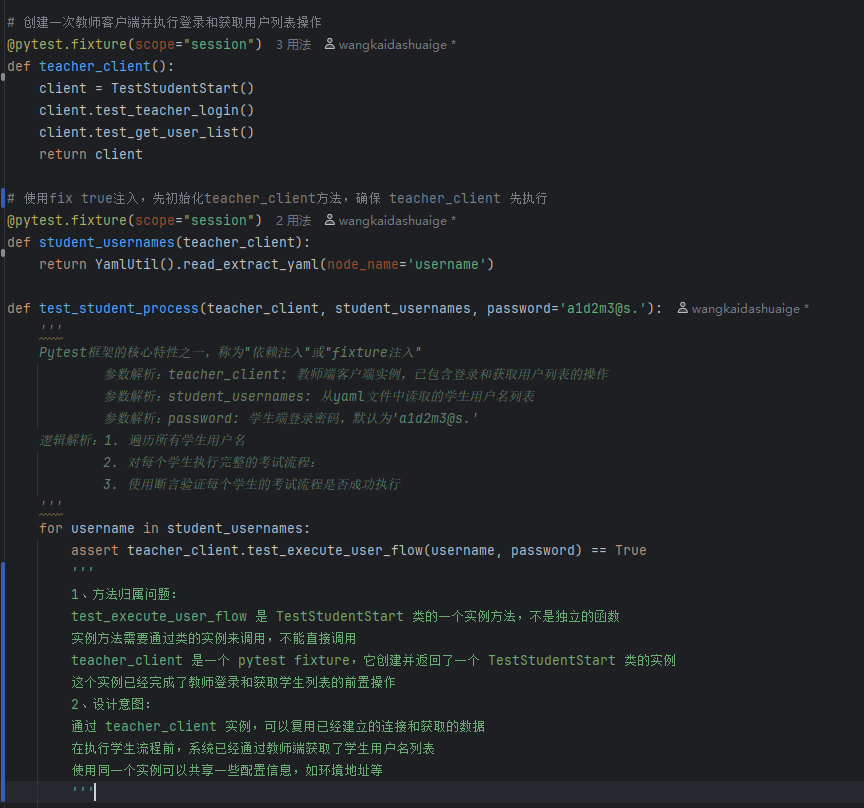
18.1 "依赖注入"或"fixture注入
以下是考生考试自动化流程
实现思路是登录教师端,获取x位学生账号,来自动化登录每个用户执行考试流程
使用第一个装饰器 @pytest.fixture(scope="session"),确保登录教师端操作仅执行一次
使用第二个装饰器 @pytest.fixture(scope="session"),确保读取用户账号操作仅执行一次
以上两个装饰器fixture注入到函数 test_student_process 中,确保优先执行装饰器的函数,达到前置操作的目的,因为执行范围是scope="session,所以也只执行一次。
结果不论自动化有多少个学生执行考试操作,前置操作仅执行一次,且优先执行