📅 我们继续 50 个小项目挑战!------
RandomChoicePicker组件
仓库地址:https://gitee.com/hhm-hhm/50days50projects.git
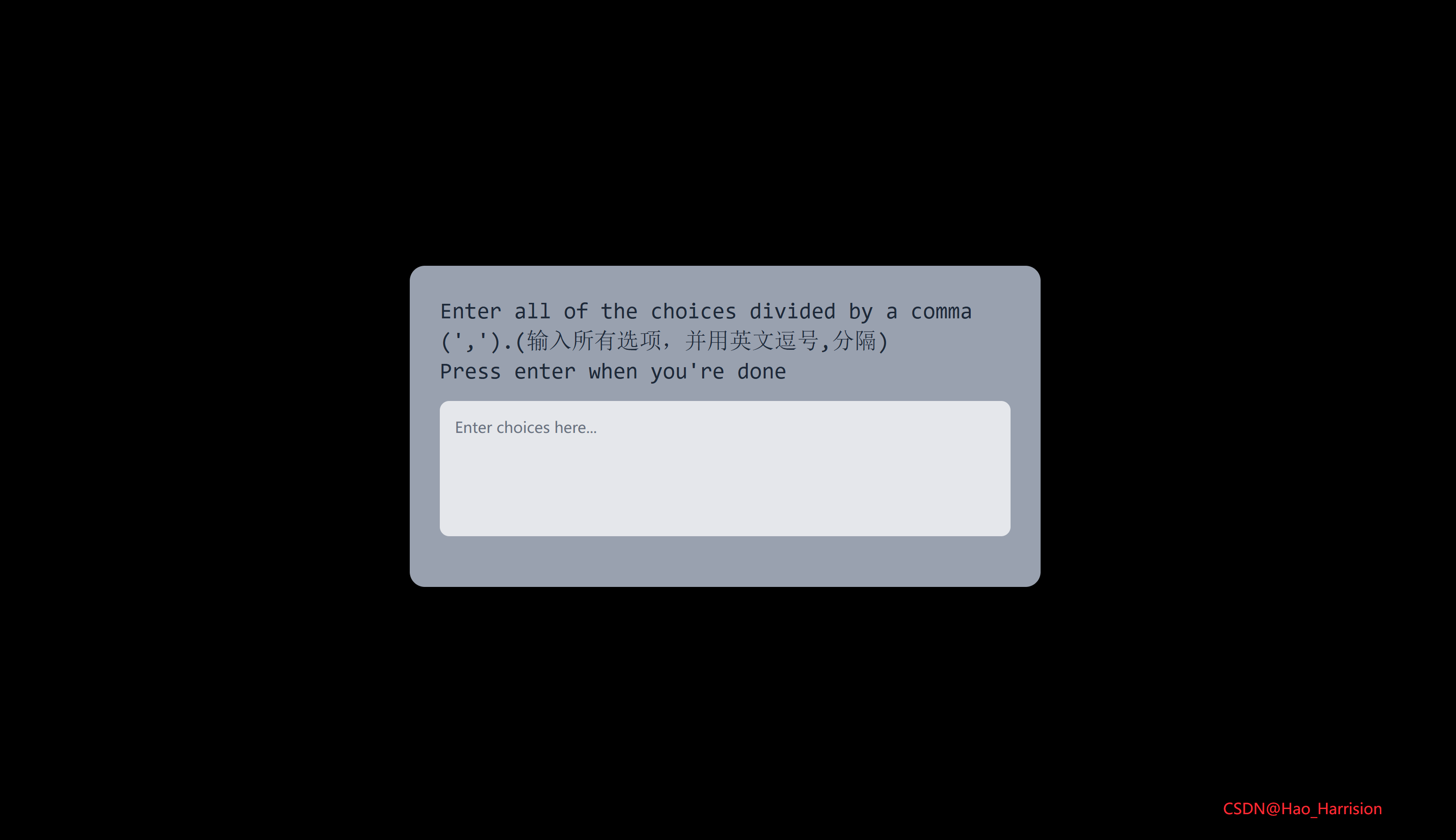
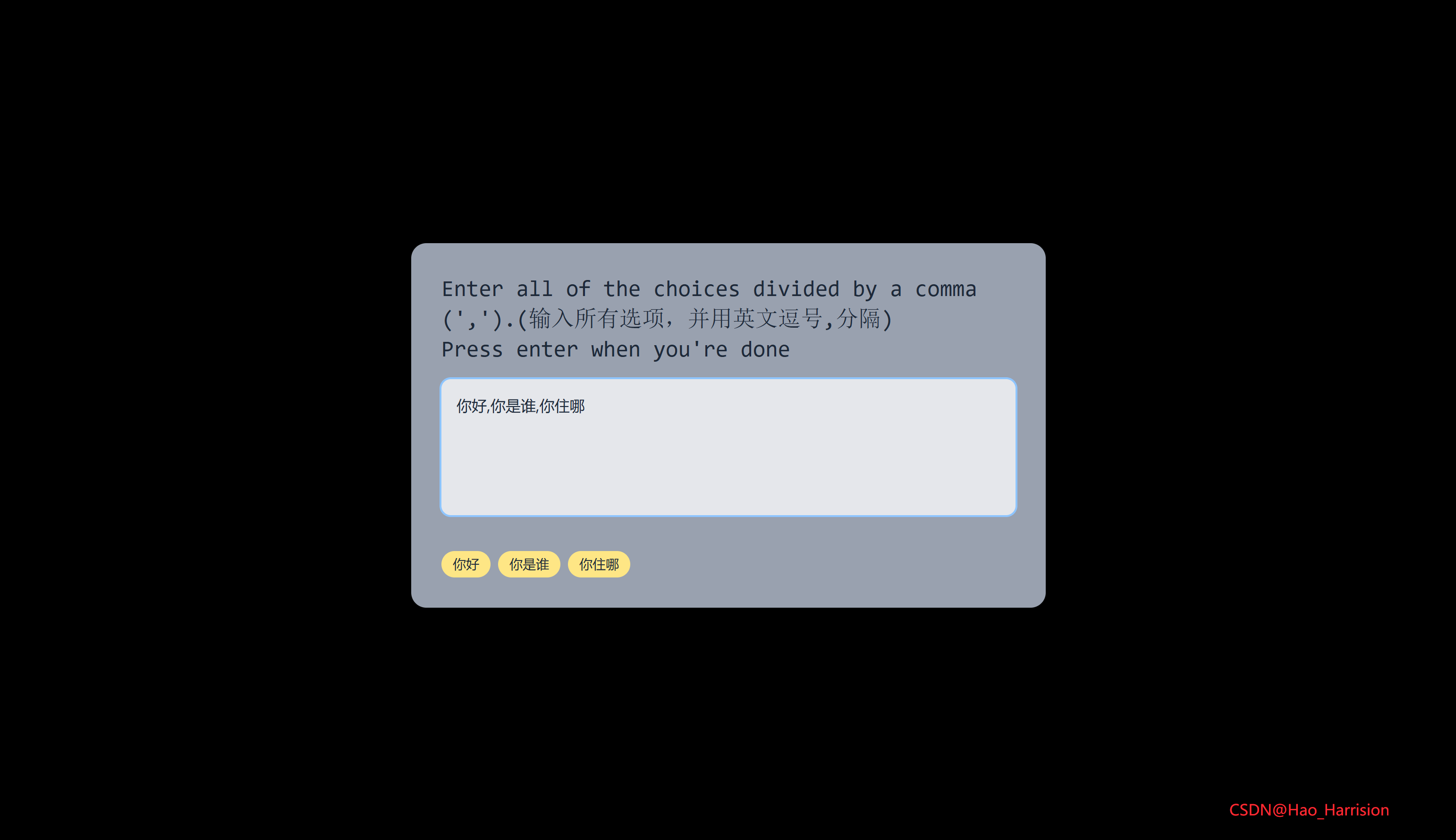
构建一个简单的标签输入组件。用户可以在文本框中输入多个选项,并通过逗号分隔,组件会自动将其拆分成可视化的"标签"展示出来。
🌀 组件目标
- 接收用户输入的一段文本。
- 使用逗号
,分割输入内容。 - 动态渲染为一组"标签"(Tag)。
- 使用 TailwindCSS 快速构建美观现代的 UI 界面。
- 提供清晰的交互反馈。
🔧 RandomChoicePicker.tsx 组件实现
TypeScript
import React, { useState, useEffect } from 'react'

const RandomChoicePicker: React.FC = () => {
    const [textareaText, setTextareaText] = useState<string>('')
    const [tagList, setTagList] = useState<string[]>([])
    // 每当 textareaText 变化时,自动分割标签
    useEffect(() => {
        const tags = textareaText
            .split(',')
            .map((item) => item.trim()) // 去除前后空格
            .filter((item) => item !== '') // 过滤空字符串

        setTagList(tags)
    }, [textareaText])

    return (
        <div className="flex h-screen items-center justify-center">
            <div className="w-full max-w-2xl rounded-2xl bg-gray-400 p-8 shadow-lg">
                <h3 className="font-mono text-2xl text-gray-800">
                    Enter all of the choices divided by a comma
                    (',').(输入所有选项,并用英文逗号,分隔)
                    <br />
                    Press enter when you're done
                </h3>
                <textarea
                    className="my-4 h-36 w-full resize-none rounded-lg bg-gray-200 p-4 text-gray-800 placeholder-gray-500 focus:ring-2 focus:ring-blue-300 focus:outline-none"
                    placeholder="Enter choices here..."
                    value={textareaText}
                    onChange={(e) => setTextareaText(e.target.value)}
                />

                {tagList.length > 0 && (
                    <div className="mt-4 flex flex-wrap gap-2">
                        {tagList.map((item, index) => (
                            <div
                                key={`${item}-${index}`} // 使用 index 避免重复 key(因 item 可能重复)
                                className="rounded-2xl bg-amber-200 px-3 py-1 text-sm font-medium text-gray-800">
                                {item}
                            </div>
                        ))}
                    </div>
                )}
            </div>
            <div className="absolute right-20 bottom-10 text-red-500">CSDN@Hao_Harrision</div>
        </div>
    )
}

export default RandomChoicePicker
✅ 关键实现说明
| 功能 | Vue 实现 | React + TS 实现 |
|---|---|---|
| 双向绑定文本域 | v-model="textareaText" |
value + onChange 控制 |
| 自动分割逗号内容 | watchEffect + splitTag() |
useEffect 监听 textareaText |
| 标签渲染 | v-for="item in tagList" |
{tagList.map(...)} |
| 空值过滤 | 无(原逻辑会保留空字符串) | ✅ 添加 .trim() 和 filter(item !== '') 提升体验 |
🛠️ 改进细节
-
去重与清理
- 使用
.trim()去除每个选项前后的空格(如" apple "→"apple")。 - 过滤掉空字符串,避免显示空白标签。
- 使用
-
Key 策略
- 因用户可能输入重复项(如
"A, A, B"),不能仅用item作 key。 - 改为
key={item−{index}}确保唯一性,避免 React 警告。
- 因用户可能输入重复项(如
-
UI/UX 增强
- 添加
resize-none禁止手动调整 textarea 大小(保持布局稳定)。 - 添加
focus:ring提升交互反馈。 - 使用
flex-wrap确保标签在小屏换行。 - 添加
bg-gray-100背景色提升整体可读性。
- 添加
-
类型安全
textareaText: stringtagList: string[]
📌 注意事项
-
此组件目前只负责输入和解析 ,不包含"随机选择"逻辑(如抽一个标签)。如果你后续需要"Pick Random"功能,可以在此基础上加一个按钮调用:
const pickRandom = () => {
  if (tagList.length > 0) {
    const random = tagList[Math.floor(Math.random() * tagList.length)];
    alert(`Selected: ${random}`);
  }
};
🎨 TailwindCSS 样式重点讲解
| 类名 | 作用 |
|---|---|
flex, items-center, justify-center |
居中布局整个容器 |
h-screen |
容器高度为视口全高 |
rounded-2xl |
圆角大小为 1rem |
bg-gray-400、bg-gray-200、bg-amber-200 |
设置背景颜色 |
p-8, p-4, p-1 |
不同层级的内边距 |
my-4 |
上下外边距为 1rem |
w-full |
宽度为 100% |
h-36 |
高度为 9rem |
text-2xl |
字体大小为 1.5rem |
font-mono |
使用等宽字体 |
gap-2 |
flex 子元素之间间隔为 0.5rem |
h-8 |
高度为 2rem |
rounded-2xl |
圆角为 1rem |
| [🎯 TailwindCSS 样式说明] |
这些类名帮助我们快速构建出一个居中的响应式布局,并确保视觉上的一致性和美观性。
🦌 路由组件 + 常量定义
router/index.tsx中 children数组中添加子路由
TypeScript
{
    path: '/',
    element: <App />,
    children: [
       ...
       {
         path: '/RandomChoicePicker',
         lazy: () =>import('@/projects/RandomChoicePicker.tsx').then((mod) => ({
                        Component: mod.default,
           })),
       },
    ],
 },
constants/index.tsx 添加组件预览常量
TypeScript
import demo13Imgfrom '@/assets/pic-demo/demo-13.png'
省略部分....
export const projectList: ProjectItem[] = [
    省略部分....
    {
        id: 13,
        title: 'Random Choice Picker',
        image: demo13Img,
        link: 'RandomChoicePicker',
    },
]
🚀 小结
作为表单组件的一部分,用于收集用户输入的多项数据。
📅 明日预告: 我们将完成AnimatedNavigation组件,一个非常有意思的动画的导航组件!🚀
原文链接:https://blog.csdn.net/qq_44808710/article/details/148615314
每天造一个轮子,码力暴涨不是梦!🚀