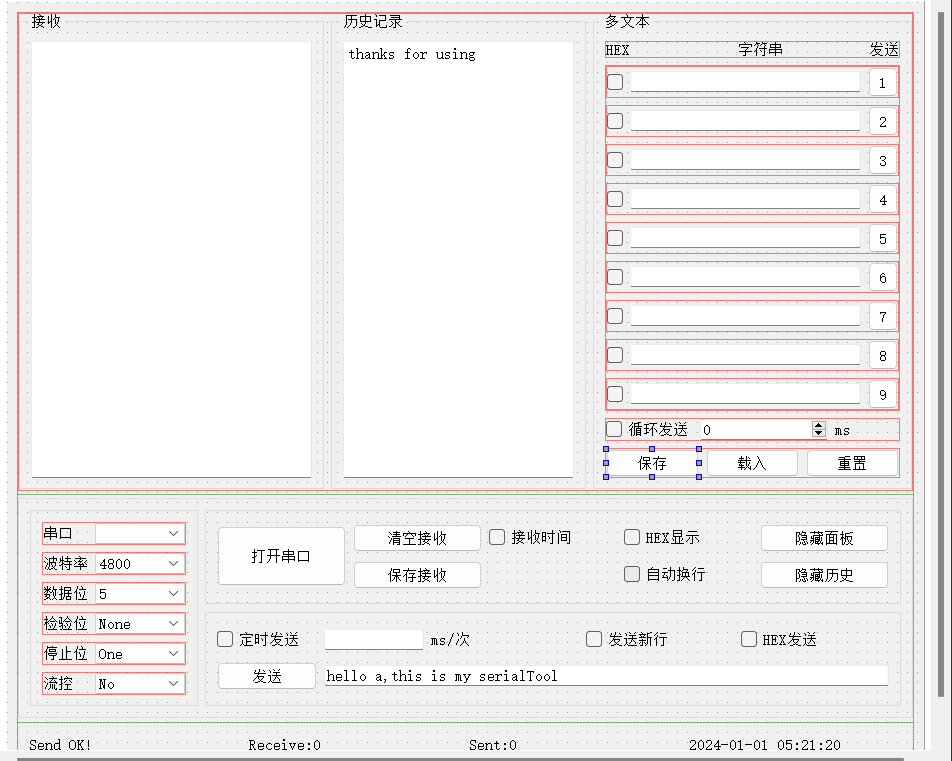
1. UI
• 如图:
2. 代码
2.1 在widget.cpp
cpp
#include "widget.h"
#include "ui_widget.h"

#include <QtSerialPort/QSerialPortInfo>
#include <QList>
#include <QSerialPort>
#include <QDebug>
#include <QMessageBox>
#include <QTimer>
#include <QFileDialog>
#include <QDateTime>
#include <QThread>


Widget::Widget(QWidget *parent)
    : QWidget(parent)
    , ui(new Ui::Widget)
{
    ui->setupUi(this);
    //拖拽窗口里面的控件也跟着发生变化
    this->setLayout(ui->gridLayoutGlobal);
    //自动检查电脑的串口
    refreshSerialName();
    //设置默认串口的属性
    //默认115200波特率,8位数据位,无校验位,无流控,1位停止位(后三个已经是默认的了)
    ui->comboBox_boautrate->setCurrentIndex(6);
    ui->comboBox_dataBit->setCurrentIndex(3);
    //设置刚刚打开的状态
    ui->labelSendStatus->setText(ui->comboBox_serialNum->currentText() + " NotOpen!");

    //默认设置控件不能操作,当没打开串口的时候,发送部分全不能操作(groupBoxDownRightLow这部分)。
    ui->btnSendContext->setEnabled(false);
    ui->lineEditSendContext->setEnabled(false);
    ui->checkBSendInTime->setEnabled(false);
    ui->checkBSendNewwLine->setEnabled(false);
    ui->checkBHexSend->setEnabled(false);
    ui->lineEditTimeEach->setEnabled(false);

    //打开串口助手
    //如果想要操作串口,打开串口,和串口通信,必须要包含这个类QSerialPort(重点)
    serialPort = new QSerialPort(this);//关联到本窗口

    //添加读取数据的信号与槽
    //readyRead() 信号是一个 "有新数据到达,可以读取了" 的通知。
    connect(serialPort,&QSerialPort::readyRead,this,&Widget::on_SerialData_readyToRead);
    //初始化记录总共发了多少个字节writeCntTotal
    writeCntTotal = 0;
    //初始化记录总共j接收了多少个字节readCntTotal
    readCntTotal = 0;

    //定时发送需要定时器
    timer = new QTimer(this);//为当前窗口添加一个定时器
    //设置定时器,超时信号的信号与槽
    connect(timer,&QTimer::timeout,[=]{
        on_btnSendContext_clicked();//超时就把框内的内容发送出去
    });

    //创建一个定时器用来记录刷新右下角的时间
    QTimer *getSysTimeTimer = new QTimer(this);//为当前窗口添加一个定时器
    //建立信号与槽
    connect(getSysTimeTimer,SIGNAL(timeout()),this,SLOT(time_refresh()));
    //启动定时器
    getSysTimeTimer->start(100);

    //需要刷新串口列表,这需要信号与槽
    //需要每次点击comboBox_serialNum刷新,但是QComboBox是没有点击这个信号
    //所以需要重写鼠标点击事件
    connect(ui->comboBox_serialNum,SIGNAL(refresh()),this,SLOT(refreshSerialName()));

    //以数组的方式解决多文本的问题
    for(int i = 1;i <= 9;i++){
        //生成按钮名称:pushButton_1 到 pushButton_9
        QString btnName = QString("pushButton_%1").arg(i);
        //通过findChild在widget界面中寻找对应的子控件(类似使用"ui->"那样去找)
        QPushButton * btn = findChild<QPushButton *>(btnName);
        //判断是否找到了
        if(btn){
            //添加到数组里面
            buttons.append(btn);
            //如果找到了pushButton之后,为此按键创建对应的属性
            btn->setProperty("buttonId",i);
            //如果找到了,为对应的pushButton创建信号与槽
            //所有按钮连接到同一个槽函数
            //为每一个pushButton创建clicked的信号与槽
            connect(btn,SIGNAL(clicked()),this,SLOT(on_command_button_click()));
        }
        //继续保存lineEdits和checkBoxs

        //生成按钮名称:lineEdit_1 到 lineEdit_9
        QString lineEditName = QString("lineEdit_%1").arg(i);
        //通过findChild在widget界面中寻找对应的子控件(类似使用"ui->"那样去找)
        QLineEdit * lineEdit = findChild<QLineEdit *>(lineEditName);
        if(lineEdit)
            lineEdits.append(lineEdit);

        //生成按钮名称:checkBoxs_1 到 checkBoxs_9
        QString checkBoxName = QString("checkBox_%1").arg(i);
        //通过findChild在widget界面中寻找对应的子控件(类似使用"ui->"那样去找)
        QCheckBox * checkBox = findChild<QCheckBox *>(checkBoxName);
        if(checkBox)
            checkBoxs.append(checkBox);
    }

    //第一种方法是使用定时器解决
    //初始化循环发送的定时器
    buttonsConTimer = new QTimer(this);
    //建立信号与槽
    connect(buttonsConTimer,&QTimer::timeout,this,&Widget::buttons_handler);
    //初始化buttonIndex索引,这是用来表示buttons的索引,在循环发送中
    buttonIndex = 0;

    //第二种是使用线程方法,但是不是在UI里面使用线程
//    c1 = new customthread(this);
//    connect(c1,&customthread::threadTimeout,this,&Widget::buttons_handler);

}

void Widget::on_command_button_click(){
    //sender可以知道信号是那个pushButton发出的
    //qobject_cast的作用,可以安全的知道发出信号的是pushButton,不是其他的信号
    //获取触发信号的按钮对象
    QPushButton * btn = qobject_cast<QPushButton *>(sender());
    //判断是否找到
    if(btn){
        //qDebug() << btn->property("buttonId").toInt();
        //根据buttonId找到对应按键
        int num = btn->property("buttonId").toInt();
        //根据num找到对应的lineEdit
        QString lineEditName = QString("lineEdit_%1").arg(num);
        QLineEdit * lineEdit = findChild<QLineEdit *>(lineEditName);
        if(lineEdit){
            if(lineEdit->text().size() <= 0)
                return;
            ui->lineEditSendContext->setText(lineEdit->text());
        }
        //根据num找到对应的CheckBox
        QString checkBoxName = QString("checkBox_%1").arg(num);
        QCheckBox * checkBox = findChild<QCheckBox *>(checkBoxName);
        if(checkBox)
            ui->checkBHexSend->setChecked(checkBox->isChecked());
        //发送
         on_btnSendContext_clicked();
    }
}

void Widget::on_SerialData_readyToRead(){
    //读取数据
    QString revMessage = serialPort->readAll();//读所有数据
    if(revMessage != NULL){//当真正有数据的时候
        qDebug() << "revCnt:" << revMessage.size();//读取了多少个字节
        qDebug() << "内容是:" << revMessage;
        if(ui->checkBLine->isChecked())//是否要自动换行
            revMessage.append("\r\n");

        if(ui->checkBHexDisplay->isChecked()){//是否是HEX显示
            //将新接收的数据转化为16进制
            QByteArray tmpHexString =  revMessage.toUtf8().toHex().toUpper();
            //原本textEdit上面的数据已经是16进制了,然后进行拼接就可以了
            QString tmpStringHex = ui->textEditRev->toPlainText();
            //拼接
            tmpHexString = tmpStringHex.toUtf8() + tmpHexString;
            //显示到textEditRev
            ui->textEditRev->setText(QString::fromUtf8(tmpHexString));
        }else {
            qDebug() << "Get Message " << revMessage;
            if(ui->checkBrevTime->checkState() == Qt::Unchecked){//是否显示接收时间
                //没有勾选
                //insertPlainText是不换行的,append是换行的。
                ui->textEditRev->insertPlainText(revMessage);
            }else if(ui->checkBrevTime->checkState() == Qt::Checked){
               // getSystemTime();
                ui->textEditRev->insertPlainText("【" + myTime + "】" +revMessage);
            }
        }
        //处理接收了多少和状态
        readCntTotal += revMessage.size();
        ui->labelRevcnt->setText("Receive:" + QString :: number(readCntTotal));

        //移动光标到末尾
        //让文本框自动滚动到最底部,并确保光标可见。
        ui->textEditRev->moveCursor(QTextCursor::End);
        ui->textEditRev->ensureCursorVisible();
    }
}

void Widget::refreshSerialName(){

   //每次刷新列表需要清理一下comboBox
    ui->comboBox_serialNum->clear();
   //获取所有电脑可用串口列表
   QList<QSerialPortInfo> serialList = QSerialPortInfo::availablePorts();
   //然后把得到的串口放到comboBox_serialNum里面
   for(QSerialPortInfo serialPort : serialList){
       ui->comboBox_serialNum->addItem(serialPort.portName());
   }
   //更新状态
   ui->labelSendStatus->setText("Com Refreshed!");
}

Widget::~Widget()
{
    delete ui;
}

//方法二用控件上面的checkable
void Widget::on_btnCloseOrOpenSerial_clicked(bool checked)
{
     //qDebug() << "checked is:" << checked;
    //判断是打开串口还是关闭串口
    if(checked){//串口没有打开的时候
        qDebug() << "checked is:" << checked;
        //1.选择串口号
        serialPort->setPortName(ui->comboBox_serialNum->currentText());
        //2.配置波特率
        serialPort->setBaudRate(ui->comboBox_boautrate->currentText().toUInt());
        //3.配置数据位
        serialPort->setDataBits(QSerialPort::DataBits(
                                    ui->comboBox_dataBit->currentText().toUInt()));

       // qDebug() << "数据位:" << serialPort->dataBits();
        //4.配置校验位
        switch (ui->comboBox_jiaoyan->currentIndex()) {//用comboBox中的索引去配置
            case 0:
                serialPort->setParity(QSerialPort::NoParity);
                break;
            case 1:
                serialPort->setParity(QSerialPort::EvenParity);
                break;
            case 2:
                serialPort->setParity(QSerialPort::MarkParity);
                break;
            case 3:
                serialPort->setParity(QSerialPort::OddParity);
                break;
            case 4:
                serialPort->setParity(QSerialPort::SpaceParity);
                break;
            default:
                serialPort->setParity(QSerialPort::UnknownParity);
                break;
        }
        //5.配置停止位?(如果配置失败,默认是1个停止位)
        serialPort->setStopBits(QSerialPort::StopBits(
                                    ui->comboBox_stopBit->currentText().toUInt()));
        //6.配置流控(默认无流控)
        if(ui->comboBox_fileCon->currentText() == "None"){
            serialPort->setFlowControl(QSerialPort::NoFlowControl);
        }

        //7.打开串口
        if(serialPort->open(QIODevice::ReadWrite)){
            qDebug() << "serial open success";
            //打开成功就把groupBox_params那部分给禁止访问
            ui->comboBox_dataBit->setEnabled(false);
            ui->comboBox_fileCon->setEnabled(false);
            ui->comboBox_jiaoyan->setEnabled(false);
            ui->comboBox_stopBit->setEnabled(false);
            ui->comboBox_boautrate->setEnabled(false);
            ui->comboBox_serialNum->setEnabled(false);
            //重新开放groupBoxDownRightLow这部分
            ui->btnSendContext->setEnabled(true);
            ui->lineEditSendContext->setEnabled(true);
            ui->checkBSendInTime->setEnabled(true);
            ui->checkBSendNewwLine->setEnabled(true);
            ui->checkBHexSend->setEnabled(true);
            ui->lineEditTimeEach->setEnabled(true);
            //并把btnCloseOrOpenSerial的打开串口改为关闭串口
            ui->btnCloseOrOpenSerial->setText("关闭串口");
            //同时改变labelSendStatus的状态表示
            ui->labelSendStatus->setText(ui->comboBox_serialNum->currentText()
                                         + "isOpened!");

            qDebug() << "停止位是:" << serialPort->stopBits();
        }else {//打开失败
            //弹窗警告
            QMessageBox msgBox;
            msgBox.setWindowTitle("打开串口失败");
            msgBox.setText("串口可能被占用或者被拔出!");
            msgBox.exec();
        }
    }else {//关闭串口,操作与上面相反
        serialPort->close();
        //判断有没有打勾
        timer->stop();
        ui->checkBSendInTime->setCheckState(Qt::Unchecked);//去掉打勾
        //禁止访问groupBoxDownRightLow
        ui->btnSendContext->setEnabled(false);
        ui->lineEditSendContext->setEnabled(false);
        ui->checkBSendInTime->setEnabled(false);
        ui->checkBSendNewwLine->setEnabled(false);
        ui->checkBHexSend->setEnabled(false);
        ui->lineEditTimeEach->setEnabled(false);
        //重新开放groupBox_params
        ui->comboBox_dataBit->setEnabled(true);
        ui->comboBox_fileCon->setEnabled(true);
        ui->comboBox_jiaoyan->setEnabled(true);
        ui->comboBox_stopBit->setEnabled(true);
        ui->comboBox_boautrate->setEnabled(true);
        ui->comboBox_serialNum->setEnabled(true);

        //并把btnCloseOrOpenSerial的关闭串口改为打开串口
        ui->btnCloseOrOpenSerial->setText("打开串口");
        //同时改变labelSendStatus的状态表示
        ui->labelSendStatus->setText(ui->comboBox_serialNum->currentText()
                                     + " isClosed!");
        //判断有没有打勾
        buttonsConTimer->stop();
        ui->checkBox_send->setChecked(false);
        ui->spinBox->setEnabled(true);
    }
}

void Widget::on_btnSendContext_clicked()
{
    int writeCnt = 0;//接收write返回值
    //获取lineEditSendContext上面的内容,并且转换为本地的编码
    //下面的转化方式有问题,如果是发长数据,连续发的话可能有重复这是因为转换的时候,
    //可能出现一些误差转换
   // const char * sendData = ui->lineEditSendContext->text().toStdString().c_str();
    //转为本地8位的
    const char * sendData = ui->lineEditSendContext->text().toLocal8Bit().constData();
    if(ui->checkBHexSend->isChecked()){//判断是不是16进制发送(//16进制发送)
        //获得lineEditSendContext里面要发送的内容
        //补充:如果此时勾选了要发送的16进制,此时lineEditSendContext的数据要一定是16进制形式的数据
        QString tmp = ui->lineEditSendContext->text();
        //判断是不是偶数位
        QByteArray tmpArray = tmp.toLocal8Bit();//是不是61 或者 01 02 这种形式
        if(tmpArray.size() % 2 != 0){
            ui->labelSendStatus->setText("Error Input!");
            return;
        }
        //判断此时的数据是不是符合16进制格式,范围是在0-9a-f的数据
        for(char c: tmpArray){
            //isxdigit用于判断一个字符是否是十六进制数字字符。
            if(!std::isxdigit(c)){//判断是不是是十六进制
                ui->labelSendStatus->setText("Error Input!");
                return;
            }
        }

        //判断是否要发送新行(证明此时的数据是16进制,再加新行)
        if(ui->checkBSendNewwLine->isChecked()){
            tmp.append("\r\n");
        }
        //发送出去
        //转换成16进制发送,用户输入01,变成16进制的1,拒绝变成字符1,ASSII 49
        //将用户输入的16进制字符串(如"01")转换成真正的二进制数据(0x01)
        QByteArray arraySend = QByteArray::fromHex(tmpArray);
        writeCnt = serialPort->write(arraySend);
    }else {
        //非16进制发送
        if(ui->checkBSendNewwLine->isChecked()){//是否勾选发送新行
            //勾选了发送新行
            //重新构建sendData
            QByteArray arraySendData(sendData,strlen(sendData));
            //添加换行
            arraySendData.append("\r\n");
            writeCnt = serialPort->write(arraySendData);
        }else
            writeCnt = serialPort->write(sendData);//没勾选
    }

    if(writeCnt == -1)
        ui->labelSendStatus->setText("Send Error!");//发送失败
    else {//发送成功
        ui->labelSendStatus->setText("Send OK!");//发送成功
        writeCntTotal += writeCnt;//累加字节
        //打印出来
        qDebug() << "Send OK " << sendData << "cnt:" << writeCnt;
        //记录到ui上面
        ui->labelSendcnt->setText("Send:" + QString :: number(writeCntTotal));
        writeCnt = 0;//清零
        //把内容记录到历史记录,但是不可以连续重复发送
        if(strcmp(sendData,sendBak.toStdString().c_str()) != 0){
            //说明不可以连续重复发送
            ui->textEditRecord->append(sendData);
//            sendBak = QString(sendData);//加入到临时变量
            sendBak = QString::fromUtf8(sendData);

            ui->textEditRecord->moveCursor(QTextCursor::End);
            ui->textEditRecord->ensureCursorVisible();
        }
    }
}

void Widget::on_checkBSendInTime_clicked(bool checked)
{
    if(checked){
        //勾选了
        //勾选了定时发送,就要禁用btnSendContext和lineEditTimeEach
        //定时发送的时候,框内的内容不能改
        ui->btnSendContext->setEnabled(false);
        ui->lineEditTimeEach->setEnabled(false);
        //设置超时时间,启动定时器
        timer->start(ui->lineEditTimeEach->text().toInt());
    }else {
        //相反操作
        ui->btnSendContext->setEnabled(true);
        ui->lineEditTimeEach->setEnabled(true);
        timer->stop();
    }
}

void Widget::on_btnrevSave_clicked()
{
    //用QFileDialog
    QString fileName = QFileDialog::getSaveFileName(this,
         tr("Save File"), "D:/CPPandQt/serialData.txt", tr("Save File (*.txt)"));

    if(fileName != NULL){
        QFile file;
        file.setFileName(fileName);
        if(!file.open(QIODevice::WriteOnly | QIODevice::Text))return;
        QTextStream out(&file);
        out.setCodec("UTF-8");
        out << ui->textEditRev->toPlainText();
        file.close();
    }
}

void Widget::time_refresh()
{
    getSystemTime();//每隔100ms获得一次时间
    ui->labelCurrentTime->setText(myTime);
}

void Widget::getSystemTime(){
    //获取系统当前时间
    QDateTime currentTime = QDateTime::currentDateTime();
    //获得当前日期
    QDate date = currentTime.date();
    int year = date.year();
    int month = date.month();
    int day = date.day();
    //获得当前时间
    QTime time = currentTime.time();
    int hour = time.hour();
    int min = time.minute();
    int sec = time.second();

    //构建时间
    myTime = QString("%1-%2-%3 %4:%5:%6")
                    .arg(year,2,10,QChar('0'))
                    .arg(month,2,10,QChar('0'))
                    .arg(day,2,10,QChar('0'))
                    .arg(hour,2,10,QChar('0'))
                    .arg(min,2,10,QChar('0'))
                    .arg(sec,2,10,QChar('0'));


    saveTextsTime = QString("%1%2%3%4%5%6")
            .arg(year,2,10,QChar('0'))
            .arg(month,2,10,QChar('0'))
            .arg(day,2,10,QChar('0'))
            .arg(hour,2,10,QChar('0'))
            .arg(min,2,10,QChar('0'))
            .arg(sec,2,10,QChar('0'));

}

void Widget::on_btnrevClear_clicked()
{
    //清空接收区
    ui->textEditRev->setText("");
}

void Widget::on_btnhideTab_clicked(bool checked)
{
    //隐藏面板(隐藏多文本)
    //qDebug() << "隐藏历史"  << checked;
    if(checked){
        ui->groupBoxTexts->hide();
        ui->btnhideTab->setText("拓展面板");
    }else {
        ui->groupBoxTexts->show();
        ui->btnhideTab->setText("隐藏面板");
    }
}

void Widget::on_btnHideHistory_clicked(bool checked)
{
    //隐藏历史(隐藏历史)
    if(checked){
        ui->groupBoxRecord->hide();
        ui->btnHideHistory->setText("拓展历史");
    }else {
        ui->groupBoxRecord->show();
        ui->btnHideHistory->setText("隐藏历史");
    }
}

void Widget::on_checkBHexDisplay_clicked(bool checked)
{
    if(checked){//判断有没有勾选HEX显示
        //1.读取textEdit上面的数据
        QString tmp = ui->textEditRev->toPlainText();
        //2.转成QByteArray,因为QString不能直接16进制
        QByteArray qtmp = tmp.toUtf8();//将字符串转换为UTF-8编码的字符数组
        qtmp = qtmp.toHex();//转换为十六进制。
        //3.显示
        QString lastShow;
        tmp = QString::fromUtf8(qtmp);//将字节数组转换回字符串
        for(int i = 0;i < tmp.size();i += 2){
            lastShow += tmp.mid(i,2) + " ";
        }
        ui->textEditRev->setText(lastShow.toUpper());
    }else {
        //读取texteditRev上面的数据,都是HEX的形式的
        QString tmpHexString = ui->textEditRev->toPlainText();
        //转换为QByteArray
        QByteArray qtmpHexString = tmpHexString.toUtf8();
        //转换为ASCII的形式
        QByteArray tmpQByteString = QByteArray::fromHex(qtmpHexString);//十六进制文本转换回原始二进制
        //写回去textEditRev上面
        ui->textEditRev->setText(QString::fromUtf8(tmpQByteString));

        //小结一下:
//        toUtf8()将字符串转换为UTF-8编码的字节数组。
//        fromUtf8()(静态)	将UTF-8编码的字节数组转换回字符串。是toUtf8()的逆操作。
//        toHex()将原始二进制数据转换为十六进制文本形式
//        fromHex()(静态)将十六进制文本转换回原始二进制数据。是toHex()的逆操作。
    }
}
void Widget::buttons_handler(){
    //每隔一段时间触发定时器超时信号,不用循环(前提是勾选循环发送)
    if(buttons.size() > buttonIndex){
        emit buttons[buttonIndex]->click();//手动点击pushbutton
        buttonIndex++;
    }else {
        buttonIndex = 0;
    }

}

//用定时器解决多文本循环发送
void Widget::on_checkBox_send_clicked(bool checked)
{
    if(checked){
        //点击了循环发送的时候,不能更改spinBox里面的值
        ui->spinBox->setEnabled(false);
        //开始定时器
        buttonsConTimer->start(ui->spinBox->text().toInt());
    }else {
        //和上述相反操作
        ui->spinBox->setEnabled(true);
        buttonsConTimer->stop();
    }
}

//用线程解决多文本循环发送
/*void Widget::on_checkBox_send_clicked(bool checked)
{
    if(checked){
        //点击了循环发送的时候,不能更改spinBox里面的值
        ui->spinBox->setEnabled(false);
        //启动线程
        c1->start();
    }else {
        //和上述相反操作
        ui->spinBox->setEnabled(true);
        c1->terminate();
    }
}*/
//void Widget::on_checkBox_send_clicked(bool checked)
//{
//    //勾选了循环发送了情况,这里的循环发大概意思是在多文本,点发,隔一段时间,点发那里的文本框
//    if(checked){
//        //通过数组buttons拿出pushButton
//        for(int i = 0;i < buttons.size();i++){
//            QPushButton* btnTmp = buttons[i];
//            //手动触发点击信号
//            emit btnTmp->click();
//            //延时一段时间
//            QThread::msleep(ui->spinBox->text().toUInt());
//             //我们不能在QT的UI线程中延时,否则导致页面刷新问题!
//        }
//    }else {

//    }
//}

//实现重置功能
void Widget::on_btnInit_clicked()
{
     QMessageBox msgBox;
     msgBox.setWindowTitle("提示");
     msgBox.setIcon(QMessageBox::Question);
     msgBox.setText("重置列表不可逆,确定是否要重置?");
     QPushButton *yesButton = msgBox.addButton("是",QMessageBox::YesRole);
     QPushButton *noButton = msgBox.addButton("否",QMessageBox::NoRole);
     int ret = msgBox.exec();
     //clickedButton是确认是那个按钮被按下
     if(msgBox.clickedButton() == yesButton){
         qDebug() << "yesButton";
         for(int i = 0;i < lineEdits.size();i++){
             //遍历lineEdit,并清空内容
             lineEdits[i]->clear();
             //遍历checkBox,并取消勾选
             checkBoxs[i]->setChecked(false);
         }
     }else if(msgBox.clickedButton() == noButton){
         qDebug() << "noButton";
     }
}
//载入指令集合
void Widget::on_btnLoad_clicked()
{
    QString fileName = QFileDialog::getOpenFileName(this,
         tr("打开文件"), "D:/CPPandQt", tr("文件类型 (*.txt)"));

    //判空
    if(fileName != NULL){
        //打开文件
        QFile file(fileName);
        if(!file.open(QIODevice::ReadOnly | QIODevice::Text))return;
        QTextStream in(&file);
        in.setCodec("UTF-8");
        //一行一行去读
        int i = 0;//索引
        while (!in.atEnd() && i < 9) {//防止i超过lineEdits和checkBoxs的范围
            QString line = in.readLine();
            //分割字符串 重点是","
            QStringList parts = line.split(",");
            //防止出现只打勾HEX,后面lineEdit没有文本的情况
            if(parts.count() == 2){//count返回列表中字符串元素的数量
                lineEdits[i]->setText(parts[1]);
                checkBoxs[i]->setChecked(parts[0].toInt());
            }
            i++;
        }
        file.close();
    }
}

void Widget::on_btnSave_clicked()
{
    //保存指令的文件格式为sendList_后面应该跟对应的时间
    QString round_name = QString("D:/CPPandQt/sendList_");
    round_name.append(saveTextsTime);

    QString fileName = QFileDialog::getSaveFileName(this,
         tr("保存文件"),round_name, tr("文件类型 (*.txt)"));

    QFile file(fileName);
    if(!file.open(QIODevice::WriteOnly | QIODevice::Text))return;

    QTextStream out(&file);
    out.setCodec("UTF-8");
    for(int i = 0;i < lineEdits.size();i++){
        out << checkBoxs[i]->isChecked() << "," << lineEdits[i]->text() << "\n";
    }
    file.close();
}
2.2 在widget.h中
cpp
#ifndef WIDGET_H
#define WIDGET_H

#include <QCheckBox>
#include <QLineEdit>
#include <QPushButton>
#include <QSerialPort>
#include <QWidget>

#include "customthread.h"

QT_BEGIN_NAMESPACE
namespace Ui { class Widget; }
QT_END_NAMESPACE

class Widget : public QWidget
{
    Q_OBJECT

public:
    Widget(QWidget *parent = nullptr);
    ~Widget();

private slots:
    void on_btnCloseOrOpenSerial_clicked(bool checked);

    void on_SerialData_readyToRead();

    void on_btnSendContext_clicked();

    void on_checkBSendInTime_clicked(bool checked);

    void on_btnrevSave_clicked();

    void time_refresh();

    void on_btnrevClear_clicked();

    void on_btnhideTab_clicked(bool checked);

    void on_btnHideHistory_clicked(bool checked);

    void on_checkBHexDisplay_clicked(bool checked);
    void refreshSerialName();

    void on_command_button_click();

    void on_checkBox_send_clicked(bool checked);

    void buttons_handler();

    void on_btnInit_clicked();

    void on_btnLoad_clicked();

    void on_btnSave_clicked();

private:
    Ui::Widget *ui;

    QSerialPort *serialPort;
    int writeCntTotal;
    int readCntTotal;
    QString sendBak;//临时变量
    QTimer * timer;
    void getSystemTime();
    QString myTime;
    QTimer * buttonsConTimer;//这个定时器用于循环发送
    QList<QPushButton *> buttons;//用于保存按钮
    QList<QLineEdit *>lineEdits;//用于保存lineEdit
    QList<QCheckBox *>checkBoxs;//用于保存checkBox
    int buttonIndex;

    customthread* c1;

    QString saveTextsTime;
};
#endif // WIDGET_H
2.3 在mycombobox.cpp
cpp
#include "mycombobox.h"

#include <QComboBox>


mycombobox::mycombobox(QWidget *parent) : QComboBox(parent)
{

}

void mycombobox::mousePressEvent(QMouseEvent *event)//重写鼠标事件
{
    if(event->button() == Qt::LeftButton){
        emit refresh();//就发送刷新信号
    }
    QComboBox::mousePressEvent(event);
    /*
        如果是左键点击时:
        先执行自定义代码:emit refresh()(发射刷新信号)
        然后执行 QComboBox::mousePressEvent(e):弹出下拉列表

        如果是其他按键(右键、中键等):
        跳过 if 块(不发射刷新信号)
        直接执行 QComboBox::mousePressEvent(e):执行默认处理(默认处理)
    */
}
2.4 在mycombobox中
cpp
#ifndef MYCOMBOBOX_H
#define MYCOMBOBOX_H

#include <QComboBox>
#include <QMouseEvent>
#include <QWidget>

class mycombobox : public QComboBox
{
    Q_OBJECT
public:
    explicit mycombobox(QWidget *parent = nullptr);

signals:
    void refresh();
protected:
    void mousePressEvent(QMouseEvent *event) override;

};

#endif // MYCOMBOBOX_H
2.5 在customthread.cpp
cpp
#include "customthread.h"


customthread::customthread(QWidget *parent) : QThread(parent)
{

}

void customthread::run()
{
    while(true){
        emit threadTimeout();
        msleep(1000);
    }

}
2.6 在customthread.h
cpp
#ifndef CUSTOMTHREAD_H
#define CUSTOMTHREAD_H

#include <QThread>
#include <QWidget>

class customthread : public QThread
{
    Q_OBJECT
public:
    customthread(QWidget* parent);

protected:
    void run() override;

signals:
    void threadTimeout();
};

#endif // CUSTOMTHREAD_H