深入浅出(二)序列化库 FlatBuffers、Protobuf、MessagePack
- [1. FlatBuffers、Protobuf 、MessagePack对比](#1. FlatBuffers、Protobuf 、MessagePack对比)
- [2. FlatBuffers](#2. FlatBuffers)
-
- [2.1 FlatBuffers 简介](#2.1 FlatBuffers 简介)
- [2.2 FlatBuffers 编译](#2.2 FlatBuffers 编译)
- [2.3 C++ 示例](#2.3 C++ 示例)
- [3. Protobuf](#3. Protobuf)
-
- [3.1 Protobuf 简介](#3.1 Protobuf 简介)
- [3.2 Protobuf 编译](#3.2 Protobuf 编译)
- [3.3 C++ 示例](#3.3 C++ 示例)
- [附录一 除了 gRPC,protobuf 还能与谁一起使用?(常见组合)](#附录一 除了 gRPC,protobuf 还能与谁一起使用?(常见组合))
- [附录二 Protobuf 适用场景](#附录二 Protobuf 适用场景)
- [附录三 Protobuf 的缺点](#附录三 Protobuf 的缺点)
- [4. MessagePack](#4. MessagePack)
-
- [4.1 MessagePack 简介](#4.1 MessagePack 简介)
- [4.2 MessagePack C++ 示例](#4.2 MessagePack C++ 示例)
1. FlatBuffers、Protobuf 、MessagePack对比
FlatBuffers 、 Protobuf 和MessagePack都是高效的序列化(serialization)库,用来把结构化数据转成二进制,以便存储或网络传输。但它们在设计理念、性能特征、内存模型和使用场景上有明显区别。详细对比如下:
protobuf 高效、安全、可扩展的网络数据格式(需解析)
flatbuffers 极致性能、零拷贝访问的结构化数据格式(无需解析)
MessagePack 像是"编译后的 JSON 协议(需解析)
-
应用场景
应用场景 推荐 网络通信 / gRPC / 后端服务 ✅ protobuf 长期存储、易扩展协议 ✅ protobuf 游戏引擎(Unity、UE)、嵌入式系统 ✅ flatbuffers 大数据量、频繁读取、实时性能要求高 ✅ flatbuffers 跨语言轻量通信、缓存、日志、JSON替代 ✅ MessagePack -
核心设计理念差异
特性 Protocol Buffers (protobuf) FlatBuffers MessagePack 设计目标 高效、紧凑的序列化格式 零拷贝(Zero-copy)访问、极致性能 像 JSON 一样易用,但更高效紧凑"的二进制数据交换格式 访问方式 反序列化后使用对象(需要解析) 可直接访问序列化内存(无需解析) 需反序列化为对象才能使用(非零拷贝) 作者/来源 Google(广泛用于RPC、gRPC) Google(用于游戏、嵌入式、实时系统) 2008 年创建 -
内存与性能对比
对比项 protobuf flatbuffers 序列化速度 较快 更快(通常快1.5--3倍) 反序列化速度 需要解析生成对象 → 较慢 无需解析 → 直接读取内存,非常快 内存占用 高(因为要创建完整对象) 低(直接访问内存) 零拷贝访问 ❌ 不支持 ✅ 支持(可直接读取缓冲区) 随机访问 ❌ 必须先反序列化 ✅ 可以直接访问任意字段 数据可修改性 ✅ 可修改反序列化后的对象 ⚠️ 设计上主要只读(需要重新构建才能修改) -
性能直观对比
项目 Protobuf FlatBuffers MessagePack 序列化速度 快 非常快 中等偏快 反序列化速度 慢(需要解析) 极快(直接访问,零拷贝) 中等(需解析,但比 JSON 快) 内存使用 大 小 中等 支持语言 C++, Java, Python, Go, C#, Rust, JS... C++, C#, Go, Java, Rust, Python... C++, Python, Go, Java, Rust, JS... 向后兼容性 很好(通过 tag 编号) 一般(可选字段但限制较多) 较好(字段可省略,结构灵活) 数据可读性 不可读(二进制) 不可读(二进制) 类似二进制 JSON(可用工具查看) 是否需 schema 定义 ✅ 需要 .proto✅ 需要 .fbs❌ 不需要(可选) 适用场景 RPC 通信、配置文件、网络协议 游戏、实时系统、嵌入式、高性能应用 跨语言通信、缓存、日志、JSON 替代
2. FlatBuffers
2.1 FlatBuffers 简介
FlatBuffers 是 Google 开发的零拷贝序列化库,专为实时系统、游戏引擎、嵌入式设计。
它的核心理念是:"直接访问序列化数据,不必反序列化。"
| 说明 | 地址 |
|---|---|
| 官网 | https://google.github.io/flatbuffers/ |
| GitHub | https://github.com/google/flatbuffers |
FlatBuffers 特性
| 特性 | 说明 |
|---|---|
| 数据访问 | 零拷贝(直接访问) |
| 是否需 schema | ✅ .fbs 文件 |
| 内存使用 | 小 |
| 向后兼容 | 一般(可选字段有限) |
| 典型应用 | 游戏、嵌入式、AR/VR、实时仿真 |
2.2 FlatBuffers 编译
-
Git 克隆代码
-
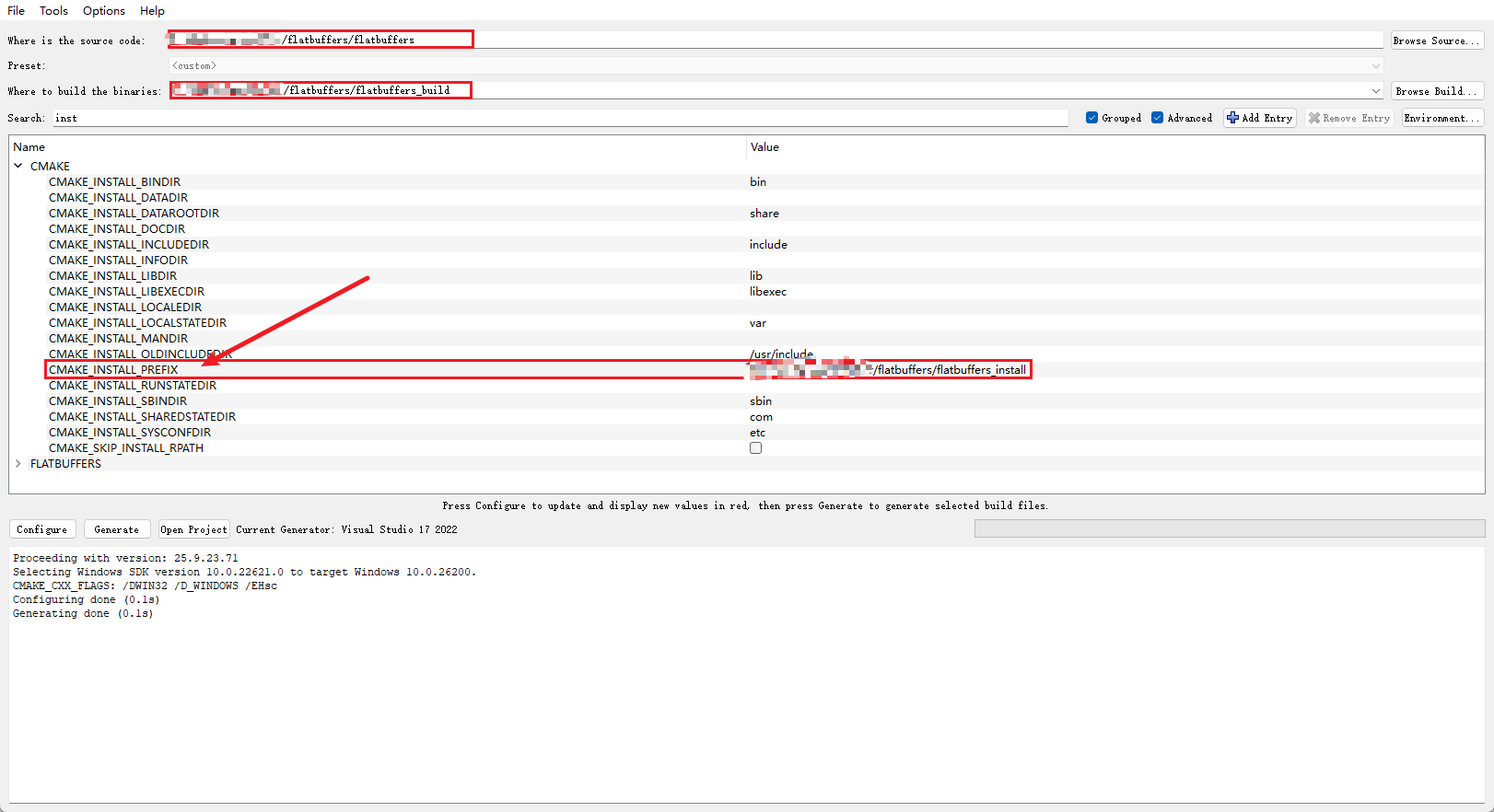
CMake GUI 打开代码。只需要修改INSTALL目录变量 即可
-
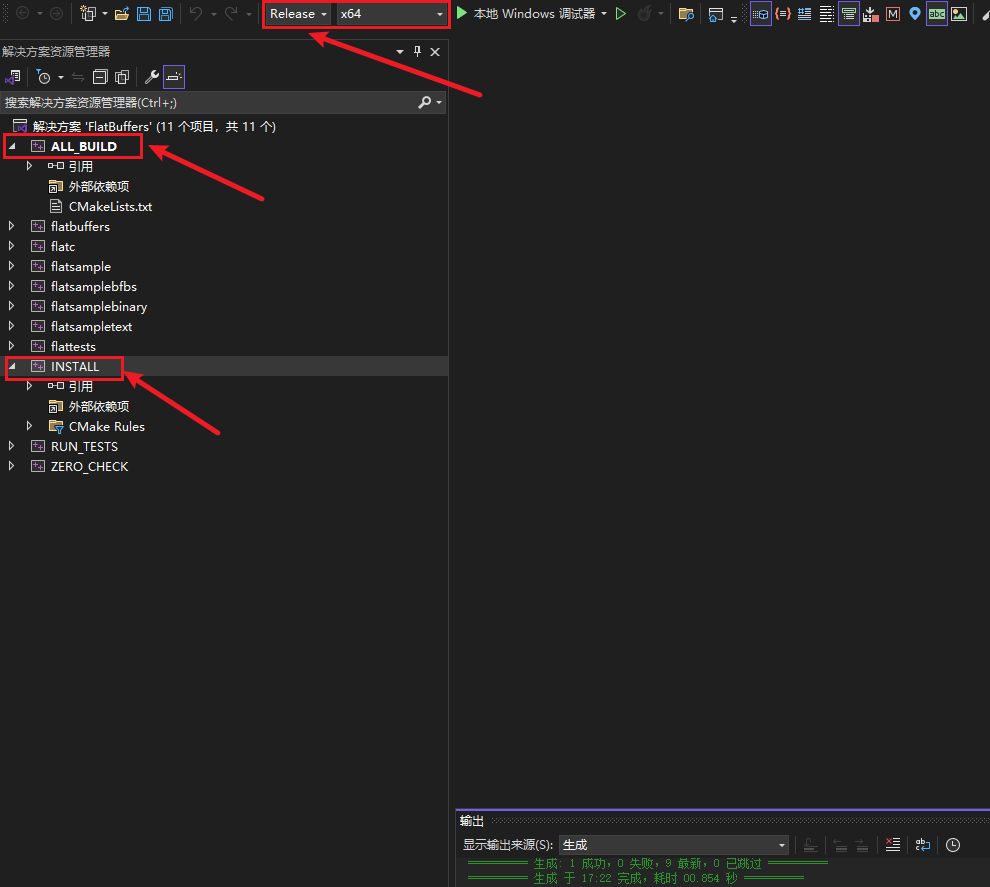
VS 2022 打开,选择Release X64 模式,先ALL_BUILD ,再INSTALL ,右键选择生成即可
-
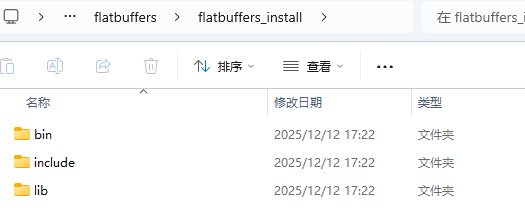
生成目录如下
2.3 C++ 示例
-
创建一个文件:example.fbs
fbsnamespace MyGame; table Monster { id:int; name:string; hp:int; mana:int = 150; } root_type Monster; -
使用
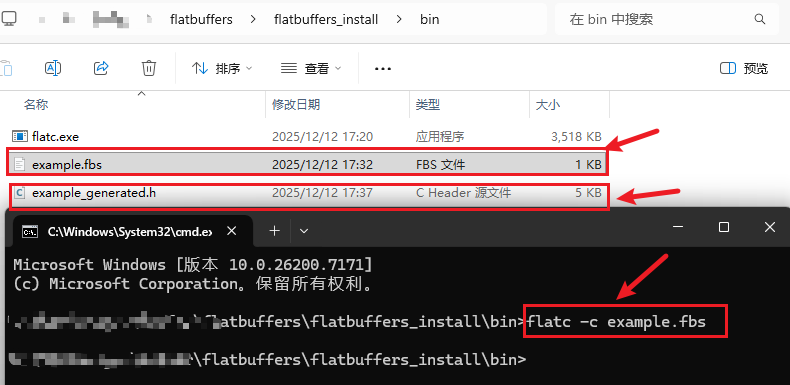
flatc.exe生成 C++ 文件执行:
bashflatc -c example.fbs会生成:
bashexample_generated.h把它们加入你的 VS/CMake 项目即可。示例图如下:
-
C++ 使用示例(序列化 & 反序列化)
可直接编译运行:
cpp#include "example_generated.h" #include <iostream> #include <fstream> int main() { flatbuffers::FlatBufferBuilder builder(1024); // 创建字符串 auto name = builder.CreateString("Orc Warrior"); // 构造 Monster MyGame::MonsterBuilder monsterBuilder(builder); monsterBuilder.add_id(1); monsterBuilder.add_name(name); monsterBuilder.add_hp(80); monsterBuilder.add_mana(200); auto monster = monsterBuilder.Finish(); builder.Finish(monster); // 完成构建,monster 作为根 // === 序列化到文件 === uint8_t* buf = builder.GetBufferPointer(); size_t size = builder.GetSize(); std::ofstream ofs("monster.bin", std::ios::binary); ofs.write(reinterpret_cast<char*>(buf), size); ofs.close(); std::cout << "Monster serialized to monster.bin\n"; // === 从文件读取并解析 === std::ifstream ifs("monster.bin", std::ios::binary); std::vector<char> data((std::istreambuf_iterator<char>(ifs)), std::istreambuf_iterator<char>()); auto monsterObj = MyGame::GetMonster(data.data()); std::cout << "ID: " << monsterObj->id() << "\n"; std::cout << "Name: " << monsterObj->name()->c_str() << "\n"; std::cout << "HP: " << monsterObj->hp() << "\n"; std::cout << "Mana: " << monsterObj->mana() << "\n"; return 0; }运行结果
vbnetMonster serialized to monster.bin ID: 1 Name: Orc Warrior HP: 80 Mana: 200
3. Protobuf
3.1 Protobuf 简介
Protocol Buffers(protobuf) 是 Google 开发的一种高效、跨语言的结构化数据序列化协议。它在网络通信、配置文件、RPC(尤其是 gRPC)中被广泛使用。
🚀 特点:体积小、速度快;语言无关;向后兼容性强;需要 .proto 文件定义数据结构。
主要用途:
- 高吞吐二进制通讯
- 客户端/服务端消息结构统一
- 自定义帧头 + protobuf 消息体
| 说明 | 地址 |
|---|---|
| 官网 | https://protobuf.dev/ |
| GitHub | https://github.com/protocolbuffers/protobuf |
3.2 Protobuf 编译
- Git 克隆代码
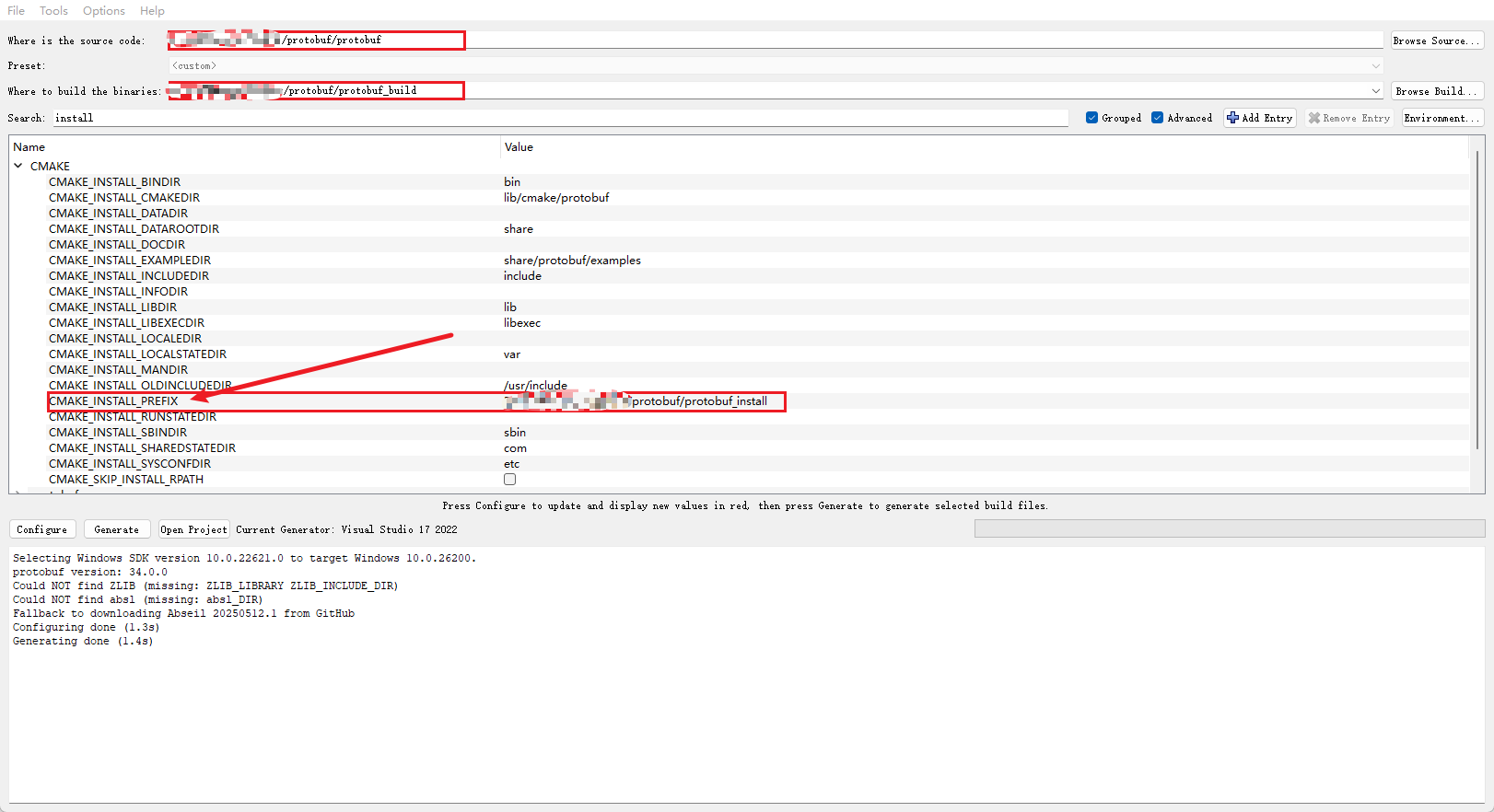
- CMake GUI 打开代码。只需要修改INSTALL目录变量 即可
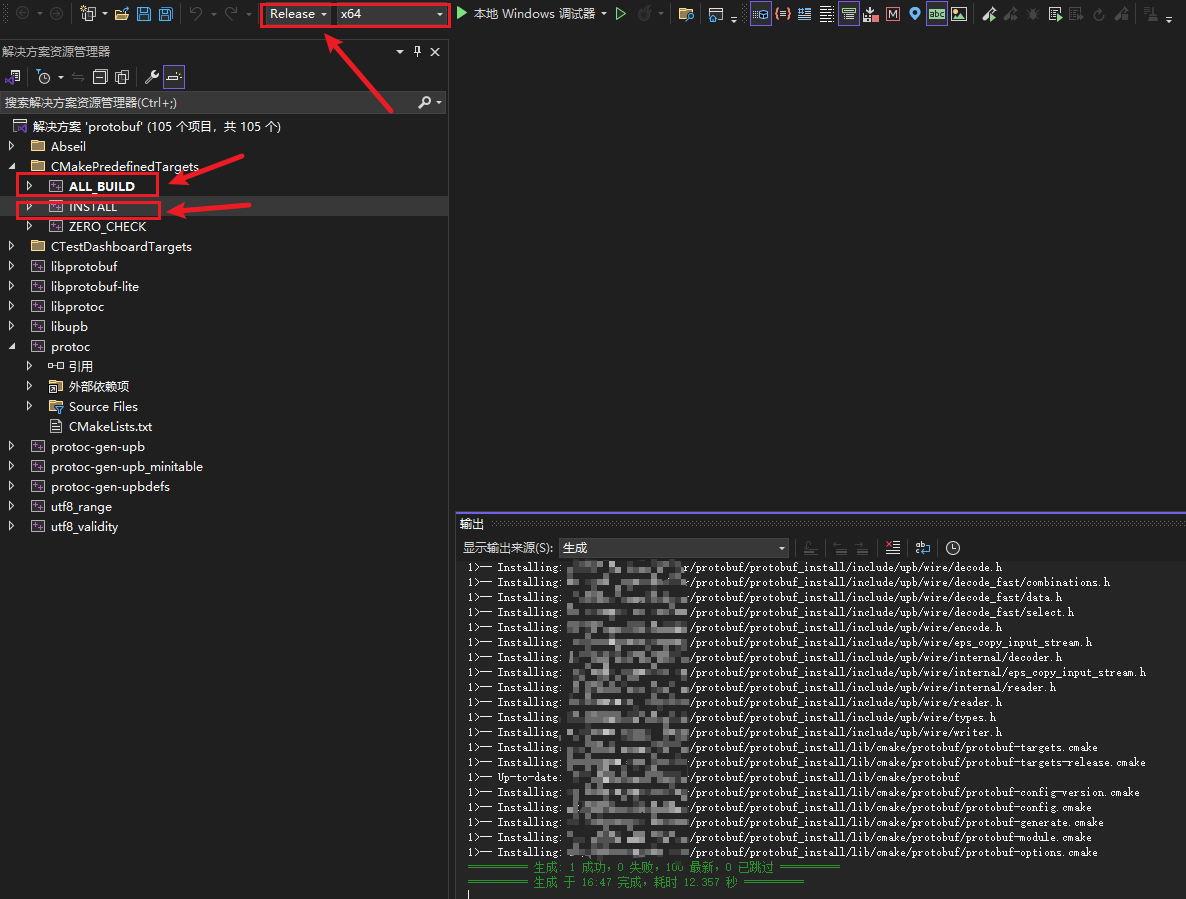
- VS 2022 打开,选择Release X64 模式,先ALL_BUILD ,再INSTALL ,右键选择生成即可
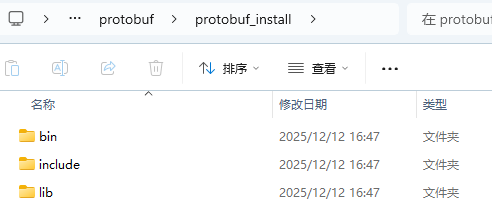
- 生成目录如下
3.3 C++ 示例
-
编写一个 test.proto
nginxsyntax = "proto3"; package demo; message Point { double x = 1; double y = 2; double z = 3; } message ScanResult { int32 id = 1; repeated Point points = 2; } -
使用 protoc 生成 C++ 文件
在当前目录执行:
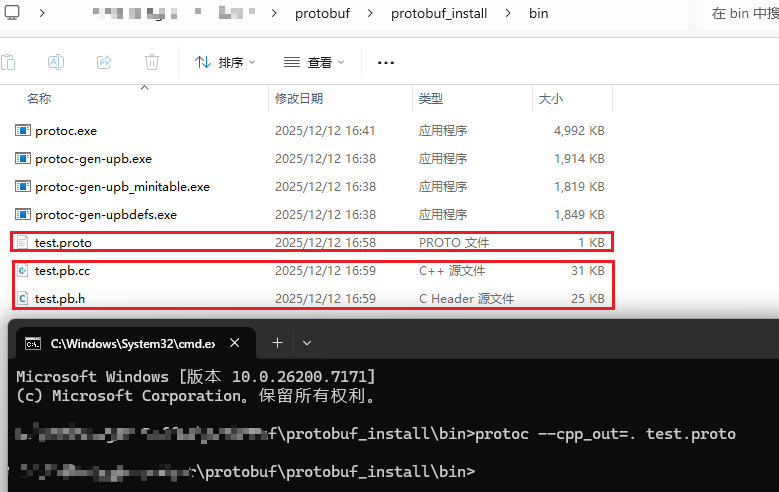
bashprotoc --cpp_out=. test.proto会生成:
bashtest.pb.h test.pb.cc把它们加入你的 VS/CMake 项目即可。示例图如下:
-
CMake 中使用 Protobuf
你的 CMakeLists 可以这样写:
cmakefind_package(Protobuf REQUIRED) add_executable(demo main.cpp test.pb.cc) target_include_directories(demo PRIVATE ${Protobuf_INCLUDE_DIRS}) target_link_libraries(demo PRIVATE ${Protobuf_LIBRARIES}) -
C++ 使用示例(序列化 & 反序列化)
可直接编译运行:
cpp#include <iostream> #include "test.pb.h" int main() { // 构造消息 demo::ScanResult msg; msg.set_id(123); auto* pt = msg.add_points(); pt->set_x(1.1); pt->set_y(2.2); pt->set_z(3.3); // 序列化到字符串(二进制) std::string out; msg.SerializeToString(&out); std::cout << "Serialized size: " << out.size() << " bytes\n"; // 反序列化 demo::ScanResult msg2; if (!msg2.ParseFromString(out)) { std::cout << "Parse failed!\n"; return -1; } std::cout << "ID: " << msg2.id() << "\n"; std::cout << "First point: " << msg2.points(0).x() << ", " << msg2.points(0).y() << ", " << msg2.points(0).z() << "\n"; return 0; }输出:
yamlSerialized size: 26 bytes ID: 123 First point: 1.1, 2.2, 3.3 -
Protobuf 与文件读写示例
写到文件:
cppstd::ofstream ofs("scan.data", std::ios::binary); msg.SerializeToOstream(&ofs);从文件读:
cppdemo::ScanResult r; std::ifstream ifs("scan.data", std::ios::binary); r.ParseFromIstream(&ifs);非常适合保存扫描路径、点云元数据、标定结果。
-
高级示例:Protobuf + TCP 消息收发(工业项目常用)
一般定义一个包格式:
css[4 bytes 消息长度][Protobuf 二进制]发送端:
cppbool SendMessage(int sock, const google::protobuf::Message& msg) { std::string data; msg.SerializeToString(&data); uint32_t len = htonl(data.size()); // 发送长度 send(sock, (char*)&len, 4, 0); // 发送内容 send(sock, data.data(), data.size(), 0); return true; }接收端(解决粘包的标准做法)
cppbool RecvMessage(int sock, google::protobuf::Message& msg) { uint32_t len_net; if (recv(sock, (char*)&len_net, 4, MSG_WAITALL) <= 0) return false; uint32_t len = ntohl(len_net); std::string data(len, '\0'); if (recv(sock, data.data(), len, MSG_WAITALL) <= 0) return false; return msg.ParseFromString(data); }这两个函数你可以直接放到你的工业通讯库里,用来解决:
- 粘包
- 拆包
- 统一消息格式
几乎所有工控系统都用这种模式。
附录一 除了 gRPC,protobuf 还能与谁一起使用?(常见组合)
-
Protobuf + TCP(最常见的自定义协议)
工业相机、机器人、PLC、分布式系统自带的一种组合。
用途:
- 高吞吐二进制通讯
- 客户端/服务端消息结构统一
- 自定义帧头 + protobuf 消息体
示例结构:
css[0x55AA][消息类型][protobuf长度][protobuf 数据...] -
Protobuf + UDP
适合高频率、低延迟数据,如:
- 传感器流数据(激光雷达、IMU)
- 控制命令通讯
- 多机器人状态同步
-
Protobuf + ZeroMQ
多用于分布式系统的消息队列。
优势:
- ZeroMQ 负责传输
- Protobuf 负责结构设计
用途:分布式处理框架、后台服务总线。
-
Protobuf + MQTT / Kafka / Redis Stream
给 IoT(物联网)和分布式系统用。
-
Protobuf + WebSocket
做前端实时数据推送(如 3D 可视化、状态监控)。
-
Protobuf + 自己实现的 RPC 框架
许多公司会自己写:
- protobuf 负责序列化
- TCP 负责传输
- 自己实现 RPC(比 gRPC 更可控、带实时性优化)
典型用于工业控制、机器人、嵌入式。
-
Protobuf 用于文件序列化 (非网络)
- 保存扫描工件的点云
- 保存机器人扫描路径
- 保存结构化配置文件
- 保存机器学习模型数据
Google 内部大量配置文件(非文本)用 protobuf 存。
附录二 Protobuf 适用场景
-
机器人、自动化、运动控制
- 工件扫描路径
- 多轴运动状态
- 嵌入式控制器通讯
- 实时传感器数据
比 JSON 快太多。
-
工业领域(你正在做的 Visual Platform / Path Planner / DART 这些)
- 工业机器人标定
- 扫描仪数据
- CNC/PLC 状态数据
- 自定义控制协议
非常适合高频数据传输。
-
游戏引擎 / 仿真(O3DE / Unity / UE)
- 网络同步状态
- 序列化场景数据
- 客户端-服务器通讯
-
云服务 / 微服务
大型项目的标准做法。
附录三 Protobuf 的缺点
-
人类不可读
是二进制,调试困难,需要 protoc --decode。(你可能觉得比 JSON 难调试)
-
不适用于超大二进制数据(如图像/点云)
通常需要外部存储 + Protobuf 存 metadata。比如:
nginxmessage CloudData { string file_path = 1; } -
对实时性 "极致要求"的情况不如 FlatBuffers
- 1ms 以下硬实时
- 不想拷贝内存(zero-copy)
这时候 FlatBuffers 更适合。
-
schema 管理成本高
proto 文件要统一管理,更新要同步。
4. MessagePack
| 说明 | 地址 |
|---|---|
| 官网 | https://protobuf.dev |
| GitHub | https://github.com/protocolbuffers/protobuf |
Protobuf 特性
| 特性 | 说明 |
|---|---|
| 数据格式 | 二进制,紧凑高效 |
| 支持语言 | C++, Python, Go, Java, Rust, JS... |
| 是否需 schema | ✅ 需要 .proto |
| 向后兼容 | ✅ 通过 tag 编号保持兼容 |
| 零拷贝 | ❌ 需要反序列化 |
4.1 MessagePack 简介
MessagePack 是一种类似 JSON 的二进制序列化格式,由日本工程师 Sadayuki Furuhashi 于 2008 年开发。目标是:"让数据像 JSON 一样简单,但更快、更小。"
| 官网 | https://msgpack.org/ |
|---|---|
| GitHub | https://github.com/msgpack/msgpack |
MessagePack 特性
| 特性 | 说明 |
|---|---|
| 格式类型 | 二进制 JSON |
| 是否需 schema | ❌ 不需要 |
| 语言支持 | C++, Python, Go, Java, Rust, JS... |
| 可读性 | 较好(可用工具解析) |
| 向后兼容 | 好(字段可省略) |
简单性能对比:JSON vs MessagePack
| 项目 | JSON | MessagePack |
|---|---|---|
| 体积 | 大 | 小 40~70% |
| 序列化速度 | 慢 | 快 |
| 可读性 | 高 | 中 |
| 是否跨语言 | ✅ | ✅ |
4.2 MessagePack C++ 示例
cpp
#include <msgpack.hpp>
#include <iostream>

struct Person {
    std::string name;
    int age;
    MSGPACK_DEFINE(name, age);
};

int main() {
    Person p{"Alice", 30};

    std::stringstream ss;
    msgpack::pack(ss, p); // 序列化

    std::string data = ss.str();
    msgpack::object_handle oh = msgpack::unpack(data.data(), data.size());
    Person p2 = oh.get().as<Person>(); // 反序列化

    std::cout << p2.name << " " << p2.age << std::endl;
}