Windows安全
1.系统安全
1.1.安全配置
1.启用密码复杂性要求
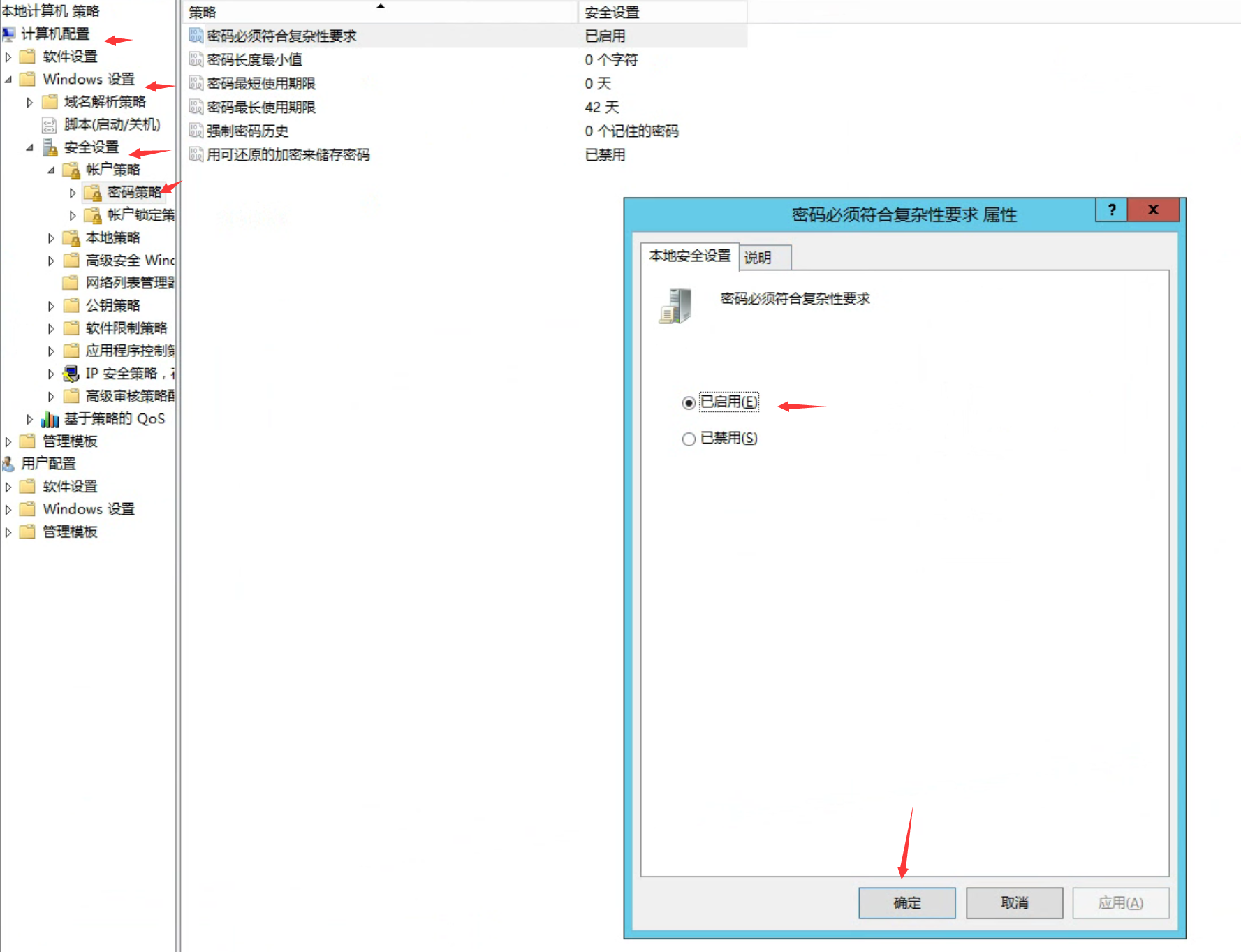
配置:运行命令"gpedit.msc"打开组策略编辑器,浏览到路径本地计算机策略\计算机配置\Windows 设置\安全设置\帐户策略\密码策略,在右边窗格中找到"密码必须符合复杂性要求",配置为"已启用"
2.配置密码长度最小值
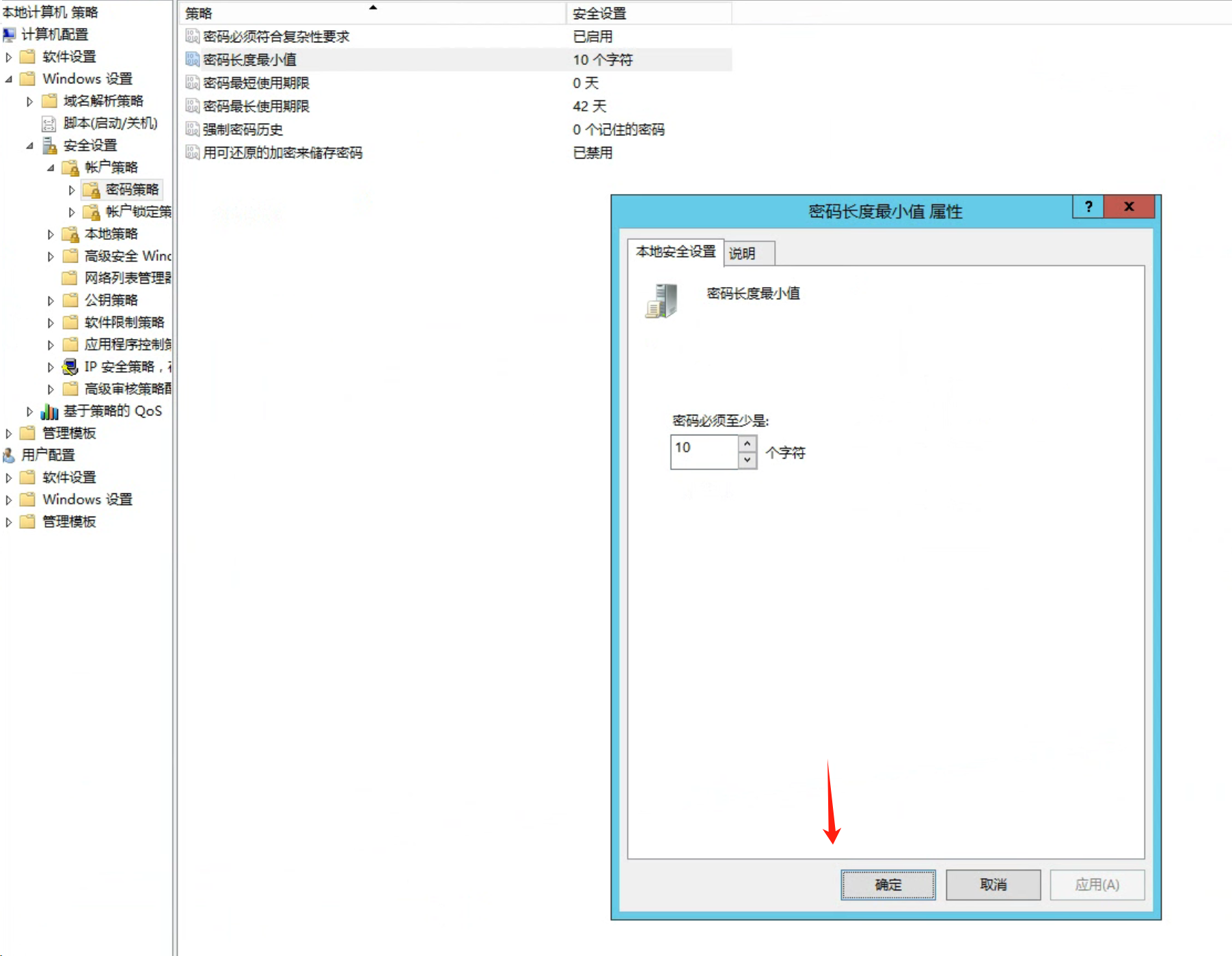
运行命令"gpedit.msc"打开组策略编辑器,浏览到路径**"本地计算机策略\计算机配置\Windows 设置\安全设置\帐户策略\密码策略"**,在右边窗格中找到"密码长度最小值",配置为不小于标准值的值。
3.强制密码历史最小值
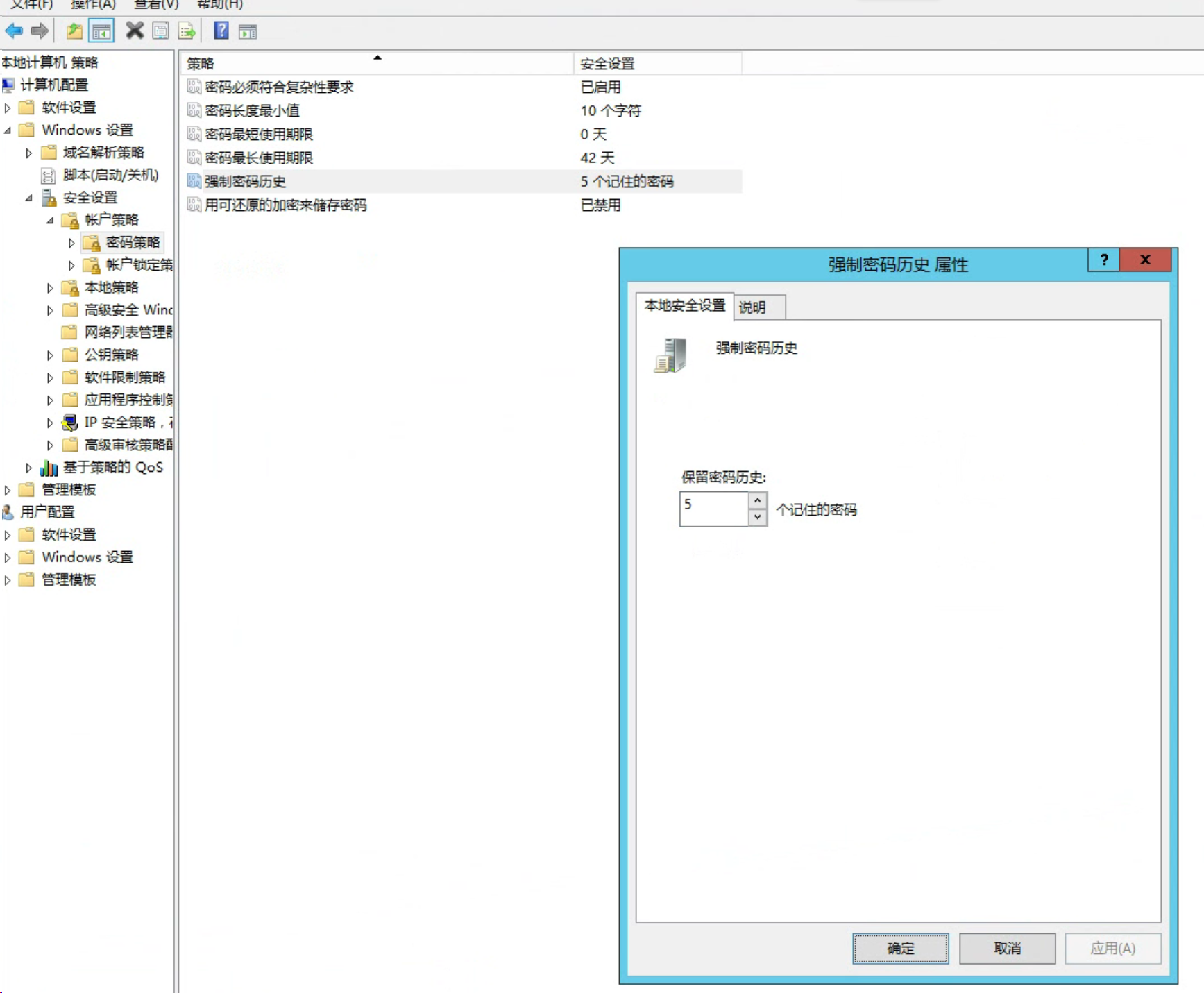
运行命令"gpedit.msc"打开组策略编辑器,浏览到路径**"本地计算机策略\计算机配置\Windows 设置\安全设置\帐户策略\密码策略"**,在右边窗格中找到"强制密码历史",配置为不小于标准值的值。
4.禁止Windows自动登录
方法1:运行命令"regedit"打开注册表编辑器,浏览到路径**"HKEY_LOCAL_MACHINE\Software\Microsoft\Windows NT\CurrentVersion\Winlogon"** ,将名称为**"AutoAdminLogon"**的数值修改为 0。
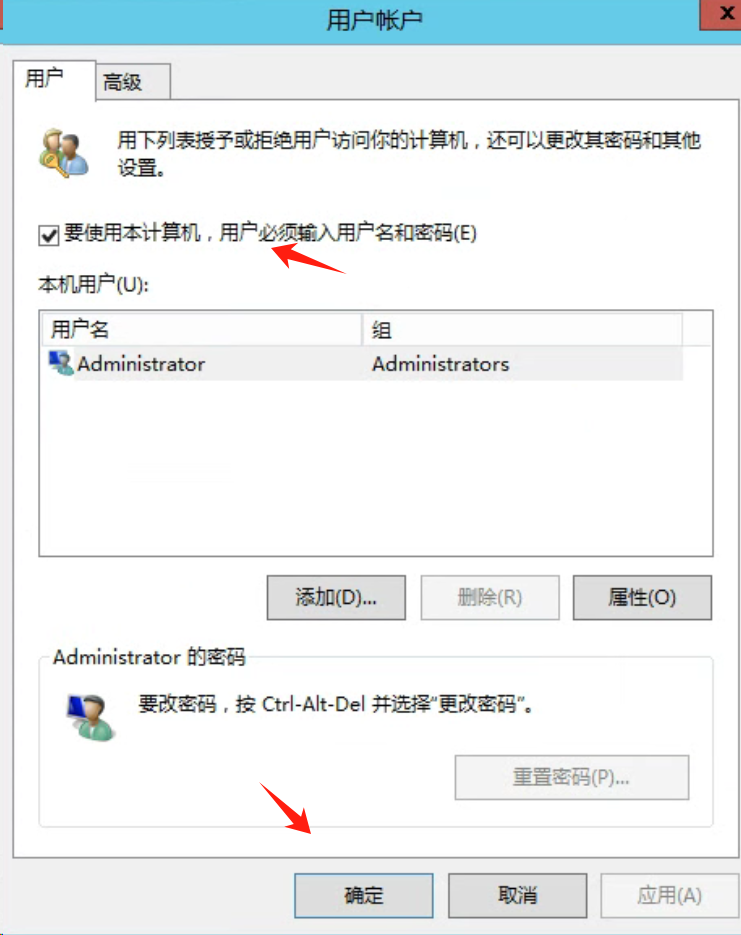
方法2:Win+R,输入:netplwiz,取消必须输入用户名和密码
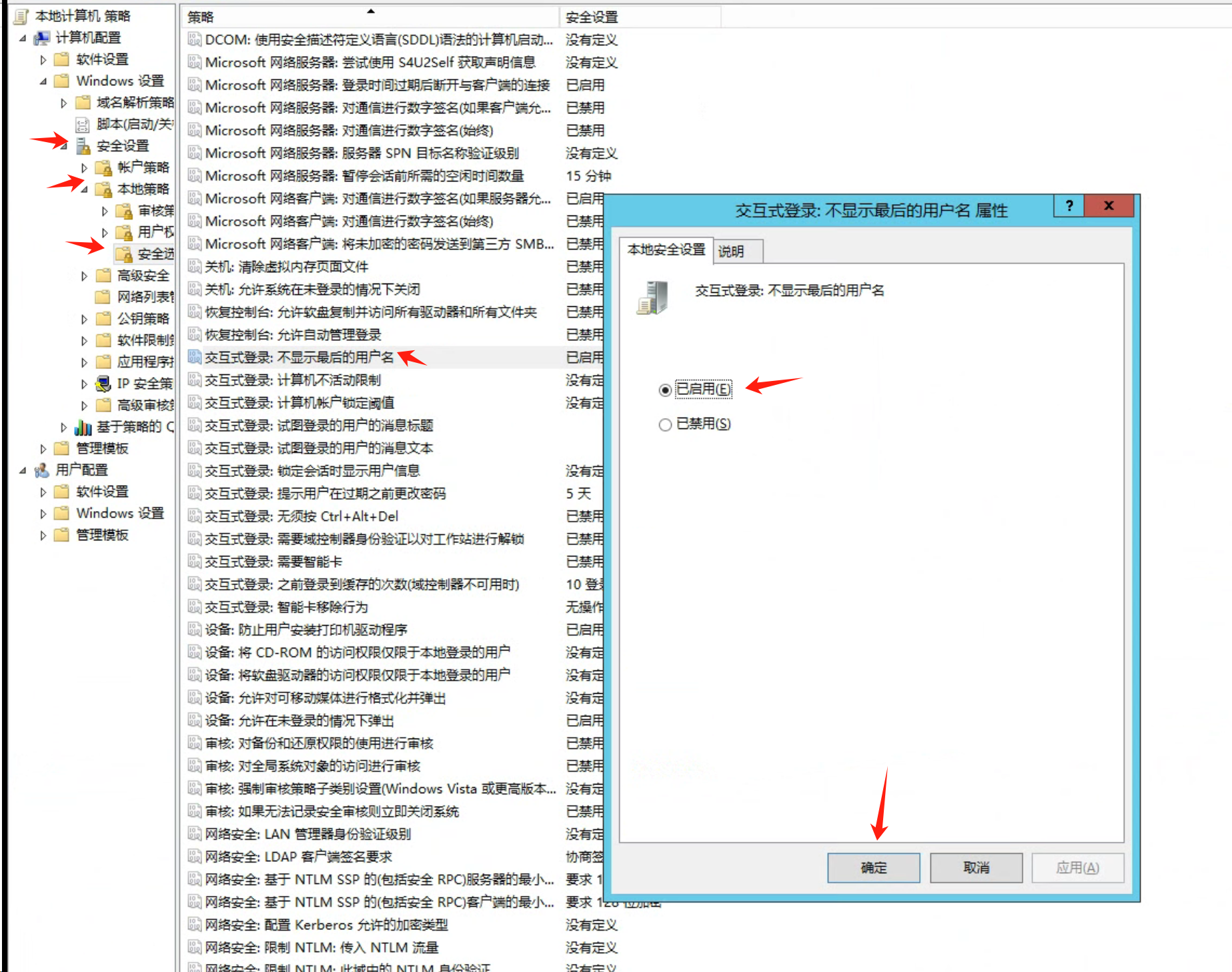
5.不显示最后的用户名
运行命令"gpedit.msc"打开组策略编辑器,浏览到路径**"本地计算机策略\计算机配置\Windows 设置\安全设置\本地策略\安全选项"** ,在右边窗格中找到**"交互式登录: 不显示最后的用户名"** ,配置为**"已启用"**
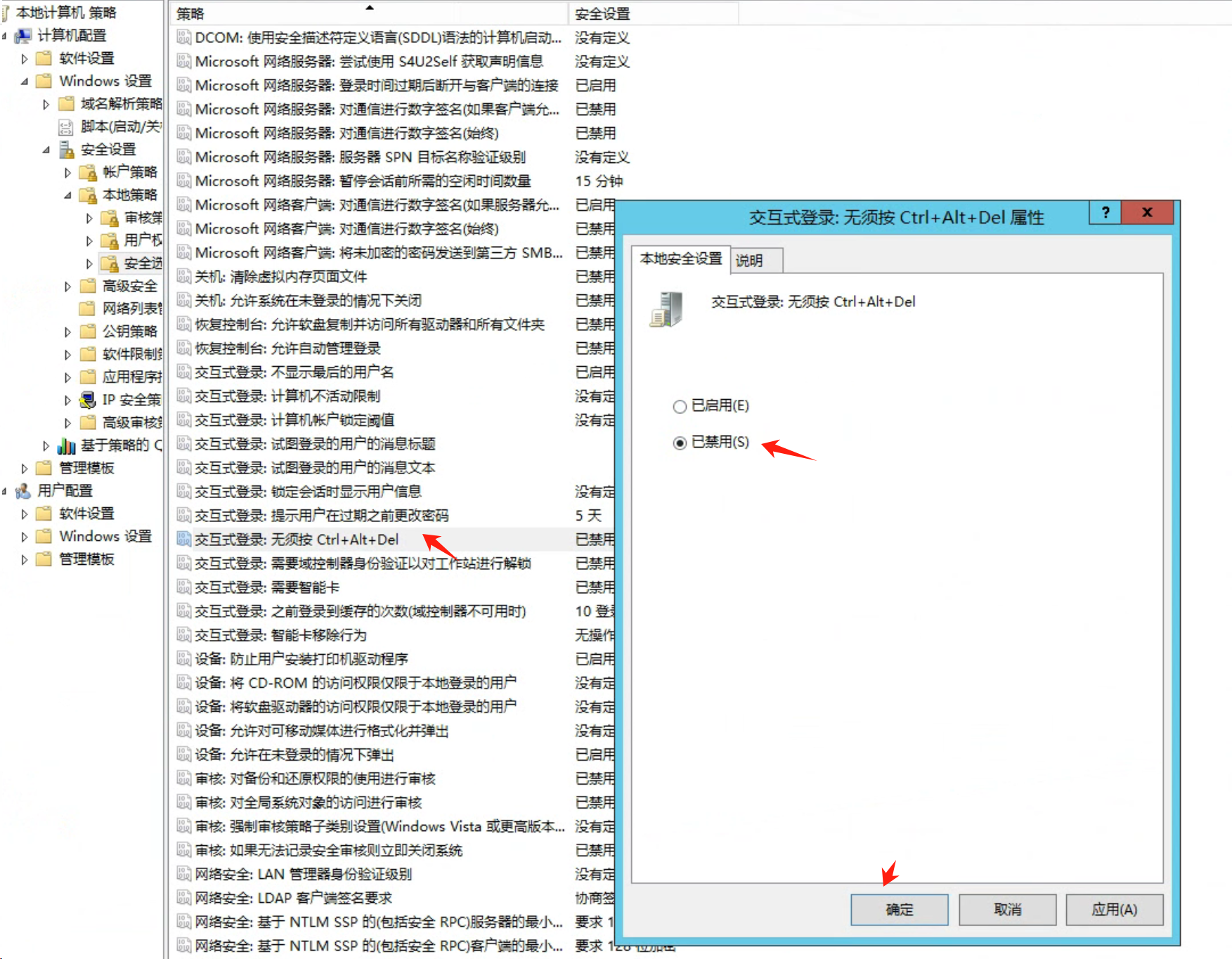
6.登录时须按 Ctrl+Alt+Del 策略
运行命令"gpedit.msc"打开组策略编辑器,浏览到路径**"本地计算机策略\计算机配置\Windows 设置\安全设置\本地策略\安全选项"** ,在右边窗格中找到**"交互式登录: 无须(不需要)按 Ctrl+Alt+Del"**,配置为"已禁用(停用)"。
1.2.关闭服务
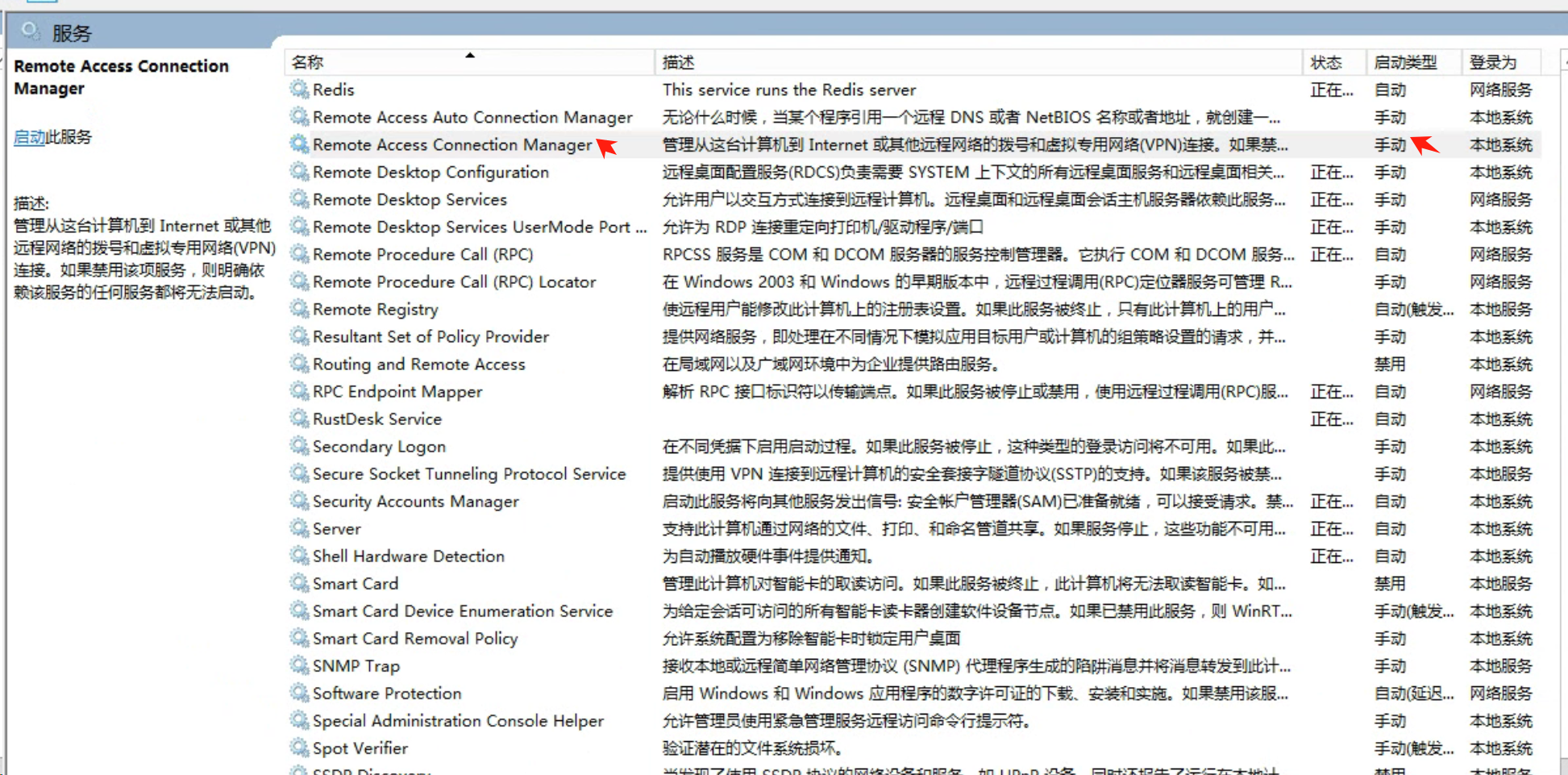
1.Remote Access Connection Manager
2.关闭 Message Queuing 服务
运行命令"services.msc"打开服务管理器,停止显示名称为"Message Queuing"的服务。
PS:该服务,SCADA需要,WCS不需要
2.环境变量
| 此系统环境变量... | 重定向到此 |
|---|---|
%APPDATA% |
C:\Windows\system32\config\systemprofile\Appdata\Roaming |
%APPDATA%\Microsoft\Internet Explorer\Quick Launch |
C:\Windows\System32\config\systemprofile\AppData\Roaming\Microsoft\Internet Explorer\Quick Launch |
%APPDATA%\Microsoft\Windows\Start Menu |
C:\Windows\System32\config\systemprofile\AppData\Roaming\Microsoft\Windows\Start Menu |
%APPDATA%\Microsoft\Windows\Start Menu\Programs |
C:\Windows\System32\config\systemprofile\AppData\Roaming\Microsoft\Windows\Start Menu\Programs |
%LOCALAPPDATA% |
C:\WINDOWS\system32\config\systemprofile\AppData\Local |
%ProgramData% |
C:\ProgramData |
%ProgramFiles% |
C:\Program Files |
%ProgramFiles%\Common Files |
C:\Program Files\Common Files |
%ProgramFiles%\Windows Sidebar\Gadgets |
C:\Program Files\Windows Sidebar\Gadgets |
%ProgramFiles%\Common Files |
C:\Program Files\Common Files |
%ProgramFiles(x86)% |
C:\Program Files (x86) |
%ProgramFiles(x86)%\Common Files |
C:\Program Files (x86)\Common Files |
%SystemDrive% |
C: |
%SystemDrive%\Program Files |
C:\Program Files |
%SystemDrive%\Program Files (x86) |
C:\Program Files (x86) |
%SystemDrive%\Users |
C:\Users |
%SystemDrive%\Users\Public |
C:\Users\Public |
%SystemRoot% |
C:\Windows |
%windir% |
C:\Windows |
%windir%\Fonts |
C:\Windows\Fonts |
%windir%\Resources |
C:\Windows\Resources |
%windir%\resources\0409 |
C:\Windows\resources\0409 |
%windir%\system32 |
C:\Windows\System32 |
%ALLUSERSPROFILE% |
C:\ProgramData |
%ALLUSERSPROFILE%\Application Data |
C:\ProgramData\Application Data |
%ALLUSERSPROFILE%\Documents |
C:\ProgramData\Documents |
%ALLUSERSPROFILE%\Documents\My Music\Sample Music |
C:\ProgramData\Documents\My Music\Sample Music |
%ALLUSERSPROFILE%\Documents\My Music |
C:\ProgramData\Documents\My Music |
%ALLUSERSPROFILE%\Documents\My Pictures |
C:\ProgramData\Documents\My Pictures |
%ALLUSERSPROFILE%\Documents\My Pictures\Sample Pictures |
C:\ProgramData\Documents\My Pictures\Sample Pictures |
%ALLUSERSPROFILE%\Documents\My Videos |
C:\ProgramData\Documents\My Videos |
%ALLUSERSPROFILE%\Microsoft\Windows\DeviceMetadataStore |
C:\ProgramData\Microsoft\Windows\DeviceMetadataStore |
%ALLUSERSPROFILE%\Microsoft\Windows\GameExplorer |
C:\ProgramData\Microsoft\Windows\GameExplorer |
%ALLUSERSPROFILE%\Microsoft\Windows\Ringtones |
C:\ProgramData\Microsoft\Windows\Ringtones |
%ALLUSERSPROFILE%\Microsoft\Windows\Start Menu |
C:\ProgramData\Microsoft\Windows\Start Menu |
%ALLUSERSPROFILE%\Microsoft\Windows\Start Menu\Programs |
C:\ProgramData\Microsoft\Windows\Start Menu\Programs |
%ALLUSERSPROFILE%\Microsoft\Windows\Start Menu\Programs\Administrative Tools |
C:\ProgramData\Microsoft\Windows\Start Menu\Programs\Administrative Tools |
%ALLUSERSPROFILE%\Microsoft\Windows\Start Menu\Programs\StartUp |
C:\ProgramData\Microsoft\Windows\Start Menu\Programs\StartUp |
%ALLUSERSPROFILE%\Microsoft\Windows\Templates |
C:\ProgramData\Microsoft\Windows\Templates |
%ALLUSERSPROFILE%\Start Menu |
C:\ProgramData\Start Menu |
%ALLUSERSPROFILE%\Start Menu\Programs |
C:\ProgramData\Start Menu\Programs |
%ALLUSERSPROFILE%\Start Menu\Programs\Administrative Tools |
C:\ProgramData\Start Menu\Programs\Administrative Tools |
%ALLUSERSPROFILE%\Templates |
C:\ProgramData\Templates |
%LOCALAPPDATA%\Microsoft\Windows\ConnectedSearch\Templates |
C:\Windows\System32\config\systemprofile\AppData\Local\Microsoft\Windows\ConnectedSearch\Templates |
%LOCALAPPDATA%\Microsoft\Windows\History |
C:\Windows\System32\config\systemprofile\AppData\Local\Microsoft\Windows\History |
%PUBLIC% |
C:\Users\Public |
%PUBLIC%\AccountPictures |
C:\Users\Public\AccountPictures |
%PUBLIC%\Desktop |
C:\Users\Public\Desktop |
%PUBLIC%\Documents |
C:\Users\Public\Documents |
%PUBLIC%\Downloads |
C:\Users\Public\Downloads |
%PUBLIC%\Music\Sample Music |
C:\Users\Public\Music\Sample Music |
%PUBLIC%\Music\Sample Playlists |
C:\Users\Public\Music\Sample Playlists |
%PUBLIC%\Pictures\Sample Pictures |
C:\Users\Public\Pictures\Sample Pictures |
%PUBLIC%\RecordedTV.library-ms |
C:\Users\Public\RecordedTV.library-ms |
%PUBLIC%\Videos |
C:\Users\Public\Videos |
%PUBLIC%\Videos\Sample Videos |
C:\Users\Public\Videos\Sample Videos |
%USERPROFILE% |
C:\Windows\system32\config\systemprofile |
%USERPROFILE%\AppData\Local |
C:\Windows\system32\config\systemprofile\AppData\Local |
%USERPROFILE%\AppData\LocalLow |
C:\Windows\system32\config\systemprofile\AppData\LocalLow |
%USERPROFILE%\AppData\Roaming |
C:\Windows\system32\config\systemprofile\AppData\Roaming |