简介
订阅发布模式是一种消息传递范式 ,用于解耦发送消息的组件(发布者 ,Publisher)和接收消息的组件(订阅者 ,Subscriber),它还有一个核心枢纽 (消息代理,Message Broker),三大核心角色组成了订阅发布模式。
核心概念
订阅发布模式中有三个主要角色:
1. 发布者 (Publisher) 📢
- 职责: 负责创建和发送消息。
- 特点: 发布者不知道哪些或有多少订阅者会接收这些消息,它只管将消息发送给一个中间层------消息代理/消息总线(Message Broker/Bus) 。
2. 订阅者 (Subscriber) 👂
- 职责: 负责接收和处理消息的角色。
- 特点: 订阅者不知道谁发布了消息。它们通过向消息代理 订阅(Subscribe) 一个或多个特定的 主题(Topic) 或 频道(Channel) 来接收相关消息。
3. 消息代理 (Message Broker) 📮
- 职责: 这是一个核心中间件,负责接收发布者发送的消息,并根据消息的主题,将消息分发给所有已订阅该主题的订阅者。
- 特点: 它就是一个核心枢纽,发布者和订阅者之间的桥梁 ,彼此可以不知道对方的存在,实现解耦。
工作流程
- 订阅: 订阅者通知消息代理,它对某个或某些主题感兴趣。
- 发布: 发布者将包含数据的消息 以及一个特定的主题发送给消息代理。
- 分发: 消息代理接收到消息后,根据消息携带的主题,查找所有订阅了该主题的订阅者。
- 接收: 消息代理将消息发送给相应的订阅者。
主要优点 🏆
- 解耦性: 这是最大的优势。发布者和订阅者彼此独立,不需要知道对方的身份或存在。这使得系统组件可以独立地开发、部署和扩展。
- 可扩展性: 可以轻松地增加新的订阅者来处理相同的消息,而无需修改发布者。
- 灵活性: 消息可以以异步方式处理。发布者无需等待订阅者处理完消息,提高了系统的响应速度。
简单用一个比喻描述订阅发布模式
有一家专门对接岗位与求职者的工会服务中心(消息代理 ),这里每天都挤满了怀揣求职梦的年轻人(订阅者)。
要是求职者们都守在服务中心里干等机会,不仅会白白耗费时间,还可能错过其他要紧事。于是工会贴心地推出了 "岗位预约提醒" 服务:求职者只需留下自己的求职意向 ------ 有人只填了 "前端开发",有人同时勾选了 "后端开发" 和 "软件测试"(多主题订阅 ),再登记好联系方式,就可以先去忙自己的事,不用再原地苦等(异步机制的体现)。
没过多久,热闹的招聘场景就来了:先是 A 科技公司的招聘负责人(发布者 1 )来到工会,带来了 2 个前端工程师的岗位需求;紧接着 B 互联网企业(发布者 2 )也上门,发布了 3 个前端岗位和 1 个后端岗位的招聘信息;半小时后,C 外包公司(发布者 3 )也送来 2 个软件测试的岗位需求(多发布者不同主题发消息)。
工会工作人员立刻对照着登记册,开启了精准分发:
- 所有只登记了 "前端开发" 的求职者,都同时收到了 A 公司和 B 公司的前端岗位信息;
- 那些同时勾选 "后端 + 测试" 的求职者,既拿到了 B 公司的后端岗位通知,也收到了 C 公司的测试岗位邀约;
- 仅意向 "后端" 的求职者,则只收到了 B 公司的后端岗位信息。
整个过程里,多家招聘方不用挨个对接求职者,不同需求的求职者也能精准获取匹配的岗位信息,甚至有人能同时收到多类岗位通知。
在Vue项目中实现一个简单的eventBus事件总线
项目有现成的不一定需要自己写事件总线,不过可以通过例子加深对订阅发布的了解,例子里面四个主要文件,这几个文件结合起来的效果是这样的,初始状态是右图,点击按钮后会发布订阅,接收者数据会变更。
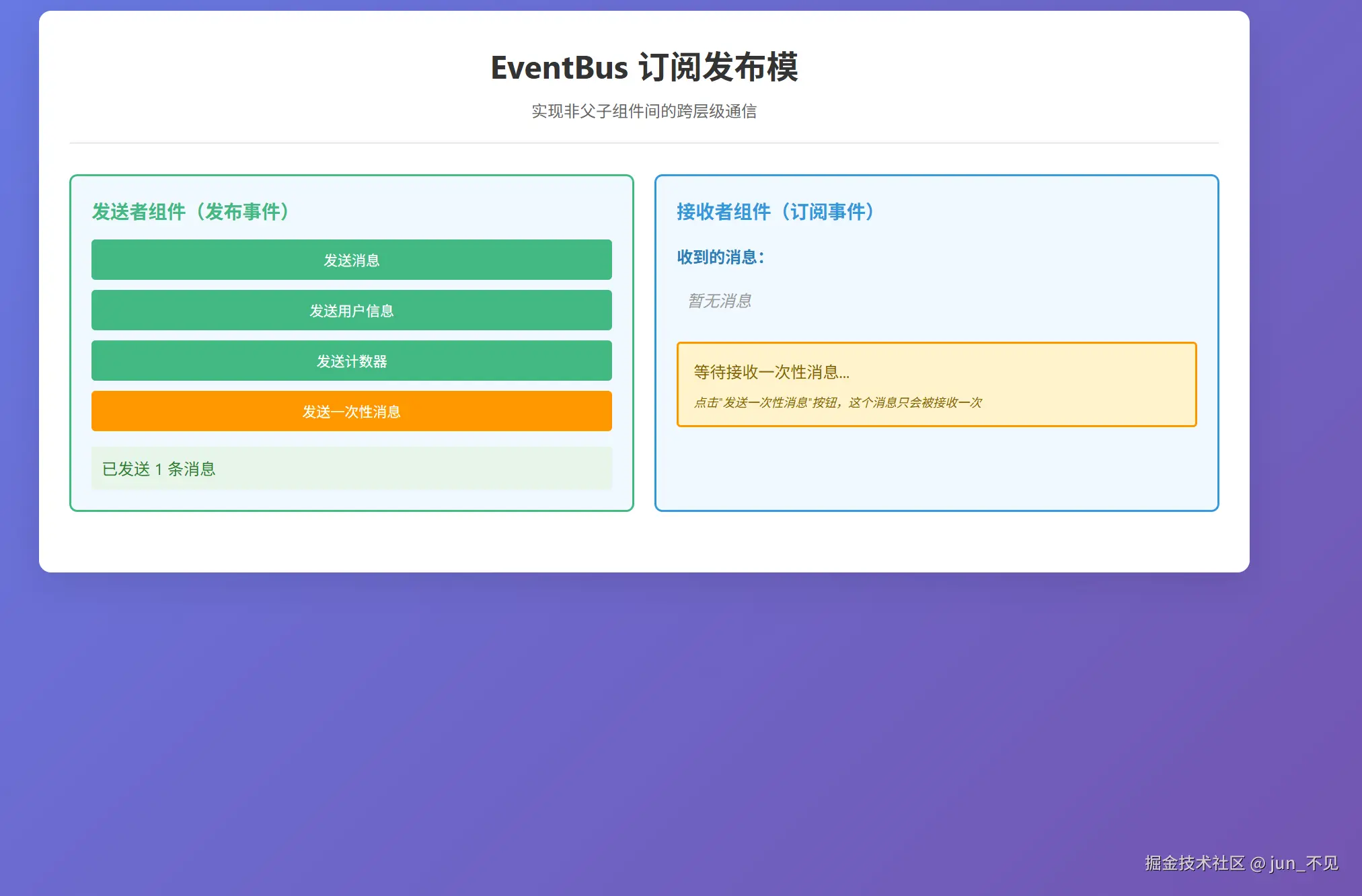
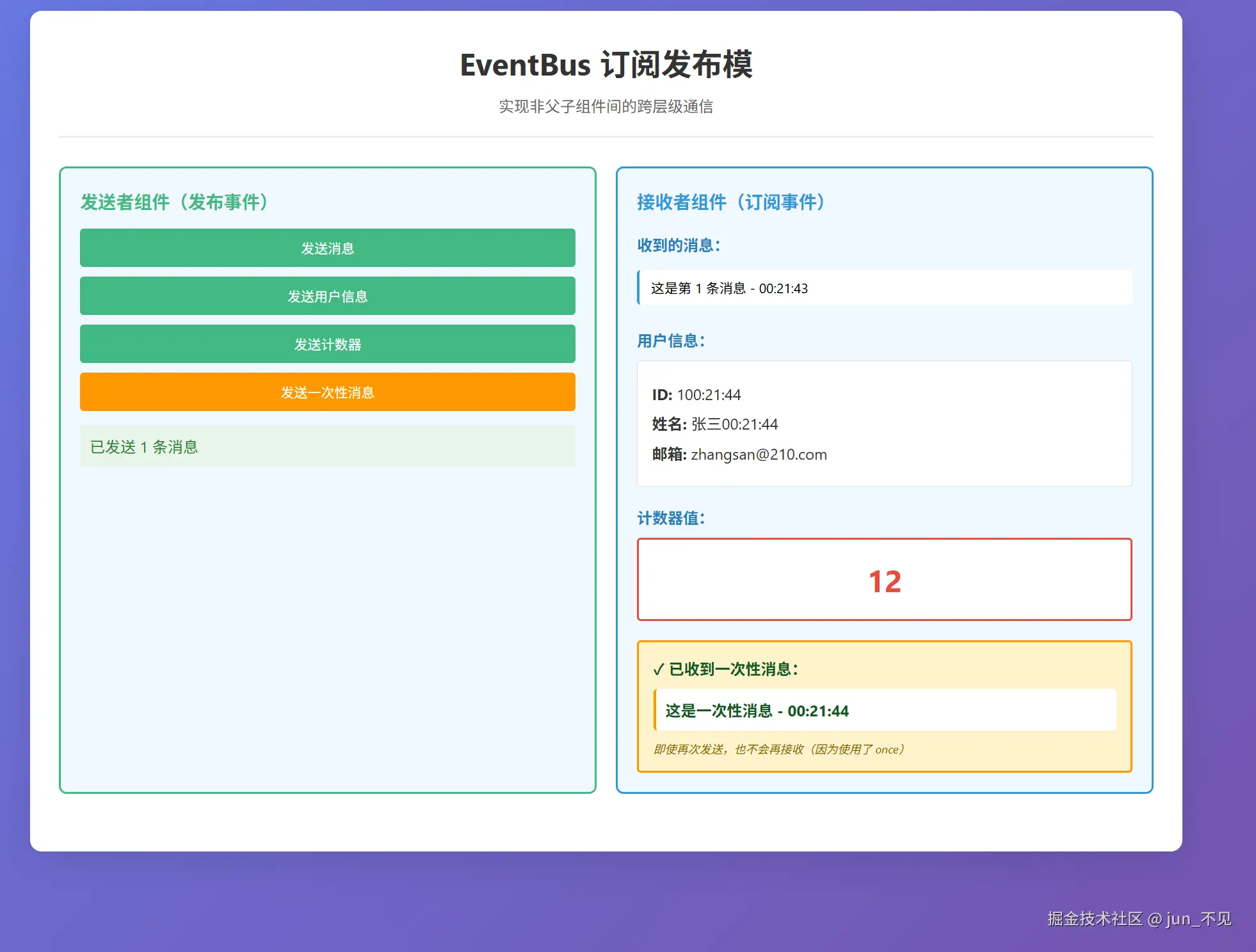
首先创建一个eventBus.JS文件,实现事件总线中心,代码如下:
js
/**
 * 核心原理:
 * 1. 中间载体:维护一个事件对象,作为事件的「中转站」
 * 2. 事件存储:使用对象存储事件名和回调函数的映射关系 { 'eventName': [cb1, cb2, ...] }
 * 3. 订阅(on):将回调函数推入对应事件名的数组中
 * 4. 发布(emit):触发事件名对应的所有回调函数,并传递参数
 * 5. 取消(off):从事件数组中移除指定回调(避免内存泄漏)
 * 6. 一次性订阅(once): 订阅事件,但只执行一次,执行后自动取消订阅
 */

class EventBus {
  constructor() {
    /**
     * 事件存储对象
     * 结构:{ 'eventName': [callback1, callback2, ...] }
     * key: 事件名称(字符串)
     * value: 该事件对应的回调函数数组
     */
    this.events = {};
  }

  isString(eventName) {
    if (!eventName || typeof eventName !== 'string') {
      console.warn('[EventBus] 事件名必须是字符串');
      return false;
    }
    return true;
  }

  /**
   * 订阅事件(on)
   * 将回调函数注册到指定事件名对应的回调数组中
   *
   * @param {string} eventName - 事件名称
   * @param {Function} callback - 回调函数
   */
  on(eventName, callback) {
    // 参数验证
    if (!this.isString(eventName)) return () => {};

    if (typeof callback !== 'function') {
      console.warn('[EventBus] 回调函数必须是函数类型');
      return () => {};
    }

    // 如果该事件名不存在,初始化为空数组
    if (!this.events[eventName]) {
      this.events[eventName] = [];
    }

    // 将回调函数推入数组中
    this.events[eventName].push(callback);

    // 返回取消订阅的函数,方便使用
    return () => {
      this.off(eventName, callback);
    };
  }

  /**
   * 发布事件(emit)
   * 触发指定事件名的所有回调函数,并传递参数
   *
   * @param {string} eventName - 事件名称
   * @param {...any} args - 传递给回调函数的参数
   */
  emit(eventName, ...args) {
    // 参数验证
    if (!this.isString(eventName)) return

    // 获取该事件对应的所有回调函数
    const callbacks = this.events[eventName];

    // 如果该事件没有订阅者,直接返回
    if (!callbacks || callbacks.length === 0) {
      console.warn(`[EventBus] 事件 "${eventName}" 没有订阅者`);
      return;
    }

    // 遍历执行所有回调函数
    callbacks.forEach((callback) => {
      try {
        // 使用 try-catch 包裹,避免某个回调出错影响其他回调
        callback.apply(null, args);
      } catch (error) {
        console.error(`[EventBus] 执行事件 "${eventName}" 的回调时出错:`, error);
      }
    });
  }

  /**
   * 取消订阅(off)
   * 从指定事件名的回调数组中移除回调函数
   *
   * @param {string} eventName - 事件名称
   * @param {Function} callback - 要移除的回调函数(可选,不传则移除该事件的所有回调)
   */
  off(eventName, callback) {
    // 参数验证
    if (this.isString(eventName)) return

    // 如果该事件不存在,直接返回
    if (!this.events[eventName]) {
      return;
    }

    // 如果没有传入 callback,则移除该事件的所有回调
    if (!callback) {
      delete this.events[eventName];
      return;
    }

    // 从数组中移除指定的回调函数
    const callbacks = this.events[eventName];
    const index = callbacks.indexOf(callback);

    if (index > -1) {
      callbacks.splice(index, 1);

      // 如果数组为空,删除该事件
      if (callbacks.length === 0) {
        delete this.events[eventName];
      }
    }
  }

  /**
   * 一次性订阅(once)
   * 订阅事件,但只执行一次,执行后自动取消订阅
   *
   * @param {string} eventName - 事件名称
   * @param {Function} callback - 回调函数
   */
  once(eventName, callback) {
    // 创建一个包装函数,执行一次后自动取消
    const wrapper = (...args) => {
      callback.apply(null, args);
      this.off(eventName, wrapper);
    };

    // 订阅包装后的函数
    this.on(eventName, wrapper);
  }

  /**
   * 清除所有事件
   * 清空所有事件和回调函数(通常在应用卸载时调用,避免内存泄漏)
   */
  clear() {
    this.events = {};
  }

}

// 创建并导出一个单例实例
// 这样整个应用使用同一个事件总线实例
const eventBus = new EventBus();

export default eventBus;

// 也可以导出类,方便需要多个独立事件总线的场景
export { EventBus };
在创建一个订阅者组件Subscriber.vue 文件,代码如下:
js
<template>
  <div class="receiver">
    <h3>接收者组件(订阅事件)</h3>

    <div class="messages">
      <h4>收到的消息:</h4>
      <div v-if="messages.length === 0" class="empty">暂无消息</div>
      <div v-else class="message-list">
        <div v-for="(msg, index) in messages" :key="index" class="message-item">
          {{ msg }}
        </div>
      </div>
    </div>

    <div class="user-info" v-if="userInfo">
      <h4>用户信息:</h4>
      <div class="info-card">
        <p><strong>ID:</strong> {{ userInfo.id + new Date().toLocaleTimeString() }}</p>
        <p><strong>姓名:</strong> {{ userInfo.name + new Date().toLocaleTimeString() }}</p>
        <p><strong>邮箱:</strong> {{ userInfo.email }}</p>
      </div>
    </div>

    <div class="counter" v-if="counter !== null">
      <h4>计数器值:</h4>
      <div class="counter-value">{{ counter }}</div>
    </div>

    <!-- once 示例区域 -->
    <div class="once-example">
      <div v-if="!onceMessageReceived" class="once-pending">
        <p>等待接收一次性消息...</p>
        <p class="tip">点击"发送一次性消息"按钮,这个消息只会被接收一次</p>
      </div>
      <div v-else class="once-received">
        <p class="success">✓ 已收到一次性消息:</p>
        <div class="once-message">{{ onceMessage }}</div>
        <p class="tip">即使再次发送,也不会再接收(因为使用了 once)</p>
      </div>
    </div>
  </div>
</template>

<script setup>
import { ref, onMounted, onUnmounted } from 'vue';
import eventBus from '../utils/eventBus';

/**
 * Receiver 组件
 * 功能:通过 EventBus 订阅事件,接收其他组件发布的消息
 */

const messages = ref([]);
const userInfo = ref(null);
const counter = ref(null);

// once 示例相关的状态
const onceMessageReceived = ref(false);
const onceMessage = ref('');

/**
 * 处理收到的消息
 */
const handleMessage = (data) => {
  messages.value.unshift(data.text);
  // 只保留最近 5 条消息
  if (messages.value.length > 5) {
    messages.value = messages.value.slice(0, 5);
  }
};

/**
 * 处理收到的用户信息
 */
const handleUserInfo = (data) => {
  userInfo.value = data;
};

/**
 * 处理收到的计数器值
 */
const handleCounter = (count) => {
  counter.value = count;
};

/**
 * 处理一次性消息(once 示例)
 *
 * 这个回调只会执行一次,执行后自动取消订阅
 */
const handleOnceMessage = (data) => {
  onceMessageReceived.value = true;
  onceMessage.value = data.text;
};

/**
 * 组件挂载时订阅事件
 *
 * 订阅三个事件:
 * 1. 'message' - 消息事件(使用 on,可多次接收)
 * 2. 'userInfo' - 用户信息事件(使用 on,可多次接收)
 * 3. 'counter' - 计数器事件(使用 on,可多次接收)
 * 4. 'onceMessage' - 一次性消息事件(使用 once,只接收一次)
 */
onMounted(() => {
  // 使用 on 订阅事件(可多次接收)
  eventBus.on('message', handleMessage);
  eventBus.on('userInfo', handleUserInfo);
  eventBus.on('counter', handleCounter);

  // 使用 once 订阅事件(只接收一次,执行后自动取消订阅)
  // 这是 once 方法的调用示例
  eventBus.once('onceMessage', handleOnceMessage)
});

/**
 * 组件卸载时取消订阅
 *
 * 重要:必须取消订阅,避免内存泄漏
 * 否则回调函数会一直保留在内存中
 */
onUnmounted(() => {
  // 取消所有订阅
  eventBus.off('message', handleMessage);
  eventBus.off('userInfo', handleUserInfo);
  eventBus.off('counter', handleCounter);
});
</script>

<style scoped>
.receiver {
  padding: 20px;
  border: 2px solid #3498db;
  border-radius: 8px;
  background-color: #f0f8ff;
}

h3 {
  margin-top: 0;
  color: #3498db;
}

h4 {
  color: #2980b9;
  margin-top: 20px;
  margin-bottom: 10px;
}

.messages {
  margin-bottom: 20px;
}

.empty {
  padding: 10px;
  color: #999;
  font-style: italic;
}

.message-list {
  max-height: 150px;
  overflow-y: auto;
}

.message-item {
  padding: 8px 12px;
  margin: 5px 0;
  background-color: white;
  border-left: 3px solid #3498db;
  border-radius: 4px;
  font-size: 14px;
}

.user-info .info-card {
  padding: 15px;
  background-color: white;
  border-radius: 4px;
  border: 1px solid #ddd;
}

.info-card p {
  margin: 8px 0;
  color: #333;
}

.counter-value {
  font-size: 32px;
  font-weight: bold;
  color: #e74c3c;
  text-align: center;
  padding: 20px;
  background-color: white;
  border-radius: 4px;
  border: 2px solid #e74c3c;
}

.once-example {
  margin-top: 20px;
  padding: 15px;
  background-color: #fff3cd;
  border-radius: 4px;
  border: 2px solid #ff9800;
}

.once-pending {
  color: #856404;
}

.once-pending .tip {
  font-size: 12px;
  margin-top: 10px;
  color: #856404;
  font-style: italic;
}

.once-received {
  color: #155724;
}

.once-received .success {
  font-weight: bold;
  color: #155724;
  margin-bottom: 10px;
}

.once-message {
  padding: 10px;
  background-color: white;
  border-radius: 4px;
  border-left: 3px solid #ff9800;
  margin: 10px 0;
  font-weight: bold;
}

.once-received .tip {
  font-size: 12px;
  margin-top: 10px;
  color: #856404;
  font-style: italic;
}
</style>
再创建一个发布者组件 Publisher.vue ,代码如下:
js
<template>
  <div class="sender">
    <h3>发送者组件(发布事件)</h3>
    <div class="buttons">
      <button @click="sendMessage">发送消息</button>
      <button @click="sendUserInfo">发送用户信息</button>
      <button @click="sendCounter">发送计数器</button>
      <button @click="sendOnceMessage" class="btn-once">
        发送一次性消息
      </button>
    </div>
    <div class="info">
      <p>已发送 {{ messageCount }} 条消息</p>
    </div>
  </div>
</template>

<script setup>
import { ref } from 'vue';
import eventBus from '../utils/eventBus';

/**
 *
 * 功能:通过 EventBus 发布事件,通知其他组件
 */

const messageCount = ref(0);

/**
 * 发送消息事件
 */
const sendMessage = () => {
  messageCount.value++;
  const message = `这是第 ${messageCount.value} 条消息 - ${new Date().toLocaleTimeString()}`;

  // 发布 'message' 事件,传递消息内容
  eventBus.emit('message', {
    text: message,
    timestamp: new Date().toISOString()
  });
};

/**
 * 发送用户信息事件
 */
const sendUserInfo = () => {
  const userInfo = {
    id: 1,
    name: '张三',
    email: `zhangsan@${Math.floor(Math.random() * 1000)}.com`
  };

  // 发布 'userInfo' 事件
  eventBus.emit('userInfo', userInfo);
};

/**
 * 发送计数器事件
 */
const sendCounter = () => {
  const count = Math.floor(Math.random() * 100);

  // 发布 'counter' 事件
  eventBus.emit('counter', count);
};

/**
 * 发送一次性消息事件(用于演示 once 方法)
 *
 * 这个事件只会被 once 订阅者接收一次
 * 即使多次点击,只有第一次会触发回调
 */
const sendOnceMessage = () => {
  const message = `这是一次性消息 - ${new Date().toLocaleTimeString()}`;

  // 发布 'onceMessage' 事件
  eventBus.emit('onceMessage', {
    text: message,
    timestamp: new Date().toISOString()
  });
};
</script>

<style scoped>
.sender {
  padding: 20px;
  border: 2px solid #42b983;
  border-radius: 8px;
  background-color: #f0f9ff;
}

h3 {
  margin-top: 0;
  color: #42b983;
}

.buttons {
  display: flex;
  gap: 10px;
  margin: 15px 0;
  display: flex;
  flex-direction: column;
}

button {
  padding: 10px 20px;
  background-color: #42b983;
  color: white;
  border: none;
  border-radius: 4px;
  cursor: pointer;
  font-size: 14px;
  transition: background-color 0.3s;
}

button:hover {
  background-color: #35a372;
}

button.btn-once {
  background-color: #ff9800;
}

button.btn-once:hover {
  background-color: #f57c00;
}

.info {
  margin-top: 15px;
  padding: 10px;
  background-color: #e8f5e9;
  border-radius: 4px;
}

.info p {
  margin: 0;
  color: #2e7d32;
}
</style>
根组件代码:
js
<template>
  <div id="app">
    <div class="container">
      <header>
        <h1>EventBus 订阅发布模</h1>
        <p class="subtitle">实现非父子组件间的跨层级通信</p>
      </header>

      <div class="components">
        <!-- 发送者组件 -->
        <Sender />
        <!-- 接收者组件 -->
        <Receiver />

      </div>
    </div>
  </div>
</template>

<script setup>
import Sender from './components/Sender.vue';
import Receiver from './components/Receiver.vue';
</script>

<style>
* {
  margin: 0;
  padding: 0;
  box-sizing: border-box;
}

body {
  background: linear-gradient(135deg, #667eea 0%, #764ba2 100%);
  min-height: 100vh;
  padding: 20px;
}

#app {
  max-width: 1200px;
  margin: 0 auto;
}

.container {
  background-color: white;
  border-radius: 12px;
  padding: 30px;
  box-shadow: 0 10px 40px rgba(0, 0, 0, 0.1);
}

header {
  text-align: center;
  margin-bottom: 30px;
  padding-bottom: 20px;
  border-bottom: 2px solid #eee;
}

header h1 {
  color: #333;
  font-size: 32px;
  margin-bottom: 10px;
}

.subtitle {
  color: #666;
  font-size: 16px;
}

.components {
  display: grid;
  grid-template-columns: repeat(auto-fit, minmax(300px, 1fr));
  gap: 20px;
  margin-bottom: 30px;
}
</style>
总结
发布订阅模式的核心价值是解耦:发布者无需知道谁订阅了事件,订阅者无需知道事件由谁发布;前端中最常用的场景是「跨组件通信」和「事件驱动逻辑」,最常用的工具是 Vue 生态的 mitt/EventBus、原生 EventEmitter、Socket.IO 等。使用时需注意取消订阅,避免内存泄漏。