ansible-Playbook是一系列ansible命令的合集,使用的是yaml语言进行编写的,自上而下的顺序进行执行,并且可以进行使用变量
Yaml语法
yaml语言是专门使用于进行编写配置文件的
大小写敏感
使用缩进来进行表示层级关系
缩进的空格数不重要,只要相同层级的在左侧对齐就可以
#表示注释
bash
支持的数据类型
1、纯量:单个,不可以再分的值,数据最小单位,单个变量
2、数组:一组按次序排序的值,数组元素使用-开头
3、对象:键值对合集 使用冒号结构  例如name: android
冒号后面必须使用空格

语法案例
name:Tom
age:27
wife:
    name:jerry
    age:25
children:
    -name: jack
     age: 15
    -name: bob
     age: 14
Playbook基本语法
所有写的playbook文件必须使用.yml进行结尾
执行playbook语法 ansible-playbook yml文件
playbook是自上到下执行的 中间有报错的不影响 修复之后可以反复执行
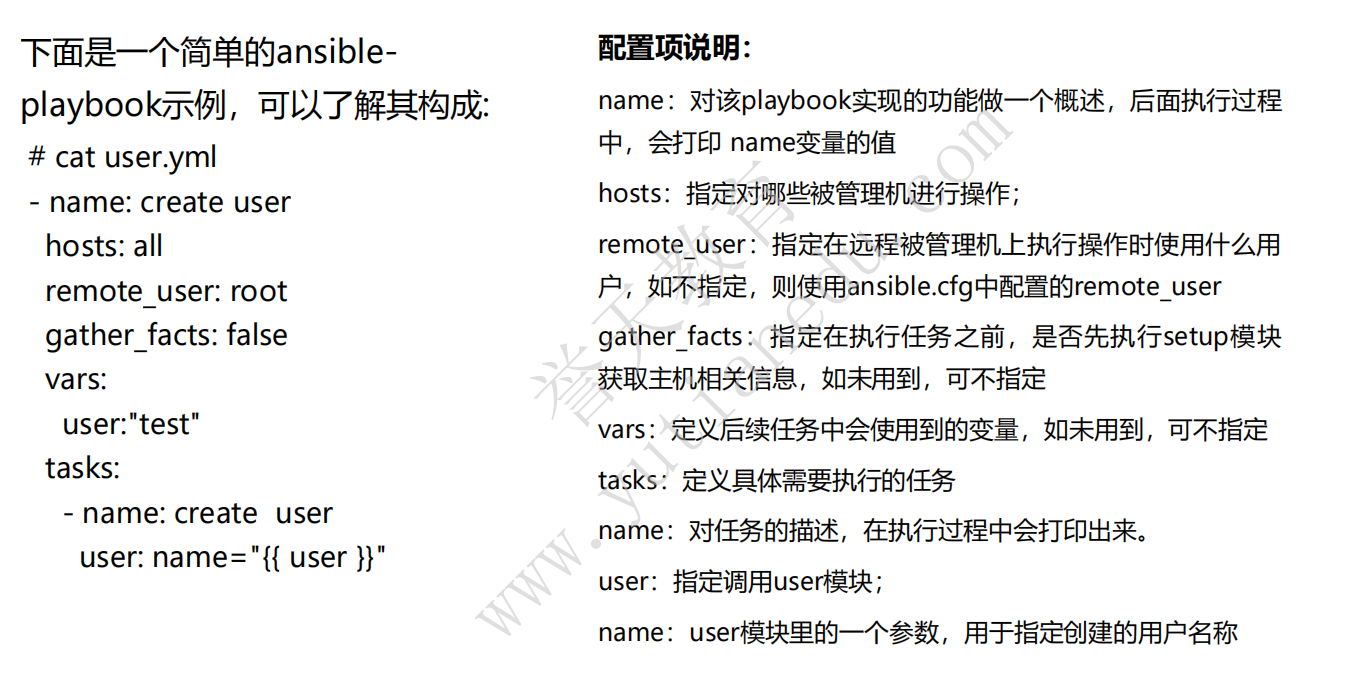
playbook结构说明,playbook是由一个或者是多个play组成的,一个task就是对ansible的模块的调用,将多个play安装顺序的组织到playbook中就是编排
playbook案例
安装在nfs主机上安装http服务,自定义网页为 Hello playbook http路径:/var/www/html/index.html
yaml
#准备好网页资源
[root@m01 http]# cat index.html
HELLO PLAYBOOK!!!

#编写playbook
[root@m01 http]# cat http.yml
- name: install https
  hosts: nfs
  tasks:
        - name: install httpd
          yum:
                name: httpd
                state: present
        - name: copy word
          copy:
                src: /http/index.html
                dest: /var/www/html/index.html
        - name: start https
          systemd:
                name: httpd
                state: started
                enabled: yes

#执行剧本
[root@m01 http]# ansible-playbook  http.yml

PLAY [install https] **********************************************************                                                                                    *

TASK [Gathering Facts] ********************************************************                                                                                    *
ok: [nfs]

TASK [install httpd] **********************************************************                                                                                    *
ok: [nfs]

TASK [copy word] **************************************************************                                                                                    *
changed: [nfs]

TASK [start https] ************************************************************                                                                                    *
changed: [nfs]

PLAY RECAP ********************************************************************                                                                                    *
nfs                        : ok=4    changed=2    unreachable=0    failed=0


#验证访问nfs的80端口
[root@m01 http]# curl  10.0.0.31:80
HELLO PLAYBOOK!!!
ansible-playbook常用选项
-v 打印运行的结果
-vv 打印任务运行的结果以及任务的配置信息
-vvv 打印包含的远程信息
-vvvv 具体的详细信息
bash
#校验playbook的语法
--syntax-check

[root@m01 http]# ansible-playbook --syntax-check http.yml

playbook: http.yml

#测试运行playbook
-C  测试运行 不会真的进行执行
[root@m01 http]# ansible-playbook -C http.yml

PLAY [install https] ***********************************************************

TASK [Gathering Facts] *********************************************************
ok: [nfs]

TASK [install httpd] ***********************************************************
ok: [nfs]

TASK [copy word] ***************************************************************
ok: [nfs]

TASK [start https] *************************************************************
ok: [nfs]

PLAY RECAP *********************************************************************
nfs                        : ok=4    changed=0    unreachable=0    failed=0    skipped=0    rescued=0    ignored=0
多个任务的playbook案例
在nfs上进行安装http服务启动并且安装mariadb
bash
#编写剧本
[root@m01 http]# cat more.yml
- name: use httpd
  hosts: nfs
  tasks:
        - name: start httpd
          yum:
                name: httpd
                state: present
        - name: copy
          copy:
                src: /http/index.html
                dest: /var/www/html/index.html
        - name: systemd
          systemd:
                name: httpd
                state: started
                enabled: yes
- name: install mariadb
  hosts: nfs
  tasks:
        - name: yum
          yum:
                name:
                     - mariadb
                     - mariadb-server
                state: present
        - name: started
          systemd:
                name: mariadb
                state: started
                enabled: yes

执行剧本
[root@m01 http]# ansible-playbook more.yml

PLAY [use httpd] **************************************************************************************************************************************************

TASK [Gathering Facts] ********************************************************************************************************************************************
ok: [nfs]

TASK [start httpd] ************************************************************************************************************************************************
ok: [nfs]

TASK [copy] *******************************************************************************************************************************************************
ok: [nfs]

TASK [systemd] ****************************************************************************************************************************************************
ok: [nfs]

PLAY [install mariadb] ********************************************************************************************************************************************

TASK [Gathering Facts] ********************************************************************************************************************************************
ok: [nfs]

TASK [yum] ********************************************************************************************************************************************************
changed: [nfs]

TASK [started] ****************************************************************************************************************************************************
changed: [nfs]

PLAY RECAP ********************************************************************************************************************************************************
nfs                        : ok=7    changed=2    unreachable=0    failed=0    skipped=0    rescued=0    ignored=0
ignore_error模块可以忽略错误信息
bash
#使用方法
- name: install mariadb
  hosts: nfs
  tasks:
        - name: yum
          yum:
                name:
                     - mariadb
                     - mariadb-server
                state: present
        - name: started
          systemd:
                name: mariadb
                state: started
                enabled: yes
          ignore_errors: True
Handler模块
handler事实上就是一个task,但是这个task默认是不执行的,只有被触发才会进行使用,通过notify进行监控某个或某几个task,一旦task执行结果有变化就触发执行handler
handler会在所有的play执行完成之后最后执行一次
Handler 的核心使用场景是:处理 "配置变更后需要重启 / 重载服务" 的场景(这是运维中最常见的需求)。
举个通俗的例子:你管理一台 Nginx 服务器,日常操作有两个步骤:
- 修改 Nginx 的配置文件(
<font style="color:rgb(0, 0, 0);">/etc/nginx/nginx.conf</font>);- 如果配置文件改了,就重启 Nginx 服务(让配置生效);如果没改,就不用重启。
bash
- name: test handler usage
  hosts: nfs
  tasks:
    # 任务1:安装httpd(若已安装,changed: false;若未装,changed: true)
    - name: install httpd package
      yum:
        name: httpd
        state: present

    # 任务2:拷贝httpd配置文件(若文件有变化,changed: true,触发Handler;否则不触发)
    - name: copy httpd config file
      copy:
        src: /tmp/httpd.conf  # 控制端的配置文件
        dest: /etc/httpd/conf/httpd.conf  # 目标主机的配置文件
      notify: restart httpd  # 关键:通知名为"restart httpd"的Handler

  # 定义Handlers部分:这里是所有Handler任务
  handlers:
    # Handler任务:重启httpd服务(名称要和notify的名称完全匹配)
    - name: restart httpd
      systemd:
        name: httpd
        state: restarted
        enabled: yes