DataStruct.h
#ifndef DATASTRUCT_H
#define DATASTRUCT_H
#include <QString>
#include <QDate>

struct Note{
    QString to;
    QString from;
    QString heading;
    QString body;
    QDate date;
    QString location;
    QString priority;
};
#endif // DATASTRUCT_H
configmanager.h
#ifndef CONFIGMANAGER_H
#define CONFIGMANAGER_H
#include <QObject>
#include <QList>
#include <QFile>
#include <QXmlStreamReader>
#include <QDebug>
#include <QDate>
#include "DataStruct.h"
class ConfigManager
{
public:
static ConfigManager* getInstance();
QList<Note> getConfigFileData();
// 保存数据到 XML 文件
bool saveNotesToXmlFile(const QList<Note> ¬es);
void init();
private:
explicit ConfigManager();
~ConfigManager();
ConfigManager(const ConfigManager& other);
void loadConfig();
QString dataPath;
static ConfigManager* instance;
//配置文件内容
QList<Note> m_data;
signals:
};
#endif // CONFIGMANAGER_Hconfigmanager.cpp
#include "configmanager.h"
#include <QCoreApplication>
#include <QDir> // 关键:包含 QDir 头文件
ConfigManager* ConfigManager::instance=nullptr;
ConfigManager *ConfigManager::getInstance()
{
if(!instance)
{
instance=new ConfigManager();
}
return instance;
}
QList<Note> ConfigManager::getConfigFileData()
{
return m_data;
}
bool ConfigManager::saveNotesToXmlFile(const QList<Note> ¬es)
{
//fileName=dataPath;
QFile file(dataPath);
if (!file.open(QIODevice::WriteOnly | QIODevice::Text)) {
qDebug() << "Failed to open file for saving:" << dataPath;
return false;
}
QXmlStreamWriter writer(&file);
writer.setAutoFormatting(true);
writer.writeStartDocument();
writer.writeStartElement("notes");
for (const Note ¬e : notes) {
writer.writeStartElement("note");
writer.writeTextElement("to", note.to);
writer.writeTextElement("from", note.from);
writer.writeTextElement("heading", note.heading);
writer.writeTextElement("body", note.body);
writer.writeTextElement("date", note.date.toString("yyyy-MM-dd"));
writer.writeTextElement("location", note.location);
writer.writeTextElement("priority", note.priority);
writer.writeEndElement(); // note
}
writer.writeEndElement(); // notes
writer.writeEndDocument();
file.close();
return true;
}
void ConfigManager::init()
{
dataPath=QCoreApplication::applicationDirPath()+"/../../config/"+"test.xml";
loadConfig();
}
ConfigManager::ConfigManager()
{
}
ConfigManager::~ConfigManager()
{
if (instance) {
delete instance;
instance = nullptr;
}
}
void ConfigManager::loadConfig()
{
QFile file(dataPath);
if (!file.open(QIODevice::ReadOnly | QIODevice::Text)) {
qDebug() << "Failed to open file:" << dataPath;
return;
}
QXmlStreamReader xmlReader(&file);
while (!xmlReader.atEnd() && !xmlReader.hasError()) {
xmlReader.readNext();
if (xmlReader.isStartElement()) {
if (xmlReader.name() == "note") {
Note note;
while (!(xmlReader.isEndElement() && xmlReader.name() == "note")) {
xmlReader.readNext();
if (xmlReader.isStartElement()) {
if (xmlReader.name() == "to") {
note.to = xmlReader.readElementText();
} else if (xmlReader.name() == "from") {
note.from = xmlReader.readElementText();
} else if (xmlReader.name() == "heading") {
note.heading = xmlReader.readElementText();
} else if (xmlReader.name() == "body") {
note.body = xmlReader.readElementText();
} else if (xmlReader.name() == "date") {
note.date = QDate::fromString(xmlReader.readElementText(), "yyyy-MM-dd");
} else if (xmlReader.name() == "location") {
note.location = xmlReader.readElementText();
} else if (xmlReader.name() == "priority") {
note.priority = xmlReader.readElementText();
}
}
}
m_data.append(note);
}
}
}
if (xmlReader.hasError()) {
qDebug() << "XML Error:" << xmlReader.errorString();
}
file.close();
}mainwindow.h
cpp
#ifndef MAINWINDOW_H
#define MAINWINDOW_H

#include <QMainWindow>
#include <QLabel>
#include <QComboBox>
#include <QHBoxLayout>
#include <QVBoxLayout>
#include <QTableWidget>
#include "configmanager.h"

QT_BEGIN_NAMESPACE
namespace Ui {
class MainWindow;
}
QT_END_NAMESPACE

class MainWindow : public QMainWindow
{
    Q_OBJECT

public:
    MainWindow(QWidget *parent = nullptr);
    ~MainWindow();
private slots:
    void onCellEdited(int row, int column); // 处理编辑完成后的槽函数

private:
    Ui::MainWindow *ui;
    QVBoxLayout *layout;
    QTableWidget *tableWidget;
    QList<Note> notes;                     // 保存的 note 数据
    QString xmlFilePath;                   // 配置文件路径
    void saveNotesToXml();                 // 保存表格中的数据到 XML 文件

};
#endif // MAINWINDOW_H
mainwindow.
cpp
#include "mainwindow.h"
#include "ui_mainwindow.h"

MainWindow::MainWindow(QWidget *parent)
    : QMainWindow(parent)
    , ui(new Ui::MainWindow)
{
    ui->setupUi(this);
    // 创建中心部件
    QWidget *centralWidget = new QWidget(this);
    setCentralWidget(centralWidget); // 将中心部件设置为窗口的中央部件

    layout=new QVBoxLayout(centralWidget);
     QLabel *nameLabel = new QLabel("选择姓名:",this);  // 创建 QLabel
     QComboBox *comboBox = new QComboBox(this);   // 创建 QComboBox
     QHBoxLayout *nameHBox=new QHBoxLayout();
     nameHBox->addWidget(nameLabel);
     nameHBox->addWidget(comboBox);
     nameHBox->addStretch();
     layout->addLayout(nameHBox);
     // 创建 QTableWidget 来展示数据
    tableWidget = new QTableWidget(this);
     tableWidget->setColumnCount(7);
     QStringList headers = {"To", "From", "Heading", "Body", "Date", "Location", "Priority"};
     tableWidget->setHorizontalHeaderLabels(headers);
     layout->addWidget(tableWidget);
     notes=ConfigManager::getInstance()->getConfigFileData();
     // 确保表格的行数与 notes 列表一致
     tableWidget->setRowCount(notes.size());
     for (int row = 0; row < notes.size(); ++row) {
         const Note& note = notes[row];
         tableWidget->setItem(row, 0, new QTableWidgetItem(note.to));
         tableWidget->setItem(row, 1, new QTableWidgetItem(note.from));
         tableWidget->setItem(row, 2, new QTableWidgetItem(note.heading));
         tableWidget->setItem(row, 3, new QTableWidgetItem(note.body));
         tableWidget->setItem(row, 4, new QTableWidgetItem(note.date.toString("yyyy-MM-dd")));
         tableWidget->setItem(row, 5, new QTableWidgetItem(note.location));
         tableWidget->setItem(row, 6, new QTableWidgetItem(note.priority));
     }
     // 允许表格编辑
     tableWidget->setEditTriggers(QAbstractItemView::DoubleClicked | QAbstractItemView::SelectedClicked);

     // 连接编辑完成信号
     connect(tableWidget, &QTableWidget::cellChanged, this, &MainWindow::onCellEdited);
     //layout->addStretch();
}

MainWindow::~MainWindow()
{
    delete ui;
}

void MainWindow::onCellEdited(int row, int column)
{
    // 获取编辑后的值
    QString newValue = tableWidget->item(row, column)->text();

    // 更新对应的 Note 对象
    switch (column) {
    case 0: notes[row].to = newValue; break;
    case 1: notes[row].from = newValue; break;
    case 2: notes[row].heading = newValue; break;
    case 3: notes[row].body = newValue; break;
    case 4: notes[row].date = QDate::fromString(newValue, "yyyy-MM-dd"); break;
    case 5: notes[row].location = newValue; break;
    case 6: notes[row].priority = newValue; break;
    }

    // // 保存所有数据到 XML 文件
     saveNotesToXml();
}

void MainWindow::saveNotesToXml()
{
    ConfigManager::getInstance()->saveNotesToXmlFile(notes);
}
main.cpp
cpp
#include "mainwindow.h"

#include <QApplication>
#include "configmanager.h"

int main(int argc, char *argv[])
{
    QApplication a(argc, argv);
    //加载配置文件
    ConfigManager::getInstance()->init();
    MainWindow w;
    w.show();
    return a.exec();
}
xml:
<?xml version="1.0" encoding="UTF-8"?>
<notes>
<note>
<to>张三</to>
<from>李四1</from>
<heading>提醒</heading>
<body>记得明天开会!</body>
<date>2023-10-20</date>
<location>会议室A</location>
<priority>中</priority>
</note>
<note>
<to>王五</to>
<from>赵六</from>
<heading>会议通知</heading>
<body>请准备材料。</body>
<date>2023-10-21</date>
<location>会议室B</location>
<priority>中</priority>
</note>
</notes>
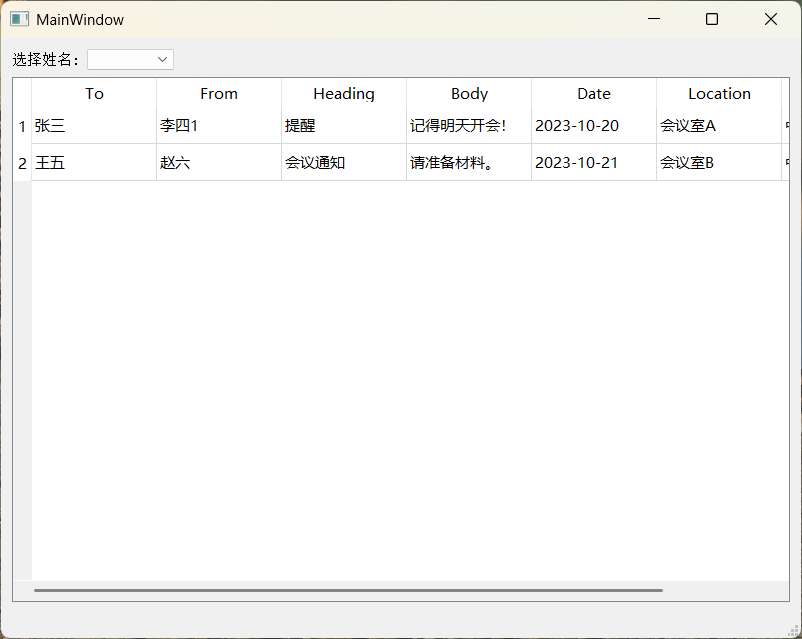
运行截图: