异步
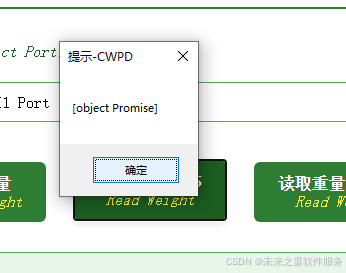
这个提示 [object Promise] 是因为你在 JS 里直接使用了 C# 插件返回的异步结果(Promise 对象),而没有等待它完成。
原因解析:
C# 插件的方法如果是异步执行 的(比如涉及 IO、硬件操作),在 JS 中调用时会返回一个Promise对象(代表 "待完成的操作")。如果直接把这个Promise对象显示出来,就会变成[object Promise]。
解决方法:
需要用 **then()** 或 async/await 来等待 Promise 完成,获取实际结果:
方式 1:用then()处理
javascript
运行
// 假设调用C#插件的方法是 callCSharpMethod()
callCSharpMethod()
  .then(result => {
    // 这里拿到的result是C#返回的实际数据
    alert("结果:" + result);
  })
  .catch(error => {
    alert("调用失败:" + error);
  });
方式 2:用async/await(更简洁)
javascript
运行
async function getCsharpResult() {
  try {
    const result = await callCSharpMethod(); // 等待Promise完成
    alert("结果:" + result);
  } catch (error) {
    alert("调用失败:" + error);
  }
}

// 调用这个异步函数
getCsharpResult();
额外注意:
如果 C# 插件本身不支持返回 Promise,可能是C# 方法被封装成了异步接口 (比如 Blazor 的IJSRuntime、COM 组件的异步回调),此时需要确保 JS 侧用异步方式接收结果。
要不要我帮你整理一份JS 调用 C# 异步方法的通用代码模板
S 接口可能是「回调函数风格」,而非 Promise 风格------ 毕竟早年的 JS 生态更依赖回调,Promise 虽已支持,但插件封装可能没跟进。
简单说:老版本里不是 "不能等",而是 "等待的方式不是 async/await 或 then ()",而是用 传统回调函数 来接收 C# 的返回结果!
关键区别:新环境 vs 旧环境(Chrome 53 场景)
| 环境(Chrome 版本) | C# 插件 JS 接口风格 | 等待 / 接收结果的方式 |
|---|---|---|
| Chrome 109+(新) | Promise 风格 | async/await 或 then () |
| Chrome 53(旧) | 回调函数风格 | 传入 success/fail 回调 |
Chrome 53 场景的解决方案:用回调函数接收结果
假设你之前调用的 C# 插件方法是 callCSharpMethod(),在 Chrome 53 里,它大概率是这样设计的(需要传入回调函数):
1. 基本用法(成功回调)
javascript
运行
// 调用 C# 插件方法,传入「成功时的回调函数」
callCSharpMethod(function(result) {
  // 这里的 result 就是 C# 返回的实际数据(回调触发时,说明 C# 已经执行完)
  alert("调用成功,结果:" + result);
});
2. 带失败处理的回调(更完整)
如果 C# 可能执行失败,插件通常会支持第二个回调参数(失败回调):
javascript
运行
// 第一个参数:C# 方法需要的入参(如果有的话)
// 第二个参数:成功回调(C# 执行完触发)
// 第三个参数:失败回调(C# 出错时触发)
callCSharpMethod(
  "传入C#的参数", // 可选,根据插件实际需求传
  function success(result) {
    alert("结果:" + result);
  },
  function fail(error) {
    alert("调用失败:" + error);
  }
);
为什么 Chrome 53 里没有 Promise 等待?
不是 Chrome 53 不支持 Promise(它支持),而是 老版 C# 插件的 JS 封装没用到 Promise------ 早年 JS 异步编程的主流是 "回调函数",插件开发者会优先用这种兼容更早浏览器的方式(比如甚至兼容 IE 等),而 Promise 风格是后来(Chrome 高版本、Manifest V3 等)才普及的。
如果你想在 Chrome 53 里用 async/await(可选)
如果觉得回调函数嵌套麻烦,也可以手动把 "回调风格" 封装成 Promise,这样就能用 await 了(Chrome 53 支持 Promise,所以可行):
javascript
运行
// 封装:把回调风格的方法转成 Promise 风格
function callCSharpWithPromise(param) {
  return new Promise(function(resolve, reject) {
    // 调用原有的回调式方法
    callCSharpMethod(
      param,
      function(result) { resolve(result); }, // 成功时 resolve
      function(error) { reject(error); }    // 失败时 reject
    );
  });
}

// 现在就能用 async/await 了!
async function getResult() {
  try {
    const result = await callCSharpWithPromise("传入C#的参数");
    alert("结果:" + result);
  } catch (error) {
    alert("失败:" + error);
  }
}

// 调用
getResult();
如果不想用C#怎么处理
你代码里 Register 方法的最后一个参数是 isAsync(是否异步) ,当前设为 true 时,JS 调用 C# 方法会返回 Promise(这就是你之前看到 [object Promise] 的核心原因);改成 false 后,C# 方法会以 同步 + 回调风格 暴露给 JS,完美适配 Chrome 53 这种旧环境(不需要 Promise 等待,直接用回调接收结果)。
修改后的代码(关键改最后一个参数为 false)
csharp
运行
// 所有 Register 的最后一个参数从 true 改为 false
灵体.JavascriptObjectRepository.Register("未来之窗", new 未来之窗插件(), false);

//CyberWin_JsStandardPlugV2005
灵体.JavascriptObjectRepository.Register("未来之窗插件2", new 未来之窗插件2(), false);

return;
传统调用方法
// 格式:插件名.方法名(入参1, 入参2, 成功回调, 失败回调)
CyberWin_APP.DoSomething(
  "参数1", // 传给 C# DoSomething 方法的第一个参数(根据实际需求传,可省略)
  "参数2", // 传给 C# 的第二个参数(可选)
  function(result) {
    // 成功回调:C# 执行完后触发,result 是 C# 返回的实际数据
    alert("调用成功:" + result);
  },
  function(error) {
    // 失败回调:C# 执行出错时触发(可选,根据需要加)
    alert("调用失败:" + error);
  }
);
阿雪技术观
在科技发展浪潮中,我们不妨积极投身技术共享。不满足于做受益者,更要主动担当贡献者。无论是分享代码、撰写技术博客,还是参与开源项目维护改进,每一个微小举动都可能蕴含推动技术进步的巨大能量。东方仙盟是汇聚力量的天地,我们携手在此探索硅基生命,为科技进步添砖加瓦。
Hey folks, in this wild tech - driven world, why not dive headfirst into the whole tech - sharing scene? Don't just be the one reaping all the benefits; step up and be a contributor too. Whether you're tossing out your code snippets, hammering out some tech blogs, or getting your hands dirty with maintaining and sprucing up open - source projects, every little thing you do might just end up being a massive force that pushes tech forward. And guess what? The Eastern FairyAlliance is this awesome place where we all come together. We're gonna team up and explore the whole silicon - based life thing, and in the process, we'll be fueling the growth of technology.