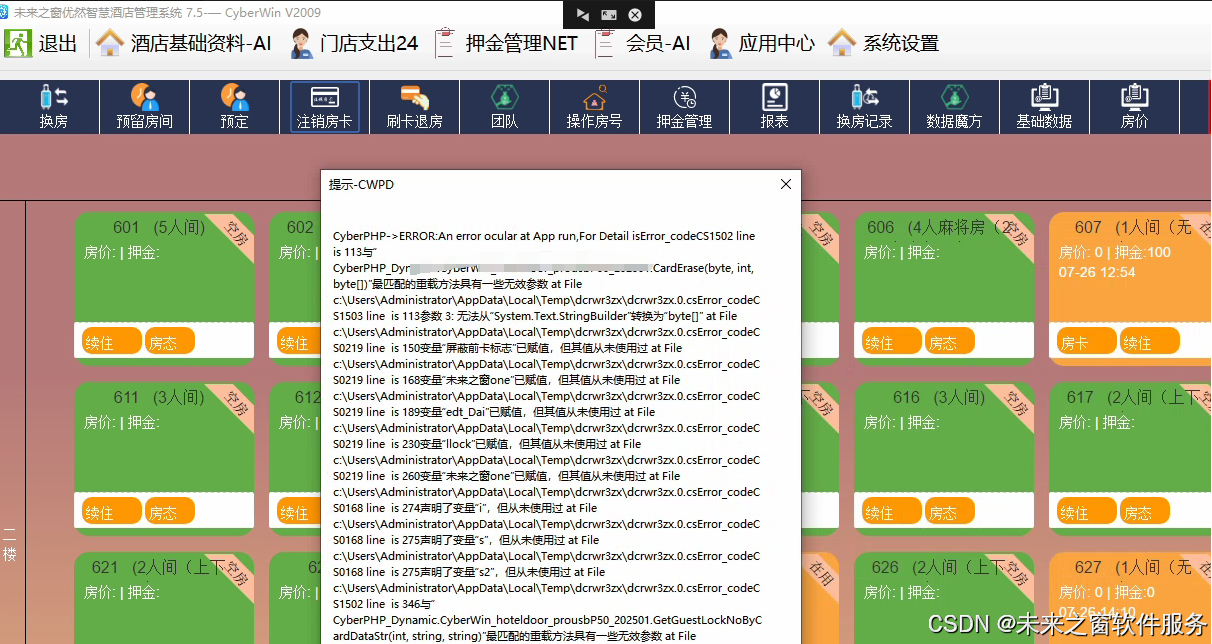
实现硬件交互(读卡、发卡、蜂鸣器等),而 TypeScript/Node.js 运行在 Node.js 环境中,无法直接调用 Windows 的 DLL 文件。因此转换方案分为两部分:
- 保留核心业务逻辑和数据处理部分,用 TypeScript 实现;
- 对于硬件交互的 DLL 调用部分,提供Node.js 调用本地 DLL 的方案(使用
ffi-napi库) 作为替代,同时标注需要适配的硬件交互逻辑。
一、环境准备
首先需要安装 Node.js 环境,然后安装依赖包:
bash
运行
# 初始化项目(如果没有package.json)
npm init -y

# 安装TypeScript及类型定义
npm install typescript @types/node --save-dev

# 安装调用DLL的依赖(仅Windows平台可用)
npm install ffi-napi ref-napi ref-struct-napi --save

# 安装处理URL参数的依赖(对应NameValueCollection)
npm install querystring --save
二、TypeScript 转换代码
创建文件hotelDoorLock.ts,代码如下:
typescript
运行
// 引入Node.js核心模块
import * as fs from 'fs';
import * as path from 'path';
import * as querystring from 'querystring';
import { promisify } from 'util';
// 引入调用DLL的库(仅Windows平台)
import ffi from 'ffi-napi';
import ref from 'ref-napi';

// -------------------------- 类型定义 --------------------------
// 对应C#的NameValueCollection(简化版,用对象模拟)
type NameValueCollection = { [key: string]: string | undefined };

// 模拟C#的CyberWinAPPProtocolPackage协议解析类
class Cl_CyberWinAPPProtocolPackage {
    private data: { [key: string]: string } = {};

    // 解析参数字符串(模拟原逻辑,可根据实际协议扩展)
    formatString(param: string): void {
        // 假设param是类似"hotelsign=123&lockno=456789&checkingouttime=2501010000"的格式
        const parsed = querystring.parse(param);
        for (const key in parsed) {
            this.data[key] = parsed[key] as string;
        }
    }

    // 获取解析后的参数
    get(key: string): string {
        return this.data[key] || '';
    }
}

// -------------------------- 硬件交互(DLL调用) --------------------------
// 定义DLL的类型(对应原C#的DllImport)
// 注意:需要根据DLL的实际导出函数签名调整类型,这里是模拟
const ProRFLV102024Dll = (() => {
    try {
        // 加载DLL文件(路径需与原C#一致,或调整为绝对路径)
        const dllPath = path.resolve(__dirname, 'CyberWinPHP/CyberPHP_Application/CyberWin_App/CyberWin_Hotdoorlock_proV10D202409/proRFLV102024.dll');
        return ffi.Library(dllPath, {
            // 函数签名:返回值类型,[参数类型列表]
            'Buzzer': ['int', ['byte', 'int']], // Buzzer(byte fUSB, int t)
            'initializeUSB': ['int', ['int']], // initializeUSB(int d12)
            'CloseUSB': ['void', []], // CloseUSB()
            'CardErase': ['int', ['int', 'int', 'string']], // CardErase(int d12, int dlsCoID, string CardNo)(模拟,原是StringBuilder)
            'GuestCard_原始': ['int', ['int', 'int', 'int', 'int', 'int', 'int', 'string', 'string', 'string', 'string']], // 模拟原函数
            'ReadCard_v10': ['int', ['byte', 'ref']], // ReadCard_v10(byte fUSB, byte[] Buffer)(ref表示指针)
        });
    } catch (err) {
        console.error('加载DLL失败:', err);
        // 返回空对象,避免程序崩溃(实际使用时需处理)
        return {} as any;
    }
})();

// -------------------------- 核心业务类 --------------------------
class APP {
    private carddata: Buffer = Buffer.alloc(128); // 对应原byte[128]
    private 身份证照片保存路径: string = '';
    public static bufCard: Buffer = Buffer.alloc(128 + 1); // 对应原静态变量
    public static bufCard_v10: Buffer = Buffer.alloc(200 + 1); // 对应原静态变量
    public static st: number = 0; // 对应原静态变量

    // 初始化USB设备(对应原initializeUSB)
    private initializeUSB(fUSB: number): number {
        if (!ProRFLV102024Dll.initializeUSB) {
            return -1; // 表示DLL加载失败
        }
        return ProRFLV102024Dll.initializeUSB(fUSB);
    }

    // 蜂鸣器(对应原Buzzer)
    private Buzzer(fUSB: number, t: number): number {
        if (!ProRFLV102024Dll.Buzzer) {
            return -1;
        }
        return ProRFLV102024Dll.Buzzer(fUSB, t);
    }

    // -------------------------- 原方法实现 --------------------------
    // 启动方法(对应原start)
    start(obj: NameValueCollection): string {
        const 参数1 = obj['param1'] || '';
        const s = '随机预安装插件';
        return s;
    }

    // 设备状态检测(对应原status)
    status(obj: NameValueCollection): string {
        this.Buzzer(1, 50); // 蜂鸣器
        return '当你听到设备蜂鸣器,说明设备已经连接';
    }

    // 退房注销卡片(对应原checkingout)
    checkingout(obj: NameValueCollection): string {
        let s = '注销卡片';
        const param = obj['param'] || '';

        // 解析协议参数
        const clApp = new Cl_CyberWinAPPProtocolPackage();
        clApp.formatString(param);
        const 酒店标识 = clApp.get('hotelsign');
        if (!酒店标识) {
            return s + ':酒店标识为空';
        }

        // 初始化USB设备
        const st读卡器 = this.initializeUSB(1); // 1表示proUSB
        if (st读卡器 !== 0) {
            console.log('设备打开失败');
            return '打开端口失败';
        }

        // 调用注销卡片函数(模拟原CardErase,原是StringBuilder,这里用字符串模拟)
        const CardNostr = ''; // 实际使用时需传入正确的卡号缓冲区
        const st = ProRFLV102024Dll.CardErase
            ? ProRFLV102024Dll.CardErase(1, parseInt(酒店标识), CardNostr)
            : -1;

        if (st !== 0) {
            s += ':注销失败' + st.toString();
            console.log(`注销失败:${st}`);
        } else {
            s += ':成功';
        }

        // 关闭USB(原代码未显式关闭,这里补充最佳实践)
        ProRFLV102024Dll.CloseUSB && ProRFLV102024Dll.CloseUSB();

        return s;
    }

    // 入住发卡(对应原checkingin)
    checkingin(obj: NameValueCollection): string {
        let s = '酒店入住发卡';
        const param = obj['param'] || '';

        // 解析协议参数
        const clApp = new Cl_CyberWinAPPProtocolPackage();
        clApp.formatString(param);
        const 锁号服务器 = clApp.get('lockno');
        const 酒店标识 = clApp.get('hotelsign');
        const 退房时间服务器 = clApp.get('checkingouttime');

        // 校验锁号长度
        if (锁号服务器.length < 6) {
            console.log(`锁号长度错误=${锁号服务器}`);
            return s + ':锁号长度错误';
        }

        // 初始化USB设备
        const st = this.initializeUSB(1);
        if (st !== 0) {
            console.log('设备打开失败');
            return '打开端口失败';
        }

        // 构造参数
        const 开房时间s = new Date().toLocaleString('zh-CN', {
            year: '2-digit',
            month: '2-digit',
            day: '2-digit',
            hour: '2-digit',
            minute: '2-digit',
            second: '2-digit',
        }).replace(/[^\d]/g, ''); // 模拟yyMMddHHmmss格式
        const 反锁标志 = 1;
        const dai = 1; // 对应原dai变量

        // 调用发卡函数(模拟原GuestCard_原始)
        const sa1_V10字符串 = ''; // 实际使用时需传入缓冲区
        const stCard = ProRFLV102024Dll.GuestCard_原始
            ? ProRFLV102024Dll.GuestCard_原始(
                1,
                parseInt(酒店标识),
                0,
                dai,
                反锁标志,
                0,
                开房时间s,
                退房时间服务器,
                锁号服务器,
                sa1_V10字符串
            )
            : -1;

        if (stCard !== 0) {
            s += '调用发卡函数失败';
            console.log(`调用发卡函数失败:${stCard}`);
        } else {
            s += `制卡成功V2024${锁号服务器}`;
        }

        // 关闭USB
        ProRFLV102024Dll.CloseUSB && ProRFLV102024Dll.CloseUSB();

        return s;
    }

    // 读取酒店标识(对应原getsign)
    getsign(obj: NameValueCollection): string {
        // 调用读卡函数(模拟原rdCard_v10)
        if (!this.rdCard_v10()) {
            return '读卡失败';
        }

        // 调用解析函数获取酒店标识
        const 酒店标识 = CyberWin_LocakAPP.未来之窗_美萍_getsign(APP.bufCard_v10);
        return 酒店标识;
    }

    // 读卡v10(对应原rdCard_v10)
    private rdCard_v10(): boolean {
        if (!ProRFLV102024Dll.ReadCard_v10) {
            console.log('读卡函数未找到');
            return false;
        }

        // 调用DLL的ReadCard_v10(ref表示传递缓冲区指针)
        APP.st = ProRFLV102024Dll.ReadCard_v10(1, ref.ref(APP.bufCard_v10));
        if (APP.st !== 0) {
            console.log(`读卡失败${APP.st}`);
            return false;
        }
        return true;
    }

    // 写日志(对应原write_log)
    public static write_log(capturetype: string, type: string, s: string): void {
        // 构造日志路径(Node.js中替换Application.StartupPath为__dirname)
        const dateStr = new Date().toLocaleDateString('zh-CN').replace(/\//g, '-');
        const logPath = path.join(__dirname, 'log', capturetype, dateStr);

        // 创建目录(同步)
        if (!fs.existsSync(logPath)) {
            fs.mkdirSync(logPath, { recursive: true });
        }

        // 日志文件路径
        const 文件路径 = path.join(logPath, `${type}_log.log`);

        // 写入日志(追加模式)
        const logContent = `==============================\n${new Date().toLocaleString()}<<<<<<<<<<<<<<<<<<<<<<<<<<\n${s}\n\n`;
        fs.appendFileSync(文件路径, logContent, 'utf8');
    }
}

// -------------------------- 辅助类(对应原CyberWin_LocakAPP) --------------------------
class CyberWin_LocakAPP {
    // 解析酒店标识(对应原未来之窗_美萍_getsign)
    public static 未来之窗_美萍_getsign(bufCard: Buffer): string {
        const 未来之窗 = bufCard.toString('ascii'); // 对应Encoding.ASCII.GetString

        // 检查是否为空白卡
        if (CyberWin_LocakAPP.Copy(bufCard, 25, 8) === 'FFFFFFFF') {
            console.log('此卡是空白卡,请换一张能开门的卡');
            return '此卡是空白卡,请换一张能开门的卡';
        }

        // 解析酒店标识(保留原逻辑)
        const s = CyberWin_LocakAPP.Copy(bufCard, 11, 4);
        let i = parseInt(s, 16) % 16384;
        const s2 = CyberWin_LocakAPP.Copy(bufCard, 9, 2);
        i = i + (parseInt(s, 16) * 65536);

        const i2 = parseInt(CyberWin_LocakAPP.Copy(bufCard, 9, 2), 16) * 65536 + parseInt(CyberWin_LocakAPP.Copy(bufCard, 11, 4), 16) % 16383;
        const 酒店标识 = i2.toString();

        return 酒店标识;
    }

    // 字符串截取(对应原Copy方法)
    public static Copy(字符串: Buffer, 开始: number, 长度: number): string {
        const 完整 = 字符串.toString('ascii');
        开始 = 开始 < 1 ? 1 : 开始;
        return 完整.substring(开始 - 1, 开始 - 1 + 长度);
    }
}

// -------------------------- 测试代码(可选) --------------------------
// 模拟调用示例
const app = new APP();
// 测试状态检测
console.log(app.status({}));
// 测试退房(模拟参数)
console.log(app.checkingout({ param: 'hotelsign=123456' }));
// 测试入住(模拟参数)
console.log(app.checkingin({ param: 'hotelsign=123456&lockno=123456&checkingouttime=2501010000' }));

// 导出类供其他模块使用
export { APP, CyberWin_LocakAPP };
三、关键代码解释
- 类型模拟 :用
NameValueCollection类型模拟 C# 的同名集合,用 - DLL 调用 :使用
ffi-napi库加载 Windows DLL,模拟原 C# 的DllImport,注意函数签名需要与 DLL 实际导出的一致(代码中是模拟,需根据实际 DLL 调整)。 - 核心业务逻辑 :保留原有的入住发卡、退房注销、读卡、写日志等逻辑,适配 TypeScript 的语法和 Node.js 的 API(如
fs模块写日志、path模块处理路径)。 - 硬件交互适配 :原 C# 的
byte[]缓冲区用 Node.js 的Buffer替代,StringBuilder用字符串模拟(实际使用时需用ref库处理指针)。
四、编译与运行
- 创建
tsconfig.json文件(TypeScript 配置):
json
{
    "compilerOptions": {
        "target": "ES6",
        "module": "CommonJS",
        "outDir": "./dist",
        "strict": true,
        "esModuleInterop": true
    },
    "include": ["*.ts"]
}- 编译 TypeScript 代码:
bash
运行
npx tsc- 运行编译后的 JS 代码:
bash
运行
node dist/hotelDoorLock.js阿雪技术观
在科技发展浪潮中,我们不妨积极投身技术共享。不满足于做受益者,更要主动担当贡献者。无论是分享代码、撰写技术博客,还是参与开源项目维护改进,每一个微小举动都可能蕴含推动技术进步的巨大能量。东方仙盟是汇聚力量的天地,我们携手在此探索硅基生命,为科技进步添砖加瓦。
Hey folks, in this wild tech - driven world, why not dive headfirst into the whole tech - sharing scene? Don't just be the one reaping all the benefits; step up and be a contributor too. Whether you're tossing out your code snippets, hammering out some tech blogs, or getting your hands dirty with maintaining and sprucing up open - source projects, every little thing you do might just end up being a massive force that pushes tech forward. And guess what? The Eastern FairyAlliance is this awesome place where we all come together. We're gonna team up and explore the whole silicon - based life thing, and in the process, we'll be fueling the growth of technology.