在 React 中实现数学公式显示:使用 KaTeX 和 react-katex
前言
在 Web 应用中显示数学公式一直是一个挑战。传统的图片方式不够灵活,而使用 LaTeX 渲染引擎可以在浏览器中直接渲染高质量的数学公式。本文将介绍如何在 React 项目中使用 react-katex 和 katex 库来实现数学公式的显示。
技术选型
KaTeX 简介
KaTeX 是一个快速、易于使用的 JavaScript 库,用于在 Web 上渲染 TeX 数学公式。相比 MathJax,KaTeX 具有以下优势:
- 性能优异:渲染速度更快,适合实时渲染
- 体积小巧:打包后的体积相对较小
- 无依赖:不依赖其他库
- 样式统一:渲染结果在不同浏览器中表现一致
react-katex
react-katex 是 KaTeX 的 React 封装,提供了两个核心组件:
InlineMath:用于行内公式BlockMath:用于块级公式
项目搭建
1. 安装依赖
首先,我们需要安装必要的依赖包:
bash
npm install katex react-katex或者使用 yarn:
bash
yarn add katex react-katex2. 导入样式
KaTeX 需要引入对应的 CSS 样式文件才能正确显示公式。在组件中导入:
typescript
import 'katex/dist/katex.min.css';实现步骤
创建 Formula 组件
让我们创建一个 Formula 组件来展示数学公式:
typescript
import React from 'react';
import { BlockMath, InlineMath } from 'react-katex';
import 'katex/dist/katex.min.css';

const Formula: React.FC = () => {
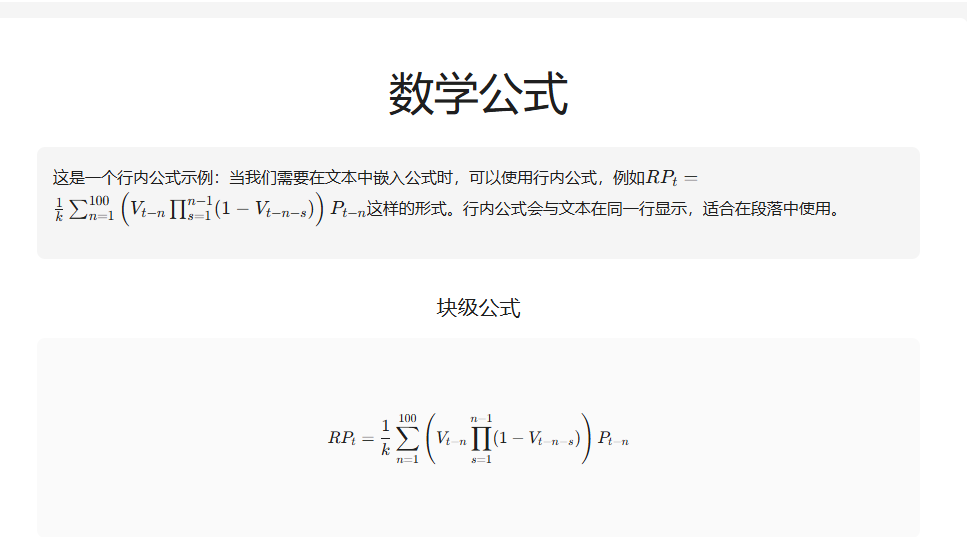
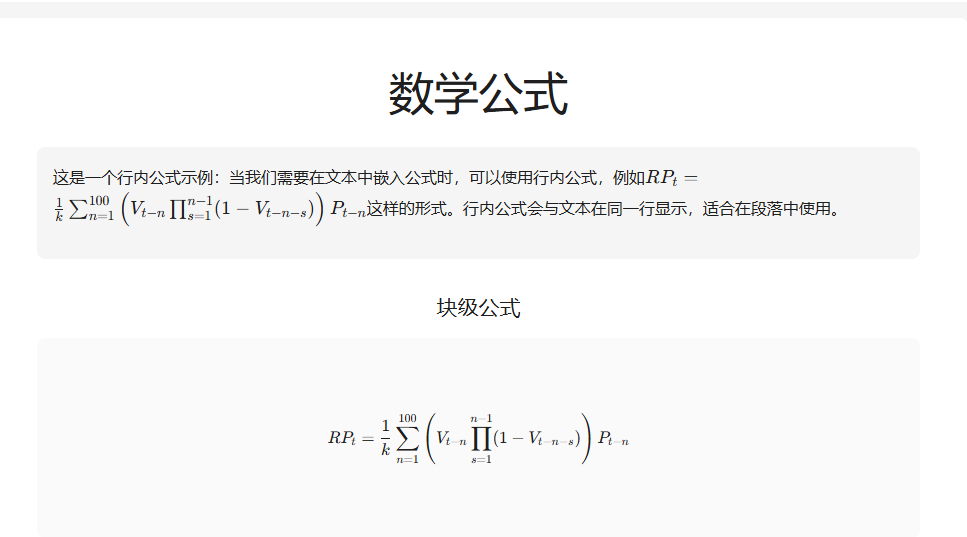
  const formula = `RP_t = \\frac{1}{k} \\sum_{n=1}^{100} \\left( V_{t-n} \\prod_{s=1}^{n-1} (1 - V_{t-n-s}) \\right) P_{t-n}`;

  return (
    <div style={{ padding: '24px' }}>
      <h1 style={{ marginBottom: '32px', textAlign: 'center' }}>数学公式</h1>

      {/* 行内公式示例 */}
      <div style={{ marginBottom: '32px', padding: '16px', backgroundColor: '#f5f5f5', borderRadius: '8px' }}>
        <p style={{ fontSize: '16px', lineHeight: '1.8' }}>
          这是一个行内公式示例:当我们需要在文本中嵌入公式时,可以使用行内公式,例如
          <InlineMath math={formula} />
          这样的形式。行内公式会与文本在同一行显示,适合在段落中使用。
        </p>
      </div>

      {/* 块级公式 */}
      <div style={{ textAlign: 'center' }}>
        <h2 style={{ marginBottom: '16px' }}>块级公式</h2>
        <div style={{
          display: 'flex',
          justifyContent: 'center',
          alignItems: 'center',
          minHeight: '200px',
          padding: '20px',
          backgroundColor: '#fafafa',
          borderRadius: '8px'
        }}>
          <BlockMath math={formula} />
        </div>
      </div>
    </div>
  );
};

export default Formula;
组件说明
InlineMath 组件
InlineMath 用于在文本行内显示公式,适合在段落中嵌入数学表达式:
typescript
<InlineMath math="E = mc^2" />特点:
- 公式与文本在同一行显示
- 自动调整高度以适应文本行高
- 适合简单的数学表达式
BlockMath 组件
BlockMath 用于显示独立的块级公式,通常居中显示:
typescript
<BlockMath math="\\int_{-\\infty}^{\\infty} e^{-x^2} dx = \\sqrt{\\pi}" />特点:
- 公式独占一行,居中显示
- 适合复杂的数学公式
- 视觉效果更突出
LaTeX 语法示例
KaTeX 支持大部分 LaTeX 数学语法,以下是一些常用示例:
分数
typescript
<InlineMath math="\\frac{a}{b}" />渲染结果: a b \frac{a}{b} ba
上下标
typescript
<InlineMath math="x^2 + y_1" />渲染结果: x 2 + y 1 x^2 + y_1 x2+y1
求和与积分
typescript
<BlockMath math="\\sum_{i=1}^{n} i = \\frac{n(n+1)}{2}" />
typescript
<BlockMath math="\\int_{0}^{\\infty} e^{-x} dx = 1" />矩阵
typescript
<BlockMath math="\\begin{pmatrix} a & b \\\\ c & d \\end{pmatrix}" />希腊字母
typescript
<InlineMath math="\\alpha, \\beta, \\gamma, \\pi, \\theta" />渲染结果: α , β , γ , π , θ \alpha, \beta, \gamma, \pi, \theta α,β,γ,π,θ
实际应用场景
1. 学术论文展示
在展示学术内容时,数学公式是必不可少的:
typescript
const Formula: React.FC = () => {
  const theorem = `\\forall \\epsilon > 0, \\exists \\delta > 0 : |x - a| < \\delta \\implies |f(x) - L| < \\epsilon`;

  return (
    <div>
      <h3>极限定义</h3>
      <BlockMath math={theorem} />
    </div>
  );
};
2. 数据科学可视化
在数据科学应用中,经常需要展示统计公式:
typescript
const StatisticalFormula: React.FC = () => {
  const mean = `\\bar{x} = \\frac{1}{n} \\sum_{i=1}^{n} x_i`;
  const variance = `s^2 = \\frac{1}{n-1} \\sum_{i=1}^{n} (x_i - \\bar{x})^2`;

  return (
    <div>
      <p>样本均值:<InlineMath math={mean} /></p>
      <p>样本方差:<InlineMath math={variance} /></p>
    </div>
  );
};
3. 物理公式展示
物理公式通常比较复杂,适合使用块级公式:
typescript
const PhysicsFormula: React.FC = () => {
  const schrodinger = `i\\hbar\\frac{\\partial}{\\partial t}\\Psi(\\mathbf{r},t) = \\hat{H}\\Psi(\\mathbf{r},t)`;

  return <BlockMath math={schrodinger} />;
};
样式定制
自定义公式样式
可以通过 CSS 来自定义公式的显示样式:
css
.katex {
  font-size: 1.2em;
}

.katex-display {
  margin: 1.5em 0;
  padding: 1em;
  background-color: #f9f9f9;
  border-left: 4px solid #1890ff;
}
响应式设计
为了在不同设备上都有良好的显示效果,可以使用响应式样式:
typescript
<div style={{
  overflowX: 'auto',
  padding: '10px'
}}>
  <BlockMath math={longFormula} />
</div>
注意事项
1. 转义字符
在 JavaScript 字符串中,反斜杠 \ 是转义字符,因此 LaTeX 命令中的单个反斜杠需要写成双反斜杠:
typescript
// 正确
const formula = `\\frac{a}{b}`;

// 错误
const formula = `\frac{a}{b}`;
2. 性能优化
对于大量公式的场景,可以考虑:
- 使用
React.memo包装组件,避免不必要的重渲染 - 延迟加载公式组件
- 使用虚拟滚动(如果公式列表很长)
typescript
const Formula = React.memo(({ math }: { math: string }) => {
  return <BlockMath math={math} />;
});
3. 错误处理
KaTeX 在遇到无法解析的公式时会抛出错误,建议添加错误处理:
typescript
import { BlockMath } from 'react-katex';
import { ErrorBoundary } from 'react-error-boundary';

const SafeFormula: React.FC<{ math: string }> = ({ math }) => {
  return (
    <ErrorBoundary fallback={<div>公式渲染错误</div>}>
      <BlockMath math={math} />
    </ErrorBoundary>
  );
};
完整示例
以下是一个完整的示例,展示了如何在实际项目中使用:
typescript
import React, { useState } from 'react';
import { BlockMath, InlineMath } from 'react-katex';
import 'katex/dist/katex.min.css';

const FormulaDemo: React.FC = () => {
  const [formula, setFormula] = useState('E = mc^2');

  const formulas = [
    'E = mc^2',
    '\\int_{-\\infty}^{\\infty} e^{-x^2} dx = \\sqrt{\\pi}',
    '\\sum_{i=1}^{n} i = \\frac{n(n+1)}{2}',
    '\\frac{d}{dx}\\left( \\int_{0}^{x} f(u)\\,du\\right)=f(x)'
  ];

  return (
    <div style={{ padding: '24px' }}>
      <h1>数学公式演示</h1>

      <div style={{ marginBottom: '24px' }}>
        <label>选择公式:</label>
        <select
          value={formula}
          onChange={(e) => setFormula(e.target.value)}
          style={{ marginLeft: '10px', padding: '5px' }}
        >
          {formulas.map((f, i) => (
            <option key={i} value={f}>公式 {i + 1}</option>
          ))}
        </select>
      </div>

      <div style={{
        padding: '20px',
        backgroundColor: '#f5f5f5',
        borderRadius: '8px',
        marginBottom: '20px'
      }}>
        <h3>行内显示:</h3>
        <p>这是公式 <InlineMath math={formula} /> 的行内显示效果。</p>
      </div>

      <div style={{
        padding: '20px',
        backgroundColor: '#fafafa',
        borderRadius: '8px',
        textAlign: 'center'
      }}>
        <h3>块级显示:</h3>
        <BlockMath math={formula} />
      </div>
    </div>
  );
};

export default FormulaDemo;
总结
使用 react-katex 在 React 中显示数学公式非常简单高效:
- 安装依赖 :
npm install katex react-katex - 导入样式 :
import 'katex/dist/katex.min.css' - 使用组件 :
<InlineMath>或<BlockMath> - 编写 LaTeX:使用标准的 LaTeX 数学语法
这种方法不仅性能优秀,而且渲染质量高,非常适合在 Web 应用中展示数学内容。无论是学术网站、教育平台还是数据可视化应用,都能很好地满足需求。
参考资源
本文基于 React 19.2.3 和 react-katex 3.1.0 编写