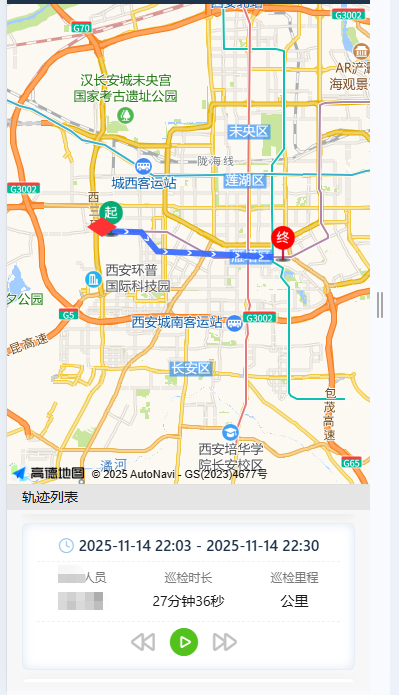
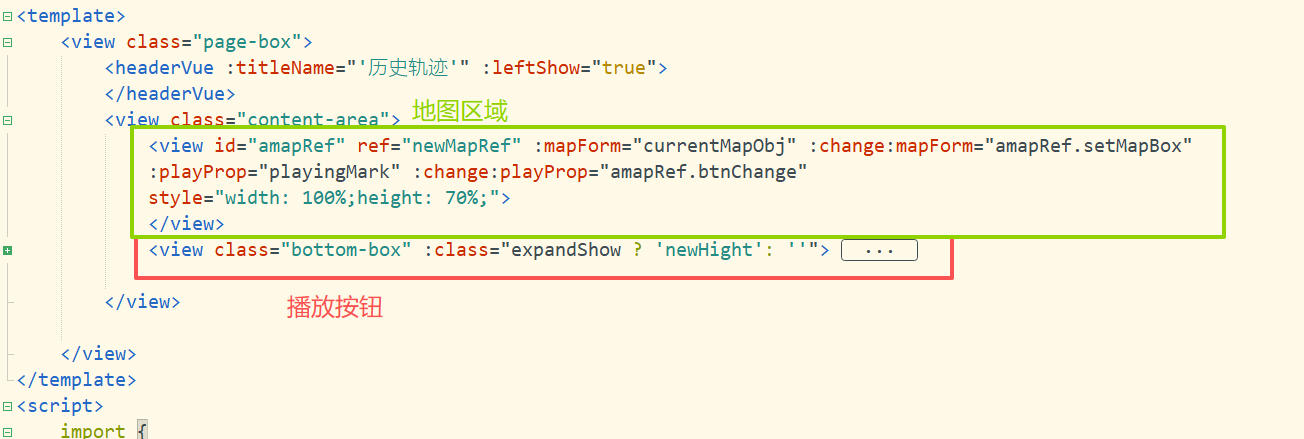
1、地图节点view对应的id是amapRef,使用给组件传值(类似于props)的方式给地图传入需要渲染的数据(即mapForm是地图中接收传入数据的参数,currentMapObj是传递给地图的数据),
2、当数据传入后,会触发setMapBox方法 ,:change:xxx(接收数据的参数名)="aaa.bbb(renderjs对应的module名.renderjs中的方法名)" :change:mapForm="amapRef.setMapBox"
3、引入import AMapLoader from '@amap/amap-jsapi-loader';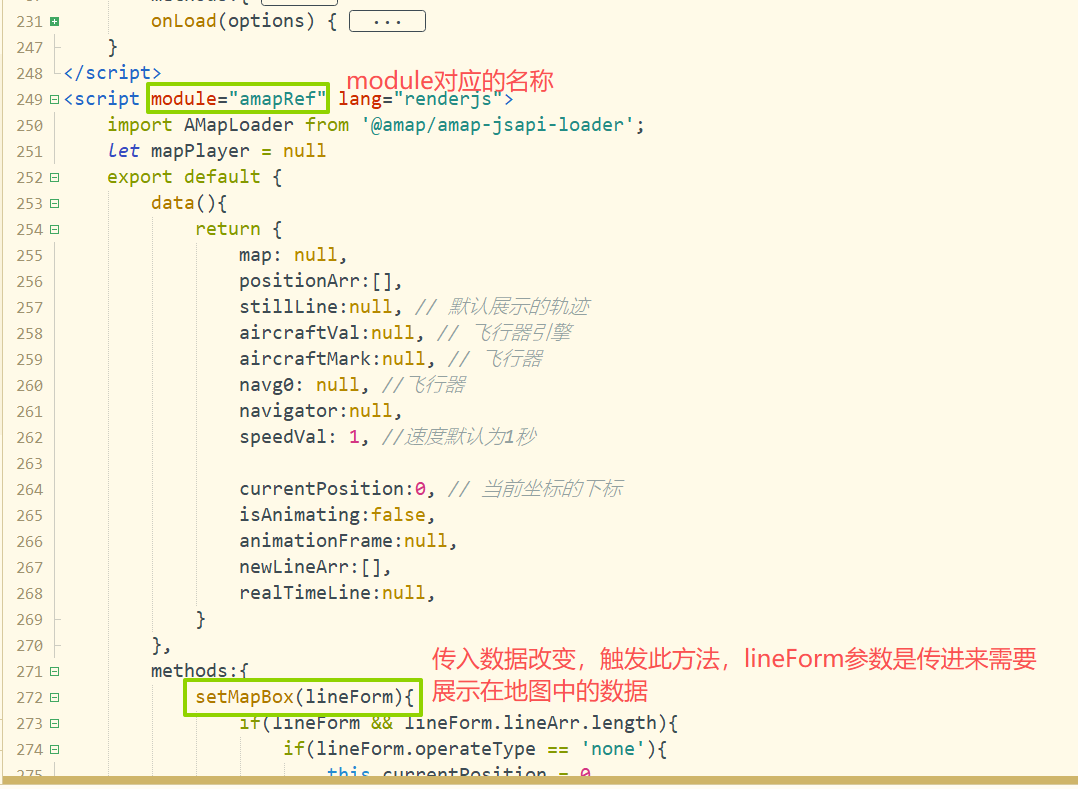
完整代码script
javascript
<script module="amapRef" lang="renderjs">
	import AMapLoader from '@amap/amap-jsapi-loader';
	let mapPlayer = null
	export default {
		data(){
			return {
				map: null,
				positionArr:[],
				stillLine:null, // 默认展示的轨迹
				aircraftVal:null, // 飞行器引擎
				aircraftMark:null, // 飞行器
				navg0: null, //飞行器
				navigator:null,
				speedVal: 1, //速度默认为1秒

				currentPosition:0, // 当前坐标的下标
				isAnimating:false,
				animationFrame:null,
				newLineArr:[],
				realTimeLine:null,
			}
		},
		methods:{
			setMapBox(lineForm){
				if(lineForm && lineForm.lineArr.length){
					if(lineForm.operateType == 'none'){
						this.currentPosition = 0
						if(this.realTimeLine){
							this.realTimeLine.setPath(null)
							this.newLineArr =[]
						}
						this.$nextTick(() =>{
							if(window.AMap){
								this.initMap(lineForm)
							}else{
								const script = document.createElement('script');
								script.src = 'https://webapi.amap.com/maps?v=1.4.15&key=xxxxxxxxxxxxxxxxxxxxxxxxxxxxx';
								script.onload = () => {
								  this.initMap(lineForm);
								}
								document.head.appendChild(script);
							}
						})
					}else if(lineForm.operateType == 'play'){
						this.btnChange(lineForm)
					}
				}else{
					this.$nextTick(() =>{
						if(window.AMap){
							this.initMap(null)
						}else{
							const script = document.createElement('script');
							script.src = 'https://webapi.amap.com/maps?v=1.4.15&key=xxxxxxxxxxxxxxxxxxxxxxxxxx';
							script.onload = () => {
							  this.initMap(null);
							}
							document.head.appendChild(script);
						}
					})
				}

			},
			initMap(lineForm){
				this.map = new AMap.Map('amapRef', {
					resizeEnable: true,
					center:lineForm ? lineForm.centerPosition : [108.95,34.26],
					zoom: 13,
					showMapLogo:false,
					logoPosition:'none',
				});

				this.map.on('click',() => {
				})
				if(lineForm) this.addLine(lineForm);
			},

			addLine(lineForm){
				// let arr = lineForm.lineArr.map(ele => [Number(ele[0]),Number(ele[1])])
				this.positionArr = lineForm.lineArr
				this.initAirCraft()
				this.stillLine = new AMap.Polyline({
					map: this.map,
					strokeColor: "#98b4ff", //线颜色
					strokeWeight: 6, //线宽
					showDir: true,
					path: lineForm.lineArr,
				});
				new AMap.Marker({
				  position: this.positionArr[0],
				  zIndex:5,
				  icon:new AMap.Icon({
					  image:require(`static/images/onSiteInspection/start.png`),
					  imageSize:[36,36],
				  }),
				  map: this.map
				});
				new AMap.Marker({
				  position: this.positionArr[this.positionArr.length-1],
				  zIndex:5,
				  icon:new AMap.Icon({
					  image:require(`static/images/onSiteInspection/end.png`),
					  imageSize:[36,36],
				  }),
				  map: this.map
				});
				// 回放轨迹
				this.realTimeLine = new AMap.Polyline({
					map: this.map,
					strokeColor: "#3366FF", //线颜色
					strokeWeight: 6, //线宽
					showDir: true,
					extData:{
						id:'realTime'
					}
				})
				this.map.setFitView();
			},
			// 创建飞行器
			initAirCraft(){
				const aircraftIcon = new AMap.Icon({
					size: new AMap.Size(24, 24),
					image: require(`static/images/onSiteInspection/air.png`),
					imageSize: new AMap.Size(24, 24)
				})
				// 创建飞行器标记
				this.aircraftVal = new AMap.Marker({
					position: this.positionArr[0],
					icon: aircraftIcon,
					offset: new AMap.Pixel(-10, -10),
					zIndex: 100,
					angle: 0
				})
				this.map.add([this.aircraftVal])
			},

			btnChange(val){
				this.isAnimating = val.playingFlag
				if(val.playingFlag) {
					if(this.currentPosition == this.positionArr.length - 1){
						this.currentPosition = 0
						if(this.realTimeLine){
							this.realTimeLine.setPath(null)
							this.newLineArr =[]
						}
					}
					this.animateFlight()

				}else{
					if (this.animationFrame) {
						cancelAnimationFrame(this.animationFrame)
					}
				}
			},

			 // 飞行动画
			animateFlight() {
				if(this.currentPosition == this.positionArr.length - 1){
					if (this.animationFrame) cancelAnimationFrame(this.animationFrame)
					this.$ownerInstance.callMethod('reciveMessage', false)
				}
				if (!this.isAnimating || this.currentPosition >= this.positionArr.length - 1) {
					this.isAnimating = false
					return
				}


			  // 当前坐标的下标
			  this.currentPosition = Math.min(this.currentPosition + this.speedVal*0.5, this.positionArr.length - 1)

			  const currentPoint = this.positionArr[Math.floor(this.currentPosition)]
			  const nextPoint = this.positionArr[Math.floor(this.currentPosition) + 1] || currentPoint

			  // 更新飞行器位置
			  this.updateAircraftPosition(currentPoint, nextPoint)
			  this.addRealLine(currentPoint)

			  // 继续动画
			  this.animationFrame = requestAnimationFrame(() => {
				this.animateFlight()
			  })
			},
			updateAircraftPosition(currentPoint, nextPoint){
				if (!this.aircraftVal) return
				// 设置位置
				this.aircraftVal.setPosition([currentPoint.lng, currentPoint.lat])

				// 计算飞行方向角度
				const angle = this.calculateBearing(
					currentPoint.lng, currentPoint.lat,
					nextPoint.lng, nextPoint.lat
				)

				// 设置角度
				this.aircraftVal.setAngle(angle)

				// 更新地图中心点(跟随飞行器)
				this.map.setCenter([currentPoint.lng, currentPoint.lat])

				// 更新地图俯仰角度(模拟3D飞行效果)
				const pitch = 60
				this.map.setPitch(Math.min(pitch, 80))
			},
			calculateBearing(lng1, lat1, lng2, lat2) {
			    const dLng = (lng2 - lng1) * Math.PI / 180
			    const lat1Rad = lat1 * Math.PI / 180
			    const lat2Rad = lat2 * Math.PI / 180

			    const y = Math.sin(dLng) * Math.cos(lat2Rad)
			    const x = Math.cos(lat1Rad) * Math.sin(lat2Rad) -
			                Math.sin(lat1Rad) * Math.cos(lat2Rad) * Math.cos(dLng)

			    let bearing = Math.atan2(y, x) * 180 / Math.PI
			    return (bearing + 360) % 360
			},
			addRealLine(point){
				this.newLineArr.push([point.lng,point.lat])
				this.realTimeLine.setPath(this.newLineArr)
			},
		},
		mounted(){

		},
		onLoad() {


		}

	}
</script>