标准的分页实现
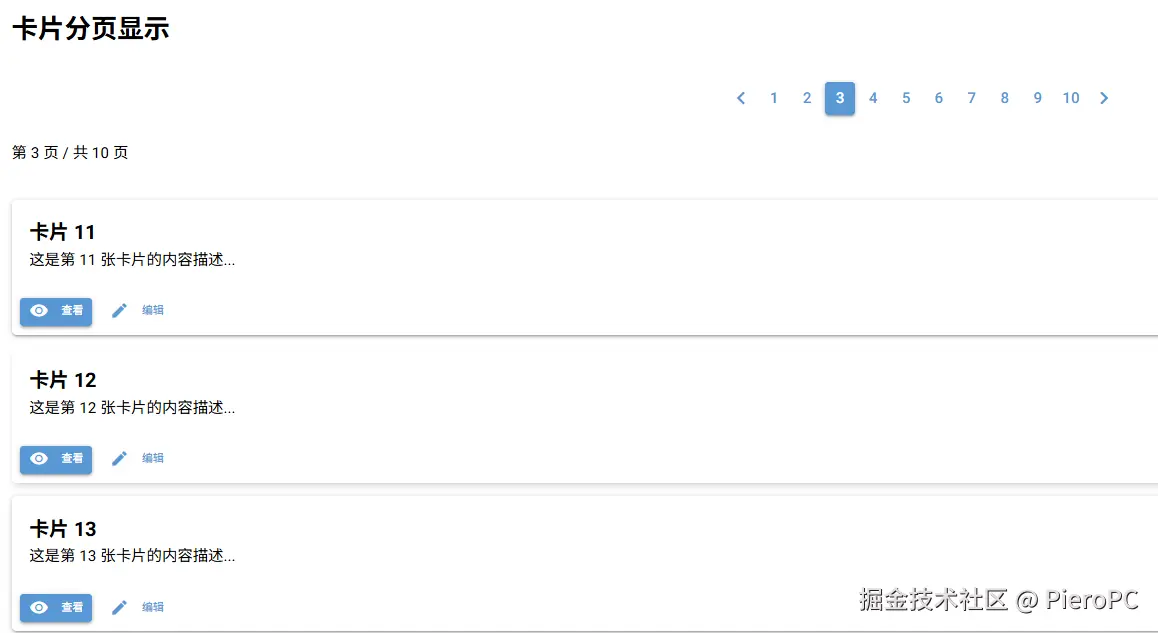
python
from nicegui import ui

class StandardPagination:
    def __init__(self):
        # 模拟数据
        self.all_items = [f'卡片 {i+1}' for i in range(50)]

        # 分页参数
        self.current_page = 1
        self.items_per_page = 5
        self.total_items = len(self.all_items)
        self.total_pages = (self.total_items + self.items_per_page - 1) // self.items_per_page

        # 创建界面
        self.create_ui()

    def create_ui(self):
        # 标题
        ui.label('卡片分页显示').classes('text-2xl font-bold mb-4')

        # 分页控件
        with ui.row().classes('w-full justify-center'):
            # 使用正确的参数顺序
            self.pagination = ui.pagination(
                1,  # min
                self.total_pages,  # max
                direction_links=True,  # 显示上一页/下一页
                value=self.current_page,  # 当前页码
                on_change=self.on_page_change
            )

        # 显示当前页码
        ui.label().bind_text_from(
            self.pagination, 'value',
            lambda v: f'第 {v} 页 / 共 {self.total_pages} 页'
        ).classes('text-center mt-2')

        # 卡片容器
        self.cards_container = ui.column().classes('w-full gap-3 mt-4')

        # 加载初始数据
        self.load_cards()

    def on_page_change(self, e):
        self.current_page = e.value
        self.load_cards()

    def load_cards(self):
        """加载当前页的卡片"""
        # 清除旧卡片
        self.cards_container.clear()

        # 计算当前页的数据范围
        start_idx = (self.current_page - 1) * self.items_per_page
        end_idx = min(start_idx + self.items_per_page, self.total_items)

        # 创建新卡片
        for i in range(start_idx, end_idx):
            with self.cards_container:
                with ui.card().tight().classes('w-full hover:shadow-md transition-shadow'):
                    with ui.card_section():
                        ui.label(f'{self.all_items[i]}').classes('text-lg font-bold')
                        ui.label(f'这是第 {i+1} 张卡片的内容描述...')
                    with ui.card_actions():
                        ui.button('查看', icon='visibility').props('size=sm')
                        ui.button('编辑', icon='edit').props('size=sm flat')

# 运行应用
StandardPagination()
ui.run()
增强版:带搜索和每页数量选择
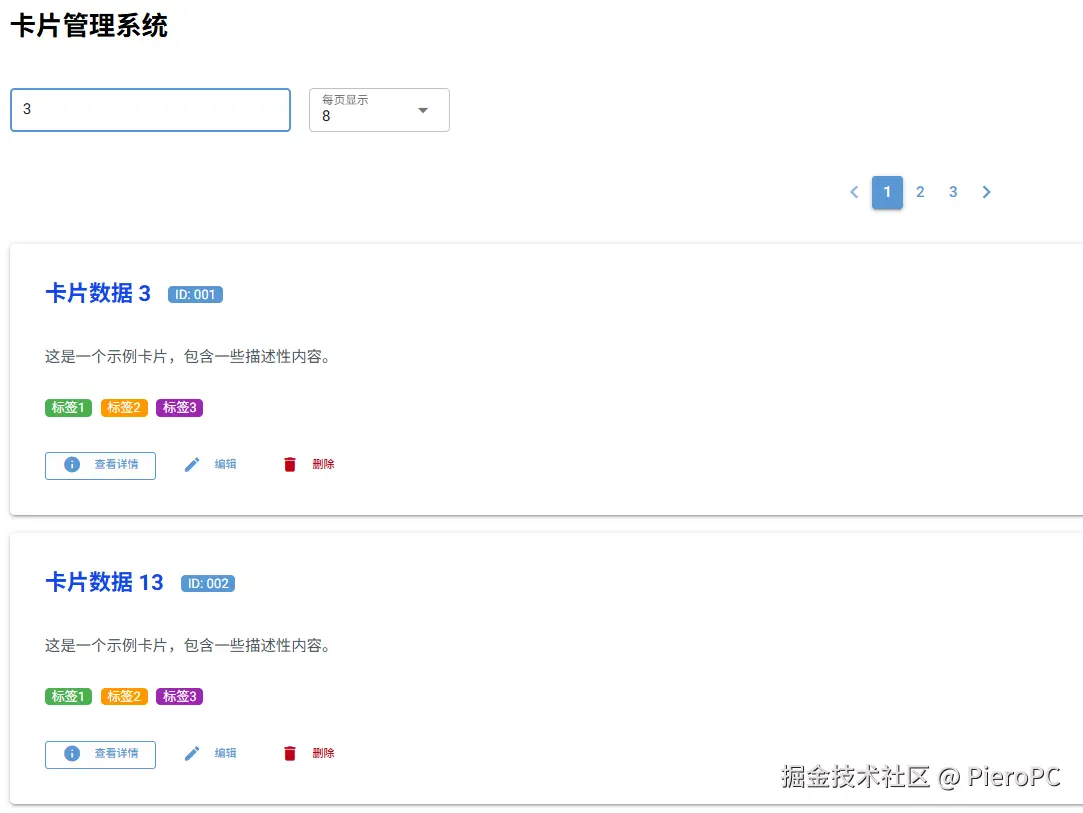
python
from nicegui import ui

class EnhancedPagination:
    def __init__(self):
        self.all_items = [f'卡片数据 {i+1}' for i in range(100)]
        self.filtered_items = self.all_items.copy()

        self.current_page = 1
        self.items_per_page = 8
        self.total_pages = 1

        self.create_ui()
        self.update_pagination()

    def create_ui(self):
        # 标题
        ui.label('卡片管理系统').classes('text-2xl font-bold mb-6')

        # 搜索和设置区域
        with ui.row().classes('w-full items-center mb-6'):
            # 搜索框
            self.search_input = ui.input(
                placeholder='输入关键词搜索...',
                on_change=self.on_search
            ).props('outlined dense').classes('w-64')

            # 每页数量选择
            self.page_size_select = ui.select(
                [4, 8, 12, 20],
                value=self.items_per_page,
                on_change=self.on_page_size_change,
                label='每页显示'
            ).props('outlined dense').classes('w-32')

            # 统计信息
            self.stats_label = ui.label('').classes('ml-auto')

        # 分页控件
        with ui.row().classes('w-full justify-center mb-4'):
            self.pagination = ui.pagination(
                1,  # min
                1,  # max (初始值,后面更新)
                direction_links=True,
                value=1,
                on_change=self.on_page_change
            )

        # 卡片容器
        self.cards_container = ui.column().classes('w-full gap-4')

        # 底部信息
        self.page_info = ui.label('').classes('text-center mt-4 text-gray-600')

    def update_pagination(self):
        """更新分页控件和数据"""
        # 计算总页数
        self.total_pages = max(1, (len(self.filtered_items) + self.items_per_page - 1) // self.items_per_page)

        # 更新分页控件的最大页码
        self.pagination._props['max'] = self.total_pages

        # 确保当前页码在有效范围内
        if self.current_page > self.total_pages:
            self.current_page = self.total_pages

        # 更新分页控件的当前值
        self.pagination.value = self.current_page

        # 更新统计信息
        total = len(self.filtered_items)
        start = (self.current_page - 1) * self.items_per_page + 1
        end = min(self.current_page * self.items_per_page, total)

        self.stats_label.text = f'共 {total} 条记录'
        self.page_info.text = f'显示第 {start}-{end} 条,共 {total} 条'

        # 重新加载卡片
        self.load_cards()

    def on_search(self, e):
        """搜索处理"""
        keyword = e.value.lower()
        if keyword:
            self.filtered_items = [
                item for item in self.all_items
                if keyword in item.lower()
            ]
        else:
            self.filtered_items = self.all_items.copy()

        self.current_page = 1
        self.update_pagination()

    def on_page_size_change(self, e):
        """每页数量改变"""
        self.items_per_page = e.value
        self.current_page = 1
        self.update_pagination()

    def on_page_change(self, e):
        """页码改变"""
        self.current_page = e.value
        self.update_pagination()

    def load_cards(self):
        """加载卡片"""
        self.cards_container.clear()

        if not self.filtered_items:
            with self.cards_container:
                ui.label('没有找到相关数据').classes(
                    'text-center text-gray-500 py-8 text-lg'
                )
            return

        # 计算当前页数据
        start_idx = (self.current_page - 1) * self.items_per_page
        end_idx = min(start_idx + self.items_per_page, len(self.filtered_items))

        # 创建卡片网格
        for i in range(start_idx, end_idx):
            with self.cards_container:
                with ui.card().classes('w-full'):
                    # 卡片头部
                    with ui.row().classes('items-center justify-between p-4'):
                        ui.label(f'{self.filtered_items[i]}').classes(
                            'text-xl font-bold text-blue-700'
                        )
                        ui.badge(f'ID: {i+1:03d}', color='primary')

                    # 卡片内容
                    with ui.column().classes('p-4 pt-0'):
                        ui.label('这是一个示例卡片,包含一些描述性内容。').classes(
                            'text-gray-600'
                        )

                        with ui.row().classes('mt-3 gap-2'):
                            ui.badge('标签1', color='green')
                            ui.badge('标签2', color='orange')
                            ui.badge('标签3', color='purple')

                    # 卡片操作
                    with ui.row().classes('justify-end p-4 pt-0 gap-2'):
                        ui.button('查看详情', icon='info').props('size=sm outline')
                        ui.button('编辑', icon='edit').props('size=sm flat')
                        ui.button('删除', icon='delete').props('size=sm flat color=negative')

# 运行应用
EnhancedPagination()
ui.run(title='卡片分页管理系统')
响应式网格布局版本
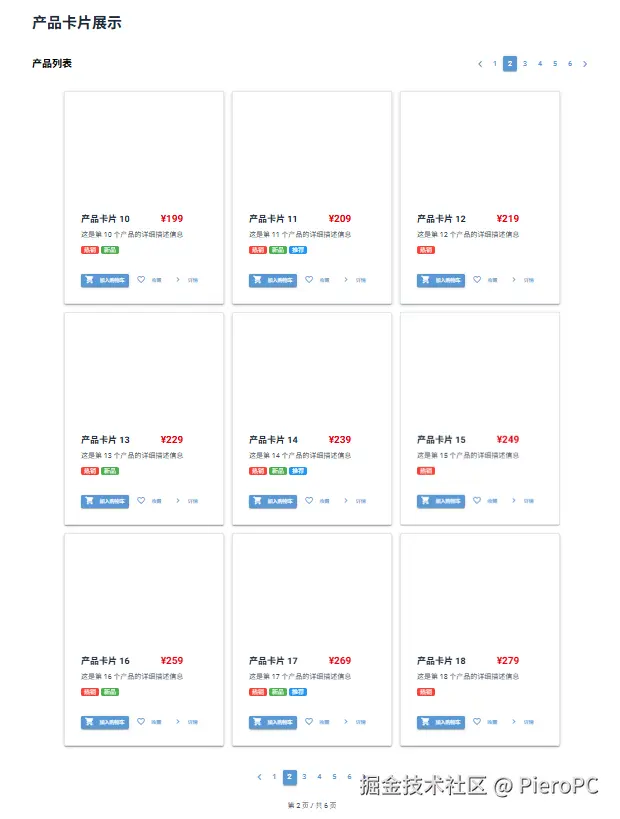
python
from nicegui import ui

class GridPagination:
    def __init__(self):
        # 生成测试数据
        self.items = []
        for i in range(1, 51):
            self.items.append({
                'id': i,
                'title': f'产品卡片 {i}',
                'description': f'这是第 {i} 个产品的详细描述信息',
                'price': f'¥{99 + i * 10}',
                'tags': ['热销', '新品', '推荐'][:i % 3 + 1]
            })

        self.current_page = 1
        self.items_per_page = 9  # 3x3 网格
        self.total_pages = (len(self.items) + self.items_per_page - 1) // self.items_per_page

        self.create_ui()

    def create_ui(self):
        # 响应式布局容器
        with ui.column().classes('w-full max-w-6xl mx-auto p-4'):
            # 标题
            ui.label('产品卡片展示').classes(
                'text-3xl font-bold text-center mb-8 text-gray-800'
            )

            # 分页控件(顶部)
            with ui.row().classes('w-full justify-between items-center mb-6'):
                ui.label('产品列表').classes('text-xl font-semibold')

                self.pagination = ui.pagination(
                    1,
                    self.total_pages,
                    direction_links=True,
                    value=self.current_page,
                    on_change=self.on_page_change
                )

            # 卡片网格容器
            self.grid_container = ui.row().classes(
                'flex-wrap justify-center gap-4 w-full'
            )

            # 分页控件(底部)
            with ui.row().classes('w-full justify-center mt-8'):
                self.bottom_pagination = ui.pagination(
                    1,
                    self.total_pages,
                    direction_links=True,
                    value=self.current_page,
                    on_change=self.on_page_change
                )

            # 页面信息
            with ui.row().classes('w-full justify-center mt-4'):
                ui.label().bind_text_from(
                    self.pagination, 'value',
                    lambda v: f'第 {v} 页 / 共 {self.total_pages} 页'
                ).classes('text-gray-600')

            # 初始加载
            self.load_grid()

    def on_page_change(self, e):
        """页码改变事件"""
        self.current_page = e.value
        self.load_grid()
        # 同步两个分页组件的值
        self.bottom_pagination.value = self.current_page

    def load_grid(self):
        """加载网格卡片"""
        self.grid_container.clear()

        # 计算当前页数据范围
        start_idx = (self.current_page - 1) * self.items_per_page
        end_idx = min(start_idx + self.items_per_page, len(self.items))

        # 创建卡片网格
        for i in range(start_idx, end_idx):
            item = self.items[i]
            with self.grid_container:
                with ui.card().classes(
                    'w-80 hover:shadow-xl transition-all duration-300 '
                    'hover:-translate-y-1 border border-gray-200'
                ):
                    # 卡片顶部图片区域
                    with ui.card_section().classes('p-0'):
                        ui.image(f'https://picsum.photos/seed/{item["id"]}/320/180').classes(
                            'w-full h-48 object-cover'
                        )

                    # 卡片内容
                    with ui.card_section().classes('p-4'):
                        # 标题和价格
                        with ui.row().classes('justify-between items-start'):
                            ui.label(item['title']).classes(
                                'text-lg font-bold text-gray-800'
                            )
                            ui.label(item['price']).classes(
                                'text-xl font-bold text-red-600'
                            )

                        # 描述
                        ui.label(item['description']).classes(
                            'text-gray-600 mt-2 text-sm'
                        )

                        # 标签
                        with ui.row().classes('flex-wrap gap-1 mt-3'):
                            for tag in item['tags']:
                                ui.badge(tag, color=self.get_tag_color(tag))

                    # 卡片操作按钮
                    with ui.card_actions().classes('px-4 pb-4'):
                        ui.button('加入购物车', icon='shopping_cart',
                                 color='primary').props('size=sm')
                        ui.button('收藏', icon='favorite_border').props(
                            'size=sm flat'
                        )
                        ui.button('详情', icon='chevron_right').props(
                            'size=sm flat'
                        )

    def get_tag_color(self, tag):
        """根据标签返回颜色"""
        colors = {
            '热销': 'red',
            '新品': 'green',
            '推荐': 'blue',
            '特价': 'orange',
            '限时': 'purple'
        }
        return colors.get(tag, 'gray')

# 运行应用
GridPagination()
ui.run()
关键点说明:
-
正确的
ui.pagination参数顺序:pythonui.pagination(min, max, direction_links=True, value=current_page, on_change=callback) -
双向绑定:
python# 绑定分页值到标签 ui.label().bind_text_from(pagination, 'value', lambda v: f'Page {v}') -
响应式设计:
- 使用 Tailwind CSS 类实现响应式
- 在移动端和桌面端都能良好显示
实现方式更加简洁,符合 NiceGUI 的设计。