Demo此问题
- 写个html 叫test.html吧
html
<!doctype html>
<html lang="zh-CN">
<head>
  <meta charset="utf-8">
  <title>DOM XSS test:test.html</title>
</head>
<body>
  <h1>DOM XSS test:test.html</h1>
  <div id="app"></div>
  <script>
    const params = new URLSearchParams(location.search);
    const msg = params.get('msg') || 'hello';
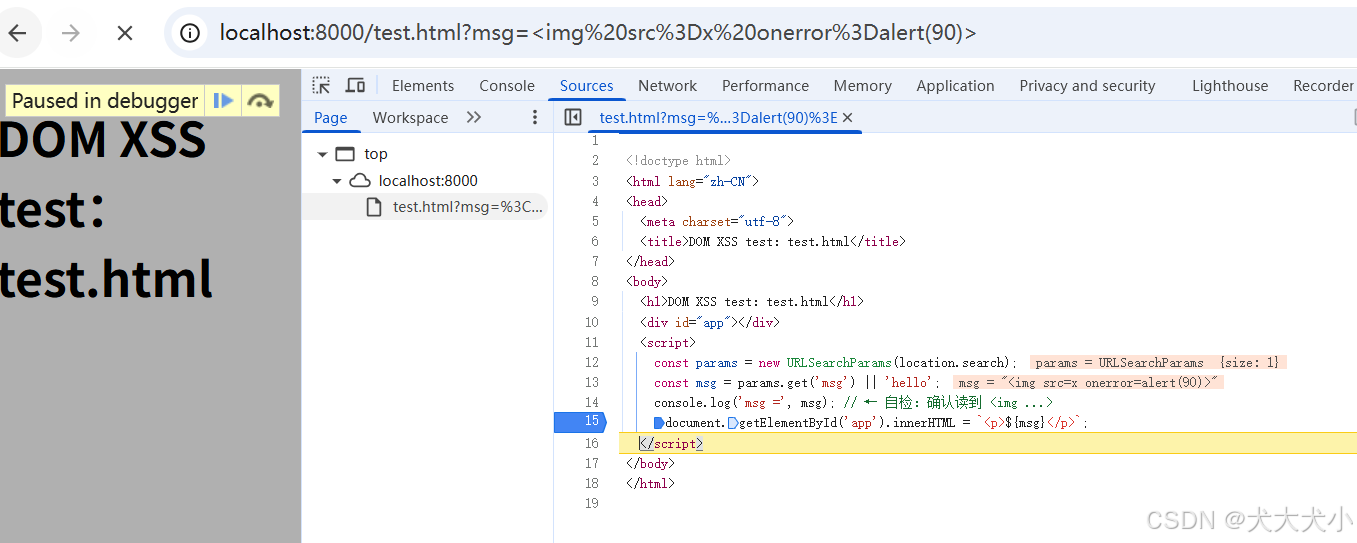
    console.log('msg =', msg); // ← 自检:确认读到 < ...>
    document.getElementById('app').innerHTML = `<p>${msg}</p>`;
  </script>
</body>
</html>
2 powershell 启动web
python -m http.server 8000
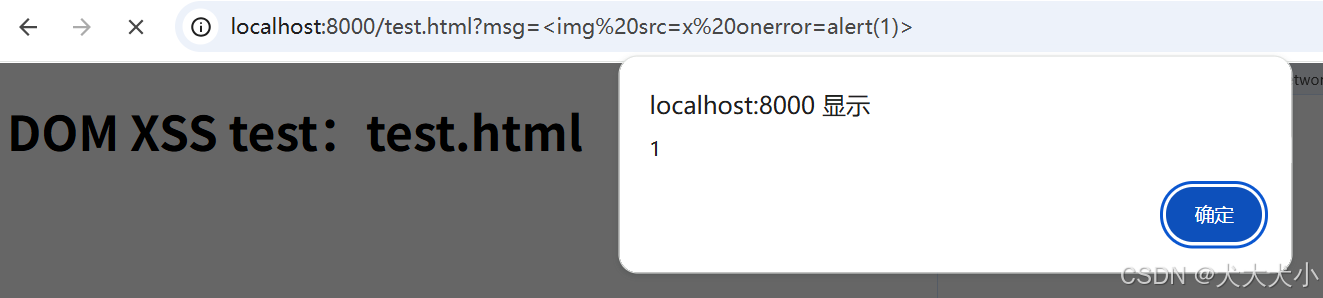
3 浏览器访问 localhost:8000/test.html?msg=<img%20src=x%20οnerrοr=alert(1)>
4 看到个弹窗
原因
它直接将用户可控的 URL 参数(msg)拼接到 innerHTML,未做任何转义或过滤。攻击者可以通过构造恶意的 msg 参数注入 JavaScript 代码,从而执行任意脚本。
运行中debug所见
修复方式
✅ 1. 输入验证与输出编码
- 输入验证 :对来自
location,document.URL,document.referrer,window.name等的值进行严格校验,只允许预期格式(如数字、固定字符串)。 - 输出编码 :在插入 HTML 时使用合适的编码:
- HTML 内容 →
textContent或innerText - 属性值 →
setAttribute() - URL → 使用
encodeURIComponent()
- HTML 内容 →
✅ 2. 避免危险的 DOM API
- 禁止使用 :
innerHTML,outerHTML,document.write()
- 替代方案 :
- 使用
textContent或createElement()+appendChild()来构建安全 DOM。
- 使用
html
<script>
  const params = new URLSearchParams(location.search);
  const msg = params.get('msg') || 'hello';
  const mode = (params.get('mode') || 'text').toLowerCase();
  const app = document.getElementById('app');

  // 方案 1:纯文本渲染(默认)
  function renderText(s){
    const p = document.createElement('p');
    p.textContent = s; // ✅ 不解析为 HTML
    app.replaceChildren(p);
  }

  // 方案 2:白名单消毒(示例实现,生产用成熟库更好)
  function renderSanitized(html){
    const allowedTags = new Set(['b','i','em','strong','u','a','code','pre','br']);
    const allowedAttrs = { 'a': new Set(['href','title']) };

    const parser = new DOMParser();
    const doc = parser.parseFromString(html, 'text/html');
    const fragment = document.createDocumentFragment();

    const walk = (node, outParent) => {
      if (node.nodeType === Node.TEXT_NODE) { outParent.appendChild(node.cloneNode()); return; }
      if (node.nodeType === Node.ELEMENT_NODE) {
        const tag = node.tagName.toLowerCase();
        if (!allowedTags.has(tag)) {
          Array.from(node.childNodes).forEach(child => walk(child, outParent)); // 剥离不安全标签,仅保留文本/安全子节点
          return;
        }
        const el = document.createElement(tag);
        for (const attr of Array.from(node.attributes)) {
          const name = attr.name.toLowerCase(), value = attr.value;
          if (name.startsWith('on')) continue; // 禁止事件属性
          const allowSet = allowedAttrs[tag];
          if (allowSet && !allowSet.has(name)) continue;
          if (tag === 'a' && name === 'href') {
            try {
              const u = new URL(value, location.origin);
              if (!['http:', 'https:', 'mailto:'].includes(u.protocol.toLowerCase())) continue; // 禁止 javascript:/data:/file:/vbscript:
            } catch (e) { continue; }
          }
          el.setAttribute(name, value);
        }
        Array.from(node.childNodes).forEach(child => walk(child, el));
        outParent.appendChild(el);
      }
    };

    Array.from(doc.body.childNodes).forEach(n => walk(n, fragment));
    app.replaceChildren(fragment);
  }

  if (mode === 'sanitize') renderSanitized(msg);
  else renderText(msg);
</script>