一、MiMo-V2-Flash的亮点
①API 定价为输入
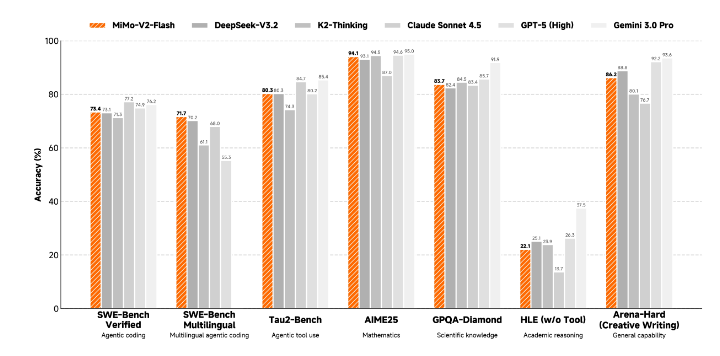
$0.1/M tokens,输出$0.3/M tokens,且目前限时免费,推理成本仅为Claude 4.5 Sonnet的2.5%。②在多个Agent测评基准中保持全球开源模型Top 2,代码能力强。
③使用场景多为智能通场景设计,支持深度思考和联网搜索。
④架构上使用混合注意力机制和多层MTP进行推理加速。
⑤模型权重和推理代码使用的是MIT协议,适用商业场景。
二、技术剖析①窗口大小为128
②原生支持32K 上下文,外扩技术支持可达256K的上下文处理
③多层MIT推理加速,并行效率倍增
三、在线体验①体验链接:https://aistudio.xiaomimimo.com
②API地址(限时免费哦!各位白嫖党抓紧机会!!!):https://platform.xiaomimimo.com/
③收费定价:输入 0.1/M tokens,输出 0.3/M tokens
③本地部署:
a.模型权重:https://hf.co/XiaomiMiMo/MiMo-V2-Flash
b.GitHub仓库:https://github.com/xiaomimimo/MiMo-V2-Flash
四、模型效果
从公布的基准测试图中看,性能上有了些许提升,主要的提升应该还是在Agent场景、推理效率的提升和价格吧!但是目前架不住他免费呀!!!
五、调用方法由于MiMo-V2-Flash 已封装成 OpenAI-Compatible HTTP 服务,启动后直接用**OpenAI SDK 或curl -i http://localhost:9001/v1/chat/completions**,模型路径、推理参数全部在启动命令里一次性配好,无需再写 .from_pretrained()。以下是四种不同场景的调用方式:
python# ①启动服务 pip install sglang python3 -m sglang.launch_server \ --model-path XiaomiMiMo/MiMo-V2-Flash \ --served-model-name mimo-v2-flash \ --tp-size 8 --trust-remote-code \ --host 0.0.0.0 --port 9001 # ②API调用 from openai import OpenAI client = OpenAI(base_url="http://localhost:9001/v1", api_key="dummy") response = client.chat.completions.create( model="mimo-v2-flash", messages=[{"role": "user", "content": "Nice to meet you MiMo"}], max_tokens=4096, temperature=0.8, top_p=0.95, stream=True, extra_body={"chat_template_kwargs": {"enable_thinking": True}} ) for chunk in response: print(chunk.choices[0].delta.content or "", end="") # ③curl方式 curl http://localhost:9001/v1/chat/completions \ -H "Content-Type: application/json" \ -d '{ "model": "mimo-v2-flash", "messages": [{"role": "user", "content": "Nice to meet you MiMo"}], "max_tokens": 4096, "temperature": 0.8, "top_p": 0.95, "stream": true, "chat_template_kwargs": {"enable_thinking": true} }' # ④JaveScript方式 const { OpenAI } = require('openai'); const client = new OpenAI({ baseURL: 'http://localhost:9001/v1', apiKey: 'dummy' }); const stream = await client.chat.completions.create({ model: 'mimo-v2-flash', messages: [{ role: 'user', content: 'Nice to meet you MiMo' }], max_tokens: 4096, temperature: 0.8, top_p: 0.95, stream: true, chat_template_kwargs: { enable_thinking: true } }); for await (const chunk of stream) { process.stdout.write(chunk.choices[0]?.delta?.content || ''); }使用流程:启动服务一次 → 拿到 http://localhost:9001/v1 → 当成 OpenAI 接口 用即可,模型、推理参数全部在启动命令里配置完成,无需再加载模型或写 .from_pretrained(
重要的事情说三遍:限时免费!限时免费!!限时免费!!!
Agent学习——小米MiMo-V2-Flash使用方法
爱吃泡芙的小白白2025-12-18 20:31
相关推荐
米小虾2 小时前
上下文:Agent 的眼睛里到底装着什么guslegend5 小时前
用十倍速制造事故:Loop Engineering 的暗面6098440665 小时前
AI Agent 长跑必踩的坑:上下文压缩导致信息流失的根因分析与解法qinglongcn5 小时前
Agent 可靠性的数学——为什么编程是第一个跑通的赛道用户3126874877205 小时前
Gemini 4 Argon 技术拆解:100 万输出 token 的"长活"模型,谷歌押注的三个战场.Bryce.5 小时前
在智能体中使用A2A工具:让大模型自己决定“该找谁帮忙“崎岖Qiu6 小时前
MCP 的架构、协议分层与通信过程Percy_kk6 小时前
AI Agent 开发实践:从手写 ReAct 到框架选型方方洛6 小时前
ai-agent教程-07-从零实现一个工程化AI-Agent方方洛6 小时前
ai-agent教程-08-多智能体协作