RecyclerView的基本使用,它与Listview组件使用大同小异,由于Listview的局限性,不能实现横向滚动,官方不得不推出这个既可以横向滚动又可以垂直滚动的组件
效果展示
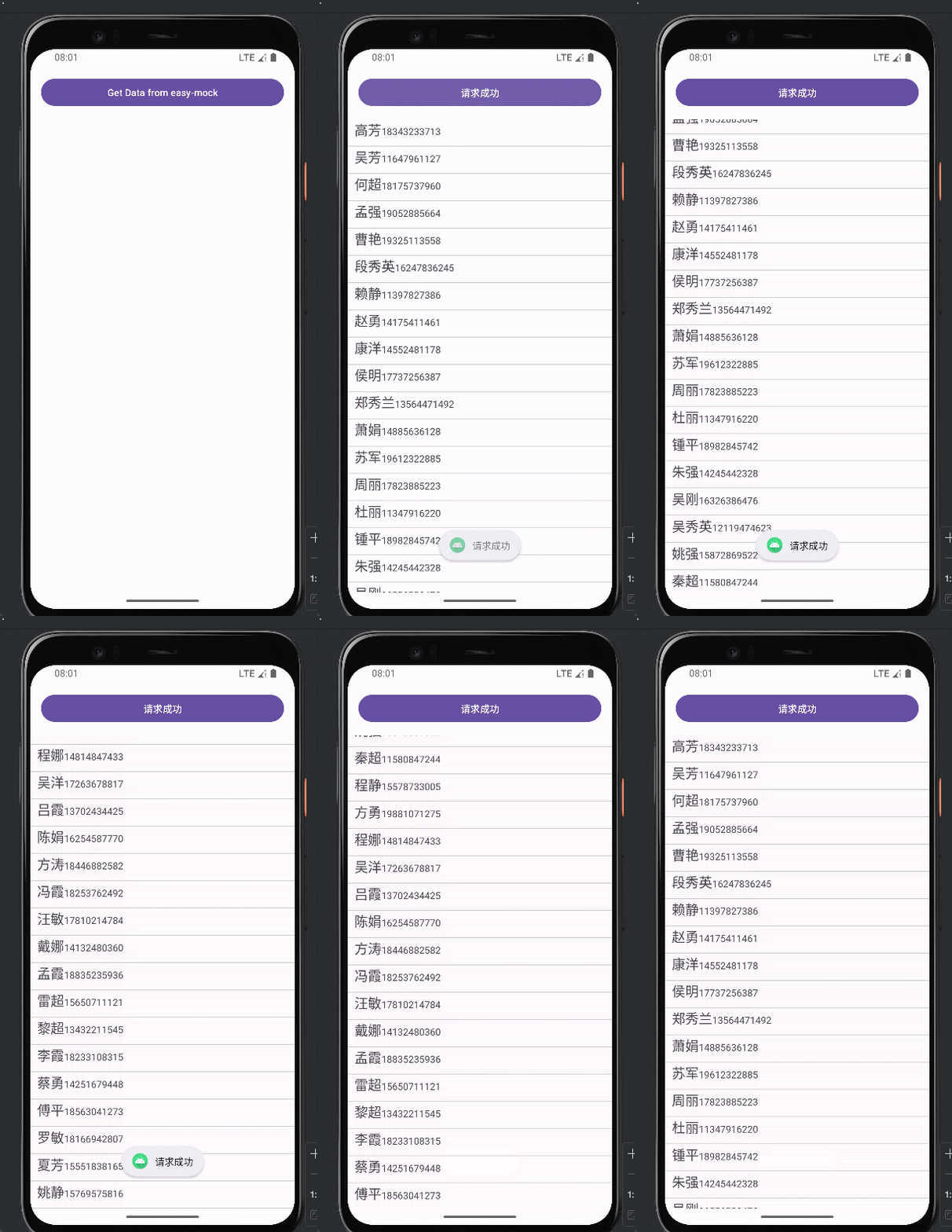
代码实现
activity类
java
public class HttpActivity01 extends AppCompatActivity {
    private Button btn;
    private OrderAdaptor myAdaptor;
    @Override
    protected void onCreate(Bundle savedInstanceState) {
        super.onCreate(savedInstanceState);
        EdgeToEdge.enable(this);
        setContentView(R.layout.activity_http01);
        ViewCompat.setOnApplyWindowInsetsListener(findViewById(R.id.main), (v, insets) -> {
            Insets systemBars = insets.getInsets(WindowInsetsCompat.Type.systemBars());
            v.setPadding(systemBars.left, systemBars.top, systemBars.right, systemBars.bottom);
            return insets;
        });
        Log.d("httpTest", "onCreate");
        // 获取页面中的按钮
        btn = findViewById(R.id.btn);
        // 点击事件
        btn.setOnClickListener( v -> {
            loadJson();
        });
        // 初始化视图
        initView();
    }
}
获取recyclerView
java
    private void initView() {
        RecyclerView recycleView = this.findViewById(R.id.recyclerView);
        recycleView.setLayoutManager(new LinearLayoutManager(this));
        myAdaptor = new OrderAdaptor();
        recycleView.setAdapter(myAdaptor);
        // 使用自定义drawable作为分割线
        DividerItemDecoration dividerItemDecoration = new DividerItemDecoration(
                recycleView.getContext(),
                LinearLayoutManager.VERTICAL
        );
        dividerItemDecoration.setDrawable(ContextCompat.getDrawable(this, R.drawable.divider));
        recycleView.addItemDecoration(dividerItemDecoration);
    }
最原始的数据请求方法,后面会一步步改用第三方插件
java
    private void loadJson(){
        new Thread(() -> {
            try {
                URL url = new URL("https://mock.presstime.cn/mock/690ab12ad456d3b19f17be44/bike-ms/order/list");
                HttpsURLConnection connection = (HttpsURLConnection) url.openConnection();
                connection.setRequestMethod("GET");
                connection.connect();
                int code = connection.getResponseCode();
                if (code == 200) {
                    Map<String, List<String>> headerFields = connection.getHeaderFields();
                    Set<Map.Entry<String, List<String>>> entries = headerFields.entrySet();
                    for (Map.Entry<String, List<String>> entry : entries) {
                        String key = entry.getKey();
                        List<String> values = entry.getValue();
                        for (String value : values) {
                            Log.d("httpTest",key + ":" + value);
                        }
                    }
                    InputStream inputStream = connection.getInputStream();
                    BufferedReader reader = new BufferedReader(new InputStreamReader(inputStream));
                    String line = reader.readLine();
                    Log.d("httpTest", line);
                    // 解析JSON数据,把接口数据中的连字符转为驼峰
                    Gson gson = new GsonBuilder()
                            .setFieldNamingPolicy(FieldNamingPolicy.LOWER_CASE_WITH_UNDERSCORES)
                            .create();
                    ResutData resutData = gson.fromJson(line, ResutData.class);

                    if (resutData != null) {
                        updateUI(resutData);
                    }
                }
                connection.disconnect();
            } catch (Exception e) {
                Log.e("httpTest", "Network request failed", e);
            }
        }).start();
    }
获取到数据后更新视图
java
 private void updateUI(ResutData resutData) {
     runOnUiThread(() -> {
         // 更新UI
         Toast.makeText(this, resutData.getMessage(), Toast.LENGTH_SHORT).show();
         btn.setText(resutData.getMessage());
         // 手动调用adaptor里面的更新方法
         myAdaptor.setData(resutData.getData().getItemList());
     });
 }
}
recycleView里面使用的xml模版
xml
<?xml version="1.0" encoding="utf-8"?>
<LinearLayout xmlns:android="http://schemas.android.com/apk/res/android"
    android:orientation="horizontal"
    android:layout_width="match_parent"
    android:paddingBottom="10dp"
    android:paddingLeft="10dp"
    android:paddingRight="10dp"
    android:layout_height="wrap_content">
    <TextView
        android:layout_width="wrap_content"
        android:layout_height="wrap_content"
        android:id="@+id/name"
        android:text="账单"
        android:textSize="20sp" />
    <TextView
        android:layout_width="wrap_content"
        android:layout_height="wrap_content"
        android:text="123"
        android:id="@+id/mobile" />
</LinearLayout>
需要使用的adaptor类
java
public class OrderAdaptor extends RecyclerView.Adapter<OrderAdaptor.ViewHolder>{

    private ArrayList<ResutData.DataDTO.ItemListDTO> itemList =  new ArrayList<>();
    @NonNull
    @Override
    public ViewHolder onCreateViewHolder(@NonNull ViewGroup parent, int viewType) {
        View inflate = LayoutInflater.from(parent.getContext()).inflate(R.layout.order_item, parent, false);
        return new ViewHolder(inflate);
    }

    @Override
    public void onBindViewHolder(@NonNull OrderAdaptor.ViewHolder holder, int position) {
        View itemView = holder.itemView;
        ResutData.DataDTO.ItemListDTO itemListDTO = itemList.get(position);

        // 获取用户名id
        TextView name = itemView.findViewById(R.id.name);
        TextView mobile = itemView.findViewById(R.id.mobile);
        name.setText(itemListDTO.getUserName());
        mobile.setText(itemListDTO.getMobile().toString());
    }

    @Override
    public int getItemCount() {
        return itemList.size();
    }

    public void setData(List<ResutData.DataDTO.ItemListDTO> newItemList) {
        // 打印itemList
        for (ResutData.DataDTO.ItemListDTO itemListDTO : itemList){
        itemList.addAll(newItemList);
        // 需要通知组件数据更新了,不然页面不会更新
        notifyDataSetChanged();
    }

    public class ViewHolder extends RecyclerView.ViewHolder {
        public ViewHolder(@NonNull View itemView) {
            super(itemView);
        }
    }
}
重点 : 😕 需要通知组件数据更新了,不然页面不会更新
notifyDataSetChanged(), onBindViewHolder还可以可以优化下
需要的实体类
java
package com.example.pojo;

import java.util.List;


public class ResutData {


    private Integer code;
    private String message;
    private DataDTO data;

    public Integer getCode() {
        return code;
    }

    public void setCode(Integer code) {
        this.code = code;
    }

    public String getMessage() {
        return message;
    }

    public void setMessage(String message) {
        this.message = message;
    }

    public DataDTO getData() {
        return data;
    }

    public void setData(DataDTO data) {
        this.data = data;
    }

    public static class DataDTO {
        private Integer page;
        private Integer pageSize;
        private Integer totalCount;
        private Integer pageCount;
        private List<ItemListDTO> itemList;

        public Integer getPage() {
            return page;
        }

        public void setPage(Integer page) {
            this.page = page;
        }

        public Integer getPageSize() {
            return pageSize;
        }

        public void setPageSize(Integer pageSize) {
            this.pageSize = pageSize;
        }

        public Integer getTotalCount() {
            return totalCount;
        }

        public void setTotalCount(Integer totalCount) {
            this.totalCount = totalCount;
        }

        public Integer getPageCount() {
            return pageCount;
        }

        public void setPageCount(Integer pageCount) {
            this.pageCount = pageCount;
        }

        public List<ItemListDTO> getItemList() {
            return itemList;
        }

        public void setItemList(List<ItemListDTO> itemList) {
            this.itemList = itemList;
        }

        public static class ItemListDTO {
            private Integer id;
            private String orderSn;
            private String bikeSn;
            private String userId;
            private String userName;
            private Long mobile;
            private Integer distance;
            private Integer totalTime;
            private Integer status;

            private String startTime;

            private String endTime;

            private Integer totalFee;

            private Integer userPay;

            public Integer getId() {
                return id;
            }

            public void setId(Integer id) {
                this.id = id;
            }

            public String getOrderSn() {
                return orderSn;
            }

            public void setOrderSn(String orderSn) {
                this.orderSn = orderSn;
            }

            public String getBikeSn() {
                return bikeSn;
            }

            public void setBikeSn(String bikeSn) {
                this.bikeSn = bikeSn;
            }

            public String getUserId() {
                return userId;
            }

            public void setUserId(String userId) {
                this.userId = userId;
            }

            public String getUserName() {
                return userName;
            }

            public void setUserName(String userName) {
                this.userName = userName;
            }

            public Long getMobile() {
                return mobile;
            }

            public void setMobile(Long mobile) {
                this.mobile = mobile;
            }

            public Integer getDistance() {
                return distance;
            }

            public void setDistance(Integer distance) {
                this.distance = distance;
            }

            public Integer getTotalTime() {
                return totalTime;
            }

            public void setTotalTime(Integer totalTime) {
                this.totalTime = totalTime;
            }

            public Integer getStatus() {
                return status;
            }

            public void setStatus(Integer status) {
                this.status = status;
            }

            public String getStartTime() {
                return startTime;
            }

            public void setStartTime(String startTime) {
                this.startTime = startTime;
            }

            public String getEndTime() {
                return endTime;
            }

            public void setEndTime(String endTime) {
                this.endTime = endTime;
            }

            public Integer getTotalFee() {
                return totalFee;
            }

            public void setTotalFee(Integer totalFee) {
                this.totalFee = totalFee;
            }

            public Integer getUserPay() {
                return userPay;
            }

            public void setUserPay(Integer userPay) {
                this.userPay = userPay;
            }
        }
    }
}
这样我们就是先了一个垂直的滑动列表。