一. 前言
借助 ConstraintLayout,您可以使用扁平视图层次结构(无嵌套视图组)创建复杂的大型布局。它与 RelativeLayout 相似,其中所有的视图均根据同级视图与父布局之间的关系进行布局,但其灵活性要高于 RelativeLayout,并且更易于与 Android Studio 的布局编辑器配合使用。
ConstraintLayout 的所有功能均可直接通过布局编辑器的可视化工具来使用,因为布局 API 和布局编辑器是专为彼此构建的。您完全可以使用 ConstraintLayout 通过拖动(而非修改 XML)来构建布局。
二.约束条件概览
如需在 ConstraintLayout 中定义某个视图的位置,您需要为该视图添加至少一个水平约束条件和一个垂直约束条件。每个约束条件均表示与其他视图、父布局或隐形引导线之间连接或对齐方式。每个约束条件均定义了视图在竖轴或者横轴上的位置。每个视图在每个轴上都必须至少有一个约束条件,但通常情况下会需要更多约束条件。
三. 常用属性
3.1 Relative Position
这部分的属性有点类似于 RelativeLayout 中的属性,但是更精细。
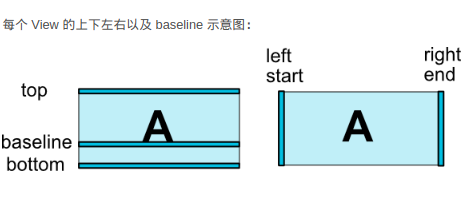
layout_constraintLeft_toLeftOf:该控件的左边相对于某控件或父布局的左边对齐。
layout_constraintLeft_toRightOf:该控件的左边相对于某控件或父布局的右边对齐。
layout_constraintRight_toLeftOf:该控件的右边相对于某控件或父布局的左边对齐。
layout_constraintRight_toRightOf:该控件的右边相对于某控件或父布局的右边对齐。
layout_constraintTop_toTopOf:该控件的顶边相对于某控件或父布局的顶边对齐。
layout_constraintTop_toBottomOf:该控件的顶边相对于某控件或父布局的底边对齐。
layout_constraintBottom_toTopOf:该控件的底边相对于某控件或父布局的顶边对齐。
layout_constraintBottom_toBottomOf:该控件的底边相对于某控件或父布局的底边对齐。
layout_constraintBaseline_toBaselineOf:该控件的水平基准线相对于某控件或父布局的水平基准线对齐。
layout_constraintStart_toStartOf:该控件的开始部分相对于某控件或父布局的开始部分对齐。
layout_constraintStart_toEndOf:该控件的开始部分相对于某控件或父布局的结束部分对齐。
layout_constraintEnd_toStartOf:该控件的结束部分相对于某控件或父布局的开始部分对齐。
layout_constraintEnd_toEndOf:该控件的结束部分相对于某控件或父布局的结束部分对齐。
3.2 Margins
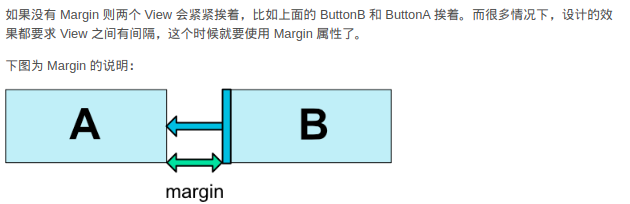
android:layout_marginStart:设置控件距离开头view的边距。
android:layout_marginEnd:设置控件距离结尾view的边距。
android:layout_marginLeft:设置控件距离左边view的边距。
android:layout_marginRight:设置控件距离右边view的边距。
android:layout_marginTop:设置控件距离顶边view的边距。
android:layout_marginBottom:设置控件距离底边view的边距。
3.3 Margins when connected to a GONE widget
layout_goneMarginStart
layout_goneMarginEnd
layout_goneMarginLeft
layout_goneMarginTop
layout_goneMarginRight
layout_goneMarginBottom
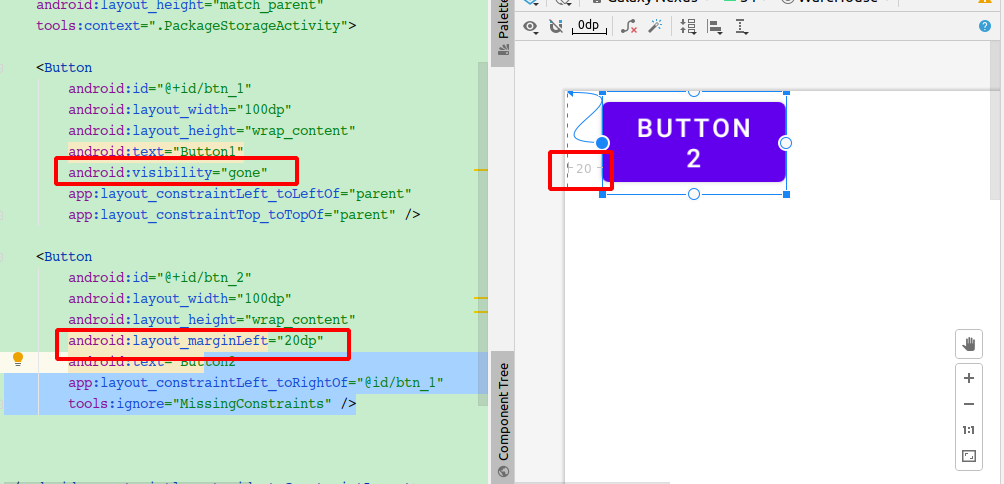
这些属性也是设置边距的,根据官方的解释是当某个位置的控件为 GONE 的时候,你也可以指定一个另外的边距。具体怎么用,举一个例子说明: