nginx.conf
server {
listen 443 ssl;
server_name 192.168.31.14;
ssl_certificate E:/nginx/nginx-1.20.2/cert/server.crt;
ssl_certificate_key E:/nginx/nginx-1.20.2/cert/server.key;
旧 WebRTC API
location /rtc-api/ {
proxy_pass http://127.0.0.1:1985/rtc-api/;
proxy_http_version 1.1;
proxy_set_header Host $host;
proxy_set_header X-Forwarded-Proto https;
}
新 WebRTC API(publish / play / whip / whep)
location /rtc/ {
proxy_pass http://127.0.0.1:1985/rtc/;
proxy_http_version 1.1;
proxy_set_header Host $host;
proxy_set_header X-Forwarded-Proto https;
}
SRS demo 页面
location / {
proxy_pass http://127.0.0.1:8080/;
}
}
证书自签名一个就行。可以看看测试环境如何生成自签名证书用于 HTTPS-CSDN博客
docker
version: '3.8'
services:
srs:
image: ossrs/srs:6
container_name: srs
restart: unless-stopped
ports:
"1935:1935/tcp" # RTMP
"1985:1985/tcp" # API
"8080:8080/tcp" # players
"8443:8443/tcp" # HTTPS(可不用,通过NGINX统一到443了)
"8000:8000/udp" # WebRTC RTP
volumes:
- E:\docker\srs\conf\srs.conf:/opt/srs/conf/srs.conf
srs.conf:(vhost defaultVhost里面的 candidate记得改成自己的ip,如果是公网服务器的话,就算有域名也写IP,因为IP是最稳的。)
listen 1935;
max_connections 1000;
daemon off;
srs_log_tank console;
http_api {
enabled on;
listen 1985;
}
http_server {
enabled on;
listen 8080;
}
vhost defaultVhost {
rtc {
enabled on;
bframe discard;
candidate 192.168.31.14;
stunServer stun:stun.l.google.com:19302;
}
http_remux {
enabled on;
mount vhost/app/stream.flv;
}
hls {
enabled on;
hls_fragment 5;
}
}
我接下来都是用自己的ip去访问和填写,大家替换一下自己ip就行了,注意看好 http 和 https。因为WebRTC是必须https的,所以这些都是基于我Nginx转发过的,所以如果没按我Nginx配置来的小伙伴得记得理一下真实访问逻辑。
推送端访问:
https://192.168.31.14/players/rtc_publisher.html
推流地址填:webrtc://192.168.31.14/live/livestream
livestream可以改成别的名。
可以通过这个来查看是否推送成功:
http://192.168.31.14:1985/api/v1/streams 这是 管理 / 监控 API:
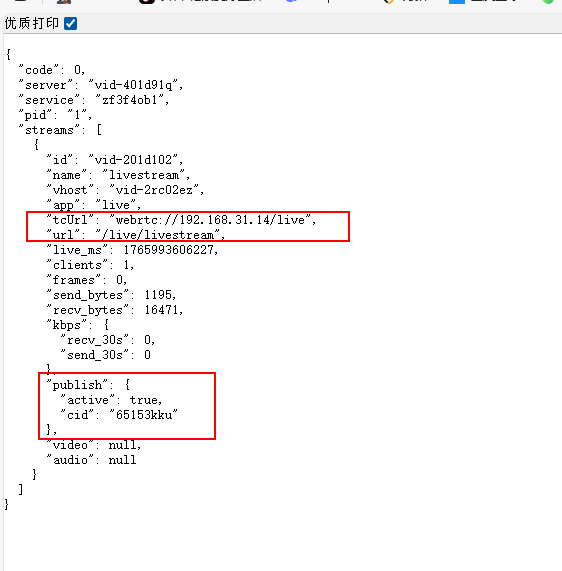
它这里面很乱,有/api、/rtc-api/、/rtc/ 都能请求一些API。别搞乱了。
拉流:
https://192.168.31.14/players/rtc_player.html
地址填跟推流地址一样的 webrtc://192.168.31.14/live/livestream
当然 还有其它很多播放方式:
https://192.168.31.14/live/livestream.m3u8
http://192.168.31.14:8080/live/livestream.flv
https://192.168.31.14/live/livestream.flv
都是改一下流名称就行了,都可以用官方播放器来看:
https://192.168.31.14/players/srs_player.html
前端调用 WebRTC 新API:
https://192.168.31.14/rtc/v1/publish/
对应的流地址:
webrtc://192.168.31.14/live/流名称
这个API地址实际是 Nginx 转发到:http://127.0.0.1:1985/rtc/v1/publish,因为 SRS WebRTC 信令本身是 HTTP, 浏览器强制要求 HTTPS → 所以用 Nginx 做 TLS 终止。
简单的架构图:
浏览器 / 前端
|
| HTTPS (强制)
| webrtc://192.168.31.14/live/xxx
v
Nginx :443 (TLS 终止)
|
|-- /rtc-api ---> 1985 (旧 WebRTC API)
|-- /rtc ---> 1985 (新 WebRTC API)
|-- /players ---> 8080 (SRS demo)
|
v
SRS (Docker)
|-- 1985/tcp 信令 / API
|-- 8000/udp WebRTC RTP
|-- 1935/tcp RTMP
|-- 8080/tcp HTTP-FLV / HLS / players