在 Coze Studio 中配置一个简单的古诗词插件,可以通过"今日诗词"开放接口(https://v1.jinrishici.com/all.json)获取古诗词数据。下面是完整的配置步骤和文件内容。
1. gushi.yaml 文件内容
文件路径:coze-studio/backend/conf/plugin/pluginproduct/gushi.yaml
yaml
info:
  description: gushi
  title: gushi
  version: v1
openapi: 3.0.1
paths:
  /all.json:
    get:
      operationId: all
      responses:
        "200":
          content:
            application/json:
              schema:
                properties:
                  author:
                    type: string
                  category:
                    type: string
                  content:
                    type: string
                  origin:
                    type: string
                type: object
          description: new desc
        default:
          description: ""
      summary: 获取所有古诗词
servers:
  - url: https://v1.jinrishici.com
2. plugin_meta.yaml 添加内容
在 plugin_meta.yaml 文件的末尾追加以下配置(注意 YAML 格式缩进,通常与文件中其他条目保持一致):
yaml
- plugin_id: 23
  product_id: 7395041302766944276
  deprecated: false
  version: v1.0.0
  openapi_doc_file: gushi.yaml
  plugin_type: 1
  manifest:
    schema_version: v1
    name_for_model: gushi
    name_for_human: 获取所有古诗词
    description_for_model: gushi
    description_for_human: gushi
    auth:
      type: none
    logo_url: default_icon/default_app_icon.png
    api:
      type: openapi
    common_params:
      body: []
      header:
        - name: User-Agent
          value: Coze/1.0
      path: []
      query: []
  tools:
    - tool_id: 230001
      deprecated: false
      method: get
      sub_url: /all.json
3. 操作说明
docker exec -it coze-server sh
cd /app/resources/conf/plugin/pluginproduct
ls -lt | head -10
bash
/app/resources/conf/plugin/pluginproduct # ls -lt | head -10
total 328
-rw-rw-r--    1 1000     1000           678 Dec 19 10:14 gushi.yaml
-rw-rw-r--    1 1000     1000         28085 Dec 19 09:12 plugin_meta.yaml
-rw-rw-r--    1 1000     1000          1825 Dec 19 05:54 gushi.yaml.bak
-rw-rw-r--    1 1000     1000         27443 Dec 19 04:51 plugin_meta.yaml.bak
-rw-rw-r--    1 1000     1000          8174 Nov 23 11:06 bocha_search.yaml
-rw-rw-r--    1 1000     1000          1385 Nov 23 11:06 chestnut_sign.yaml
-rw-rw-r--    1 1000     1000         30360 Nov 23 11:06 gaode_map.yaml
-rw-rw-r--    1 1000     1000          1767 Nov 23 11:06 image_compression.yaml
-rw-rw-r--    1 1000     1000          1952 Nov 23 11:06 lark_authentication_authorization.yaml
记得要重启
bash
docker restart coze-server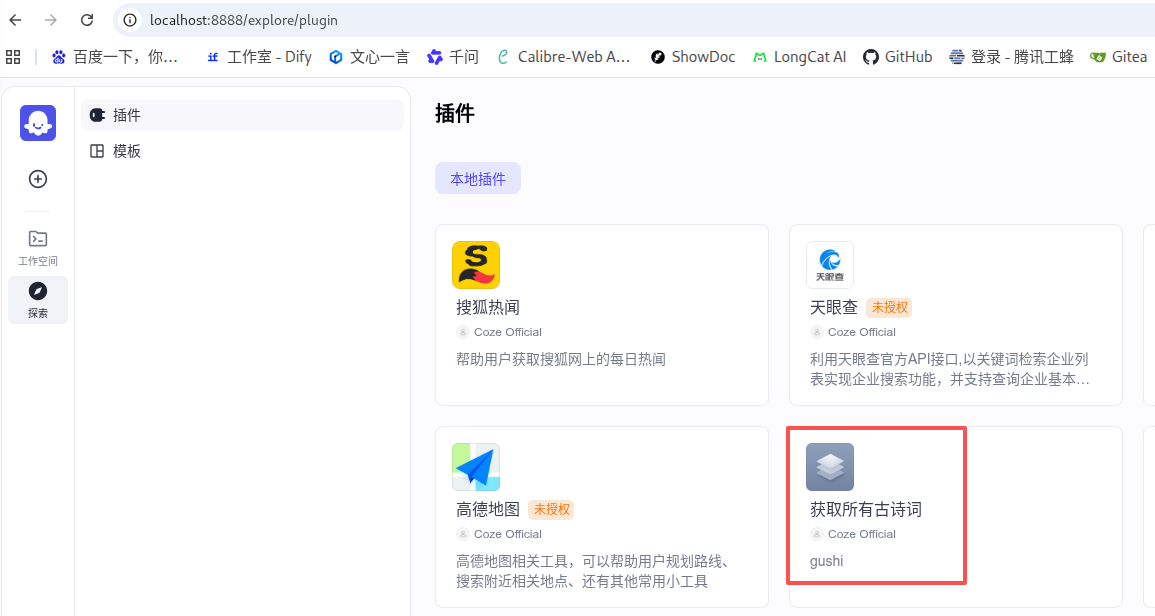
配置说明
- 该插件无需认证(
auth.type: none)。 - 调用接口为
GET https://v1.jinrishici.com/all.json,返回字段包括作者(author)、类别(category)、诗词内容(content)和出处(origin)。 - 添加了自定义 User-Agent 头,便于接口方识别 Coze 请求。
配置完成后,重启或重新加载插件,即可在 Coze Bot 中使用"获取所有古诗词"工具调用该接口。