效果
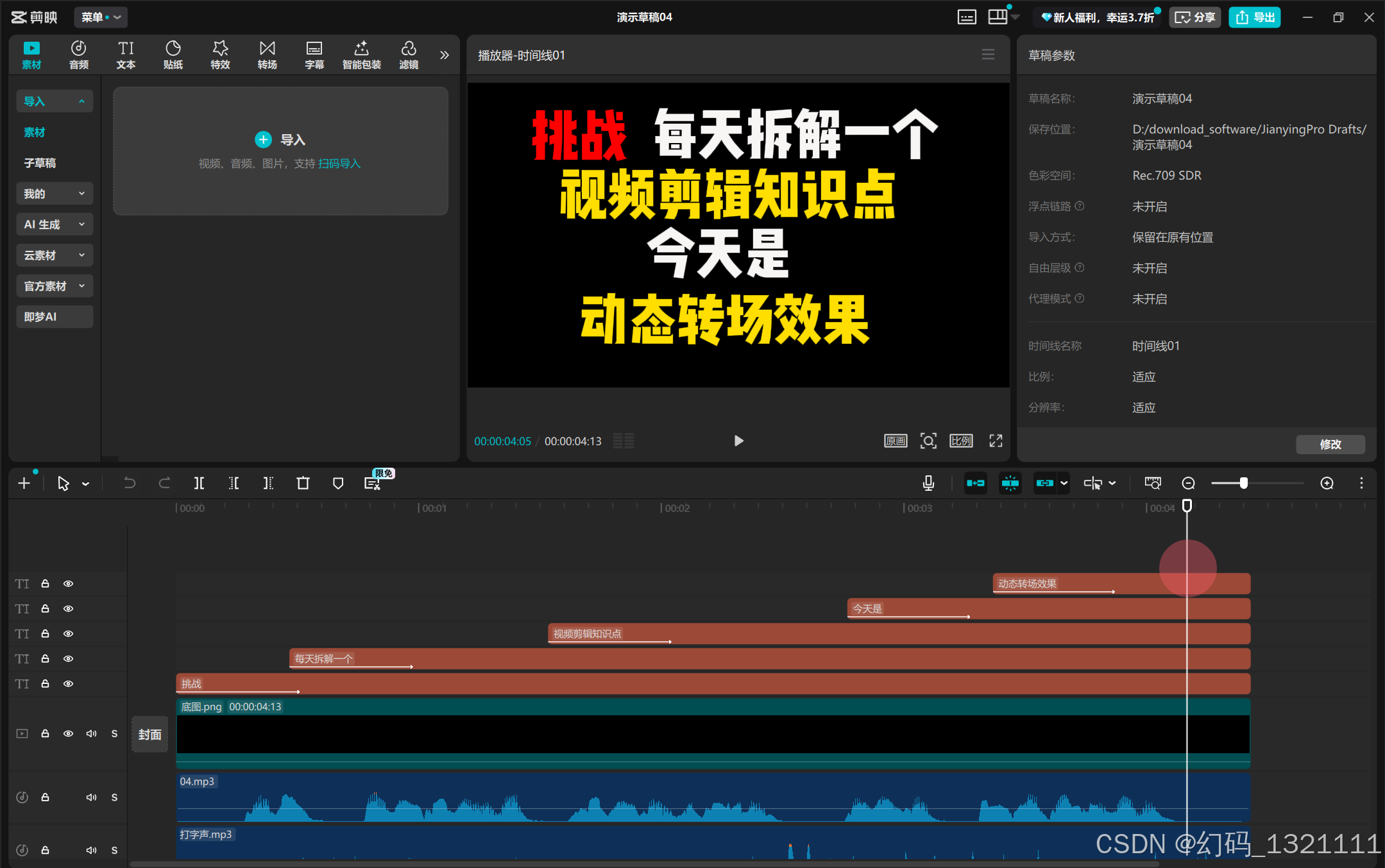
python
import os
import pyJianYingDraft as draft
from pyJianYingDraft import TrackType, trange, TextStyle, ClipSettings,TextIntro
from typing import List, Dict, Tuple

def rgb_255_to_float(rgb_tuple: tuple, decimal_places: int = 4) -> tuple:
    """将0-255的RGB值转换为0-1的浮点数"""
    for value in rgb_tuple:
        if not (0 <= value <= 255):
            raise ValueError(f"RGB值必须在0-255之间,当前值:{value}")
    return tuple(round(v / 255, decimal_places) for v in rgb_tuple)

def create_jianying_draft(
    draft_name: str,
    resolution: str,
    audio_path: str,
    background_image_path: str,
    background_music_path: str,
    text_styles: List[Dict],
    draft_folder_path: str
) -> None:
    """
    创建剪映草稿,包含音频、背景图片、背景音乐和文字轨道

    参数:
        draft_name: 草稿名称
        resolution: 画面尺寸,如"1920*1080"
        audio_path: 音频文件路径
        background_image_path: 底层图片路径
        background_music_path: 背景音乐路径
        text_styles: 文字样式列表
        draft_folder_path: 剪映草稿文件夹路径
    """
    # 校验输入文件是否存在
    for path in [audio_path, background_image_path, background_music_path]:
        if not os.path.exists(path):
            raise FileNotFoundError(f"文件不存在: {path}")

    # 解析分辨率
    try:
        width, height = map(int, resolution.split('*'))
    except ValueError:
        raise ValueError(f"分辨率格式错误: {resolution},正确格式应为'宽*高'(如1920*1080)")

    # 创建草稿文件夹实例
    draft_folder = draft.DraftFolder(draft_folder_path)

    # 创建新草稿(不允许覆盖)
    script = draft_folder.create_draft(
        draft_name,
        width,
        height,
        allow_replace=False
    )

    # 添加所需轨道
    script.add_track(TrackType.audio, "main_audio")       # 主音频轨道
    script.add_track(TrackType.video, "background_image") # 背景图片轨道
    script.add_track(TrackType.audio, "bgm")              # 背景音乐轨道
    script.add_track(TrackType.audio, "last_text_bgm")    # 最后文字背景音乐轨道


    # 获取主音频时长(微秒)
    main_audio_material = draft.AudioMaterial(audio_path)
    main_audio_duration = main_audio_material.duration

    # 添加主音频到轨道
    main_audio_segment = draft.AudioSegment(
        audio_path,
        trange(0, main_audio_duration)
    )
    script.add_segment(main_audio_segment, "main_audio")

    # 添加底层图片(与音频时长对齐)
    background_image_segment = draft.VideoSegment(
        background_image_path,
        trange(0, main_audio_duration)
    )
    script.add_segment(background_image_segment, "background_image")

    # 添加背景音乐(与音频时长对齐)
    bgm_segment = draft.AudioSegment(
        background_music_path,
        trange(0, main_audio_duration)
    )
    bgm_segment.volume = 1
    script.add_segment(bgm_segment, "bgm")

    # 处理文字轨道
    num_texts = len(text_styles)
    if num_texts == 0:
        raise("警告:文字样式列表为空,未添加任何文字轨道")
    else:
                # 计算每个文本的长度(包含标点符号)和总长度
        total_length = 0
        for text_info_dict in text_styles:
            total_length = total_length+len(text_info_dict ["text"])+1

        current_start_time = 0  # 当前文本片段的开始时间

        for i, text_info_dict in enumerate(text_styles):

            # 计算当前文本的长度占比
            text_length = len(text_info_dict["text"])+1
            text_ratio = text_length / total_length
            # 根据比例计算当前文本的显示时长
            text_duration = int(main_audio_duration * text_ratio)

            # 创建独立文字轨道
            track_name = f"text_track_{i}"
            script.add_track(TrackType.text, track_name)

            # 计算文字显示时间范围(从当前开始时间一直到整个草稿结束)
            text_timerange = trange(current_start_time, main_audio_duration-current_start_time)

            # 结束时间
            text_end_time = current_start_time + text_duration

            # 转换RGB颜色
            try:
                rgb = tuple(text_info_dict["colorRgb"])
                color_float = rgb_255_to_float(rgb)
            except KeyError:
                raise KeyError(f"文字样式列表第{i}项缺少'colorRgb'属性")

            # 转换位置坐标
            x_pos = text_info_dict["xPosition"]
            y_pos = text_info_dict["yPosition"]
            transform_x = x_pos / width
            transform_y = y_pos / height

            # 获取字体(处理不存在的字体)
            font_name = text_info_dict["fontName"]
            try:
                font = getattr(draft.FontType, font_name)
            except AttributeError:
                print(f"警告:字体'{font_name}'不存在,将使用默认字体")
                font = draft.FontType.文轩体

            # 创建文字片段
            text_segment = draft.TextSegment(
                text=text_info_dict["text"],
                timerange=text_timerange,
                font=font,
                style=TextStyle(
                    size=text_info_dict["fontSize"],
                    color=color_float,
                    bold=text_info_dict["isBold"] == "是" or text_info_dict["isBold"] == True,
                    align=1  # 居中对齐
                ),
                clip_settings=ClipSettings(
                    transform_x=transform_x,
                    transform_y=transform_y
                )
            )

            # 动画持续时间
            animation_duration = text_end_time-current_start_time

            #如果是最后一个,则添加入场动画
            if i == num_texts - 1:
                # 添加缩小动画
                text_segment.add_animation(TextIntro.缩小, duration=animation_duration)
                # 为最后一段文字添加背景音乐,持续时长以这段音频时长为准
                # 获取音频时长(微秒)
                last_text_audio_duration = draft.AudioMaterial(last_text_background_music_path).duration
                last_text_background_music_segment = draft.AudioSegment(
                    last_text_background_music_path,
                    trange(current_start_time, last_text_audio_duration)
                )
                last_text_background_music_segment.volume = 1
                script.add_segment(last_text_background_music_segment, "last_text_bgm")
            else:
                text_segment.add_animation(TextIntro.打字机IV, duration=animation_duration)

            # 添加文字到轨道
            script.add_segment(text_segment, track_name)

            # 更新下一个文本的开始时间
            current_start_time += text_duration

    # 保存草稿
    script.save()

    # 打印成功信息
    print(f"剪映草稿 {draft_name} 创建成功!")


# 示例调用
if __name__ == "__main__":
    draft_name = "视频草稿20"
    resolution = "1920*1080"
    audio_path = "D:\\Desktop\\演示文件\\新建文件夹\\广告男声.mp3"
    background_image_path = "D:\\Desktop\\演示文件\\新建文件夹\\底图.png"
    background_music_path = "D:\\Desktop\\演示文件\\新建文件夹\\打字声.mp3"
    last_text_background_music_path = "D:\\Desktop\\演示文件\\新建文件夹\\bulingbuling.MP3"
    draft_folder = r"D:\download_software\JianyingPro Drafts"

    text_styles = [
        {"text":"挑战","fontName":"新青年体","fontSize":18,"colorRgb":[255,0,0],"isBold":"否","xPosition":-1133,"yPosition":710},
        {"text":"每天拆解一个","fontName":"新青年体","fontSize":18,"colorRgb":[248,245,245],"isBold":"否","xPosition":393,"yPosition":720},
        {"text":"视频剪辑知识点","fontName":"新青年体","fontSize":18,"colorRgb":[255,222,0],"isBold":"否","xPosition":-71,"yPosition":293},
        {"text":"今天是","fontName":"新青年体","fontSize":18,"colorRgb":[248,245,245],"isBold":"否","xPosition":-136,"yPosition":-124},
        {"text":"闪回转场效果","fontName":"新青年体","fontSize":18,"colorRgb":[255,222,0],"isBold":"否","xPosition":-95,"yPosition":-594}
    ]

    create_jianying_draft(
        draft_name=draft_name,
        resolution=resolution,
        audio_path=audio_path,
        background_image_path=background_image_path,
        background_music_path=background_music_path,
        text_styles=text_styles,
        draft_folder_path=draft_folder
    )