首先,题目要求是这样的:(操作题)现给一家公司组网,要求如下:公司分为三组,管理,财务,销售,其中管理和财务组只有有线,销售组因为人多有无线。三台服务器(邮件,ftp和财务系统)。邮件和ftp服务器所有组都能访问,财务系统只有财务组能访问。
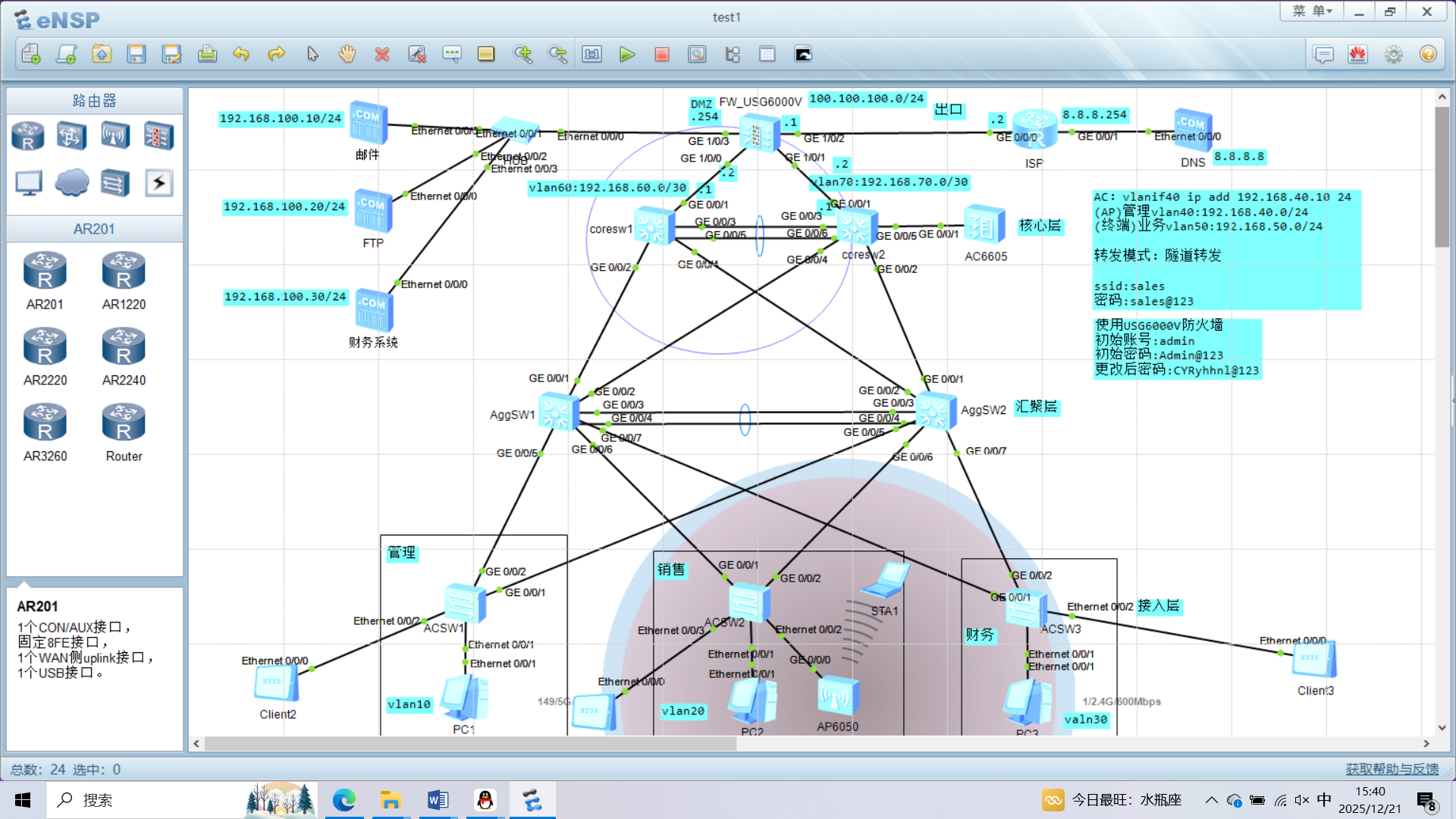
作为网络工程专业的核心实验,该 eNSP 拓扑完整呈现了三层交换架构、AC 集中式无线管理、出口安全控制的企业网典型方案,以下从专业维度拆解各模块的技术逻辑与配置要点:
一、三层架构的分层转发逻辑:核心 - 汇聚 - 接入的功能解耦
拓扑采用 "核心层(coreSW)- 汇聚层(AggSW1/2)- 接入层(ACS1/2/3)" 的经典分层模型,各层功能遵循 OSI 分层原则:
- 核心层 :基于三层接口(如
int Vlanif60)实现不同网段的高速转发,通过链路聚合或多链路互联(拓扑中核心与汇聚的多条 GE 链路)提供冗余,保障网络可用性; - 汇聚层:承担 VLAN 间路由(三层交换)、流量汇聚与策略控制(如 ACL),是核心层与接入层的 "转发枢纽";
- 接入层:通过 Access 接口将终端(PC、AP)划入对应 VLAN(如销售终端归属 vlan20),实现终端的二层接入与广播域隔离。
二、AC+AP 无线部署的协议联动:CAPWAP 与 DHCP Option43
拓扑中 AC6605 采用集中式无线管理,与 AP6050 通过 CAPWAP 协议(UDP 5246/5247)实现控制与数据分离:
-
AC 的 CAPWAP 源接口配置 :为使 AP 稳定发现 AC,需将 AC 的 CAPWAP 报文源 IP 绑定到管理 VLAN 接口(vlan40),配置如下:
plaintext
vlan batch 40 50 int Vlanif40 ip address 192.168.40.10 255.255.255.0 capwap source interface Vlanif40 -
AP 的 AC 发现机制 :瘦 AP 无本地配置,需通过 DHCP Option43 字段获取 AC 地址。在 AP 的管理 VLAN(vlan40)对应的 DHCP 服务器中配置:
plaintext
int Vlanif40
 dhcp server option 43 sub-option 3 ascii 192.168.40.10
Option43 是 CAPWAP 协议约定的 AC 地址传递字段,AP 获取 DHCP 地址后,即可通过该字段发起 CAPWAP 隧道建立。
-
无线业务 VLAN 映射 :AC 上创建 VAP 模板,将 SSID "sales" 与业务 VLAN50 绑定,实现 STA 流量的 VLAN 映射:
plaintext
wlan
 ssid-profile name sales
  ssid sales
 vap-profile name sales
  ssid-profile sales
  service-vlan vlan 50
  forward-mode tunnel  # 流量通过CAPWAP隧道转发至AC
ap all
 vap-profile sales wlan 1 radio all
三、出口安全与地址转换:防火墙的 NAT 与路由功能
拓扑中 FW_USG6000 作为出口设备,实现 ** 内网与外网的地址转换(NAT)** 与路由互联:
- 内网侧(GE1/0/1)配置私网地址(100.100.100.254/24),外网侧(GE1/0/2)配置公网地址(8.8.8.254/24);
- 通过 NAT 策略将内网私网地址(如 192.168.50.0/24)转换为外网公网地址,实现内网终端的外网访问;
- 配置静态路由(如
ip route-static 0.0.0.0 0.0.0.0 8.8.8.254),引导内网流量指向出口。
实验验证维度:
- 三层连通性 :核心层 VLAN 间 ping 测试(如
ping 192.168.60.1); - AP 注册状态 :AC 上执行
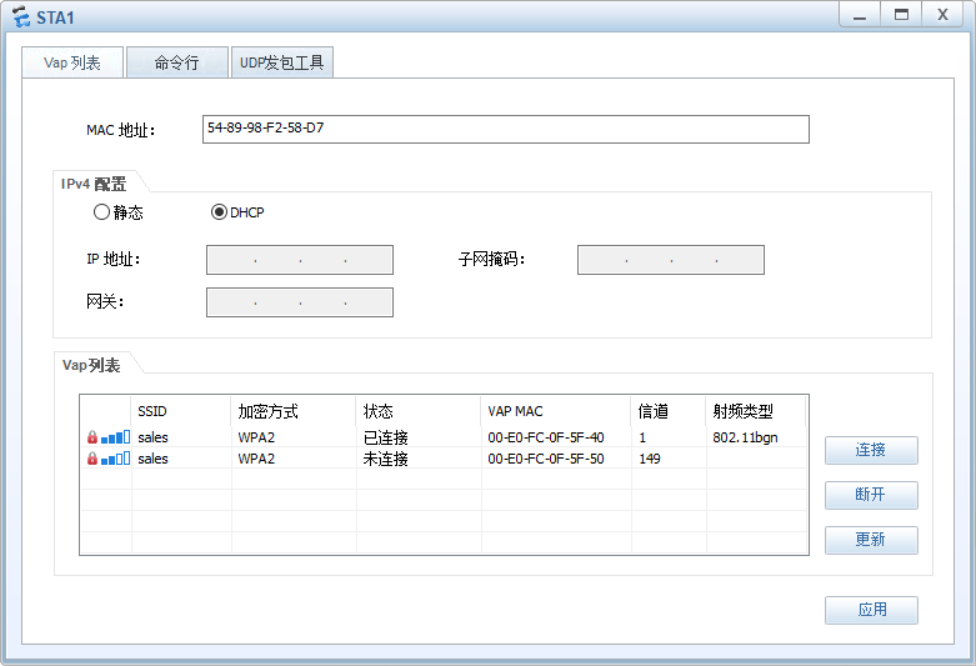
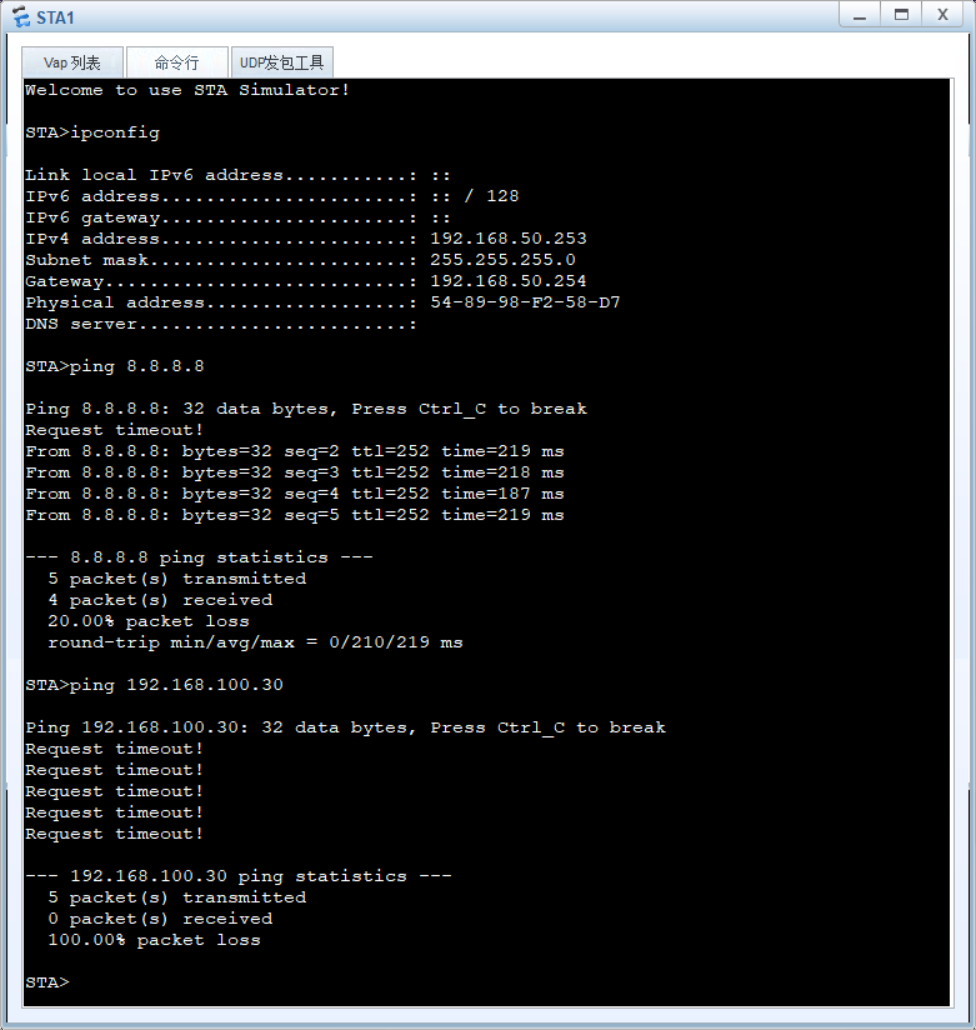
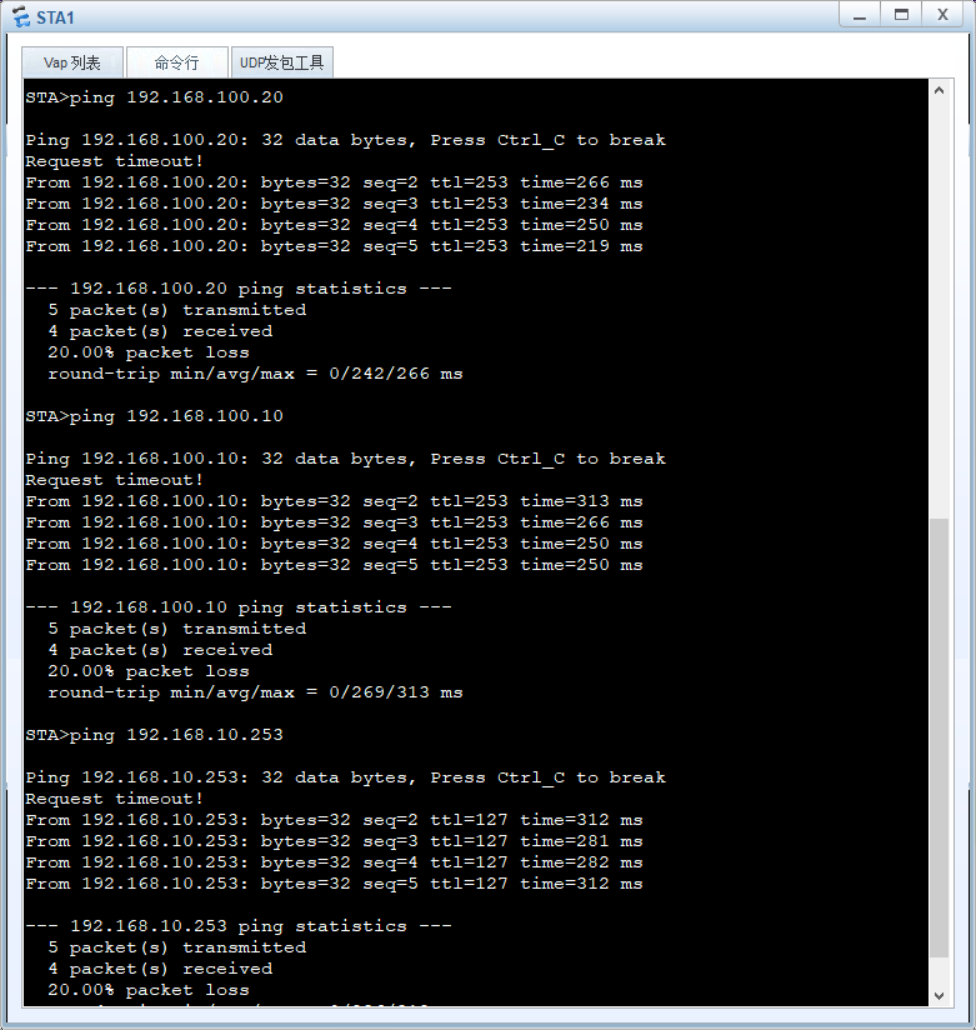
display ap all,查看 AP 状态为 "normal"; - 无线业务测试:STA 连接 SSID "sales" 后,获取 vlan50 网段 IP(192.168.50.x),并 ping 通内网服务器。
该拓扑完整覆盖了《计算机网络》《交换路由技术》的核心知识点,是企业网架构设计的典型案例。
相关实现截图:
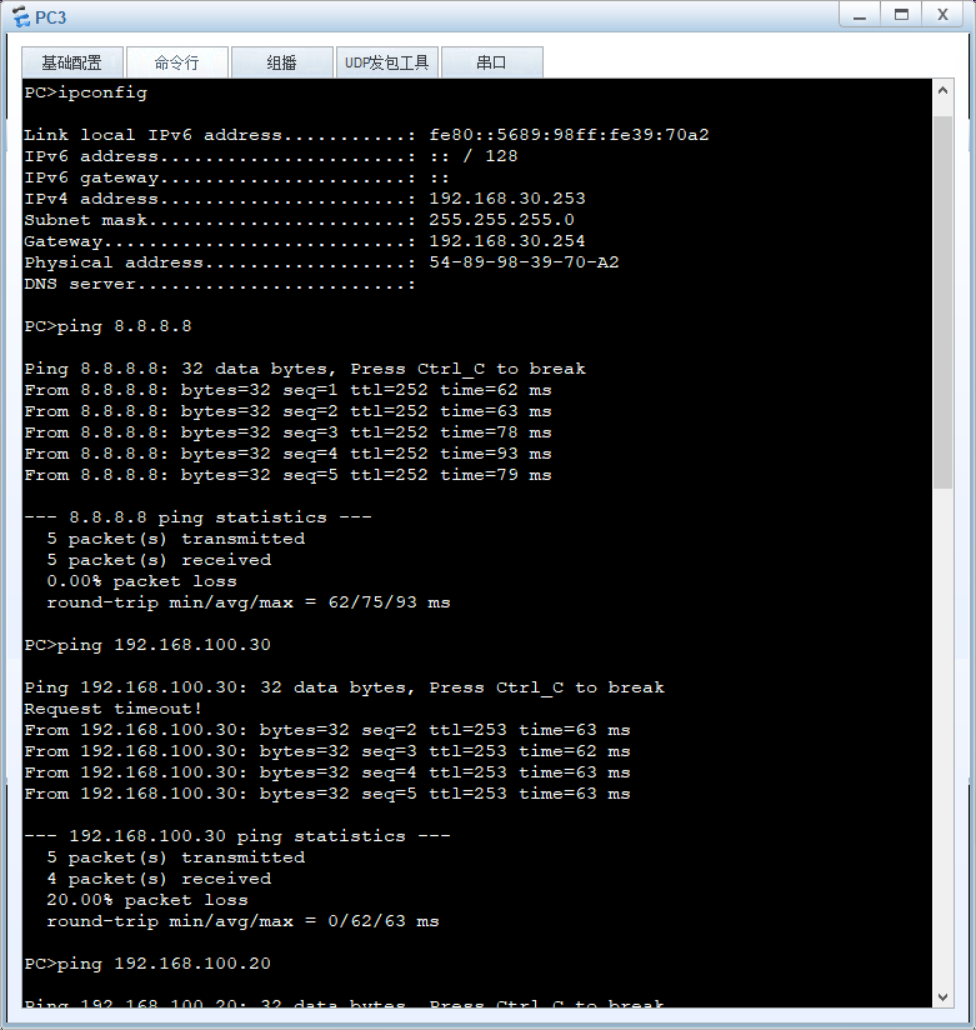
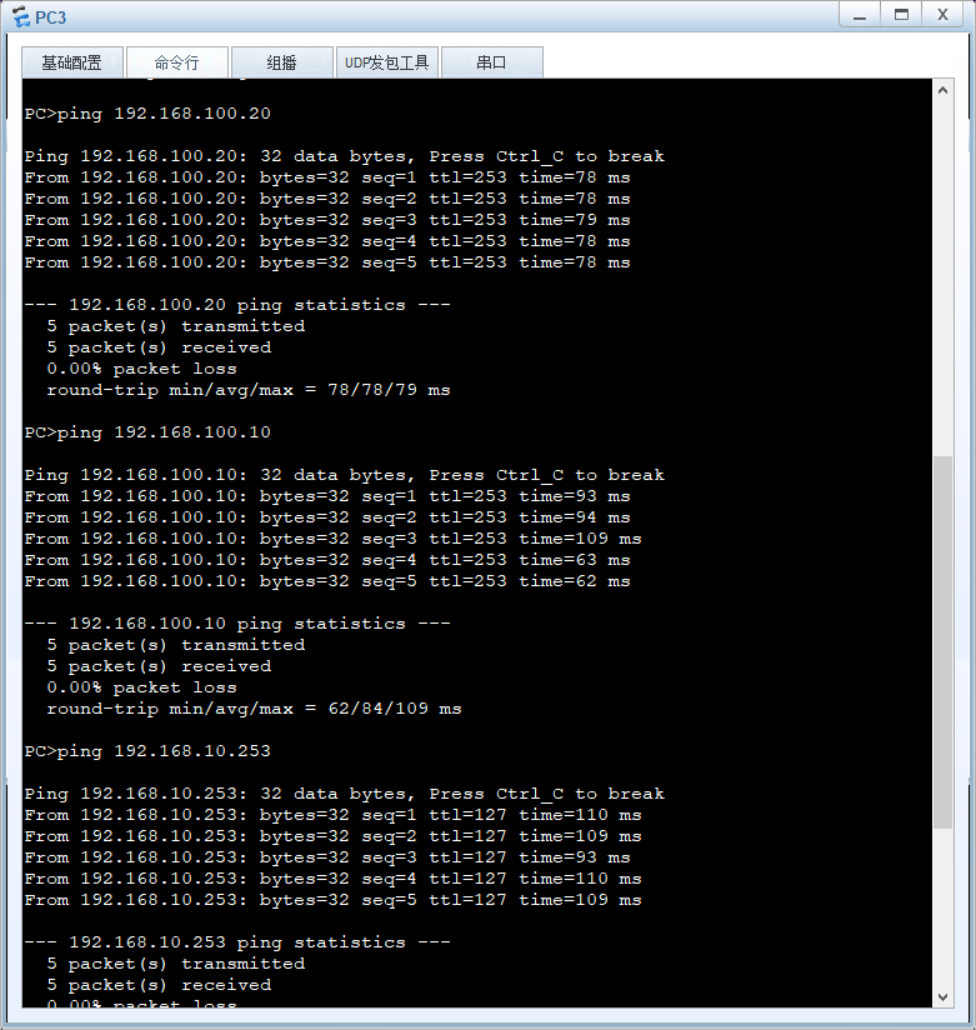
具体配置代码:
ACSW1
#
sysname acsw1
#
undo info-center enable
#
vlan batch 10 20 30 40 50
#
#
stp region-configuration
 region-name huawei
 instance 1 vlan 10 30
 instance 2 vlan 20 40 50
 active region-configuration
#
#
interface Ethernet0/0/1
 port link-type access
 port default vlan 10
#
interface Ethernet0/0/2
 port link-type access
 port default vlan 10
#
#
interface GigabitEthernet0/0/1
 port link-type trunk
 port trunk allow-pass vlan 2 to 4094
#
interface GigabitEthernet0/0/2
 port link-type trunk
 port trunk allow-pass vlan 2 to 4094
#
ACSW2
#
sysname acsw2
#
undo info-center enable
#
vlan batch 10 20 30 40 50
#
#
stp region-configuration
 region-name huawei
 instance 1 vlan 10 30
 instance 2 vlan 20 40 50
 active region-configuration
#
#
interface Ethernet0/0/1
 port link-type access
 port default vlan 20
#
interface Ethernet0/0/2
 port link-type trunk
 port trunk pvid vlan 40
 port trunk allow-pass vlan 2 to 4094
#
interface Ethernet0/0/3
 port link-type access
 port default vlan 20
#
#
interface GigabitEthernet0/0/1
 port link-type trunk
 port trunk allow-pass vlan 2 to 4094
#
interface GigabitEthernet0/0/2
 port link-type trunk
 port trunk allow-pass vlan 2 to 4094
#
ACSW3
#
sysname acsw3
#
undo info-center enable
#
vlan batch 10 20 30 40 50
#
#
stp region-configuration
 region-name huawei
 instance 1 vlan 10 30
 instance 2 vlan 20 40 50
 active region-configuration
#
#
interface Ethernet0/0/1
 port link-type access
 port default vlan 30
#
interface Ethernet0/0/2
 port link-type access
 port default vlan 30
#
#
interface GigabitEthernet0/0/1
 port link-type trunk
 port trunk allow-pass vlan 2 to 4094
#
interface GigabitEthernet0/0/2
 port link-type trunk
 port trunk allow-pass vlan 2 to 4094
#

AGGSW1
#
sysname aggsw1
#
undo info-center enable
#
vlan batch 10 20 30 40 50
#
#
stp region-configuration
 region-name huawei
 instance 1 vlan 10 30
 instance 2 vlan 20 40 50
 active region-configuration
#
#
interface GigabitEthernet0/0/1
 port link-type trunk
 port trunk allow-pass vlan 2 to 4094
#
interface GigabitEthernet0/0/2
 port link-type trunk
 port trunk allow-pass vlan 2 to 4094
#
#
interface GigabitEthernet0/0/5
 port link-type trunk
 port trunk allow-pass vlan 2 to 4094
#
interface GigabitEthernet0/0/6
 port link-type trunk
 port trunk allow-pass vlan 2 to 4094
#
interface GigabitEthernet0/0/7
 port link-type trunk
 port trunk allow-pass vlan 2 to 4094
#
int eth 1
mode lacp
tr g 0/0/3 0/0/4
p l t
p t a v a
#
AGGSW2
#
sysname aggsw2
#
undo info-center enable
#
vlan batch 10 20 30 40 50
#
#
stp region-configuration
 region-name huawei
 instance 1 vlan 10 30
 instance 2 vlan 20 40 50
 active region-configuration
#
#
interface GigabitEthernet0/0/1
 port link-type trunk
 port trunk allow-pass vlan 2 to 4094
#
interface GigabitEthernet0/0/2
 port link-type trunk
 port trunk allow-pass vlan 2 to 4094
#
#
interface GigabitEthernet0/0/5
 port link-type trunk
 port trunk allow-pass vlan 2 to 4094
#
interface GigabitEthernet0/0/6
 port link-type trunk
 port trunk allow-pass vlan 2 to 4094
#
interface GigabitEthernet0/0/7
 port link-type trunk
 port trunk allow-pass vlan 2 to 4094
#
int eth 1
mode lacp
tr g 0/0/3 0/0/4
p l t
p t a v a
#

ISP
#
interface GigabitEthernet0/0/0
 ip address 100.100.100.2 255.255.255.0
#
interface GigabitEthernet0/0/1
 ip address 8.8.8.254 255.255.255.0
#
#
ip route-static 0.0.0.0 0.0.0.0 100.100.100.1
#
FW
#
interface GigabitEthernet1/0/0
 ip address 192.168.60.2 255.255.255.252
#
interface GigabitEthernet1/0/1
 ip address 192.168.70.2 255.255.255.252
#
interface GigabitEthernet1/0/2
 ip address 100.100.100.1 255.255.255.0
#
interface GigabitEthernet1/0/3
 ip address 192.168.100.254 255.255.255.0
quit
fire zone trust
add int g1/0/0
add int g1/0/1
fire zone untrust
add int g1/0/2
fire zone dmz
add int g1/0/3
quit
#
#
ospf 1
 default-route-advertise always
 area 0.0.0.0
  network 192.168.60.0 0.0.0.3
  network 192.168.70.0 0.0.0.3
  network 192.168.100.0 0.0.0.255
quit
quit
#
ip route-static 0.0.0.0 0.0.0.0 100.100.100.2
#
security-policy
 rule name t_u
  source-zone trust
  destination-zone untrust
  action permit
 rule name t_d_mailftp
  source-zone trust
  destination-zone dmz
  destination-address 192.168.100.10 0.0.0.0
  destination-address 192.168.100.20 0.0.0.0
  action permit
 rule name t_allow_caiwu
  source-zone trust
  destination-zone dmz
  source-address 192.168.30.0 0.0.0.255
  destination-address 192.168.100.30 0.0.0.0
  action permit
 rule name others_deny_caiwu
  source-zone trust
  destination-zone dmz
  destination-address 192.168.100.30 0.0.0.0
  action deny
#

AC
v b 40 50
int vlanif 40
ip add 192.168.40.10 24
q
capwap source interface vlan 40
int g0/0/1
p l t
p  t a v a
q
dis ip int brief
ip route-static 0.0.0.0 0 192.168.40.254
#
wlan
ap auth-mode no-auth
dis ap all
#
wlan
ssid name sales
ssid sales
sec name sales
sec wpa2 psk pass-phrase sales@123 aes
vap name sales
ssid sales
sec sales
service-vlan vlan 50
forward-mode tunnel
ap-g name default
vap sales wlan 1 radio all
#

CORESW1
#
sysname coresw1
#
undo info-center enable
#
vlan batch 10 20 30 40 50 60 70
#
#
dhcp enable
#
interface Vlanif10
 ip address 192.168.10.254 255.255.255.0
dhcp enable
interface Vlanif10
 dhcp select interface
#
#
interface Vlanif20
 ip address 192.168.20.254 255.255.255.0
dhcp enable
interface Vlanif20
 dhcp select interface
#
interface Vlanif30
 ip address 192.168.30.254 255.255.255.0
dhcp enable
interface Vlanif30
 dhcp select interface
#
#
interface Vlanif40
 ip address 192.168.40.254 255.255.255.0
dhcp enable
interface Vlanif40
 dhcp select interface
#
interface Vlanif50
 ip address 192.168.50.254 255.255.255.0
dhcp enable
interface Vlanif50
 dhcp select interface
#
#
interface Vlanif60
 ip address 192.168.60.1 255.255.255.252
#
#
interface GigabitEthernet0/0/1
 port link-type access
 port default vlan 60
#
interface GigabitEthernet0/0/2
 port link-type trunk
 port trunk allow-pass vlan 2 to 4094
#
#
interface GigabitEthernet0/0/4
 port link-type trunk
 port trunk allow-pass vlan 2 to 4094
#
int eth 1
mode lacp
tr g 0/0/3 0/0/5
p l t
p t a v a
#
#
ospf 1
 area 0.0.0.0
  network 192.168.60.0 0.0.0.3
 area 0.0.0.1
  network 192.168.10.0 0.0.0.255
  network 192.168.30.0 0.0.0.255
 area 0.0.0.2
  network 192.168.20.0 0.0.0.255
  network 192.168.40.0 0.0.0.255
  network 192.168.50.0 0.0.0.255
#

CORESW2
#
sysname coresw2
#
undo info-center enable
#
vlan batch 10 20 30 40 50 60 70
#
#
dhcp enable
#
interface Vlanif10
 ip address 192.168.10.254 255.255.255.0
dhcp enable
interface Vlanif10
 dhcp select interface
#
#
interface Vlanif20
 ip address 192.168.20.254 255.255.255.0
dhcp enable
interface Vlanif20
 dhcp select interface
#
interface Vlanif30
 ip address 192.168.30.254 255.255.255.0
dhcp enable
interface Vlanif30
 dhcp select interface
#
#
interface Vlanif40
 ip address 192.168.40.254 255.255.255.0
dhcp enable
interface Vlanif40
 dhcp select interface
#
interface Vlanif50
 ip address 192.168.50.254 255.255.255.0
dhcp enable
interface Vlanif50
 dhcp select interface
#
#
interface Vlanif70
 ip address 192.168.70.1 255.255.255.252
#
#
interface GigabitEthernet0/0/1
 port link-type access
 port default vlan 70
#
interface GigabitEthernet0/0/2
 port link-type trunk
 port trunk allow-pass vlan 2 to 4094
#
#
interface GigabitEthernet0/0/4
 port link-type trunk
 port trunk allow-pass vlan 2 to 4094
#
interface GigabitEthernet0/0/5
 port link-type trunk
 port trunk allow-pass vlan 2 to 4094
#
#
int eth 1
mode lacp
tr g 0/0/3 0/0/6
p l t
p t a v a
#
ospf 1
 area 0.0.0.0
  network 192.168.70.0 0.0.0.3
 area 0.0.0.1
  network 192.168.10.0 0.0.0.255
  network 192.168.30.0 0.0.0.255
 area 0.0.0.2
  network 192.168.20.0 0.0.0.255
  network 192.168.40.0 0.0.0.255
  network 192.168.50.0 0.0.0.255
#