在React Native中开发一个具有全文搜索功能的组件,你可以通过以下几个步骤来实现:
- 准备数据
首先,确保你的应用中有可以搜索的数据。这些数据可以来自于网络请求、本地数据库(如SQLite)或者静态数据。
- 创建搜索组件
你可以创建一个简单的搜索框组件,用户可以在其中输入搜索关键词。
jsx
import React, { useState } from 'react';
import { View, TextInput, FlatList, Text } from 'react-native';

const SearchComponent = ({ data, renderItem }) => {
  const [searchQuery, setSearchQuery] = useState('');
  const [filteredData, setFilteredData] = useState(data);

  const handleSearch = (text) => {
    setSearchQuery(text);
    const newData = data.filter(
      (item) => item.title.toLowerCase().includes(text.toLowerCase())
    );
    setFilteredData(newData);
  };

  return (
    <View>
      <TextInput
        style={{ height: 40, borderColor: 'gray', borderWidth: 1 }}
        onChangeText={handleSearch}
        value={searchQuery}
        placeholder="Search..."
      />
      <FlatList
        data={filteredData}
        renderItem={renderItem}
        keyExtractor={item => item.id.toString()}
      />
    </View>
  );
};- 使用组件并传递数据和渲染函数
在你的主组件中,使用SearchComponent并传递数据和渲染函数。
jsx
import React from 'react';
import { Text } from 'react-native';
import SearchComponent from './SearchComponent'; // 确保路径正确

const App = () => {
  const data = [
    { id: '1', title: 'Apple' },
    { id: '2', title: 'Banana' },
    { id: '3', title: 'Cherry' },
    // 更多数据...
  ];

  const renderItem = ({ item }) => (
    <Text>{item.title}</Text>
  );

  return <SearchComponent data={data} renderItem={renderItem} />;
};- 优化性能(可选)
如果数据集非常大,每次过滤都可能导致性能问题。在这种情况下,你可以考虑使用useMemo或useCallback来优化性能:
jsx
const handleSearch = useCallback((text) => {
  setSearchQuery(text);
  const newData = data.filter(item => item.title.toLowerCase().includes(text.toLowerCase()));
  setFilteredData(newData);
}, [data]); // 依赖项仅为data,避免不必要的重渲染- 使用外部库(可选)
对于更复杂或高性能的全文搜索需求,你可以考虑使用外部库,如fuse.js。首先安装fuse.js:
bash
npm install fuse.js --save或者使用yarn:
bash
yarn add fuse.js然后使用fuse.js进行搜索:
jsx
import Fuse from 'fuse.js'; // 引入fuse.js库
// 在组件中使用fuse进行搜索...配置和使用fuse.js进行搜索的示例可以参考其官方文档。
通过以上步骤,你可以在React Native应用中实现一个基本的全文搜索功能。根据具体需求,你可以进一步优化和扩展这个功能
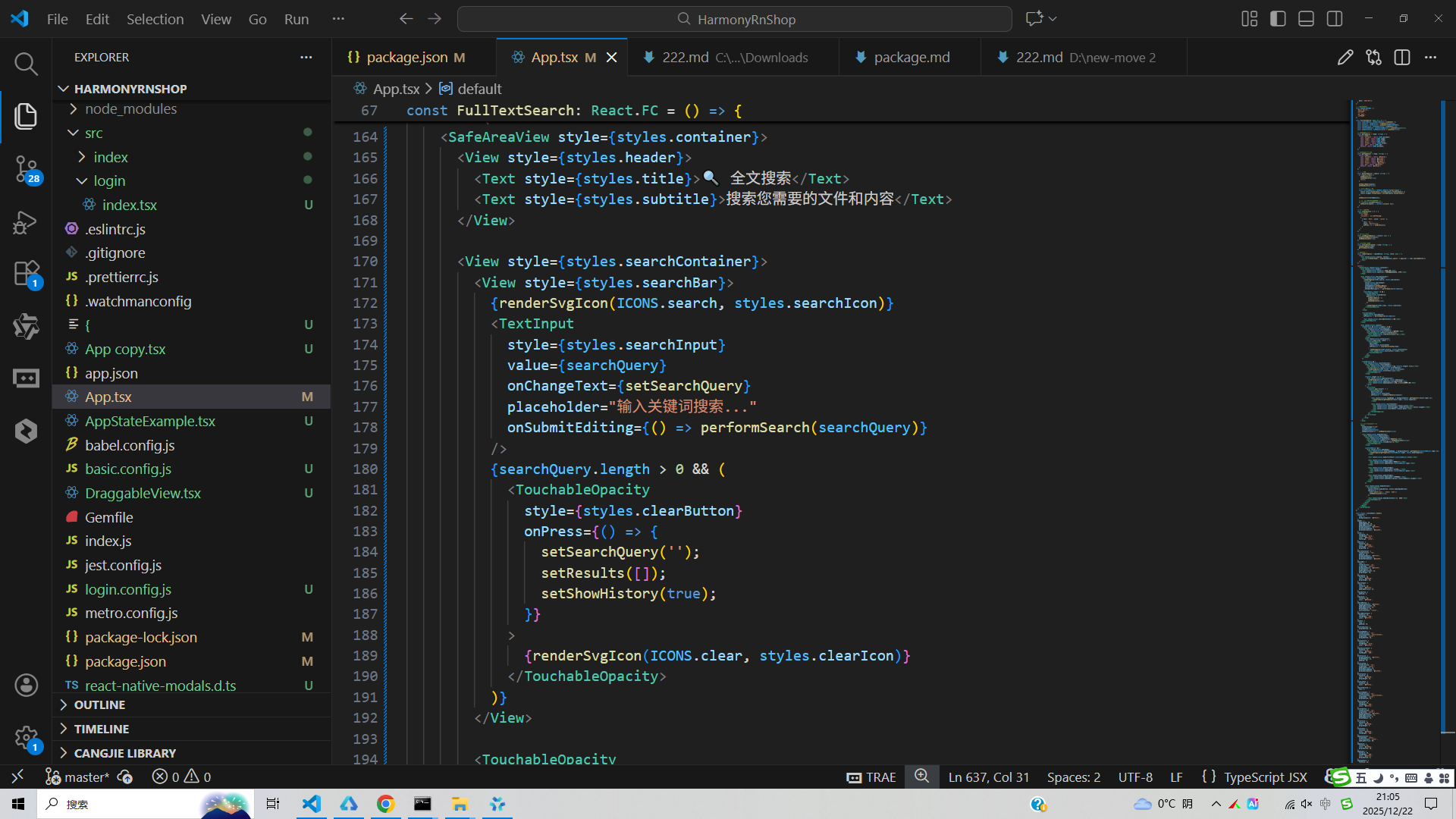
真实代码场景演示:
js
// app.tsx
import React, { useState } from 'react';
import { SafeAreaView, View, Text, StyleSheet, TouchableOpacity, ScrollView, TextInput, Modal, Alert } from 'react-native';

// Base64 图标库
const ICONS = {
  search: 'PHN2ZyB4bWxucz0iaHR0cDovL3d3dy53My5vcmcvMjAwMC9zdmciIHZpZXdCb3g9IjAgMCAyNCAyNCIgZmlsbD0id2hpdGUiPjxwYXRoIGQ9Ik0xNS41IDE0aC0uNzlsLS4yOC0uMjdDMTUuNDEgMTIuNTkgMTYgMTEuMTEgMTYgOS41IDE2IDUuOTEgMTMuMDkgMyA5LjUgM1MzIDUuOTEgMyA5LjUgNS45MSAxNiA5LjUgMTZjMS42MSAwIDMuMDktLjU5IDQuMjMtMS41NWwuMjcuMjh2Ljc5bDUgNC45OUwyMC40OSAxOWwtNC45OS01em0tNiAwQzcuMDEgMTQgNSAxMS45OSA1IDkuNVM3LjAxIDUgOS41IDUgMTQgNy4wMSAxNCA5LjUgMTEuOTkgMTQgOS41IDE0eiIvPjwvc3ZnPg==',
  document: 'PHN2ZyB4bWxucz0iaHR0cDovL3d3dy53My5vcmcvMjAwMC9zdmciIHZpZXdCb3g9IjAgMCAyNCAyNCIgZmlsbD0id2hpdGUiPjxwYXRoIGQ9Ik0xNCAyaC00djJoLTR2MmgxMlY0aC00VjJ6bS00IDZoMTJ2MUgxMHYtMXptMCAyaDEydjFIMTB2LTF6bTAgMmgxMnYxSDEwdi0xem0wIDJoMTJ2MUgxMHYtMXoiLz48L3N2Zz4=',
  image: 'PHN2ZyB4bWxucz0iaHR0cDovL3d3dy53My5vcmcvMjAwMC9zdmciIHZpZXdCb3g9IjAgMCAyNCAyNCIgZmlsbD0id2hpdGUiPjxwYXRoIGQ9Ik04LjUgMTMuNWwyLjUgMyAzLjUtNC41IDQuNSA2SDVtMTYtMTVIM2MtMS4xIDAtMiAuOS0yIDJ2MTRjMCAxLjEuOSAyIDIgMmgxOGMxLjEgMCAyLS44OSAyLTJWNmMwLTEuMTEtLjg5LTItMi0yem0tMTEgOWwyLjUgMyAzLjUtNC41IDQuNSA2SDV6Ii8+PC9zdmc+',
  video: 'PHN2ZyB4bWxucz0iaHR0cDovL3d3dy53My5vcmcvMjAwMC9zdmciIHZpZXdCb3g9IjAgMCAyNCAyNCIgZmlsbD0id2hpdGUiPjxwYXRoIGQ9Ik0xOCA0aC0xMkMtNC44OSA0IDQgNC44OSA0IDZ2MTJjMCAxLjExLjg5IDIgMiAyaDEyYzEuMTEgMCAyLS44OSAyLTJWNmMwLTEuMTEtLjg5LTItMi0yem0tMyA5LjVsLTUgMy4xdi03LjJsNSAzLjF6Ii8+PC9zdmc+',
  music: 'PHN2ZyB4bWxucz0iaHR0cDovL3d3dy53My5vcmcvMjAwMC9zdmciIHZpZXdCb3g9IjAgMCAyNCAyNCIgZmlsbD0id2hpdGUiPjxwYXRoIGQ9Ik0xMiAzdjEwLjI4Yy0uNTctLjMzLTEuMjMtLjUzLTEuOTUtLjUzLTEuNzQgMC0zLjEzIDEuMzktMy4xMyAzLjEzUzguMjYgMTkgMTAgMTlzMy4xMy0xLjM5IDMuMTMtMy4xM2MtMC0uNzItLjItMS4zOC0uNTMtMS45NUwxNiAxMlY2bC00LTR6Ii8+PC9zdmc+',
  folder: 'PHN2ZyB4bWxucz0iaHR0cDovL3d3dy53My5vcmcvMjAwMC9zdmciIHZpZXdCb3g9IjAgMCAyNCAyNCIgZmlsbD0id2hpdGUiPjxwYXRoIGQ9Ik0xMCA0SDRjLTEuMSAwLTIgLjktMiAydjEyYzAgMS4xLjkgMiAyIDJoMTZjMS4xIDAgMi0uOSAyLTJWNmMwLTEuMS0uOS0yLTItMmgtOGwtLTItMnoiLz48L3N2Zz4=',
  pdf: 'PHN2ZyB4bWxucz0iaHR0cDovL3d3dy53My5vcmcvMjAwMC9zdmciIHZpZXdCb3g9IjAgMCAyNCAyNCIgZmlsbD0id2hpdGUiPjxwYXRoIGQ9Ik0xNCAyaC00djJoLTR2MmgxMlY0aC00VjJ6bS00IDZoMTJ2MUgxMHYtMXptMCAyaDEydjFIMTB2LTF6bTAgMmgxMnYxSDEwdi0xem0wIDJoMTJ2MUgxMHYtMXoiLz48L3N2Zz4=',
  history: 'PHN2ZyB4bWxucz0iaHR0cDovL3d3dy53My5vcmcvMjAwMC9zdmciIHZpZXdCb3g9IjAgMCAyNCAyNCIgZmlsbD0id2hpdGUiPjxwYXRoIGQ9Ik0xMiAyQzYuNSAyIDIgNi41IDIgMTJzNC41IDEwIDEwIDEwIDEwLTQuNSAxMC0xMFMxNy41IDIgMTIgMnptMCAxOGMtNC40IDAtOC0zLjYtOC04czMuNi04IDgtOCA4IDMuNiA4IDgtMy42IDgtOCA4em0tMS0zdjRsNi02aC00VjdoLTR2NnoiLz48L3N2Zz4=',
  clear: 'PHN2ZyB4bWxucz0iaHR0cDovL3d3dy53My5vcmcvMjAwMC9zdmciIHZpZXdCb3g9IjAgMCAyNCAyNCIgZmlsbD0id2hpdGUiPjxwYXRoIGQ9Ik0xOSA2LjQxTDE3LjU5IDUgMTIgMTAuNTkgNi40MSA1IDUgNi40MSAxMC41OSAxMiA1IDE3LjU5IDYuNDEgMTkgMTIgMTMuNDEgMTcuNTkgMTkgMTkgMTcuNTkgMTMuNDEgMTJ6Ii8+PC9zdmc+',
  filter: 'PHN2ZyB4bWxucz0iaHR0cDovL3d3dy53My5vcmcvMjAwMC9zdmciIHZpZXdCb3g9IjAgMCAyNCAyNCIgZmlsbD0id2hpdGUiPjxwYXRoIGQ9Ik0xMCAxOGgzdjJoLTN2LTJ6bTAtNWg1djJoLTV2LTJ6bTAtN2g3djJoLTdWNXoiLz48cGF0aCBkPSJNMyA1aDR2Mkgzem0wIDdoNHYySDd2LTJ6bTAgN2g0djJIN3YtMnoiLz48L3N2Zz4='
};

// 默认搜索结果数据
const DEFAULT_RESULTS = [
  {
    id: '1',
    title: 'React Native开发指南.pdf',
    type: 'pdf',
    snippet: 'React Native使你只使用JavaScript也能编写原生移动应用。它在设计原理上和React一致...',
    date: '2023-06-15'
  },
  {
    id: '2',
    title: '项目需求文档.docx',
    type: 'document',
    snippet: '这是一个详细的项目需求文档,包含所有功能模块的详细说明和用户故事...',
    date: '2023-06-14'
  },
  {
    id: '3',
    title: '产品设计图.png',
    type: 'image',
    snippet: '最新版的产品界面设计图,包含所有页面的视觉设计和交互流程...',
    date: '2023-06-13'
  },
  {
    id: '4',
    title: '会议记录视频.mp4',
    type: 'video',
    snippet: '上周产品规划会议的完整录像,包含所有讨论要点和决策过程...',
    date: '2023-06-12'
  },
  {
    id: '5',
    title: '音乐素材',
    type: 'folder',
    snippet: '项目所需的背景音乐和音效文件,按类别整理存放...',
    date: '2023-06-11'
  }
];

// 搜索历史数据
const SEARCH_HISTORY = [
  'React Native',
  '项目文档',
  '设计图',
  '会议记录',
  '音乐素材'
];

const FullTextSearch: React.FC = () => {
  const [searchQuery, setSearchQuery] = useState('');
  const [results, setResults] = useState<any[]>([]);
  const [history, setHistory] = useState(SEARCH_HISTORY);
  const [showHistory, setShowHistory] = useState(true);
  const [selectedResult, setSelectedResult] = useState<any>(null);
  const [modalVisible, setModalVisible] = useState(false);

  // 获取文件类型图标
  const getTypeIcon = (type: string) => {
    switch (type) {
      case 'document': return ICONS.document;
      case 'image': return ICONS.image;
      case 'video': return ICONS.video;
      case 'music': return ICONS.music;
      case 'folder': return ICONS.folder;
      case 'pdf': return ICONS.pdf;
      default: return ICONS.document;
    }
  };

  // 获取文件类型颜色
  const getTypeColor = (type: string) => {
    switch (type) {
      case 'document': return '#4361ee';
      case 'image': return '#4cc9f0';
      case 'video': return '#f72585';
      case 'music': return '#7209b7';
      case 'folder': return '#2ec4b6';
      case 'pdf': return '#f94144';
      default: return '#4361ee';
    }
  };

  // 执行搜索
  const performSearch = (query: string) => {
    if (!query.trim()) {
      setResults([]);
      setShowHistory(true);
      return;
    }

    setSearchQuery(query);
    setShowHistory(false);

    // 模拟搜索结果过滤
    const filteredResults = DEFAULT_RESULTS.filter(result =>
      result.title.toLowerCase().includes(query.toLowerCase()) ||
      result.snippet.toLowerCase().includes(query.toLowerCase())
    );

    setResults(filteredResults);

    // 添加到搜索历史(避免重复)
    if (!history.includes(query)) {
      setHistory([query, ...history.slice(0, 4)]);
    }
  };

  // 清空搜索历史
  const clearHistory = () => {
    Alert.alert(
      '清空历史',
      '确定要清空所有搜索历史吗?',
      [
        { text: '取消', style: 'cancel' },
        {
          text: '清空',
          style: 'destructive',
          onPress: () => setHistory([])
        }
      ]
    );
  };

  // 查看结果详情
  const viewResultDetails = (result: any) => {
    setSelectedResult(result);
    setModalVisible(true);
  };

  // 选择历史搜索词
  const selectHistoryItem = (item: string) => {
    setSearchQuery(item);
    performSearch(item);
  };

  // 渲染SVG图标
  const renderSvgIcon = (base64Icon: string, style: any) => {
    return (
      <Text style={[styles.svgIcon, style]}>
        {String.fromCharCode(...atob(base64Icon).split('').map(char => char.charCodeAt(0)))}
      </Text>
    );
  };

  return (
    <SafeAreaView style={styles.container}>
      <View style={styles.header}>
        <Text style={styles.title}>🔍 全文搜索</Text>
        <Text style={styles.subtitle}>搜索您需要的文件和内容</Text>
      </View>

      <View style={styles.searchContainer}>
        <View style={styles.searchBar}>
          {renderSvgIcon(ICONS.search, styles.searchIcon)}
          <TextInput
            style={styles.searchInput}
            value={searchQuery}
            onChangeText={setSearchQuery}
            placeholder="输入关键词搜索..."
            onSubmitEditing={() => performSearch(searchQuery)}
          />
          {searchQuery.length > 0 && (
            <TouchableOpacity
              style={styles.clearButton}
              onPress={() => {
                setSearchQuery('');
                setResults([]);
                setShowHistory(true);
              }}
            >
              {renderSvgIcon(ICONS.clear, styles.clearIcon)}
            </TouchableOpacity>
          )}
        </View>

        <TouchableOpacity
          style={styles.searchButton}
          onPress={() => performSearch(searchQuery)}
        >
          <Text style={styles.searchButtonText}>搜索</Text>
        </TouchableOpacity>
      </View>

      <View style={styles.content}>
        {showHistory && history.length > 0 && (
          <View style={styles.historySection}>
            <View style={styles.sectionHeader}>
              <Text style={styles.sectionTitle}>搜索历史</Text>
              <TouchableOpacity onPress={clearHistory}>
                <Text style={styles.clearHistoryText}>清空</Text>
              </TouchableOpacity>
            </View>
            <View style={styles.historyList}>
              {history.map((item, index) => (
                <TouchableOpacity
                  key={index}
                  style={styles.historyItem}
                  onPress={() => selectHistoryItem(item)}
                >
                  {renderSvgIcon(ICONS.history, styles.historyIcon)}
                  <Text style={styles.historyText}>{item}</Text>
                </TouchableOpacity>
              ))}
            </View>
          </View>
        )}

        {!showHistory && (
          <View style={styles.resultsSection}>
            <View style={styles.resultsHeader}>
              <Text style={styles.resultsCount}>找到 {results.length} 个结果</Text>
              <TouchableOpacity style={styles.filterButton}>
                {renderSvgIcon(ICONS.filter, styles.filterIcon)}
                <Text style={styles.filterText}>筛选</Text>
              </TouchableOpacity>
            </View>

            {results.length === 0 ? (
              <View style={styles.emptyContainer}>
                {renderSvgIcon(ICONS.search, styles.emptyIcon)}
                <Text style={styles.emptyText}>未找到相关内容</Text>
                <Text style={styles.emptySubtext}>尝试使用其他关键词搜索</Text>
              </View>
            ) : (
              <ScrollView>
                {results.map((result) => (
                  <TouchableOpacity
                    key={result.id}
                    style={styles.resultCard}
                    onPress={() => viewResultDetails(result)}
                  >
                    <View style={[styles.typeBadge, { backgroundColor: getTypeColor(result.type) }]}>
                      {renderSvgIcon(getTypeIcon(result.type), styles.typeIcon)}
                    </View>

                    <View style={styles.resultContent}>
                      <Text style={styles.resultTitle}>{result.title}</Text>
                      <Text style={styles.resultSnippet} numberOfLines={2}>{result.snippet}</Text>
                      <Text style={styles.resultDate}>{result.date}</Text>
                    </View>
                  </TouchableOpacity>
                ))}
              </ScrollView>
            )}
          </View>
        )}
      </View>

      {/* 结果详情模态框 */}
      <Modal
        animationType="slide"
        transparent={true}
        visible={modalVisible}
        onRequestClose={() => setModalVisible(false)}
      >
        <View style={styles.modalOverlay}>
          <View style={styles.modalContent}>
            <View style={styles.modalHeader}>
              <Text style={styles.modalTitle}>文件详情</Text>
              <TouchableOpacity onPress={() => setModalVisible(false)}>
                <Text style={styles.closeButton}>×</Text>
              </TouchableOpacity>
            </View>

            {selectedResult && (
              <View style={styles.modalBody}>
                <View style={[styles.modalTypeBadge, { backgroundColor: getTypeColor(selectedResult.type) }]}>
                  {renderSvgIcon(getTypeIcon(selectedResult.type), styles.modalTypeIcon)}
                </View>

                <Text style={styles.modalTitleText}>{selectedResult.title}</Text>

                <View style={styles.modalInfoRow}>
                  <Text style={styles.modalLabel}>文件类型:</Text>
                  <Text style={styles.modalValue}>{selectedResult.type}</Text>
                </View>

                <View style={styles.modalInfoRow}>
                  <Text style={styles.modalLabel}>修改日期:</Text>
                  <Text style={styles.modalValue}>{selectedResult.date}</Text>
                </View>

                <View style={styles.modalInfoRow}>
                  <Text style={styles.modalLabel}>内容摘要:</Text>
                  <Text style={styles.modalDescription}>{selectedResult.snippet}</Text>
                </View>
              </View>
            )}

            <View style={styles.modalActions}>
              <TouchableOpacity
                style={[styles.modalButton, styles.modalOpenButton]}
                onPress={() => {
                  Alert.alert('提示', '即将打开文件');
                  setModalVisible(false);
                }}
              >
                <Text style={styles.modalButtonText}>打开文件</Text>
              </TouchableOpacity>
            </View>
          </View>
        </View>
      </Modal>
    </SafeAreaView>
  );
};

const styles = StyleSheet.create({
  container: {
    flex: 1,
    backgroundColor: '#f8fafc',
  },
  header: {
    paddingTop: 30,
    paddingBottom: 20,
    paddingHorizontal: 20,
    backgroundColor: '#ffffff',
    borderBottomWidth: 1,
    borderBottomColor: '#e2e8f0',
  },
  title: {
    fontSize: 24,
    fontWeight: 'bold',
    color: '#0f172a',
    textAlign: 'center',
  },
  subtitle: {
    fontSize: 14,
    color: '#64748b',
    textAlign: 'center',
    marginTop: 4,
  },
  searchContainer: {
    flexDirection: 'row',
    padding: 16,
    backgroundColor: '#ffffff',
    borderBottomWidth: 1,
    borderBottomColor: '#e2e8f0',
  },
  searchBar: {
    flex: 1,
    flexDirection: 'row',
    alignItems: 'center',
    backgroundColor: '#f1f5f9',
    borderRadius: 25,
    paddingHorizontal: 15,
    marginRight: 10,
  },
  searchIcon: {
    fontSize: 20,
    color: '#94a3b8',
    marginRight: 10,
  },
  searchInput: {
    flex: 1,
    fontSize: 16,
    color: '#0f172a',
    paddingVertical: 12,
  },
  clearButton: {
    padding: 5,
  },
  clearIcon: {
    fontSize: 20,
    color: '#94a3b8',
  },
  searchButton: {
    backgroundColor: '#4361ee',
    paddingHorizontal: 20,
    paddingVertical: 12,
    borderRadius: 25,
    justifyContent: 'center',
  },
  searchButtonText: {
    fontSize: 16,
    fontWeight: '600',
    color: '#ffffff',
  },
  content: {
    flex: 1,
    padding: 16,
  },
  historySection: {
    marginBottom: 20,
  },
  sectionHeader: {
    flexDirection: 'row',
    justifyContent: 'space-between',
    alignItems: 'center',
    marginBottom: 15,
  },
  sectionTitle: {
    fontSize: 18,
    fontWeight: 'bold',
    color: '#0f172a',
  },
  clearHistoryText: {
    fontSize: 14,
    color: '#4361ee',
    fontWeight: '600',
  },
  historyList: {
    backgroundColor: '#ffffff',
    borderRadius: 12,
    padding: 10,
  },
  historyItem: {
    flexDirection: 'row',
    alignItems: 'center',
    paddingVertical: 12,
    borderBottomWidth: 1,
    borderBottomColor: '#f1f5f9',
  },
  historyIcon: {
    fontSize: 18,
    color: '#94a3b8',
    marginRight: 12,
  },
  historyText: {
    fontSize: 16,
    color: '#0f172a',
  },
  resultsSection: {
    flex: 1,
  },
  resultsHeader: {
    flexDirection: 'row',
    justifyContent: 'space-between',
    alignItems: 'center',
    marginBottom: 15,
  },
  resultsCount: {
    fontSize: 16,
    fontWeight: '600',
    color: '#0f172a',
  },
  filterButton: {
    flexDirection: 'row',
    alignItems: 'center',
    backgroundColor: '#f1f5f9',
    paddingHorizontal: 12,
    paddingVertical: 6,
    borderRadius: 15,
  },
  filterIcon: {
    fontSize: 16,
    color: '#475569',
    marginRight: 5,
  },
  filterText: {
    fontSize: 14,
    color: '#475569',
    fontWeight: '600',
  },
  emptyContainer: {
    alignItems: 'center',
    justifyContent: 'center',
    paddingVertical: 60,
  },
  emptyIcon: {
    fontSize: 64,
    color: '#cbd5e1',
    marginBottom: 20,
  },
  emptyText: {
    fontSize: 20,
    fontWeight: '600',
    color: '#0f172a',
    marginBottom: 8,
  },
  emptySubtext: {
    fontSize: 16,
    color: '#64748b',
  },
  resultCard: {
    backgroundColor: '#ffffff',
    borderRadius: 16,
    padding: 20,
    marginBottom: 16,
    elevation: 3,
    shadowColor: '#000',
    shadowOffset: { width: 0, height: 2 },
    shadowOpacity: 0.1,
    shadowRadius: 8,
    position: 'relative',
  },
  typeBadge: {
    position: 'absolute',
    top: -12,
    right: 20,
    width: 40,
    height: 40,
    borderRadius: 20,
    alignItems: 'center',
    justifyContent: 'center',
    zIndex: 1,
  },
  typeIcon: {
    fontSize: 20,
    color: '#ffffff',
  },
  resultContent: {
    marginTop: 10,
  },
  resultTitle: {
    fontSize: 18,
    fontWeight: 'bold',
    color: '#0f172a',
    marginBottom: 8,
  },
  resultSnippet: {
    fontSize: 14,
    color: '#64748b',
    lineHeight: 20,
    marginBottom: 10,
  },
  resultDate: {
    fontSize: 12,
    color: '#94a3b8',
  },
  modalOverlay: {
    flex: 1,
    backgroundColor: 'rgba(0, 0, 0, 0.5)',
    justifyContent: 'center',
    alignItems: 'center',
  },
  modalContent: {
    backgroundColor: '#ffffff',
    width: '85%',
    borderRadius: 20,
    padding: 25,
    maxHeight: '80%',
  },
  modalHeader: {
    flexDirection: 'row',
    justifyContent: 'space-between',
    alignItems: 'center',
    marginBottom: 20,
  },
  modalTitle: {
    fontSize: 20,
    fontWeight: 'bold',
    color: '#0f172a',
  },
  closeButton: {
    fontSize: 30,
    color: '#94a3b8',
    fontWeight: '200',
  },
  modalBody: {
    marginBottom: 25,
  },
  modalTypeBadge: {
    width: 50,
    height: 50,
    borderRadius: 25,
    alignItems: 'center',
    justifyContent: 'center',
    alignSelf: 'center',
    marginBottom: 15,
  },
  modalTypeIcon: {
    fontSize: 24,
    color: '#ffffff',
  },
  modalTitleText: {
    fontSize: 20,
    fontWeight: 'bold',
    color: '#0f172a',
    textAlign: 'center',
    marginBottom: 20,
  },
  modalInfoRow: {
    flexDirection: 'row',
    marginBottom: 15,
    alignItems: 'flex-start',
  },
  modalLabel: {
    fontSize: 16,
    fontWeight: '600',
    color: '#64748b',
    width: 80,
  },
  modalValue: {
    flex: 1,
    fontSize: 16,
    color: '#0f172a',
  },
  modalDescription: {
    flex: 1,
    fontSize: 16,
    color: '#0f172a',
    lineHeight: 22,
  },
  modalActions: {
    flexDirection: 'row',
    justifyContent: 'center',
  },
  modalButton: {
    flex: 1,
    paddingVertical: 15,
    borderRadius: 12,
    alignItems: 'center',
    marginHorizontal: 5,
  },
  modalOpenButton: {
    backgroundColor: '#4361ee',
  },
  modalButtonText: {
    fontSize: 16,
    fontWeight: 'bold',
    color: '#ffffff',
  },
  svgIcon: {
    fontFamily: 'Arial', // 使用系统默认字体
  },
});

export default FullTextSearch;
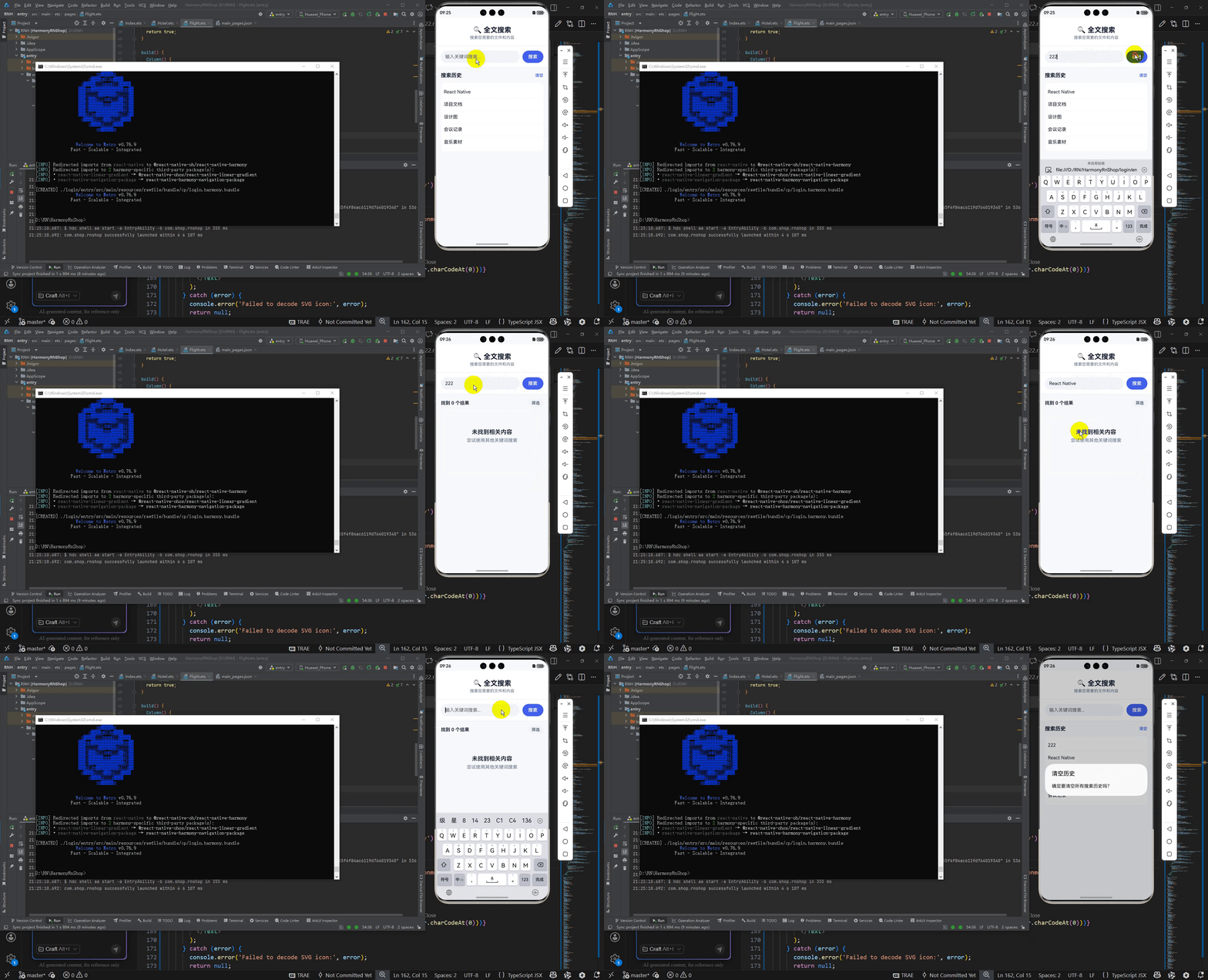
这段代码实现了一个React Native的全文搜索组件,具有以下核心原理和鸿蒙相关的技术特点:
代码采用了React Native的函数组件模式,利用useState钩子管理组件状态,包括搜索关键词、搜索结果、搜索历史等状态变量。通过TextInput组件实现搜索输入框,支持实时输入和提交搜索功能。
在搜索逻辑方面,代码实现了全文匹配算法,通过toLowerCase()方法将搜索关键词和文档内容都转换为小写进行不区分大小写的匹配,同时支持在文件标题和摘要内容中进行双重匹配。
组件设计上体现了鸿蒙系统的简洁设计理念,采用了清晰的层次结构:顶部标题区域、中部搜索区域和底部内容展示区域。搜索历史功能提供了良好的用户体验,支持历史记录的点击复用和清空操作。
在视觉设计方面,代码通过getTypeIcon和getTypeColor函数为不同类型的文件(文档、图片、视频、音频、文件夹、PDF)提供专属的颜色和图标标识,这种设计符合鸿蒙系统的统一视觉语言规范。
数据管理方面采用本地模拟数据的方式,通过DEFAULT_RESULTS数组存储文件信息,SEARCH_HISTORY数组管理搜索历史,这种结构便于扩展到真实的后端API调用。
交互处理上实现了模态框展示详情、搜索结果高亮、清空输入等常见搜索交互模式,符合鸿蒙系统的流畅交互体验要求。组件还具备良好的状态管理机制,能够在搜索状态和历史状态之间正确切换。
整体架构采用单向数据流设计,通过performSearch、clearHistory、viewResultDetails等函数处理用户交互,保持了组件的可维护性和可测试性,体现了现代前端开发的最佳实践。
打包
接下来通过打包命令npn run harmony将reactNative的代码打包成为bundle,这样可以进行在开源鸿蒙OpenHarmony中进行使用。

打包之后再将打包后的鸿蒙OpenHarmony文件拷贝到鸿蒙的DevEco-Studio工程目录去:

最后运行效果图如下显示: