解决uniapp在内网构建ETIMEDOUT卡住的问题
- 一、查信息打印来源
- 二、尝试的解决方案
-
- [(一)禁用统计功能 (无效)](#(一)禁用统计功能 (无效))
- (二)预加载脚本(推荐)
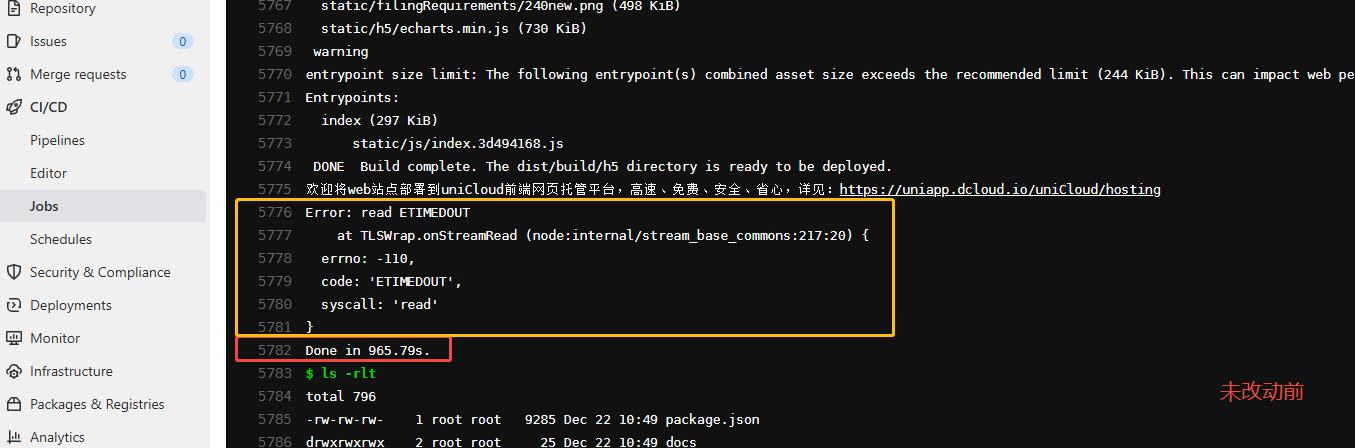
uni-app 2.0.x。通过 ci/cd内网devops 容器内 运行 npm run build:h5:prod构建时。有以下提示:
DONE  Build complete. The dist/build/h5 directory is ready to be deployed.

欢迎将web站点部署到uniCloud前端网页托管平台,高速、免费、安全、省心,详见: https://uniapp.dcloud.io/uniCloud/hosting

Error: read ETIMEDOUT

at TLSWrap.onStreamRead (node:internal/stream_base_commons:217:20) {

errno: -110,

code: 'ETIMEDOUT',

syscall: 'read'

}

Done in 948.11s.。主要是Error: read ETIMEDOUT
一、查信息打印来源
打印来源于:node_modules/@dcloudio/vue-cli-plugin-uni/commands/build.js 217-220 行:
js
          if (process.env.UNI_PLATFORM === 'h5' && !isInHBuilderX) {
            console.log()
            console.log('欢迎将web站点部署到uniCloud前端网页托管平台,高速、免费、安全、省心,详见:https://uniapp.dcloud.io/uniCloud/hosting')
          }
问题分析
查看源码是出自这附近 node_modules/@dcloudio/vue-cli-plugin-uni/commands/build.js 217-217 。上述只涉及一个打印信息,还是要全面进行排查,虽然有ETIMEDOUT,但构建最终是成功的,但卡时间占用太多了。
由于内网是不能访问外网的,node_modules 都是使用内网的私有库,所以可以从网络方面排查,加上打印日志。
项目环境和信息涉及的文件有: vue.config.js package.json。
加入信息打印
shell
# 在构建前启动(后台),打印时间/源IP/目的IP/SNI 到 stdout。 使用 tshark(能显示 TLS SNI,最精确)
sudo tshark -i any -n -l -Y "tls.handshake.type == 1" \
  -T fields -e frame.time -e ip.src -e ip.dst -e tls.handshake.extensions_server_name 2>/dev/null &

# 打印到 stdout(不要 -w),加 -l 保证行缓冲。 如果没有 tshark,使用 tcpdump(行缓冲输出到 stdout)
sudo tcpdump -n -i any 'tcp port 443 and not src host 127.0.0.1' -l -q &

# 会在 stdout 打出 Node TLS/HTTP 连接相关日志。无抓包工具时,用 Node 内部调试(最轻量)
NODE_DEBUG=http,net,tls npm run build:h5:prod## GitLab CI job
# 检查并启动抓包(打印到 stdout),失败时降级到 NODE_DEBUG
if command -v tshark >/dev/null 2>&1 && [ "$(id -u)" = "0" ]; then
echo '[info] starting tshark'
tshark -i any -n -l -Y "tls.handshake.type == 1" -T fields -e frame.time -e ip.src -e ip.dst -e tls.handshake.extensions_server_name 2>&1 | sed -u 's/^/[tshark] /' & CAP_PID=$!
elif command -v tcpdump >/dev/null 2>&1; then
echo '[info] starting tcpdump'
tcpdump -n -i any -s 0 -l 'tcp port 443 and not src host 127.0.0.1' 2>&1 | sed -u 's/^/[tcpdump] /' & CAP_PID=$! || true
else
echo '[info] no capture tool found; will use NODE_DEBUG fallback'
fi
# 用内部脚本避免外网请求(推荐)并同时打印 Node 网络调试信息
NODE_DEBUG=http,net,tls yarn run build:h5:internal接着就可以在构建时候查看ci/cd日志,分析是哪些外网请求超时了,还是本地文件访问超时了。
二、尝试的解决方案
(一)禁用统计功能 (无效)
如何解决 timeout 的问题。是由于容器不能请求外网超时,还是不能访问本地文件超时还是其他原因。
可以通过在 package.json 里新增一个构建脚本,禁用统计功能。
json
"scripts": {
  "build:h5:prod": "DISABLE_UNI_STATISTICS=true UNI_STATISTICS=false UNI_CLOUD_PROVIDER=false uni-build --mode h5 --dest dist/build/h5"
}
通过多次社区、官方的文档进行了多次配置,发现当前版本的uniapp并无效果。
(二)预加载脚本(推荐)
日志显示即便加了 DISABLE_UNI_STATISTICS=1 / --no-socket,uni-build 仍试图向 uniapp.dcloud.net.cn 发 POST(最后 read ETIMEDOUT),因此需要在构建时彻底拦截/模拟这些出站请求。构建本身能完成,但会卡在等待远端响应并产生日志噪音/超时。
增加一个预加载脚本,在 Node 启动时 monkey patch http/https,把访问 uniapp.dcloud.net.cn 的请求直接拦截并快速返回(不真实网络调用)。把脚本通过 node -r 或 NODE_OPTIONS=--require 预加载到 build 命令中,保证任何模块发起请求都会被拦截。
- 新建 disable-network-plugin.js:
js
// ...existing code...
if (process.env.DISABLE_UNI_STATISTICS === '1') {
  const http = require('http');
  const https = require('https');
  const { PassThrough } = require('stream');

  const makeStub = () => {
    return function stubRequest(options, callback) {
      try {
        const host = (typeof options === 'string') ? options : (options && (options.hostname || options.host || options.href));
        if (host && String(host).includes('uniapp.dcloud.net.cn')) {
          const req = new PassThrough();
          // simulate immediate response next tick
          process.nextTick(() => {
            const res = new PassThrough();
            res.statusCode = 200;
            res.headers = {};
            if (callback) callback(res);
            req.emit('response', res);
            res.end('{}');
          });
          // mimic minimal interface
          req.end = (data) => { if (data) PassThrough.prototype.write.call(req, data); PassThrough.prototype.end.call(req); };
          return req;
        }
      } catch (e) { /* ignore */ }
      // fallback to original
      return original.apply(this, arguments);
    };
  };

  const original = http.request;
  http.request = makeStub();
  http.get = function() {
    const r = http.request.apply(this, arguments);
    r.end();
    return r;
  };

  const originalHttps = https.request;
  https.request = makeStub();
  https.get = function() {
    const r = https.request.apply(this, arguments);
    r.end();
    return r;
  };
}- 修改 package.json 构建脚本:
(1)主要改动是这块:
DISABLE_UNI_STATISTICS=1 node -r ./disable-network-plugin.js ./node_modules/@vue/cli-service/bin/vue-cli-service.js
json
"build:h5:internal": "cross-env NODE_ENV=production UNI_PLATFORM=h5 UNI_STATISTICS=false UNI_CLOUD_PROVIDER=false DISABLE_UNI_STATISTICS=1 node -r ./disable-network-plugin.js ./node_modules/@vue/cli-service/bin/vue-cli-service.js uni-build --base=/bcrm/h5/ --mode prod --no-socket"(2)可选,CI 层(建议把 env 也加为 pipeline 变量,保证更早生效)
yml
variables:
  DISABLE_UNI_STATISTICS: "1"
  UNI_STATISTICS: "false"
  UNI_CLOUD_PROVIDER: "false"

build_job:
  script:
    - export NODE_DEBUG=http,net,tls    # 调试时可保留
    - yarn run build:h5:internal
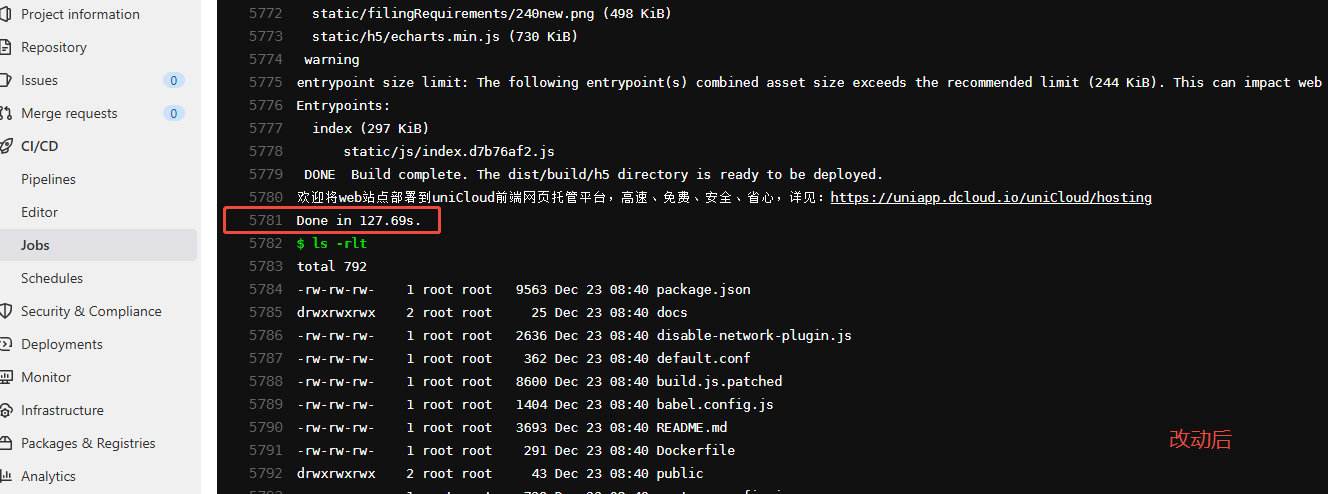
(3)构建就生效了。如图
效果显著: