在玩中学,直接上手实战是猫哥一贯的自学方法心得。假期期间实在无聊!我不睡懒觉、不看电影、也不刷手机、不玩游戏、也无处可去。那么我干嘛嘞?闲的都想看蚂蚁上树,无聊透顶,百无聊赖,感觉假期好没意思啊。做什么呢? 于是翻出来之前做过的"爱影家"影视app项目,找个跨多端的技术栈再玩一把。
该篇继续分享爱影家免费观影APP的实战过程,影视票房榜组件完整实现。免费看电影和听歌,持续迭代中。
项目开源地址:https://gitcode.com/qq8864/uniappx_imovie,
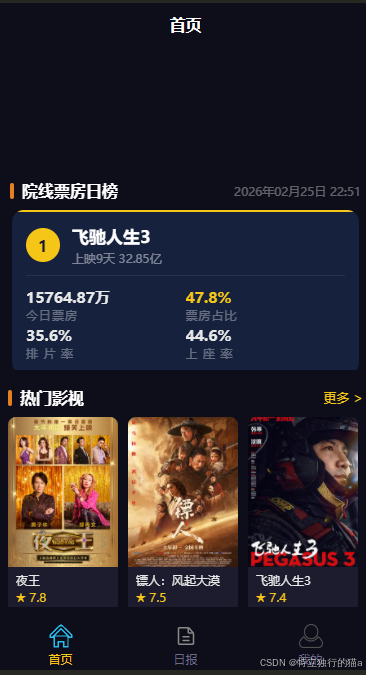
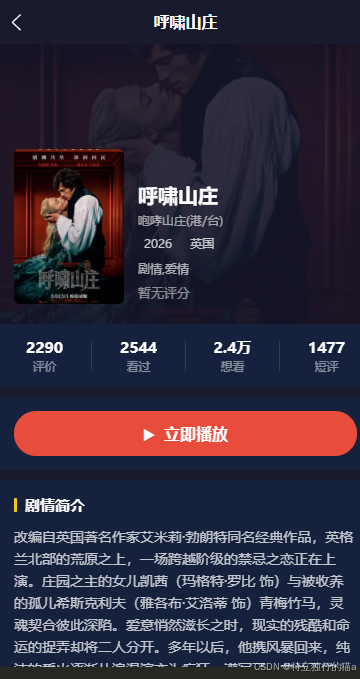
欢迎下载体验。目前已实现的效果:
项目概述
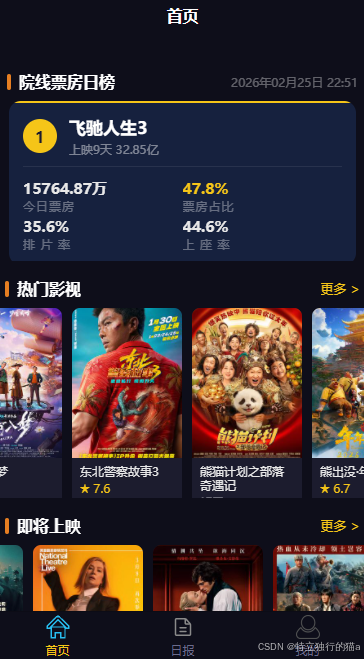
本文基于爱影家(imovie)项目,详细介绍如何使用 uni-app x 技术栈开发一个院线票房日榜组件(box-office)。该组件展示实时院线票房数据,包括今日票房、票房占比、排片率、上座率四项核心指标,以横向翻页卡片的形式呈现,视觉上干净现代。
本项目用到的后台影视和音乐接口文档:https://blog.csdn.net/qq8864/article/details/154404554
uni-app x 是 DCloud 推出的新一代跨平台开发框架,支持将代码编译为多个平台的原生代码:
- Android 平台:编译为 Kotlin
- iOS 平台:编译为 Swift
- 鸿蒙 Next 平台:编译为 ArkTS
- Web 和小程序平台:编译为 JS
在 App 端,uni-app x 的工程被整体编译为平台原生代码,性能与原生应用一致。
整体架构
票房榜组件涉及三层代码:
bash
utils/request.uts       ← 通用 HTTP 请求封装(拦截器、类型定义)
       ↓
api/movie.uts           ← 业务接口封装(PiaoItem 类型、getPiaomovie 方法)
       ↓
components/box-office/  ← 票房榜 UI 组件(数据加载、布局渲染)
  box-office.uvue
这种分层方式将网络通信、数据模型、UI 渲染三个关注点完全分离,每一层都可以独立维护和复用。
第一层:网络请求封装(utils/request.uts)
设计思路
uni-app x 提供了 uni.request 作为底层网络 API,但直接使用存在几个问题:
- 每次请求都要重复写 baseUrl、Content-Type 等公共配置
- 无法统一注入 token、统一处理错误
- 回调风格不友好,难以配合
async/await使用
项目封装了一个 Request 类,解决上述问题,提供类似 Axios 的使用体验。
类型定义
ts
// HTTP 方法枚举
type HttpMethod = "GET" | "POST" | "PUT" | "DELETE" | "OPTIONS" | "HEAD"

// 请求选项
export type RequestOptions = {
  url : string
  method : HttpMethod
  data : any | null
  headers : Map<string, string>
}

// 统一响应结构(与后端协议约定)
export type ResponseData<T> = {
  code : number      // 0 表示成功
  message : string   // 提示信息
  data : T           // 业务数据
}

// 拦截器函数类型
export type RequestInterceptorFn = (options : RequestOptions) => RequestOptions
export type ResponseInterceptorFn = (response : any) => any
ResponseData<T> 使用泛型,让不同接口的响应体都能得到类型保护。
Request 类核心实现
ts
export class Request {
  private baseUrl : string
  private headers : Map<string, string>
  // 拦截器用 Map 存储,key 为自增 ID,保证按注册顺序执行
  private requestInterceptors : Map<number, RequestInterceptorFn>
  private responseInterceptors : Map<number, ResponseInterceptorFn>
  private requestInterceptorId : number
  private responseInterceptorId : number

  constructor(baseUrl : string) {
    this.baseUrl = baseUrl
    this.headers = new Map<string, string>()
    this.headers.set('Content-Type', 'application/json')
    this.headers.set('accept', 'application/json')
    this.requestInterceptors = new Map<number, RequestInterceptorFn>()
    this.responseInterceptors = new Map<number, ResponseInterceptorFn>()
    this.requestInterceptorId = 0
    this.responseInterceptorId = 0
  }
  // ...
}
拦截器设计
拦截器使用 Map<number, Fn> 存储,key 是自增 ID:
- 注册时返回 ID,移除时通过 ID 精确删除,不影响其他拦截器
- 执行时将所有 ID 排序,保证按注册先后顺序依次调用
ts
// 注册请求拦截器(返回 ID 供后续移除)
addRequestInterceptor(fn : RequestInterceptorFn) : number {
  this.requestInterceptorId += 1
  const id = this.requestInterceptorId
  this.requestInterceptors.set(id, fn)
  return id
}

removeRequestInterceptor(id : number) : void {
  this.requestInterceptors.delete(id)
}
执行拦截器链时,将 Map 中的 key 提取为数组排序后依次执行,每个拦截器的输出作为下一个的输入:
ts
private runRequestInterceptors(options : RequestOptions) : RequestOptions {
  const ids : Array<number> = []
  this.requestInterceptors.forEach((_ : RequestInterceptorFn, id : number) => {
    ids.push(id)
  })
  ids.sort((a : number, b : number) : number => a - b)

  let current = options
  for (let i = 0; i < ids.length; i++) {
    const fn = this.requestInterceptors.get(ids[i])
    if (fn != null) {
      current = fn(current)
    }
  }
  return current
}
核心 request 方法
ts
request<T>(options : RequestOptions) : Promise<ResponseData<T>> {
  // 1. 执行请求拦截器链(注入 token、修改 header 等)
  const interceptedOptions = this.runRequestInterceptors(options)

  // 2. 拼接完整 URL(已带 http 则直接用,否则拼接 baseUrl)
  const url = interceptedOptions.url.startsWith('http://') || interceptedOptions.url.startsWith('https://')
    ? interceptedOptions.url
    : this.baseUrl + interceptedOptions.url

  const header = this.buildHeader(interceptedOptions.headers)

  return new Promise<ResponseData<T>>((resolve, reject) => {
    uni.request({
      url: url,
      method: interceptedOptions.method,
      data: interceptedOptions.data,
      header: header,
      success: (res) => {
        if (res.statusCode === 200) {
          // 3. 执行响应拦截器链(统一错误处理、数据转换等)
          const processed = this.runResponseInterceptors(res.data)
          resolve(processed as ResponseData<T>)
        } else {
          reject(new Error(`Request failed: ${res.statusCode}`))
        }
      },
      fail: (err) => {
        reject(new Error(err.errMsg))
      }
    })
  })
}
将回调风格的 uni.request 包装为 Promise,上层可以直接 async/await。
语法糖方法
ts
get<T>(url : string, params : any | null, headers : Map<string, string> | null) : Promise<ResponseData<T>> {
  return this.request<T>({
    url: url, method: 'GET',
    data: params,
    headers: headers ?? new Map<string, string>()
  })
}

post<T>(url : string, data : any | null, headers : Map<string, string> | null) : Promise<ResponseData<T>> {
  return this.request<T>({
    url: url, method: 'POST',
    data: data,
    headers: headers ?? new Map<string, string>()
  })
}
全局实例与拦截器注册
ts
// 创建全局单例,所有业务 API 共用
export const request = new Request('http://49.235.52.102:8000/api/v1')

// 全局请求拦截器:打印请求日志
request.addRequestInterceptor((options : RequestOptions) : RequestOptions => {
  console.log(`[Request] ${options.method} ${options.url}`)
  return options
})

// 全局响应拦截器:打印响应并处理错误码
request.addResponseInterceptor((response : any) : any => {
  const res = response as ResponseData<any>
  console.log(`[Response] code=${res.code} message=${res.message}`)
  if (res.code !== 0) {
    console.error('[API Error]', res.code, res.message)
  }
  return response
})
需要 token 鉴权时,在具体业务模块注册拦截器即可:
ts
const tokenId = request.addRequestInterceptor((options : RequestOptions) : RequestOptions => {
  const token = uni.getStorageSync('token') as string
  if (token != null && token.length > 0) {
    options.headers.set('Authorization', `Bearer ${token}`)
  }
  return options
})

// 不需要时移除
// request.removeRequestInterceptor(tokenId)
第二层:业务接口封装(api/movie.uts)
数据类型定义
票房榜涉及两个类型,清晰描述接口返回的数据结构:
ts
// 院线票房榜单条目
export type PiaoItem = {
  top : number          // 排名(1、2、3...)
  name : string         // 影片名称
  release_date : string // 上映日期
  box_million : string  // 今日票房(如 "3542.3万")
  share_box : string    // 票房占比(如 "28.6%")
  row_films : string    // 排片率(如 "31.2%")
  row_seats : string    // 上座率(如 "18.7%")
}

// 票房榜接口完整响应
export type PiaoResult = {
  list : PiaoItem[]  // 榜单列表
  day : string       // 数据日期(如 "2026-02-25")
}
注意:票房、占比、排片率、上座率都使用 string 类型------后端直接返回格式化好的文字(如 "3542.3万"、"28.6%"),前端无需再做数字格式化,直接渲染即可。
API 方法封装
ts
export class MovieApi {
  /**
   * 获取院线票房日榜
   * GET /piaomovie
   */
  static async getPiaomovie() : Promise<PiaoResult> {
    const res = await request.get<any>('/piaomovie', null, null)
    const full : any = res
    return {
      list: full.data as PiaoItem[],
      day: full.day as string
    } as PiaoResult
  }
  // ...
}这里有一个细节:full.day 直接挂在响应根节点而非 data 字段里,是后端特有的结构,所以单独从 full.day 取出,不经过 ResponseData.data。
使用方式极为简洁:
ts
MovieApi.getPiaomovie().then((result : PiaoResult) => {
  // 使用 result.list 和 result.day
})
第三层:票房榜 UI 组件(box-office.uvue)
组件结构总览
bash
box-office
├── 标题栏(院线票房日榜 + 数据日期)
├── 横向滚动卡片区(scroll-view)
│   └── 卡片行(cards-row,宽度由 JS 精确计算)
│       └── 单张卡片(movie-card)× N
│           ├── 顶部彩色条(rank-accent)
│           └── 卡片主体(card-body)
│               ├── 排名徽章 + 片名区(card-head)
│               ├── 分割线(divider)
│               └── 四项指标 2×2 网格(metrics)
└── 加载占位(loading 时显示)
颜色体系设计
排名不同,视觉强调色也不同,营造金银铜的层次感:
ts
// 前三名:金 / 银 / 铜;其余:深蓝
const getRankColor = (top : number) : string => {
  if (top === 1) return '#f5c518'  // 金色
  if (top === 2) return '#9eb3c2'  // 银色
  if (top === 3) return '#e67e22'  // 铜色
  return '#3a5085'                 // 深蓝(通用)
}
此函数在三处复用:
- 卡片顶部彩色条
rank-accent的背景色 - 排名圆形徽章
rank-badge的背景色 - 排名数字
rank-num的文字色(前三名深色,其余白色)
html
<view class="rank-accent" :style="`background-color: ${getRankColor(item.top)};`"></view>
<view class="rank-badge" :style="`background-color: ${getRankColor(item.top)};`">
  <text class="rank-num" :style="`color: ${item.top <= 3 ? '#1a1a2e' : '#ffffff'};`">
    {{ item.top }}
  </text>
</view>
横向滚动的关键:精确计算行宽
uni-app x 在 App 端编译为原生代码,原生布局引擎与 Web 浏览器有一个关键差异:
scroll-view的内容容器必须有明确的、超出 scroll-view 宽度的像素尺寸 ,原生引擎才会开启横向滚动。仅靠flex-direction: row+flex-wrap: nowrap是不够的。
组件的解决方案:
ts
// 卡片宽度:屏幕宽度减去两侧 14px padding,单张近全屏
const cardWidth = Math.floor(uni.getWindowInfo().windowWidth - 28)

// 行总宽度(响应式,随数据加载后动态更新)
// 公式:14(padding-left) + (卡片宽 + 12间距) × 数量 + 14(右侧留白)
const rowWidth = computed(() : number => {
  return 14 + (cardWidth + 12) * list.value.length + 14
})
绑定到模板:
html
<view class="cards-row" :style="`width: ${rowWidth}px;`">用 computed 而不是 ref 的好处:数据加载完成后 list.value.length 改变,rowWidth 自动重新计算,视图同步更新,不需要手动维护。
每张卡片还必须加 flex-shrink: 0,防止被压缩:
css
.movie-card {
  flex-shrink: 0;
}
四项指标的 2×2 布局
票房、占比、排片率、上座率四项数据用 flex-wrap: wrap + width: 50% 实现 2×2 网格,简洁高效:
html
<view class="metrics">
  <view class="metric">
    <text class="metric-val">{{ item.box_million }}</text>
    <text class="metric-label">今日票房</text>
  </view>
  <view class="metric">
    <text class="metric-val metric-highlight">{{ item.share_box }}</text>
    <text class="metric-label">票房占比</text>
  </view>
  <view class="metric metric-bottom">
    <text class="metric-val">{{ item.row_films }}</text>
    <text class="metric-label">排 片 率</text>
  </view>
  <view class="metric metric-bottom">
    <text class="metric-val">{{ item.row_seats }}</text>
    <text class="metric-label">上 座 率</text>
  </view>
</view>
css
.metrics {
  flex-direction: row;
  flex-wrap: wrap;
}

.metric {
  width: 50%;        /* 2列布局,每列占 50% */
  margin-bottom: 4px;
}

.metric-bottom {
  margin-bottom: 0;  /* 最后一行去掉底部间距 */
}票房占比用黄色高亮(metric-highlight),视觉上突出核心数据。
加载状态处理
数据未返回前显示占位,避免页面空白造成布局跳动:
ts
const loading = ref<boolean>(true) // 初始为加载中
html
<!-- 有数据时显示卡片 -->
<scroll-view v-if="!loading && list.length > 0" ...>
  ...
</scroll-view>

<!-- 加载中时显示占位 -->
<view v-if="loading" class="placeholder">
  <text class="placeholder-text">加载中...</text>
</view>
数据加载
ts
onMounted(() => {
  MovieApi.getPiaomovie().then((result : any) => {
    const raw = result as { list : PiaoItem[], day : string }
    // 过滤掉片名为空的异常数据
    list.value = raw.list.filter((item : PiaoItem) : boolean => item.name.length > 0)
    day.value = raw.day
    loading.value = false
  }).catch((_ : any) => {
    loading.value = false  // 失败时也关闭加载状态,避免永久 loading
  })
})
在 onMounted 中发起请求,保证组件挂载后再请求数据,避免组件尚未渲染时操作 DOM。过滤 name.length > 0 防御性处理了后端可能返回的空条目。
完整组件代码
box-office.uvue
html
<template>
  <view class="box-office">
    <!-- 标题栏 -->
    <view class="section-header">
      <view class="header-left">
        <view class="title-bar"></view>
        <text class="title">院线票房日榜</text>
      </view>
      <text v-if="day.length > 0" class="day-text">{{ day }}</text>
    </view>

    <!-- 卡片横向滚动 -->
    <scroll-view v-if="!loading && list.length > 0" class="cards-scroll" direction="horizontal">
      <view class="cards-row" :style="`width: ${rowWidth}px;`">
        <view
          v-for="item in list"
          :key="item.top"
          class="movie-card"
          :style="`width: ${cardWidth}px;`"
        >
          <!-- 顶部彩色条 -->
          <view class="rank-accent" :style="`background-color: ${getRankColor(item.top)};`"></view>

          <view class="card-body">
            <!-- 排名 + 片名 -->
            <view class="card-head">
              <view class="rank-badge" :style="`background-color: ${getRankColor(item.top)};`">
                <text class="rank-num" :style="`color: ${item.top <= 3 ? '#1a1a2e' : '#ffffff'};`">
                  {{ item.top }}
                </text>
              </view>
              <view class="name-block">
                <text class="movie-name" :numberOfLines="1">{{ item.name }}</text>
                <text class="release-text">{{ item.release_date }}</text>
              </view>
            </view>

            <!-- 分割线 -->
            <view class="divider"></view>

            <!-- 四项指标 2×2 排列 -->
            <view class="metrics">
              <view class="metric">
                <text class="metric-val">{{ item.box_million }}</text>
                <text class="metric-label">今日票房</text>
              </view>
              <view class="metric">
                <text class="metric-val metric-highlight">{{ item.share_box }}</text>
                <text class="metric-label">票房占比</text>
              </view>
              <view class="metric metric-bottom">
                <text class="metric-val">{{ item.row_films }}</text>
                <text class="metric-label">排 片 率</text>
              </view>
              <view class="metric metric-bottom">
                <text class="metric-val">{{ item.row_seats }}</text>
                <text class="metric-label">上 座 率</text>
              </view>
            </view>
          </view>
        </view>

        <!-- 右侧留白,防止最后一张卡片紧贴边缘 -->
        <view style="width: 14px; flex-shrink: 0;"></view>
      </view>
    </scroll-view>

    <!-- 加载占位 -->
    <view v-if="loading" class="placeholder">
      <text class="placeholder-text">加载中...</text>
    </view>
  </view>
</template>

<script setup lang="uts">
  import { ref, computed, onMounted } from 'vue'
  import { MovieApi, PiaoItem } from '@/api/movie'

  const list = ref<PiaoItem[]>([])
  const day = ref<string>('')
  const loading = ref<boolean>(true)

  // 卡片宽度:屏幕宽度减去两侧各 14px,近全屏
  const cardWidth = Math.floor(uni.getWindowInfo().windowWidth - 28)

  // 行总宽度:原生布局引擎需要明确的像素宽度才能识别横向可滚动内容
  const rowWidth = computed(() : number => {
    return 14 + (cardWidth + 12) * list.value.length + 14
  })

  // 按排名返回强调色
  const getRankColor = (top : number) : string => {
    if (top === 1) return '#f5c518'
    if (top === 2) return '#9eb3c2'
    if (top === 3) return '#e67e22'
    return '#3a5085'
  }

  onMounted(() => {
    MovieApi.getPiaomovie().then((result : any) => {
      const raw = result as { list : PiaoItem[], day : string }
      list.value = raw.list.filter((item : PiaoItem) : boolean => item.name.length > 0)
      day.value = raw.day
      loading.value = false
    }).catch((_ : any) => {
      loading.value = false
    })
  })
</script>

<style>
  .box-office {
    margin-top: 4px;
  }

  .section-header {
    flex-direction: row;
    justify-content: space-between;
    align-items: center;
    padding: 18px 12px 10px 12px;
  }

  .header-left {
    flex-direction: row;
    align-items: center;
  }

  .title-bar {
    width: 4px;
    height: 16px;
    background-color: #e67e22;
    border-radius: 2px;
    margin-right: 8px;
  }

  .title {
    font-size: 16px;
    font-weight: bold;
    color: #ffffff;
  }

  .day-text {
    font-size: 11px;
    color: rgba(255, 255, 255, 0.35);
  }

  /* scroll-view 必须有固定高度 */
  .cards-scroll {
    width: 100%;
    height: 160px;
  }

  .cards-row {
    flex-direction: row;
    flex-wrap: nowrap;
    padding-left: 14px;
  }

  /* flex-shrink: 0 是横向滚动生效的关键 */
  .movie-card {
    margin-right: 12px;
    background-color: #16213e;
    border-radius: 12px;
    overflow: hidden;
    flex-shrink: 0;
  }

  .rank-accent {
    width: 100%;
    height: 2px;
  }

  .card-body {
    padding: 14px;
  }

  .card-head {
    flex-direction: row;
    align-items: flex-start;
    margin-bottom: 10px;
  }

  .rank-badge {
    width: 34px;
    height: 34px;
    border-radius: 17px;
    align-items: center;
    justify-content: center;
    flex-shrink: 0;
    margin-right: 12px;
    margin-top: 2px;
  }

  .rank-num {
    font-size: 16px;
    font-weight: bold;
  }

  .name-block {
    flex: 1;
  }

  .movie-name {
    font-size: 17px;
    font-weight: bold;
    color: #ffffff;
    margin-bottom: 5px;
  }

  .release-text {
    font-size: 11px;
    color: rgba(255, 255, 255, 0.45);
  }

  .divider {
    height: 1px;
    background-color: rgba(255, 255, 255, 0.08);
    margin-bottom: 12px;
  }

  .metrics {
    flex-direction: row;
    flex-wrap: wrap;
  }

  .metric {
    width: 50%;
    margin-bottom: 4px;
  }

  .metric-bottom {
    margin-bottom: 0;
  }

  .metric-val {
    font-size: 15px;
    font-weight: bold;
    color: #e8e8e8;
    margin-bottom: 2px;
  }

  .metric-highlight {
    color: #f5c518;
  }

  .metric-label {
    font-size: 10px;
    color: rgba(255, 255, 255, 0.35);
    letter-spacing: 1px;
  }

  .placeholder {
    height: 100px;
    align-items: center;
    justify-content: center;
  }

  .placeholder-text {
    font-size: 13px;
    color: rgba(255, 255, 255, 0.35);
  }
</style>
注意事项与踩坑记录
1. 横向滚动必须为行容器指定精确像素宽度
这是 uni-app x 原生端与 Web 端最大的差异之一。原生布局引擎不会像浏览器那样自动识别 flex 溢出,必须显式告知内容宽度:
ts
// ❌ 错误:没有宽度,不会横向滚动
<view style="flex-direction: row; flex-wrap: nowrap;">

// ✅ 正确:绑定精确的像素总宽度
<view :style="`width: ${rowWidth}px; flex-direction: row;`">
2. 卡片必须设置 flex-shrink: 0
css
/* ✅ 防止卡片被 flex 容器压缩,保证宽度有效 */
.movie-card {
  flex-shrink: 0;
}
3. rowWidth 用 computed 而非 ref
因为数据是异步加载的,组件初始化时 list.value.length 为 0,数据到达后需要重新计算宽度。用 computed 会自动响应 list.value 的变化,无需手动更新。
ts
// ✅ computed 响应 list.value.length 变化,自动更新 rowWidth
const rowWidth = computed(() : number => {
  return 14 + (cardWidth + 12) * list.value.length + 14
})
4. scroll-view 需要固定高度
css
/* ✅ height 必须明确,否则在部分平台会塌陷为 0 */
.cards-scroll {
  width: 100%;
  height: 160px;
}
5. UTS 中 Map 的 forEach 参数顺序与 JS 相反
UTS 的 Map.forEach 回调参数顺序为 (value, key),与 JavaScript 的 Map.forEach 是 (value, key) 相同,但容易误写为 (key, value)。本项目拦截器链执行时按 key(ID)排序,特别需要注意取对正确的参数:
ts
// ✅ 正确:第一个参数是 value(拦截器函数),第二个是 key(ID)
this.requestInterceptors.forEach((_ : RequestInterceptorFn, id : number) => {
  ids.push(id)
})
6. 响应数据中非标准字段需单独提取
部分后端接口响应中,业务字段不在 data 层级内,而是直接挂在响应根节点。此时需在 API 封装层显式提取:
ts
// day 字段直接在响应根节点,不在 data 里
const full : any = res
return {
  list: full.data as PiaoItem[],  // data 字段
  day: full.day as string          // 根节点字段
} as PiaoResult
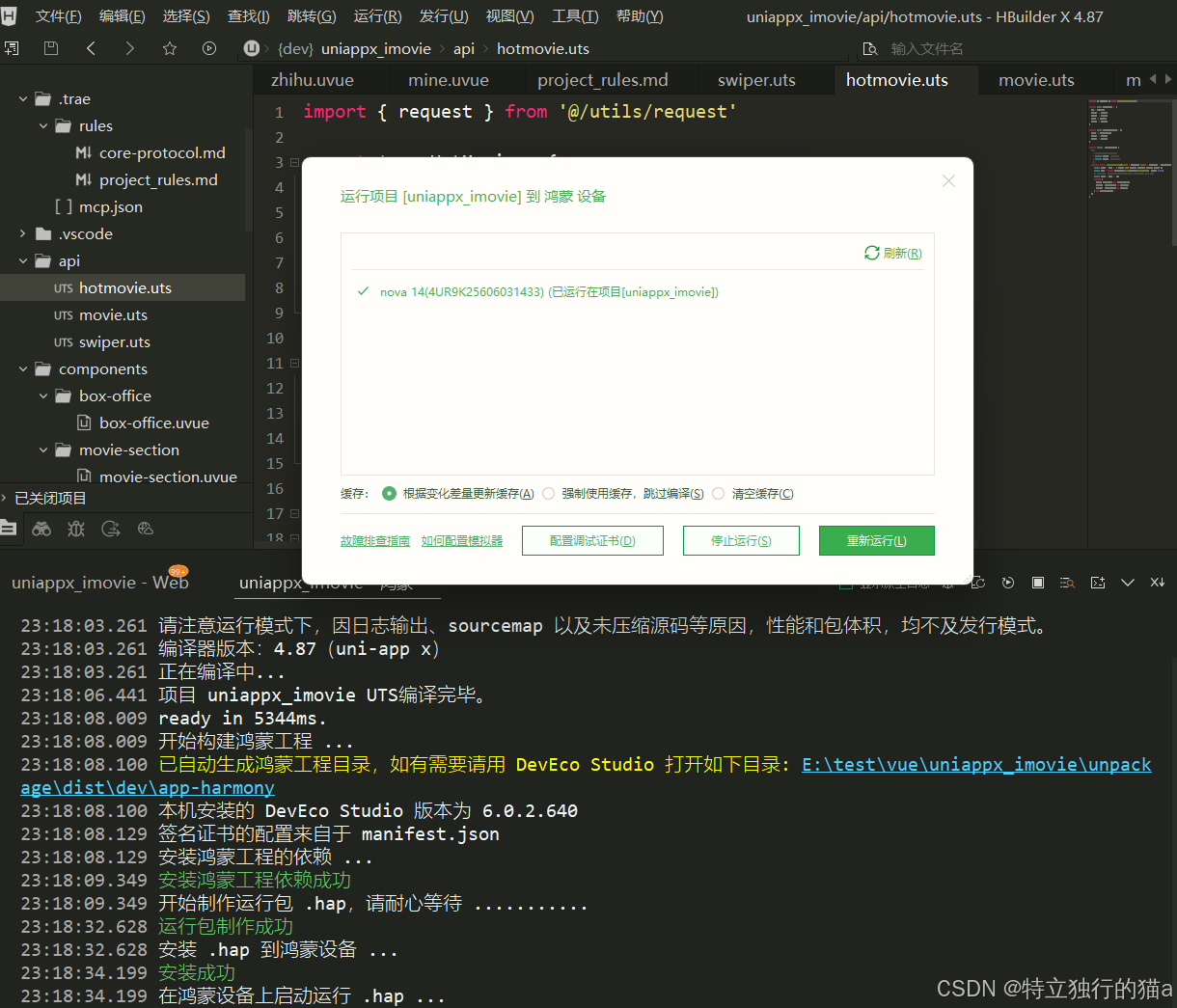
运行到鸿蒙手机上的效果
总结
票房榜组件的实现体现了 uni-app x 项目中的几个最佳实践:
- 分层架构:请求工具层 → 业务 API 层 → UI 组件层,各层职责清晰
- 请求封装 :将
uni.request包装为带拦截器的 Promise 接口,兼顾灵活性和复用性 - 类型安全:用 UTS 强类型定义数据结构,接口契约清晰,减少运行时错误
- 横向滚动:在原生端必须为行容器计算并绑定精确像素宽度,这是与 Web 开发最需要注意的差异
- 响应式宽度 :用
computed联动数据和布局,数据加载后自动更新滚动区域尺寸
这套模式适用于 uni-app x 项目中所有横向滚动列表场景,可以直接参考复用。