📅 我们继续 50 个小项目挑战!------ StickyNavbar 组件
仓库地址:https://gitee.com/hhm-hhm/50days50projects.git
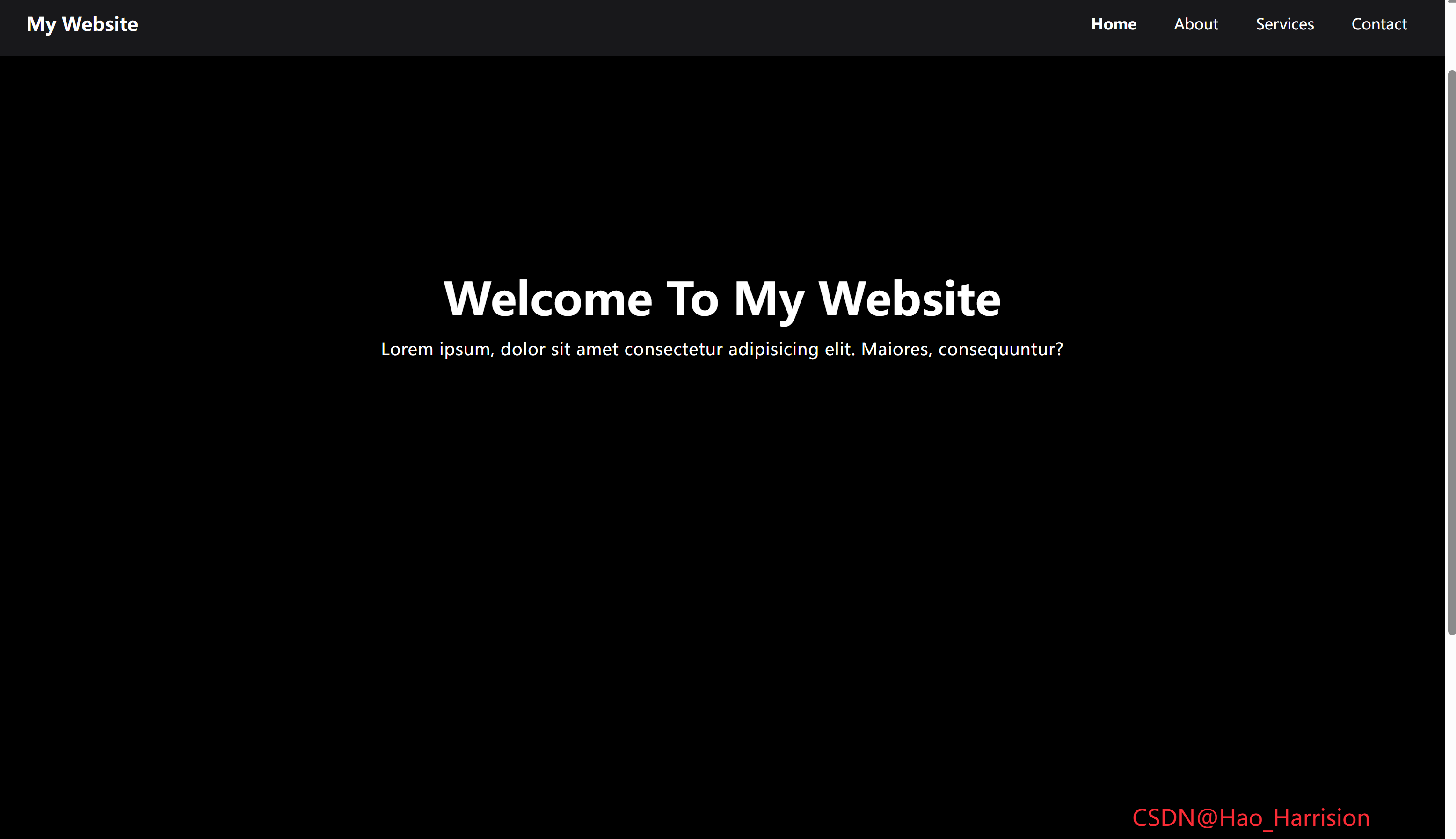
创建一个响应式导航栏组件。该导航栏会随着页面滚动自动变为白色背景并带有阴影,同时支持当前页签的高亮显示。
🌀 组件目标
- 创建一个固定定位、响应式导航栏
- 页面滚动时切换导航栏样式(暗色 → 浅色)
- 支持当前页签高亮状态
- 导航栏下方包含
Hero区域和内容区域 - 使用
TailwindCSS快速构建 UI 样式 - 添加平滑过渡动画以增强交互体验
🔧 StickyNavbar.tsx组件实现
TypeScript
import React, { useState, useEffect } from 'react'

const StickyNavbar: React.FC = () => {
    const [isSticky, setIsSticky] = useState<boolean>(false)
    const activePage = 'Home' // 可替换为 useLocation() 或路由状态

    // 滚动处理函数
    const handleScroll = () => {
        setIsSticky(window.scrollY > 100)
    }

    // 监听滚动事件
    useEffect(() => {
        window.addEventListener('scroll', handleScroll)
        return () => {
            window.removeEventListener('scroll', handleScroll) // 清理
        }
    }, [])

    // 动态生成链接类名
    const getLinkClass = (page: string): string => {
        const baseClasses = 'transition-colors duration-300 px-3 py-1'
        const colorClasses = isSticky
            ? 'text-black hover:text-red-600'
            : 'text-white hover:text-red-400'
        const activeClass = activePage === page ? 'text-red-600 font-bold' : ''

        return `${baseClasses} ${colorClasses} ${activeClass}`
    }

    return (
        <div>
            {/* 导航栏 */}
            <nav
                className={`fixed top-0 right-0 left-0 z-50 transition-all duration-300 ${
                    isSticky ? 'bg-white shadow-md' : 'bg-zinc-900'
                }`}>
                <div
                    className={`container mx-auto flex items-center justify-between transition-all duration-300 ${
                        isSticky ? 'py-2' : 'py-5'
                    }`}>
                    <h1 className="ml-6 text-xl font-bold">
                        <a href="#" className={isSticky ? 'text-black' : 'text-white'}>
                            My Website
                        </a>
                    </h1>
                    <ul className="mr-6 flex gap-4">
                        <li>
                            <a href="#" className={getLinkClass('Home')}>
                                Home
                            </a>
                        </li>
                        <li>
                            <a href="#" className={getLinkClass('About')}>
                                About
                            </a>
                        </li>
                        <li>
                            <a href="#" className={getLinkClass('Services')}>
                                Services
                            </a>
                        </li>
                        <li>
                            <a href="#" className={getLinkClass('Contact')}>
                                Contact
                            </a>
                        </li>
                    </ul>
                </div>
            </nav>

            {/* Hero 区域 */}
            <section className="relative z-10 flex h-screen items-center justify-center bg-cover bg-center text-center text-white">
                <div className="bg-opacity-50 absolute inset-0 z-0 bg-black"></div>
                <div className="relative z-10 px-4">
                    <h1 className="-mt-5 mb-4 text-4xl font-bold md:text-5xl">
                        Welcome To My Website
                    </h1>
                    <p className="text-lg tracking-wide">
                        Lorem ipsum, dolor sit amet consectetur adipisicing elit. Maiores,
                        consequuntur?
                    </p>
                </div>
            </section>

            {/* 内容区域 */}
            <section className="container mx-auto space-y-6 px-4 py-10">
                <h2 className="mt-4 text-2xl font-semibold">Content One</h2>
                <p className="leading-7 tracking-wide text-gray-600">
                    Lorem, ipsum dolor sit amet consectetur adipisicing elit. Ratione dolorem
                    voluptates eveniet tempora ut cupiditate magnam, sapiente, hic quo in ipsum iste
                    soluta eaque perferendis nihil recusandae dolore officia aperiam corporis
                    similique. Facilis quos tempore labore totam! Consectetur molestiae iusto
                    ducimus error reiciendis aspernatur dolor, modi dolorem sit architecto,
                    voluptate magni sunt unde est quas? Voluptates a dolorum voluptatum quo
                    perferendis aut sit. Aspernatur libero laboriosam ab eligendi omnis delectus
                    earum labore, placeat officiis sint illum rem voluptas ipsum repellendus iste
                    eius recusandae quae excepturi facere, iure rerum sequi? Illum velit delectus
                    dicta et iste dolorum obcaecati minus odio eligendi!
                </p>

                <h3 className="text-xl font-semibold">Content Two</h3>
                <p className="leading-7 tracking-wide text-gray-600">
                    Lorem ipsum dolor sit amet consectetur, adipisicing elit. Pariatur provident
                    nostrum possimus inventore nisi laboriosam consequatur modi nulla eos, commodi,
                    omnis distinctio! Maxime distinctio impedit provident, voluptates illo odio
                    nostrum minima beatae similique a sint sapiente voluptatum atque optio illum
                    est! Tenetur tempora doloremque quae iste aperiam hic cumque repellat?
                </p>
            </section>
            <div className="fixed right-20 bottom-5 text-2xl text-red-500">CSDN@Hao_Harrision</div>
        </div>
    )
}

export default StickyNavbar
🔄 核心转换对照表
| Vue 特性 | React + TS 实现 |
|---|---|
ref(isSticky) |
useState(false) |
onMounted / onBeforeUnmount |
useEffect(() => { add; return () => remove }, []) |
动态 class (:class="[...]) |
模板字符串或条件拼接:className={${cond ? 'A' : 'B'} ...} |
方法 linkClass(page) |
提取为普通函数 getLinkClass(page) |
activePage 状态 |
保留为常量(实际项目中可结合 react-router-dom 的 useLocation()) |
✅ 最佳实践亮点
- 事件监听器安全清理:避免组件卸载后仍触发滚动回调;
- 类型安全 :
isSticky明确为boolean; - Tailwind 完全兼容:所有类名直接复用,无需额外 CSS;
- 语义清晰 :
getLinkClass封装逻辑,提升可读性; - 无障碍友好 :使用
<nav>,<section>,<h1>--<h3>等语义化标签。
💡 扩展建议(真实项目)
若使用 React Router,可这样获取当前路径:
TypeScript
import { useLocation } from 'react-router-dom';

// 在组件内
const location = useLocation();
const activePage = location.pathname === '/' ? 'Home' :
                  location.pathname === '/about' ? 'About' : ...;
🎨 TailwindCSS 样式重点讲解
| 类名 | 作用 |
|---|---|
fixed top-0 right-0 left-0 z-50 |
固定定位导航栏 |
transition-all duration-300 |
平滑过渡动画 |
bg-white, shadow-md |
白色背景 + 阴影 |
bg-zinc-900 |
深色背景 |
text-xl font-bold |
网站 Logo 文字样式 |
flex gap-4 |
导航链接水平排列 |
hover:text-red-600 |
链接悬停变色 |
bg-cover, bg-center |
背景图自适应居中 |
absolute inset-0, z-0 |
遮罩层覆盖全屏 |
bg-opacity-50 |
半透明黑色遮罩 |
| [🎯 TailwindCSS 样式说明] |
🦌 路由组件 + 常量定义
router/index.tsx中 children数组中添加子路由
TypeScript
{
    path: '/',
    element: <App />,
    children: [
       ...
      {
                path: '/StickyNavbar',
                lazy: () =>
                    import('@/projects/StickyNavbar.tsx').then((mod) => ({
                        Component: mod.default,
                    })),
            },
    ],
 },
constants/index.tsx 添加组件预览常量
import demo25Img from '@/assets/pic-demo/demo-25.png'
省略部分....
export const projectList: ProjectItem[] = [
    省略部分....
     {
        id: 25,
        title: 'Sticky Navbar',
        image: demo25Img,
        link: 'StickyNavbar',
    },
]
https://blog.csdn.net/qq_44808710/article/details/149208103
🚀 小结
基于React19 + Tailwindcss V4 的响应式导航栏组件,适合用于企业官网、个人博客、作品集网站等需要展示信息的页面。
你可以进一步扩展此组件的功能包括:
✅ 支持移动端菜单折叠(汉堡菜单)
✅ 支持深色/浅色主题切换
✅ 支持点击后平滑滚动到对应区域
✅ 将导航栏封装为独立组件(如 <AppNavbar />)
✅ 支持响应式断点(如仅在桌面显示某些元素)
📅 明日预告: 我们将完成DoubleVerticalSlider组件,非常具有交互性的适合广告展示。🚀
感谢阅读,欢迎点赞、收藏和分享 😊
原文链接:https://blog.csdn.net/qq_44808710/article/details/149208103
每天造一个轮子,码力暴涨不是梦!🚀