前言
本篇博客将详细介绍基于Spring前后端分离版本的论坛,主要介绍其框架,思想,及实现.
该论坛项目围绕帖子与用户两个核心角色进行业务处理
使用统一返回格式+全局错误信息定义处理前后端交互时返回的结果结果
使用@ControllerAdvice+@ExceptionHandler实现全局异常处理
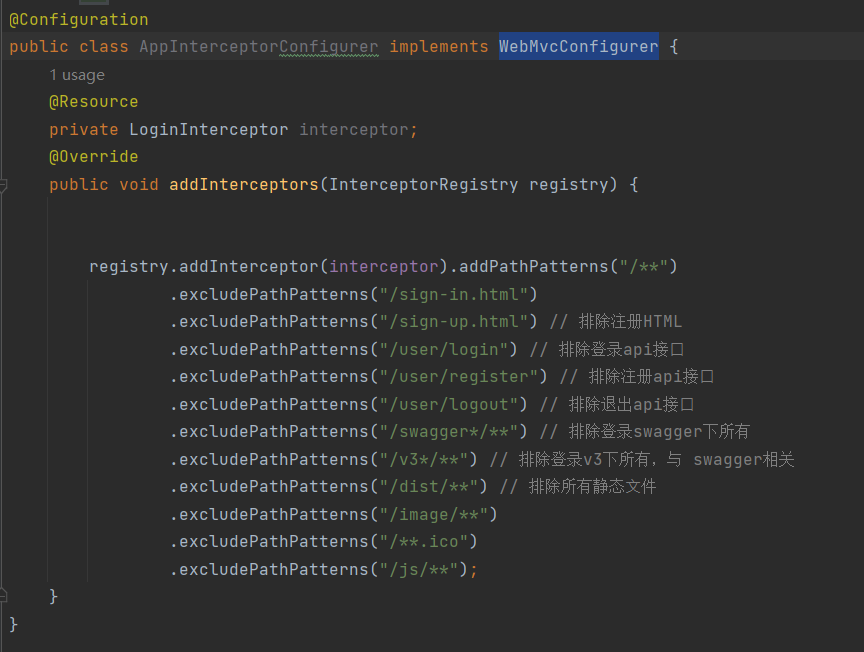
使用@HandlerInterceptor+@WebMvcConfigurer实现登陆拦截
使用MybatisGeneratorConfig生成常用的增删查改方法(mapper)
集成Swagger实现自动生成API测试接口
使用jQuery完成AJAX请求,并处理HTML页面标签
对数据库中常见的查询字段建立索引
一.项目准备
技术选型 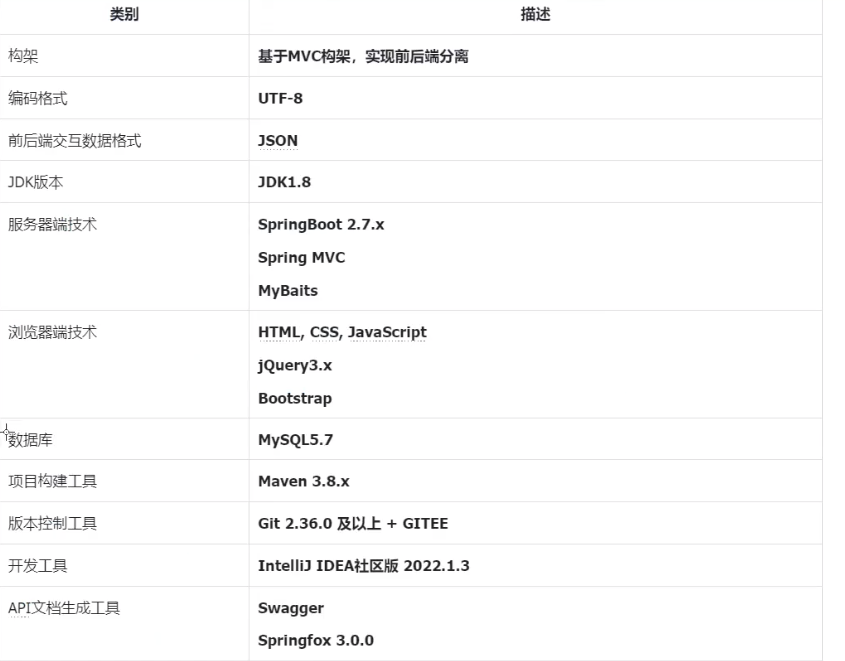
需尽量将使用版本进行对齐
为方便管理,我们可以在pom.xml文件中,将对应的版本号放入<properties></properties>中
例如:
XML
<properties>
		<!-- JDK的版本号 -->
		<java.version>1.8</java.version>
		<!-- 编译环境JDK版本 -->
		<maven.compiler.source>${java.version}</maven.compiler.source>
		<!-- 运行环境JVM版本 -->
		<maven.compiler.target>${java.version}</maven.compiler.target>
		<!-- 构建项目指定编码集 -->
		<project.build.sourceEncoding>UTF-8</project.build.sourceEncoding>
		<!-- 数据库驱动 -->
		<mysql-connector.version>5.1.49</mysql-connector.version>
		<!-- Mybatis依赖-->
		<mybatis-starter.version>2.3.0</mybatis-starter.version>
		<!-- 数据源 -->
		<druid-starter.version>1.2.16</druid-starter.version>
		<!-- Mybatis generator-->
		<mybatis-generator-plugin-version>1.4.1</mybatis-generator-plugin-version>
		<!-- springfox -->
		<springfox-boot-starter.version>3.0.0</springfox-boot-starter.version>
	</properties>
数据库设计
1.库设计
将数据库起名为forum_db
sql
create database forum_db character set utf8mb4 collate utf8mb4_general_ci;后面的编码设计若不设置,MySQL也会自动设置,但我们尽量少让数据库自动配置,多手动配置
1.表设计
该项目中,我们设计了5个表,分别为用户表(t_user) ,帖子表(t_article) ,帖子回复表(t_article_reply),
板块表(t_board) ,站内信表(t_message).
每个表中,无特殊情况下都会配置以下公共字段****:
|-------------|----------|---------|---------|-----|------------|
| 字段 | 类型 | 非空(Y/N) | 主键(Y/N) | 默认值 | 备注 |
| id | bigint | Y | Y | | 编号,自增 |
| state | tinyint | Y | N | 0 | 状态,0正常,1禁用 |
| deleteState | tinyint | Y | N | 0 | 是否删除,0否,1是 |
| createTime | dateTime | Y | N | | 创建时间,精确到秒 |
| updateTime | dateTime | Y | N | | 更新时间,精确到秒 |
其他字段根据需求文档进行设计
SQL脚本如下:
sql
# 创建数据库
create database forum_db character set utf8mb4 collate utf8mb4_general_ci;
# 选择数据库
use forum_db;

# 创建表
# 用户表
create table t_user (
	id bigint primary key auto_increment comment '编号,主键自增',
    username varchar(20) not null unique comment '用户名,唯一',
    password varchar(32) not null comment '加密后的密码',
    nickname varchar(50) not null comment '昵称',
    phoneNum varchar(20) comment '手机号',
    email varchar(50) comment '电子邮箱',
    gender tinyint not null default 2 comment '性别 0女,1男,2保密',
    salt varchar(32) not null comment '为密码加盐',
    avatarUrl varchar(255) comment '用户头像路径',
    articleCount int not null default 0 comment '发帖数量',
    isAdmin tinyint not null default 0 comment '是否管理员 0否,1是',
    remark varchar(1000) comment '备注,自我介绍',
    state tinyint not null default 0 comment '状态 0正常,1禁言',
    deleteState tinyint not null default 0 comment '是否删除,0否,1是',
    createTime datetime not null comment '创建时间,精确到秒',
    updateTime datetime not null comment '更新时间,精确到秒'
);

# 版块表
create table t_board (
	id bigint primary key auto_increment comment '编号,主键自增',
    name varchar(50) not null comment '版块名',
    articleCount int not null default 0 comment '帖子数量',
    sort int not null default 0 comment '排序优先级,升序',
    state tinyint not null default 0 comment '状态 0正常,1禁用',
    deleteState tinyint not null default 0 comment '是否删除,0否,1是',
    createTime datetime not null comment '创建时间,精确到秒',
    updateTime datetime not null comment '更新时间,精确到秒'
);

# 帖子表
create table t_article (
	id bigint primary key auto_increment comment '编号,主键自增',
    boardId bigint not null comment '编号,主键自增',
    userId bigint not null comment '发帖人,关联用户编号',
    title varchar(100) not null comment '帖子标题',
    content text not null comment '帖子正文',
    visitCount int not null default 0 comment '访问量',
    replyCount int not null default 0 comment '回复数',
    likeCount int not null default 0 comment '点赞数',
    state tinyint not null default 0 comment '状态 0正常,1禁用',
    deleteState tinyint not null default 0 comment '是否删除,0否,1是',
    createTime datetime not null comment '创建时间,精确到秒',
    updateTime datetime not null comment '更新时间,精确到秒'
);


# 帖子回复表
create table t_article_reply (
	id bigint primary key auto_increment comment '编号,主键自增',
    articleId bigint not null comment '关联帖子编号',
    postUserId bigint not null comment '楼主用户,关联用户编号',
    replyId bigint comment '关联回复编号,支持楼中楼',
    replyUserId bigint comment '楼主下的回复用户编号,支持楼中楼',
    content varchar(500) not null comment '回贴内容',
    likeCount int not null comment '回贴内容',
    state tinyint not null default 0 comment '状态 0正常,1禁用',
    deleteState tinyint not null default 0 comment '是否删除,0否,1是',
    createTime datetime not null comment '创建时间,精确到秒',
    updateTime datetime not null comment '更新时间,精确到秒'

);

# 站内信表
drop table if exists t_message;
create table t_message (
	id bigint primary key auto_increment comment '编号,主键自增',
    postUserId bigint not null comment '发送者,关联用户编号',
    receiveUserId bigint not null comment '接收者,关联用户编号',
    content varchar(255) not null comment '内容',
    state tinyint not null default 0 comment '状态 0正常,1禁用',
    deleteState tinyint not null default 0 comment '是否删除,0否,1是',
    createTime datetime not null comment '创建时间,精确到秒',
    updateTime datetime not null comment '更新时间,精确到秒'
);

-- 写入版块信息数据
INSERT INTO `t_board` (`id`, `name`, `articleCount`, `sort`, `state`, `deleteState`, `createTime`, `updateTime`) VALUES
(1, 'Java', 0, 1, 0, 0, '2023-06-25 10:25:55', '2023-06-25 10:25:55');
INSERT INTO `t_board` (`id`, `name`, `articleCount`, `sort`, `state`, `deleteState`, `createTime`, `updateTime`) VALUES
(2, 'C++', 0, 2, 0, 0, '2023-06-25 10:25:56', '2023-06-25 10:25:56');
INSERT INTO `t_board` (`id`, `name`, `articleCount`, `sort`, `state`, `deleteState`, `createTime`, `updateTime`) VALUES
(3, '前端技术', 0, 3, 0, 0, '2023-06-25 10:25:56', '2023-06-25 10:25:56');
INSERT INTO `t_board` (`id`, `name`, `articleCount`, `sort`, `state`, `deleteState`, `createTime`, `updateTime`) VALUES
(4, 'MySQL', 0, 4, 0, 0, '2023-06-25 19:05:22', '2023-06-25 19:05:22');
INSERT INTO `t_board` (`id`, `name`, `articleCount`, `sort`, `state`, `deleteState`, `createTime`, `updateTime`) VALUES (5, '面试宝典', 0, 5, 0, 0, '2023-06-25 19:05:22', '2023-06-25 19:05:22');
INSERT INTO `t_board` (`id`, `name`, `articleCount`, `sort`, `state`, `deleteState`, `createTime`, `updateTime`) VALUES (6, '经验分享', 0, 6, 0, 0, '2023-06-25 19:05:22', '2023-06-25 19:05:22');
INSERT INTO `t_board` (`id`, `name`, `articleCount`, `sort`, `state`, `deleteState`, `createTime`, `updateTime`) VALUES
(7, '招聘信息', 0, 7, 0, 0, '2023-06-25 19:05:22', '2023-06-25 19:05:22');
INSERT INTO `t_board` (`id`, `name`, `articleCount`, `sort`, `state`, `deleteState`, `createTime`, `updateTime`) VALUES (8, '福利待遇', 0, 8, 0, 0, '2023-06-25 19:05:22', '2023-06-25 19:05:22');
INSERT INTO `t_board` (`id`, `name`, `articleCount`, `sort`, `state`, `deleteState`, `createTime`, `updateTime`) VALUES (9, '灌水区', 0, 9, 0, 0, '2023-06-25 19:05:22', '2023-06-25 19:05:22');
环境搭建
创建一个SpringBoot项目,导入以下依赖
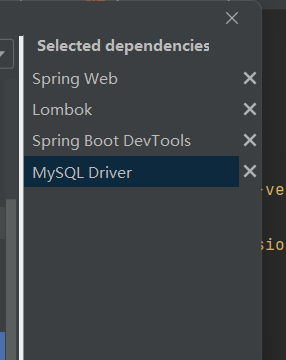
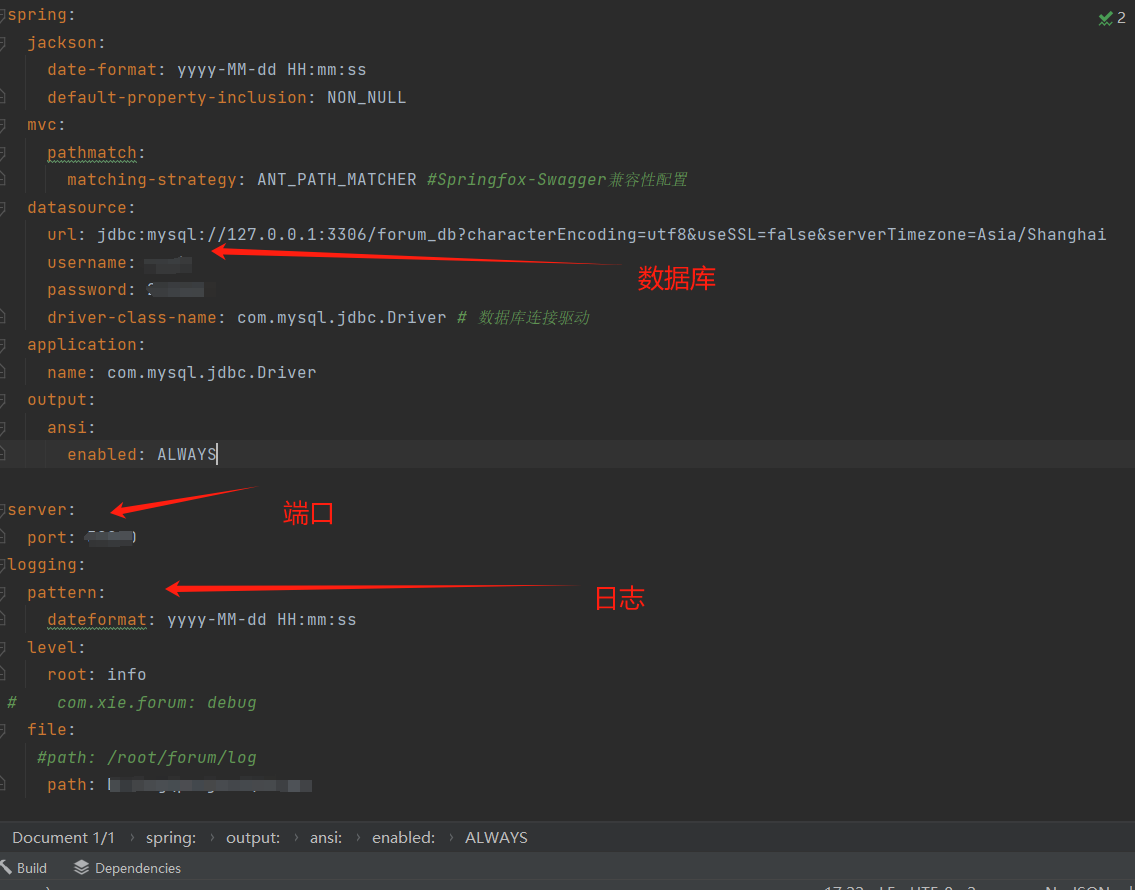
在resources⽬录下appliaction.yml中,进行端口,数据库,日志等配置
1.包的创建
根据以下工程结构,创建包
├─java # java*⽂件区*
│ └─com
│ └─xie
│ └─forum
│ ├─common #公共类
│ ├─config *#配置类
│ ├─controller #控制器层类
│ ├─dao *#数据库访问类
│ ├─exception *#⾃定义异常类
│ ├─interceptor *#⾃定义拦截器类
│ ├─model *#*数据库实体对应模型类
│ ├─services *#*业务服务层接⼝
│ │ └─impl *#*业务服务层接⼝实现类
│ └─utils *#*输助⼯具类
|
|
└─resources *#*资源⽂件区
├─mapper #数据库与模型映射⽂件
│ └─extension *#扩展数据库与模型映射⽂件,⾃定义业务⽅法
├─mybatis *# Mybatis Generator配置⽂件
├─static *#*静态⽂件
└─templates *#*模板⽂件
2.编写类与映射文件
1)在pom.xml引入依赖与插件
plugins标签下加入以下配置:
XML
<plugin>
				<groupId>org.mybatis.generator</groupId>
				<artifactId>mybatis-generator-maven-plugin</artifactId>
				<version>${mybatis-generator-plugin-version}</version>
				<executions>
					<execution>
						<id>Generate MyBatis Artifacts</id>
						<phase>deploy</phase>
						<goals>
							<goal>generate</goal>
						</goals>
					</execution>
				</executions>
				<!-- 相关配置 -->
				<configuration>
					<!-- 打开日志 -->
					<verbose>true</verbose>
					<!-- 允许覆盖 -->
					<overwrite>true</overwrite>
					<!-- 配置文件路径 -->
					<configurationFile>
						src/main/resources/mybatis/generatorConfig.xml
					</configurationFile>
				</configuration>
</plugin>此为MybatisGeneratorConfig插件,能够帮助我们快速的实现与数据库的映射,自动生成mapper,dao,modle等相关配置.
然后,在resources - mybatis中建立generatorConfix.xml文件,并配置文件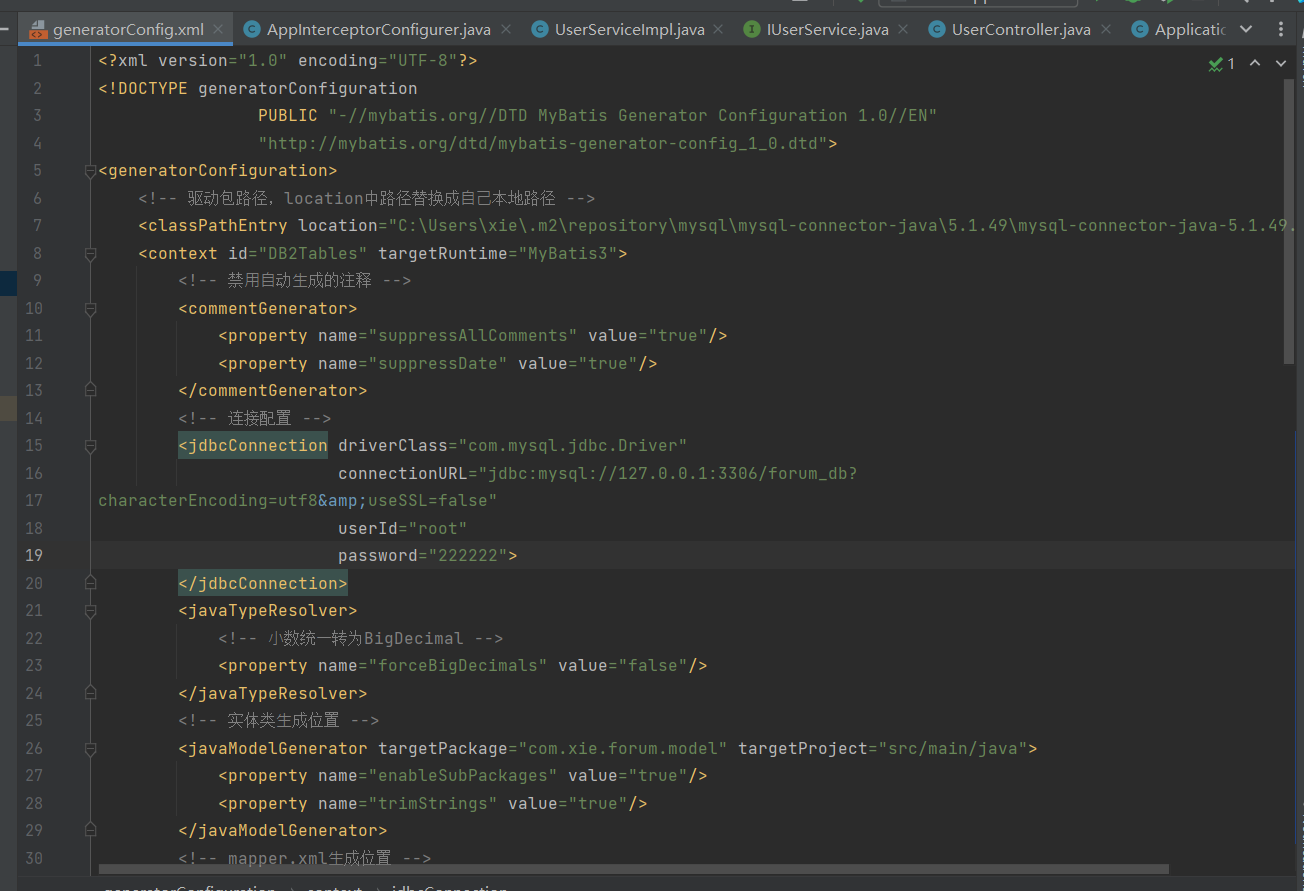
完成后刷新Maven,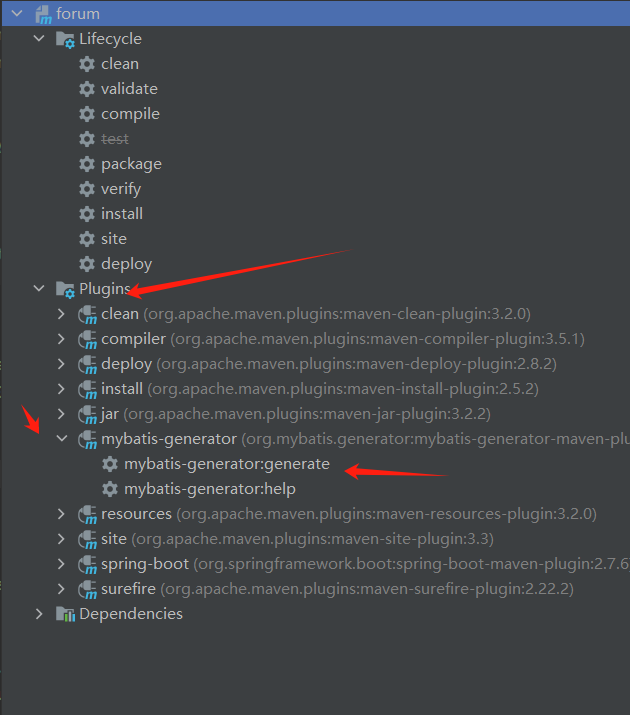
即可自动生成数据库的映射文件.
3.定义状态码与返回结果
状态码对于我们发现bug类型,发现bug发生位置具有重大作用,通过状态码,我们可以高效的管理代码中的错误.
在common包下定义一个枚举类,通过枚举,罗列我们所需要的状态码与提示信息.
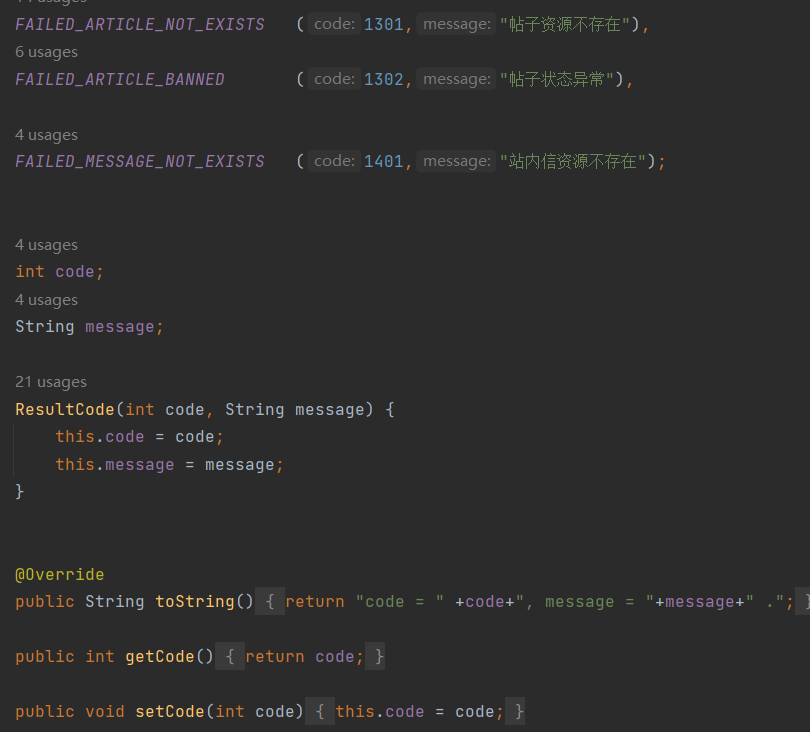
在common包下定义一个管理返回结果的类,这个类中有定义三个属性code,message,data.
再在类中定义多个重载返回,分别表示成功事不传参数,成功时传一个参数.....如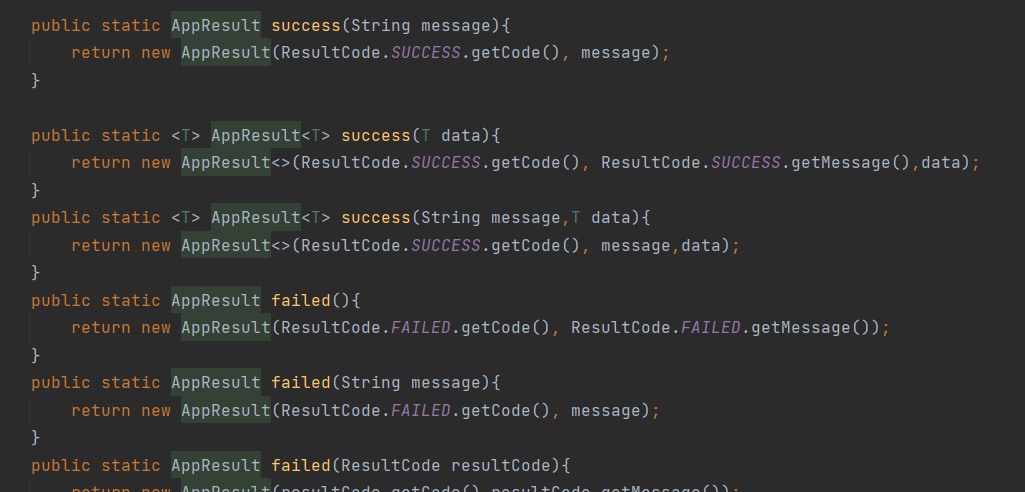
这样,我们就实现了controller层统一返回结果.
4.定义异常与异常全局处理
在excepception中,定义一个自定义类型类,继承自RuntimeException.
java
public class ApplicationException extends RuntimeException{
    //在异常中持有一个错误信息对象
    protected AppResult errorResult;

    public AppResult getErrorResult() {
        return errorResult;
    }
    public ApplicationException (AppResult errorResult){
        super(errorResult.getMessage());
        this.errorResult=errorResult;
    }

    public ApplicationException(String message) {
        super(message);
    }

    public ApplicationException(String message, Throwable cause) {
        super(message, cause);
    }

    public ApplicationException(Throwable cause) {
        super(cause);
    }
}
然后再定义一个类,用于拦截并处理全局异常.
使用**@ControllerAdvice + @ExceptionHandler** 注解实现统⼀异常处理
@ControllerAdvice:定义于类外,表示控制器通知类.
@ExceptionHandler:()内填入需拦截的异常类
代码如下:
java
@Slf4j
@ControllerAdvice
public class GlobalExceptionHandler{
    @ResponseBody
    @ExceptionHandler(ApplicationException.class)
    public AppResult applicationException(ApplicationException e){
        log.error(e.getMessage());
        if(e.getErrorResult()!=null){
            return e.getErrorResult();
        }
        if(e.getMessage()==null||e.getMessage().equals(" ")){
            return AppResult.failed(ResultCode.ERROR_SERVICES);
        }
        return AppResult.failed(e.getMessage());
    }

    @ResponseBody
    @ExceptionHandler(Exception.class)
    public AppResult exception(Exception e){
        log.error(e.getMessage());
        if(e.getMessage()==null||e.getMessage().equals("")){
            return AppResult.failed(ResultCode.ERROR_SERVICES);
        }
        return AppResult.failed(e.getMessage());
    }
}
5.登入拦截器
在intercepttor中,我们需根据用户登入状态判断是否拦截,我们可以在登入时,为用户创建一个session,若是用户有session,则无需拦截,若无session,则跳转至登入页面.
interceptor包下创建LoginInterceptor类,继承HandlerInterceptor,重载preHandle方法,并获取session. 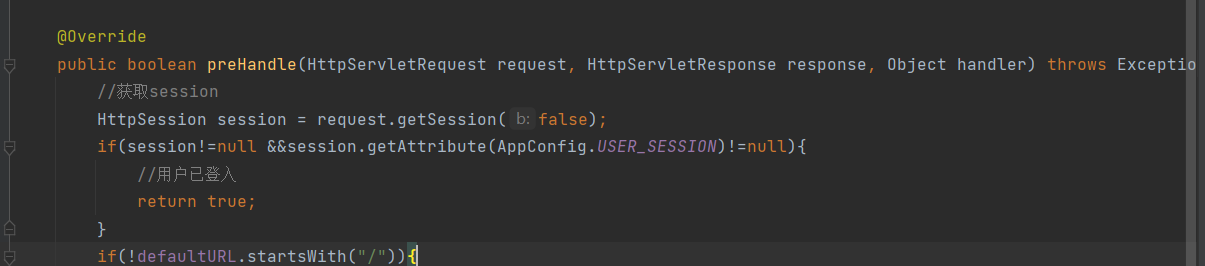
根据session有无,判断是否拦截,若有,则返回true
若无,则跳转至登入页面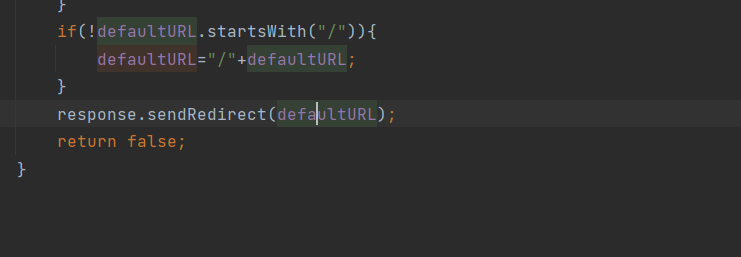
随后,在interceptor包下创建AppInterceptorConfigurer类并继承WebMvcConfigurer,在此类涉资拦截的具体细节(启用哪个拦截器,拦截哪些url,哪些不进行拦截.....)
二.功能实现
接下来分析主要功能的实现.
按照以下步骤一步步实现接口功能:
1)在mapper层编写SQL语句
2)在dao层查询数据库
3)在Service层定义接口,并在Impl层实现服务层代码
4)对服务层代码进行测试
5)编写Controller层与前端进行映射
6)接口测试
下面将举例几个常用接口进行讲解
1.注册接口
1)模拟流程:
用户进入注册界面发生请求->发送至服务器->查询是否已存在该用户(存在则返回注册失败)->不存在则新增用户->返回过结果->返回登入页面
2)编写SQL
根据流程分析,注册用户主要需要两个Sql,首先需要查询用户是否存在(select),与往数据库里插入一个新用户(insert).
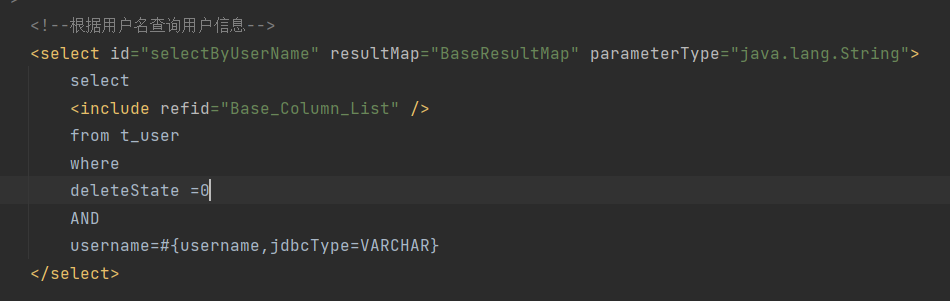
首先根据用户名查询用户
往数据库中插入一条数据
sql
<insert id="insertSelective" parameterType="com.xie.forum.model.User" useGeneratedKeys="true" keyProperty="id" >
    insert into t_user
    <trim prefix="(" suffix=")" suffixOverrides=",">
      <if test="id != null">
        id,
      </if>
      <if test="username != null">
        username,
      </if>
      <if test="password != null">
        password,
      </if>
      <if test="nickname != null">
        nickname,
      </if>
      <if test="phoneNum != null">
        phoneNum,
      </if>
      <if test="email != null">
        email,
      </if>
      <if test="gender != null">
        gender,
      </if>
      <if test="salt != null">
        salt,
      </if>
      <if test="avatarUrl != null">
        avatarUrl,
      </if>
      <if test="articleCount != null">
        articleCount,
      </if>
      <if test="isAdmin != null">
        isAdmin,
      </if>
      <if test="remark != null">
        remark,
      </if>
      <if test="state != null">
        state,
      </if>
      <if test="deleteState != null">
        deleteState,
      </if>
      <if test="createTime != null">
        createTime,
      </if>
      <if test="updateTime != null">
        updateTime,
      </if>
    </trim>
    <trim prefix="values (" suffix=")" suffixOverrides=",">
      <if test="id != null">
        #{id,jdbcType=BIGINT},
      </if>
      <if test="username != null">
        #{username,jdbcType=VARCHAR},
      </if>
      <if test="password != null">
        #{password,jdbcType=VARCHAR},
      </if>
      <if test="nickname != null">
        #{nickname,jdbcType=VARCHAR},
      </if>
      <if test="phoneNum != null">
        #{phoneNum,jdbcType=VARCHAR},
      </if>
      <if test="email != null">
        #{email,jdbcType=VARCHAR},
      </if>
      <if test="gender != null">
        #{gender,jdbcType=TINYINT},
      </if>
      <if test="salt != null">
        #{salt,jdbcType=VARCHAR},
      </if>
      <if test="avatarUrl != null">
        #{avatarUrl,jdbcType=VARCHAR},
      </if>
      <if test="articleCount != null">
        #{articleCount,jdbcType=INTEGER},
      </if>
      <if test="isAdmin != null">
        #{isAdmin,jdbcType=TINYINT},
      </if>
      <if test="remark != null">
        #{remark,jdbcType=VARCHAR},
      </if>
      <if test="state != null">
        #{state,jdbcType=TINYINT},
      </if>
      <if test="deleteState != null">
        #{deleteState,jdbcType=TINYINT},
      </if>
      <if test="createTime != null">
        #{createTime,jdbcType=TIMESTAMP},
      </if>
      <if test="updateTime != null">
        #{updateTime,jdbcType=TIMESTAMP},
      </if>
    </trim>
  </insert>
3)dao层
sql
User selectByUserName(@Param("username") String username);
sql
int insertSelective(User row);注意:此处的名称需与mapper中方法的id名一致
4)Service层
service层要实现两个功能
首先,去数据库中查询用户是否已经存在(通过用户名进行查询)
java
User existsUser= userMapper.selectByUserName(user.getUsername());
        if(existsUser!=null){
            //打印日志
            log.info(ResultCode.FAILED_USER_EXISTS.toString());
            //抛出异常
            throw new ApplicationException(AppResult.failed(ResultCode.FAILED_USER_EXISTS));
        }
若存在,则抛出异常,若不存在,则往数据库插入一条新用户的数据
java
user.setArticleCount(0);
        user.setIsAdmin((byte)0);
        user.setState((byte)0);
        user.setDeleteState((byte)0);
        Date date=new Date();
        user.setCreateTime(date);
        user.setUpdateTime(date);

        //写入数据库
        int row= userMapper.insertSelective(user);
        if(row!=1){
            log.info(ResultCode.FAILED_CREATE.toString());
            throw new ApplicationException(AppResult.failed(ResultCode.FAILED_CREATE));
        }
        log.info("新增用户成功. username="+user.getUsername());
5)Controller层

接收前端传来的参数
根据需求文档,传来的参数中有重复输入密码,需要进行验证
java
if(!password.equals(passwordRepeat)){
            log.info(ResultCode.FAILED_TWO_PWD_NOT_SAME.toString());
            return AppResult.failed(ResultCode.FAILED_TWO_PWD_NOT_SAME);
        }
接着,调用服务层接口
java
service.createNormalUser(user);
        return AppResult.success();
2.登入接口
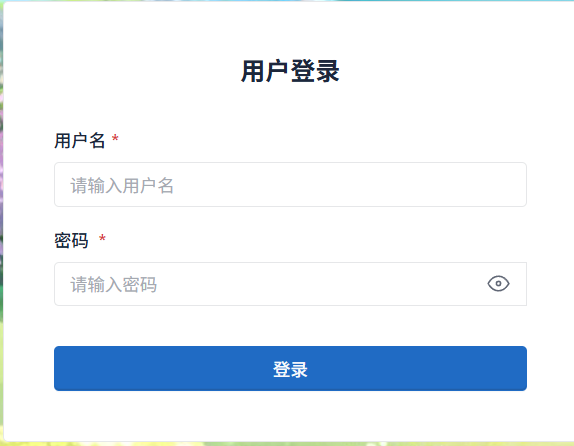
根据需求文档,进行登陆时需要向后端发送用户名与密码
1)模拟流程:
输入用户信息->发送至服务器->服务器发送至数据库中查询用户名->返回结果至服务器->校验数据->返回登录成功或失败
2)Controller层
接收前端发送的参数

并调用服务层的login()方法,若登录失败,则抛出异常;若登录成功,则设置session,并返回前端
java
 if(login==null){
                log.info(ResultCode.FAILED_LOGIN.toString());
                return AppResult.failed(ResultCode.FAILED_LOGIN);
            }
            HttpSession session = request.getSession(true);
            session.setAttribute(AppConfig.USER_SESSION,login);
            return AppResult.success();
3)Service层
首先,查询该用户是否存在,根据用户名查询数据库,若不存在,则抛出异常
java
User user= selectByUserName(username);
        if(user==null){
            log.warn(ResultCode.FAILED_LOGIN.toString()+",username="+username);
            throw new ApplicationException(AppResult.failed(ResultCode.FAILED_LOGIN));
        }
若用户存在,则进行密码验证,密码正确,则登录成功,密码错误,则登录失败
java
 String encryptPassword= MD5Util.md5Salt(password,salt);
        if(!encryptPassword.equalsIgnoreCase(user.getPassword())){
            log.info("密码输入错误");
            throw new ApplicationException(AppResult.failed(ResultCode.FAILED_LOGIN));
        }
        log.info(username+"登入成功");
4)dao层
java
User selectByUserName(@Param("username") String username);5)编写SQL
跟据dao层,要根据用户名查询用户
java
    <select id="selectByUserName" resultMap="BaseResultMap" parameterType="java.lang.String">
        select
        <include refid="Base_Column_List" />
        from t_user
        where
        deleteState =0
        AND
        username=#{username,jdbcType=VARCHAR}
    </select>
3.帖子列表
当用户登录后,会进入首页
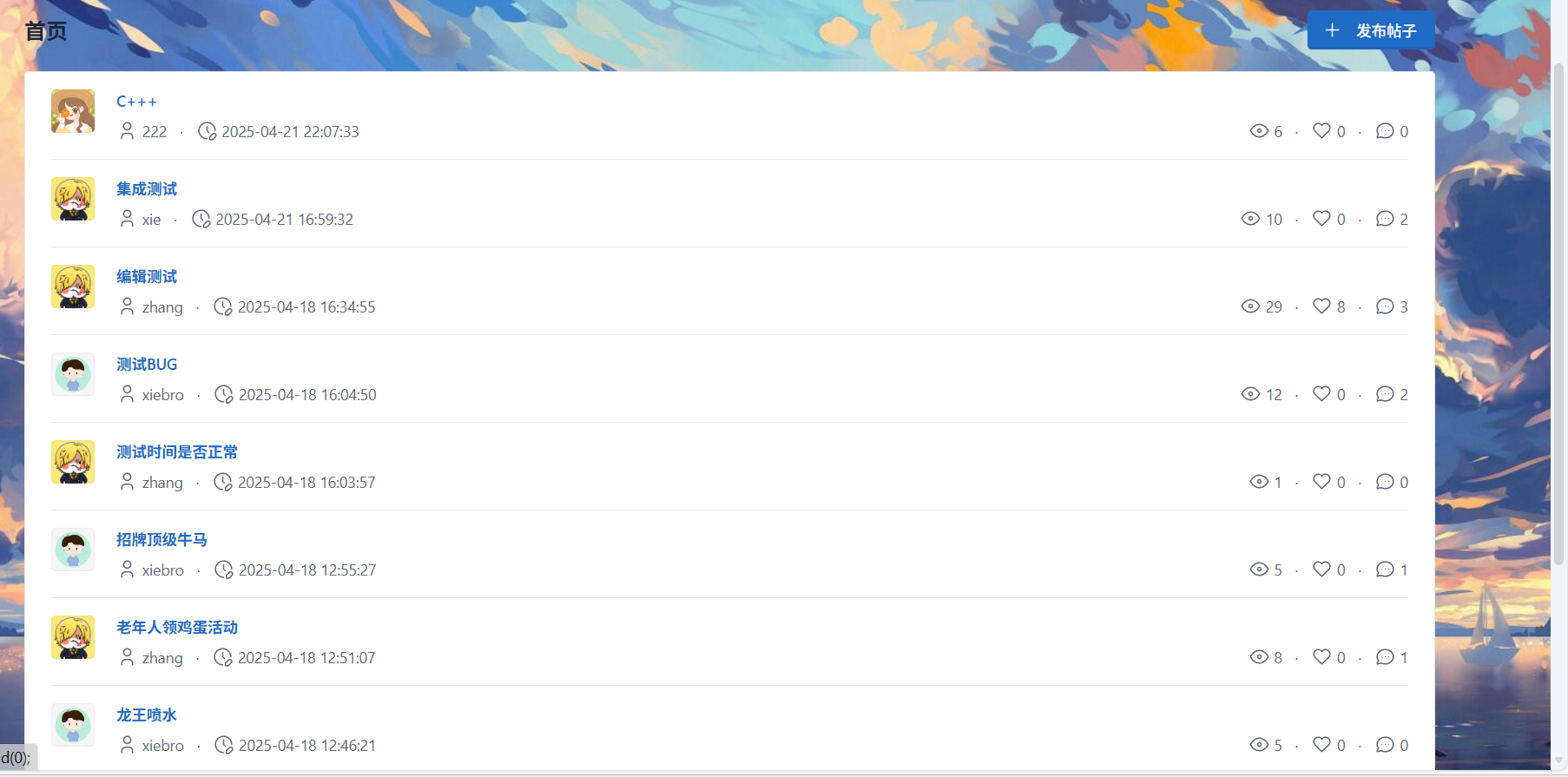
帖子会按照时间顺序进行排序
1)流程模拟:
前端向后端发送展示的帖子模块Id(首页不传)->后端接收参数进行判断->发送数据库查询->返回查询结果至服务器->将列表返回前端
2)Controller层:

根据boardId(模块Id)调用服务层
当boardId为null,则展示的首页帖子
当boardId不为null,则是模块的帖子
java
 List<Article> articles;
        if (boardId == null) {
            articles = articleService.selectAll();
            if (articles == null) {
                articles = new ArrayList<>();
            }
        } else {
            articles = articleService.selectAllByBoardId(boardId);
            if (articles == null) {
                articles = new ArrayList<>();
            }

        }
        return AppResult.success(articles);
3)Service层
首先是无参数版,直接调用dao层接口,查询全部帖子
java
public List<Article> selectAll() {
        List<Article> articles = articleMapper.selectAll();

        return articles;
若有参数,首先进行参数校验,确保参数的合法性
java
//非空校验
        if (boardId == null || boardId <= 0) {
            log.warn(ResultCode.FAILED_PARAMS_VALIDATE.toString());
            throw new ApplicationException(AppResult.failed(ResultCode.FAILED_PARAMS_VALIDATE));
        }
根据板块id查询对应的板块是否存在
java
 //校验板块是否存在
        Board board = boardservice.seleteById(boardId);
        if (board == null) {
            log.warn(ResultCode.FAILED_BOARD_NOT_EXISTS.toString());
            throw new ApplicationException(AppResult.failed(ResultCode.FAILED_BOARD_NOT_EXISTS));
        }
最后,调用dao层接口,查询对应模块的帖子
java
List<Article> articles = articleMapper.selectAllByBoardId(boardId);4)dao层
java
List<Article> selectAllByBoardId(@Param("boardId") Long boardId);
java
List<Article> selectAll();5)编写SQL
查询所有帖子的SQL
XML
<select id="selectAll" resultMap="AllInfoResultMap">
        select
        u.id as u_id,
        u.avatarUrl u_avatarUrl,
        u.nickname as u_nickname,
        u.gender as u_gender,
        a.id,
        a.boardId,
        a.userId,
        a.title,
        a.visitCount,
        a.replyCount,
        a.likeCount,
        a.createTime,
        a.updateTime
        from
        t_article a,t_user u
        where
        a.userId=u.id and
        a.deleteState =0
        order by a.createTime desc
    </select>
查询对应模块帖子的SQL
XML
<select id="selectAllByBoardId" resultMap="AllInfoResultMap" parameterType="java.lang.Long">
        select
        u.id as u_id,
        u.avatarUrl u_avatarUrl,
        u.nickname as u_nickname,
        u.gender as u_gender,
        a.id,
        a.boardId,
        a.userId,
        a.title,
        a.visitCount,
        a.replyCount,
        a.likeCount,
        a.createTime,
        a.updateTime
        from
        t_article a,t_user u
        where
        a.userId=u.id and
        a.deleteState =0 and
        a.boardId =#{boardId,jdbcType=BIGINT}
        order by a.createTime desc
    </select>
以以上三个功能为例,其他功能根据需求文档编写即可