高级特性详解
贪婪与非贪婪匹配
贪婪匹配 (Greedy):默认匹配模式,尽可能匹配更多的字符
非贪婪匹配 (Lazy/Reluctant):匹配尽可能少的字符
| 量词 | 贪婪模式 | 非贪婪模式 |
|---|---|---|
| * | .* | .*? |
| + | .+ | .+? |
| ? | .? | .?? |
| {n,m} | .{n,m} | .{n,m}? |
| {n,} | .{n,} | .{n,}? |
示例
匹配div标签
python
import re

html_text = '<div>content1</div><div>content2</div>'

# 贪婪匹配
greedy_pattern = r'<div>.*<\/div>'
re.findall(greedy_pattern, html_text)
# ['<div>content1</div><div>content2</div>']

# 非贪婪匹配
lazy_pattern = r'<div>.*?<\/div>'
re.findall(lazy_pattern, html_text)
# ['<div>content1</div>', '<div>content2</div>']
分组和反向引用
捕获分组:用括号 () 定义,从左到右编号
非捕获分组:语法为(?:pattern) ,表示只分组不捕获
反向引用:在同一个正则表达式中引用前面的捕获组,用 \1, \2 等
示例
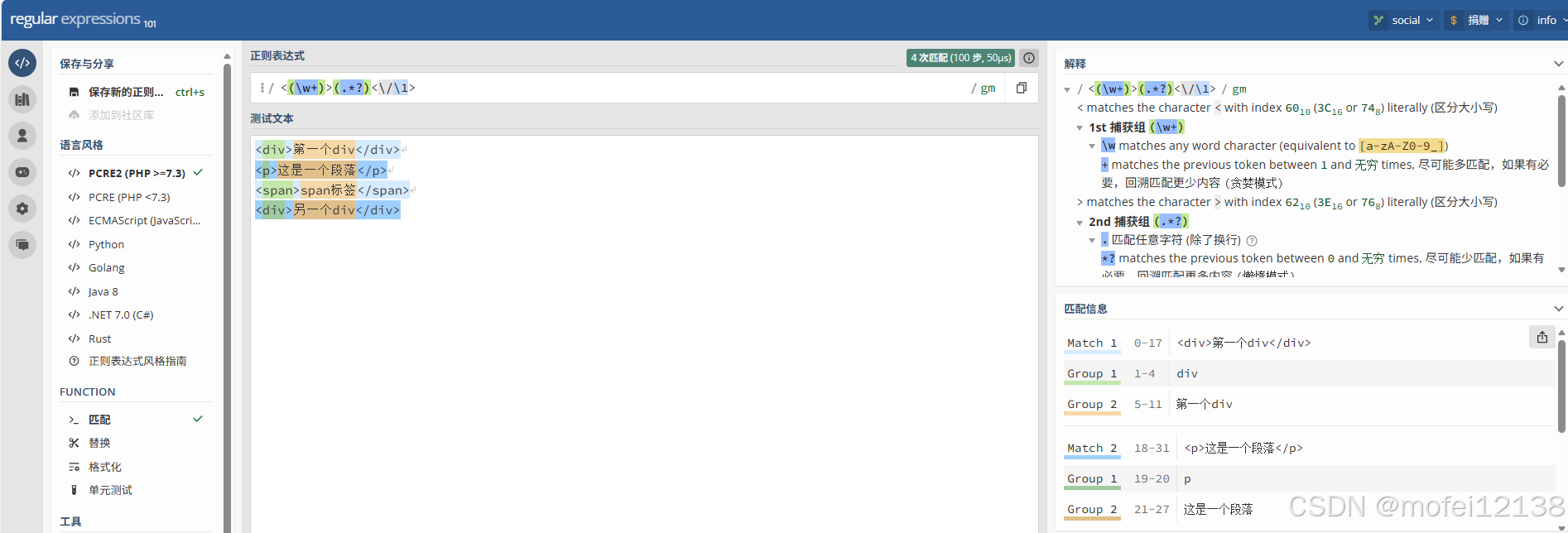
匹配对称的HTML标签
python
import re

html_text = """
<div>第一个div</div>
<p>这是一个段落</p>
<span>span标签</span>
<div>另一个div</div>
"""
pattern = r'<(\w+)>(.*?)</\1>'
matches = re.finditer(pattern, html_text)
for match in matches:
    print(f"标签: <{match.group(1)}>, 内容: '{match.group(2)}'")
# 输出:
# 标签: <div>, 内容: '第一个div'
# 标签: <p>, 内容: '这是一个段落'
# 标签: <span>, 内容: 'span标签'
# 标签: <div>, 内容: '另一个div'
格式化日期
python
# 使用反向引用进行替换
date_text = "2024-05-15"
re.sub(r'(\d{4})-(\d{2})-(\d{2})', r'\3/\2/\1', date_text)
# 15/05/2024
命名捕获组
语法:(?Ppattern)
说明:name是捕获组的名称,可以使用 (?P=name) 来反向引用
示例
处理配置文件
python
import re

config_text = """
# 数据库配置
db_host = localhost
db_port = 5432
db_name = mydb
"""
config_pattern = r'''
    ^
    \s*                                  # 忽略前导空格
    (?P<key>[a-zA-Z_][a-zA-Z0-9_]*)      # 键名(命名捕获组)
    \s*=\s*                              # 等号
    (?P<value>[^#\n]+)                   # 值(到注释或换行为止)
    \s*
    (?:\#.*)?                            # 忽略注释
    $
'''

matches = re.finditer(config_pattern, config_text, re.MULTILINE | re.VERBOSE)
for match in matches:
    groups = match.groupdict()  # 获取所有命名组作为字典
    key = groups['key']
    value = groups['value'].strip()
    print(f"{key} = {value}")
# 输出:
# db_host = localhost
# db_port = 5432
# db_name = mydb
模式修饰符
| 修饰符 | re 模块常量 | 说明 |
|---|---|---|
| i | re.IGNORECASE 或 re.I | 忽略大小写 |
| m | re.MULTILINE 或 re.M | 多行模式,使^和$匹配每行的开头结尾 |
| s | re.DOTALL 或 re.S | 单行模式,使.匹配包括换行符在内的所有字符 |
| x | re.VERBOSE 或 re.X | 忽略空白和注释 |
| u | re.UNICODE 或 re.U | Unicode模式(Python 3 默认) |
| a | re.ASCII 或 re.A | ASCII 模式 |
| g | 没有对应的常量,可以用re.findall()函数实现 | 全局匹配 |
示例
python
import re

text = "Hello World\nhello Python\nHELLO Regex"

# 1. 忽略大小写
pattern1 = re.compile(r'hello', re.IGNORECASE)
pattern1.findall(text)
# ['Hello', 'hello', 'HELLO']

# 2. 多行模式
pattern2 = re.compile(r'^hello', re.IGNORECASE | re.MULTILINE)
pattern2.findall(text)
# ['Hello', 'hello', 'HELLO']

# 3. 使 . 匹配所有字符
text2 = "start\nmiddle\nend"
pattern3 = re.compile(r'start.*end', re.DOTALL)
pattern3.search(text2).group()
# start\nmiddle\nend

# 4. 详细模式(允许注释和空白)
email_pattern = re.compile(r'''
    ^                   # 开始
    [\w\.-]+            # 用户名
    @                   # @符号
    [\w\.-]+            # 域名
    \.                  # 点
    [a-zA-Z]{2,}        # 顶级域名
    $                   # 结束
''', re.VERBOSE)
email = "test@example.com"
email_pattern.match(email).group()
# test@example.com

# 5. Python 3 中,默认启用 Unicode 匹配
re.findall(r'\w+', 'café')
# ['café']

# 6. ASCII 模式
re.findall(r'\w+', 'café', re.ASCII)
# ['caf']
嵌入修饰符
语法
(?修饰符字母)      # 开启修饰符
(?-修饰符字母)     # 关闭修饰符
(?修饰符字母:子模式)  # 对子模式应用修饰符
示例
python
import re

# 1. 全局开启修饰符
pattern1 = re.compile(r'(?i)hello')
print(pattern1.findall("Hello WORLD"))  # ['Hello']

# 2. 局部修饰符
pattern2 = re.compile(r'Hello (?i:world)!')
print(pattern2.findall("Hello WORLD!"))  # ['Hello WORLD!']
print(pattern2.findall("hello WORLD!"))  # [] - Hello 区分大小写
先行断言和后行断言
正则表达式的先行断言和后行断言一共有 4 种形式:
- (?=pattern) 零宽正向先行断言(zero-width positive lookahead assertion)
- (?!pattern) 零宽负向先行断言(zero-width negative lookahead assertion)
- (?<=pattern) 零宽正向后行断言(zero-width positive lookbehind assertion)
- (?<!pattern) 零宽负向后行断言(zero-width negative lookbehind assertion)
如同 ^ 代表开头,$ 代表结尾,\b 代表单词边界一样,先行断言和后行断言也有类似的作用,它们只匹配某些位置,在匹配过程中,不占用字符,所以被称为"零宽"。
正向先行断言
语法:(?=pattern)
说明:代表字符串中的一个位置,紧接该位置之后的字符序列能够匹配 pattern。
示例
匹配后面跟着"元"的数字
python
import re

text = "苹果价格100元, 香蕉价格50元, 橙子价格20元"
pattern = r'\d+(?=元)'
re.findall(pattern, text)
# ['100', '50', '20']
提取扩展名前的主文件名
python
import re

filenames = ["file.txt", "image.jpg", "document.pdf", "noextension", "archive.tar.gz"]
pattern = r'.+?(?=\.\w)'
for filename in filenames:
    match = re.match(pattern, filename)
    if match:
        print(f"{filename} → {match.group()}")
    else:
        print(f"{filename} → 文件名格式错误")
# 输出:
# file.txt → file
# image.jpg → image
# document.pdf → document
# noextension → 文件名格式错误
# archive.tar.gz → archive
复杂密码验证(至少8位,包含大写字母、数字、特殊字符)
python
import re

passwords = ["Pass123#", "password", "PASSWORD123", "Pass123", "Pass@1234"]
pattern = r'^(?=.*[A-Z])(?=.*\d)(?=.*[@#$%^&+=]).{8,}$'
for pwd in passwords:
    if re.match(pattern, pwd):
        print(f"{pwd}: ✓ 通过")
    else:
        print(f"{pwd}: ✗ 失败")
# 输出:
# Pass123#: ✓ 通过
# password: ✗ 失败(缺大写、数字、特殊字符)
# PASSWORD123: ✗ 失败(缺特殊字符)
# Pass123: ✗ 失败(缺特殊字符,长度不够)
# Pass@1234: ✓ 通过
负向先行断言
语法:(?!pattern)
说明:代表字符串中的一个位置,紧接该位置之后的字符序列不能匹配 pattern。
示例
提取非注释的Python配置项
python
import re

config_text = """# 数据库配置
DATABASE_HOST = "localhost"
# DATABASE_PORT = 5432
DATABASE_PORT = 3306
DATABASE_NAME = "myapp_db"
"""
pattern = r'^(?!\s*#).+$'
matches = re.findall(pattern, config_text, re.MULTILINE)
for i, line in enumerate(matches, 1):
    print(f"{i:2}. {line.strip()}")
# 输出:
# 1. DATABASE_HOST = "localhost"
# 2. DATABASE_PORT = 3306
# 3. DATABASE_NAME = "myapp_db"
正向后行断言
语法:(?<=pattern)
说明:代表字符串中的一个位置,紧接该位置之前的字符序列能够匹配 pattern。
注意:在python中,后行断言要求模式必须是固定宽度的
示例
从配置文件中提取指定键后面的值
python
import re

config_text = """
# Redis配置
redis_host = 127.0.0.1
redis_port = 6379
redis_password = "redis_pass"
"""
pattern = r'(?<=\bredis_host\s=\s)([^\s#]+)'
match = re.search(pattern, config_text)
if match:
    print(match.group(1))
# 127.0.0.1
负向后行断言
语法:(?<!pattern)
说明:代表字符串中的一个位置,紧接该位置之前的字符序列不能匹配 pattern。
注意:在python中,后行断言要求模式必须是固定宽度的
示例
匹配前面不是 "not " 的 "happy"
python
import re

text = "I am happy, you are not happy, we are happy"
pattern = r'(?<!not\s)happy'

matches = re.finditer(pattern, text)
for match in matches:
    start, end = match.span()
    print(f"位置 {start}-{end}: '{match.group()}'")
# 输出:
# 位置 5-10: 'happy'
# 位置 38-43: 'happy'
原子分组与占有量词
原子分组:使用语法 (?>pattern)。一旦这个分组内的子表达式匹配成功,匹配点就会固定,引擎会关闭该分组内的所有回溯可能性。
占有量词:原子分组应用于量词的快捷语法。它在普通量词后加上一个 +。比如 .+ 等同于 (?>. )
示例
python
import re

text = "ID: 12345678901234567890, Name: LongID"

# 普通量词 - 会回溯尝试5-10位的各种组合
pattern_normal = r"ID: (\d{5,10}), Name: (\w+)"
match = re.search(pattern_normal, text)
print(f"ID={match.group(1)}" if match else '不匹配')  # 不匹配
# 使用原子分组 - 直接匹配10位然后失败
pattern_atomic = r"ID: ((?>\d{5,10})), Name: (\w+)"
match = re.search(pattern_atomic, text)
print(f"ID={match.group(1)}" if match else '不匹配')  # 不匹配
# 使用占有量词 - 同原子分组
pattern_possess = r"ID: (\d{5,10}+), Name: (\w+)"
match = re.search(pattern_possess, text)
print(f"ID={match.group(1)}" if match else '不匹配')  # 不匹配
性能测试
python
import re

# 创建一个会导致大量回溯的长文本,进行性能测试
long_text = "ID: " + "1" * 10001 + "abc"
pattern_normal = r"ID: (\d{5,10000}), Name: (\w+)"
pattern_atomic = r"ID: (\d{5,10000}+), Name: (\w+)"

# 测试普通分组
import time
start = time.time()
for _ in range(1000):  # 重复多次
    re.search(pattern_normal, long_text)

end = time.time()
print(f"普通分组 1000次匹配耗时: {(end-start)*1000:.2f}毫秒")  # 64.38毫秒

# 测试占有量词
start2 = time.time()
for _ in range(1000):
    re.search(pattern_atomic, long_text)

end2 = time.time()
print(f"占有量词 1000次匹配耗时: {(end2-start2)*1000:.2f}毫秒")  # 24.43毫秒

print(f"效率提升: {((end-start)/(end2-start2)-1)*100:.1f}%")  # 效率提升: 163.6%
条件表达式
语法:(?(condition)yes-pattern|no-pattern)
说明:如果condition匹配了,则尝试yes-pattern,否则尝试no-pattern
条件可以是:
- 捕获组的编号:(?(1)...)
- 命名捕获组的名称:(?(name)...)
示例
匹配带或不带引号的字符串
python
import re

texts = [
    '"quoted string"',     # 双引号
    'unquoted string',     # 不带引号
    "'single quotes'",     # 单引号
    'another string',      # 不带引号
]
pattern = r'''
    ^
    (["'])?               # 第1组: 可选的引号
    (?(1)                 # 条件: 如果第1组匹配了(有引号)
        ([^"']+)          # yes模式: 引号内的内容
    |                     # 否则
        (.+)              # no模式: 不带引号的内容
    )
    (?(1)\1)              # 条件: 如果有引号,匹配对应的结束引号
    $
'''
for text in texts:
    match = re.search(pattern, text, re.VERBOSE)
    if match:
        if match.group(1):
            print(f"带引号字符串: 引号={match.group(1)}, 内容={match.group(2)}")
        else:
            print(f"无引号字符串: 内容={match.group(3)}")
# 输出:
# 带引号字符串: 引号=", 内容=quoted string
# 无引号字符串: 内容=unquoted string
# 带引号字符串: 引号=', 内容=single quotes
# 无引号字符串: 内容=another string
递归匹配
递归匹配:允许模式引用自身,用于匹配嵌套结构
语法:
- (?R):递归整个模式
- (?0):同 (?R)
- (?1), (?2), ... :递归指定捕获组
- (?&name):递归命名捕获组 "name"
示例
匹配嵌套的圆括号
python
import regex  # 需要安装: pip install regex

text = "a(b(c)d(e)f)g(h)i"
# 使用递归模式 ?R 或 ?0
pattern = r'\((?:[^()]*|(?0))+\)'
regex.findall(pattern, text)  # ['(b(c)d(e)f)', '(h)']
分支重置
分支重置让多个分支共享相同的捕获组编号。
语法:(?|pattern1|pattern2|pattern3)
示例
匹配日期
python
import regex

text1 = "2024-01-15"
text2 = "15/01/2024"

# 传统方式(分组编号混乱)
pattern_bad = r'(\d{4})-(\d{2})-(\d{2})|(\d{2})/(\d{2})/(\d{4})'
regex.search(pattern_bad, text1).groups()  # ('2024', '01', '15', None, None, None)
regex.search(pattern_bad, text2).groups()  # (None, None, None, '15', '01', '2024')

# 使用分支重置
pattern_good = r'(?|(\d{4})-(\d{2})-(\d{2})|(\d{2})/(\d{2})/(\d{4}))'
regex.search(pattern_good, text1).groups()  # ('2024', '01', '15')
regex.search(pattern_good, text2).groups()  # ('15', '01', '2024')
子程序调用
语法:
(?(DEFINE)
    (?P<name1>pattern1)    # 定义命名子模式1
    (?P<name2>pattern2)    # 定义命名子模式2
    ...
)
(?&name1)                  # 调用子模式name1
示例
匹配div标签
python
import regex

html = """<div class="container">
    <h1>Title</h1>
    <p class="content">Paragraph with <strong>bold</strong> text.</p>
    <a href="/link">Click here</a>
</div>
"""
pattern = r'''(?six)  # s: DOTALL, i: IGNORECASE, x: VERBOSE
(?(DEFINE)
    # 定义标签名
    (?P<tagname>[a-z][a-z0-9]*)
    # 定义属性部分
    (?P<attrs>\s+[^>]*?)
    # 定义开始标签
    (?P<start_tag><(?&tagname)(?&attrs)?>)
    # 定义结束标签
    (?P<end_tag></(?&tagname)>)
    # 定义自闭合标签
    (?P<self_closing><(?&tagname)(?&attrs)?\s*/>)
    # 定义文本内容(不包含<符号)
    (?P<text>[^<]+)
    # 定义元素(支持递归)
    (?P<element>
        (?&text)
        |
        (?&self_closing)
        |
        (?&start_tag)
            (?&element)*
        (?&end_tag)
    )
)
<div(?&attrs)?>
    (?&element)*
</div>
'''
match = regex.search(pattern, html)
if match:
    print(match.group())
# 输出
# <div class="container">
#    <h1>Title</h1>
#    <p class="content">Paragraph with <strong>bold</strong> text.</p>
#    <a href="/link">Click here</a>
# </div>
工具推荐
正则表达式在线测试工具:https://regex101.com/