一、基本概念
Mock Server:模拟服务器,模拟后端api服务器,用一个模拟对象替换系统的部分。
主要目的:
- 解决接口依赖:可以实现前后端并行开发.
- 测试隔离:前端可以依赖稳定的模拟数据,不受后端接口影响
- 测试复杂场景:可以模拟异常场景,边缘数据场景测试
- 演示与原型:涉及敏感信息或在没有后端服务或网络异常场景可以正常演示交互流程
二、练习
新建文件夹26复制UI5_Walkthrough_Step 25: Remote OData Service Odata服务 文件夹下内容
2.1 webapp/test/mockServer.html
webapp下新建文件夹test,test文件夹下新建mockServer.html文件,复制view文件夹下index.html内容
data-sap-ui-oninit值替换成module:sap/ui5/walkthrough/test/initMockServer
html
<!DOCTYPE html>
<html>
<head>
	<meta charset="utf-8">
	<title>SAPUI5 UI5 Walkthrough - Mockserver Test Page</title>
	<script
		id="sap-ui-bootstrap"
		src="https://openui5.hana.ondemand.com/resources/sap-ui-core.js"
		data-sap-ui-theme="sap_fiori_3"
		data-sap-ui-compat-version="edge"
		data-sap-ui-async="true"
		data-sap-ui-on-init="module:sap/ui5/walkthrough/test/initMockServer"
		data-sap-ui-resource-roots='{
			"sap.ui5.walkthrough": "../"
		}'>
	</script>
</head>
<body class="sapUiBody" id="content">
	<div data-sap-ui-component data-name="sap.ui5.walkthrough" data-id="container" data-settings='{"id" : "walkthrough"}'></div>

</body>
</html>
2.2 webapp/test/initMockServer.js
test文件夹心再新建initMockServer.js,即2.1定义的加载module的路径/test/initMockServer.js,
data-sap-ui-oninit="module:sap/ui5/walkthrough/test/initMockServer"
sap.ui.define( "../localService/mockserver" 从localService文件夹下mockserver.js导入mockserver的实现。
javascript
sap.ui.define([
	"../localService/mockserver"
], function(mockserver) {
	"use strict";

	// initialize the mock server
	mockserver.init();

	// initialize the embedded component on the HTML page
	sap.ui.require(["sap/ui/core/ComponentSupport"]);
});
2.3 webapp/localService/mockdata/Invoices.json
webapp下新建文件夹localService,localService文件夹下新建文件夹mockdata,将练习UI5_Walkthrough_Step 24: Sorting and Grouping 排序和分组- 文件夹下Invoices.json复制到mockdata文件夹下
javascript
 [
    {
      "ProductName": "Pineapple",
      "Quantity": 21,
      "ExtendedPrice": 87.2,
      "ShipperName": "Fun Inc.",
      "ShippedDate": "2015-04-01T00:00:00",
      "Status": "A"
    },
    {
      "ProductName": "Milk",
      "Quantity": 4,
      "ExtendedPrice": 10,
      "ShipperName": "ACME",
      "ShippedDate": "2015-02-18T00:00:00",
      "Status": "B"
    },
    {
      "ProductName": "Canned Beans",
      "Quantity": 3,
      "ExtendedPrice": 6.85,
      "ShipperName": "ACME",
      "ShippedDate": "2015-03-02T00:00:00",
      "Status": "B"
    },
    {
      "ProductName": "Salad",
      "Quantity": 2,
      "ExtendedPrice": 8.8,
      "ShipperName": "ACME",
      "ShippedDate": "2015-04-12T00:00:00",
      "Status": "C"
    },
    {
      "ProductName": "Bread",
      "Quantity": 1,
      "ExtendedPrice": 2.71,
      "ShipperName": "Fun Inc.",
      "ShippedDate": "2015-01-27T00:00:00",
      "Status": "A"
    }
  ]
2.4 webapp/localService/metadata.xml
localService文件夹下新建文件metadata.xml
XML
<edmx:Edmx Version="1.0" xmlns:edmx="http://schemas.microsoft.com/ado/2007/06/edmx">
	<edmx:DataServices m:DataServiceVersion="1.0" m:MaxDataServiceVersion="3.0"
			xmlns:m="http://schemas.microsoft.com/ado/2007/08/dataservices/metadata">
		<Schema Namespace="NorthwindModel" xmlns="http://schemas.microsoft.com/ado/2008/09/edm">
			<EntityType Name="Invoice">
				<Key>
					<PropertyRef Name="ProductName"/>
					<PropertyRef Name="Quantity"/>
					<PropertyRef Name="ShipperName"/>
				</Key>
				<Property Name="ShipperName" Type="Edm.String" Nullable="false" MaxLength="40" FixedLength="false"
							Unicode="true"/>
				<Property Name="ProductName" Type="Edm.String" Nullable="false" MaxLength="40" FixedLength="false"
							Unicode="true"/>
				<Property Name="Quantity" Type="Edm.Int16" Nullable="false"/>
				<Property Name="ExtendedPrice" Type="Edm.Decimal" Precision="19" Scale="4"/>
				<Property Name="Status" Type="Edm.String" Nullable="false" MaxLength="1" FixedLength="false"
							Unicode="true"/>
			</EntityType>
		</Schema>
		<Schema Namespace="ODataWebV2.Northwind.Model" xmlns="http://schemas.microsoft.com/ado/2008/09/edm">
			<EntityContainer Name="NorthwindEntities" m:IsDefaultEntityContainer="true" p6:LazyLoadingEnabled="true"
					xmlns:p6="http://schemas.microsoft.com/ado/2009/02/edm/annotation">
				<EntitySet Name="Invoices" EntityType="NorthwindModel.Invoice"/>
			</EntityContainer>
		</Schema>
	</edmx:DataServices>
</edmx:Edmx>
2.5 webapp/localService/mockserver.js
localService 文件下新建文件mockserver.js文件
- 导入标准实现sap/ui/core/util/MockServer
- 创建实例oMockServer,rootUri配置为正式url服务地址,MockServer将会拦截所有对这个地址的请求,即前端仍然调用真实接口地址,但请求会被MockServer拦截并返回模拟数据
- MockServer.config配置MockServer行为
autoRespond: true:自动响应请求,无需手动触发
autoRespondAfter: 延迟时间:模拟网络延迟,默认500毫秒
- 设置模拟数据:调用sap.ui.require.toUrl()方法将模块路径转换为url,
simulate()方法设置测试元数据文档**metadata.xml,及元数据文件mockdata目录**
javascript
sap.ui.define([
	"sap/ui/core/util/MockServer",
], function(MockServer)  {
	"use strict";

	return {
		init() {
			// create
            var oMockServer = new MockServer({
				rootUri: "https://services.odata.org/V2/Northwind/Northwind.svc/"
			});


			// configure mock server with a delay
		   MockServer.config({
				autoRespond: true,
				autoRespondAfter: 500
			});

			// simulate
			var sPath = sap.ui.require.toUrl("sap/ui5/walkthrough/localService");
			oMockServer.simulate(sPath + "/metadata.xml", sPath + "/mockdata");

			// start
			oMockServer.start();
		}
	};
});
2.6 ui5.yaml
UI5_Walkthrough_Step 25: Remote OData Service Odata服务 练习中为解决跨域问题使用了代理服务器,这里mockserver.js文件中添加拦截的请求地址rootUri:"https://services.odata.org/V2/Northwind/Northwind.svc/"
所以我这里把Step 25 练习中 ui5.yaml配置删除,文件如下
javascript
specVersion: "2.3"
metadata:
  name: "sap.m.tutorial.walkthrough.26"
type: application
resources:
  configuration:
    paths:
      webapp: .
2.7 webapp\manifest.json
把练习25中anifest.json配置的invoiceRemote uri替换如下
javascript
 "dataSources": {
            "invoiceRemote": {
              "uri": "https://services.odata.org/V2/Northwind/Northwind.svc/",
              "type": "OData",
              "settings": {
              "odataVersion": "2.0"
                          }
                    }
三、运行结果
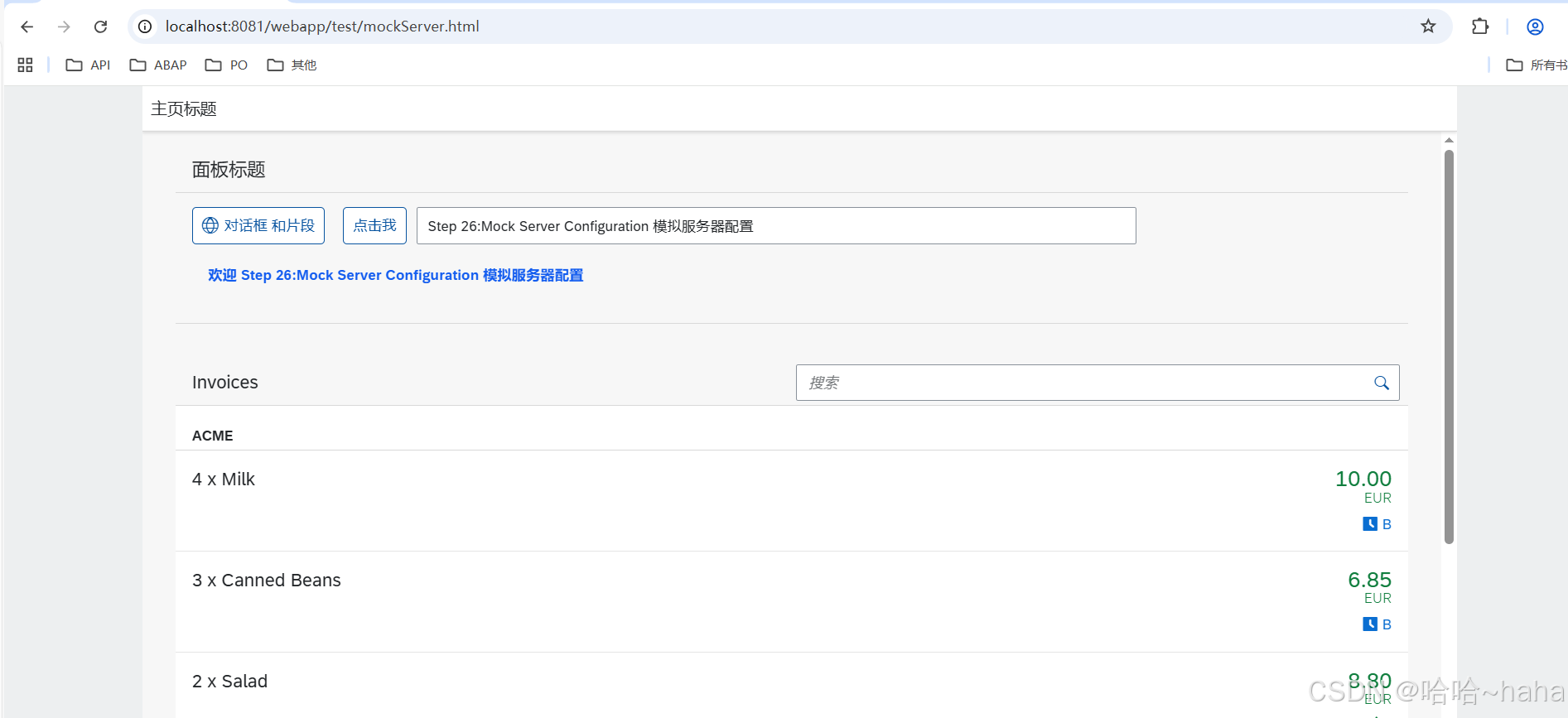
访问url:http://localhost:8080/webapp/test/mockServer.html