效果图
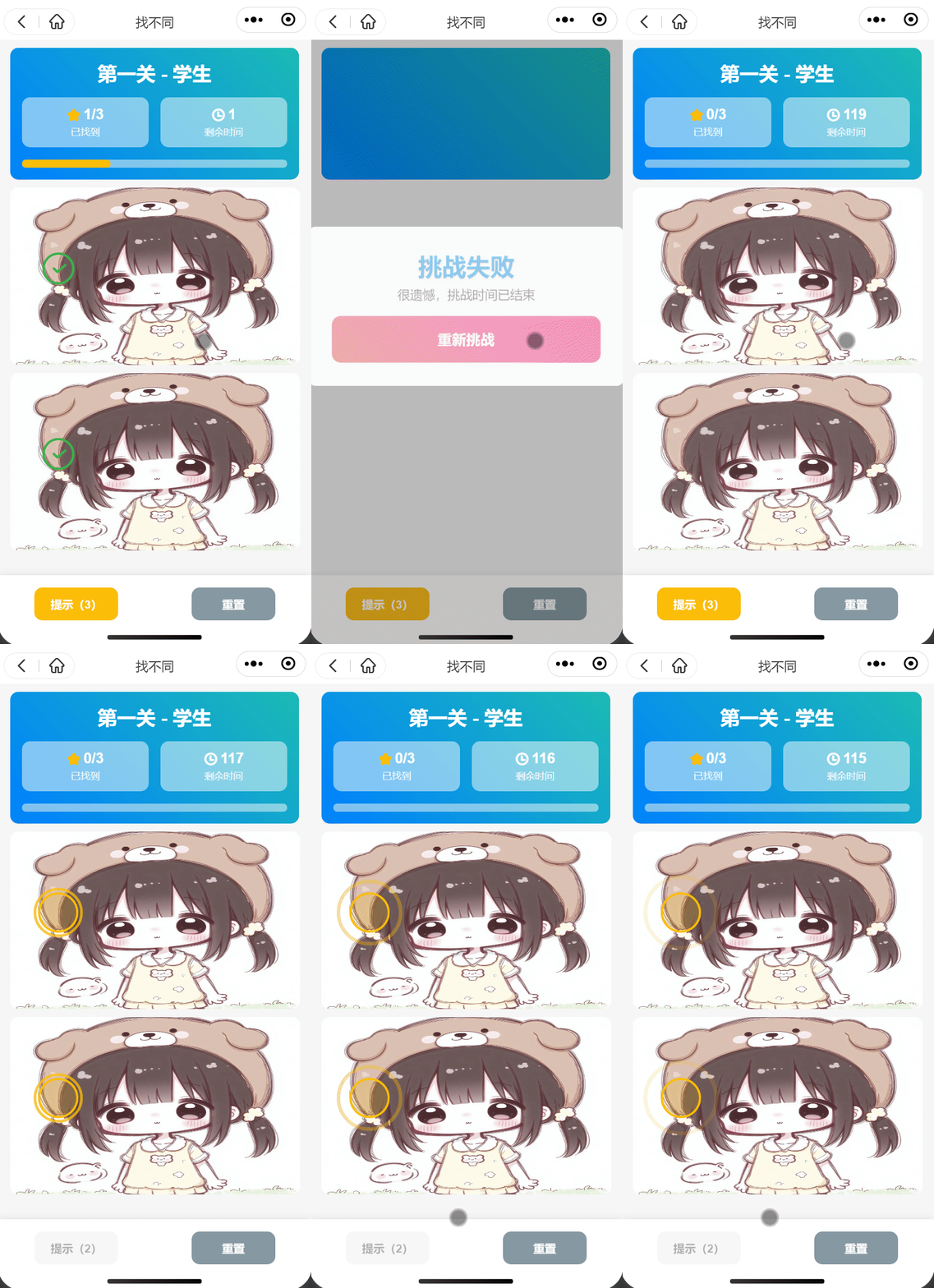
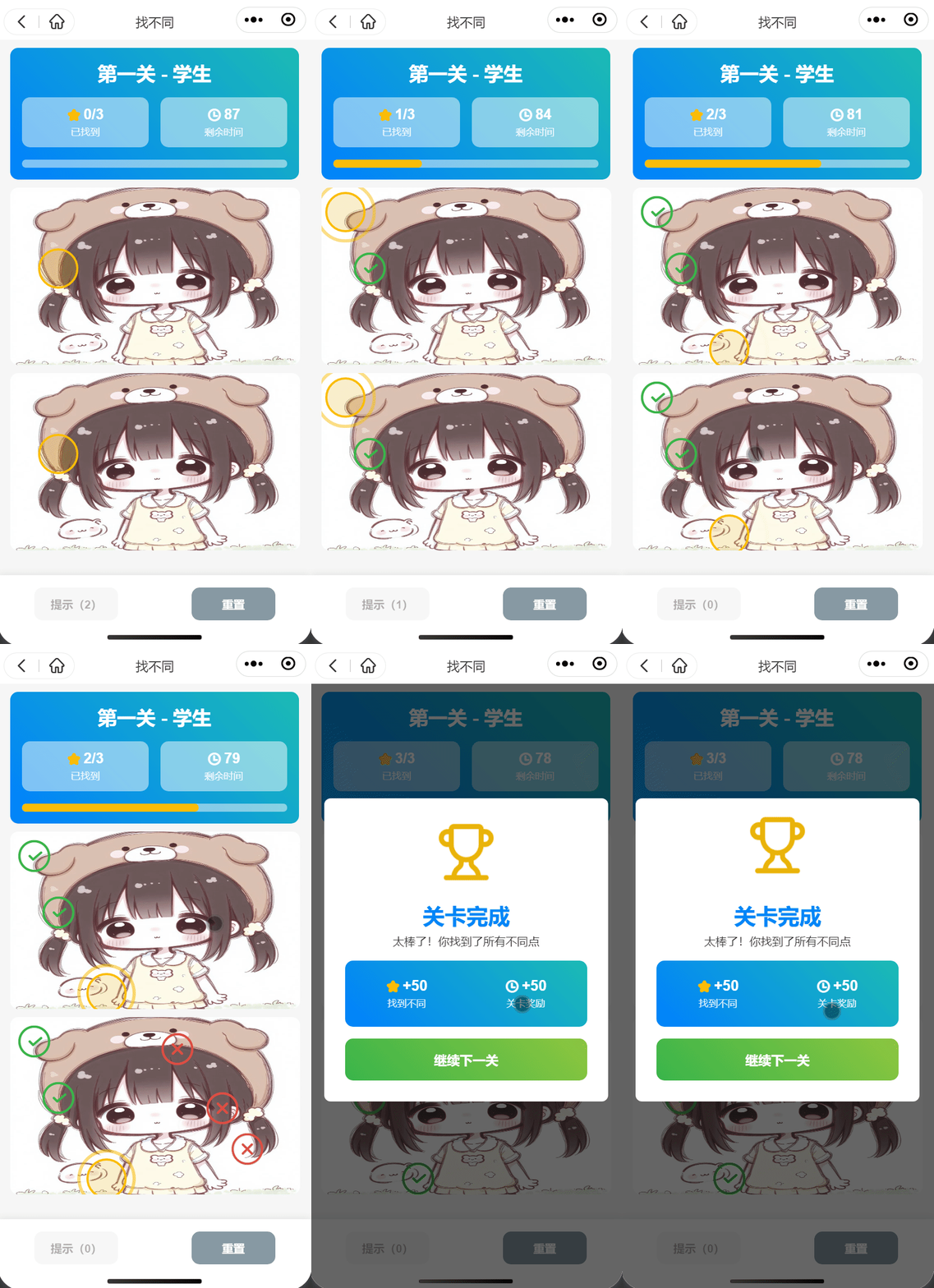
index.vue
<template>
  <wxy-nav-back :isOccupy="false" des="找不同" />
  <head-info :refresh="refresh" :countdown="countdown" :title="levelTitle" :progress="correct.length" :len="differences.length" />
  <img-info v-if="list.length" ref="imgInfoRef" :list="list" :differences="differences" :tipsShow="tipsShow"
            :correct="correct" @change="updateNum" />
  <view class="wxy-button flex-around">
    <button class="flex-center btn wxy-btn bg-main" :disabled="tipsNum === 0 || tipsShow"
            @click="goTips">
      提示({{ tipsNum }})
    </button>
    <button class="bg-grey flex-center btn wxy-btn" @click="reset">
      重置
    </button>
  </view>
  <view style="height: 9vh;" />
  <victory-model :show="victoryShow" @change="getData(true)" />
</template>

<script setup lang='ts'>
/* eslint-disable @typescript-eslint/no-explicit-any */
import { ref, onMounted } from 'vue'
import { throttle } from '@/modules/tool'
import headInfo from './components/head-info/head-info.vue'
import imgInfo from './components/img-info/img-info.vue'
import victoryModel from './components/victory-model/victory-model.vue'
import { useData } from './hooks/data'

const imgInfoRef = ref()

const {
  refresh,
  level,
  levelTitle,
  list,
  differences,
  correct,
  tipsShow,
  tipsNum,
  victoryShow,
  countdown,
  data,
} = useData()

let timer:any
/** 倒计时 */
const startCountdown = () => {
  timer = setInterval(() => {
    if (countdown.value > 0) countdown.value--
    else {
      clearInterval(timer)
      victoryShow.value = 2
    }
  }, 1000)
}

/** 去提示 */
const goTips = () => {
  tipsNum.value -= 1
  tipsShow.value = true
}

/** 更新进度 */
const updateNum = (val:{x:number, y:number}) => {
  if (tipsShow.value) tipsShow.value = false
  correct.value.push(val)
  if (correct.value.length === differences.value.length) {
    clearInterval(timer)
    victoryShow.value = 1
  }
}

/** 重置 */
const reset = throttle(() => {
  correct.value = []
  tipsNum.value = 3
  tipsShow.value = false
  countdown.value = 120
  victoryShow.value = 0
  imgInfoRef.value.setAnswer()
})

/** 获取数据 */
const getData = (status?:boolean) => {
  refresh.value = true
  if (status) {
    if (victoryShow.value === 1) level.value += 1
    if (data.length - 1 < level.value) level.value = 0
    list.value = []
    reset()
  }
  setTimeout(() => {
    const o = data[level.value]
    levelTitle.value = o.title
    list.value = o.list
    differences.value = o.differences
    refresh.value = false
    startCountdown()
  }, 100)
}

onMounted(() => {
  getData()
})
</script>

<style lang='scss' scoped>
.btn{
  min-width: 200rpx;
  height: 80rpx;
  padding: 0 30rpx;
  font-weight: 700;
  border-radius: 20rpx;
}
</style>
head-info.vue
<template>
  <view class="nav wdh bg-gradual-blue padding-md margin-top-sm">
    <view class="nav-title fade-in-right-70 animated" style="animation-delay:.2s;"
          :style="refresh?`visibility: visible;animation-name:none;`:''">
      {{ title }}
    </view>
    <view class="flex-around margin-top-md fade-in-up-50 animated" style="animation-delay:.3s;"
          :style="refresh?`visibility: visible;animation-name:none;`:''">
      <view class="nav-content flex-center">
        <view>
          <view class="flex-center nav-content-title">
            <view class="cu-icon-star nav-content-icon" />
            <view>{{ progress }}/{{ len }}</view>
          </view>
          <view class="nav-content-text">已找到</view>
        </view>
      </view>
      <view class="nav-content flex-center margin-left-md">
        <view>
          <view class="flex-center nav-content-title">
            <view class="cu-icon-time nav-content-icon" />
            <view>{{ countdown }}</view>
          </view>
          <view class="nav-content-text">剩余时间</view>
        </view>
      </view>
    </view>
    <view class="nav-line fade-in animated" style="animation-delay:.5s;"
          :style="refresh?`visibility: visible;animation-name:none;`:`--w:${(progress / len) * 100}%;`" />
  </view>
</template>

<script setup lang='ts'>
defineProps({
  progress: {
    type: Number,
    default: 0,
  },
  len: {
    type: Number,
    default: 0,
  },
  refresh: {
    type: Boolean,
    default: false,
  },
  title: {
    type: String,
    default: '',
  },
  countdown: {
    type: Number,
    default: 120,
  },
})
</script>

<style lang='scss' scoped>
.nav{
  text-align: center;
  border-radius: 20rpx;

  &-title{
    font-weight: 700;
    font-size: 48rpx;
  }

  &-line{
    position: relative;
    width: 100%;
    height: 20rpx;
    margin-top: 30rpx;
    overflow: hidden;
    background-color: rgb(255 255 255 / 50%);
    border-radius: 20rpx;
    backdrop-filter: blur(10px) brightness(90%);
  }

  &-line::after{
    position: absolute;
    top: 0;
    left: 0;
    width: var(--w);
    height: 100%;
    background: var(--main);
    border-radius: 20rpx;
    transition: all .3s;
    content: '';
  }

  &-content{
    flex: 1;
    height: 120rpx;
    background-color: rgb(255 255 255 / 50%);
    border-radius: 20rpx;
    backdrop-filter: blur(10px) brightness(90%);

    .cu-icon-star{
      color: var(--main);
    }

    &-icon{
      margin-right: 6rpx;
      font-size: 36rpx;
    }

    &-title{
      font-weight: 700;
      font-size: 36rpx;
    }

    &-text{
      margin-top: 6rpx;
      color: rgb(255 255 255 / 90%);
      font-size: 24rpx;
    }
  }
}
</style>
img-info.vue
<template>
  <view v-for="(item,index) in list" :id="`container${index}`" :key="index"
        class="content fade-in animated" style="animation-delay:.5s;"
        @click="getLocation($event,index)">
    <image class="content-img" :src="item" />
    <!-- 提示框 -->
    <view v-if="answer.length && tipsShow" class="content-tips" :style="`--x:${answer[0].x}px;--y:${answer[0].y}px;`" />
    <!-- 正确列表 -->
    <view v-for="(i,iIndex) in correct" :key="iIndex"
          class="content-box flex-center content-success" :style="`--x:${i.x}px;--y:${i.y}px;`">
      <view class="text-green cu-icon-adopt content-icon" />
      <particle-burst />
    </view>
  </view>
  <!-- 错误列表 -->
  <view v-for="(item,index) in errorArr" :key="index"
        class="content-box flex-center content-hide"
        :class="{'content-show':item.show}"
        :style="`--x:${item.x}px;--y:${item.y}px;`">
    <view class="text-red cu-icon-fail content-icon" />
  </view>
</template>

<script setup lang='ts'>
/* eslint-disable @typescript-eslint/no-explicit-any */
import { ref, onMounted, getCurrentInstance } from 'vue'
import particleBurst from '../particle-burst/particle-burst.vue'

const emit = defineEmits(['change'])

const props = defineProps({
  list: {
    type: Array as () => any[],
    default: () => [],
  },
  differences: {
    type: Array as () => any[],
    default: () => [],
  },
  correct: {
    type: Array as () => any[],
    default: () => [],
  },
  tipsShow: {
    type: Boolean,
    default: false,
  },
})

/** 答案列表 */
const answer = ref<any[]>([])
/** 错误列表 */
const errorArr = ref([
  { x: 0, y: 0, show: false },
  { x: 0, y: 0, show: false },
  { x: 0, y: 0, show: false },
  { x: 0, y: 0, show: false },
  { x: 0, y: 0, show: false },
  { x: 0, y: 0, show: false },
])
/** 错误下标 */
let errorIndex = 0

/** 容器坐标 */
const relative = [
  { x: 0, y: 0 },
  { x: 0, y: 0 },
]

/** 设置答案 */
const setAnswer = () => {
  answer.value = props.differences.map((item) => ({
    x: item.x - 25,
    y: item.y - 25,
    w: 50,
    h: 50,
  }))
}

/** 验证答案 */
const isInAnswerArea = (clickX: number, clickY: number) => {
  const hitAnswer = answer.value.findIndex((item) => (
    clickX >= item.x
    && clickX <= item.x + item.w
    && clickY >= item.y
    && clickY <= item.y + item.h
  ))
  return hitAnswer
}
/** 获取点击坐标 */
const getLocation = (e:any, index:number) => {
  const o = e.detail
  const d = relative[index]
  const clickX = o.x - d.x
  const clickY = o.y - d.y
  const i = isInAnswerArea(clickX, clickY)
  if (i >= 0) {
    const val = answer.value[i]
    emit('change', { x: val.x, y: val.y })
    answer.value.splice(i, 1)
    return
  }
  const v = errorIndex
  errorIndex = errorIndex + 1 === errorArr.value.length ? 0 : errorIndex + 1
  errorArr.value[v] = {
    x: o.x - 25,
    y: o.y - 25,
    show: true,
  }
  setTimeout(() => {
    errorArr.value[v].show = false
  }, 1000)
}
const instance = getCurrentInstance()
/** 获取容器坐标 */
const getHeight = () => {
  for (let i = 0; i < relative.length; i++) {
    uni.createSelectorQuery().in(instance?.proxy)
      .select(`#container${i}`)
      .boundingClientRect((res:any) => {
        relative[i] = {
          x: parseInt(res.left),
          y: parseInt(res.top),
        }
      }).exec()
  }
}

onMounted(() => {
  setAnswer()
  getHeight()
})

defineExpose({
  setAnswer,
})
</script>

<style lang='scss' scoped>
@keyframes magnify{
  from{
    transform: scale(1);
    opacity: 1;
  }

  to{
    transform: scale(2);
    opacity: 0;
  }
}

.content{
  position: relative;
  width: 360px;
  height: 220px;
  margin: 20rpx auto 0;
  overflow: hidden;
  border-radius: 20rpx;

  &-img{
    position: absolute;
    width: 100%;
    height: 100%;
  }

  &-tips{
    --w:50px;

    position: absolute;
    top: var(--y);
    left: var(--x);
    z-index: 1;
    width: var(--w);
    height: var(--w);
    background: rgb(234 179 8 / 20%);
    border: 3px solid var(--main);
    border-radius: 50%;
  }

  &-tips::after{
    position: absolute;
    top: -3px;
    left: -3px;
    width:100%;
    height: 100%;
    border: 3px solid var(--main);
    border-radius: 50%;
    animation: magnify 1s infinite;
    content: '';
  }
}

@keyframes enlarge{
  from{
    transform: scale(0.7);
    opacity: 0;
  }

  to{
    transform: scale(1);
    opacity: 1;
  }
}

.content-success{
  animation: enlarge .3s;
}

.content-box{
  position: absolute;
  top: var(--y);
  left: var(--x);
  z-index: 2;
  width: 50px;
  height: 50px;
  font-size: 88rpx;
}

.content-hide{
  transform: scale(0.7);
  opacity: 0;
  transition: transform .3s,opacity .3s;
  pointer-events: none;
}

.content-show{
  transform: scale(1);
  opacity: 1;
}

.content-icon{
  font-size: 88rpx;
}
</style>
particle-burst.vue
<template>
  <view class="burst-container">
    <view class="particle" />
    <view class="particle" />
    <view class="particle" />
    <view class="particle" />
    <view class="particle" />
    <view class="particle" />
    <view class="particle" />
    <view class="particle" />
  </view>
</template>

<script setup lang='ts'>

</script>

<style lang='scss' scoped>
.burst-container {
  position: absolute;
  top:0;
  left: 0;
  display: flex;
  align-items: center;
  justify-content: center;
  width: 100%;
  height: 100%;
}

.particle {
  position: absolute;
  width: 20rpx;
  height: 20rpx;
  background-color: var(--main);
  border-radius: 50%;
  opacity: 0;
}

@keyframes burst {
  0% {
    transform: scale(0.1);
    opacity: 0;
  }

  20% {
    opacity: 1;
  }

  100% {
    transform: scale(1.5) translate(var(--tx), var(--ty));
    opacity: 0;
  }
}

.particle:nth-child(1) {
  --tx: -25px;
  --ty: -25px;

  animation: burst .6s ease-out .1s forwards;
}

.particle:nth-child(2) {
  --tx: 25px;
  --ty: -25px;

  animation: burst .6s ease-out .1s forwards;
}

.particle:nth-child(3) {
  --tx: -25px;
  --ty: 25px;

  animation: burst .6s ease-out .2s forwards;
}

.particle:nth-child(4) {
  --tx: 25px;
  --ty: 25px;

  animation: burst .6s ease-out .2s forwards;
}

.particle:nth-child(5) {
  --tx: 0px;
  --ty: -50px;

  animation: burst .6s ease-out .3s forwards;
}

.particle:nth-child(6) {
  --tx: 0px;
  --ty: 50px;

  animation: burst .6s ease-out .3s forwards;
}

.particle:nth-child(7) {
  --tx: -50px;
  --ty: 0px;

  animation: burst .6s ease-out .4s forwards;
}

.particle:nth-child(8) {
  --tx: 50px;
  --ty: 0px;

  animation: burst .6s ease-out .4s forwards;
}
</style>
victory-model.vue
<template>
  <!-- 成功 -->
  <view class="wxy-modal" :class="{'show':show === 1}">
    <view class="wxy-dialog" @click.stop>
      <view class="victory padding-xl bg-white">
        <image class="victory-img" src="https://get.hnzmsz.com/gw/victory.png" />
        <view class="victory-title">关卡完成</view>
        <view>太棒了!你找到了所有不同点</view>
        <view class="flex-around margin-top-md bg-gradual-blue victory-box">
          <view class="victory-content flex-center">
            <view>
              <view class="flex-center victory-content-title">
                <view class="cu-icon-star victory-content-icon" />
                <view>+50</view>
              </view>
              <view class="victory-content-text">找到不同</view>
            </view>
          </view>
          <view class="victory-content flex-center margin-left-md">
            <view>
              <view class="flex-center victory-content-title">
                <view class="cu-icon-time victory-content-icon" />
                <view>+50</view>
              </view>
              <view class="victory-content-text">关卡奖励</view>
            </view>
          </view>
        </view>
        <view class="bg-gradual-green flex-center victory-btn margin-top-md wxy-btn"
              @click="emit('change')">
          继续下一关
        </view>
      </view>
    </view>
  </view>
  <!-- 失败 -->
  <view class="wxy-modal" :class="{'show':show === 2}">
    <view class="wxy-dialog" @click.stop>
      <view class="victory padding-xl bg-white">
        <view class="victory-title">挑战失败</view>
        <view>很遗憾,挑战时间已结束</view>
        <view class="bg-gradual-red flex-center victory-btn margin-top-md wxy-btn"
              @click="emit('change')">
          重新挑战
        </view>
      </view>
    </view>
  </view>
</template>

<script setup lang='ts'>
const emit = defineEmits(['change'])

defineProps({
  show: {
    type: Number,
    default: 0,
  },
})
</script>

<style lang='scss' scoped>
@keyframes lift{
  from{
    transform: translateY(0);
  }

  to{
    transform: translateY(-60rpx);
  }
}

.victory{
  &-img{
    width: 150rpx;
    height: 150rpx;
    margin-top: 40rpx;
    animation: lift 1s cubic-bezier(0.1, 0.6, 0.2, 1) infinite alternate;
  }

  &-title{
    margin-bottom: 10rpx;
    color: #0081ff;
    font-weight: 700;
    font-size: 52rpx;
  }

  &-box{
    padding: 20rpx;
    overflow: hidden;
    border-radius: 20rpx;
  }

  &-content{
    flex: 1;
    height: 120rpx;
    border-radius: 20rpx;

    .cu-icon-star{
      color: var(--main);
    }

    &-icon{
      margin-right: 6rpx;
      font-size: 36rpx;
    }

    &-title{
      font-weight: 700;
      font-size: 36rpx;
    }

    &-text{
      margin-top: 6rpx;
      color: rgb(255 255 255 / 90%);
      font-size: 24rpx;
    }
  }

  &-btn{
    height: 100rpx;
    font-weight: 700;
    font-size: 32rpx;
    border-radius: 20rpx;
  }
}
</style>
data.ts
import { ref } from 'vue'

export function useData() {
  /** 刷新 */
  const refresh = ref(false)

  /** 关卡 */
  const level = ref(0)
  const levelTitle = ref('')

  /** 图片 */
  const list = ref<string[]>([])

  /** 答案 */
  const differences = ref<{ x: number; y: number }[]>([])

  /** 正确列表 */
  const correct = ref<{x: number, y: number}[]>([])

  /** 提示 */
  const tipsShow = ref(false)
  const tipsNum = ref(3)
  /** 胜利 */
  const victoryShow = ref(0)
  /** 倒计时 */
  const countdown = ref(120)

  const data = [
    {
      title: '第一关 - 学生',
      list: [
        'https://c-ssl.dtstatic.com/uploads/blog/202507/26/aLSLb1vXc0V0Evm.thumb.1000_0.png',
        'https://c-ssl.dtstatic.com/uploads/blog/202507/26/aLSLb1vXc0V0Evm.thumb.1000_0.png',
      ],
      differences: [
        { x: 60, y: 100 },
        { x: 30, y: 30 },
        { x: 120, y: 200 },
      ],
    },
    {
      title: '第二关 - 落叶',
      list: [
        'https://c-ssl.dtstatic.com/uploads/item/201809/08/20180908231317_tmkfh.thumb.1000_0.jpg',
        'https://c-ssl.dtstatic.com/uploads/item/201809/08/20180908231317_tmkfh.thumb.1000_0.jpg',
      ],
      differences: [
        { x: 60, y: 100 },
        { x: 30, y: 30 },
        { x: 120, y: 200 },
        { x: 300, y: 160 },
      ],
    },
    {
      title: '第三关 - 郊游',
      list: [
        'https://c-ssl.dtstatic.com/uploads/blog/202303/03/20230303161732_038dc.thumb.1000_0.jpg',
        'https://c-ssl.dtstatic.com/uploads/blog/202303/03/20230303161732_038dc.thumb.1000_0.jpg',
      ],
      differences: [
        { x: 60, y: 100 },
        { x: 30, y: 30 },
        { x: 120, y: 200 },
        { x: 300, y: 160 },
        { x: 260, y: 60 },
      ],
    },
  ]

  return {
    refresh,
    level,
    levelTitle,
    list,
    differences,
    correct,
    tipsShow,
    tipsNum,
    victoryShow,
    countdown,
    data,
  }
}
遇到问题可以看我主页加我,很少看博客,对你有帮助别忘记点赞收藏。