微信小程序树形选择组件
一、介绍
目前支持式三级:例如省市区,有些着急,递归组件后续在进行研究修改
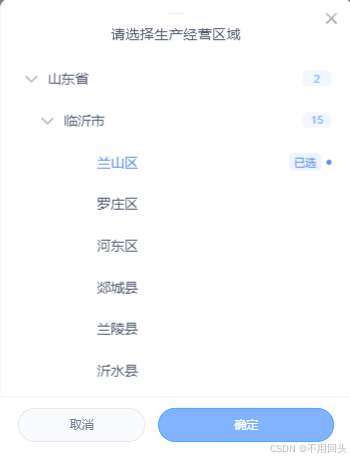
一切还要从PC的一张图说起,老板也想让小程序这样选择,我一个后端,一直扒拉组件,就是没找到,然后只能跟AI合作开发一个了(小程序这个写的组件,直接复制引入就行)
| PC | 小程序 |
|---|
|
u-popup组件地址:https://uviewui.com/components/popup.html
二、代码
1、主文件
主文件调用选择组件,form是要传给后台的对象,
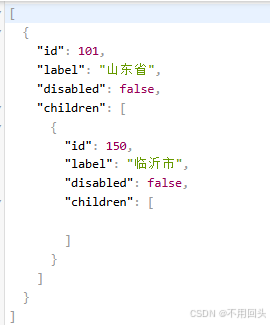
placeholder是显示的提示,deptOptions是传给组件的树形结构(具体需要的参数格式见组件formatData方法),handleDeptConfirm是确认方法deptOptions需要一个value(参数值),text(显示文本),children(子集)
value支持传入--->id,value,key
text支持传入--->label,text,name
children支持传入--->children,sub例如:
[{"id":101,"label":"山东省","disabled":false,"children":[{"id":150,"label":"临沂市","disabled":false,"children":[]}]}]
bash
<dept-selector v-model="form.deptId" placeholder="请选择生产经营区域" :tree-data="deptOptions" @confirm="handleDeptConfirm" />
bash
methods: {
	// 获取下拉数据
	getOptions() {
		// 获取区域树数据(我这是调用的接口进行赋值)
		deptTreeSelect().then(response => {
			// 如果数据格式不满足需要进行修改,可以从下面进行修改传入,也可以修改组件==》formatData方法
			// const formatData = (list) => {
			// 	if (!Array.isArray(list)) return [];
			// 	return list.map(item => ({
			// 		value: item.id + '',
			// 		text: item.label || '',
			// 		children: formatData(item.children)
			// 	}));
			// };
			// this.deptOptions = formatData(response.data);
			this.deptOptions = response.data;
		});
	},
	// 区域选择组件
	handleDeptConfirm(res) {
		// 组件确认赋值
		this.form.deptId = res.value
	},
}
2、调用组件
目前支持式三级:例如省市区
bash
<template>
	<view class="dept-selector-container">
		<!-- 输入框部分 -->
		<view class="custom-picker-input" @click="handleInputClick">
			<text class="picker-text" :class="{'placeholder': !displayText}">
				{{ displayText || placeholder }}
			</text>
			<u-icon name="arrow-down" size="18" color="#A0AEC0" class="input-arrow"></u-icon>
		</view>

		<!-- 弹窗部分 -->
		<u-popup :show="showPicker" mode="bottom" round="24" @close="handleClose" :closeOnClickOverlay="true"
			bgColor="rgba(0,0,0,0.3)">
			<view class="custom-picker-popup">
				<view class="popup-header">
					<view class="header-line"></view>
					<text class="picker-title">{{ title }}</text>
				</view>
				<scroll-view class="picker-content" scroll-y @touchmove.stop>
					<view class="dept-tree">
						<!-- 加载中状态 -->
						<view v-if="isLoading" class="loading-state">
							<view class="loading-icon"></view>
							<text class="loading-text">加载中...</text>
						</view>
						<!-- 空状态 -->
						<view v-else-if="!formattedTreeData.length" class="empty-tree">
							<u-icon name="file-text" size="60" color="#CBD5E1" class="empty-icon"></u-icon>
							<text class="empty-text">{{ emptyText }}</text>
						</view>
						<!-- 树节点容器 -->
						<view v-else class="dept-children">
							<view v-for="node in formattedTreeData" :key="node.value" class="child-item">
								<view class="child-item-wrap" @click="handleNodeClick(node)">
									<!-- 展开/收起按钮 -->
									<view class="expand-btn-wrap" @click.stop="toggleNodeExpand(node.value)"
										v-if="node.hasChildren">
										<u-icon :name="isNodeExpanded(node.value) ? 'arrow-down' : 'arrow-right'"
											size="18" color="#94A3B8" class="expand-icon" />
									</view>
									<view class="expand-btn-placeholder" v-else></view>
									<!-- 节点内容 -->
									<view class="node-content">
										<text class="child-name"
											:class="{'selected': selectedNode && selectedNode.value === node.value}">
											{{ node.text }}
										</text>
										<view class="node-meta">
											<text v-if="node.hasChildren"
												class="child-count">{{ node.children.length }}</text>
											<text v-if="selectedNode && selectedNode.value === node.value"
												class="selected-badge">已选</text>
										</view>
									</view>
								</view>

								<!-- 渲染子节点(一级) -->
								<view v-if="isNodeExpanded(node.value) && node.children.length"
									class="dept-children level-1">
									<view v-for="child in node.children" :key="child.value" class="child-item">
										<view class="child-item-wrap" @click="handleNodeClick(child)">
											<view class="expand-btn-wrap" @click.stop="toggleNodeExpand(child.value)"
												v-if="child.hasChildren">
												<u-icon
													:name="isNodeExpanded(child.value) ? 'arrow-down' : 'arrow-right'"
													size="18" color="#94A3B8" class="expand-icon" />
											</view>
											<view class="expand-btn-placeholder" v-else></view>
											<view class="node-content">
												<text class="child-name"
													:class="{'selected': selectedNode && selectedNode.value === child.value}">
													{{ child.text }}
												</text>
												<view class="node-meta">
													<text v-if="child.hasChildren"
														class="child-count">{{ child.children.length }}</text>
													<text v-if="selectedNode && selectedNode.value === child.value"
														class="selected-badge">已选</text>
												</view>
											</view>
										</view>

										<!-- 渲染子节点(二级) -->
										<view v-if="isNodeExpanded(child.value) && child.children.length"
											class="dept-children level-2">
											<view v-for="subChild in child.children" :key="subChild.value"
												class="child-item">
												<view class="child-item-wrap" @click="handleNodeClick(subChild)">
													<view class="expand-btn-placeholder"></view>
													<view class="node-content">
														<text class="child-name"
															:class="{'selected': selectedNode && selectedNode.value === subChild.value}">
															{{ subChild.text }}
														</text>
														<view class="node-meta">
															<text
																v-if="selectedNode && selectedNode.value === subChild.value"
																class="selected-badge">已选</text>
														</view>
													</view>
												</view>
											</view>
										</view>
									</view>
								</view>
							</view>
						</view>
					</view>
				</scroll-view>
				<view class="picker-footer">
					<view class="footer-actions">
						<u-button type="default" text="取消" @click="handleCancel" shape="circle"
							customStyle="width: 40%;background: #F8FAFC;color: #718096;border: 1px solid #E2E8F0;"></u-button>
						<u-button type="primary" text="确定" @click="handleConfirm" shape="circle"
							customStyle="width: 55%;background: #81B3FF;" :disabled="!selectedNode"></u-button>
					</view>
				</view>
			</view>
		</u-popup>
	</view>
</template>

<script>
	export default {
		name: 'deptSelector',
		props: {
			// 选中的值
			value: {
				type: [String, Number, Boolean],
				default: ''
			},
			// 显示的选中文本
			selectedText: {
				type: String,
				default: ''
			},
			// 输入框占位符
			placeholder: {
				type: String,
				default: '请选择生产经营区域'
			},
			// 弹窗标题
			title: {
				type: String,
				default: '请选择生产经营区域'
			},
			// 空数据提示文本
			emptyText: {
				type: String,
				default: '暂无区域数据'
			},
			// 树形数据源
			treeData: {
				type: Array,
				default: () => []
			},
			// 显示连接符
			connect: {
				type: String,
				default: '  '
			}
		},
		data() {
			return {
				showPicker: false,
				selectedNode: null, // 当前选中的节点对象
				formattedTreeData: [], // 格式化后的树形数据
				isLoading: false,
				expandedNodes: [], // 已展开节点的value数组
				treeDataCache: null, // 原始数据缓存
				tempSelectedNode: null, // 临时选中节点(避免取消时残留)
			}
		},
		computed: {
			// 计算显示文本
			displayText() {
				if (this.selectedText) return this.selectedText;
				if (!this.selectedNode) return '';

				// 查找节点路径
				const result = this.findNodeAndPath(this.selectedNode.value, this.formattedTreeData);
				return result ? result.path.map(item => item.text).join(this.connect) : this.selectedNode.text;
			}
		},
		watch: {
			// 监听value属性变化
			value: {
				immediate: true,
				handler(newVal) {
					const stringValue = this.safeToString(newVal);
					if (stringValue !== (this.selectedNode ? this.selectedNode.value : '')) {
						this.updateSelectedNode(stringValue);
					}
				}
			},
			// 监听treeData变化
			treeData: {
				immediate: true,
				deep: true,
				async handler(newVal) {
					// 浅对比+长度判断
					const isDataChanged = !this.treeDataCache ||
						newVal.length !== this.treeDataCache.length ||
						newVal.some((item, idx) => item.id !== this.treeDataCache[idx]?.id);

					if (isDataChanged) {
						await this.loadTreeData();
						this.treeDataCache = JSON.parse(JSON.stringify(newVal));
					}
				}
			},
			// 监听selectedText变化,确保displayText实时更新
			selectedText: {
				immediate: true,
				handler() {
					// 触发computed重新计算
					this.$forceUpdate();
				}
			}
		},
		methods: {
			// 输入框点击事件
			async handleInputClick() {
				this.showPicker = true;
				// 缓存当前选中状态,取消时恢复
				this.tempSelectedNode = this.selectedNode ? {
					...this.selectedNode
				} : null;
				// 如果还没有加载数据,则加载
				if (!this.formattedTreeData.length && !this.isLoading) {
					await this.loadTreeData();
				}
			},

			// 安全转换为字符串
			safeToString(value) {
				if (value === undefined || value === null) return '';
				// 布尔值特殊处理:避免false转为"false"
				if (typeof value === 'boolean') return value ? 'true' : '';
				return String(value);
			},

			// 加载树数据
			async loadTreeData() {
				this.isLoading = true;
				try {
					if (!this.treeData || !Array.isArray(this.treeData)) {
						this.formattedTreeData = [];
						return;
					}
					this.formattedTreeData = this.formatData(this.treeData);
					// 如果有初始值,设置选中节点
					if (this.value) {
						this.updateSelectedNode(this.safeToString(this.value));
					}
				} catch (error) {
					this.formattedTreeData = [];
					uni.showToast({
						title: "加载区域数据失败,请稍后重试",
						icon: 'none',
						duration: 2000
					});
				} finally {
					this.isLoading = false;
				}
			},

			// 格式化数据
			formatData(data) {
				if (!Array.isArray(data)) return [];

				return data.map(item => {
					const value = String(item.id || item.value || item.key ||
						`temp_${Date.now()}_${Math.random().toString(36).slice(2)}`);
					return {
						value,
						text: item.label || item.text || item.name || '未知区域',
						children: this.formatData(item.children || item.sub || []),
						hasChildren: (item.children || item.sub || []).length > 0
					};
				});
			},

			// 更新选中节点
			updateSelectedNode(value) {
				if (!value || !this.formattedTreeData.length) {
					this.selectedNode = null;
					return;
				}

				const result = this.findNodeAndPath(value, this.formattedTreeData);
				if (result) {
					this.selectedNode = result.node;
					// 自动展开父节点
					result.path.forEach(item => {
						if (item.hasChildren && !this.expandedNodes.includes(item.value)) {
							this.expandedNodes.push(item.value);
						}
					});
				} else {
					this.selectedNode = null;
				}
			},

			// 查找节点和路径
			findNodeAndPath(deptId, treeData, path = [], depth = 0) {
				// 防止递归栈溢出,限制最大深度5
				if (depth >= 5) return null;

				for (const node of treeData) {
					if (String(node.value) === String(deptId)) {
						return {
							node,
							path: [...path, node]
						};
					}
					if (node.hasChildren && node.children.length) {
						const found = this.findNodeAndPath(deptId, node.children, [...path, node], depth + 1);
						if (found) return found;
					}
				}
				return null;
			},

			// 检查节点是否已展开
			isNodeExpanded(nodeValue) {
				return this.expandedNodes.includes(nodeValue);
			},

			// 切换节点展开/收起
			toggleNodeExpand(nodeValue) {
				const index = this.expandedNodes.indexOf(nodeValue);
				if (index > -1) {
					this.expandedNodes.splice(index, 1);
				} else {
					this.expandedNodes.push(nodeValue);
				}
			},

			// 节点点击事件
			handleNodeClick(node) {
				this.selectedNode = node;
			},

			// 关闭弹窗(清理临时状态)
			handleClose() {
				this.showPicker = false;
				this.selectedNode = this.tempSelectedNode;
				this.tempSelectedNode = null;
			},

			// 取消选择(恢复原状态)
			handleCancel() {
				this.selectedNode = this.tempSelectedNode;
				this.tempSelectedNode = null;
				this.showPicker = false;
			},

			// 确认选择
			handleConfirm() {
				if (!this.selectedNode) {
					uni.showToast({
						title: "请选择生产经营区域",
						icon: 'none',
						duration: 2000
					});
					return;
				}

				this.$emit('confirm', {
					value: this.selectedNode.value,
					text: this.displayText,
					node: this.selectedNode
				});
				this.tempSelectedNode = null;
				this.showPicker = false;
			}
		}
	}
</script>

<style lang="scss" scoped>
	.dept-selector-container {
		position: relative;
		width: 100%;
	}

	.custom-picker-input {
		background-color: #FAFBFC;
		border-radius: 12rpx;
		border: 1.5rpx solid #E9EDF3;
		padding: 24rpx 28rpx;
		height: auto;
		min-height: 96rpx;
		display: flex;
		align-items: center;
		justify-content: space-between;
		width: 100%;
		box-sizing: border-box;
		transition: all 0.25s ease;
		cursor: pointer;

		&:active {
			background-color: #F5F7FA;
			border-color: #D1DBE8;
		}
	}

	.picker-text {
		font-size: 30rpx;
		color: #4A5568;
		flex: 1;
		overflow: hidden;
		text-overflow: ellipsis;
		white-space: nowrap;
		font-family: -apple-system, BlinkMacSystemFont, 'Segoe UI', sans-serif;

		&.placeholder {
			color: #A0AEC0;
		}
	}

	.input-arrow {
		transition: transform 0.3s ease;
		margin-left: 12rpx;
	}

	.custom-picker-popup {
		width: 100%;
		background: #FFFFFF;
		border-radius: 24rpx 24rpx 0 0;
		position: relative;
		overflow: hidden;

		&::before {
			content: '';
			position: absolute;
			top: 0;
			left: 0;
			right: 0;
			height: 60rpx;
			background: linear-gradient(180deg, rgba(255, 255, 255, 0.95) 0%, transparent 100%);
			z-index: 1;
		}

		.popup-header {
			padding: 32rpx 36rpx 24rpx;
			text-align: center;
			position: relative;
			background: #FFFFFF;

			.header-line {
				width: 36rpx;
				height: 4rpx;
				background: #D8E0EB;
				border-radius: 2rpx;
				margin: 0 auto 20rpx;
				opacity: 0.6;
			}

			.picker-title {
				font-size: 32rpx;
				font-weight: 500;
				color: #4A5568;
				font-family: -apple-system, BlinkMacSystemFont, 'Segoe UI', sans-serif;
			}
		}

		.picker-content {
			max-height: 60vh;
			min-height: 300rpx;
			padding: 10rpx 20rpx 20rpx;
			position: relative;
			z-index: 2;

			.loading-state {
				display: flex;
				flex-direction: column;
				align-items: center;
				justify-content: center;
				padding: 80rpx 0;

				.loading-icon {
					width: 36rpx;
					height: 36rpx;
					border: 3rpx solid #F0F4F8;
					border-top-color: #81B3FF;
					border-radius: 50%;
					animation: loading 1s ease-in-out infinite;
				}

				.loading-text {
					font-size: 28rpx;
					color: #A0AEC0;
					margin-top: 16rpx;
				}
			}

			.empty-tree {
				display: flex;
				flex-direction: column;
				align-items: center;
				justify-content: center;
				padding: 100rpx 0;

				.empty-icon {
					opacity: 0.5;
					margin-bottom: 16rpx;
				}

				.empty-text {
					font-size: 28rpx;
					color: #CBD5E1;
				}
			}

			.dept-children {
				width: 100%;

				&.level-1 {
					padding-left: 36rpx;
				}

				&.level-2 {
					padding-left: 72rpx;
				}

				.child-item {
					width: 100%;

					.child-item-wrap {
						display: flex;
						align-items: center;
						padding: 20rpx 24rpx;
						width: 100%;
						box-sizing: border-box;
						border-radius: 8rpx;
						cursor: pointer;
						margin: 2rpx 0;

						&:active {
							background-color: #F7F9FC;
						}
					}

					.expand-btn-wrap {
						display: flex;
						align-items: center;
						justify-content: center;
						width: 48rpx;
						height: 48rpx;
						margin-right: 12rpx;
						cursor: pointer;
						border-radius: 8rpx;
						position: relative;

						&::before {
							content: '';
							position: absolute;
							top: -8rpx;
							left: -8rpx;
							right: -8rpx;
							bottom: -8rpx;
						}

						&:active {
							background-color: #F0F4F8;
						}
					}

					.expand-btn-placeholder {
						width: 48rpx;
						height: 48rpx;
						margin-right: 12rpx;
					}

					.node-content {
						flex: 1;
						display: flex;
						align-items: center;
						justify-content: space-between;
					}

					.child-name {
						font-size: 30rpx;
						color: #4A5568;
						font-family: -apple-system, BlinkMacSystemFont, 'Segoe UI', sans-serif;
						line-height: 1.4;

						&.selected {
							color: #5B8DF5;
							font-weight: 500;
						}
					}

					.node-meta {
						display: flex;
						gap: 12rpx;
						align-items: center;

						.child-count {
							font-size: 24rpx;
							color: #81B3FF;
							background: rgba(129, 179, 255, 0.1);
							padding: 4rpx 12rpx;
							border-radius: 12rpx;
							min-width: 40rpx;
							text-align: center;
							font-weight: 500;
						}

						.selected-badge {
							font-size: 24rpx;
							color: #5B8DF5;
							background: rgba(91, 141, 245, 0.1);
							padding: 4rpx 12rpx;
							border-radius: 12rpx;
							font-weight: 500;
						}
					}

					.expand-icon {
						transition: transform 0.3s ease;

						&[name="arrow-down"] {
							transform: rotate(0deg);
						}

						&[name="arrow-right"] {
							transform: rotate(-90deg);
						}
					}
				}
			}
		}

		.picker-footer {
			padding: 24rpx 36rpx 40rpx;
			position: relative;
			z-index: 3;
			background: #FFFFFF;
			border-top: 1rpx solid #F0F4F8;

			.footer-actions {
				display: flex;
				justify-content: space-between;
				gap: 20rpx;

				.u-button {
					height: 88rpx;
					font-size: 30rpx;
					font-weight: 500;
					transition: all 0.2s ease;

					&[type="default"] {
						&:active {
							background: #F0F4F8 !important;
							transform: scale(0.98);
						}
					}

					&[type="primary"] {
						&:active {
							opacity: 0.9;
							transform: scale(0.98);
						}
					}
				}
			}
		}
	}

	// 移出scoped,解决动画失效问题
	@keyframes loading {
		0% {
			transform: rotate(0deg);
		}

		100% {
			transform: rotate(360deg);
		}
	}
</style>