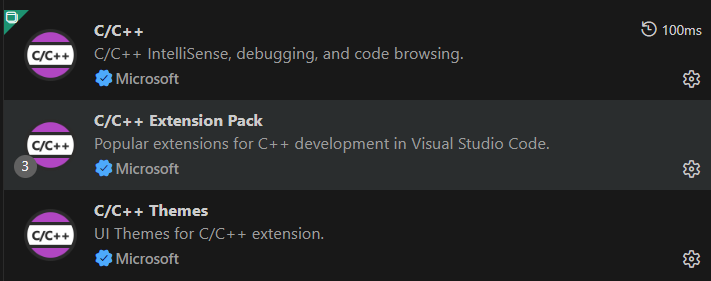
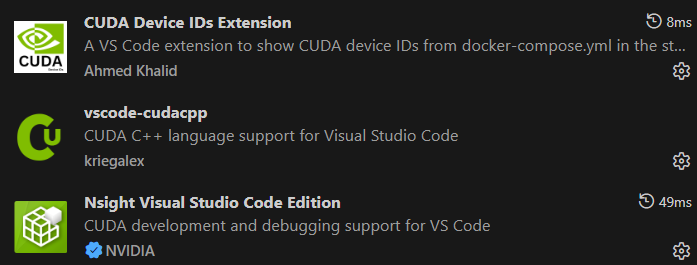
安装相关插件
在项目下的.vscode文件夹中正确配置版本和相关文件的路径,有些路径需要根据你电脑中的实际路径进行配置,如果某个路径有标黄的波浪线,说明vscode没有找到这个路径
c_cpp_properties.json
{
    "configurations": [
        {
            "name": "Win64",
            "includePath": [
                "${workspaceFolder}/**",
                // 明确CUDA include路径(**确保递归解析子目录)
                "C:/Program Files/NVIDIA GPU Computing Toolkit/CUDA/v12.4/include/**",
                // 替换为你实际的MSVC版本路径(手动找:VS2022安装目录→VC→Tools→MSVC→具体版本号)
                "C:/Program Files (x86)/Microsoft Visual Studio/2022/BuildTools/VC/Tools/MSVC/14.43.34808/include",
                // 替换为你实际的Windows SDK版本(手动找:Windows Kits/10/Include/具体版本号)
                "C:/Program Files (x86)/Windows Kits/10/Include/10.0.26100.0/um",
                "C:/Program Files (x86)/Windows Kits/10/Include/10.0.26100.0/shared",
                "C:/Program Files (x86)/Windows Kits/10/Include/10.0.26100.0/winrt" // 补充winrt路径(可选)
            ],
            "defines": [
                "_DEBUG",
                "UNICODE",
                "_UNICODE",
                "__CUDACC__",
                "_WIN64",
                "CUDA_VERSION=12040" // 显式定义CUDA版本(辅助IntelliSense解析)
            ],
            // 适配CUDA的IntelliSense模式(优先选cuda-msvc-x64,无则用windows-msvc-x64)
            "intelliSenseMode": "windows-msvc-x64",
            "compilerPath": "C:/Program Files/NVIDIA GPU Computing Toolkit/CUDA/v12.4/bin/nvcc.exe",
            "cStandard": "c11",
            "cppStandard": "c++17",
            "browse": {
                "path": [
                    "${workspaceFolder}/**",
                    "C:/Program Files/NVIDIA GPU Computing Toolkit/CUDA/v12.4/**"
                ],
                "limitSymbolsToIncludedHeaders": false, // 允许解析所有CUDA头文件符号
                "databaseFilename": ""
            }
        }
    ],
    "version": 4
}
launch.json
{
    "version": "0.2.0",
    "configurations": [
        {
            "name": "CUDA Launch",
            "type": "cppdbg",
            "request": "launch",
            "program": "${workspaceFolder}/main.exe",
            "args": [],
            "stopAtEntry": false,
            "cwd": "${workspaceFolder}",
            "environment": [],
            "externalConsole": false,
            "MIMode": "gdb",
            "miDebuggerPath": "D:/Program Files/mingw64/bin/gdb.exe",
            "setupCommands": [
                {
                    "description": "Enable pretty-printing for gdb",
                    "text": "-enable-pretty-printing",
                    "ignoreFailures": true
                }
            ],
            "preLaunchTask": "build",
            "postDebugTask": "clean"
        }
    ]
}
settings.json(这个文件非常重要,如果没有,基本没法跳转)
{
    "C_Cpp.default.includePath": [
        "C:/Program Files/NVIDIA GPU Computing Toolkit/CUDA/v12.4/include",
        "C:/Program Files/NVIDIA GPU Computing Toolkit/CUDA/v12.4/include/cublas",
        "C:/Program Files/NVIDIA GPU Computing Toolkit/CUDA/v12.4/include/cudnn" // 如果用cudnn
    ],
    "C_Cpp.default.defines": [
        "__CUDACC__",
        "CUDA_VERSION=12040"
    ],
    "files.associations": {
        "*.cu": "cpp",
        "*.cuh": "cpp",
        "cuda_runtime.h": "cpp",
        "cublas*.h": "cpp"
    }
}
tasks.json,这个文件的配置根据自己的实际情况决定,不需要跟我的一样
{
    "version": "2.0.0",
    "tasks": [
        {
            "label": "build",
            "type": "shell",
            "command": "C:\\Program Files\\NVIDIA GPU Computing Toolkit\\CUDA\\v12.4\\bin\\nvcc.exe",
            "args": [
                "${workspaceFolder}/main.cu",
                "-o",
                "${workspaceFolder}/main.exe",
                "-arch=sm_60",

                "-std=c++17"
            ],
            "group": {
                "kind": "build",
                "isDefault": true
            },
            "problemMatcher": ["$nvcc"],
            "detail": "使用nvcc编译CUDA程序"
        },
        {
            "label": "run CUDA",
            "type": "shell",
            "command": "${fileDirname}\\${fileBasenameNoExtension}.exe",
            "dependsOn": "build",
            "group": {
                "kind": "test",
                "isDefault": true
            },
            "problemMatcher": []
        },
        {
            "label": "clean",
            "type": "shell",
            "command": "del",
            "args": [
                "${workspaceFolder}\\main.exe",
                "/f",
                "/q"
            ],
            "problemMatcher": []
        }
    ]
}
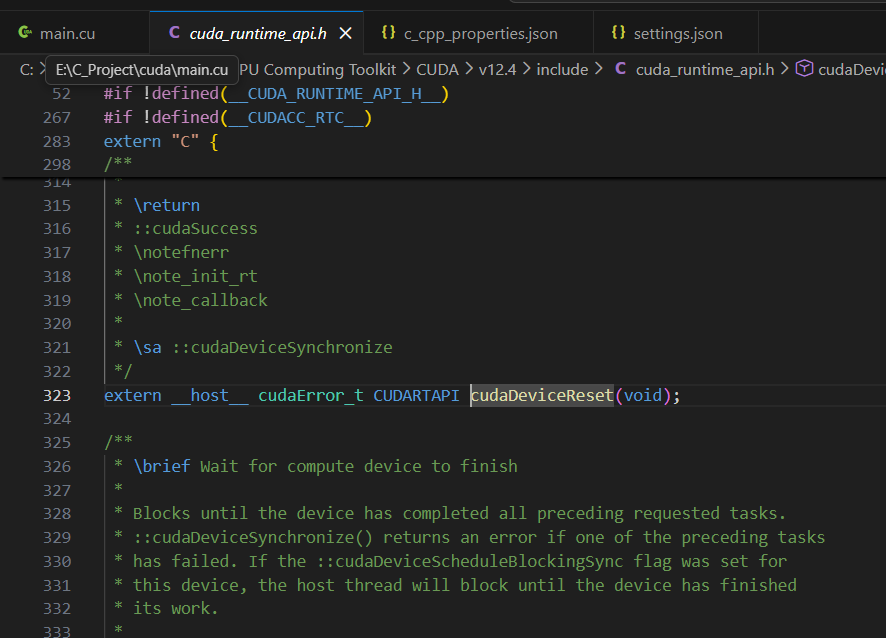
配置好之后就可以正确跳转了