Android手持机扫码出入库的开发详解-6.APP下载更新
APP下载/更新
APP下载更新程序图
flowchart TD
A[触发版本检查] --> B[检查网络连接]
B -->|网络不可用| C[提示网络错误]
B -->|网络可用| D[请求服务器版本信息]
D --> E[解析版本信息]
E --> F[比较版本号]
F -->|无需更新| G[提示当前为最新版本]
F -->|需要更新| H[显示更新提示]
H --> I[下载新版本APK]
I --> J[安装新版本]
J --> K[重启应用]
APP下载更新源代码
java
// UpdateVersion.java - 版本更新核心代码
public class UpdateVersion {
    private Context context;
    private String versionName;
    private String downloadUrl;
    private String apkName;
    private ProgressDialog progressDialog;

    public UpdateVersion(Context context) {
        this.context = context;
    }

    // 检查版本更新
    public void checkUpdate() {
        new Thread(new Runnable() {
            @Override
            public void run() {
                try {
                    // 请求服务器版本信息
                    String versionInfo = HttpUtil.getVersionInfo();
                    if (versionInfo != null) {
                        // 解析版本信息
                        parseXml(versionInfo);
                        // 比较版本号
                        if (needUpdate()) {
                            // 显示更新提示
                            ((Activity) context).runOnUiThread(new Runnable() {
                                @Override
                                public void run() {
                                    showUpdateDialog();
                                }
                            });
                        } else {
                            // 提示当前为最新版本
                            ((Activity) context).runOnUiThread(new Runnable() {
                                @Override
                                public void run() {
                                    Toast.makeText(context, "当前为最新版本", Toast.LENGTH_SHORT).show();
                                }
                            });
                        }
                    }
                } catch (Exception e) {
                    e.printStackTrace();
                }
            }
        }).start();
    }

    // 解析版本信息XML
    private void parseXml(String xml) throws Exception {
        DocumentBuilderFactory factory = DocumentBuilderFactory.newInstance();
        DocumentBuilder builder = factory.newDocumentBuilder();
        Document document = builder.parse(new InputSource(new StringReader(xml)));
        Element root = document.getDocumentElement();

        // 获取版本号
        Element versionElement = (Element) root.getElementsByTagName("version").item(0);
        this.versionName = versionElement.getFirstChild().getNodeValue();

        // 获取下载地址
        Element urlElement = (Element) root.getElementsByTagName("url").item(0);
        this.downloadUrl = urlElement.getFirstChild().getNodeValue();

        // 获取APK名称
        Element nameElement = (Element) root.getElementsByTagName("name").item(0);
        this.apkName = nameElement.getFirstChild().getNodeValue();
    }

    // 判断是否需要更新
    private boolean needUpdate() throws Exception {
        PackageManager pm = context.getPackageManager();
        PackageInfo pi = pm.getPackageInfo(context.getPackageName(), 0);
        String localVersion = pi.versionName;

        // 比较版本号
        return compareVersion(versionName, localVersion) > 0;
    }

    // 显示更新提示对话框
    private void showUpdateDialog() {
        AlertDialog.Builder builder = new AlertDialog.Builder(context);
        builder.setTitle("版本更新");
        builder.setMessage("发现新版本,是否更新?");
        builder.setPositiveButton("更新", new DialogInterface.OnClickListener() {
            @Override
            public void onClick(DialogInterface dialog, int which) {
                dialog.dismiss();
                // 开始下载
                downloadApk();
            }
        });
        builder.setNegativeButton("取消", new DialogInterface.OnClickListener() {
            @Override
            public void onClick(DialogInterface dialog, int which) {
                dialog.dismiss();
            }
        });
        builder.setCancelable(false);
        builder.show();
    }

    // 下载APK
    private void downloadApk() {
        progressDialog = new ProgressDialog(context);
        progressDialog.setProgressStyle(ProgressDialog.STYLE_HORIZONTAL);
        progressDialog.setMessage("正在下载更新...");
        progressDialog.setCancelable(false);
        progressDialog.show();

        // 启动下载线程
        new downloadApkThread().start();
    }

    // 下载线程
    private class downloadApkThread extends Thread {
        @Override
        public void run() {
            try {
                File file = downloadFile(downloadUrl, progressDialog);
                sleep(1000);
                // 安装APK
                installApk(file);
                progressDialog.dismiss();
            } catch (Exception e) {
                e.printStackTrace();
            }
        }
    }

    // 下载文件
    private File downloadFile(String downloadUrl, ProgressDialog pd) throws Exception {
        // 创建文件存储目录
        String savePath = Environment.getExternalStorageDirectory() + "/download/";
        File saveDir = new File(savePath);
        if (!saveDir.exists()) {
            saveDir.mkdirs();
        }

        // 创建文件
        String apkFilePath = savePath + apkName;
        File file = new File(apkFilePath);

        // 下载文件
        URL url = new URL(downloadUrl);
        HttpURLConnection conn = (HttpURLConnection) url.openConnection();
        conn.connect();
        int length = conn.getContentLength();
        InputStream is = conn.getInputStream();
        FileOutputStream fos = new FileOutputStream(file);

        int count = 0;
        byte[] buffer = new byte[1024];
        while (true) {
            int numread = is.read(buffer);
            count += numread;
            int progress = (int) ((float) count / length * 100);
            // 更新进度条
            pd.setProgress(progress);
            if (numread <= 0) {
                // 下载完成
                break;
            }
            fos.write(buffer, 0, numread);
        }
        fos.close();
        is.close();
        return file;
    }

    // 安装APK
    private void installApk(File file) {
        Intent intent = new Intent(Intent.ACTION_VIEW);
        // 兼容Android N及以上版本
        if (Build.VERSION.SDK_INT >= Build.VERSION_CODES.N) {
            intent.setFlags(Intent.FLAG_GRANT_READ_URI_PERMISSION);
            Uri contentUri = FileProvider.getUriForFile(context, "cbw.materials.fileProvider", file);
            intent.setDataAndType(contentUri, "application/vnd.android.package-archive");
        } else {
            intent.setDataAndType(Uri.fromFile(file), "application/vnd.android.package-archive");
            intent.setFlags(Intent.FLAG_ACTIVITY_NEW_TASK);
        }
        context.startActivity(intent);
    }

    // 比较版本号
    private int compareVersion(String version1, String version2) {
        if (version1.equals(version2)) {
            return 0;
        }

        String[] version1Array = version1.split("\\.");
        String[] version2Array = version2.split("\\.");
        int index = 0;
        int minLen = Math.min(version1Array.length, version2Array.length);
        int diff = 0;

        while (index < minLen && (diff = Integer.parseInt(version1Array[index]) - Integer.parseInt(version2Array[index])) == 0) {
            index++;
        }

        if (diff != 0) {
            return diff;
        } else {
            // 如果前面的版本号相同,比较版本号的长度
            return version1Array.length - version2Array.length;
        }
    }
}
调用系统更新
java
    //系统更新
    private class SystemUpdateOnClickListenerImpl implements View.OnClickListener {
        @Override
        public void onClick(View v) {

            //提示信息
            //Toast.makeText(SystemSetup.this, "您点击了系统更校招!", 500).show();


            update();


        }
    }

    private void update() {
        if(isNetworkAvailable(SystemSetup.this)){//判断网络是否有效
            if (Environment.getExternalStorageState().equals(Environment.MEDIA_MOUNTED)){
                String sdpath = Environment.getExternalStorageDirectory() + "/";
                Log.i("debug",sdpath.toString());
                String mSavePath = sdpath + "download/";//文件的下载路径
                Log.i("debug",mSavePath.toString());
                UpdateVersion updateManager = new UpdateVersion(this,"http://192.168.10.5:80/OA/HandheldApp/UpdateVersion_Materials.xml", mSavePath);
                updateManager.checkUpdate();

            }else{
                Toast.makeText(this, "SD卡不可用", Toast.LENGTH_SHORT).show();
                Log.i("TAG", "11213");
            }
        }else{
            Toast.makeText(this, "网络没有连接", Toast.LENGTH_SHORT).show();
        }
    }
    public boolean isNetworkAvailable(Context context) {
        ConnectivityManager cm = (ConnectivityManager) context.getSystemService(Context.CONNECTIVITY_SERVICE);
        NetworkInfo info = cm.getActiveNetworkInfo();//没有网络的时候会返回 null
        Log.i("TAG", "INFOddd");
        if (info == null || !cm.getBackgroundDataSetting()) {
            return false;
        }else
            return true;
    }
windows 2003 Server服务器-IIS配置
打开APK所有的服务端网站属性进行配置
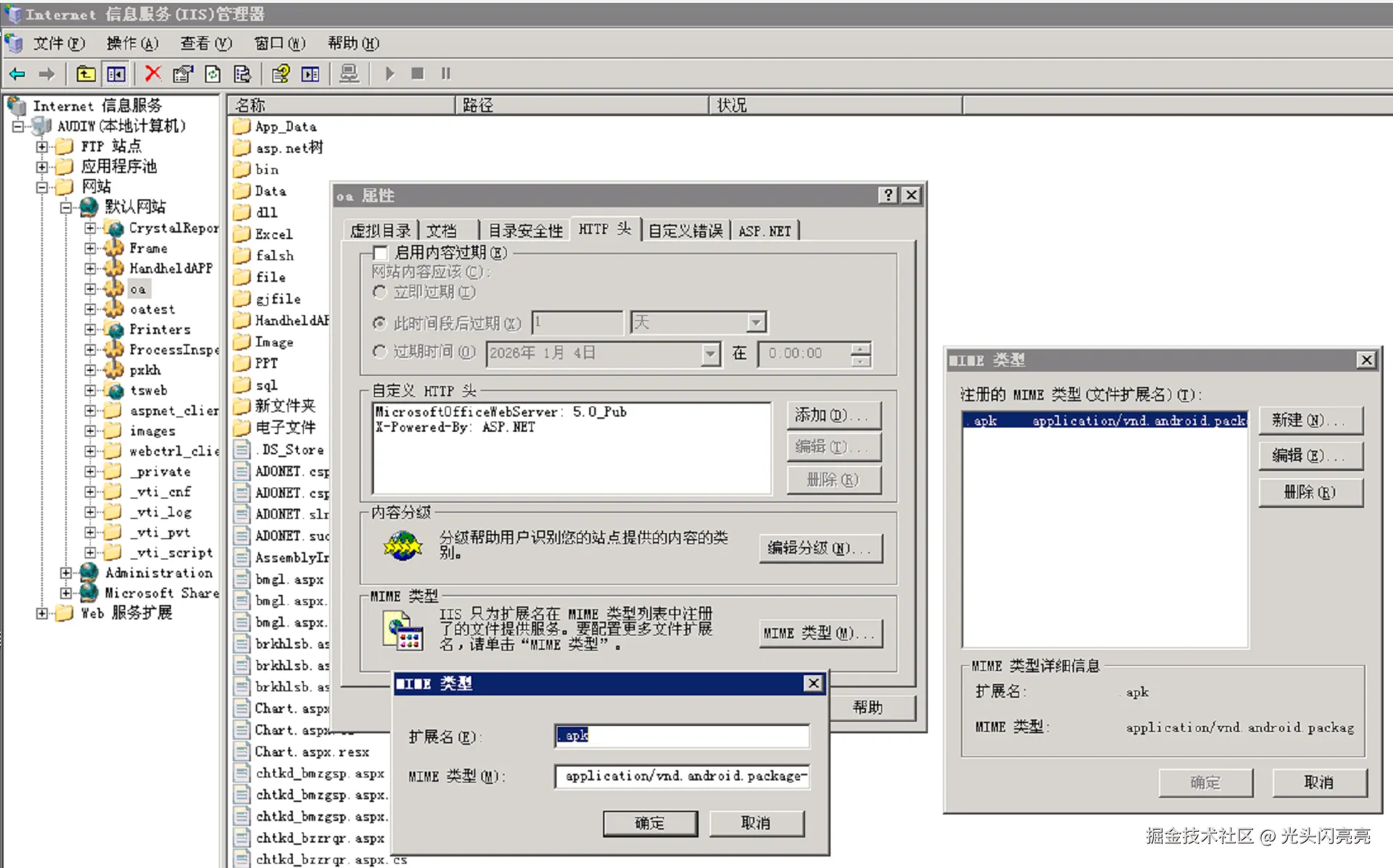
####MIME类型
bash
扩展名:.apk
MIME类型:application/vnd.android.package-archive
在服务端网站中创建文件夹HandheldApp,将生成的APK都保存到此目录中
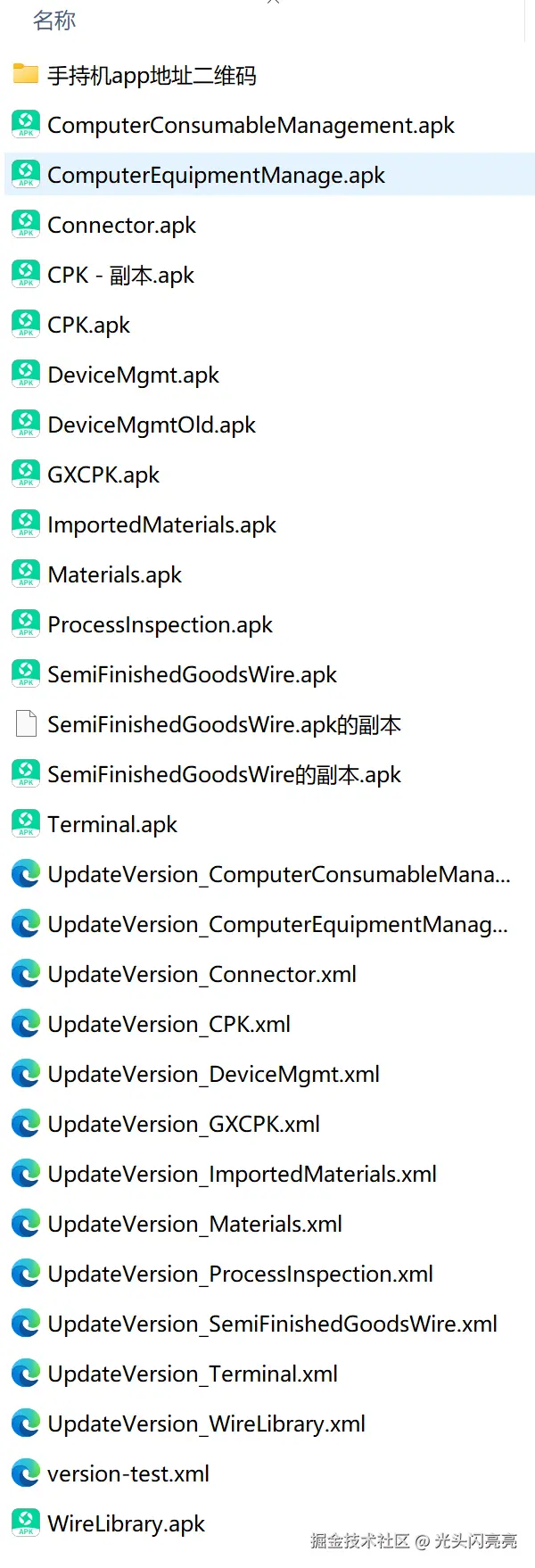
在HandheldApp目录中创建UpdateVersion_Materials.xml
xml
<update>
    <version>12</version>
    <name>BoilerAndroid_1.1</name>
    <url>http://192.168.10.5:80/OA/HandheldAPP/Materials.apk</url>
    <updateinfo>1.增加收藏功能</updateinfo>
</update>