续一下上篇的 async-hook 所有异步函数
这个走了一个弯路,本来想打印堆栈+ 异步回调函数的tostring, 但是一直获取不到业务代码app.js的堆栈。突然想起来,这里没有必要也不应该输出堆栈,否则日志量就太夸张了 。
因此只输出 回调函数的tostring .
bash
// trace_all_async_safe.js ------ 专注 init + 函数源码追踪版
// 用法: node --require ./trace_all_async_safe.js app.js

const async_hooks = require('async_hooks');
const fs = require('fs');

function log(msg) {
    fs.writeSync(1, msg + '\n');  // 同步写 stdout,避免 TTYWRAP 递归
}

// 必须忽略这些类型,否则 init 阶段就会递归崩溃
const IGNORE_TYPES = new Set([
    'TTYWRAP',
    'TickObject',
    'TIMERWRAP',
    'Immediate',
    'SHUTDOWNWRAP',
    'SIGNALWRAP',
    'TCPCONNECTWRAP',     // ← 加这一行
    'GETADDRINFOREQWRAP'  // ← 也可以加这一行
]);

// 你关心的类型:这些会输出详细日志 + 源码 + 栈
const TRACK_TYPES = new Set([
    'Timeout',              // setTimeout / setInterval
    'Immediate',            // setImmediate(即使在 IGNORE,也想看源码时可移出 IGNORE)
    'PROMISE',              // Promise(无源码)
    'FSREQCALLBACK',        // fs 操作
    'GETADDRINFOREQWRAP',   // dns.lookup
    'TCPCONNECTWRAP',       // net.connect
    'HTTPINCOMINGMESSAGE',
    'HTTPCLIENTREQUEST',
    'DNSCHANNEL'
]);

// 安全的 toString 封装(函数源码截断到 maxLength)
function safeToString(obj, maxLength = 500) {
    try {
        if (obj === null) return 'null';
        if (obj === undefined) return 'undefined';
        if (typeof obj === 'function') {
            const str = obj.toString();
            return str.length > maxLength ? str.substring(0, maxLength) + '...\n// ... (truncated)' : str;
        }
        if (typeof obj === 'object') {
            return Object.prototype.toString.call(obj);
        }
        return String(obj);
    } catch (e) {
        return `[toString Error: ${e.message}]`;
    }
}


// 提取回调函数(不同类型不同字段)
function getCallback(resource, type) {
    if (!resource) return null;

    try {
        switch (type) {
            case 'Timeout':
                return resource._onTimeout || null;
            case 'Immediate':
                return resource._onImmediate || null;
            case 'TickObject':
                return resource._callback || null;
            default:
                return null;
        }
    } catch (e) {
        return null;
    }
}

async_hooks.createHook({
    init(asyncId, type, triggerAsyncId, resource) {
        if (IGNORE_TYPES.has(type)) {
            return; // 完全忽略,防止任何递归
        }

        if (TRACK_TYPES.has(type)) {
            log(`[CREATED] ${type} asyncId=${asyncId} trigger=${triggerAsyncId || 'root'}`);
            const callback = getCallback(resource, type);
            const callbackSource = callback ? safeToString(callback, 500) : 'No callback found';

            console.log(`
         ${type === 'Timeout' ? `Delay: ${resource?._idleTimeout || 'unknown'}ms` : ''}
        ${type === 'Timeout' ? `Repeat: ${resource?._repeat ? 'yes (setInterval)' : 'no (setTimeout)'}` : ''}
            ${callbackSource}`)
        }


    },
    before(asyncId) {

    },


}).enable();

log('\n' + '='.repeat(70));
log('Async Tracer STARTED - Tracking selected types with source & stack');
log('Tracked types: ' + Array.from(TRACK_TYPES).join(', '));
log('='.repeat(70) + '\n');
bash
// Timeout (setTimeout)

setTimeout(function timeoutCallback() {
    console.log('  ✓ Timeout executed');
}, 500)

// 日志:
[CREATED] Timeout asyncId=13 trigger=1

         Delay: 500ms
        Repeat: no (setTimeout)
            function timeoutCallback() {
    console.log('  ✓ Timeout executed');
}
  ✓ Timeout executed
但是这个貌似c层也有解决方案。改到c层试一下
看一下c层的async-hook
其实就是把上面的js 逻辑写到下面的cc里。
位置:D:\Code\C\node\src\async_wrap.cc
plain
#include "tracing/trace_event.h"


void AsyncWrap::EmitAsyncInit(Environment* env,
                              Local<Object> object,
                              Local<String> type,
                              double async_id,
                              double trigger_async_id) {
  // koohai add 1224
static bool async_trace_enabled =
    (getenv("NODE_ASYNC_TRACE_ENABLED") != nullptr);

if (async_trace_enabled) {
  Isolate* isolate = env->isolate();
  Local<Context> context = env->context();
  String::Utf8Value type_str(isolate, type);

  fprintf(stderr, "{async|init:[%s] -> id:%.0f", *type_str, async_id);

  if (strcmp(*type_str, "Timeout") == 0) {
    Local<Value> callback_val;
    if (object->Get(context, FIXED_ONE_BYTE_STRING(isolate, "_onTimeout"))
            .ToLocal(&callback_val) &&
        callback_val->IsFunction()) {
      Local<v8::Function> fn = callback_val.As<v8::Function>();
      String::Utf8Value name(isolate, fn->GetName());
      fprintf(stderr, " -> cb:[%s]", name.length() > 0 ? *name : "anonymous");
    }
  }
  fprintf(stderr, "}\n");
  fflush(stderr);
}
// koohai add end

  CHECK(!object.IsEmpty());
  CHECK(!type.IsEmpty());
  //....源代码


void AsyncWrap::EmitBefore(Environment* env, double async_id) {
  // koohai add 1224
  static bool async_trace_enabled =
      (getenv("NODE_ASYNC_TRACE_ENABLED") != nullptr);

  if (async_trace_enabled) {
    fprintf(stderr, "{async|before -> id:%f}\n", async_id);
    fflush(stderr);
  }
  //koohai added 1224
  Emit(env, async_id, AsyncHooks::kBefore,
       env->async_hooks_before_function());
}
编译测试一波:
测试一下异步hook
plain
window=global;
window.test = 123;
console.log(window.test);

// 故意使用 global 来触发你的对象拦截器
global.myAppStatus = 'starting';

console.log('\n--- 开始异步测试 ---');

// 1. 测试 Timeout (触发 EmitAsyncInit 和 EmitBefore)
setTimeout(function myTimer() {
    global.timeoutTriggered = true;
    console.log('1. 定时器回调执行中...');
}, 100);

// 2. 测试 Promise (触发 PROMISE 类型)
Promise.resolve().then(() => {
    global.promiseResolved = 'yes';
    console.log('2. Promise 微任务执行中...');
});

// 3. 测试文件 I/O (触发 FSREQCALLBACK)
const fs = require('fs');
fs.readFile(__filename, (err, data) => {
    global.fsReadDone = true;
    console.log('3. 文件读取完成,长度:', data.length);
});

console.log('--- 同步代码执行完毕 ---\n');
执行后出现:
plain
D:\Code\C\node>.\out\Release\node.exe demo.js
{async|init:[TTYWRAP] -> id:2}
{async|init:[SIGNALWRAP] -> id:3}
{async|init:[TTYWRAP] -> id:4}
123

--- 开始异步测试 ---
{async|init:[FSREQCALLBACK] -> id:7}
--- 同步代码执行完毕 ---

2. Promise 微任务执行中...
{async|before -> id:7.000000}
{async|init:[FSREQCALLBACK] -> id:9}
{async|before -> id:9.000000}
{async|init:[FSREQCALLBACK] -> id:10}
{async|before -> id:10.000000}
{async|init:[FSREQCALLBACK] -> id:11}
{async|before -> id:11.000000}
3. 文件读取完成,长度: 845
1. 定时器回调执行中...
只是这个FSREQCALLBACK 等不明显,回头改成对应的函数名试试。 这个输出的太多了,还是要修改成过滤的模式,也没有输出tostring。下篇继续。
Trace Events的使用
浅试 一下trace Events,还没get到方法。
bash
# 调试模式:输出所有日志
node --trace-events-enabled \
     --trace-event-categories proxy,async \
     your_app.js

# 生产模式:不传参数,零开销
node your_app.js
直接使用
plain
# 开启并指定只追踪异步钩子和文件系统
node --trace-event-categories node.async_hooks,node.fs app.js
# 生成 node_trace.1.log
生成的log如下:
plain
{
    "traceEvents": [
        {
            "pid": 45268,
            "tid": 41240,
            "ts": 660125182515,
            "tts": 0,
            "ph": "B",
            "cat": "node,node.fs,node.fs.sync",
            "name": "fs.sync.lstat",
            "dur": 0,
            "tdur": 0,
            "args": {}
        },
        {
            "pid": 45268,
            "tid": 41240,
            "ts": 660125182564,
            "tts": 0,
            "ph": "E",
            "cat": "node,node.fs,node.fs.sync",
            "name": "fs.sync.lstat",
            "dur": 0,
            "tdur": 0,
            "args": {}
        },....]
打开chrome://tracing ,把log 拖进去
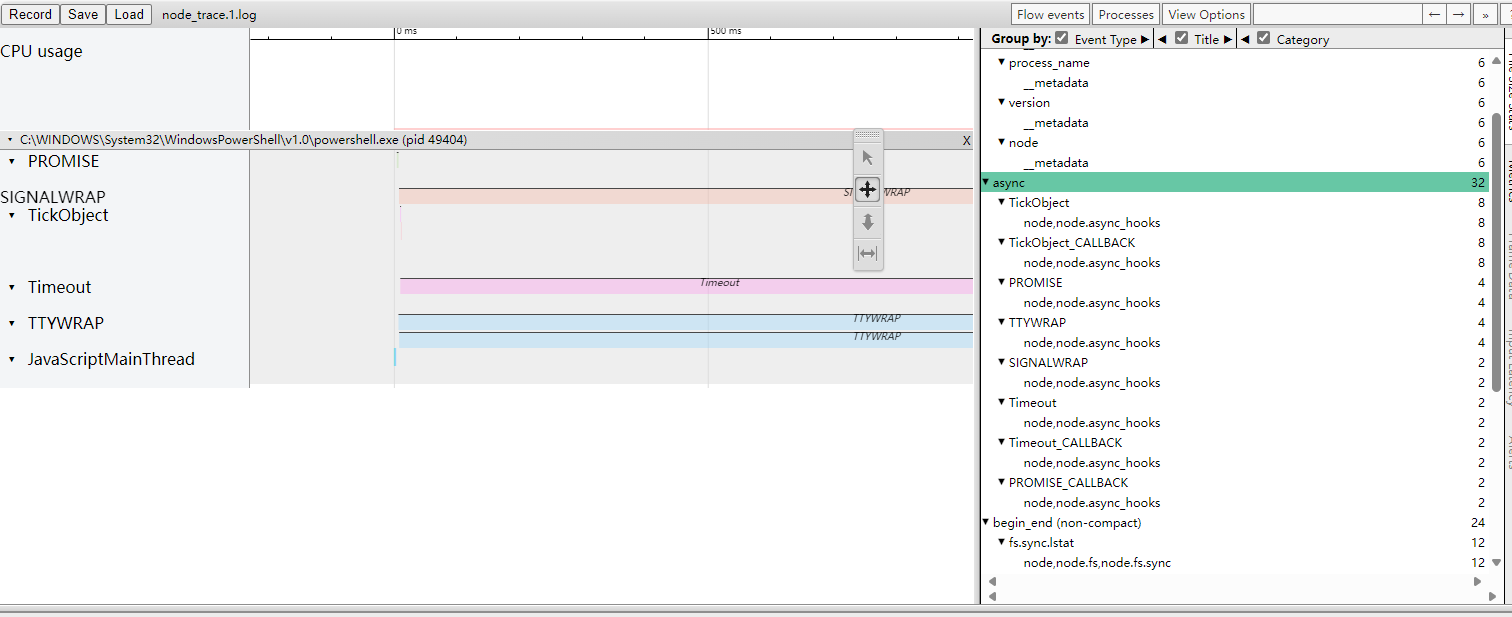
emm 这个不是给人看的,是给机器看的。最后再处理。
更多文章,敬请关注gzh:零基础爬虫第一天