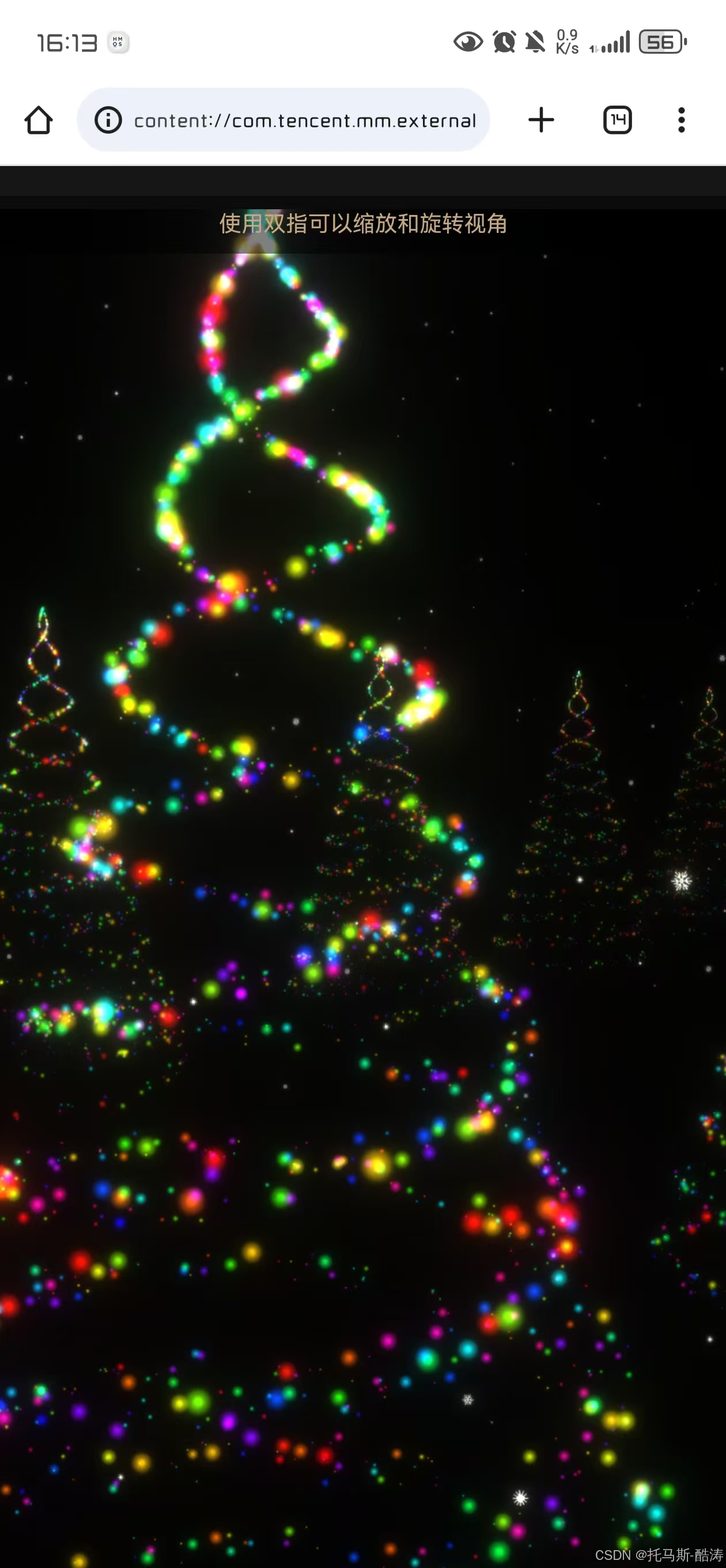
<!DOCTYPE html>
<html lang="en">
<head>
<meta charset="UTF-8">
<meta name="viewport" content="width=device-width, initial-scale=1.0, maximum-scale=1.0, user-scalable=no">
<title>圣诞树</title>
<link rel="stylesheet" href="https://cdnjs.cloudflare.com/ajax/libs/normalize/5.0.0/normalize.min.css">
<style>
* {
box-sizing: border-box;
}
body {
margin: 0;
height: 100vh;
overflow: hidden;
display: flex;
align-items: center;
justify-content: center;
background: #161616;
color: #c5a880;
font-family: sans-serif;
touch-action: none;
}
.mobile-notice {
position: absolute;
top: 20px;
left: 0;
right: 0;
text-align: center;
color: #c5a880;
font-size: 14px;
padding: 10px;
background: rgba(0, 0, 0, 0.5);
z-index: 1000;
}
/* 移除所有与音乐相关的样式 */
.text-loading {
font-size: 2rem;
}
</style>
<script>
window.console = window.console || function (t) { };
if (document.location.search.match(/type=embed/gi)) {
window.parent.postMessage("resize", "*");
}
</script>
</head>
<body translate="no">
<div class="mobile-notice">使用双指可以缩放和旋转视角</div>
<script src="https://cdn.jsdelivr.net/npm/three@0.115.0/build/three.min.js"></script>
<script src="https://cdn.jsdelivr.net/npm/three@0.115.0/examples/js/postprocessing/EffectComposer.js"></script>
<script src="https://cdn.jsdelivr.net/npm/three@0.115.0/examples/js/postprocessing/RenderPass.js"></script>
<script src="https://cdn.jsdelivr.net/npm/three@0.115.0/examples/js/postprocessing/ShaderPass.js"></script>
<script src="https://cdn.jsdelivr.net/npm/three@0.115.0/examples/js/shaders/CopyShader.js"></script>
<script src="https://cdn.jsdelivr.net/npm/three@0.115.0/examples/js/shaders/LuminosityHighPassShader.js"></script>
<script src="https://cdn.jsdelivr.net/npm/three@0.115.0/examples/js/postprocessing/UnrealBloomPass.js"></script>
<script id="rendered-js">
const { PI, sin, cos } = Math;
const TAU = 2 * PI;
const map = (value, sMin, sMax, dMin, dMax) => {
return dMin + (value - sMin) / (sMax - sMin) * (dMax - dMin);
};
const range = (n, m = 0) =>
Array(n).
fill(m).
map((i, j) => i + j);
const rand = (max, min = 0) => min + Math.random() * (max - min);
const randInt = (max, min = 0) => Math.floor(min + Math.random() * (max - min));
const randChoise = arr => arr[randInt(arr.length)];
const polar = (ang, r = 1) => [r * cos(ang), r * sin(ang)];
let scene, camera, renderer;
let step = 0;
const uniforms = {
time: { type: "f", value: 0.0 },
step: { type: "f", value: 0.0 }
};
const params = {
exposure: 1,
bloomStrength: 0.9,
bloomThreshold: 0,
bloomRadius: 0.5
};
let composer;
let isDragging = false;
let previousMousePosition = { x: 0, y: 0 };
let cameraDistance = 24;
let cameraAngleX = 0;
let cameraAngleY = 0;
const fftSize = 2048;
const totalPoints = 2000; // 减少粒子数量以适应移动端性能
// 模拟音频分析数据(随机波动)
const mockAudioData = new Uint8Array(fftSize / 2);
function updateMockAudioData() {
// 创建类似音乐波动的模拟数据
const time = Date.now() * 0.001;
for (let i = 0; i < mockAudioData.length; i++) {
// 低频部分有较大的波动,高频部分波动较小
const amplitude = 1 - (i / mockAudioData.length);
const baseValue = Math.sin(time * 2 + i * 0.1) * 50 * amplitude + 100;
const randomVariation = Math.sin(time * 5 + i * 0.05) * 30;
mockAudioData[i] = Math.max(0, Math.min(255, baseValue + randomVariation));
}
}
function init() {
scene = new THREE.Scene();
// 移动端优化:降低精度以提高性能
renderer = new THREE.WebGLRenderer({
antialias: true,
powerPreference: "low-power"
});
renderer.setPixelRatio(Math.min(window.devicePixelRatio, 2)); // 限制像素比
renderer.setSize(window.innerWidth, window.innerHeight);
document.body.appendChild(renderer.domElement);
camera = new THREE.PerspectiveCamera(
60,
window.innerWidth / window.innerHeight,
1,
1000);
// 初始相机位置
resetCamera();
// 创建模拟音频纹理
uniforms.tAudioData = {
value: new THREE.DataTexture(mockAudioData, fftSize / 2, 1, THREE.LuminanceFormat),
type: 't'
};
uniforms.tAudioData.value.needsUpdate = true;
// 添加场景元素
addPlane(scene, uniforms, 1500); // 减少地面粒子数量
addSnow(scene, uniforms);
// 减少树木数量以适应移动端
const treeRows = 5;
for (let i = 0; i < treeRows; i++) {
addTree(scene, uniforms, totalPoints, [15, 0, -20 * i]);
addTree(scene, uniforms, totalPoints, [-15, 0, -20 * i]);
}
const renderScene = new THREE.RenderPass(scene, camera);
const bloomPass = new THREE.UnrealBloomPass(
new THREE.Vector2(window.innerWidth, window.innerHeight),
1.5,
0.4,
0.85);
bloomPass.threshold = params.bloomThreshold;
bloomPass.strength = params.bloomStrength;
bloomPass.radius = params.bloomRadius;
composer = new THREE.EffectComposer(renderer);
composer.addPass(renderScene);
composer.addPass(bloomPass);
// 添加交互控制
setupControls();
// 开始动画循环
animate();
}
function resetCamera() {
cameraDistance = 24;
cameraAngleX = 0.1;
cameraAngleY = 0;
updateCameraPosition();
}
function updateCameraPosition() {
const x = cameraDistance * Math.sin(cameraAngleY) * Math.cos(cameraAngleX);
const y = cameraDistance * Math.sin(cameraAngleX);
const z = cameraDistance * Math.cos(cameraAngleY) * Math.cos(cameraAngleX);
camera.position.set(x, y + 2, z); // 稍微抬高相机
camera.lookAt(0, 0, -20);
}
function setupControls() {
// 鼠标控制(桌面端)
renderer.domElement.addEventListener('mousedown', (e) => {
isDragging = true;
previousMousePosition = { x: e.clientX, y: e.clientY };
});
renderer.domElement.addEventListener('mousemove', (e) => {
if (!isDragging) return;
const deltaX = e.clientX - previousMousePosition.x;
const deltaY = e.clientY - previousMousePosition.y;
cameraAngleY += deltaX * 0.01;
cameraAngleX = Math.max(-Math.PI/3, Math.min(Math.PI/3, cameraAngleX - deltaY * 0.01));
updateCameraPosition();
previousMousePosition = { x: e.clientX, y: e.clientY };
});
renderer.domElement.addEventListener('mouseup', () => {
isDragging = false;
});
renderer.domElement.addEventListener('mouseleave', () => {
isDragging = false;
});
// 触摸控制(移动端)
let touchStartDistance = 0;
let touchStartAngleX = 0;
let touchStartAngleY = 0;
let touchStartX = 0;
let touchStartY = 0;
renderer.domElement.addEventListener('touchstart', (e) => {
e.preventDefault();
if (e.touches.length === 1) {
// 单指:旋转
touchStartX = e.touches[0].clientX;
touchStartY = e.touches[0].clientY;
touchStartAngleX = cameraAngleX;
touchStartAngleY = cameraAngleY;
} else if (e.touches.length === 2) {
// 双指:缩放
const dx = e.touches[0].clientX - e.touches[1].clientX;
const dy = e.touches[0].clientY - e.touches[1].clientY;
touchStartDistance = Math.sqrt(dx * dx + dy * dy);
}
});
renderer.domElement.addEventListener('touchmove', (e) => {
e.preventDefault();
if (e.touches.length === 1) {
// 单指旋转
const deltaX = e.touches[0].clientX - touchStartX;
const deltaY = e.touches[0].clientY - touchStartY;
cameraAngleY = touchStartAngleY + deltaX * 0.01;
cameraAngleX = Math.max(-Math.PI/3, Math.min(Math.PI/3,
touchStartAngleX - deltaY * 0.01));
updateCameraPosition();
} else if (e.touches.length === 2) {
// 双指缩放
const dx = e.touches[0].clientX - e.touches[1].clientX;
const dy = e.touches[0].clientY - e.touches[1].clientY;
const currentDistance = Math.sqrt(dx * dx + dy * dy);
const scale = touchStartDistance / currentDistance;
cameraDistance = Math.max(10, Math.min(50, cameraDistance * scale));
touchStartDistance = currentDistance;
updateCameraPosition();
}
});
// 鼠标滚轮缩放
renderer.domElement.addEventListener('wheel', (e) => {
e.preventDefault();
cameraDistance = Math.max(10, Math.min(50, cameraDistance + e.deltaY * 0.01));
updateCameraPosition();
});
// 窗口大小调整
window.addEventListener('resize', onWindowResize, false);
}
function onWindowResize() {
const width = window.innerWidth;
const height = window.innerHeight;
camera.aspect = width / height;
camera.updateProjectionMatrix();
renderer.setSize(width, height);
if (composer) composer.setSize(width, height);
}
function animate(time) {
// 更新模拟音频数据
updateMockAudioData();
uniforms.tAudioData.value.needsUpdate = true;
step = (step + 1) % 1000;
uniforms.time.value = time;
uniforms.step.value = step;
composer.render();
requestAnimationFrame(animate);
}
function addTree(scene, uniforms, totalPoints, treePosition) {
const vertexShader = `
attribute float mIndex;
varying vec3 vColor;
varying float opacity;
uniform sampler2D tAudioData;
float norm(float value, float min, float max ){
return (value - min) / (max - min);
}
float lerp(float norm, float min, float max){
return (max - min) * norm + min;
}
float map(float value, float sourceMin, float sourceMax, float destMin, float destMax){
return lerp(norm(value, sourceMin, sourceMax), destMin, destMax);
}
void main() {
vColor = color;
vec3 p = position;
vec4 mvPosition = modelViewMatrix * vec4( p, 1.0 );
float amplitude = texture2D( tAudioData, vec2( mIndex, 0.1 ) ).r;
float amplitudeClamped = clamp(amplitude-0.4,0.0, 0.6 );
float sizeMapped = map(amplitudeClamped, 0.0, 0.6, 1.0, 20.0);
opacity = map(mvPosition.z , -200.0, 15.0, 0.0, 1.0);
gl_PointSize = sizeMapped * ( 100.0 / -mvPosition.z );
gl_Position = projectionMatrix * mvPosition;
}
`;
const fragmentShader = `
varying vec3 vColor;
varying float opacity;
uniform sampler2D pointTexture;
void main() {
gl_FragColor = vec4( vColor, opacity );
gl_FragColor = gl_FragColor * texture2D( pointTexture, gl_PointCoord );
}
`;
const shaderMaterial = new THREE.ShaderMaterial({
uniforms: {
...uniforms,
pointTexture: {
value: new THREE.TextureLoader().load(`https://assets.codepen.io/3685267/spark1.png`)
}
},
vertexShader,
fragmentShader,
blending: THREE.AdditiveBlending,
depthTest: false,
transparent: true,
vertexColors: true
});
const geometry = new THREE.BufferGeometry();
const positions = [];
const colors = [];
const sizes = [];
const phases = [];
const mIndexs = [];
const color = new THREE.Color();
for (let i = 0; i < totalPoints; i++) {
const t = Math.random();
const y = map(t, 0, 1, -8, 10);
const ang = map(t, 0, 1, 0, 6 * TAU) + TAU / 2 * (i % 2);
const [z, x] = polar(ang, map(t, 0, 1, 5, 0));
const modifier = map(t, 0, 1, 1, 0);
positions.push(x + rand(-0.3 * modifier, 0.3 * modifier));
positions.push(y + rand(-0.3 * modifier, 0.3 * modifier));
positions.push(z + rand(-0.3 * modifier, 0.3 * modifier));
color.setHSL(map(i, 0, totalPoints, 1.0, 0.0), 1.0, 0.5);
colors.push(color.r, color.g, color.b);
phases.push(rand(1000));
sizes.push(1);
const mIndex = map(i, 0, totalPoints, 1.0, 0.0);
mIndexs.push(mIndex);
}
geometry.setAttribute(
"position",
new THREE.Float32BufferAttribute(positions, 3).setUsage(
THREE.DynamicDrawUsage));
geometry.setAttribute("color", new THREE.Float32BufferAttribute(colors, 3));
geometry.setAttribute("size", new THREE.Float32BufferAttribute(sizes, 1));
geometry.setAttribute("phase", new THREE.Float32BufferAttribute(phases, 1));
geometry.setAttribute("mIndex", new THREE.Float32BufferAttribute(mIndexs, 1));
const tree = new THREE.Points(geometry, shaderMaterial);
const [px, py, pz] = treePosition;
tree.position.x = px;
tree.position.y = py;
tree.position.z = pz;
scene.add(tree);
}
function addSnow(scene, uniforms) {
const vertexShader = `
attribute float size;
attribute float phase;
attribute float phaseSecondary;
varying vec3 vColor;
varying float opacity;
uniform float time;
uniform float step;
float norm(float value, float min, float max ){
return (value - min) / (max - min);
}
float lerp(float norm, float min, float max){
return (max - min) * norm + min;
}
float map(float value, float sourceMin, float sourceMax, float destMin, float destMax){
return lerp(norm(value, sourceMin, sourceMax), destMin, destMax);
}
void main() {
float t = time* 0.0006;
vColor = color;
vec3 p = position;
p.y = map(mod(phase+step, 1000.0), 0.0, 1000.0, 25.0, -8.0);
p.x += sin(t+phase);
p.z += sin(t+phaseSecondary);
opacity = map(p.z, -150.0, 15.0, 0.0, 1.0);
vec4 mvPosition = modelViewMatrix * vec4( p, 1.0 );
gl_PointSize = size * ( 100.0 / -mvPosition.z );
gl_Position = projectionMatrix * mvPosition;
}
`;
const fragmentShader = `
uniform sampler2D pointTexture;
varying vec3 vColor;
varying float opacity;
void main() {
gl_FragColor = vec4( vColor, opacity );
gl_FragColor = gl_FragColor * texture2D( pointTexture, gl_PointCoord );
}
`;
function createSnowSet(sprite) {
const totalPoints = 150; // 减少雪花数量
const shaderMaterial = new THREE.ShaderMaterial({
uniforms: {
...uniforms,
pointTexture: {
value: new THREE.TextureLoader().load(sprite)
}
},
vertexShader,
fragmentShader,
blending: THREE.AdditiveBlending,
depthTest: false,
transparent: true,
vertexColors: true
});
const geometry = new THREE.BufferGeometry();
const positions = [];
const colors = [];
const sizes = [];
const phases = [];
const phaseSecondaries = [];
const color = new THREE.Color();
for (let i = 0; i < totalPoints; i++) {
const [x, y, z] = [rand(25, -25), 0, rand(15, -150)];
positions.push(x);
positions.push(y);
positions.push(z);
color.set(randChoise(["#f1d4d4", "#f1f6f9", "#eeeeee", "#f1f1e8"]));
colors.push(color.r, color.g, color.b);
phases.push(rand(1000));
phaseSecondaries.push(rand(1000));
sizes.push(rand(4, 2));
}
geometry.setAttribute(
"position",
new THREE.Float32BufferAttribute(positions, 3));
geometry.setAttribute("color", new THREE.Float32BufferAttribute(colors, 3));
geometry.setAttribute("size", new THREE.Float32BufferAttribute(sizes, 1));
geometry.setAttribute("phase", new THREE.Float32BufferAttribute(phases, 1));
geometry.setAttribute(
"phaseSecondary",
new THREE.Float32BufferAttribute(phaseSecondaries, 1));
const mesh = new THREE.Points(geometry, shaderMaterial);
scene.add(mesh);
}
const sprites = [
"https://assets.codepen.io/3685267/snowflake1.png",
"https://assets.codepen.io/3685267/snowflake2.png",
"https://assets.codepen.io/3685267/snowflake3.png",
"https://assets.codepen.io/3685267/snowflake4.png",
"https://assets.codepen.io/3685267/snowflake5.png"];
// 减少雪花类型数量
sprites.slice(0, 3).forEach(sprite => {
createSnowSet(sprite);
});
}
function addPlane(scene, uniforms, totalPoints) {
const vertexShader = `
attribute float size;
attribute vec3 customColor;
varying vec3 vColor;
void main() {
vColor = customColor;
vec4 mvPosition = modelViewMatrix * vec4( position, 1.0 );
gl_PointSize = size * ( 300.0 / -mvPosition.z );
gl_Position = projectionMatrix * mvPosition;
}
`;
const fragmentShader = `
uniform vec3 color;
uniform sampler2D pointTexture;
varying vec3 vColor;
void main() {
gl_FragColor = vec4( vColor, 1.0 );
gl_FragColor = gl_FragColor * texture2D( pointTexture, gl_PointCoord );
}
`;
const shaderMaterial = new THREE.ShaderMaterial({
uniforms: {
...uniforms,
pointTexture: {
value: new THREE.TextureLoader().load(`https://assets.codepen.io/3685267/spark1.png`)
}
},
vertexShader,
fragmentShader,
blending: THREE.AdditiveBlending,
depthTest: false,
transparent: true,
vertexColors: true
});
const geometry = new THREE.BufferGeometry();
const positions = [];
const colors = [];
const sizes = [];
const color = new THREE.Color();
for (let i = 0; i < totalPoints; i++) {
const [x, y, z] = [rand(-25, 25), 0, rand(-150, 15)];
positions.push(x);
positions.push(y);
positions.push(z);
color.set(randChoise(["#93abd3", "#f2f4c0", "#9ddfd3"]));
colors.push(color.r, color.g, color.b);
sizes.push(1);
}
geometry.setAttribute(
"position",
new THREE.Float32BufferAttribute(positions, 3).setUsage(
THREE.DynamicDrawUsage));
geometry.setAttribute(
"customColor",
new THREE.Float32BufferAttribute(colors, 3));
geometry.setAttribute("size", new THREE.Float32BufferAttribute(sizes, 1));
const plane = new THREE.Points(geometry, shaderMaterial);
plane.position.y = -8;
scene.add(plane);
}
// 页面加载完成后初始化
window.addEventListener('load', init);
// 防止移动端手势冲突
document.addEventListener('gesturestart', function(e) {
e.preventDefault();
});
</script>
</body>
</html>