一、基本概念
- 单元测试(Unit Test ): 针对软件中的最小可测试单元**,**以是一个函数、方法、类、功能模块或者子系统
- **QUnit:**一个轻量级的JavaScript 单元测试框架。
二、练习
新建文件夹27,复制练习UI5_Walkthrough_Step 26:Mock Server Configuration 模拟服务器配置 文件夹下内容
2.1 webapp\test\unit\model\formatter.js
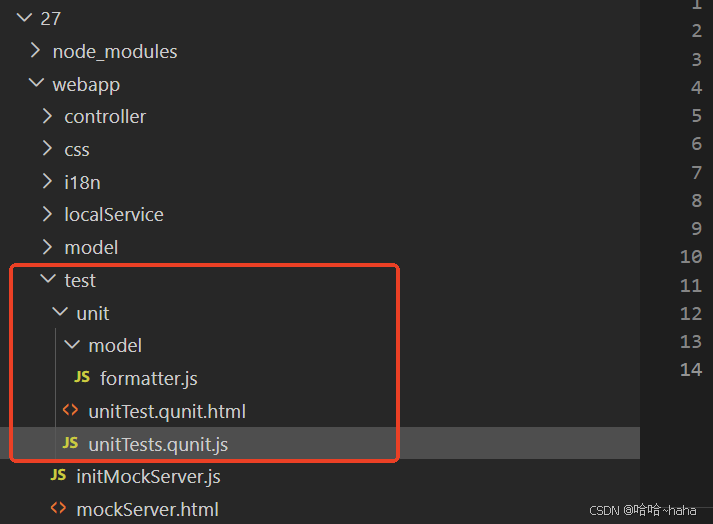
在test文价夹下新建unit文件夹,unit文件夹下新建model文件夹,model文件夹下新建formatter.js文件
文件目录如下
测试用例
sap.ui.define 声明模块依赖
QUnit.module():分组测试,将测试用例组织在一起,便于管理,共享设置和清理,这里测试的目标是格式器,即Formatting functions,用QUnit.test定义测试目标预测结果分析
beforeEach:每个测试前执行 → 创建测试环境
afterEach:每个测试后执行 → 清理资源,避免内存泄漏
模拟Model对象:this.stub()是QUnit测试中常用的一个方法,用于创建一个模拟函数(stub)或模拟对象即oModel,配置当调用oModel("i18n")时返回this._oResourceModel,模拟了UI5中获取国际化资源模型的行为- 模拟View对象:var oViewStub = { getModel: oModel } 创建一个视图存根对象,视图的
getModel方法返回上面创建的oModel存根模拟 Controller 对象:var oControllerStub = {getView: this.stub().returns(oViewStub) };创建控制器存根对象,
getView()方法返回上面创建的oViewStub
Controller.getView()  →  View.getModel("i18n")  →  ResourceModel
       ↑                      ↑                         ↑
 oControllerStub       oViewStub.getModel       this._oResourceModel
控制器通过视图获取国际化资源模型,验证翻译文本是否正确,var fnIsolatedFormatter = formatter.statusText.bind(oControllerStub)作用是绑定格式化函数,
formatter.statusText- 这是一个格式化函数.bind(oControllerStub)- 将函数绑定到控制器存根
assert.strictEqual()是 QUnit 测试框架中最严格、最常用的断言方法 ,用于验证两个值是否完全相等(包括类型和值)。assert.strictEqual(actual实际值, expected期望值, message测试描述);
javascript
/*global QUnit*/

sap.ui.define([
	"sap/ui5/walkthrough/model/formatter",
	"sap/ui/model/resource/ResourceModel"
], function (formatter, ResourceModel) {
	"use strict";
	QUnit.module("Formatting functions", {
		beforeEach: function () {
			this._oResourceModel = new ResourceModel({
				bundleUrl: sap.ui.require.toUrl("sap/ui5/walkthrough") + "/i18n/i18n.properties"
			});
		},
		afterEach: function () {
			this._oResourceModel.destroy();
		}
	});

	QUnit.test("Should return the translated texts", function (assert) {
		var oModel = this.stub();
		oModel.withArgs("i18n").returns(this._oResourceModel);
		var oViewStub = {
			getModel: oModel
		};
		var oControllerStub = {
			getView: this.stub().returns(oViewStub)
		};

		var fnIsolatedFormatter = formatter.statusText.bind(oControllerStub);

		assert.strictEqual(fnIsolatedFormatter("A"), "New", "The long text for status A is correct");

		assert.strictEqual(fnIsolatedFormatter("B"), "In Progress", "The long text for status B is correct");

		assert.strictEqual(fnIsolatedFormatter("C"), "Done", "The long text for status C is correct");

		assert.strictEqual(fnIsolatedFormatter("Foo"), "Foo", "The long text for status Foo is correct");
	});
});
2.2 webapp\test\unit\unitTest.qunit.html
在test文件夹下新建unit文件夹,unit文件夹下新建model文件夹,model文件夹下新建unitTest.qunit.html,此文件为运行单元测试的入口页面,
data-sap-ui-resourceroots='{ "sap.ui5.walkthrough": "../../" }' 指定资源文件路径,sap.ui5.walkthrough命名空间下,"../../"为当前目录的父目录的父目录,即根目录为\webapp
html
<!DOCTYPE html>
<html>
<head>
	<title>Unit tests for SAPUI5 Walkthrough</title>
	<meta charset="utf-8">

	<script
		id="sap-ui-bootstrap"
		src="https://openui5.hana.ondemand.com/resources/sap-ui-core.js"
		data-sap-ui-resourceroots='{
			"sap.ui5.walkthrough": "../../"
		}'
		data-sap-ui-async="true">
	</script>

	<link rel="stylesheet" type="text/css" href="https://openui5.hana.ondemand.com/resources/sap/ui/thirdparty/qunit-2.css">

	<script src="https://openui5.hana.ondemand.com/resources/sap/ui/thirdparty/qunit-2.js"></script>
	<script src="https://openui5.hana.ondemand.com/resources/sap/ui/qunit/qunit-junit.js"></script>
	<script src="https://openui5.hana.ondemand.com/resources/sap/ui/qunit/qunit-coverage.js"></script>
	<script src="https://openui5.hana.ondemand.com/resources/sap/ui/thirdparty/sinon.js"></script>
	<script src="https://openui5.hana.ondemand.com/resources/sap/ui/thirdparty/sinon-qunit.js"></script>

	<script src="unitTests.qunit.js"></script>
</head>
<body>
	<div id="qunit"/>
	<div id="qunit-fixture"/>
</body>
</html>
2.3 webapp\test\unit\unitTests.qunit.js
测试启动脚本
QUnit.config.autostart = false; 手动控制测试启动
sap.ui.getCore():获取 UI5 核心的单例实例
attachInit(callback):注册回调函数,当 UI5 核心初始化完成后执行sap.ui.require():加载测试模块,入参指定加载测试用例formatter.js
javascript
/* global QUnit */

QUnit.config.autostart = false;

sap.ui.getCore().attachInit(function () {
	"use strict";

	sap.ui.require([
		"sap/ui5/walkthrough/test/unit/model/formatter"
	], function () {
		QUnit.start();
	});
});
三、运行结果
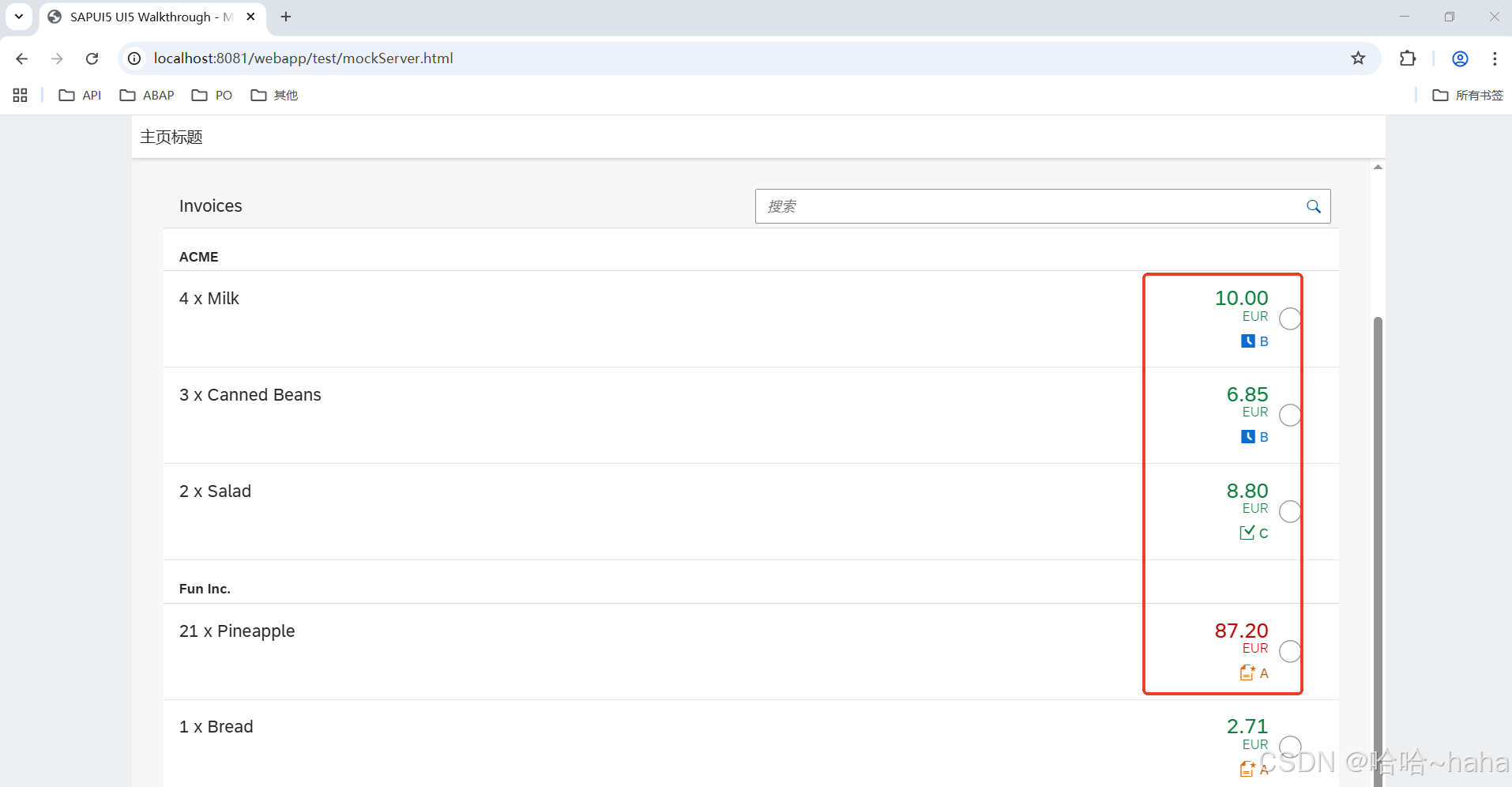
http://localhost:8081/webapp/test/mockServer.html 结果值如下
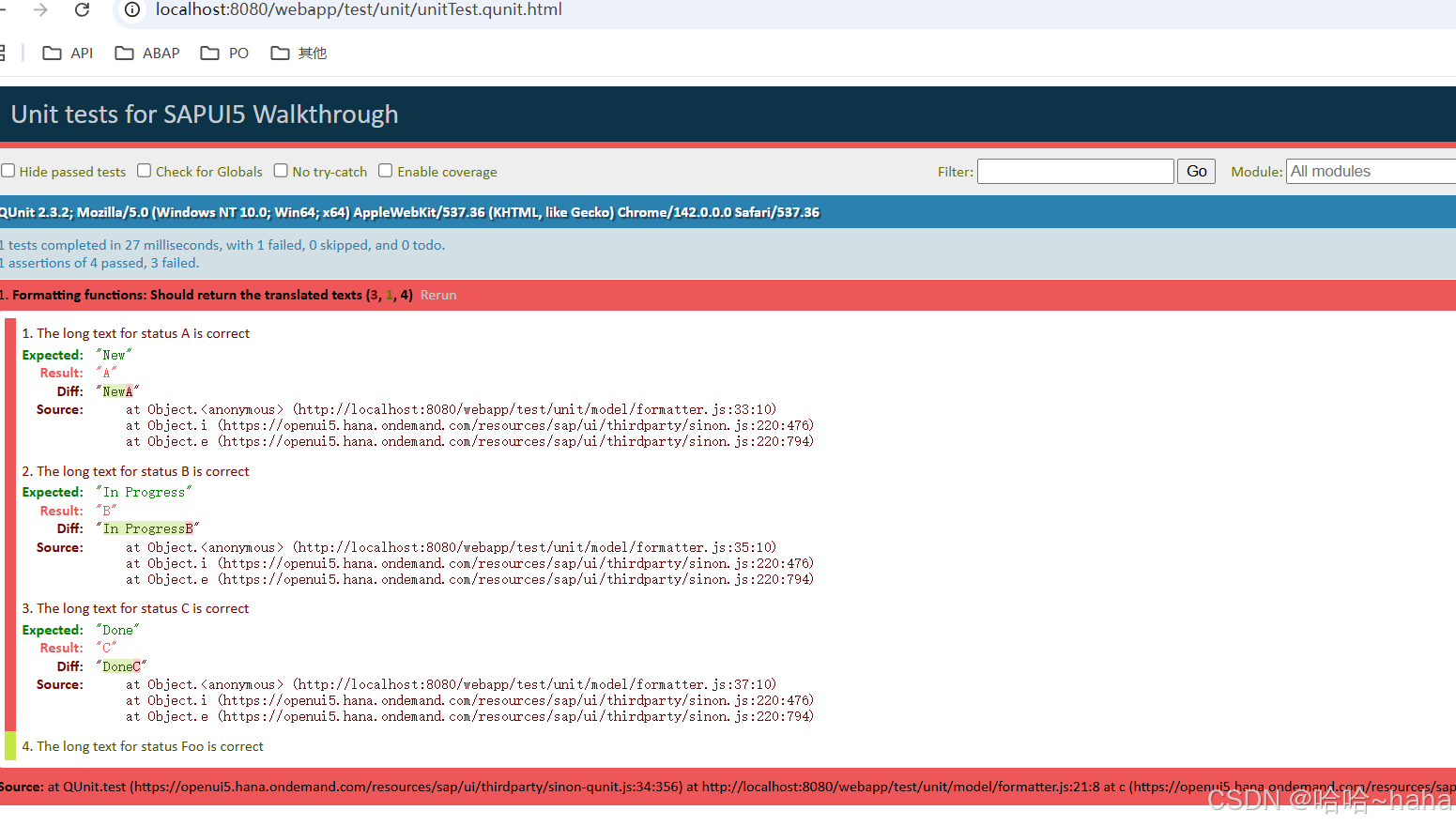
http://localhost:8080/webapp/test/unit/unitTest.qunit.html 测试执行结果