SSL
SSL 是 Secure Sockets Layer(安全套接层协议)的缩写,可以在 Internet 提供秘密性传输。它由 Netscape 开发,用于对客户端和服务器端之间的身份认证,加密传输数据,确保传输数据的保密性、完整性,实现两者之间的安全通信。
SSL 协议已经经历了多个版本更新,它主要包含 SSL 1.0、SSL 2.0、SSL 3.0。由于 SSL 2.0 中存在了许多安全漏洞,即使 SSL3.0 解决了许多的漏洞,但是 SSL3.0 也已不被推荐使用
TSL
TSL 是Transport Layer Security(传输层安全性协议)的缩写,它的前身正是上述的 SSL,可以理解为 SSL 的加强版
由互联网标准组织在1999年基于Netscape 公司设计的SSL 3.0协议进行标准化并改进而来,如今网络通信(例如HTTPS网站)使用的几乎都是TLS协议(通常是TLS 1.2或1.3版本)
我们常说的"SSL证书",只是在行业习惯上沿用了旧称,但其底层核心技术早已是TLS协议
SSL/TSL 设计之初是用于 HTTPS,但实际上它是一个独立的加密流程,目前被广泛应用于需要加密的数据传输协议中
TLS协议工作在传输层之上、应用层之下 。就像一个"安全秘书",应用程序(如浏览器、邮件客户端)想发送明文数据时,会先交给TLS处理。TLS负责完成加密、身份认证(握手) ,再将加密后的密文交给下层的TCP协议传输。接收方收到后,再经由TLS解密、验证,还原成明文交给应用程序
PKI
所有跟数字证书相关的概念和技术,统称为 PKI(Public Key Infrastructure 公共密钥基础设施)
它的核心机制是证书颁发机构 CA (Certificate Authority)证书认证机构、客户端、服务端三方通过证书的颁发、交换、验证建立的信任关系
下面是一个三方认证的实例:
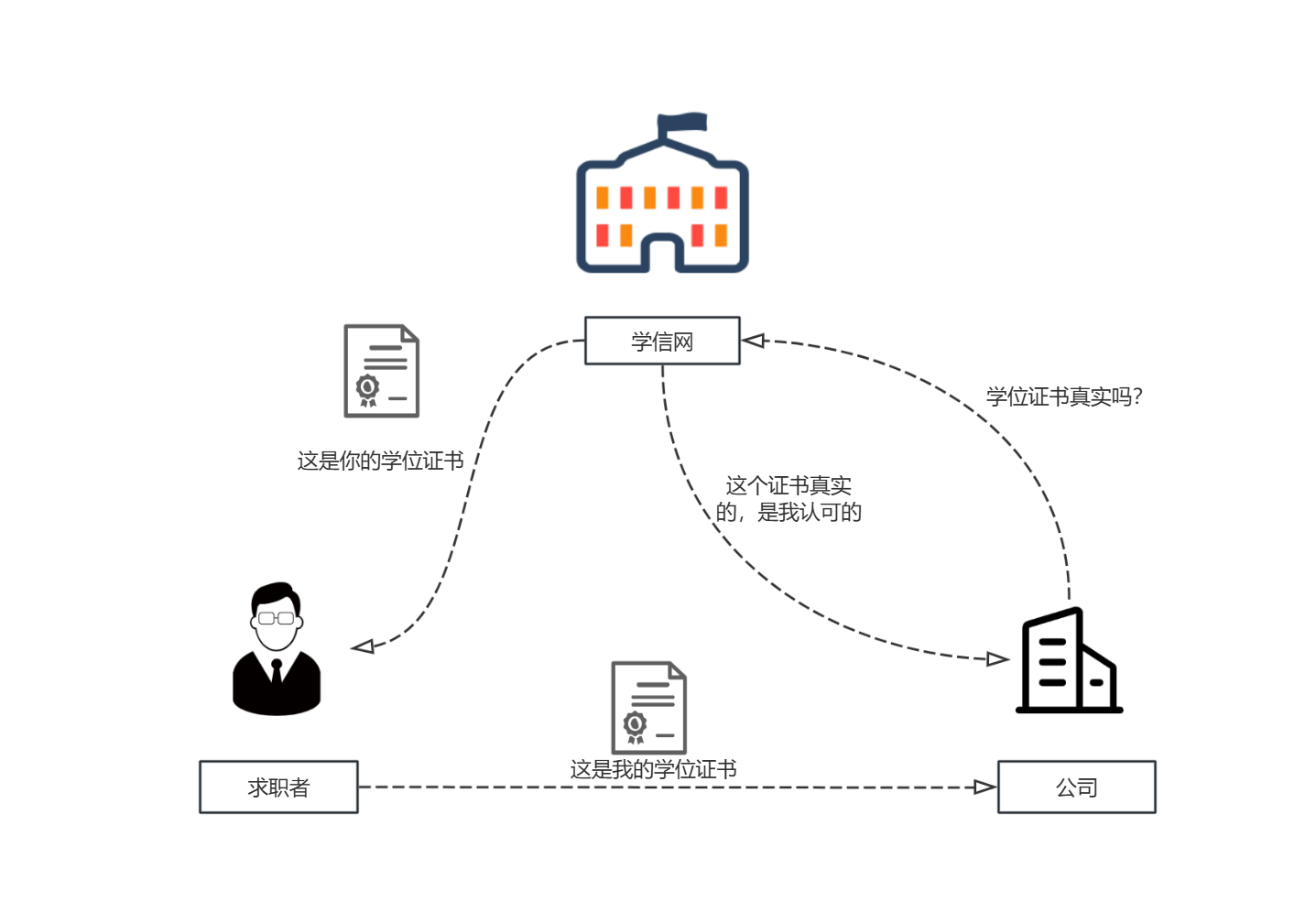
CA 认证机构就相当于具有公信力的组织,只要证明这个证书是 CA 颁发的即可证明证书的有效性
CA 是分层级的,层级结构为树状层级,主要分为根 CA、中间 CA 和终端实体
- 根 CA:根 CA 的证书是自签名 ,根CA的私钥必须严格离线保存,通常存储在物理隔绝的保险库中,绝不直接用于签发服务器证书
- 中间 CA:用于处理日常事务,其 CA 由根 CA 颁发,不同的 CA 被用于处理不同的事务
- 终端实体:不是CA,而是需要被认证的最终实体 ,如网站、邮箱用户、程序代码等;它们持有由中间CA签发的用户证书,这是我们日常访问网站时实际接触到的证书
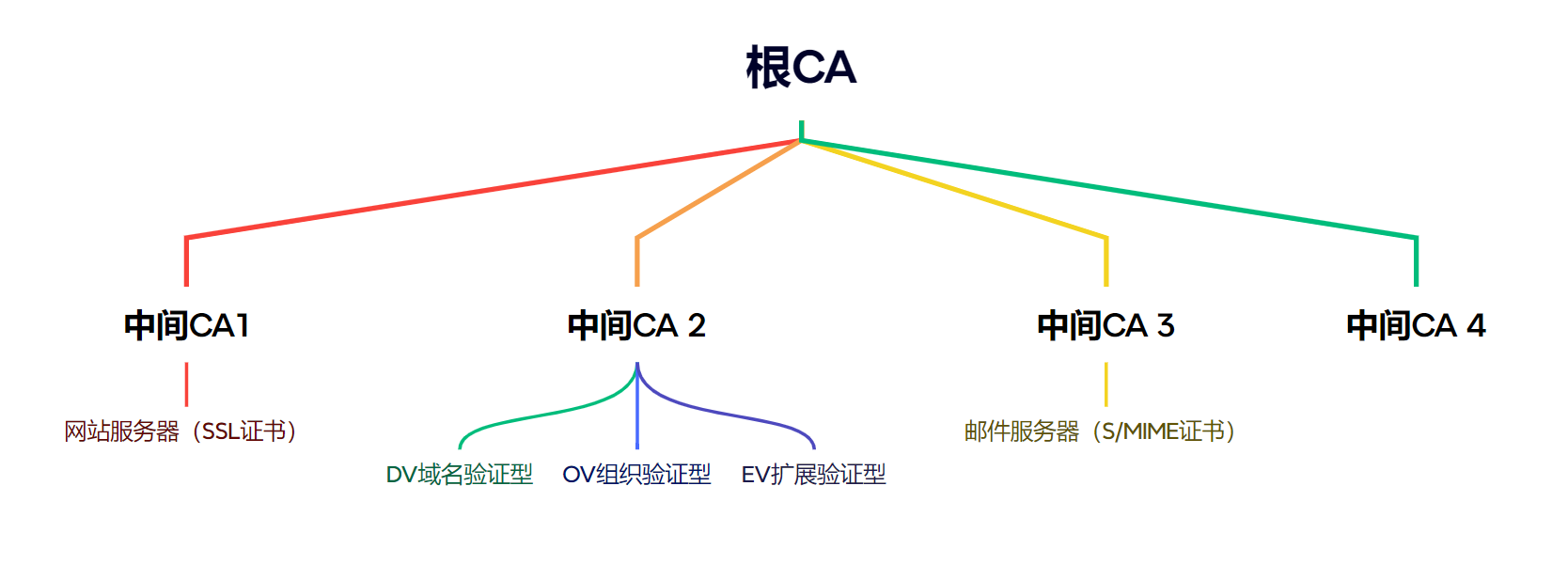
- DV 域名验证型:验证强度最低,证书签发时间几分钟~几小时,核心验证域名所有权,典型用途是个人网站、博客、测试环境
- OV 组织验证型:验证强度中等,证书颁发时间 1~3 个工作日,核心验证域名所有权+组织真实性和合法性,典型用途是公司的官网,点击证书可查看到公司的信息
- EV 扩展验证型:验证强度最高,证书颁发时间 3~7 个工作日,核心验证域名所有权+严格的组织真实性和合法性校验,典型用途是银行、金融、电商、大型企业等高信任需求网站
文件类型
CA 颁发的证书文件 类型如下:
|-----------|-----------------------------------------------|
| 文件类型 | 作用 |
| .crt .cer | crt 是 Linux 下的证书,cer 是 Windows 下的 |
| .der | 证书的二进制存储格式 |
| .key | 单独存放的 pem 格式的密钥,一般为私钥 |
| .pub | pem 格式的密钥,一般为公钥 |
| .csr | 证书签名请求,包含了证书的持有人信息:国家、域名、邮箱 ... |
| *.pem | 证书或密钥的 Base64 文本存储格式,可以单独存放证书或密钥,也可以同时存放证书或密钥 |
实战案例
Ubuntu 生成 OpenVPN 所需证书文件
生成证书的流程:
-
安装软件包easy-rsa
sudo apt install easy-rsa
-
设置 PKI
mkdir ~/easy-rsa
ln -s /usr/share/easy-rsa/* ~/easy-rsa/
chmod 700 ~/easy-rsa
cd ~/easy-rsa -
初始化和生成证书
./easyrsa init-pki
./easyrsa build-ca nopass # 创建 CA,需要输入名称
./easyrsa gen-req server nopass # 创建服务器证书请求
./easyrsa sign-req server server # 签署服务器证书
./easyrsa gen-dh # 生成 Diffie-Hellman 参数 -
创建客户端证书
./easyrsa gen-req client1 nopass
./easyrsa sign-req client client1
|-----------------------------------|---------------------------------------------------------------|-------------------------------------------------------------------------------------------------------|
| 命令 | 生成文件 | 作用 |
| ./easyrsa init-pki | 创建 pki 目录及其子目录(如 private, reqs, issued) | 初始化一个全新的、空的 PKI 目录结构,为后续生成证书和密钥准备好"文件柜" |
| ./easyrsa build-ca nopass | pki/ca.crt:CA根证书。 pki/private/ca.key:CA的私钥 | 创建根证书颁发机构 ca.crt 是整个信任体系的基石。需要分发给所有服务器和客户端,用于验证后续所有由其签发的证书 ca.key 是整个系统中最核心的机密,必须绝对保密。用于签署所有服务器和客户端证书 |
| ./easyrsa gen-req server nopass | pki/private/server.key 服务器私钥 pki/reqs/server.req 证书签名请求(中间文件) | 为服务器生成证书请求和对应的私钥,服务器用它来证明自己的身份,并协商加密密钥 |
| ./easyrsa sign-req server server | pki/issued/server.crt:服务器证书 | 使用CA的私钥签署服务器的证书请求,生成正式的服务器证书;它包含了服务器的公开信息(如名称)和公钥,并由CA的数字签名担保其真实性;服务端使用该文件向客户端证明自己的身份 |
| ./easyrsa gen-dh | pki/dh.pem:DH参数文件 | 确保即使服务器私钥未来被泄露,现在被截获的通信记录也无法被解密 |
| ./easyrsa gen-req client1 nopass | pki/private/client1.key:客户端私钥 | 为客户端 client1 生成私钥、证书请求 |
| ./easyrsa sign-req client client1 | pki/issued/client1.crt:客户端证书 | 客户端使用该文件向服务器证明自己的身份 |
操作实例
需要注意的是,串口输出这个提示信息后,Type the word 'yes' to continue, or any other input to abort.,需要输入 yes,否则会中断证书生成
wang@ubuntu:~/easy-rsa$ ./easyrsa init-pki


WARNING!!!

You are about to remove the EASYRSA_PKI at: /home/wang/easy-rsa/pki
and initialize a fresh PKI here.

Type the word 'yes' to continue, or any other input to abort.
  Confirm removal: yes

init-pki complete; you may now create a CA or requests.
Your newly created PKI dir is: /home/wang/easy-rsa/pki

wang@ubuntu:~/easy-rsa$ ./easyrsa build-ca nopass

Using SSL: openssl OpenSSL 1.1.1f  31 Mar 2020
Generating RSA private key, 2048 bit long modulus (2 primes)
......+++++
.....+++++
e is 65537 (0x010001)
Can't load /home/wang/easy-rsa/pki/.rnd into RNG
140016733984064:error:2406F079:random number generator:RAND_load_file:Cannot open file:../crypto/rand/randfile.c:98:Filename=/home/wang/easy-rsa/pki/.rnd
You are about to be asked to enter information that will be incorporated
into your certificate request.
What you are about to enter is what is called a Distinguished Name or a DN.
There are quite a few fields but you can leave some blank
For some fields there will be a default value,
If you enter '.', the field will be left blank.
-----
Common Name (eg: your user, host, or server name) [Easy-RSA CA]:

CA creation complete and you may now import and sign cert requests.
Your new CA certificate file for publishing is at:
/home/wang/easy-rsa/pki/ca.crt

wang@ubuntu:~/easy-rsa$ ./easyrsa gen-req server nopass

Using SSL: openssl OpenSSL 1.1.1f  31 Mar 2020
Generating a RSA private key
..................................................................................+++++
.................+++++
writing new private key to '/home/wang/easy-rsa/pki/private/server.key.voJLxWGzfk'
-----
You are about to be asked to enter information that will be incorporated
into your certificate request.
What you are about to enter is what is called a Distinguished Name or a DN.
There are quite a few fields but you can leave some blank
For some fields there will be a default value,
If you enter '.', the field will be left blank.
-----
Common Name (eg: your user, host, or server name) [server]:

Keypair and certificate request completed. Your files are:
req: /home/wang/easy-rsa/pki/reqs/server.req
key: /home/wang/easy-rsa/pki/private/server.key

wang@ubuntu:~/easy-rsa$ ./easyrsa sign-req server server

Using SSL: openssl OpenSSL 1.1.1f  31 Mar 2020


You are about to sign the following certificate.
Please check over the details shown below for accuracy. Note that this request
has not been cryptographically verified. Please be sure it came from a trusted
source or that you have verified the request checksum with the sender.

Request subject, to be signed as a server certificate for 1080 days:

subject=
    commonName                = server


Type the word 'yes' to continue, or any other input to abort.
  Confirm request details: yes
Using configuration from /home/wang/easy-rsa/pki/safessl-easyrsa.cnf
Check that the request matches the signature
Signature ok
The Subject's Distinguished Name is as follows
commonName            :ASN.1 12:'server'
Certificate is to be certified until Dec 10 07:34:52 2028 GMT (1080 days)

Write out database with 1 new entries
Data Base Updated

Certificate created at: /home/wang/easy-rsa/pki/issued/server.crt

wang@ubuntu:~/easy-rsa$ ./easyrsa gen-dh

Using SSL: openssl OpenSSL 1.1.1f  31 Mar 2020
Generating DH parameters, 2048 bit long safe prime, generator 2
This is going to take a long time
........+............................................................................................+.................................................................................................................................................................................................................++*++*++*++*

DH parameters of size 2048 created at /home/wang/easy-rsa/pki/dh.pem

wang@ubuntu:~/easy-rsa$
wang@ubuntu:~/easy-rsa$ ./easyrsa sign-req client client1

Using SSL: openssl OpenSSL 1.1.1f  31 Mar 2020


You are about to sign the following certificate.
Please check over the details shown below for accuracy. Note that this request
has not been cryptographically verified. Please be sure it came from a trusted
source or that you have verified the request checksum with the sender.

Request subject, to be signed as a client certificate for 1080 days:

subject=
    commonName                = client1


Type the word 'yes' to continue, or any other input to abort.
  Confirm request details:

Aborting without confirmation.
wang@ubuntu:~/easy-rsa$ ./easyrsa gen-req client1 nopass

Using SSL: openssl OpenSSL 1.1.1f  31 Mar 2020


WARNING!!!

An existing private key was found at /home/wang/easy-rsa/pki/private/client1.key
Continuing with key generation will replace this key.

Type the word 'yes' to continue, or any other input to abort.
  Confirm key overwrite: yes
Generating a RSA private key
............................................+++++
.....+++++
writing new private key to '/home/wang/easy-rsa/pki/private/client1.key.xP5TnbL2Lx'
-----
You are about to be asked to enter information that will be incorporated
into your certificate request.
What you are about to enter is what is called a Distinguished Name or a DN.
There are quite a few fields but you can leave some blank
For some fields there will be a default value,
If you enter '.', the field will be left blank.
-----
Common Name (eg: your user, host, or server name) [client1]:

Keypair and certificate request completed. Your files are:
req: /home/wang/easy-rsa/pki/reqs/client1.req
key: /home/wang/easy-rsa/pki/private/client1.key