提示:RK3576-Android15 谷歌原生相机Camera2 使用客户定制的USB相机,发现预览和成像方向错位,相机软件需要适配USB相机
文章目录
前言-需求
产品是大屏平板类型设备4K 32寸 随心屏,客户自己打样了USB相机,产品出厂用的就是USB相机设备
问题:
- USB相机安装上去发现 拍照预览有一个方向是倒置的
- 拍照的照片 成像都是倒置的,旋转了180度
- 视频预览都是倒置的,视频成像到是没什么问题。
所以要解决的问题有3个:拍照一个方向和视频横竖屏方向预览倒置了,拍照成像方向旋转了180度。
一、基础-参考资料-思路
参考资料
基础补充
相机整个模块确实太专业、复杂了。 无论从硬件外设、驱动【USBCamera免驱】、相机 都比较专业、覆盖面及广,针对思考中的问题 给出自己认为比较好相关博客,方便了解,助于梳理流程、提升认知。
对于上层应用或者Framework 系统应用开发者,只需要了解基本的架构、API、使用方法,当然这些也不简单的
下面提供部分资源,方便快速了解,充电:
架构图了解
MTKCamera2相机架构
Camera2架构
Android Camera架构简析
Camera相关专栏
Camera Framework 专栏
小驰私房菜系列
小驰私房菜MTK系列
小驰Camera 开发系列
Camera 相机开发
展讯平台 Camera
官方文档:谷歌官方 API 描述
零散知识了解
MTK 相机UI介绍
Camera2 相机认知
Camera2学习笔记
camera2关于拍照预览方向旋转90度和拍照图片镜像功能实现
Camera2 预览集成、简单拍照:熟悉预览步骤流程比较有用
Camera镜像上下左右颠倒问题的解决办法
MTK相机成像质量差
Camera应用分析
部分相机源码参考,学习API使用,梳理流程,偏应用层
极客相机 Camera2 API
Camera2 API详解
极客相机源码
Camera2 相机Demo
Camera2 专业相机Demo
拍照、预览、录像Demo
使用Camera2 拍照
实现需求思路
其实对于相机Camera2 的修改,难点在于:Camera2 源码量或者说Android体系下AOSP中各个模块的代码量本身太大,每个模块都有自己的架构,不同Android版本架构思路其实不一样的 并不能直接复用。 所以针对性看大量的源码存在一定困难、理解起来更困难、调试起来更是天方夜谭,只能编译调试。
但是,如果就预览方向和相机拍照成像方向,根据经验思路如下:基于这个思路极大方便针对性查看源码
| 调整场景 | 核心方法/API | 关键考虑因素 | 主要实现思路 |
|---|---|---|---|
| 预览方向 | TextureView.setTransform(matrix) | 设备物理方向、传感器方向、预览显示 | 计算变换矩阵并应用到显示控件 |
| 拍照方向 | CaptureRequest.JPEG_ORIENTATION | 设备物理方向、传感器方向、照片存储 | 设置JPEG图像写入时的旋转元数据 |
二、修改文件
java
packages/apps/Camera2/src/com/android/camera/TextureViewHelper.java
packages/apps/Camera2/src/com/android/camera/util/CameraUtil.java这里面一个文件是修改预览方向,TextureViewHelper 见名知意;一个是设置成像方向旋转。
三、实现方案
修改预览方向-TextureViewHelper
第一步:导包
java
// modify by fangchen start
import android.content.res.Configuration;
import com.android.camera.app.CameraServices;
import com.android.camera.app.CameraServicesImpl;
import com.android.camera.settings.SettingsManager;
import com.android.camera.settings.Keys;
// modify by fangchen end
第二步:拍照预览情况下判断横竖屏方向针对某一个方向进行预览旋转,实际情况就一个方向预览倒置。 方法 updateTransform(Matrix matrix) 修改如下:
java
    public void updateTransform(Matrix matrix) {

		  android.util.Log.d(TAGT,"=====updateTransform===111==" );

        RectF previewRect = new RectF(0, 0, mWidth, mHeight);
        matrix.mapRect(previewRect);

        float previewWidth = previewRect.width();
        float previewHeight = previewRect.height();
        if (previewHeight == 0 || previewWidth == 0) {
            Log.e(TAG, "Invalid preview size: " + previewWidth + " x " + previewHeight);
            return;
        }
        float aspectRatio = previewWidth / previewHeight;
        aspectRatio = aspectRatio < 1 ? 1 / aspectRatio : aspectRatio;
        if (aspectRatio != mAspectRatio) {
            setAspectRatio(aspectRatio);
        }

        RectF previewAreaBasedOnAspectRatio = mCaptureLayoutHelper.getPreviewRect();
        Matrix addtionalTransform = new Matrix();
        addtionalTransform.setRectToRect(previewRect, previewAreaBasedOnAspectRatio,
                Matrix.ScaleToFit.CENTER);
        matrix.postConcat(addtionalTransform);

		 // modify by fangchen start
		 if(isPortraitByConfiguration()){
			    android.util.Log.d(TAGT,"=====isPortraitByConfiguration===  ==" );
                matrix.postRotate(180, previewWidth / 2f, previewHeight / 2f);
          }
		 // modify by fangchen end

        mPreview.setTransform(matrix);
        updatePreviewArea(matrix);

    }


	 // modify by fangchen start
	  public  boolean isPortraitByConfiguration( ) {
        int orientation =  mAppController.getAndroidContext().getResources().getConfiguration().orientation;
        return orientation == Configuration.ORIENTATION_PORTRAIT;
    }
// modify by fangchen end 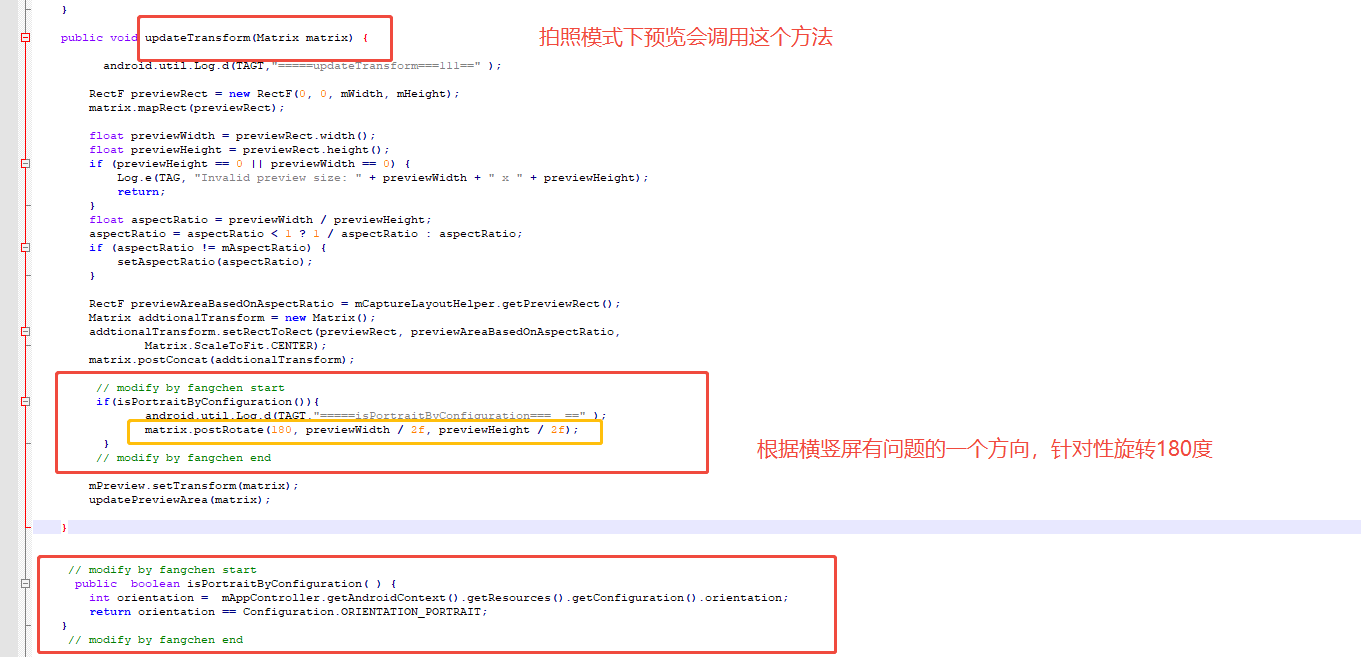
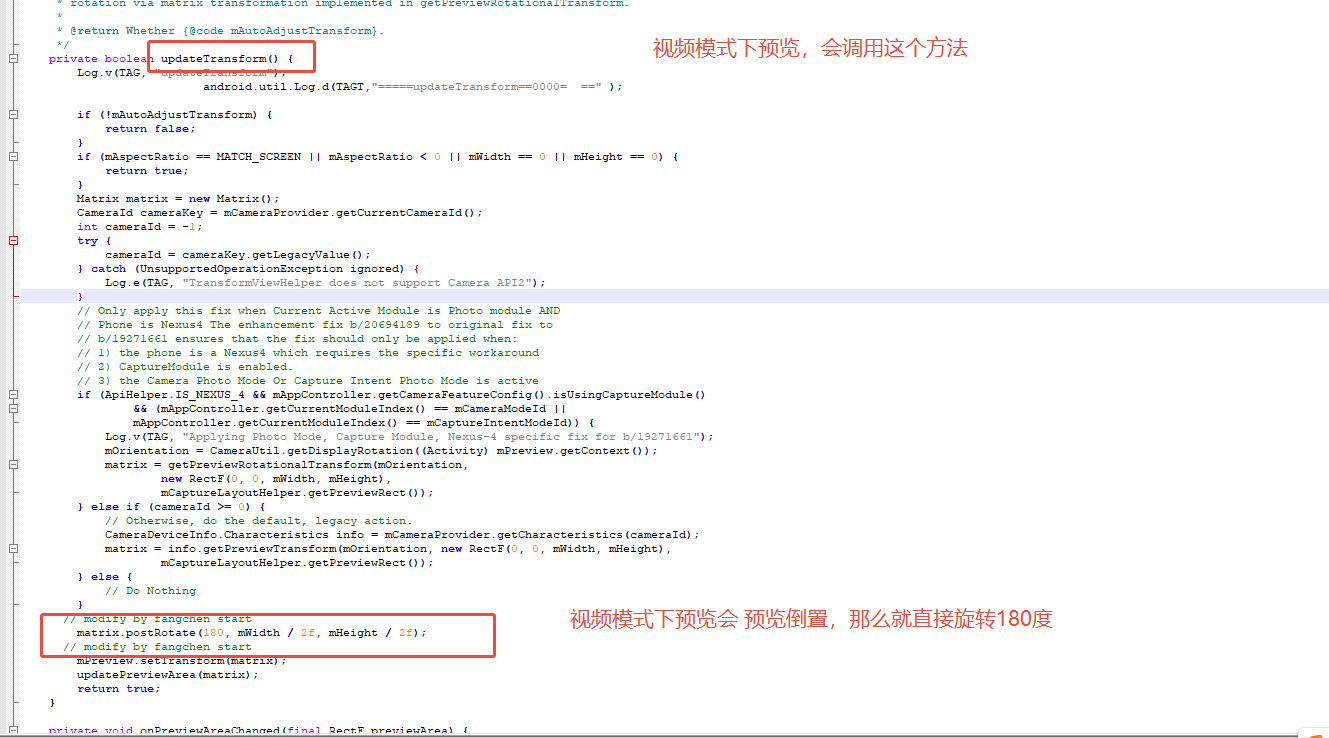
第三步:视频预览情况下进行预览旋转,实际情况是视频模式下预览都倒置,那么就直接旋转180度。 方法 updateTransform() 修改如下:
java
 private boolean updateTransform() {
        Log.v(TAG, "updateTransform");
		         		  android.util.Log.d(TAGT,"=====updateTransform==0000=  ==" );

        if (!mAutoAdjustTransform) {
            return false;
        }
        if (mAspectRatio == MATCH_SCREEN || mAspectRatio < 0 || mWidth == 0 || mHeight == 0) {
            return true;
        }
        Matrix matrix = new Matrix();
        CameraId cameraKey = mCameraProvider.getCurrentCameraId();
        int cameraId = -1;
        try {
            cameraId = cameraKey.getLegacyValue();
        } catch (UnsupportedOperationException ignored) {
            Log.e(TAG, "TransformViewHelper does not support Camera API2");
        }
        // Only apply this fix when Current Active Module is Photo module AND
        // Phone is Nexus4 The enhancement fix b/20694189 to original fix to
        // b/19271661 ensures that the fix should only be applied when:
        // 1) the phone is a Nexus4 which requires the specific workaround
        // 2) CaptureModule is enabled.
        // 3) the Camera Photo Mode Or Capture Intent Photo Mode is active
        if (ApiHelper.IS_NEXUS_4 && mAppController.getCameraFeatureConfig().isUsingCaptureModule()
                && (mAppController.getCurrentModuleIndex() == mCameraModeId ||
                mAppController.getCurrentModuleIndex() == mCaptureIntentModeId)) {
            Log.v(TAG, "Applying Photo Mode, Capture Module, Nexus-4 specific fix for b/19271661");
            mOrientation = CameraUtil.getDisplayRotation((Activity) mPreview.getContext());
            matrix = getPreviewRotationalTransform(mOrientation,
                    new RectF(0, 0, mWidth, mHeight),
                    mCaptureLayoutHelper.getPreviewRect());
        } else if (cameraId >= 0) {
            // Otherwise, do the default, legacy action.
            CameraDeviceInfo.Characteristics info = mCameraProvider.getCharacteristics(cameraId);
            matrix = info.getPreviewTransform(mOrientation, new RectF(0, 0, mWidth, mHeight),
                    mCaptureLayoutHelper.getPreviewRect());
        } else {
            // Do Nothing
        }
	  // modify by fangchen start
        matrix.postRotate(180, mWidth / 2f, mHeight / 2f);
      // modify by fangchen start
        mPreview.setTransform(matrix);
        updatePreviewArea(matrix);
        return true;
    }
修改成像方向-CameraUtil
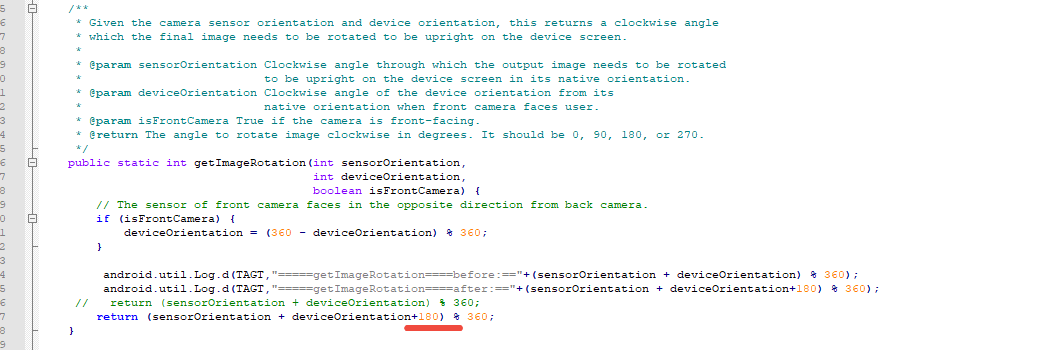
如上修改思路,对于拍照成像方向,找一下:CaptureRequest.JPEG_ORIENTATION 相关代码,就是Camera2 机制里面,拍照时候去设置一个参数。 当然还有一种方案就是存储的时候 进行旋转【这里不处理,尽量不要在上层处理 , 直接处理成像流】
在 getImageRotation 方法中添加方向多180度即可,如下:
java
/**
     * Given the camera sensor orientation and device orientation, this returns a clockwise angle
     * which the final image needs to be rotated to be upright on the device screen.
     *
     * @param sensorOrientation Clockwise angle through which the output image needs to be rotated
     *                          to be upright on the device screen in its native orientation.
     * @param deviceOrientation Clockwise angle of the device orientation from its
     *                          native orientation when front camera faces user.
     * @param isFrontCamera True if the camera is front-facing.
     * @return The angle to rotate image clockwise in degrees. It should be 0, 90, 180, or 270.
     */
    public static int getImageRotation(int sensorOrientation,
                                       int deviceOrientation,
                                       boolean isFrontCamera) {
        // The sensor of front camera faces in the opposite direction from back camera.
        if (isFrontCamera) {
            deviceOrientation = (360 - deviceOrientation) % 360;
        }

		 android.util.Log.d(TAGT,"=====getImageRotation====before:=="+(sensorOrientation + deviceOrientation) % 360);
		 android.util.Log.d(TAGT,"=====getImageRotation====after:=="+(sensorOrientation + deviceOrientation+180) % 360);
     //   return (sensorOrientation + deviceOrientation) % 360;
        return (sensorOrientation + deviceOrientation+180) % 360;
    }
四、源码解读-思路
困难点-日志工具
一方面代码量大、不同Android版本Camera2 架构还是有少许变化的;另外一方面 日志,AOSP 里面每个模块都有日志工具。目的是有日志打印,所以日志工具、模式 要搞清楚,但是很多时候发现日志就是不打印 所以最好的方案就是把日志打印打出来,搞清楚 日志架构;实在不行 那么就自己用自己日志吧,方便调试。
如下日志打印:android.util.Log.d(TAGT,"=====getImageRotation====before:=="+(sensorOrientation + deviceOrientation) % 360);
预览方向调试
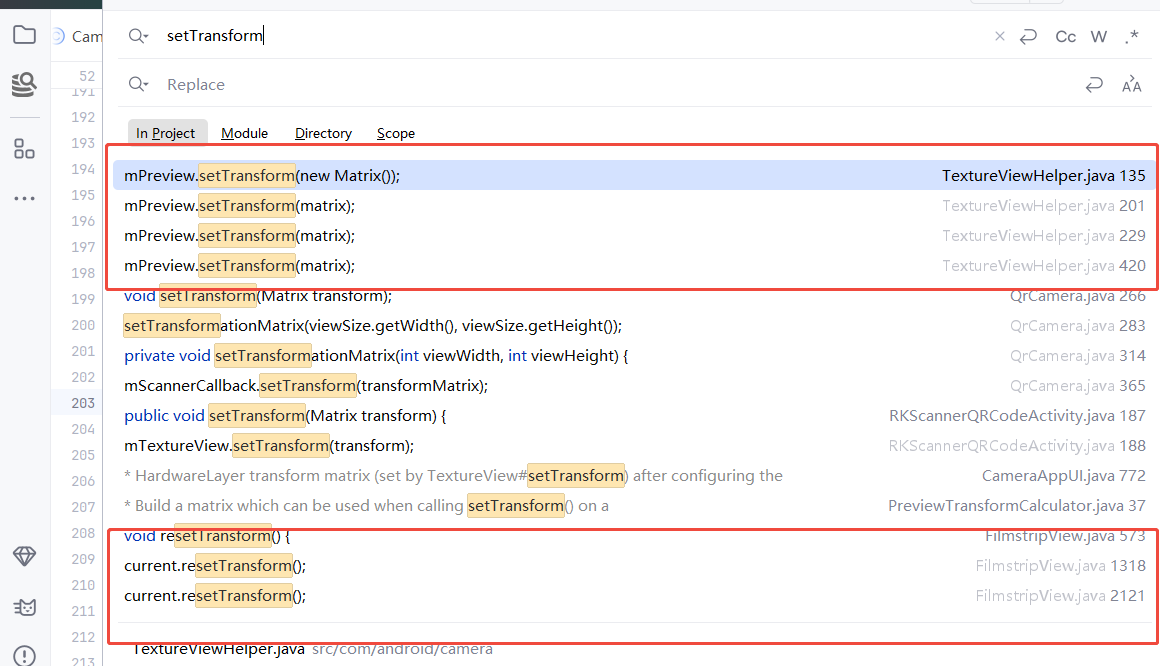
预览方向以前的经验:TextureView.setTransform(matrix)
在源码里面就直接搜索到了,如下:所以大概率就是要修改 TextureViewHelper
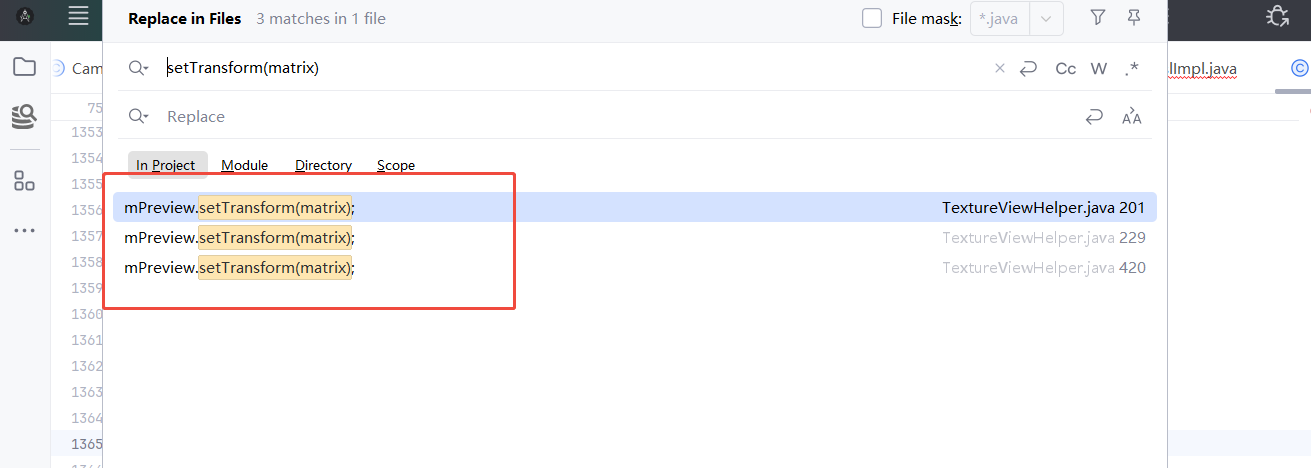
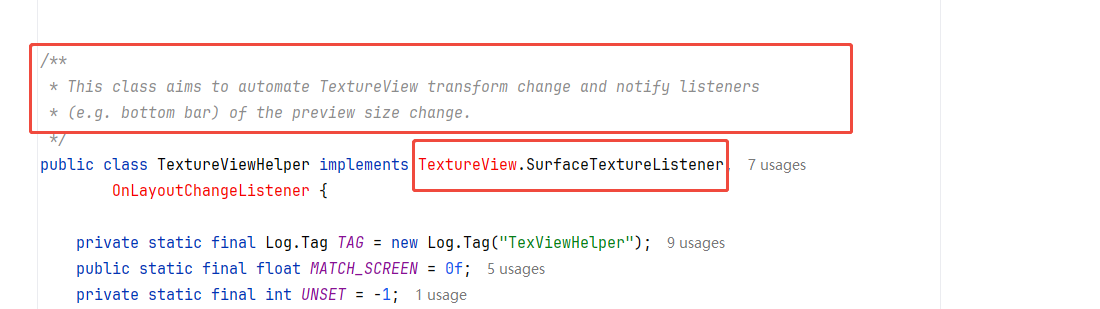
看类注释和这个类实现的类TextureView.SurfaceTextureListener 就大概率猜到这个类就是需要修改的类了,剩下的就是看日志 、分析流程的事情了。
拍照成像调试
根据经验和基础:CaptureRequest.JPEG_ORIENTATION,直接搜索相关代码
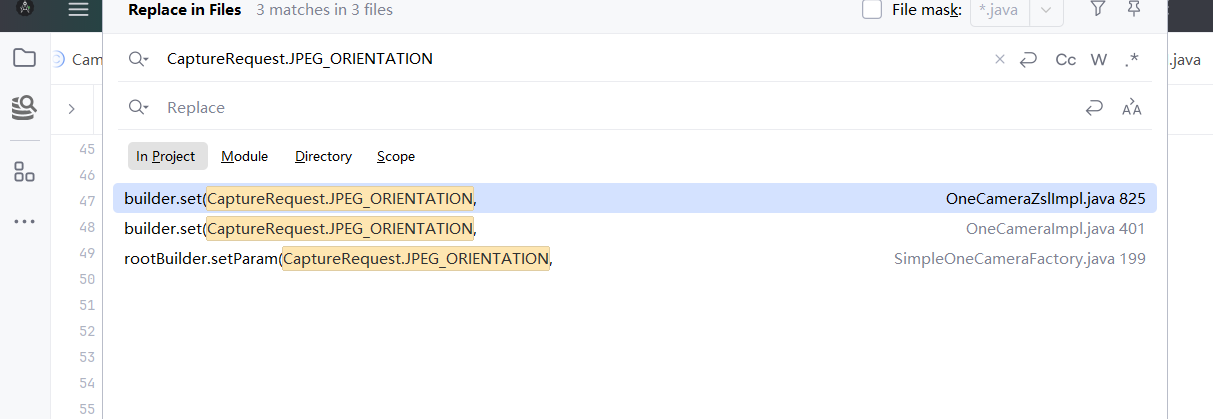
代码如下:
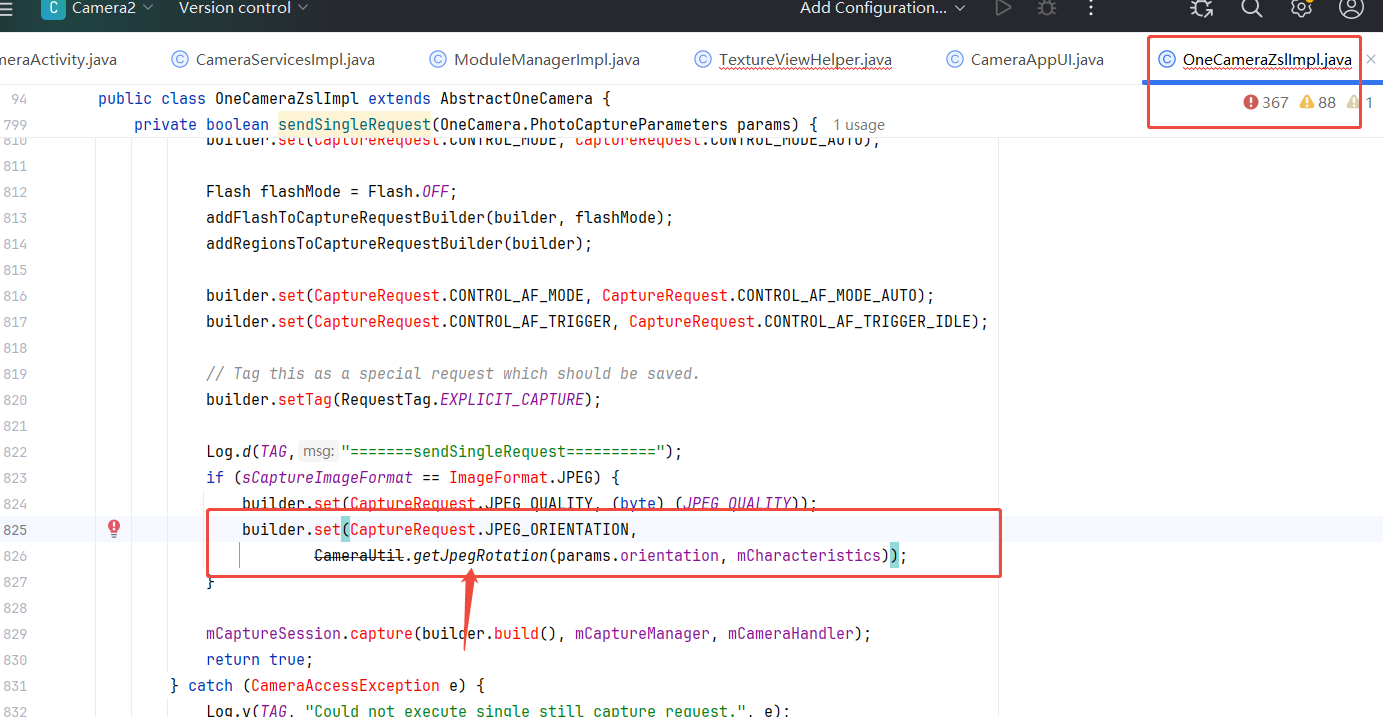
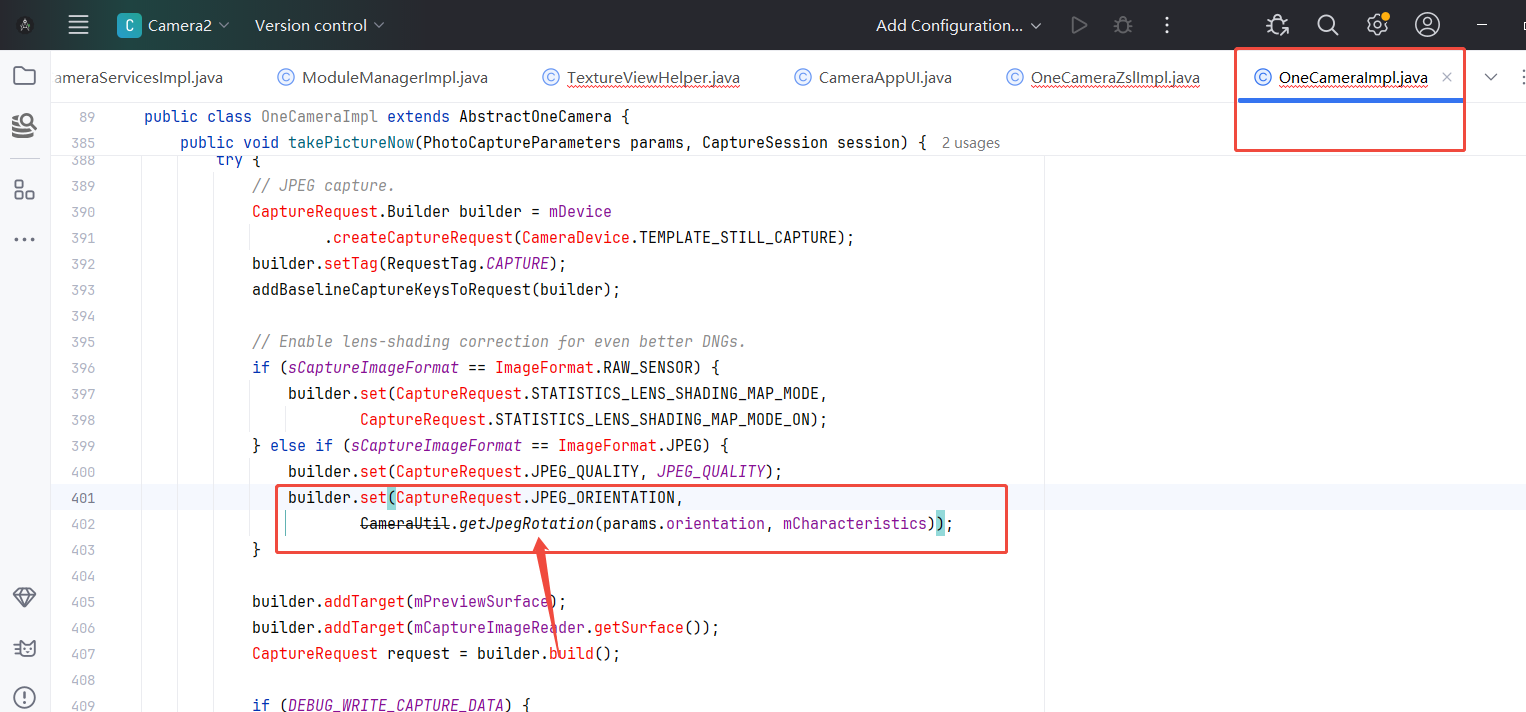
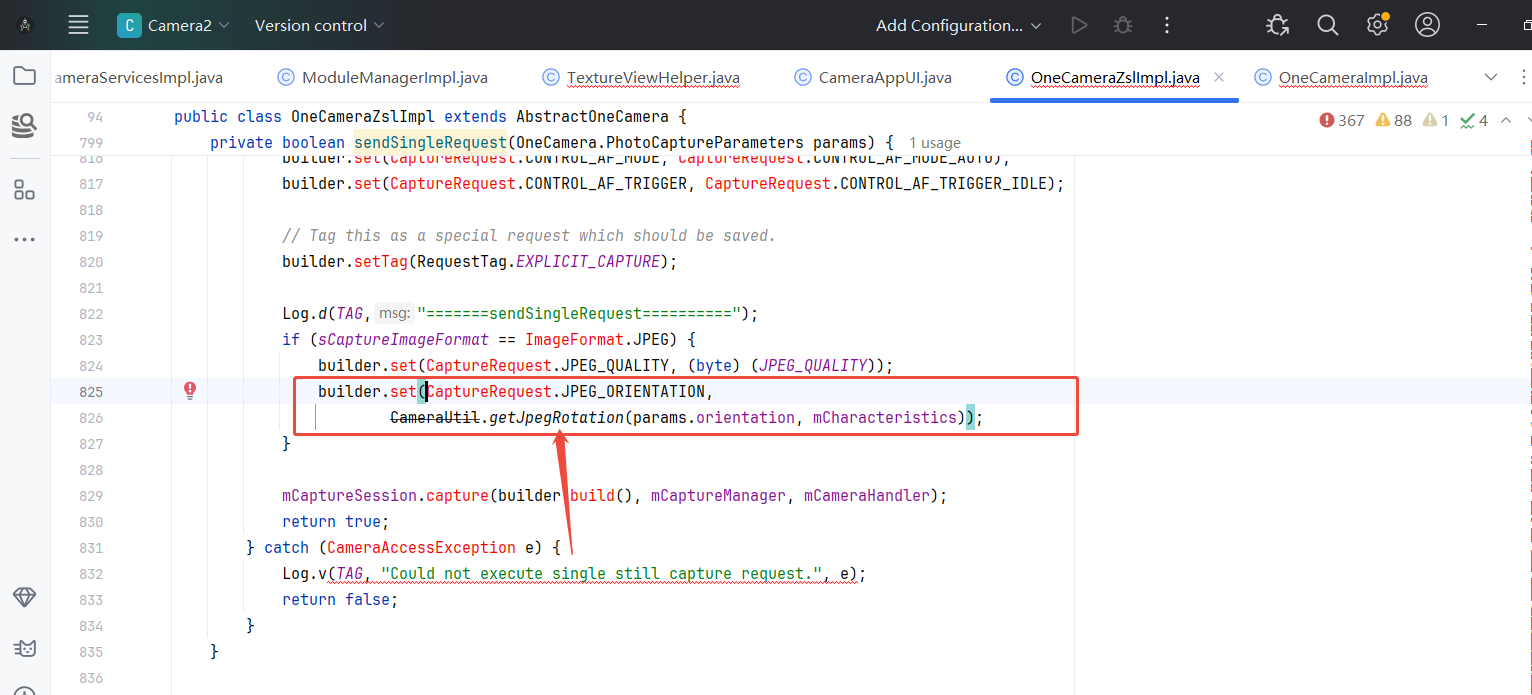
所以都指向了一个类的一个方法 CameraUtil.getJpegRotation ->getImageRotation 修改即可
java
  /**
     * Given the device orientation and Camera2 characteristics, this returns
     * the required JPEG rotation for this camera.
     *
     * @param deviceOrientationDegrees the clockwise angle of the device orientation from its
     *                                 natural orientation in degrees.
     * @return The angle to rotate image clockwise in degrees. It should be 0, 90, 180, or 270.
     */
    public static int getJpegRotation(int deviceOrientationDegrees,
                                      CameraCharacteristics characteristics) {
        if (deviceOrientationDegrees == OrientationEventListener.ORIENTATION_UNKNOWN) {
            return 0;
        }
        boolean isFrontCamera = characteristics.get(CameraCharacteristics.LENS_FACING) !=
                CameraMetadata.LENS_FACING_BACK;
        int sensorOrientation = characteristics.get(CameraCharacteristics.SENSOR_ORIENTATION);
        return getImageRotation(sensorOrientation, deviceOrientationDegrees, isFrontCamera);
    }


  /**
     * Given the camera sensor orientation and device orientation, this returns a clockwise angle
     * which the final image needs to be rotated to be upright on the device screen.
     *
     * @param sensorOrientation Clockwise angle through which the output image needs to be rotated
     *                          to be upright on the device screen in its native orientation.
     * @param deviceOrientation Clockwise angle of the device orientation from its
     *                          native orientation when front camera faces user.
     * @param isFrontCamera True if the camera is front-facing.
     * @return The angle to rotate image clockwise in degrees. It should be 0, 90, 180, or 270.
     */
    public static int getImageRotation(int sensorOrientation,
                                       int deviceOrientation,
                                       boolean isFrontCamera) {
        // The sensor of front camera faces in the opposite direction from back camera.
        if (isFrontCamera) {
            deviceOrientation = (360 - deviceOrientation) % 360;
        }
        return (sensorOrientation + deviceOrientation) % 360;
    }
总结
- 对于有时间和精力的朋友,强烈建议多看看基础知识储备基本技能知识点
- 对于Camera2 修改,建议多总结,代码量大且架构变化多,不同平台和不同Android版本,导致代码变化大,建议多针对性看并且讲究方法
- 日志很重要,看日志针对性看流程
- 根据经验,针对性得看需求知识点。