1. uniapp基于picker选择器实现年月日时分秒
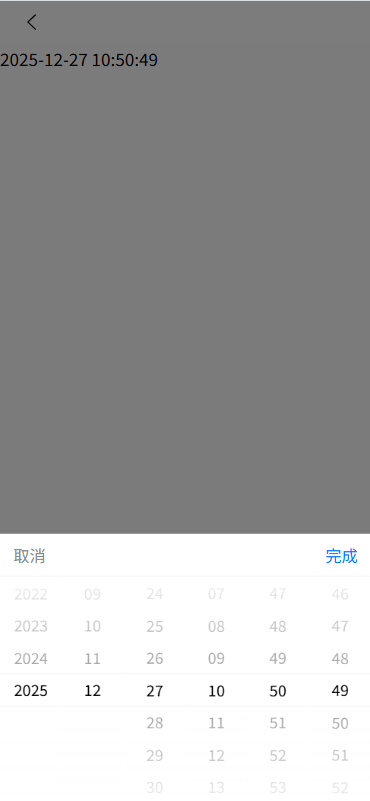
1.1. 需求
通过时间筛选的方式,查看对应时间短的数据。为了更精准的比对,因此需要时间确切到秒的筛选。
1.2. 涉及技术点
(1)uniapp类型为mode = multiSelector的多列选择器picker。
(2)ios时间不能用'-'解析成时间戳。
(3)javascript Date对象的使用。
1.3. 代码实现
在ios上'-'没法被解析为时间戳的解决方案,使用正则将'-'替换为'/'。安卓,pc端,ios端均可适配。
(1)工具类dateTimeHelper.js
javascript
/**
 * 自定义多列时间选择器
 */
function withData(param) {
	return param < 10 ? '0' + param : '' + param;
}
const getLoopArray = (startNum, endNum) => {
	let start = startNum || 0;
	let end = endNum || 1;
	let array = [];
	for (let i = start; i <= end; i++) {
		array.push(withData(i));
	}
	return array;
}
const getMonthDay = (year, month) => {
	let flag = year % 400 === 0
		|| (year % 4 === 0 && year % 100 !== 0), array = null;
	switch (month) {
		case '01':
		case '03':
		case '05':
		case '07':
		case '08':
		case '10':
		case '12':
			array = getLoopArray(1, 31)
			break;
		case '04':
		case '06':
		case '09':
		case '11':
			array = getLoopArray(1, 30)
			break;
		case '02':
			array = flag ? getLoopArray(1, 29) : getLoopArray(1, 28)
			break;
		default:
			array = '月份格式不正确,请重新输入!'
	}
	return array;
}


function getNewDateArry() {
	// 当前时间的处理
	let newDate = new Date();
	let year = withData(newDate.getFullYear()),
		mont = withData(newDate.getMonth() + 1),
		date = withData(newDate.getDate()),
		hour = withData(newDate.getHours()),
		minu = withData(newDate.getMinutes()),
		seco = withData(newDate.getSeconds());

	return [year, mont, date, hour, minu, seco];
}

function dateTimePicker(startYear, endYear, date) {
	// 返回默认显示的数组和联动数组的声明
	let dateTime = [], dateTimeArray = [[], [], [], [], [], []];
	let start = startYear || 2000;
	let end = endYear || 2100;
	// 默认开始显示数据
	let defaultDate = date ? [...date.split(' ')[0].split('-'), ...date.split(' ')[1].split(':')] : getNewDateArry();
	// 处理联动列表数据
	/*年月日 时分秒*/
	dateTimeArray[0] = getLoopArray(start, end);
	dateTimeArray[1] = getLoopArray(1, 12);
	dateTimeArray[2] = getMonthDay(defaultDate[0], defaultDate[1]);
	dateTimeArray[3] = getLoopArray(0, 23);
	dateTimeArray[4] = getLoopArray(0, 59);
	dateTimeArray[5] = getLoopArray(0, 59);

	dateTimeArray.forEach((current, index) => {
		dateTime.push(current.indexOf(defaultDate[index]));
	});
	return {
		dateTimeArray: dateTimeArray,
		dateTime: dateTime
	}
}

export default {
	dateTimePicker: dateTimePicker,
	getMonthDay: getMonthDay
}
使用
javascript
<template>
  <view class="choose-value-box row column-me">
    <picker mode="multiSelector"
            @change="changeDateTime"
            @columnchange="changeDateTimeColumn"
            :range="dateTimeObj.dateTimeArray"
            :value="dateTimeObj.dateTime">
      <view class='lableBox'>
        <view class="choose-value">{{ timeStr }}</view>
      </view>
    </picker>
  </view>
</template>

<script>
import dateTimeHelper from "/helper/dateTimeHelper";

export default {
  data() {
    return {
      dateTimeObj: {
        dateTime: null,
        dateTimeArray: null,
        startYear: 2000,
      },
      timeStr: '请选择'
    }
  },

  onLoad() {
    this.initDateTime()
  },

  methods: {
    initDateTime() {
      let that = this;
      let date = new Date();
      let endYear = date.getFullYear();
      // 获取完整的年月日 时分秒,以及默认显示的数组
      let obj = dateTimeHelper.dateTimePicker(
          that.dateTimeObj.startYear, endYear);
      // 精确到分的处理,将数组的秒去掉
      // let lastArray = obj.dateTimeArray.pop();
      // let lastTime = obj.dateTime.pop();
      that.dateTimeObj.dateTimeArray = obj.dateTimeArray
      that.dateTimeObj.dateTime = obj.dateTime
    },

    changeDateTime(e) {
      let that = this;
      that.dateTimeObj.dateTime = e.detail.value;
      let dateTimeArray = that.dateTimeObj.dateTimeArray
      let dateTime = that.dateTimeObj.dateTime
      this.timeStr = dateTimeArray[0][dateTime[0]]
          + '-' + dateTimeArray[1][dateTime[1]]
          + '-' + dateTimeArray[2][dateTime[2]]
          + ' ' + dateTimeArray[3][dateTime[3]]
          + ":" + dateTimeArray[4][dateTime[4]]
          + ":" + dateTimeArray[5][dateTime[5]];
    },

    /*年,月切换时重新更新计算*/
    changeDateTimeColumn(e) {
      let that = this;
      let {column, value} = e.detail;
      if (column === 0 || column === 1) {
        //直接修改数组下标视图不更新,用深拷贝之后替换数组
        let dateTime = JSON.parse(JSON.stringify(
            that.dateTimeObj.dateTime));
        let dateTimeArray = JSON.parse(JSON.stringify(
            that.dateTimeObj.dateTimeArray));
        dateTime[column] = value;
        dateTimeArray[2] = dateTimeHelper.getMonthDay(
            dateTimeArray[0][dateTime[0]],
            dateTimeArray[1][dateTime[1]]);
        that.dateTimeObj.dateTime = dateTime;
        that.dateTimeObj.dateTimeArray = dateTimeArray;
      }
    },
  }
}
</script>

<style>
.choose-value{
  color: black;
  font-size: 18px;
}
</style>