基本概念
分支推送策略
| 分支类型 | 是否需推送远程 | 原因 |
|---|---|---|
master |
✅ 必须 | 主分支需保持全局同步 |
dev |
✅ 必须 | 团队协作开发的基础分支 |
bug |
❌ 通常不需要 | 本地修复使用,除非需要审查 |
feature |
⚠️ 按需 | 仅当多人协作开发该功能时需要推送 |
原则
- 先拉后推 ------ 永远在
git pull获取最新代码后再执行git push - 分支可见性 ------ 本地新建分支不推送则对他人不可见
- 命名一致性 ------ 建议本地分支名与远程分支名保持一致
查看远程库信息
-
查看远程库基本信息
sh$ git remote origin -
查看远程库详细信息
sh$ git remote -v origin git@github.com:aaa/bbb.git (fetch) origin git@github.com:aaa/bbb.git (push)
注意 :远程仓库默认名称
origin
首次接入项目
相关指令
git clone------ 克隆远程仓库到本地git checkout -b------ 从远程分支创建本地分支并建立追踪
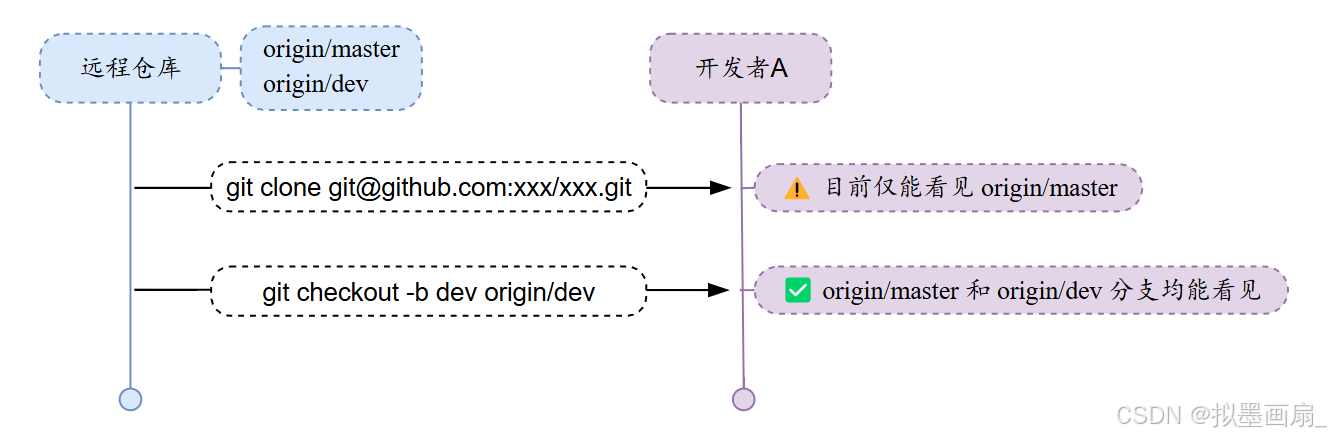
场景:开发者首次接入远程仓库 aaa/bbb.git 进行开发
-
克隆远程仓库到本地 ------ 仅能看到
origin/master分支sh$ git clone git@github.com:aaa/bbb.git Cloning into 'aaa'... remote: Counting objects: 40, done. remote: Compressing objects: 100% (21/21), done. remote: Total 40 (delta 14), reused 40 (delta 14), pack-reused 0 Receiving objects: 100% (40/40), done. Resolving deltas: 100% (14/14), done.!tip
注意 :克隆时自动建立本地
master与远程origin/master的关联 -
关联远程分支
dev到本地,建立追踪sh$ git checkout -b dev origin/devsh# 关联成功时的响应: Branch 'dev' set up to track remote branch 'dev' from 'origin'. # 分支追踪关系建立 Switched to a new branch 'dev' # 成功创建并切换到新分支 devsh# 关联失败时的响应: fatal: 'origin/dev' is not a commit and a branch 'dev' cannot be created from it # 检查远程是否有该分支
推送文件和冲突解决
相关指令
git push------ 推送本地分支到远程git pull------ 拉取远程分支到本地git branch --set-upstream-to------ 指定本地与远程分支的关联
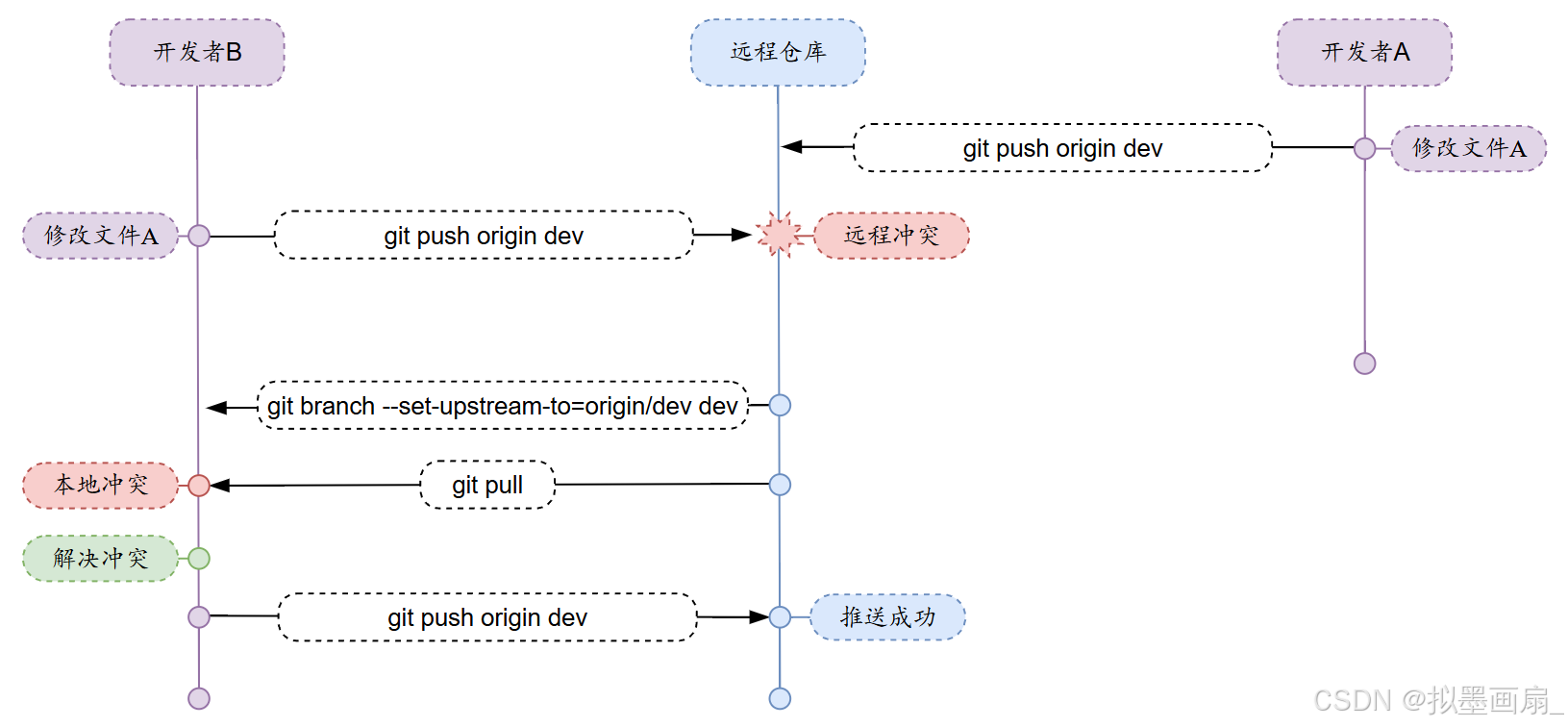
场景:开发者 A 推送文件 A 到远程,此时开发者 B 再推送自己修改的文件 A 时发生冲突
-
开发者
A推送文件A到远程dev------ 推送成功sh$ git push origin devshCounting objects: 5, done. # 统计需要推送的Git对象数量 Delta compression using up to 8 threads. # 使用8线程进行差异压缩 Compressing objects: 100% (3/3), done. # 成功压缩3个对象 Writing objects: 100% (5/5), 2.34 KiB | 2.34 MiB/s, done. # 写入5个对象,速度2.34MB/s Total 5 (delta 1), reused 0 (delta 0) # 总计5对象,1个差异,无复用对象 To github.com:user/repo.git # 目标远程仓库地址 1a2b3c4..6d7e8f9 dev -> dev # 成功将本地dev分支推送到远程dev分支 -
开发者
B推送文件A到远程dev------ 推送失败,发生冲突sh$ git push origin devshTo github.com:aaa/bbb.git ! [rejected] dev -> dev (non-fast-forward) # 推送拒绝:dev无法快进合并(远程有本地没有的新提交) error: failed to push some refs to 'git@github.com:aaa/bbb.git' hint: Updates were rejected because the tip of your current branch is behind hint: its remote counterpart. Integrate the remote changes (e.g. hint: 'git pull ...') before pushing again. hint: See the 'Note about fast-forwards' in 'git push --help' for details. -
开发者
B尝试拉取远程分支dev------ 拉取失败(未建立分支dev的连接)sh$ git pullshThere is no tracking information for the current branch. # 当前分支未关联到任何远程分支 Please specify which branch you want to merge with. # 需明确指定要拉取的远程分支 See git-pull(1) for details. git pull <remote> <branch> # 临时指定:显式指定远程分支 If you wish to set tracking information for this branch you can do so with: # 如果想建立长期关联 git branch --set-upstream-to=origin/<branch> dev # 长期关联:将当前本地分支关联到指定的远程分支 -
开发者
B指定本地与远程dev的连接sh$ git branch --set-upstream-to=origin/dev devshBranch 'dev' set up to track remote branch 'dev' from 'origin'. -
开发者
B再次拉取远程分支dev------ 拉取成功,但本地存在冲突需要解决sh$ git pullshAuto-merging A.txt # Git尝试自动合并A.txt文件 CONFLICT (add/add): Merge conflict in A.txt # 冲突类型:双方都新增了该文件(且内容不同) Automatic merge failed; fix conflicts and then commit the result. # 自动合并失败,需手动解决冲突后提交 -
开发者
B在本地解决冲突 -
开发者
B再次推送文件 ------ 推送成功sh$ git push origin devshCounting objects: 6, done. Delta compression using up to 4 threads. Compressing objects: 100% (4/4), done. Writing objects: 100% (6/6), 621 bytes | 621.00 KiB/s, done. Total 6 (delta 0), reused 0 (delta 0) To github.com:aaa/bbb.git 7a5e5dd..57c53ab dev -> dev
推送原则
- 先拉后推 ------ 永远先拉取(
git pull获取最新代码)再推送(git push)