#
前言
拖拽排序是一种直观的交互方式,用户可以通过长按并拖动来调整列表项的顺序。在笔记应用中,拖拽排序可以用于调整笔记的显示顺序、任务清单的优先级、文件夹的排列等场景。一个流畅的拖拽排序功能需要提供清晰的视觉反馈和平滑的动画效果。本文将详细介绍如何在Flutter和OpenHarmony平台上实现拖拽排序功能。
Flutter ReorderableListView
Flutter提供了ReorderableListView组件实现拖拽排序。
dart
class ReorderableNotesPage extends StatefulWidget {
  @override
  _ReorderableNotesPageState createState() => _ReorderableNotesPageState();
}

class _ReorderableNotesPageState extends State<ReorderableNotesPage> {
  List<Note> _notes = [
    Note(id: '1', title: '笔记一'),
    Note(id: '2', title: '笔记二'),
    Note(id: '3', title: '笔记三'),
    Note(id: '4', title: '笔记四'),
  ];

  @override
  Widget build(BuildContext context) {
    return ReorderableListView.builder(
      itemCount: _notes.length,
      itemBuilder: (context, index) {
        return ListTile(
          key: ValueKey(_notes[index].id),
          title: Text(_notes[index].title),
          trailing: ReorderableDragStartListener(
            index: index,
            child: Icon(Icons.drag_handle),
          ),
        );
      },
      onReorder: (oldIndex, newIndex) {
        setState(() {
          if (newIndex > oldIndex) newIndex--;
          final item = _notes.removeAt(oldIndex);
          _notes.insert(newIndex, item);
        });
      },
    );
  }
}
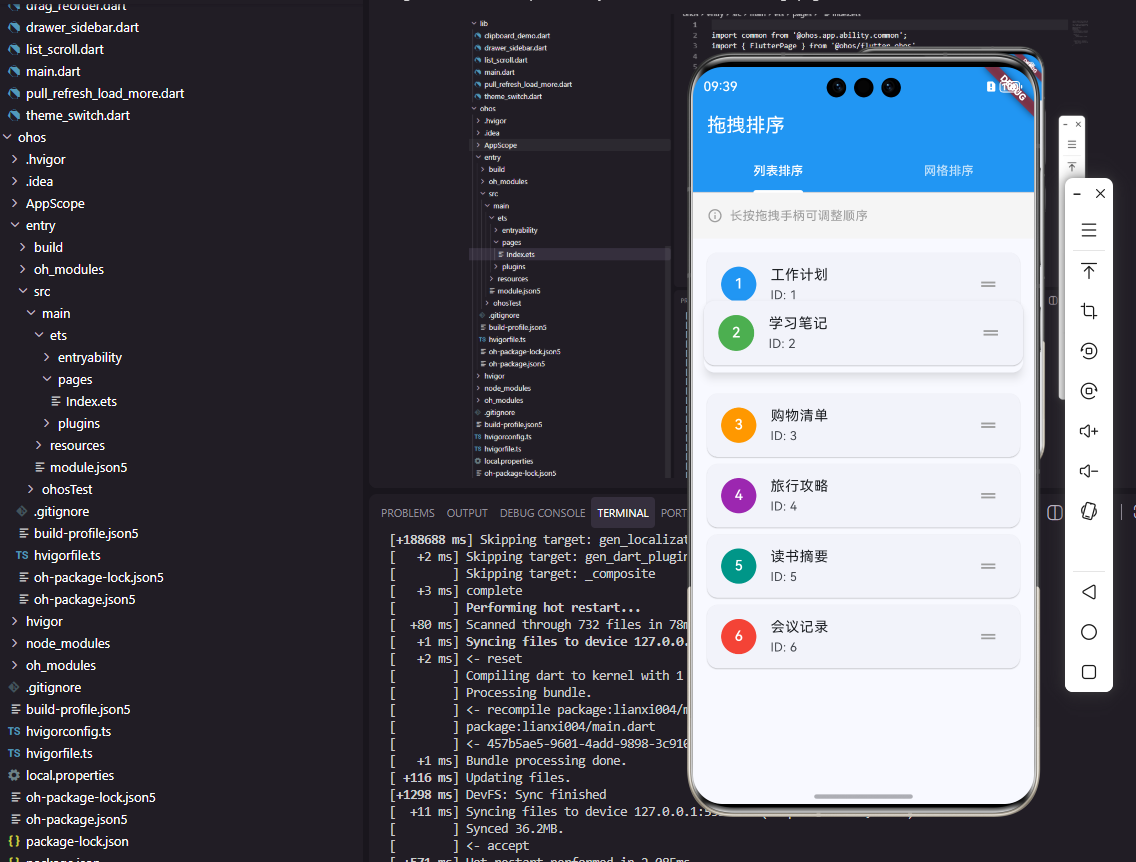
ReorderableListView.builder是构建可排序列表的推荐方式。每个列表项必须有唯一的key,通常使用数据的id。ReorderableDragStartListener提供拖拽手柄,用户可以通过拖动手柄来排序,而不是长按整个列表项。onReorder回调在排序完成时触发,需要手动更新数据列表的顺序。注意当newIndex大于oldIndex时需要减1,这是因为移除元素后索引会发生变化。
dart
ReorderableListView.builder(
  itemCount: _notes.length,
  proxyDecorator: (child, index, animation) {
    return AnimatedBuilder(
      animation: animation,
      builder: (context, child) {
        final elevation = lerpDouble(0, 8, animation.value);
        return Material(
          elevation: elevation!,
          shadowColor: Colors.black45,
          child: child,
        );
      },
      child: child,
    );
  },
  itemBuilder: (context, index) {
    return NoteCard(
      key: ValueKey(_notes[index].id),
      note: _notes[index],
    );
  },
  onReorder: _handleReorder,
)
proxyDecorator属性可以自定义拖拽时的视觉效果。animation参数提供拖拽动画的进度值,可以用于创建动态效果。这里使用lerpDouble在0和8之间插值计算阴影高度,拖拽时卡片会浮起并显示阴影,增强拖拽的视觉反馈。Material组件提供阴影效果,让拖拽的项目看起来悬浮在其他项目之上。
自定义拖拽效果
有时需要更精细地控制拖拽行为。
dart
class DraggableNoteList extends StatefulWidget {
  @override
  _DraggableNoteListState createState() => _DraggableNoteListState();
}

class _DraggableNoteListState extends State<DraggableNoteList> {
  List<Note> _notes = [];
  int? _draggingIndex;

  @override
  Widget build(BuildContext context) {
    return ListView.builder(
      itemCount: _notes.length,
      itemBuilder: (context, index) {
        return LongPressDraggable<int>(
          data: index,
          feedback: Material(
            elevation: 8,
            child: SizedBox(
              width: MediaQuery.of(context).size.width - 32,
              child: NoteCard(note: _notes[index]),
            ),
          ),
          childWhenDragging: Opacity(
            opacity: 0.5,
            child: NoteCard(note: _notes[index]),
          ),
          onDragStarted: () {
            setState(() => _draggingIndex = index);
          },
          onDragEnd: (details) {
            setState(() => _draggingIndex = null);
          },
          child: DragTarget<int>(
            onAccept: (fromIndex) {
              _reorderNotes(fromIndex, index);
            },
            builder: (context, candidateData, rejectedData) {
              return NoteCard(
                note: _notes[index],
                isHighlighted: candidateData.isNotEmpty,
              );
            },
          ),
        );
      },
    );
  }
}
LongPressDraggable和DragTarget组合可以实现更灵活的拖拽排序。LongPressDraggable在长按时开始拖拽,feedback是拖拽时显示的Widget,childWhenDragging是原位置显示的Widget。DragTarget是放置目标,onAccept在拖拽项放置时触发。candidateData包含当前悬停在目标上的数据,可以用于显示高亮效果。这种方式提供了完全的控制权,可以实现任意复杂的拖拽交互。
dart
void _reorderNotes(int fromIndex, int toIndex) {
  setState(() {
    final item = _notes.removeAt(fromIndex);
    if (toIndex > fromIndex) toIndex--;
    _notes.insert(toIndex, item);
    _saveOrder();
  });
}

Future<void> _saveOrder() async {
  final orderData = _notes.map((n) => n.id).toList();
  await NoteService.saveNoteOrder(orderData);
}
排序完成后通常需要持久化保存新的顺序。_saveOrder方法将笔记ID列表保存到本地存储或服务器。这样用户下次打开应用时可以看到之前调整的顺序。排序数据的持久化是拖拽排序功能完整性的重要组成部分。
OpenHarmony拖拽排序
OpenHarmony通过List组件的拖拽功能实现排序。
typescript
@Entry
@Component
struct ReorderableNotesPage {
  @State noteList: NoteItem[] = [
    { id: '1', title: '笔记一' },
    { id: '2', title: '笔记二' },
    { id: '3', title: '笔记三' },
    { id: '4', title: '笔记四' }
  ]

  build() {
    List() {
      ForEach(this.noteList, (item: NoteItem, index: number) => {
        ListItem() {
          Row() {
            Text(item.title)
              .fontSize(16)
              .layoutWeight(1)
            Image($r('app.media.drag_handle'))
              .width(24)
              .height(24)
              .fillColor('#999999')
          }
          .width('100%')
          .padding(15)
          .backgroundColor('#FFFFFF')
        }
      }, (item: NoteItem) => item.id)
    }
    .editMode(true)
    .onItemMove((from: number, to: number) => {
      this.moveItem(from, to)
      return true
    })
  }

  moveItem(from: number, to: number) {
    let item = this.noteList.splice(from, 1)[0]
    this.noteList.splice(to, 0, item)
  }
}
OpenHarmony的List组件通过editMode属性启用编辑模式,在编辑模式下可以拖拽排序。onItemMove回调在拖拽排序时触发,from和to分别是原索引和目标索引。ForEach的第二个参数是key生成函数,确保每个项有唯一标识。moveItem方法使用splice操作数组实现元素移动。返回true表示接受这次移动操作。
typescript
List() {
  ForEach(this.noteList, (item: NoteItem, index: number) => {
    ListItem() {
      this.NoteItemBuilder(item)
    }
    .swipeAction({
      end: this.DeleteButtonBuilder(index)
    })
  }, (item: NoteItem) => item.id)
}
.editMode(this.isEditMode)
.onItemMove((from: number, to: number) => {
  this.moveItem(from, to)
  return true
})
.onItemDelete((index: number) => {
  this.deleteItem(index)
  return true
})

@Builder
DeleteButtonBuilder(index: number) {
  Button('删除')
    .backgroundColor('#FF4D4F')
    .onClick(() => {
      this.deleteItem(index)
    })
}
List组件还支持滑动操作和删除功能。swipeAction配置滑动时显示的操作按钮,end表示从右侧滑出。onItemDelete回调在删除操作时触发。这些功能可以与拖拽排序结合使用,提供完整的列表管理能力。isEditMode状态变量可以控制是否启用编辑模式,让用户在浏览和编辑模式之间切换。
网格拖拽排序
网格布局的拖拽排序适合图片或卡片的排列。
dart
ReorderableGridView.builder(
  gridDelegate: SliverGridDelegateWithFixedCrossAxisCount(
    crossAxisCount: 2,
    crossAxisSpacing: 12,
    mainAxisSpacing: 12,
  ),
  itemCount: _notes.length,
  itemBuilder: (context, index) {
    return Card(
      key: ValueKey(_notes[index].id),
      child: Center(child: Text(_notes[index].title)),
    );
  },
  onReorder: (oldIndex, newIndex) {
    setState(() {
      final item = _notes.removeAt(oldIndex);
      _notes.insert(newIndex, item);
    });
  },
)
ReorderableGridView提供网格布局的拖拽排序功能。gridDelegate配置网格的列数和间距,与普通GridView的配置方式相同。拖拽时其他项会自动让出位置,形成流畅的重排动画。网格拖拽排序适合笔记缩略图、图片相册等场景。
拖拽排序的视觉反馈
良好的视觉反馈可以提升拖拽体验。
dart
DragTarget<int>(
  onWillAccept: (data) => data != index,
  onAccept: (fromIndex) => _reorderNotes(fromIndex, index),
  builder: (context, candidateData, rejectedData) {
    return AnimatedContainer(
      duration: Duration(milliseconds: 200),
      decoration: BoxDecoration(
        border: candidateData.isNotEmpty
            ? Border.all(color: Colors.blue, width: 2)
            : null,
        borderRadius: BorderRadius.circular(8),
      ),
      child: NoteCard(note: _notes[index]),
    );
  },
)
当拖拽项悬停在目标上方时,显示蓝色边框作为放置提示。AnimatedContainer为边框的出现和消失添加动画效果。onWillAccept可以判断是否接受拖拽,这里排除了拖拽到自身的情况。这种视觉反馈让用户清楚地知道可以放置的位置。
总结
拖拽排序是一种直观高效的交互方式,Flutter和OpenHarmony都提供了相应的实现方案。开发者需要关注拖拽的视觉反馈、动画效果和数据持久化,为用户提供流畅自然的排序体验。在笔记应用中,拖拽排序可以让用户灵活地组织笔记顺序,提升内容管理的效率。
欢迎加入开源鸿蒙跨平台社区:https://openharmonycrossplatform.csdn.net